Page 100 of 546
04
4-15
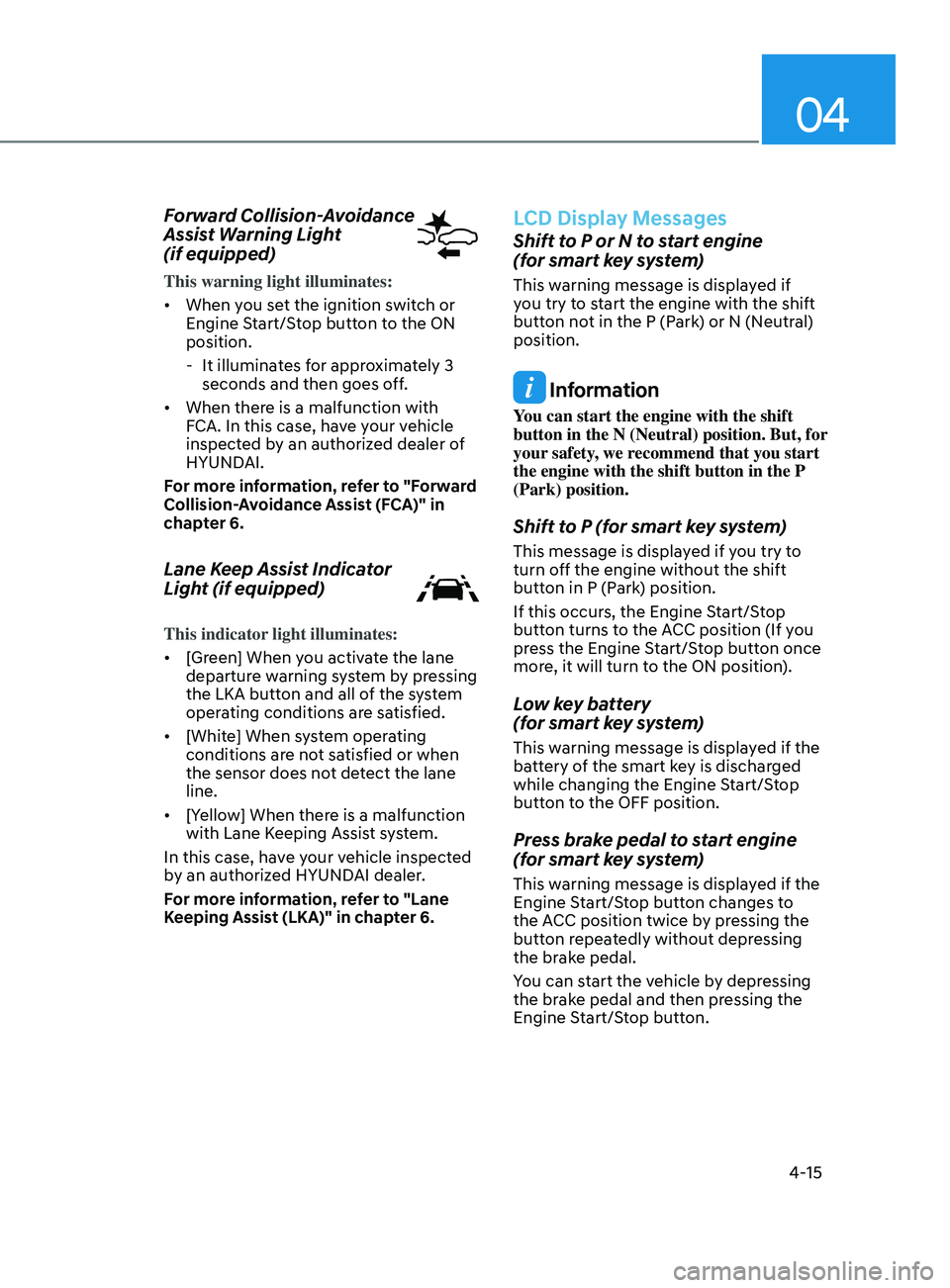
Forward Collision-Avoidance
Assist Warning Light
(if equipped)
This warning light illuminates:
• When you set the ignition switch or
Engine Start/Stop button to the ON
position.
- It illumina
tes for approximately 3
seconds and then goes off.
• When there is a malfunction with
FCA. In this case, have your vehicle
inspected by an authorized dealer of
HYUNDAI.
For more information, refer to "Forward
Collision-Avoidance Assist (FCA)" in
chapter 6.
Lane Keep Assist Indicator
Light (if equipped)
This indicator light illuminates:
• [Green] When you activate the lane
departure warning system by pressing
the LKA button and all of the system
operating conditions are satisfied.
• [White] When system operating
conditions are not satisfied or when
the sensor does not detect the lane
line.
• [Yellow] When there is a malfunction
with Lane Keeping Assist system.
In this case, have your vehicle inspected
by an authorized HYUNDAI dealer.
For more information, refer to "Lane
Keeping Assist (LKA)" in chapter 6.
LCD Display Messages
Shift to P or N to start engine
(for smart key system)
This warning message is displayed if
you try to start the engine with the shift
button not in the P (Park) or N (Neutral)
position.
Information
You can start the engine with the shift
button in the N (Neutral) position. But, for
your safety, we recommend that you start
the engine with the shift button in the P
(Park) position.
Shift to P (for smart key system)
This message is displayed if you try to
turn off the engine without the shift
button in P (Park) position.
If this occurs, the Engine Start/Stop
button turns to the ACC position (If you
press the Engine Start/Stop button once
more, it will turn to the ON position).
Low key battery
(for smart key system)
This warning message is displayed if the
battery of the smart key is discharged
while changing the Engine Start/Stop
button to the OFF position.
Press brake pedal to start engine
(for smart key system)
This warning message is displayed if the
Engine Start/Stop button changes to
the ACC position twice by pressing the
button repeatedly without depressing
the brake pedal.
You can start the vehicle by depressing
the brake pedal and then pressing the
Engine Start/Stop button.
Page 102 of 546
04
4-17
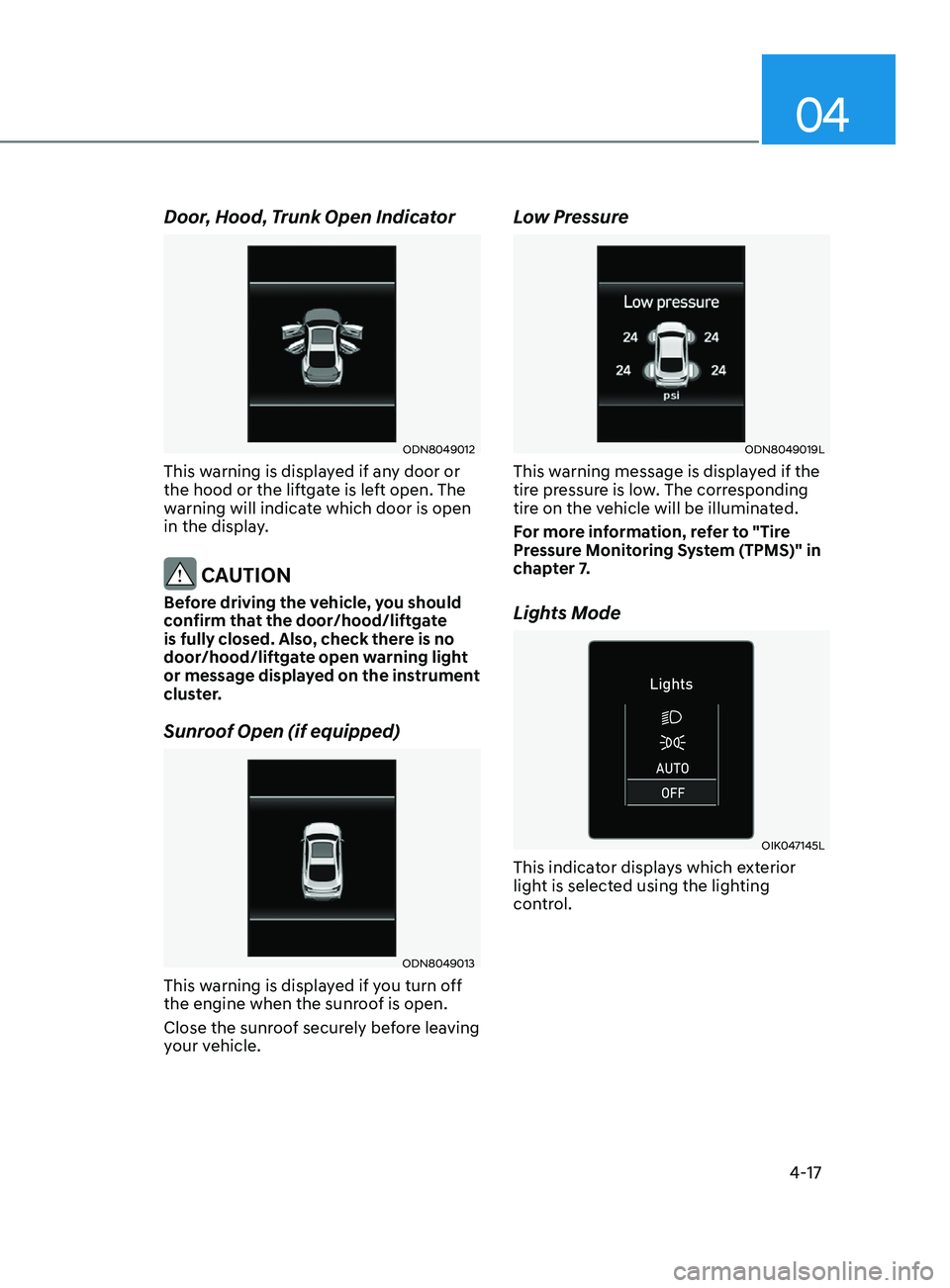
Door, Hood, Trunk Open Indicator
ODN8049012
This warning is displayed if any door or
the hood or the liftgate is left open. The
warning will indicate which door is open
in the display.
CAUTION
Before driving the vehicle, you should
confirm that the door/hood/liftgate
is fully closed. Also, check there is no
door/hood/liftgate open warning light
or message displayed on the instrument
cluster.
Sunroof Open (if equipped)
ODN8049013
This warning is displayed if you turn off
the engine when the sunroof is open.
Close the sunroof securely before leaving
your vehicle.
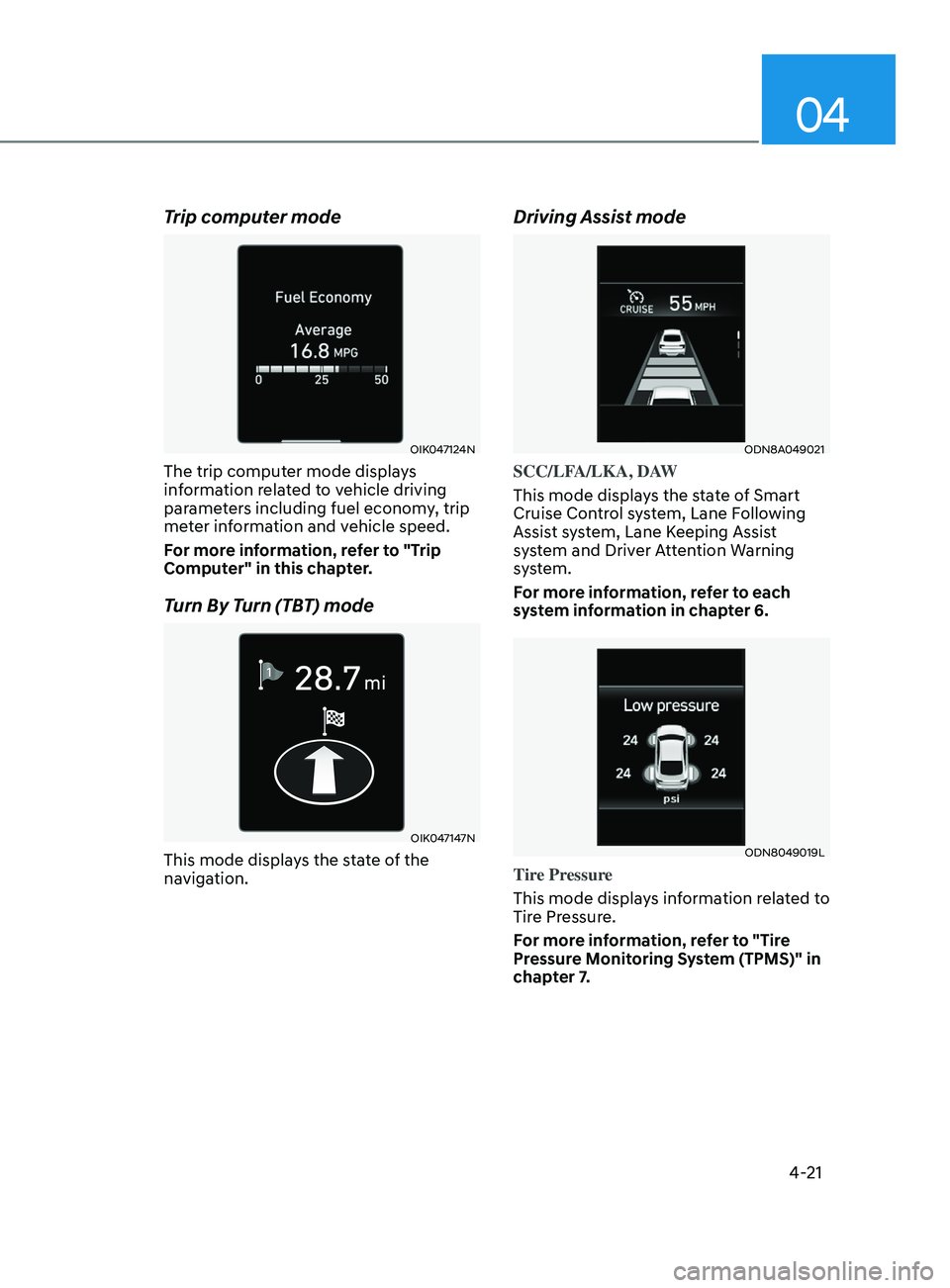
Low Pressure
ODN8049019L
This warning message is displayed if the
tire pressure is low. The corresponding
tire on the vehicle will be illuminated.
For more information, refer to "Tire
Pressure Monitoring System (TPMS)" in
chapter 7.
Lights Mode
OIK047145L
This indicator displays which exterior
light is selected using the lighting
control.
Page 106 of 546
04
4-21
Trip computer mode
OIK047124N
The trip computer mode displays
information related to vehicle driving
parameters including fuel economy, trip
meter information and vehicle speed.
For more information, refer to "Trip
Computer" in this chapter.
Turn By Turn (TBT) mode
OIK047147N
This mode displays the state of the
navigation.
Driving Assist mode
ODN8A049021
SCC/LFA/LKA, DAW
This mode displays the state of Smart
Cruise Control system, Lane Following
Assist system, Lane Keeping Assist
system and Driver Attention Warning
system.
For more information, refer to each
system information in chapter 6.
ODN8049019L
Tire Pressure
This mode displays information related to
Tire Pressure.
For more information, refer to "Tire
Pressure Monitoring System (TPMS)" in
chapter 7.
Page 109 of 546
Instrument Cluster
4-24
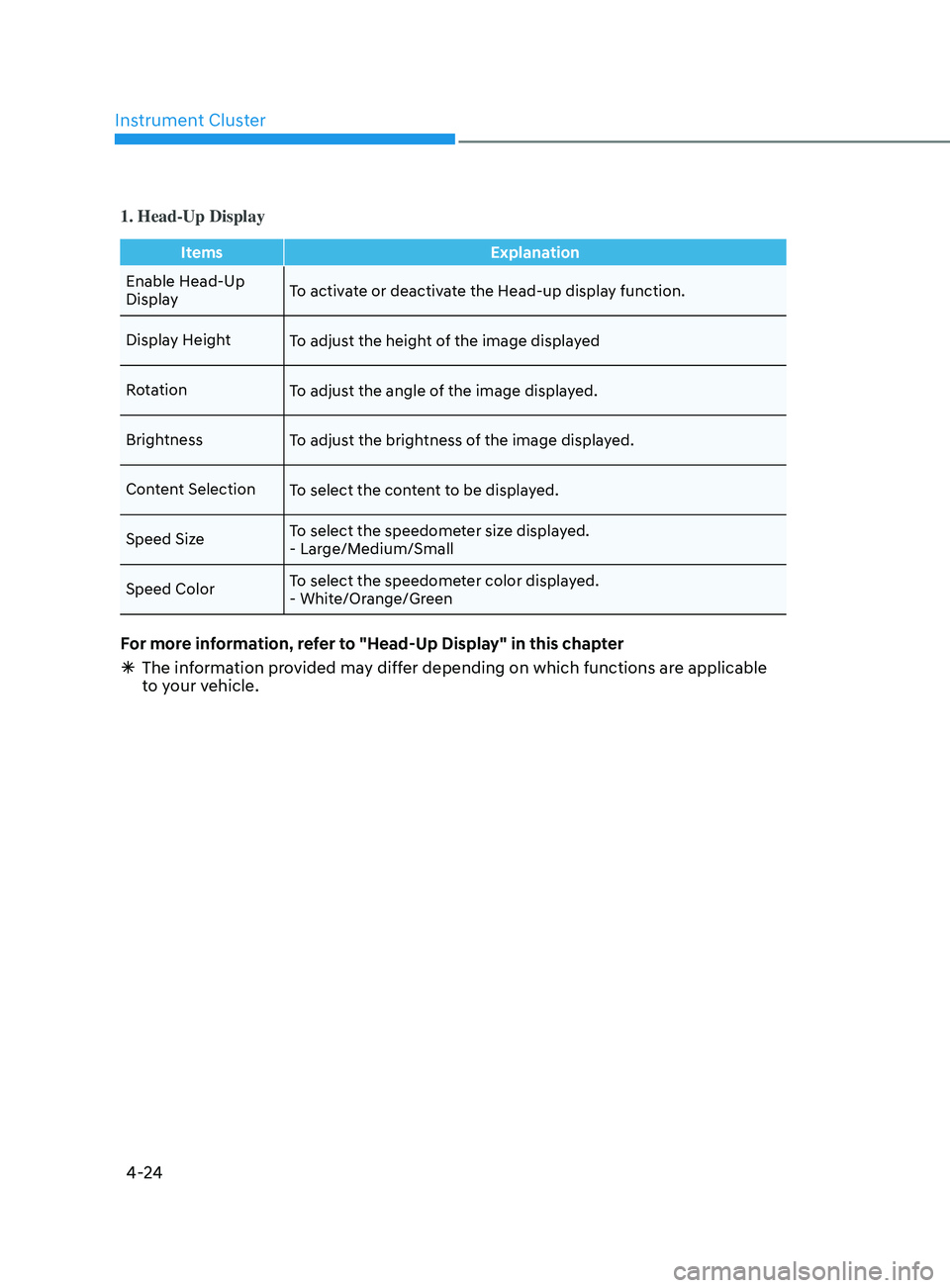
1. Head-Up Display
ItemsExplanation
Enable Head-Up
Display To activate or deactivate the Head-up display function.
Display Height To adjust the height of the image displayed
Rotation To adjust the angle of the image displayed.
Brightness To adjust the brightness of the image displayed.
Content Selection To select the content to be displayed.
Speed Size To select the speedometer size displayed.
- Large/Medium/Small
Speed Color To select the speedometer color displayed.
- White/Orange/Green
For more information, refer to "Head-Up Display" in this chapter
Ã
The in
formation provided may differ depending on which functions are applicable
to your vehicle.
Page 110 of 546
04
4-25
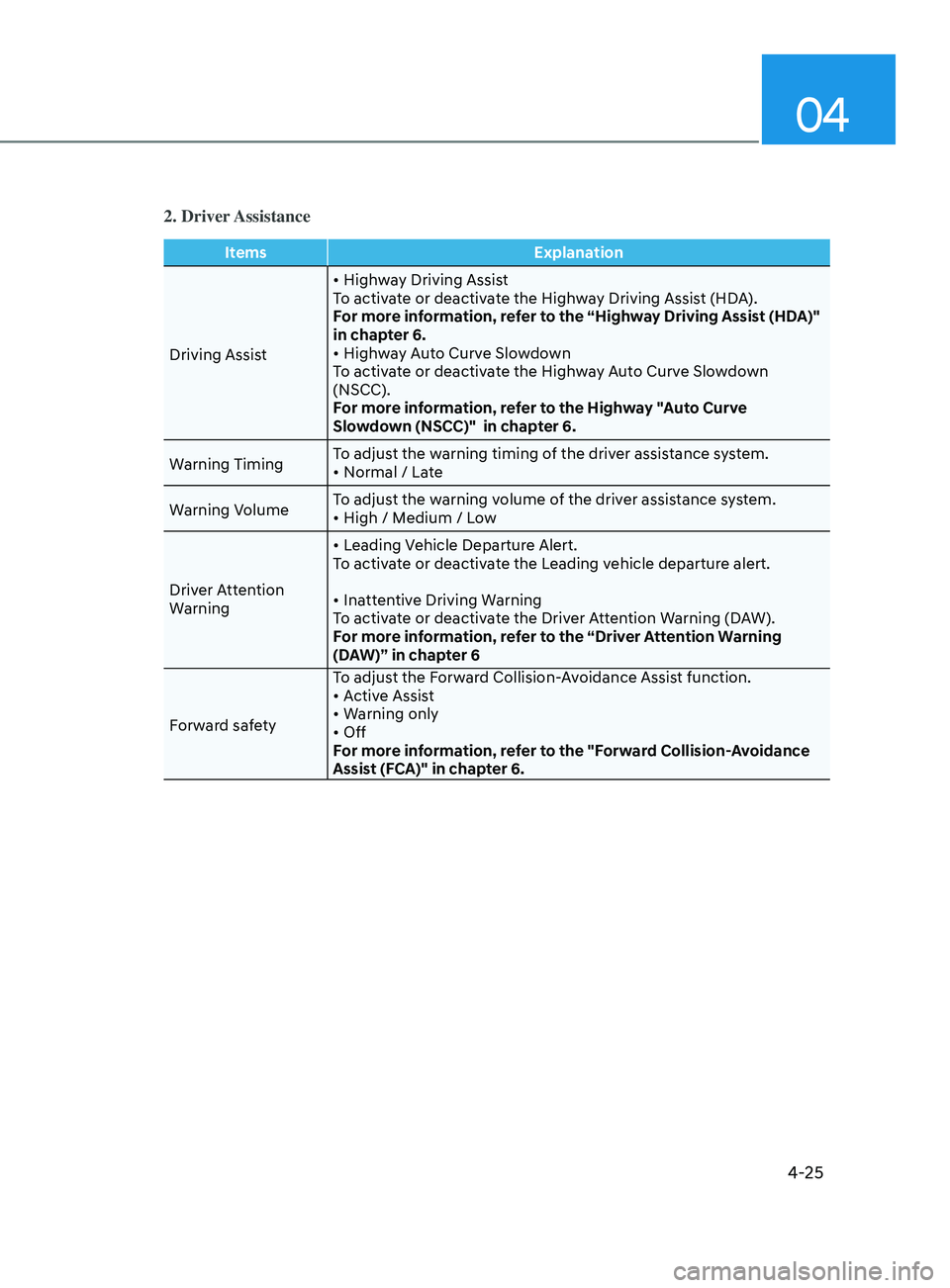
2. Driver Assistance
ItemsExplanation
Driving Assist •
Highway Driving Assist
To activate or deactivate the Highway Driving Assist (HDA).
For more information, refer to the “Highway Driving Assist (HDA)"
in chapter 6.
•
Highway Auto Curve Slowdown
To activate or deactivate the Highway Auto Curve Slowdown
(NSCC).
For more information, refer to the Highway "Auto Curve
Slowdown (NSCC)" in chapter 6.
Warning Timing To adjust the warning timing of the driver assistance system.
•
Normal / Late
W
arning Volume To adjust the warning volume of the driver assistance system.
•
High / Medium / Low
Driver Attention
Warning •
Leading Vehicle Departure Alert.
To activate or deactivate the Leading vehicle departure alert.
•
Inattentive Driving Warning
To activate or deactivate the Driver Attention Warning (DAW).
For more information, refer to the “Driver Attention Warning
(DAW)” in chapter 6
Forward safety To adjust the Forward Collision-Avoidance Assist function.
•
Active Assist
•
Warning only
•
Off
For more information, refer to the "Forward Collision-Avoidance
Assist (FCA)" in chapter 6.
Page 111 of 546
Instrument Cluster
4-26
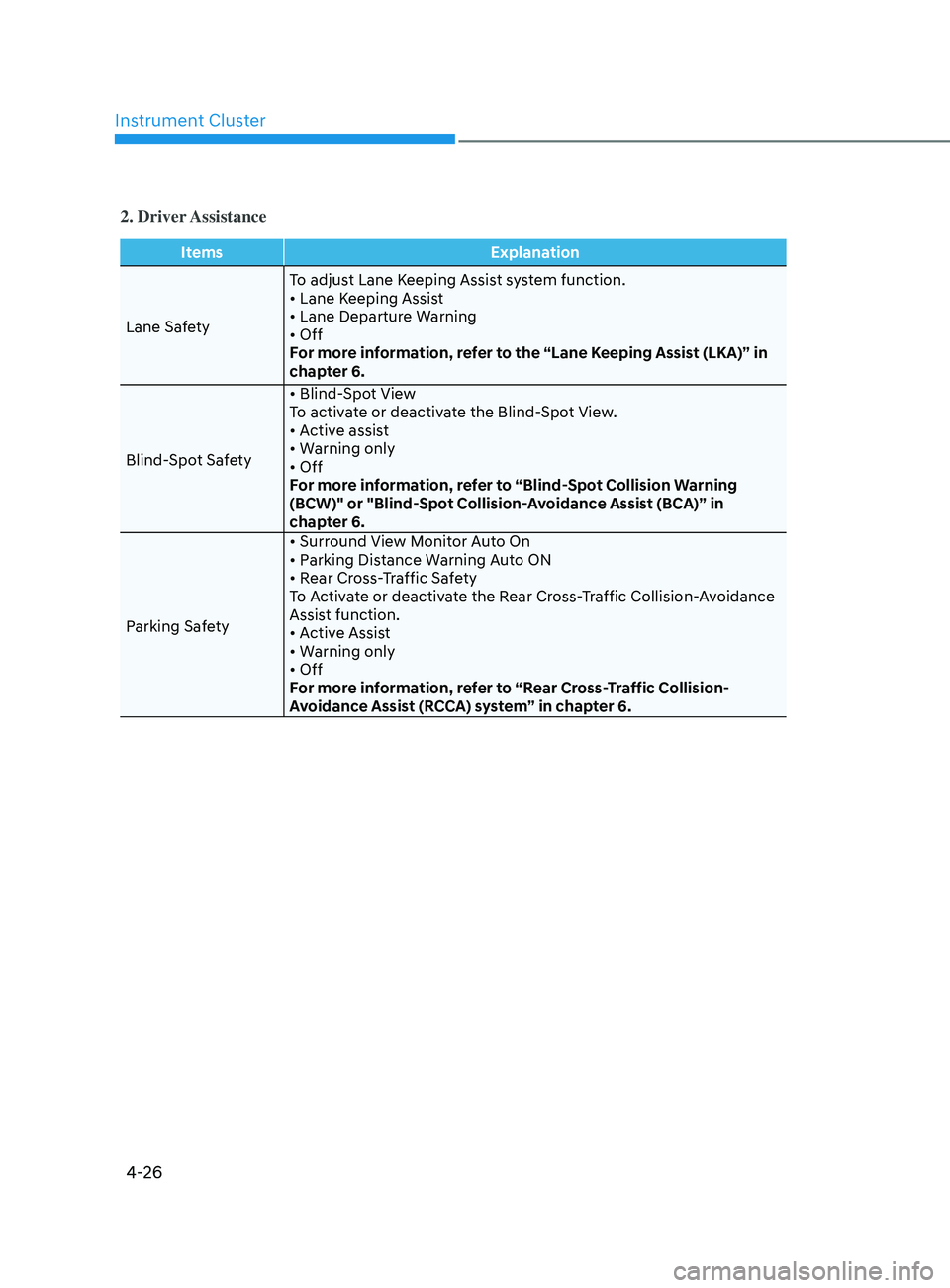
2. Driver Assistance
ItemsExplanation
Lane Safety To adjust Lane Keeping Assist system function.
•
Lane Keeping Assist
•
Lane Departure Warning
•
Off
For more information, refer to the “Lane Keeping Assist (LKA)” in
chapter 6.
Blind-Spot Safety •
Blind-Spot View
To activate or deactivate the Blind-Spot View.
•
Active assist
•
Warning only
•
Off
For more information, refer to “Blind-Spot Collision Warning
(BCW)" or "Blind-Spot Collision-Avoidance Assist (BCA)” in
chapter 6.
Parking Safety •
Surround View Monitor Auto On
•
Parking Distance Warning Auto ON
•
Rear Cross-Traffic Safety
T
o Activate or deactivate the Rear Cross-Traffic Collision-Avoidance
Assist function.
•
Active Assist
•
Warning only
•
Off
F
or more information, refer to “Rear Cross-Traffic Collision-
Avoidance Assist (RCCA) system” in chapter 6.
Page 112 of 546
04
4-27
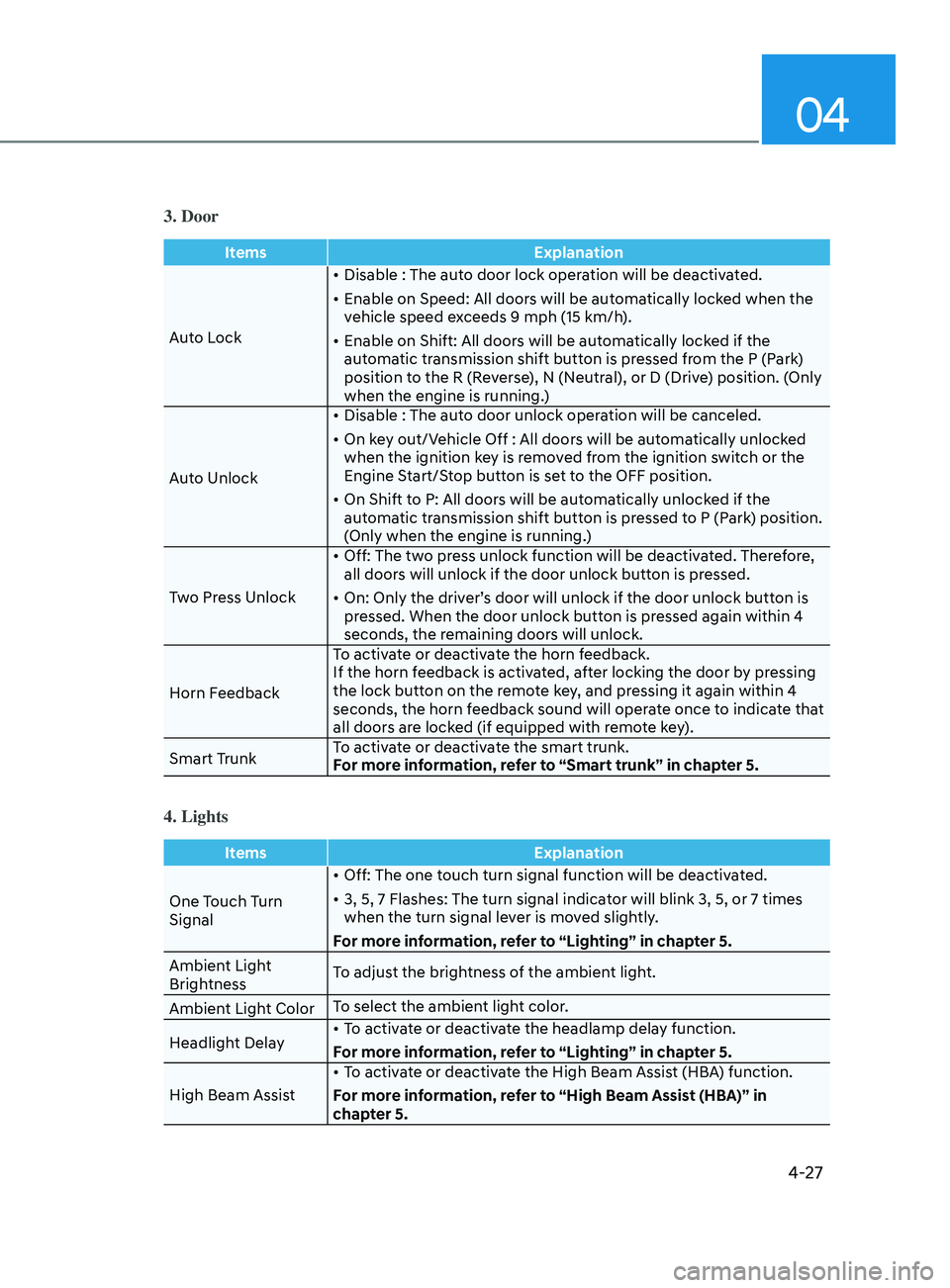
3. Door
ItemsExplanation
Auto Lock •
Disable : The auto door lock operation will be deactivated.
•
E
nable on Speed: All doors will be automatically locked when the
vehicle speed exceeds 9 mph (15 km/h).
•
E
nable on Shift: All doors will be automatically locked if the
automatic transmission shift button is pressed from the P (Park)
position to the R (Reverse), N (Neutral), or D (Drive) position. (Only
when the engine is running.)
Auto Unlock •
Disable : The aut
o door unlock operation will be canceled.
•
On k
ey out/Vehicle Off : All doors will be automatically unlocked
when the ignition key is removed from the ignition switch or the
Engine Start/Stop button is set to the OFF position.
•
On Shift t
o P: All doors will be automatically unlocked if the
automatic transmission shift button is pressed to P (Park) position.
(Only when the engine is running.)
Two Press Unlock •
Off: The tw
o press unlock function will be deactivated. Therefore,
all doors will unlock if the door unlock button is pressed.
•
On: Only the driv
er’s door will unlock if the door unlock button is
pressed. When the door unlock button is pressed again within 4
seconds, the remaining doors will unlock.
Horn Feedback To activate or deactivate the horn feedback.
If the horn feedback is activated, after locking the door by pressing
the lock button on the remote key, and pressing it again within 4
seconds, the horn feedback sound will operate once to indicate that
all doors are locked (if equipped with remote key).
Smart Trunk To activate or deactivate the smart trunk.
For more information, refer to “Smart trunk” in chapter 5.
4. Lights
Items
Explanation
One Touch Turn
Signal •
Off: The one touch turn signal function will be deactivated.
•
3, 5, 7 Flashes: The turn signal indica
tor will blink 3, 5, or 7 times
when the turn signal lever is moved slightly.
For more information, refer to “Lighting” in chapter 5.
Ambient Light
Brightness To adjust the brightness of the ambient light.
Ambient Light Color To select the ambient light color.
Headlight Delay •
To activate or deactivate the headlamp delay function.
For more information, refer to “Lighting” in chapter 5.
High Beam Assist •
To activate or deactivate the High Beam Assist (HBA) function.
For more information, refer to “High Beam Assist (HBA)” in
chapter 5.
Page 113 of 546
Instrument Cluster
4-28
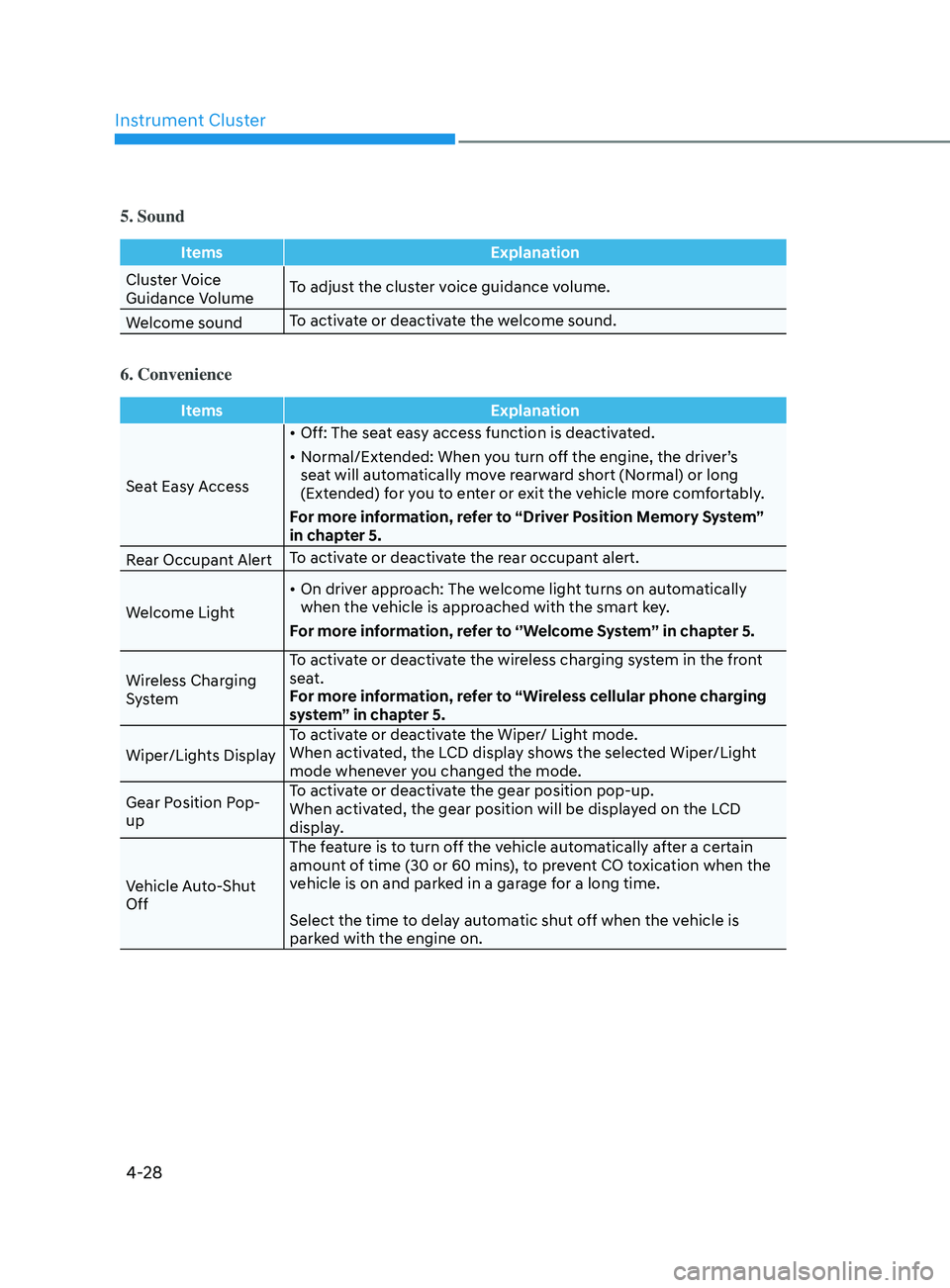
5. Sound
ItemsExplanation
Cluster Voice
Guidance Volume To adjust the cluster voice guidance volume.
Welcome sound To activate or deactivate the welcome sound.
6. Convenience
Items
Explanation
Seat Easy Access •
Off: The seat easy access function is deactivated.
•
N
ormal/Extended: When you turn off the engine, the driver’s
seat will automatically move rearward short (Normal) or long
(Extended) for you to enter or exit the vehicle more comfortably.
For more information, refer to “Driver Position Memory System”
in chapter 5.
Rear Occupant Alert To activate or deactivate the rear occupant alert.
Welcome Light •
On driv
er approach: The welcome light turns on automatically
when the vehicle is approached with the smart key.
For more information, refer to ‘’Welcome System’’ in chapter 5.
Wireless Charging
System To activate or deactivate the wireless charging system in the front
seat.
For more information, refer to “Wireless cellular phone charging
system” in chapter 5.
Wiper/Lights Display To activate or deactivate the Wiper/ Light mode.
When activated, the LCD display shows the selected Wiper/Light
mode whenever you changed the mode.
Gear Position Pop-
up To activate or deactivate the gear position pop-up.
When activated, the gear position will be displayed on the LCD
display.
Vehicle Auto-Shut
Off The feature is to turn off the vehicle automatically after a certain
amount of time (30 or 60 mins), to prevent CO toxication when the
vehicle is on and parked in a garage for a long time.
Select the time to delay automatic shut off when the vehicle is
parked with the engine on.