2021 HYUNDAI SANTA FE HYBRID change wheel
[x] Cancel search: change wheelPage 437 of 598
Driver assistance system
7-84
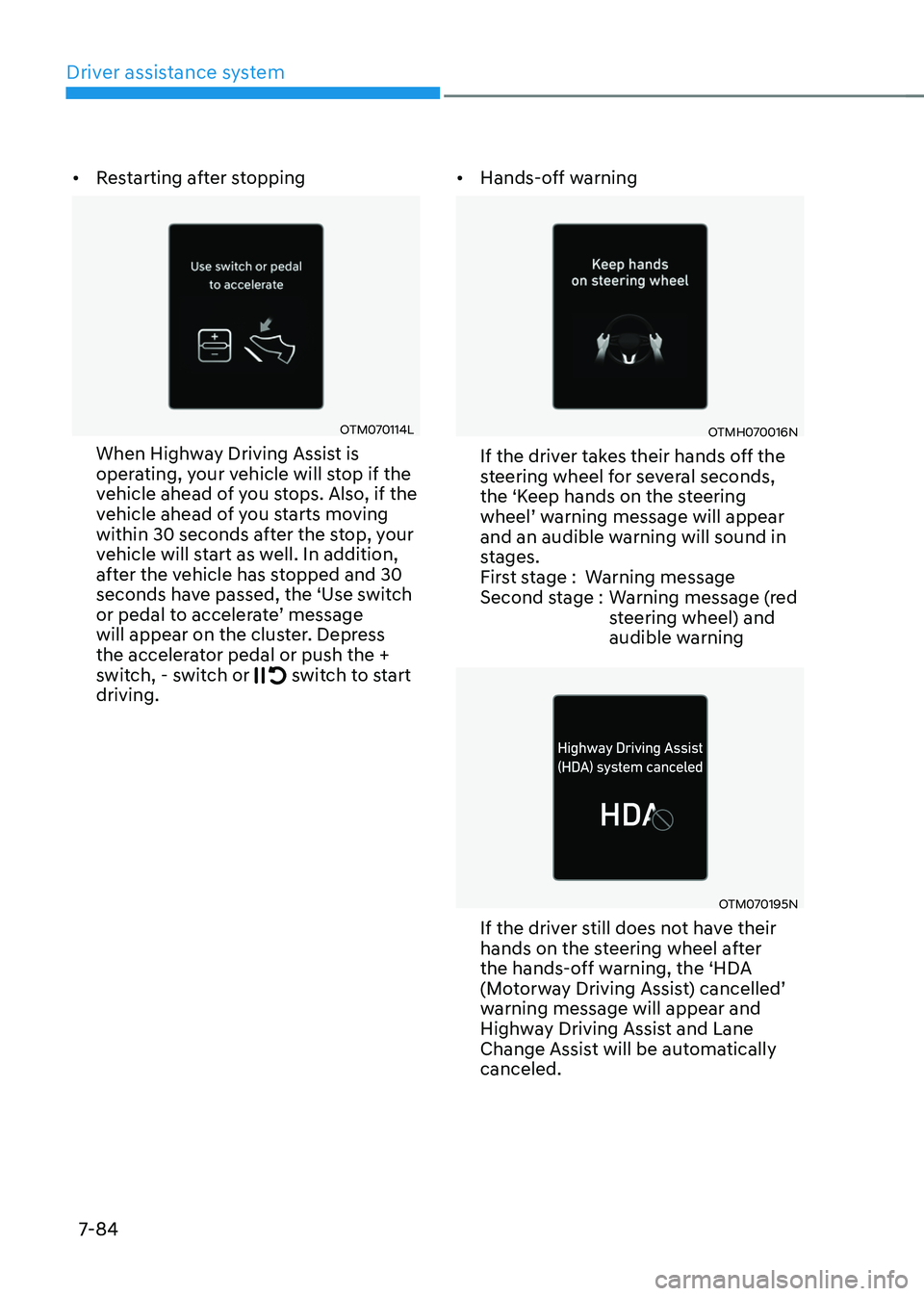
• Restarting after stopping
OTM070114L
When Highway Driving Assist is
operating, your vehicle will stop if the
vehicle ahead of you stops. Also, if the
vehicle ahead of you starts moving
within 30 seconds after the stop, your
vehicle will start as well. In addition,
after the vehicle has stopped and 30
seconds have passed, the ‘Use switch
or pedal to accelerate’ message will appear on the cluster. Depress
the accelerator pedal or push the +
switch, - switch or
switch to start driving. •
Hands-off warning
OTMH070016N
If the driver takes their hands off the
steering wheel for several seconds,
the ‘Keep hands on the steering
wheel’ warning message will appear and an audible warning will sound in
stages.
First stage : Warning message
Second stage : Warning message (red
steering wheel) and
audible warning
OTM070195N
If the driver still does not have their
hands on the steering wheel after
the hands-off warning, the ‘HDA
(Motorway Driving Assist) cancelled’ warning message will appear and
Highway Driving Assist and Lane
Change Assist will be automatically
canceled.
Page 438 of 598
07
7-85
System standby
When Smart Cruise Control is
temporarily canceled while Highway
Driving Assist is operating, Highway
Driving Assist will be in the standby state.
At this time, Lane Following Assist will
operate normally.
System malfunction and
limitations
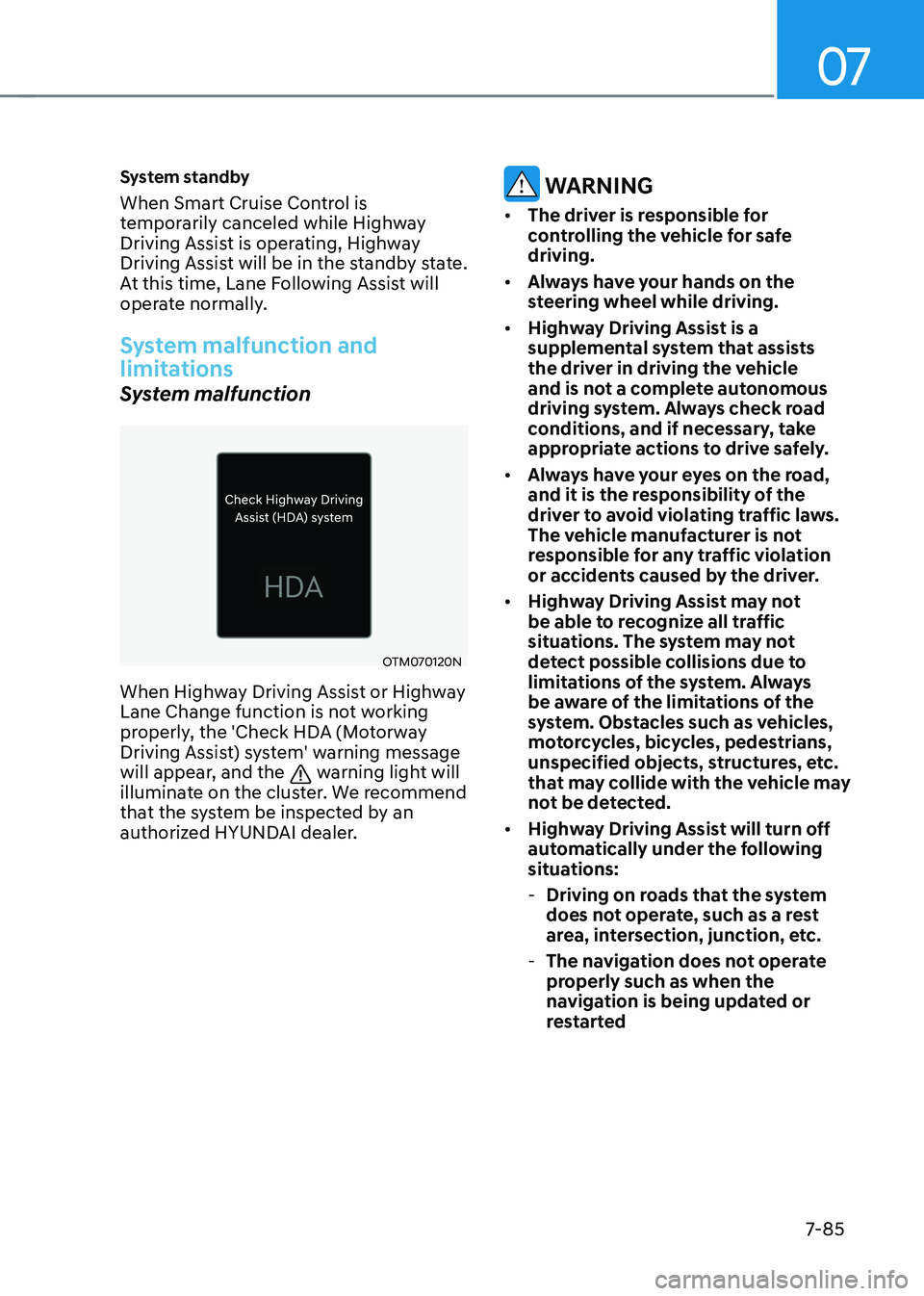
System malfunction
OTM070120N
When Highway Driving Assist or Highway
Lane Change function is not working
properly, the 'Check HDA (Motorway
Driving Assist) system' warning message
will appear, and the
warning light will
illuminate on the cluster. We recommend
that the system be inspected by an
authorized HYUNDAI dealer.
WARNING
• The driver is responsible for
controlling the vehicle for safe
driving.
• Always have your hands on the
steering wheel while driving.
• Highway Driving Assist is a
supplemental system that assists
the driver in driving the vehicle
and is not a complete autonomous
driving system. Always check road
conditions, and if necessary, take
appropriate actions to drive safely.
• Always have your eyes on the road,
and it is the responsibility of the
driver to avoid violating traffic laws.
The vehicle manufacturer is not
responsible for any traffic violation
or accidents caused by the driver.
• Highway Driving Assist may not
be able to recognize all traffic
situations. The system may not
detect possible collisions due to
limitations of the system. Always
be aware of the limitations of the
system. Obstacles such as vehicles,
motorcycles, bicycles, pedestrians,
unspecified objects, structures, etc.
that may collide with the vehicle may
not be detected.
• Highway Driving Assist will turn off
automatically under the following
situations:
-Driving on roads that the system
does not operate, such as a rest
area, intersection, junction, etc.
-The navigation does not operate
properly such as when the
navigation is being updated or
restarted
Page 439 of 598
Driver assistance system
7-86
• Highway Driving Assist may
inadvertently operate or turn off
depending on road conditions
(navigation information) and
surroundings.
• Lane Following Assist function may
be temporarily disabled when the
front view camera cannot detect
lanes properly or the hands-off
warning is on.
• You may not hear the warning sound
of Highway Driving Assist if the
surrounding is noisy.
• If the vehicle is driven at high speed
above a certain speed at a curve,
your vehicle may drive to one side or
may depart from the driving lane.
• When you are towing a trailer or
another vehicle, we recommend that
Highway Driving Assist is turned off
due to safety reasons.
• The hands–off warning message
may appear early or late depending
on how the steering wheel is held or
road conditions. Always have your
hands on the steering wheel while
driving.
• For your safety, please read the
owner's manual before using the
Highway Driving Assist.
• Highway Driving Assist will not
operate when the engine is started,
or when the detecting sensors or
navigation is being initialized.Limitations of the system
Highway Driving Assist may not operate
normally, or may not operate under the
following circumstances:
• The map information and the
actual road is different because the
navigation is not updated
• The map information and the actual
road is different because of real-time
GPS data or map information error
• The infotainment system is overloaded
by simultaneously performing
functions such as route search, video
playback, voice recognition, etc.
• GPS signals are blocked in areas such
as a tunnel
• The driver goes off course or the
route to the destination is changed or
canceled by resetting the navigation
• The vehicle enters a service station or
rest area
• Android Auto or Car Play is operating
• The navigation cannot detect the
current vehicle position (ex: elevated
roads including overpass adjacent to
general roads or nearby roads exist in
a parallel way)
For more details on the limitations of
the front view camera, front radar, front
corner radar and rear corner radar, refer
to “Forward Collision-Avoidance Assist
(FCA)” section in chapter 7.
Page 481 of 598
Driver assistance system
7-128
• When remotely moving forward
using method (2), it is recognized
as a parking situation, and will
immediately control the steering
wheel according to the condition
ahead to assist with entering the
parking space and aligning the
vehicle. However, performance
may reduce depending on the
pedestrians, animals, shape of
objects, location, etc. around the
vehicle.
• For moving remotely in reverse,
both method (1) and (2) aligns the
steering wheel first, and then will
only move the vehicle straight.
• When remotely moving forward or
in reverse is completed, the vehicle
will automatically shift to P (Park)
and engage EPB (Electronic Parking
Brake). CAUTION
• When using Remote Forward/
Backward function, make sure that
all passengers have gotten out of the
vehicle.
• If the vehicle’s battery is discharged
or Remote Smart Parking Assist
malfunctions when parked in a
narrow parking space, Remote
Forward/Backward function will not
operate. Always park your vehicle in
a space wide enough for you to get in
or out of your vehicle.
• Please note that depending on the
parking space, you may not be able
to exit from the space you have
entered by using Remote Forward/
Backward function.
• After parking, the surrounding may
change due to the movement of
surrounding vehicles. If this occurs,
Remote Forward/Backward function
may not operate.
• Before leaving the vehicle, close
windows and sunroofs, and make
sure the engine is off before locking
the doors.
Page 506 of 598
Emergency situations
8-16
Changing tires
WARNING
A vehicle can slip or roll off of a jack
causing serious injury or death to you or
those nearby. Take the following safety
precautions:
• Do not get under a vehicle that is
supported by a jack.
• NEVER attempt to change a tire in
the lane of traffic. ALWAYS move the
vehicle completely off the road on
level, firm ground away from traffic
before trying to change a tire. If you
cannot find a level, firm place off
the road, call a towing service for
assistance.
• Be sure to use the jack provided with
the vehicle.
• ALWAYS place the jack on the
designated jacking positions on the
vehicle and NEVER on the bumpers
or any other part of the vehicle for
jacking support.
• Do not start or run the engine while
the vehicle is on the jack.
• Do not allow anyone to remain in the
vehicle while it is on the jack.
• Keep children away from the road
and the vehicle. Follow these steps to change your
vehicle’s tire:
1. Park on a level, firm surface.
2. Move the shift button into P (Park),
apply the parking brake, and place
the ignition switch in the LOCK/OFF
position.
3. Press the hazard warning flasher
button.
4. Remove the wheel lug nut wrench,
jack, jack handle, and spare tire from
the vehicle.
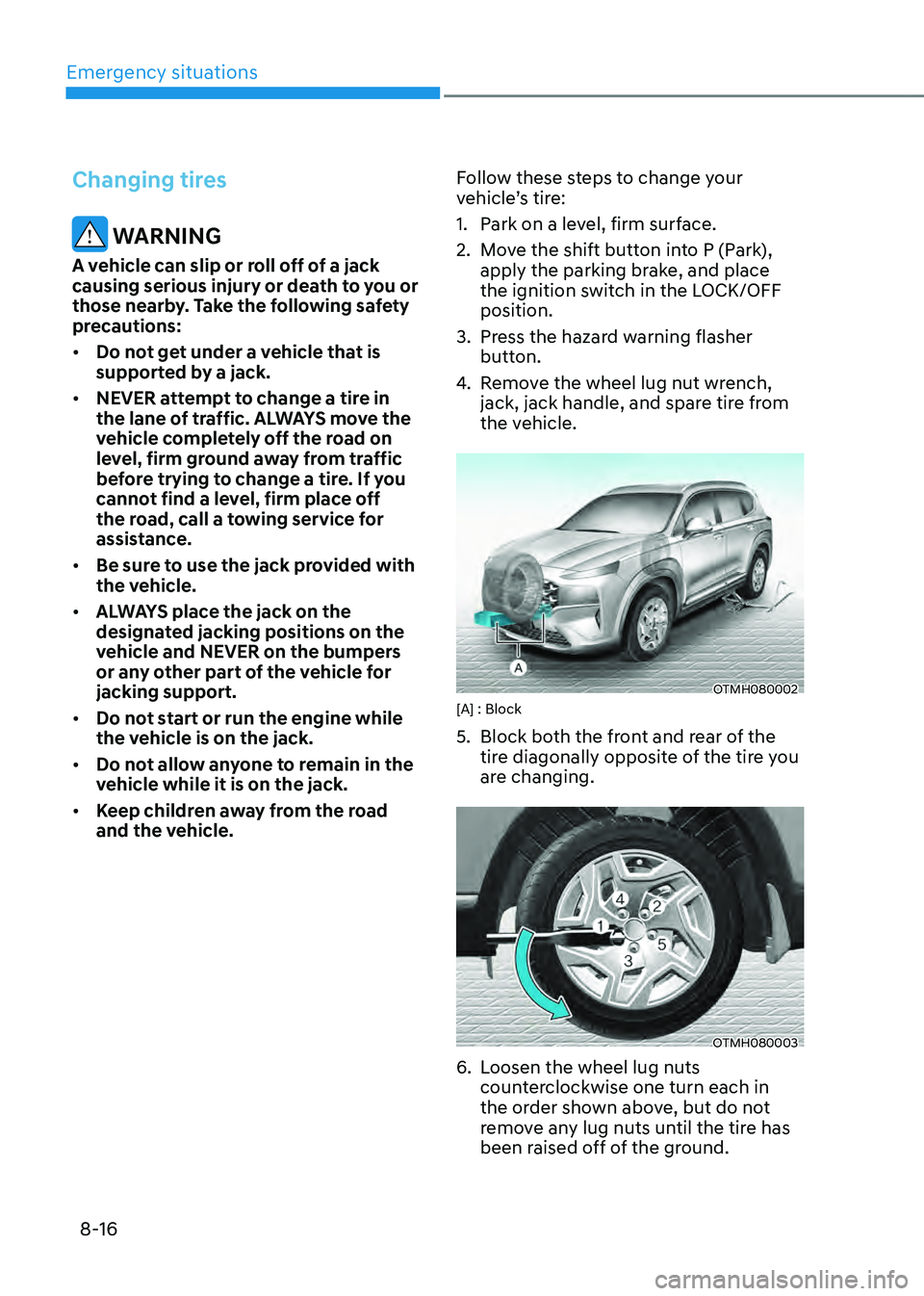
OTMH080002[A] : Block
5. Block both the front and rear of the
tire diagonally opposite of the tire you
are changing.
OTMH080003
6. Loosen the wheel lug nuts
counterclockwise one turn each in
the order shown above, but do not
remove any lug nuts until the tire has
been raised off of the ground.
Page 508 of 598
Emergency situations
8-18
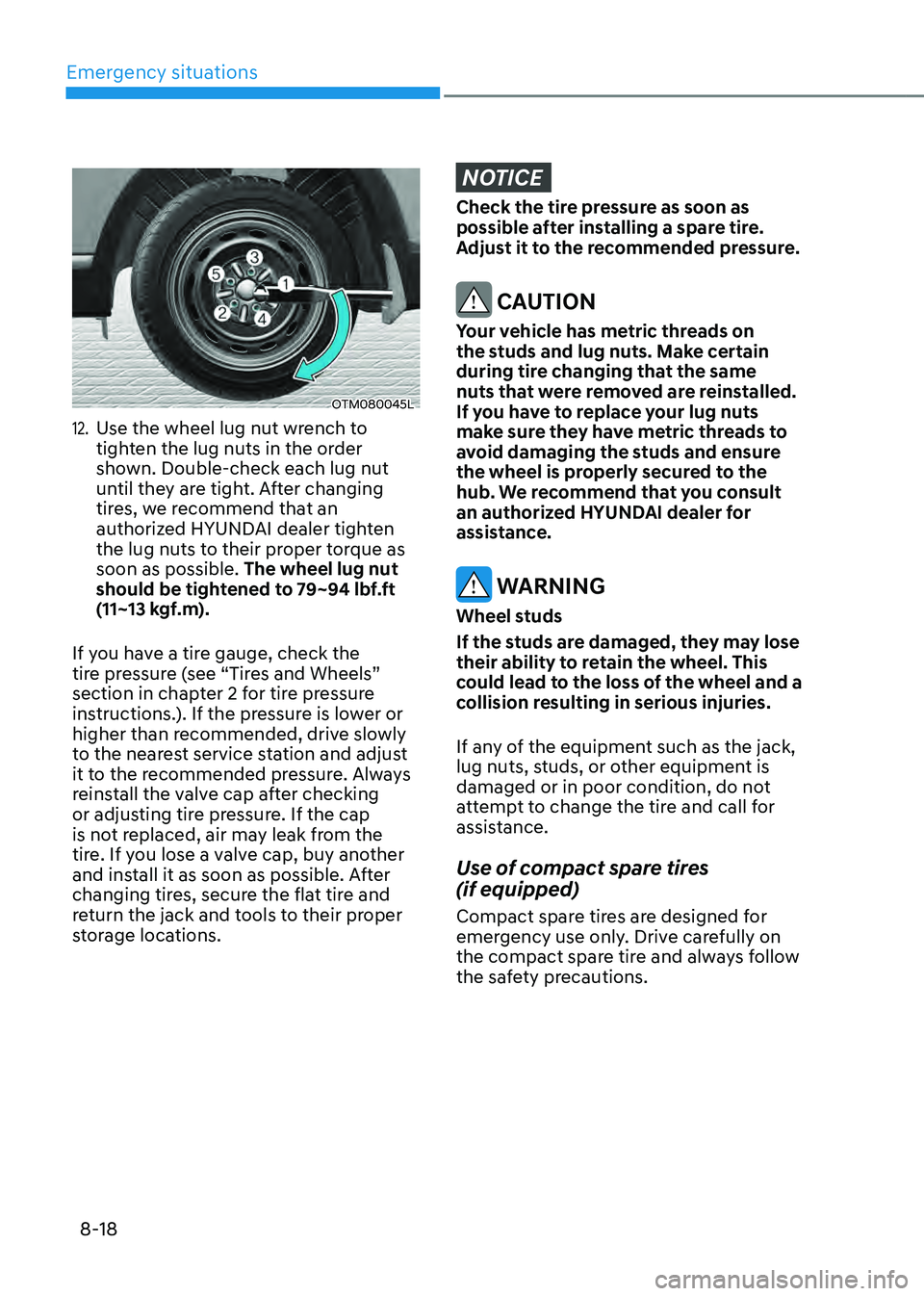
OTM080045L
12. Use the wheel lug nut wrench to
tighten the lug nuts in the order
shown. Double-check each lug nut
until they are tight. After changing
tires, we recommend that an
authorized HYUNDAI dealer tighten
the lug nuts to their proper torque as
soon as possible. The wheel lug nut
should be tightened to 79~94 lbf.ft
(11~13 kgf.m).
If you have a tire gauge, check the
tire pressure (see “Tires and Wheels”
section in chapter 2 for tire pressure
instructions.). If the pressure is lower or
higher than recommended, drive slowly
to the nearest service station and adjust
it to the recommended pressure. Always
reinstall the valve cap after checking
or adjusting tire pressure. If the cap
is not replaced, air may leak from the
tire. If you lose a valve cap, buy another
and install it as soon as possible. After
changing tires, secure the flat tire and
return the jack and tools to their proper
storage locations.
NOTICE
Check the tire pressure as soon as
possible after installing a spare tire.
Adjust it to the recommended pressure.
CAUTION
Your vehicle has metric threads on
the studs and lug nuts. Make certain
during tire changing that the same
nuts that were removed are reinstalled.
If you have to replace your lug nuts
make sure they have metric threads to
avoid damaging the studs and ensure
the wheel is properly secured to the
hub. We recommend that you consult
an authorized HYUNDAI dealer for
assistance.
WARNING
Wheel studs
If the studs are damaged, they may lose
their ability to retain the wheel. This
could lead to the loss of the wheel and a
collision resulting in serious injuries.
If any of the equipment such as the jack,
lug nuts, studs, or other equipment is
damaged or in poor condition, do not
attempt to change the tire and call for
assistance.
Use of compact spare tires
(if equipped)
Compact spare tires are designed for
emergency use only. Drive carefully on
the compact spare tire and always follow
the safety precautions.
Page 511 of 598
![HYUNDAI SANTA FE HYBRID 2021 Owners Manual 08
8-21
Towing service
OTMH080014[A] : Dollies
If emergency towing is necessary,
we recommend having it done by
an authorized HYUNDAI dealer or a
commercial tow-truck service.
Proper lifting and to](/manual-img/35/56184/w960_56184-510.png "HYUNDAI SANTA FE HYBRID 2021 Owners Manual 08
8-21
Towing service
OTMH080014[A] : Dollies
If emergency towing is necessary,
we recommend having it done by
an authorized HYUNDAI dealer or a
commercial tow-truck service.
Proper lifting and to")
08
8-21
Towing service
OTMH080014[A] : Dollies
If emergency towing is necessary,
we recommend having it done by
an authorized HYUNDAI dealer or a
commercial tow-truck service.
Proper lifting and towing procedures
are necessary to prevent damage to
the vehicle. The use of wheel dollies or
flatbed is recommended.
It is acceptable to tow the vehicle with
the rear wheels on the ground (without
dollies) and the front wheels off the
ground.
If any of the loaded wheels or suspension
components are damaged or the vehicle
is being towed with the front wheels on
the ground, use a towing dolly under the
front wheels.
When being towed by a commercial tow
truck and wheel dollies are not used,
the front of the vehicle should always be
lifted, not the rear.
CAUTION
OTM080013
• Do not tow with sling-type
equipment. Use wheel lift or flatbed
equipment.
OTMH080009
• Do not tow the vehicle with the front
wheels on the ground as this may
cause damage to the vehicle.
When towing your vehicle in an
emergency without wheel dollies:
• Vehicle without EPB
1. Place the ignition switch in the ACC
position.
2. Place the shift button in N (Neutral).
3. Release the parking brake.
• Vehicle with EPB
1. Release EPB before turning off the
engine.
2. Place the ignition switch to the OFF
position.
3. Change the gear to N (Neutral) while
pressing the brake pedal.
4. Place the ignition switch to the ACC
position.
CAUTION
Failure to place the shift button in N
(Neutral) may cause internal damage to
the transmission.
TOWING
Page 521 of 598
Maintenance
9-6
While operating your vehicle:
• Note any changes in the sound of the
exhaust or any smell of exhaust fumes
in the vehicle.
• Check for vibrations in the steering
wheel. Notice if there is any increased
steering effort or looseness in the
steering wheel, or change in its
straight-ahead position.
• Notice if your vehicle constantly turns
slightly or “pulls” to one side when
traveling on smooth, level road.
• When stopping, listen and check for
unusual sounds, pulling to one side,
increased brake pedal travel or “hard-
to-push” brake pedal.
• If any slipping or changes in the
operation of your transmission occurs,
check the transmission fluid level.
• Check the automatic transmission P
(Park) function.
• Check the parking brake.
• Check for fluid leaks under your
vehicle (water dripping from the air
conditioning system during or after
use is normal).
At least monthly:
• Check coolant level in the engine
coolant reservoir.
• Check the operation of all exterior
lights, including the stoplights, turn
signals and hazard warning flashers.
• Check the inflation pressures of all
tires including the spare for tires that
are worn, show uneven wear, or are
damaged.
• Check for loose wheel lug nuts.
At least twice a year: (i.e., every
Spring and Autumn)
• Check radiator, heater and air
conditioning hoses for leaks or
damage.
• Check windshield washer spray and
wiper operation. Clean wiper blades
with a clean cloth dampened with
washer fluid.
• Check headlamp alignment.
• Check muffler, exhaust pipes, shields
and clamps.
• Check the seat belts for wear and
function.
At least once a year:
• Clean body and door drain holes.
• Lubricate door hinges and hood
hinges.
• Lubricate door and hood locks and
latches.
• Lubricate door rubber weather strips.
• Check the air conditioning system.
• Inspect and lubricate automatic
transmission linkage and controls.
• Clean the battery and terminals.
• Check the brake fluid level.