2021 HYUNDAI PALISADE ESP
[x] Cancel search: ESPPage 343 of 612
5-34
Driving your vehicle
Using ABS
To obtain the maximum benefit from
your ABS in an emergency situation,
do not attempt to modulate your
brake pressure and do not try to
pump your brakes. Depress your
brake pedal as hard as possible.
When you apply your brakes under
conditions which may lock the
wheels, you may hear sounds from
the brakes, or feel a corresponding
sensation in the brake pedal. This is
normal and it means your ABS is
active.
ABS does not reduce the time or dis-
tance it takes to stop the vehicle.
Always maintain a safe distance from
the vehicle in front of you.
ABS will not prevent a skid that
results from sudden changes in
direction, such as trying to take a
corner too fast or making a sudden
lane change. Always drive at a safe
speed for the road and weather con-
ditions.ABS cannot prevent a loss of stabili-
ty. Always steer moderately when
braking hard. Severe or sharp steer-
ing wheel movement can still cause
your vehicle to veer into oncoming
traffic or off the road.
On loose or uneven road surfaces,
operation of the anti-lock brake sys-
tem may result in a longer stopping
distance than for vehicles equipped
with a conventional brake system.
The ABS warning light ( ) will stay
on for several seconds after the igni-
tion switch is in the ON position.
During that time, the ABS will go
through self-diagnosis and the light
will go off if everything is normal. If
the light stays on, you may have a
problem with your ABS. Contact an
authorized HYUNDAI dealer as soon
as possible
If the ABS warning light ( ) is
on and stays on, you may have
a problem with the ABS. Your
power brakes will work normal-
ly. To reduce the risk of serious
injury or death, contact your
HYUNDAI dealer as soon as
possible.
WARNING
Page 345 of 612

5-36
Driving your vehicle
When operating
When the ESC is in opera-
tion, the ESC indicator light
blinks:
When you apply your brakes under
conditions which may lock the
wheels, you may hear sounds from
the brakes, or feel a corresponding
sensation in the brake pedal. This
is normal and it means your ESC is
active.
When the ESC activates, the
engine may not respond to the
accelerator as it does under rou-
tine conditions.
If the Cruise Control was in use
when the ESC activates, the Cruise
Control automatically disengages.
The Cruise Control can be reen-
gaged when the road conditions
allow. See "Cruise Control System"
later in this chapter. (if equipped)
When moving out of the mud or
driving on a slippery road, the
engine RPM (revolutions per
minute) may not increase even if
you press the accelerator pedal
deeply. This is to maintain the sta-
bility and traction of the vehicle and
does not indicate a problem.
ESC OFF condition
To cancel ESC operation :
State 1
Press the ESC OFF button briefly.
The ESC OFF indicator light and
message "Traction Control disabled"
will illuminate. In this state, the trac-
tion control function of ESC (engine
management) is disabled, but the
brake control function of ESC (brak-
ing management) still operates.
Press and hold the ESC OFF button
continuously for more than 3 sec-
onds. The ESC OFF indicator light
and message "Traction and Stability
Control disabled" illuminates and a
warning chime sounds. In this state,
both the traction control function of
ESC (engine management) and the
brake control function of ESC (brak-
ing management) are disabled.
If the ignition switch is placed to the
LOCK/OFF position when ESC is off,
ESC remains off. Upon restarting the
engine, the ESC will automatically turn
on again.
Indicator lights
When the ignition switch is placed to
the ON position, the ESC indicator
light illuminates, then goes off if the
ESC system is operating normally.
The ESC indicator light blinks when-
ever the ESC is operating.
If ESC indicator light stays on, your
vehicle may have a malfunction with
the ESC system. When this warning
light illuminates have your vehicle
checked by an authorized HYUNDAI
dealer as soon as possible.
The ESC OFF indicator light comes
on when the ESC is turned off.
■ESC indicator light (blinks)
■ ESC OFF indicator light (comes on)
Page 347 of 612
5-38
Driving your vehicle
Vehicle Stability Management
(VSM)
The Vehicle Stability Management
(VSM) is a function of the Electronic
Stability Control (ESC) system. It
helps ensure the vehicle stays stable
when accelerating or braking sud-
denly on wet, slippery and rough
roads where traction over the four
tires can suddenly become uneven.
VSM operation
VSM ON condition
The VSM operates when:
The Electronic Stability Control
(ESC) is on.
Vehicle speed is approximately
above 13 mph (22 km/h) on curve
roads.
Vehicle speed is approximately
above 6 mph (10 km/h) when the
vehicle is braking on a two surface
road.
✱The two surface road is made of
surfaces which have different fric-
tion forces.
When operating
When you apply your brakes under
conditions which may activate the
ESC, you may hear sounds from the
brakes, or feel a corresponding sen-
sation in the brake pedal. This is nor-
mal and it means your VSM is active.
Information
The VSM does not operate when:
• Driving on a banked road such as
gradient or incline.
• Driving rearward.
• ESC OFF indicator light is on.
• EPS (Electric Power Steering) warn-
ing light ( ) is on or blinks.
i
Never drive too fast for the
road conditions. The VSM sys-
tem will not prevent acci-
dents. Excessive speed in bad
weather, slippery and uneven
roads can result in severe
accidents.
Take the following precautions
when using the Vehicle Stability
Management (VSM):
ALWAYS check the speed and
the distance to the vehicle
ahead. The VSM is not a sub-
stitute for safe driving prac-
tices.
WARNING
Page 352 of 612
5-43
Driving your vehicle
5
The All Wheel Drive (AWD) system
delivers engine torque to both the
front and rear wheels for extra trac-
tion. AWD is useful when maximum
traction is required on slippery,
muddy, wet, or snow-covered roads.
Occasional off-road use such as
established unpaved roads and trails
are OK. It is always important that
the driver carefully reduces the
speed to a level that does not exceed
the safe operating speed for those
conditions. Do not drive in water if the level
is higher than the bottom of the
vehicle.
Check your brake condition
once you are out of mud or
water. Depress the brake pedal
several times as you move slow-
ly until you feel normal braking
return.
Shorten your scheduled mainte-
nance interval if you drive in off-
road conditions such as sand,
mud or water (see "Maintenance
Under Severe Usage Conditions"
in chapter 7).
Always wash your vehicle thor-
oughly after off road use, espe-
cially the bottom of the vehicle.
Be sure to equip the vehicle with
four tires of the same size and
type.
Make sure that a full time AWD
vehicle is towed by a flat bed
tow truck.NOTICE
A AL
LL
L
W
WH
HE
EE
EL
L
D
DR
RI
IV
VE
E
(
(A
AW
WD
D)
)
(
(I
IF
F
E
EQ
QU
UI
IP
PP
PE
ED
D)
)
To reduce the risk of SERIOUS
INJURY or DEATH:
Do not drive in conditions that
exceed the vehicles intended
design such as challenging
off-road conditions.
Avoid high speeds when cor-
nering or turning.
Do not make quick steering
wheel movements, such as
sharp lane changes or fast,
sharp turns.
The risk of a rollover is great-
ly increased if you lose con-
trol of your vehicle at highway
speeds.
Loss of control often occurs if
two or more wheels drop off
the roadway and the driver
over steers to reenter the
roadway.
In the event your vehicle
leaves the roadway, do not
steer sharply. Instead, slow
down before pulling back into
the travel lanes.
WARNING
Page 367 of 612
5-58
Driving your vehicle
When ECO mode is activated:
The acceleration response may be
slightly reduced if the accelerator
pedal is depressed moderately.
The air conditioner performance
may be limited.
The shift pattern of the automatic
transmission may change.
The engine noise may be louder at
some automatic transmission
shifts as down-shift requires press-
ing down more on the accelerator.
The above situations are normal
conditions when ECO mode is acti-
vated to help improve fuel efficiency.
Limitation of ECO mode operation:
If the following conditions occur while
ECO mode is operating, the system
operation is limited even though
there is no change in the ECO indi-
cator. When the coolant temperature is
low:
The system will be limited until
engine performance becomes nor-
mal.
When driving up a hill:
The system will be limited to gain
power when driving uphill because
engine torque is restricted.
When driving the vehicle in manual
shift mode using the paddle shifter.
The system will be limited accord-
ing to the shift location.
Page 371 of 612
5-62
Driving your vehicle
ECO mode
When the drive mode is
set to ECO mode, the
engine and transmission
control logic are changed
to maximize fuel efficien-
cy.
When ECO mode is selected by
rotating the DRIVE mode selection
knob, the ECO indicator will illumi-
nate.
The vehicle starts in ECO mode,
when the engine was turned OFF
in ECO mode.
Information
Fuel efficiency depends on the driver's
driving habit and road condition.
When ECO mode is activated:
The acceleration response may be
slightly reduced if the accelerator
pedal is depressed moderately.
The air conditioner performance
may be limited.
The shift pattern of the automatic
transmission may change.
The engine noise may be louder at
some automatic transmission
shifts as down-shift requires press-
ing down more on the accelerator.
The above situations are normal
conditions when ECO mode is acti-
vated to help improve fuel efficiency.
Limitation of ECO mode operation:
If the following conditions occur while
ECO mode is operating, the system
operation is limited even though
there is no change in the ECO indi-
cator. When the coolant temperature is
low:
The system will be limited until
engine performance becomes nor-
mal.
When driving up a hill:
The system will be limited to gain
power when driving uphill because
engine torque is restricted.
When driving the vehicle in manual
shift mode using the paddle shifter.
The system will be limited accord-
ing to the shift location.
i
ECO
Page 377 of 612
5-68
Driving your vehicle
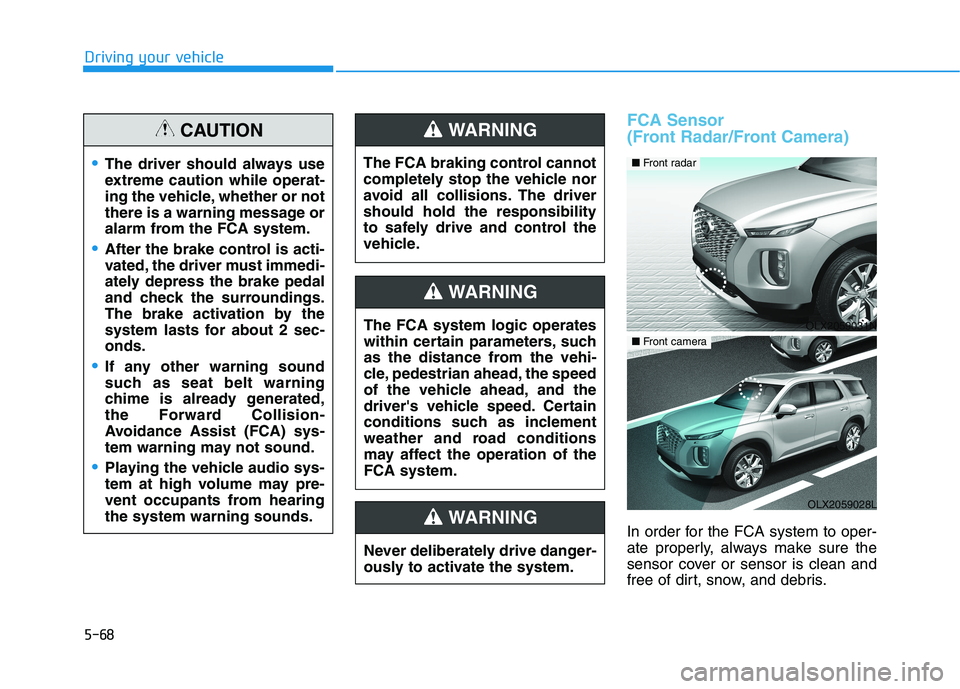
FCA Sensor
(Front Radar/Front Camera)
In order for the FCA system to oper-
ate properly, always make sure the
sensor cover or sensor is clean and
free of dirt, snow, and debris.
The driver should always use
extreme caution while operat-
ing the vehicle, whether or not
there is a warning message or
alarm from the FCA system.
After the brake control is acti-
vated, the driver must immedi-
ately depress the brake pedal
and check the surroundings.
The brake activation by the
system lasts for about 2 sec-
onds.
If any other warning sound
such as seat belt warning
chime is already generated,
the Forward Collision-
Avoidance Assist (FCA) sys-
tem warning may not sound.
Playing the vehicle audio sys-
tem at high volume may pre-
vent occupants from hearing
the system warning sounds.
CAUTION
The FCA system logic operates
within certain parameters, such
as the distance from the vehi-
cle, pedestrian ahead, the speed
of the vehicle ahead, and the
driver's vehicle speed. Certain
conditions such as inclement
weather and road conditions
may affect the operation of the
FCA system.
WARNING
The FCA braking control cannot
completely stop the vehicle nor
avoid all collisions. The driver
should hold the responsibility
to safely drive and control the
vehicle.
WARNING
Never deliberately drive danger-
ously to activate the system.
WARNING
OLX2059031N
■ Front radar
OLX2059028L
■ Front camera
Page 380 of 612
5-71
Driving your vehicle
5
Both FCA warning light and warn-
ing message will disappear once
the ESC warning light issue is
resolved.The FCA system may not acti-
vate if the driver applies the
brake pedal to avoid collision.
The brake control may be
insufficient, possibly causing
a collision, if a vehicle in front
abruptly stops. Always pay
extreme caution.
The FCA system may not acti-
vate according to the road
conditions, inclement weath-
er, driving conditions or traffic
conditions.
Occupants may get injured, if
the vehicle abruptly stops by
the activated FCA system. Pay
extreme caution.
The FCA system operates
only to detect vehicles, pedes-
trian in front of the vehicle.
FCA is only a supplemental
system for the driver's con-
venience. It is the driver's
responsibility to control the
vehicle operation. Do not
solely depend on the FCA
system. Rather, maintain a
safe braking distance, and, if
necessary, depress the brake
pedal to reduce the driving
speed or to stop the vehicle.
In certain instances and
under certain driving condi-
tions, the FCA system may
activate prematurely. This ini-
tial warning message appears
on the LCD display with a
warning chime.
WARNING
Also due to sensing limita-
tions, in certain situations, the
front radar sensor or camera
recognition system may not
detect the vehicle, pedestrian
ahead. The FCA system may
not activate and the warning
message may not be dis-
played.
If there is a malfunction with
the FCA system, the Forward
Collision avoidance assist
system is not applied even
though the braking system is
operating normally.
If the vehicle in front stops
suddenly, you may have less
control of the brake system.
Therefore, always keep a safe
distance between your vehicle
and the vehicle in front of you.
The FCA system may activate
during braking and the vehi-
cle may stop suddenly shift-
ing loose objects toward the
passengers. Always keep
loose objects secured.