Page 390 of 546
5-100
Driving your vehicle
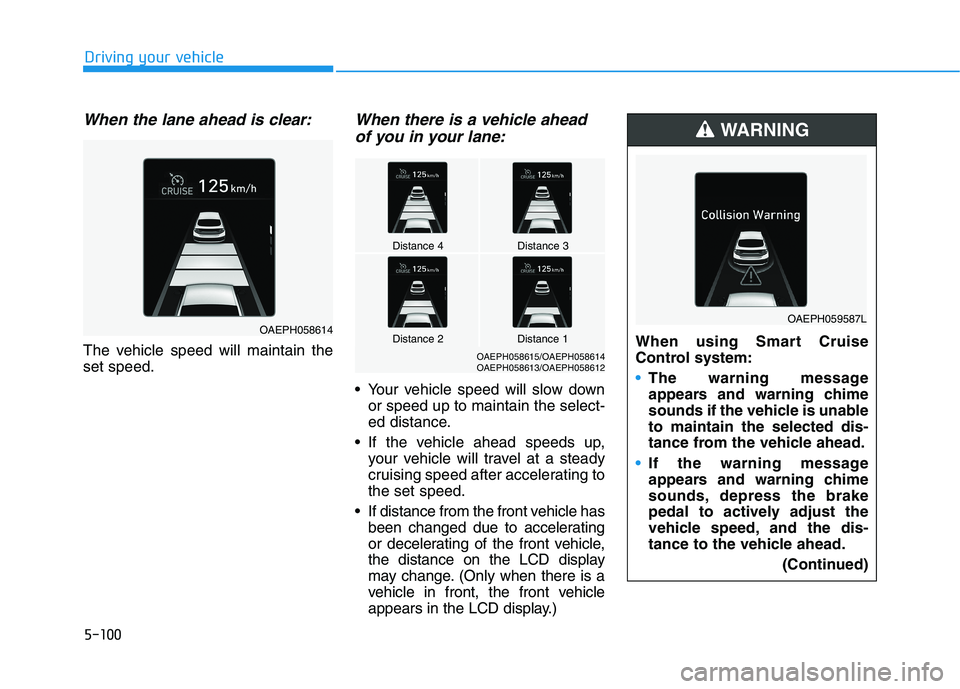
When the lane ahead is clear:
The vehicle speed will maintain the set speed.
When there is a vehicle aheadof you in your lane:
Your vehicle speed will slow down or speed up to maintain the select-
ed distance.
If the vehicle ahead speeds up, your vehicle will travel at a steady
cruising speed after accelerating tothe set speed.
If distance from the front vehicle has been changed due to accelerating
or decelerating of the front vehicle,
the distance on the LCD display
may change. (Only when there is a
vehicle in front, the front vehicle
appears in the LCD display.)
Distance 4Distance 3
OAEPH058615/OAEPH058614
OAEPH058613/OAEPH058612
Distance 1Distance 2OAEPH058614 When using Smart Cruise
Control system:
The warning message
appears and warning chime
sounds if the vehicle is unableto maintain the selected dis-
tance from the vehicle ahead.
If the warning message
appears and warning chime
sounds, depress the brake
pedal to actively adjust the
vehicle speed, and the dis-
tance to the vehicle ahead.
(Continued)
WARNING
OAEPH059587L
Page 392 of 546
5-102
Driving your vehicle
If you push the Smart CruiseControl toggle switch (RES+ or
SET-) while Auto Hold and smart
cruise control is operating the AutoHold will be released regardless of
accelerator pedal operation and
the vehicle will start to move. The
AUTO HOLD indicator changes
from green to white.Sensor to detect distance to
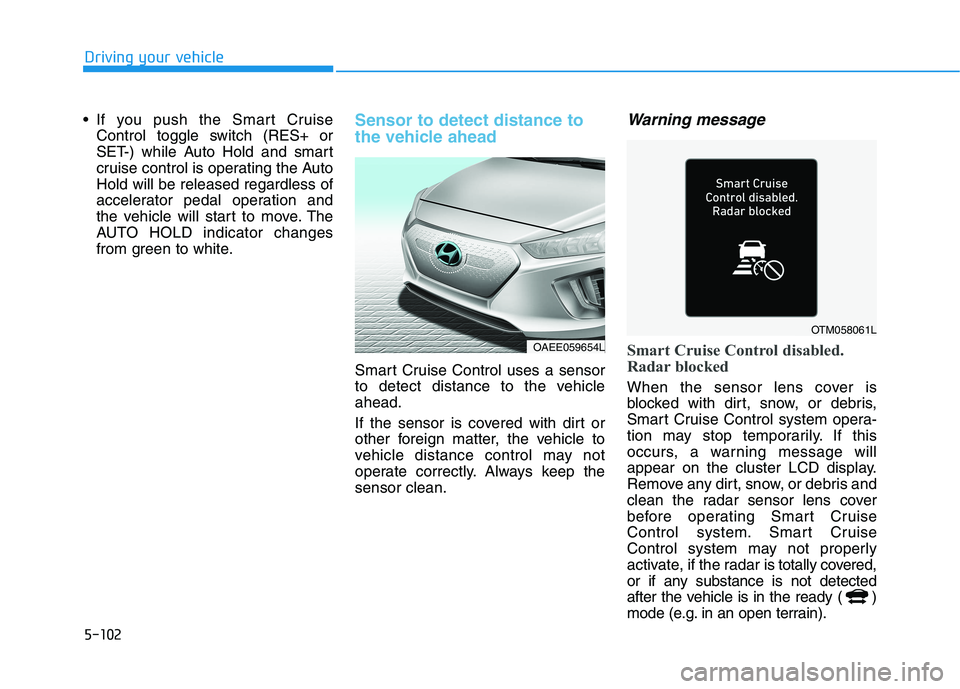
the vehicle ahead
Smart Cruise Control uses a sensor
to detect distance to the vehicleahead.
If the sensor is covered with dirt or
other foreign matter, the vehicle to
vehicle distance control may not
operate correctly. Always keep thesensor clean.
Warning message
Smart Cruise Control disabled.
Radar blocked
When the sensor lens cover is
blocked with dirt, snow, or debris,
Smart Cruise Control system opera-
tion may stop temporarily. If this
occurs, a warning message will
appear on the cluster LCD display.
Remove any dirt, snow, or debris and
clean the radar sensor lens cover
before operating Smart Cruise
Control system. Smart Cruise
Control system may not properly
activate, if the radar is totally covered,
or if any substance is not detected
after the vehicle is in the ready ( )
mode (e.g. in an open terrain).
OAEE059654L
OTM058061L
Page 393 of 546
5-103
Driving your vehicle
5
Information
For the SCC operation is temporarily
stopped if the radar is blocked, but
you wish to use cruise control mode
(speed control function), you must
convert to the cruise control mode
(refer to "To convert to Cruise
Control mode" in the following page.
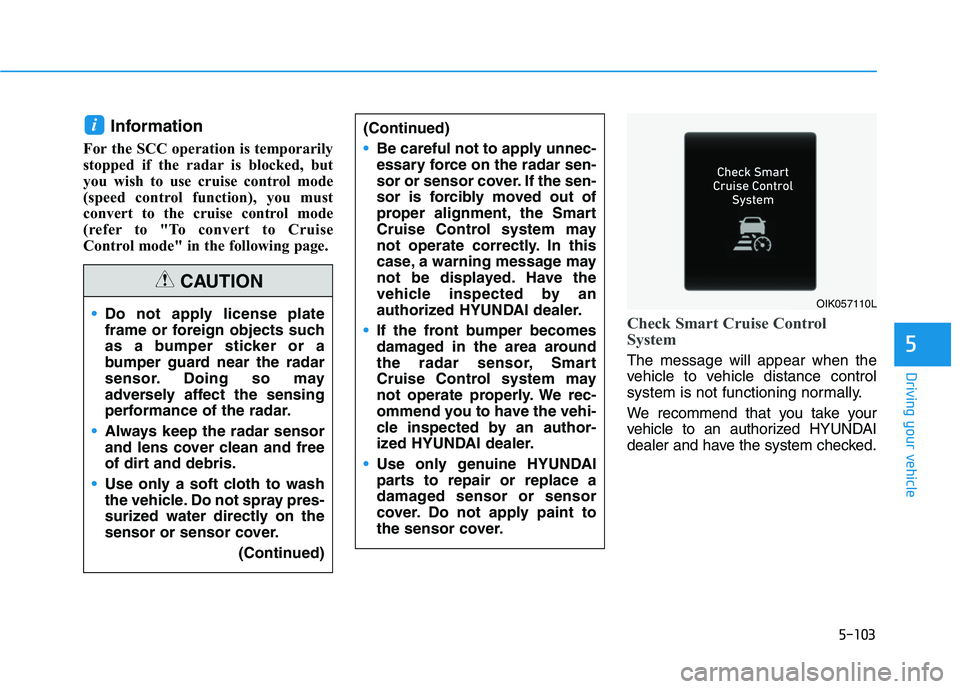
Check Smart Cruise Control
System
The message will appear when the
vehicle to vehicle distance control
system is not functioning normally.
We recommend that you take your
vehicle to an authorized HYUNDAI
dealer and have the system checked.
i
Do not apply license plate
frame or foreign objects such
as a bumper sticker or a
bumper guard near the radar
sensor. Doing so may
adversely affect the sensing
performance of the radar.
Always keep the radar sensor
and lens cover clean and free
of dirt and debris.
Use only a soft cloth to wash
the vehicle. Do not spray pres-
surized water directly on the
sensor or sensor cover. (Continued)
CAUTION
(Continued)
Be careful not to apply unnec-
essary force on the radar sen-
sor or sensor cover. If the sen-
sor is forcibly moved out of
proper alignment, the Smart
Cruise Control system may
not operate correctly. In this
case, a warning message may
not be displayed. Have the
vehicle inspected by an
authorized HYUNDAI dealer.
If the front bumper becomes
damaged in the area around
the radar sensor, Smart
Cruise Control system may
not operate properly. We rec-
ommend you to have the vehi-
cle inspected by an author-
ized HYUNDAI dealer.
Use only genuine HYUNDAI
parts to repair or replace a
damaged sensor or sensor
cover. Do not apply paint to
the sensor cover.
OIK057110L
Page 394 of 546
5-104
Driving your vehicle
Limitations of the system
Smart Cruise Control System may
have limits to its ability to detect dis-
tance to the vehicle ahead due to
road and traffic conditions.
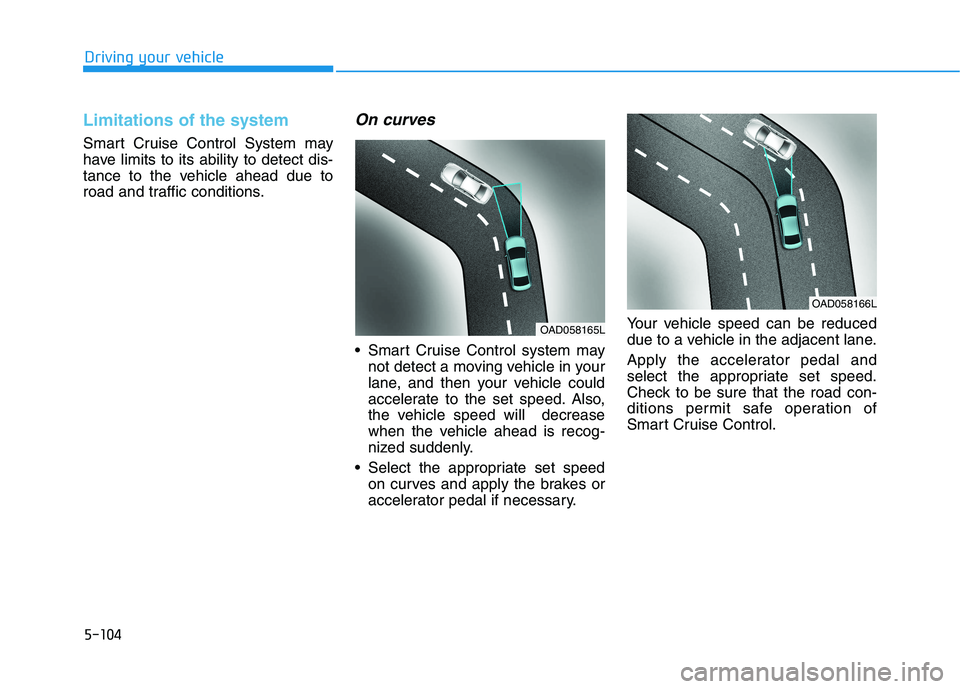
On curves
Smart Cruise Control system maynot detect a moving vehicle in your
lane, and then your vehicle could
accelerate to the set speed. Also,
the vehicle speed will decrease
when the vehicle ahead is recog-
nized suddenly.
Select the appropriate set speed on curves and apply the brakes or
accelerator pedal if necessary. Your vehicle speed can be reduced
due to a vehicle in the adjacent lane.
Apply the accelerator pedal and
select the appropriate set speed.
Check to be sure that the road con-
ditions permit safe operation of
Smart Cruise Control.
OAD058166L
OAD058165L
Page 395 of 546
5-105
Driving your vehicle
5
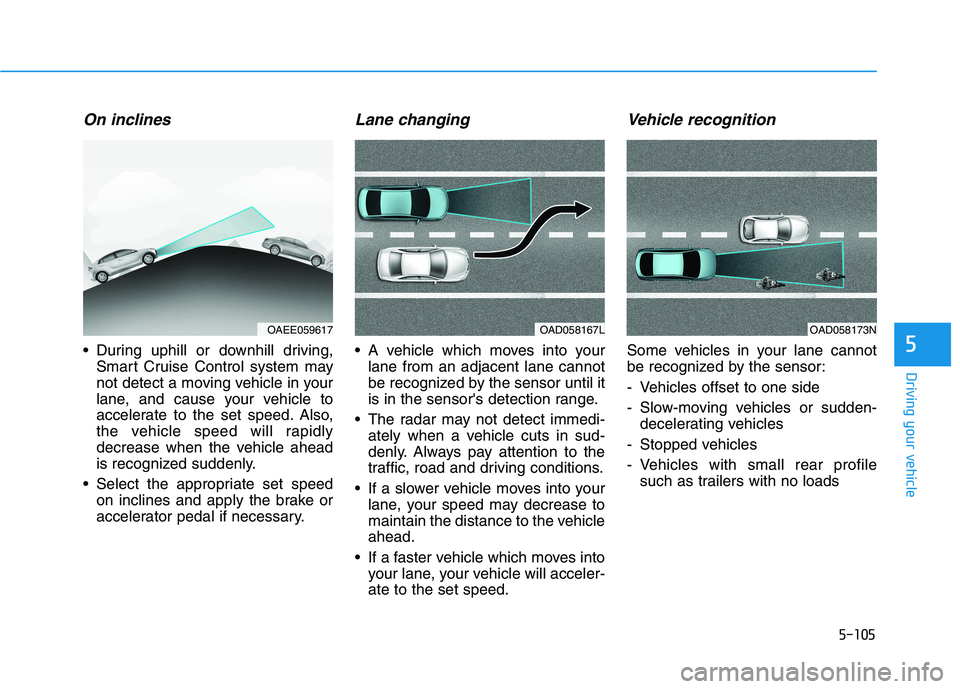
On inclines
During uphill or downhill driving,Smart Cruise Control system may
not detect a moving vehicle in your
lane, and cause your vehicle to
accelerate to the set speed. Also,
the vehicle speed will rapidly
decrease when the vehicle ahead
is recognized suddenly.
Select the appropriate set speed on inclines and apply the brake or
accelerator pedal if necessary.
Lane changing
A vehicle which moves into yourlane from an adjacent lane cannot
be recognized by the sensor until it
is in the sensor's detection range.
The radar may not detect immedi- ately when a vehicle cuts in sud-
denly. Always pay attention to the
traffic, road and driving conditions.
If a slower vehicle moves into your lane, your speed may decrease to
maintain the distance to the vehicleahead.
If a faster vehicle which moves into your lane, your vehicle will acceler-ate to the set speed.
Vehicle recognition
Some vehicles in your lane cannot
be recognized by the sensor:
- Vehicles offset to one side
- Slow-moving vehicles or sudden-decelerating vehicles
- Stopped vehicles
- Vehicles with small rear profile such as trailers with no loads
OAD058167LOAD058173NOAEE059617
Page 396 of 546
5-106
Driving your vehicle
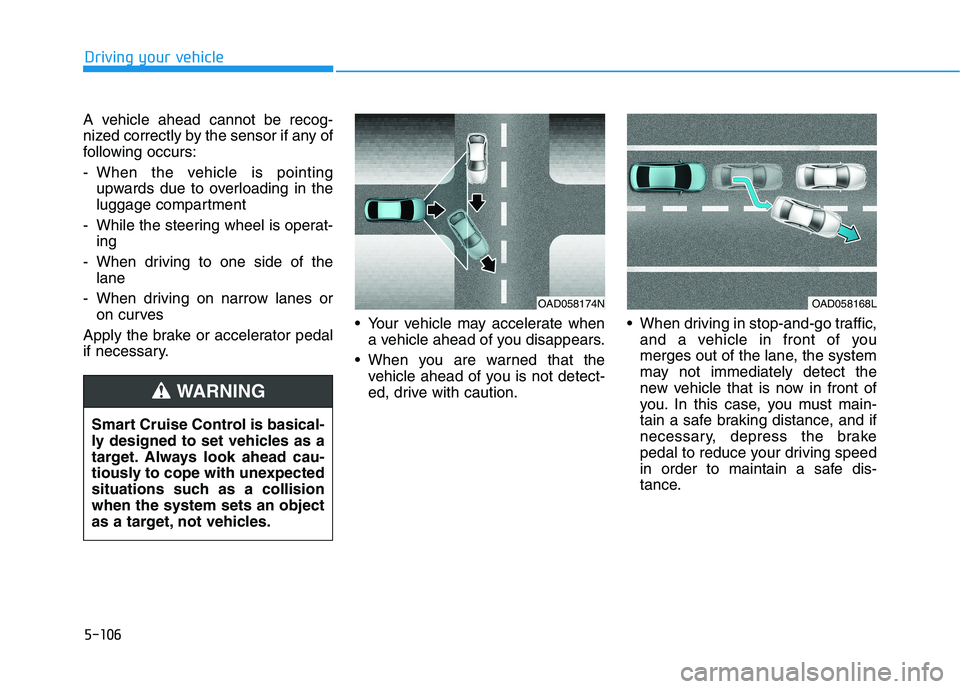
A vehicle ahead cannot be recog-
nized correctly by the sensor if any of
following occurs:
- When the vehicle is pointingupwards due to overloading in the
luggage compartment
- While the steering wheel is operat- ing
- When driving to one side of the lane
- When driving on narrow lanes or on curves
Apply the brake or accelerator pedal
if necessary. Your vehicle may accelerate when
a vehicle ahead of you disappears.
When you are warned that the vehicle ahead of you is not detect-
ed, drive with caution. When driving in stop-and-go traffic,
and a vehicle in front of you
merges out of the lane, the system
may not immediately detect the
new vehicle that is now in front of
you. In this case, you must main-
tain a safe braking distance, and if
necessary, depress the brake
pedal to reduce your driving speed
in order to maintain a safe dis-
tance.
OAD058174NOAD058168L
Smart Cruise Control is basical-
ly designed to set vehicles as a
target. Always look ahead cau-
tiously to cope with unexpected
situations such as a collisionwhen the system sets an object
as a target, not vehicles.
WARNING
Page 397 of 546
5-107
Driving your vehicle
5
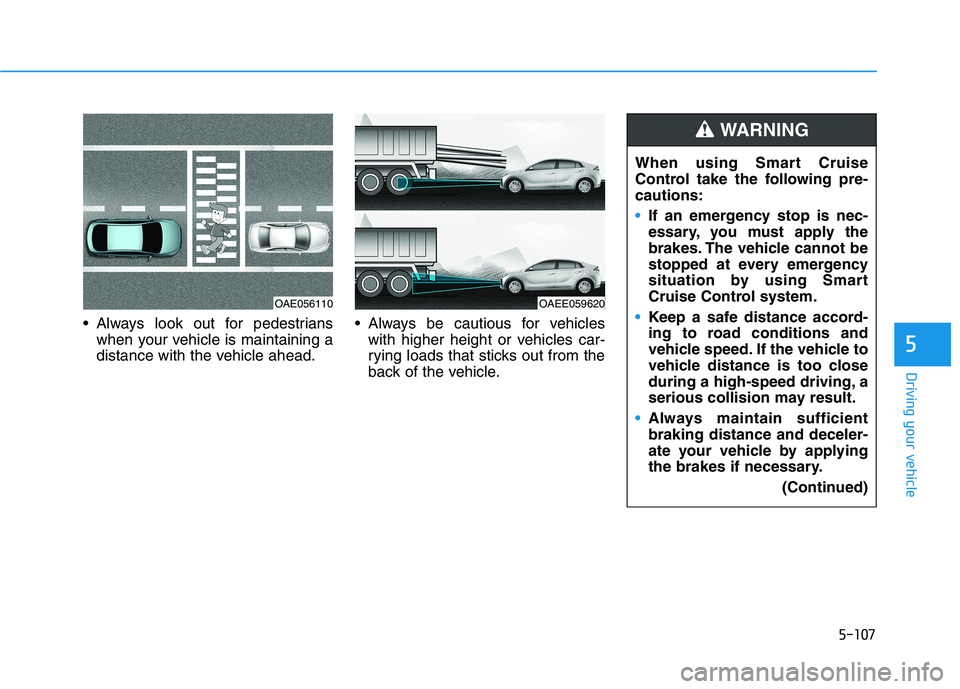
Always look out for pedestrianswhen your vehicle is maintaining a
distance with the vehicle ahead. Always be cautious for vehicles
with higher height or vehicles car-
rying loads that sticks out from the
back of the vehicle.
OAE056110OAEE059620 When using Smart Cruise
Control take the following pre-cautions:
If an emergency stop is nec-
essary, you must apply the
brakes. The vehicle cannot be
stopped at every emergency
situation by using Smart
Cruise Control system.
Keep a safe distance accord-
ing to road conditions and
vehicle speed. If the vehicle to
vehicle distance is too close
during a high-speed driving, a
serious collision may result.
Always maintain sufficient braking distance and deceler-
ate your vehicle by applying
the brakes if necessary.
(Continued)
WARNING
Page 398 of 546
5-108
Driving your vehicle
Smart Cruise Control system may
not operate temporarily due to:
Electrical interference
Modifying the suspension
Differences of tire abrasion ortire pressure
Installing different type of tires
NOTICE(Continued)
Smart Cruise Control system
may not recognize complex
driving situations so always
pay attention to driving condi-
tions and control your vehiclespeed.
Turn off the Smart Cruise
Control system when the
vehicle is being towed.
Do not activate Smart Cruise
Control when towing a trailer
or vehicle.
Safety of the vehicle may be deteriorated when braking
control is applied in the tow-ing condition.
(Continued)
Smart Cruise Control system
cannot recognize a stopped
vehicle, pedestrians or an
oncoming vehicle. Always
look ahead cautiously to pre-
vent unexpected and sudden
situations from occurring.
Vehicles moving in front of
you with a frequent lane
change may cause a delay in
the system's reaction or maycause the system to react to a
vehicle actually in an adjacent
lane. Always drive cautiously
to prevent unexpected and
sudden situations from occur-ring.
Always be aware of the select-
ed speed and vehicle to vehi-
cle distance. The driver
should not solely rely on the
system but always pay atten-tion to driving conditions and
control your vehicle speed.
(Continued)