Page 254 of 659
4-22
Multimedia System
Range of supported compressed file
types
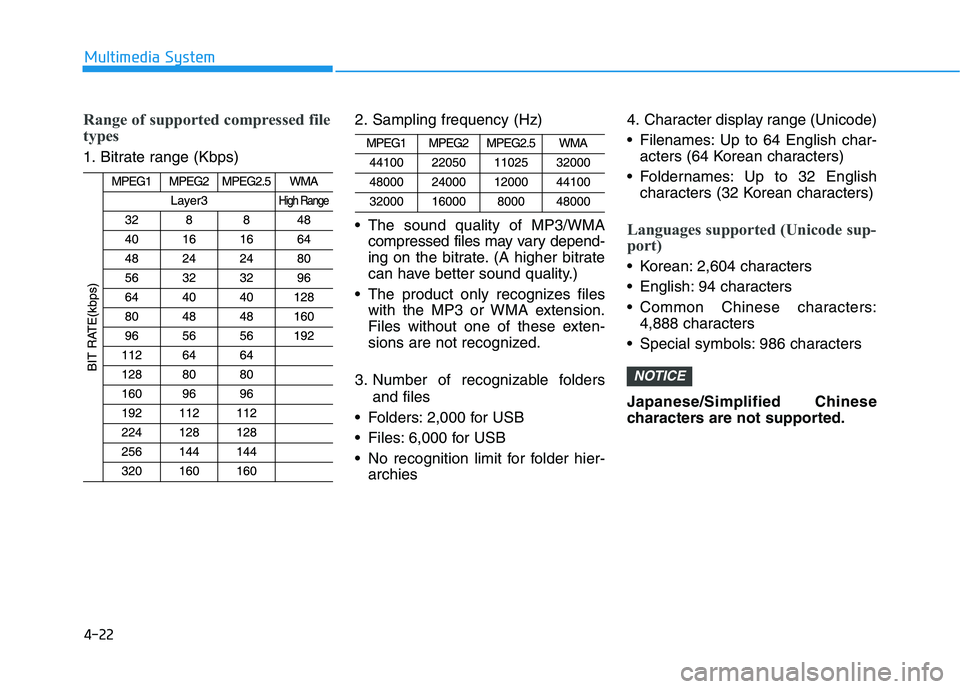
1. Bitrate range (Kbps)2. Sampling frequency (Hz)
The sound quality of MP3/WMA
compressed files may vary depend-
ing on the bitrate. (A higher bitrate
can have better sound quality.)
The product only recognizes files with the MP3 or WMA extension.
Files without one of these exten-
sions are not recognized.
3. Number of recognizable folders and files
Folders: 2,000 for USB
Files: 6,000 for USB
No recognition limit for folder hier- archies 4. Character display range (Unicode)
Filenames: Up to 64 English char-
acters (64 Korean characters)
Foldernames: Up to 32 English characters (32 Korean characters)
Languages supported (Unicode sup-
port)
Korean: 2,604 characters
English: 94 characters
Common Chinese characters:4,888 characters
Special symbols: 986 characters
Japanese/Simplified Chinese
characters are not supported.
NOTICE
Page 284 of 659
4-52
Multimedia System
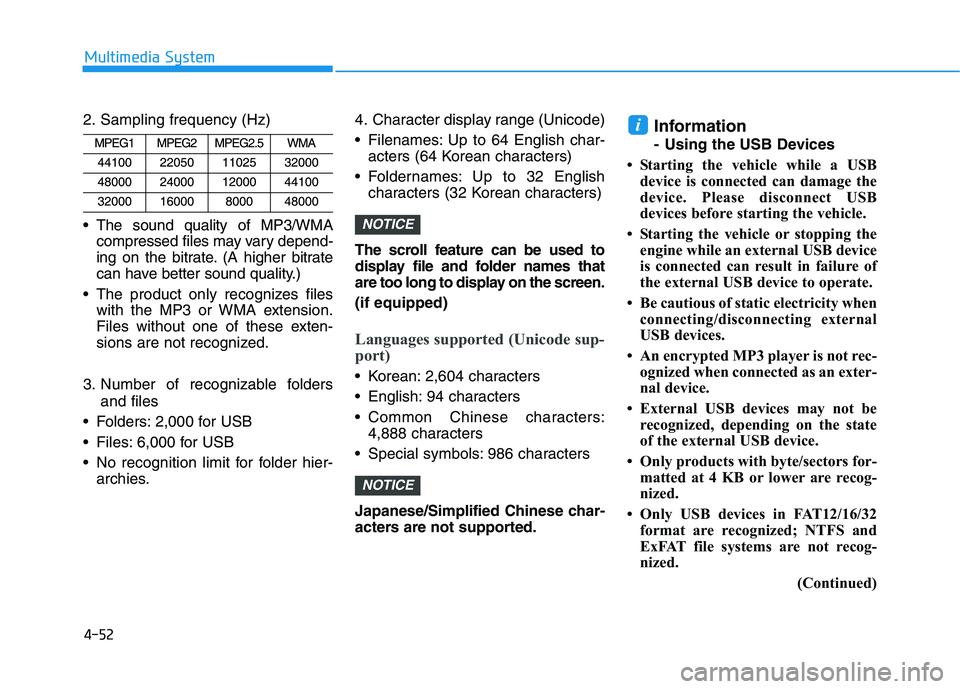
2. Sampling frequency (Hz)
The sound quality of MP3/WMA compressed files may vary depend-
ing on the bitrate. (A higher bitrate
can have better sound quality.)
The product only recognizes files with the MP3 or WMA extension.
Files without one of these exten-
sions are not recognized.
3. Number of recognizable folders and files
Folders: 2,000 for USB
Files: 6,000 for USB
No recognition limit for folder hier- archies. 4. Character display range (Unicode)
Filenames: Up to 64 English char-
acters (64 Korean characters)
Foldernames: Up to 32 English characters (32 Korean characters)
The scroll feature can be used to
display file and folder names that
are too long to display on the screen.
(if equipped)
Languages supported (Unicode sup-
port)
Korean: 2,604 characters
English: 94 characters
Common Chinese characters: 4,888 characters
Special symbols: 986 characters
Japanese/Simplified Chinese char-
acters are not supported.
Information
- Using the USB Devices
• Starting the vehicle while a USB device is connected can damage the
device. Please disconnect USB
devices before starting the vehicle.
• Starting the vehicle or stopping the engine while an external USB device
is connected can result in failure of
the external USB device to operate.
• Be cautious of static electricity when connecting/disconnecting external
USB devices.
• An encrypted MP3 player is not rec- ognized when connected as an exter-
nal device.
• External USB devices may not be recognized, depending on the state
of the external USB device.
• Only products with byte/sectors for- matted at 4 KB or lower are recog-
nized.
• Only USB devices in FAT12/16/32 format are recognized; NTFS and
ExFAT file systems are not recog-
nized.
(Continued)
i
NOTICE
NOTICE
Page 406 of 659
5-102
Driving your vehicle
System setting and activation
System setting
The driver can activate the SLIF byselecting 'User Settings →Driving
Assist →Speed Limit Information
Function'.
When the SLIF is activated, the symbols appear on the instrument
cluster to display the speed limit
information and overtaking restric-
tion.
When the SLIF is activated in the navigation setting, the above infor-
mation and the restriction are also
displayed on the navigation.
System activation
The SLIF displays the speed limitinformation and alerts the overtak-
ing restriction, when your vehicle
passes by the relevant traffic signs.
The SLIF restores the previous speed limit information, right after
the ignition switch is placed to the
ON position. You may find different speed limit
information for the same road. The
information is displayed depending
on the driving situations. Because,
traffic signs with additional sign
(e.g. rainy, arrow, etc.) are also
detected and compared with vehi-
cle internal data (e.g. wiper opera-
tion, turn signal, etc.).
The SLIF automatically updates the speed limit information in the
following situations.
- The vehicle changes drivingdirection, or makes a U-turn.
- The vehicle enters or exits from a highway, country road, etc.
- The vehicle enters or exits from a town, village, etc.
Information
The speed limit information on the
instrument cluster may differ from
the one on the navigation. In this case,
check the speed unit setting on the
navigation.
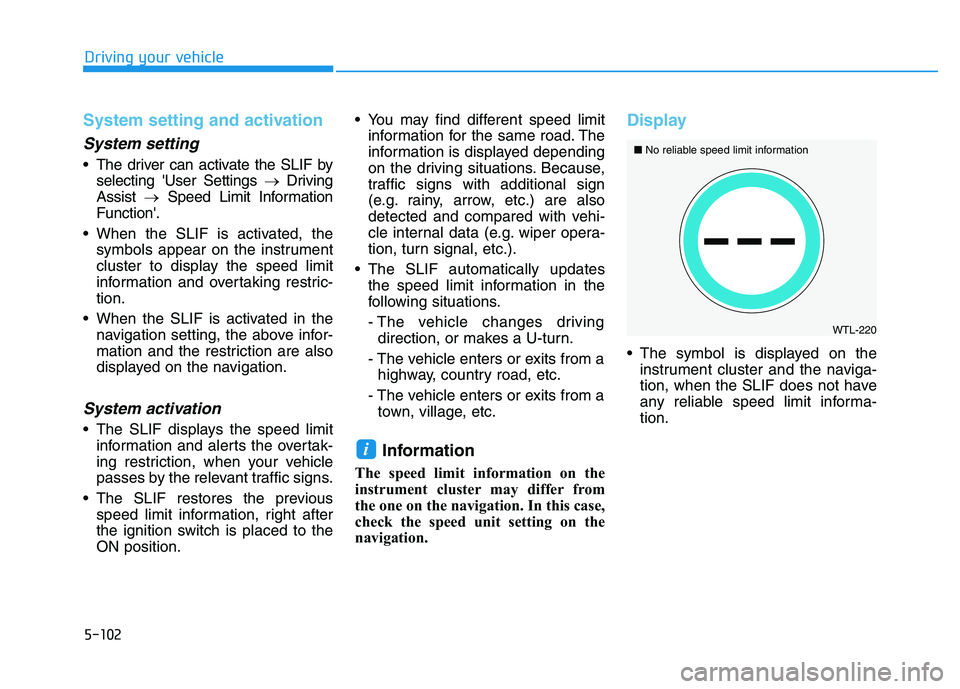
Display
The symbol is displayed on the instrument cluster and the naviga-
tion, when the SLIF does not have
any reliable speed limit informa-
tion.
i
���
WTL-220
■
No reliable speed limit information
Page 407 of 659
5-103
Driving your vehicle
5
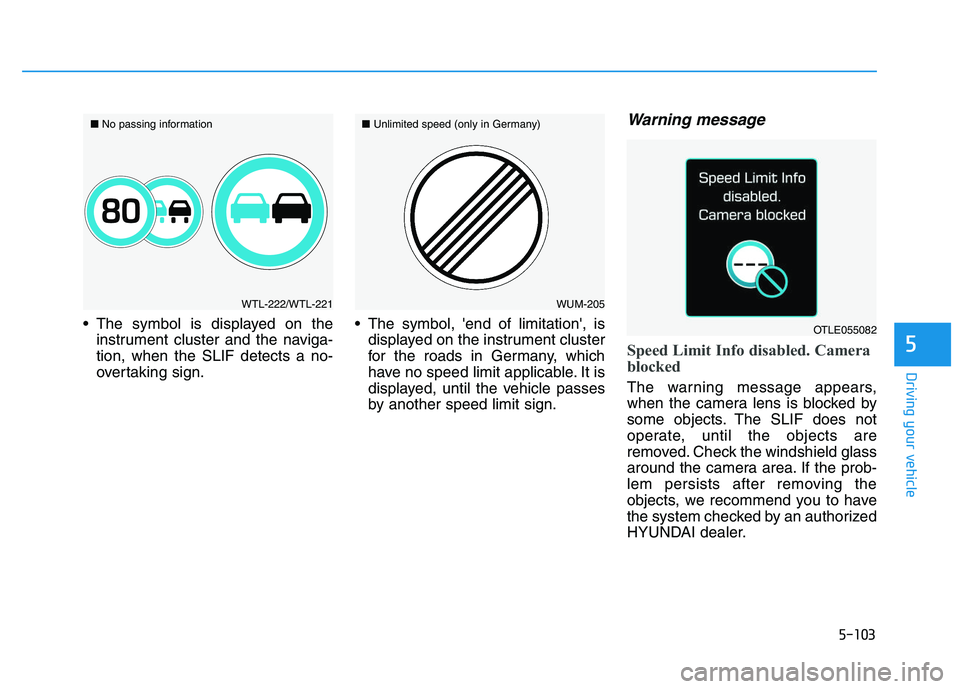
The symbol is displayed on theinstrument cluster and the naviga-
tion, when the SLIF detects a no-
overtaking sign. The symbol, 'end of limitation', is
displayed on the instrument cluster
for the roads in Germany, which
have no speed limit applicable. It is
displayed, until the vehicle passes
by another speed limit sign.
Warning message
Speed Limit Info disabled. Camera
blocked
The warning message appears,
when the camera lens is blocked by
some objects. The SLIF does not
operate, until the objects are
removed. Check the windshield glass
around the camera area. If the prob-
lem persists after removing the
objects, we recommend you to have
the system checked by an authorized
HYUNDAI dealer.
WTL-222/WTL-221
■
No passing informationWUM-205
■
Unlimited speed (only in Germany)
OTLE055082
Page 558 of 659

7-45
7
Maintenance
Install a new climate control air filter
in the correct direction with the
arrow symbol(
↓
↓) facing downwards.
Otherwise, the climate control effects
may decrease, possibly with a noise.
Blade inspection
Contamination of either the wind-
shield or the wiper blades with for-
eign matter can reduce the effective-
ness of the windshield wipers.
Common sources of contamination
are insects, tree sap, and hot wax
treatments used by some commer-
cial car washes. If the blades are not
wiping properly, clean both the win-
dow and the blades with a good
cleaner or mild detergent, and rinse
thoroughly with clean water. To prevent damage to the wiper
blades, arms or other compo-
nents, do not:
Use gasoline, kerosene, paint
thinner, or other solvents on or
near them.
Attempt to move the wipers manually.
Use non-specified wiper blades.
Information
Commercial hot waxes applied by
automatic car washes have been
known to make the windshield diffi-
cult to clean.
Information
Wiper blades are consumable item and
normal wear of the wipers may not be
covered by your vehicle warranty.
i
i
NOTICENOTICE
W
W I
I P
P E
E R
R
B
B L
L A
A D
D E
E S
S
Page 571 of 659
7-58
Maintenance
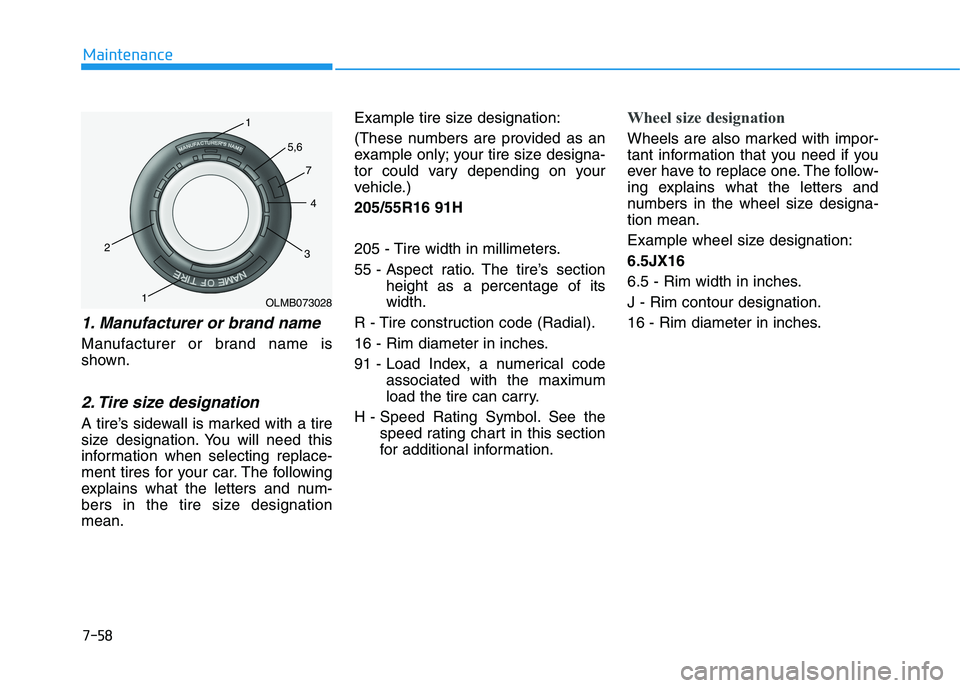
1. Manufacturer or brand name
Manufacturer or brand name is
shown.
2. Tire size designation
A tire’s sidewall is marked with a tire
size designation. You will need this
information when selecting replace-
ment tires for your car. The following
explains what the letters and num-
bers in the tire size designation
mean.Example tire size designation:
(These numbers are provided as an
example only; your tire size designa-
tor could vary depending on your
vehicle.)
205/55R16 91H
205 - Tire width in millimeters.
55 - Aspect ratio. The tire’s section
height as a percentage of its
width.
R - Tire construction code (Radial).
16 - Rim diameter in inches.
91 - Load Index, a numerical code associated with the maximum
load the tire can carry.
H - Speed Rating Symbol. See the speed rating chart in this section
for additional information.
Wheel size designation
Wheels are also marked with impor-
tant information that you need if you
ever have to replace one. The follow-
ing explains what the letters and
numbers in the wheel size designa-
tion mean.
Example wheel size designation:
6.5JX16
6.5 - Rim width in inches.
J - Rim contour designation.
16 - Rim diameter in inches.
OLMB073028
1
1
2
34
5,6
7
Page 572 of 659
7-59
7
Maintenance
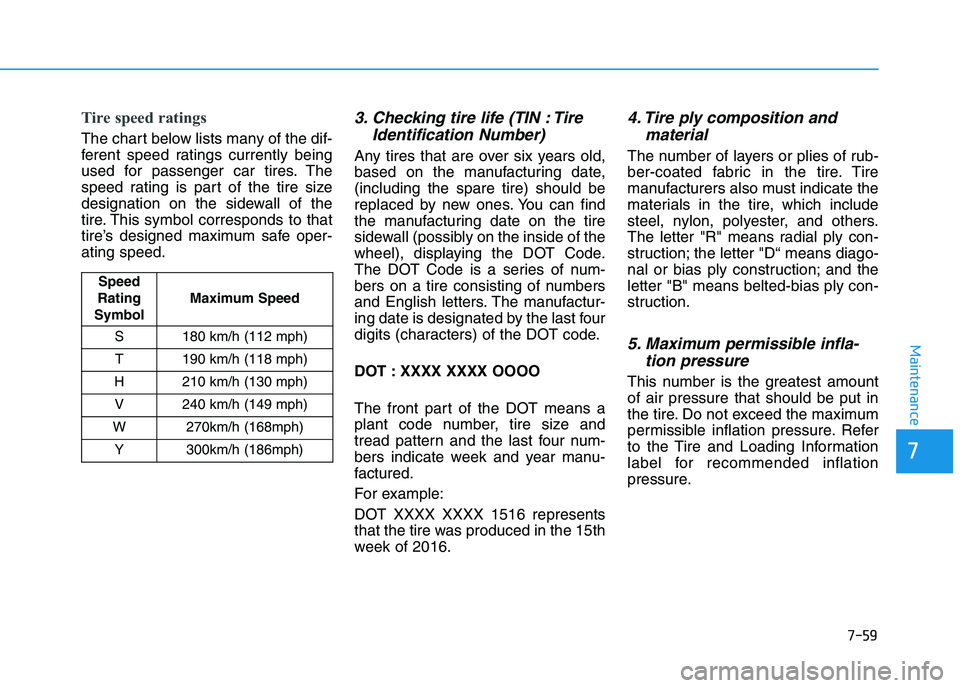
Tire speed ratings
The chart below lists many of the dif-
ferent speed ratings currently being
used for passenger car tires. The
speed rating is part of the tire size
designation on the sidewall of the
tire. This symbol corresponds to that
tire’s designed maximum safe oper-
ating speed.
3. Checking tire life (TIN : TireIdentification Number)
Any tires that are over six years old,
based on the manufacturing date,
(including the spare tire) should be
replaced by new ones. You can find
the manufacturing date on the tire
sidewall (possibly on the inside of the
wheel), displaying the DOT Code.
The DOT Code is a series of num-
bers on a tire consisting of numbers
and English letters. The manufactur-
ing date is designated by the last four
digits (characters) of the DOT code.
DOT : XXXX XXXX OOOO
The front part of the DOT means a
plant code number, tire size and
tread pattern and the last four num-
bers indicate week and year manu-
factured.
For example:
DOT XXXX XXXX 1516 represents
that the tire was produced in the 15th
week of 2016.
4. Tire ply composition andmaterial
The number of layers or plies of rub-
ber-coated fabric in the tire. Tire
manufacturers also must indicate the
materials in the tire, which include
steel, nylon, polyester, and others.
The letter "R" means radial ply con-
struction; the letter "D“ means diago-
nal or bias ply construction; and the
letter "B" means belted-bias ply con-
struction.
5. Maximum permissible infla-tion pressure
This number is the greatest amount
of air pressure that should be put in
the tire. Do not exceed the maximum
permissible inflation pressure. Refer
to the Tire and Loading Information
label for recommended inflation
pressure.
Speed
Rating
Symbol Maximum Speed
S 180 km/h (112 mph) T 190 km/h (118 mph)
H 210 km/h (130 mph) V 240 km/h (149 mph)
W 270km/h (168mph) Y 300km/h (186mph)
Page 580 of 659
7-67
7
Maintenance
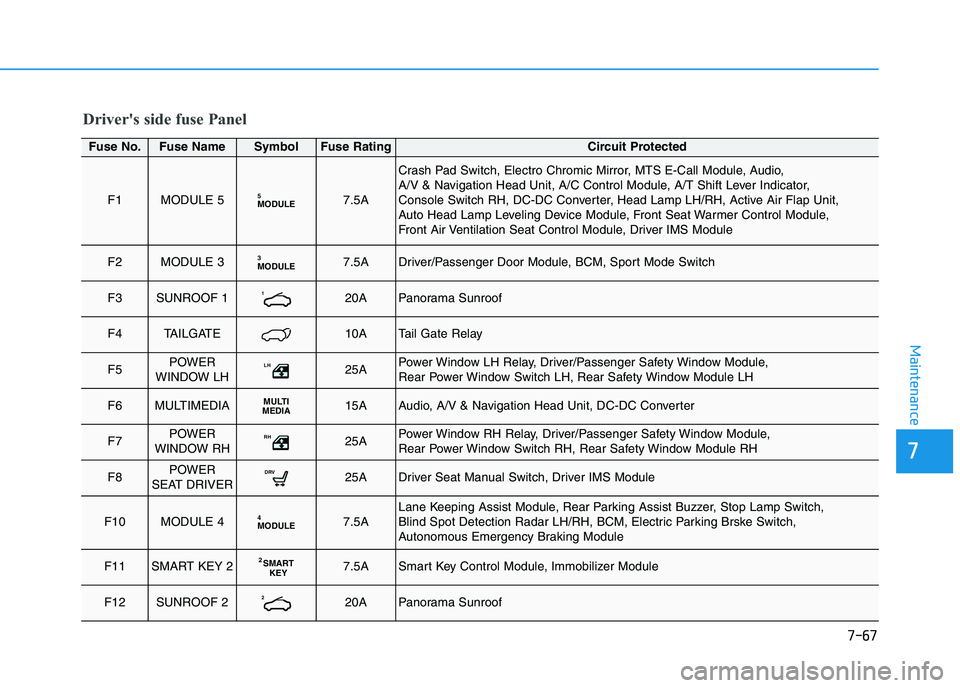
Driver's side fuse Panel
Fuse No.Fuse NameSymbolFuse RatingCircuit Protected
F1MODULE 5MODULE57.5A
Crash Pad Switch, Electro Chromic Mirror, MTS E-Call Module, Audio,
A/V & Navigation Head Unit, A/C Control Module, A/T Shift Lever Indicator,
Console Switch RH, DC-DC Converter, Head Lamp LH/RH, Active Air Flap Unit,
Auto Head Lamp Leveling Device Module, Front Seat Warmer Control Module,
Front Air Ventilation Seat Control Module, Driver IMS Module
F2MODULE 3MODULE37.5ADriver/Passenger Door Module, BCM, Sport Mode Switch
F3SUNROOF 1120APanorama Sunroof
F4TAILGATE10ATail Gate Relay
F5POWER
WINDOW LHLH25APower Window LH Relay, Driver/Passenger Safety Window Module,
Rear Power Window Switch LH, Rear Safety Window Module LH
F6MULTIMEDIAMULTI
MEDIA15AAudio, A/V & Navigation Head Unit, DC-DC Converter
F7POWER
WINDOW RHRH25APower Window RH Relay, Driver/Passenger Safety Window Module,
Rear Power Window Switch RH, Rear Safety Window Module RH
F8POWER
SEAT DRIVERDRV25ADriver Seat Manual Switch, Driver IMS Module
F10MODULE 4MODULE47.5ALane Keeping Assist Module, Rear Parking Assist Buzzer, Stop Lamp Switch,
Blind Spot Detection Radar LH/RH, BCM, Electric Parking Brske Switch,
Autonomous Emergency Braking Module
F11SMART KEY 2S MART
KEY27.5ASmart Key Control Module, Immobilizer Module
F12SUNROOF 2220APanorama Sunroof