2021 HYUNDAI ELANTRA HYBRID lock
[x] Cancel search: lockPage 154 of 555

5.Convenient Features
Convenient Features
Accessing Your Vehicle ........................................................................\
..........5-4Remote Key ........................................................................\
.......................................5-4
Smart Key ........................................................................\
...........................................5 -7
Immobilizer System ........................................................................\
........................5-14
Hyundai Digital Key ........................................................................\
.........................5-15
Door Locks ........................................................................\
.............................5-31Operating Door Locks from Outside the Vehicle ..................................................5-31
Operating Door Locks from Inside the Vehicle ....................................................5-33
Automatic Door Lock and Unlock Features ..........................................................5-35
Child-Protector Rear Door Locks ........................................................................\
..5-35
Rear Occupant Alert (ROA) System .......................................................................5-36
Theft –Alarm System ........................................................................\
...........5-37
Driver position memory system
..................................................................5-38Storing memory positions ........................................................................\
.............5-38
Recalling memory positions ........................................................................\
..........5-38
Driver position memory system reset ...................................................................5-39
Easy access function ........................................................................\
......................5-40
Steering Wheel ........................................................................\
......................5-41Electric Power Steering (EPS) ........................................................................\
.........5-41
Tilt Steering / Telescope Steering ........................................................................\
.5-42
Horn ........................................................................\
................................................. 5-43
Mirrors ........................................................................\
..................................5-44Inside Rearview Mirror ........................................................................\
...................5-44
Side View Mirrors ........................................................................\
...........................5-52
Windows ........................................................................\
...............................5-54Power Windows ........................................................................\
..............................5-55
Sunroof ........................................................................\
.................................5-58Sunroof opening and closing ........................................................................\
........5-59
Tilting the sunroof ........................................................................\
..........................5-60
Sunshade ........................................................................\
........................................5-60
Resetting the sunroof ........................................................................\
.....................5-61
Sunroof open warning ........................................................................\
....................5-61
Hood ........................................................................\
.....................................5-62
Trunk
........................................................................\
.....................................5-64Emergency trunk safety release ........................................................................\
....5-65
Smart Trunk release ........................................................................\
.......................5-66
5
Page 156 of 555

5
Storage compartment ........................................................................\
........5-102Center console storage ........................................................................\
.................5-102
Glove box ........................................................................\
.......................................5-102
Interior Features ........................................................................\
.................5-103Cup Holder ........................................................................\
.....................................5-103
Sunvisor ........................................................................\
........................................5-104
Power Outlet ........................................................................\
.................................5-104
USB Charger ........................................................................\
..................................5-105
Wireless Cellular Phone Charging System .........................................................5-106
Clock ........................................................................\
.............................................5-108
Clothes Hanger ........................................................................\
.............................5-108
Infotainment System ........................................................................\
.........5-109USB Port ........................................................................\
........................................5-109
Antenna ........................................................................\
..........................................5-110
Steering wheel audio control ........................................................................\
........5-111
Infotainment system ........................................................................\
......................5-112
Voice recognition ........................................................................\
...................................5-112
Bluetooth® Wireless Technology hands-free ........................................................5-112
How vehicle radio works ........................................................................\
................5-113
5. Convenient Features
Page 157 of 555
Convenient Features
5-4
Remote Key (if equipped)
OIG046001
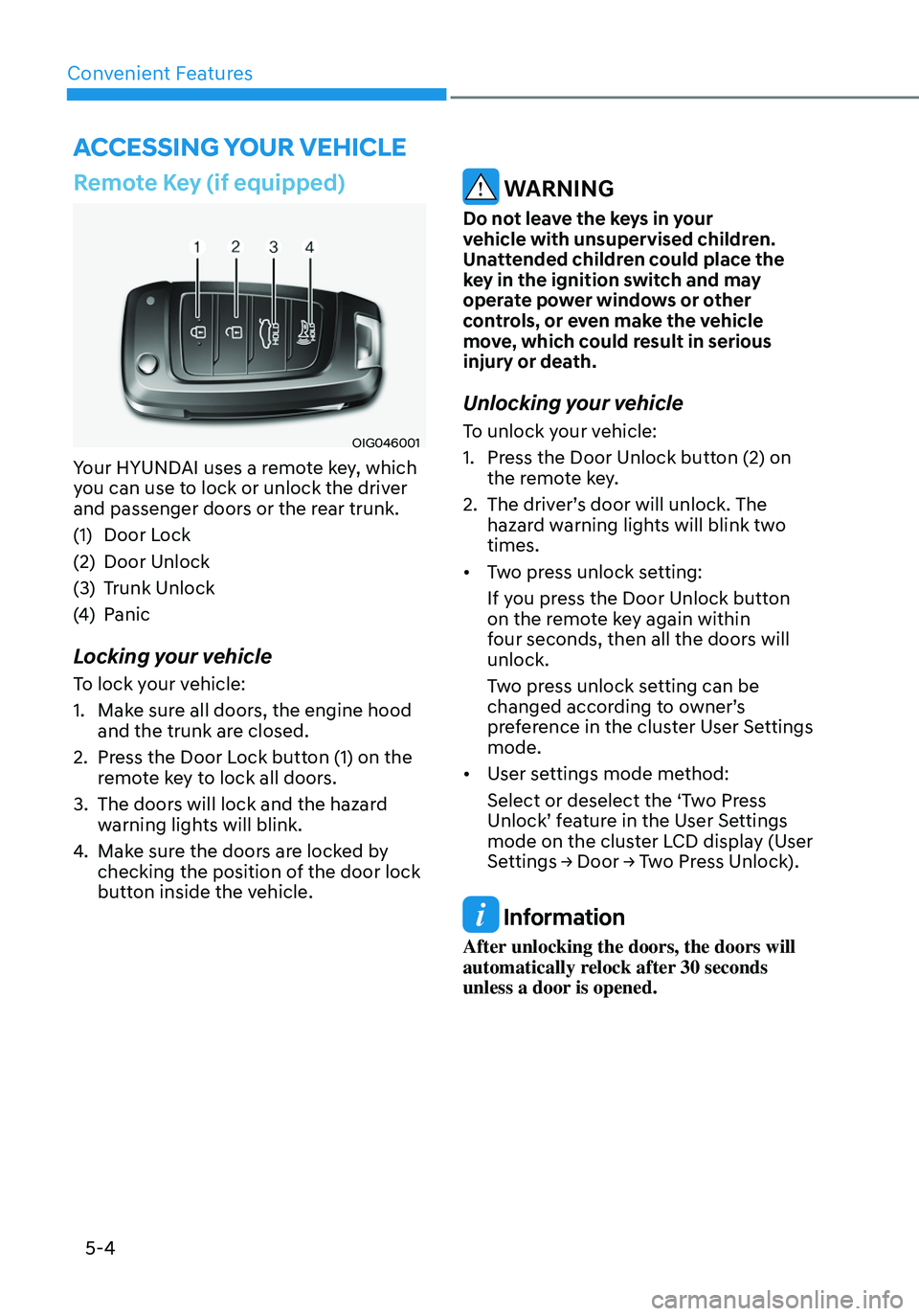
Your HYUNDAI uses a remote key, which
you can use to lock or unlock the driver
and passenger doors or the rear trunk.
(1) Door Lock
(2) Door Unlock
(3) Trunk Unlock
(4) Panic
Locking your vehicle
To lock your vehicle:
1. Make sure all doors, the engine hood
and the trunk are closed.
2. Press the Door Lock button (1) on the
remote key to lock all doors.
3. The doors will lock and the hazard
warning lights will blink.
4. Make sure the doors are locked by
checking the position of the door lock
button inside the vehicle.
WARNING
Do not leave the keys in your
vehicle with unsupervised children.
Unattended children could place the
key in the ignition switch and may
operate power windows or other
controls, or even make the vehicle
move, which could result in serious
injury or death.
Unlocking your vehicle
To unlock your vehicle:
1. Press the Door Unlock button (2) on
the remote key.
2. The driver’s door will unlock. The
hazard warning lights will blink two
times.
• Two press unlock setting:
If you press the Door Unlock button
on the remote key again within
four seconds, then all the doors will
unlock.
Two press unlock setting can be
changed according to owner’s
preference in the cluster User Settings
mode.
• User settings mode method:
Select or deselect the ‘Two Press
Unlock’ feature in the User Settings
mode on the cluster LCD display (User
Settings → Door → Two Press Unlock).
Information
After unlocking the doors, the doors will
automatically relock after 30 seconds
unless a door is opened.
ACCESSING YOUR VEHICLE
Page 158 of 555
05
5-5
Trunk unlocking
To unlock the trunk :
1. Press and hold the Trunk Unlock
button (3) on the remote key for more
than one second.
2. The hazard warning lights will blink
two times and the trunk will be
unlocked.
3. Once the trunk is opened and then
closed, the trunk will automatically
lock.
Information
The word “HOLD” is written on the
button to inform you that you must press
and hold the button for more than one
second.
Panic button
Press and hold the Panic button (4) for
more than one second. The horn sounds
and hazard warning lights flash for about
30 seconds.
To cancel the panic mode, press any
button on the remote key.
Start-up
For information, refer to the “Key
Ignition Switch” section in chapter 6.
NOTICE
To prevent damaging the remote key:
• Keep the remote key away from
water or any liquid and fire. Internal
circuits may malfunction if the inside
of the remote key gets damp (from
liquids or moisture) or if it is heated.
This can exclude the remote key from
being covered under warranty.
• Avoid dropping or throwing the
remote key.
• Protect the remote key from extreme
temperatures.
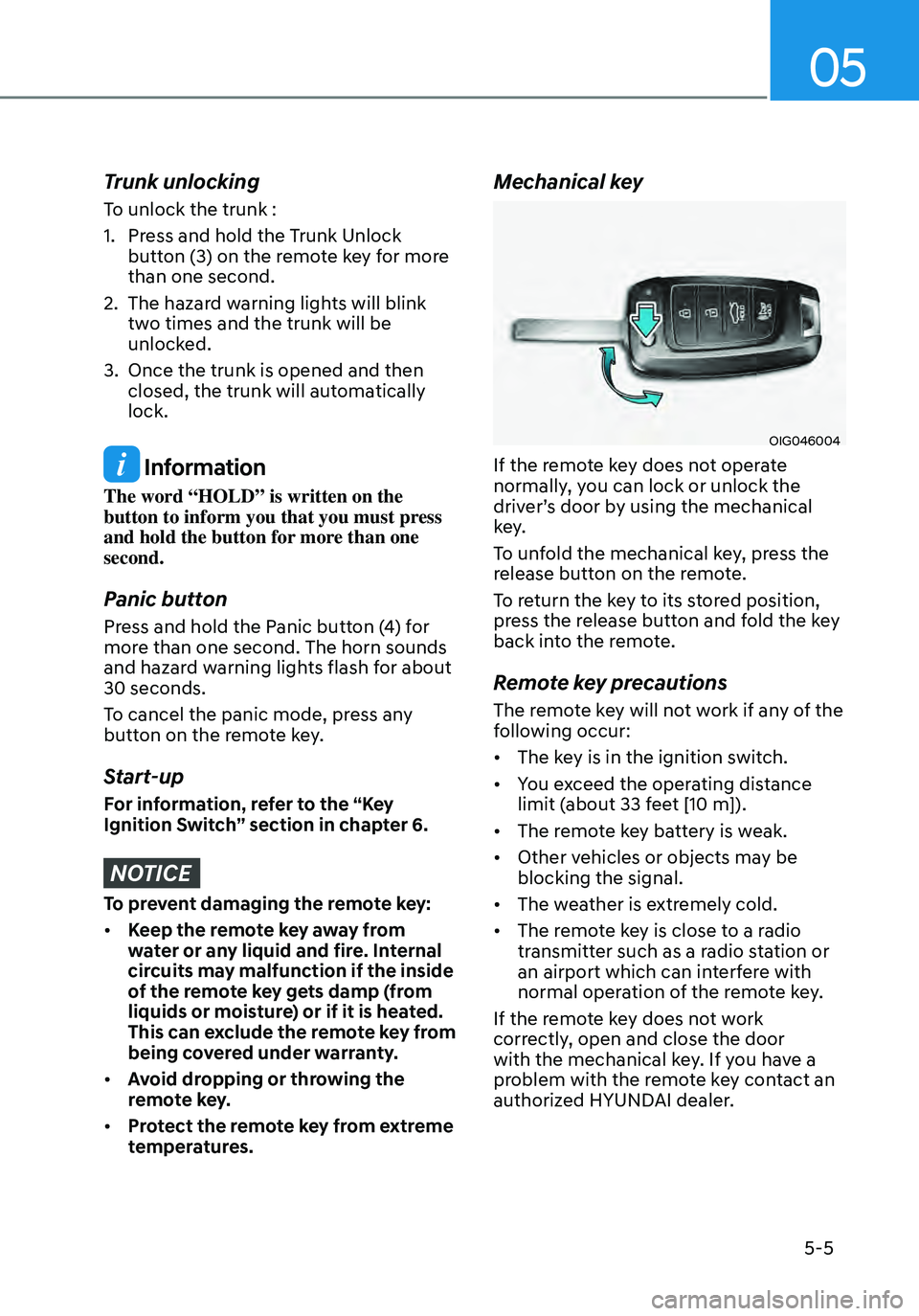
Mechanical key
OIG046004
If the remote key does not operate
normally, you can lock or unlock the
driver’s door by using the mechanical
key.
To unfold the mechanical key, press the
release button on the remote.
To return the key to its stored position,
press the release button and fold the key
back into the remote.
Remote key precautions
The remote key will not work if any of the
following occur:
• The key is in the ignition switch.
• You exceed the operating distance
limit (about 33 feet [10 m]).
• The remote key battery is weak.
• Other vehicles or objects may be
blocking the signal.
• The weather is extremely cold.
• The remote key is close to a radio
transmitter such as a radio station or
an airport which can interfere with
normal operation of the remote key.
If the remote key does not work
correctly, open and close the door
with the mechanical key. If you have a
problem with the remote key contact an
authorized HYUNDAI dealer.
Page 159 of 555
Convenient Features
5-6
If the remote key is in close proximity to
your mobile phone, the signal could be
blocked by your mobile phone’s normal
operational signals. This is specifically
relevant when the phone is active such
as making and receiving calls, text
messaging, and/or sending/receiving
emails.
When possible, avoid placing the remote
key and your mobile phone in the same
location such as a pants or jacket pocket
in order to avoid interference between
the two devices.
Information
This device complies with Part 15 of the
FCC rules.
Operation is subject to the following three
conditions:
1. This device may not cause harmful
interference.
2. This device must accept any
interference received, including
interference that may cause undesired
operation.
3. Changes or modifications not expressly
approved by the party responsible
for compliance could void the user’s
authority to operate the device.
NOTICE
Keep the remote key away from
electromagnetic materials that block
electromagnetic waves to the key
surface.
Battery replacement
OPD046002
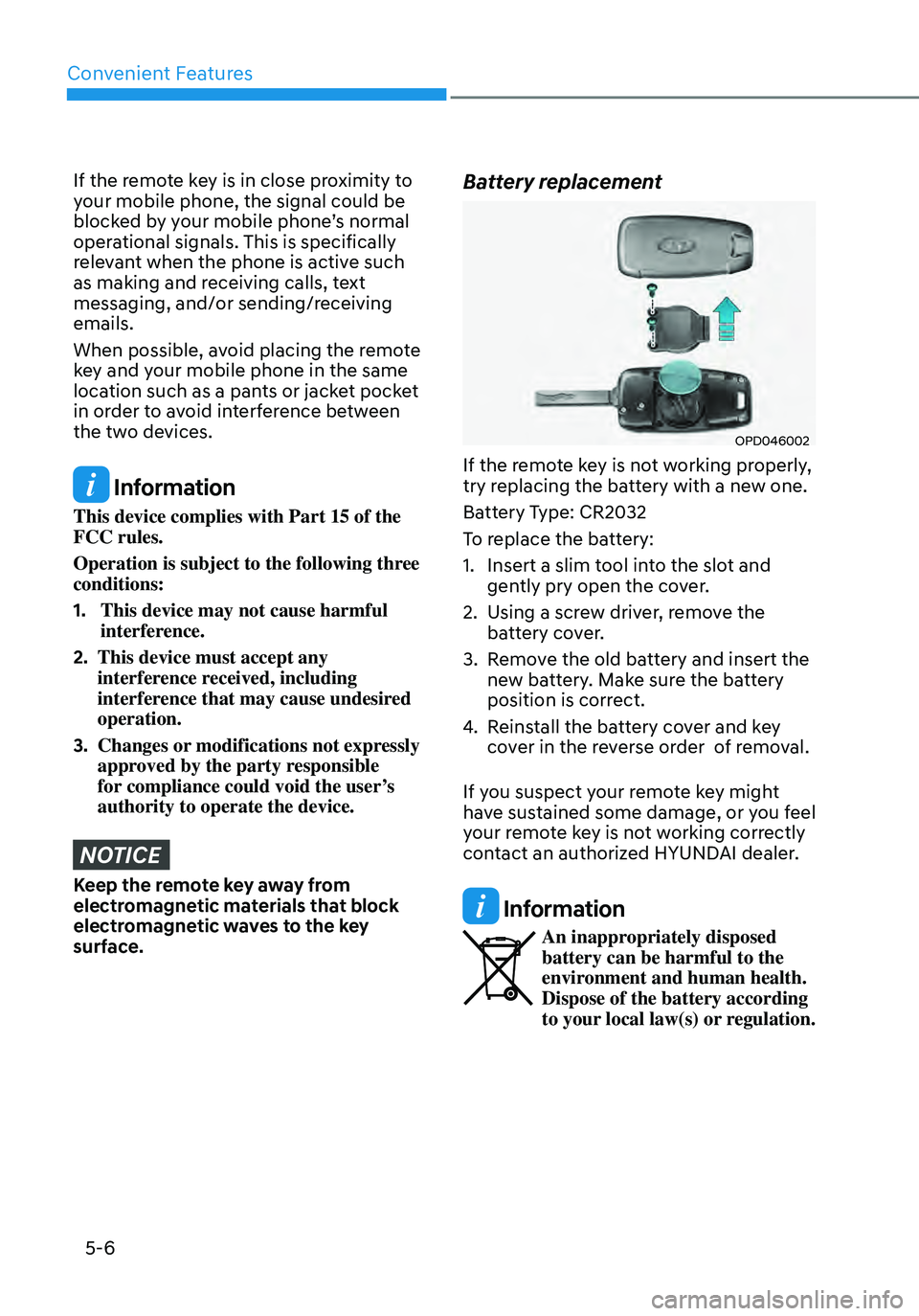
If the remote key is not working properly,
try replacing the battery with a new one.
Battery Type: CR2032
To replace the battery:
1. Insert a slim tool into the slot and
gently pry open the cover.
2. Using a screw driver, remove the
battery cover.
3. Remove the old battery and insert the
new battery. Make sure the battery
position is correct.
4. Reinstall the battery cover and key
cover in the reverse order of removal.
If you suspect your remote key might
have sustained some damage, or you feel
your remote key is not working correctly
contact an authorized HYUNDAI dealer.
Information
An inappropriately disposed battery can be harmful to the
environment and human health.
Dispose of the battery according
to your local law(s) or regulation.
Page 160 of 555
05
5 -7
Smart Key (if equipped)
„„Type A
OCN7050004
„„Type B
OCN7050005
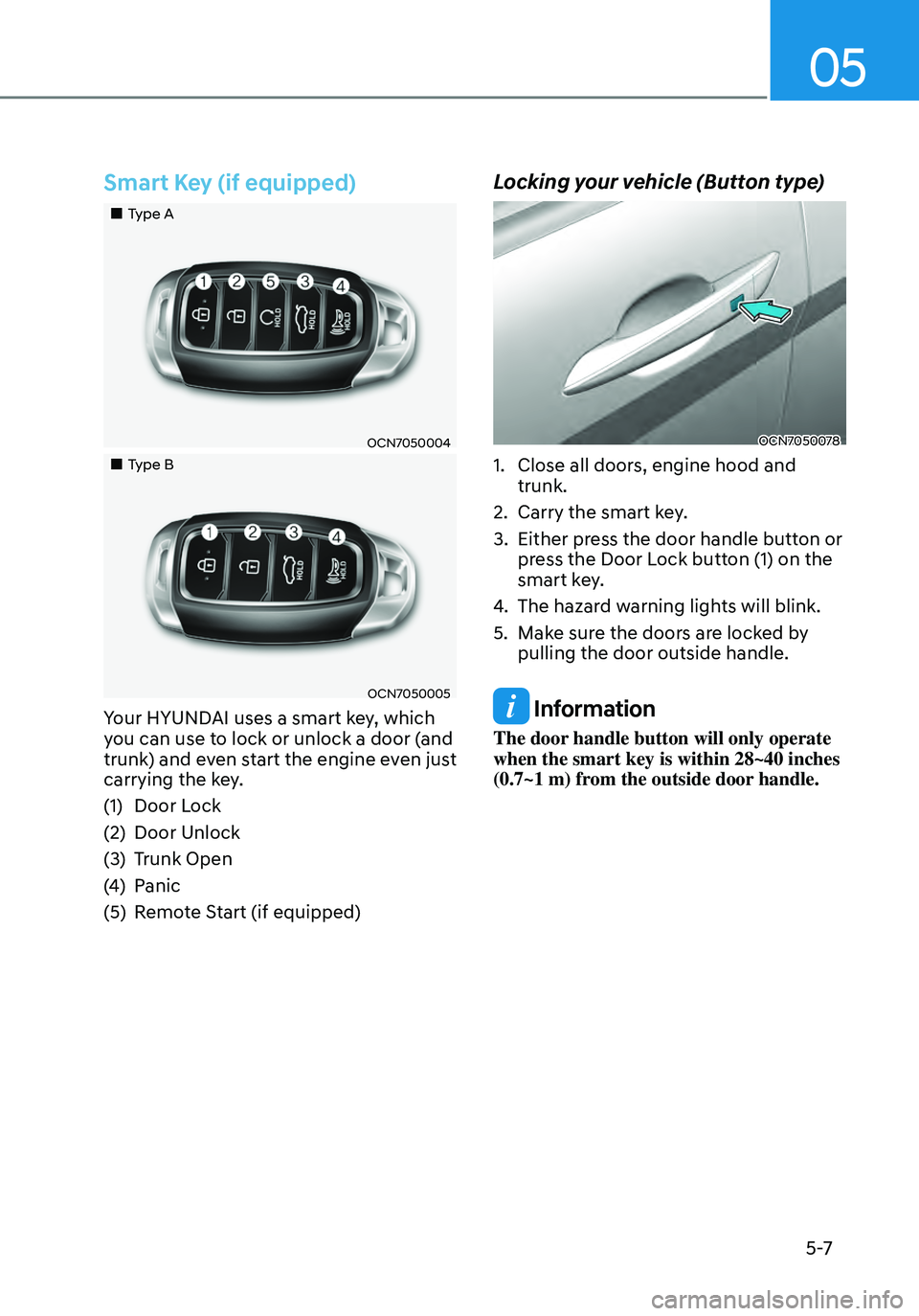
Your HYUNDAI uses a smart key, which
you can use to lock or unlock a door (and
trunk) and even start the engine even just
carrying the key.
(1) Door Lock
(2) Door Unlock
(3) Trunk Open
(4) Panic
(5) Remote Start (if equipped)
Locking your vehicle (Button type)
OCN7050078
1. Close all doors, engine hood and
trunk.
2. Carry the smart key.
3. Either press the door handle button or
press the Door Lock button (1) on the
smart key.
4. The hazard warning lights will blink.
5. Make sure the doors are locked by
pulling the door outside handle.
Information
The door handle button will only operate
when the smart key is within 28~40 inches
(0.7~1 m) from the outside door handle.
Page 161 of 555

Convenient Features
5-8
Locking your vehicle
(Touch sensor type) (if equipped)
OCN7050092N
1. Close all doors, engine hood and
trunk.
2. Carry the smart key.
3. Either touch the touch sensor on the
door handle (the engraved part) or
press the Door Lock button (1) on the
smart key.
4. The hazard warning lights will blink.
5. Make sure the doors are locked by
pulling the door outside handle.
Information
• The door handle button will only
operate when the smart key is within
28~40 inches (0.7~1 m) from the outside
door handle.
• If you locked the door with the touch
sensor on the door handle, the doors
cannot be unlocked with the sensor
within 3 seconds.
Information
Even though you press the outside door
handle button or touch the touch sensor,
the doors will not be locked and the chime
will sound for 3 seconds if any of the
following occurs:
• The Smart Key is in the vehicle
• The Engine Start/Stop button is in ACC
or ON position.
• Any door except the trunk is opened.
CAUTION
When you leave your vehicle with
the smart key, make sure to press the
button on the front door handle or
touch the touch sensor on the front
door handle to lock the doors after
closing all of the doors, the hood and
the trunk. If you do not press the button
or touch the touch sensor firmly, the
doors might not be locked so please use
caution.
WARNING
Do not leave the Smart Key in your
vehicle with unsupervised children.
Unattended children could press the
Engine Start/ Stop button and may
operate power windows or other
controls, or even make the vehicle
move, which could result in serious
injury or death.
Page 162 of 555

05
5-9
Unlocking your vehicle
(When the Two Press Unlock feature
is off)
„„Button type
OCN7050078
„„Touch sensor type
OCN7050093N
1. Make sure you have the smart key in
your possession.
2. Press the Door Unlock button (2) on
the smart key, press the button on the
front door handle or touch the door
unlock sensor inside of the front door
handle to unlock the doors.
3. All of the doors will unlock. When the
doors unlock, the hazard warning
lights will blink two times.
• The door handle button will only
operate when the smart key is within
28~40 inches (0.7~1 m) from the
outside door handle.
• If you do not open the door after
unlocking within 30 seconds, it will
return to the lock mode.
• If you unlocked the door with the door
handle, the doors cannot be locked
with the sensor for up to 2 seconds.
Unlocking your vehicle
(When the Two Press Unlock feature
is on)
1. Make sure you have the smart key in
your possession.
2. Press the Door Unlock button (2) on
the smart key, press the button on the
front door handle or touch the door
unlock sensor inside of the front door
handle to unlock the doors.
3. The driver’s door will unlock.
4. If you press the button on the front
door handle or touch the door unlock
sensor inside of the front door handle
to unlock the doors within 4 seconds,
all of the doors unlock. When the
doors unlock, the hazard warning
lights will blink two times.
• The door handle button will only
operate when the smart key is within
28~40 inches (0.7~1 m) from the
outside door handle.
• If you do not open the door after
unlocking within 30 seconds, it will
return to the lock mode.
• The factory default setting is in off
mode so you should set in the User’s
Settings mode.
• If you unlocked the door with the door
handle, the doors cannot be locked
with the sensor for up to 2 seconds.