2021 HONDA PILOT Radar
[x] Cancel search: RadarPage 28 of 739

26
Quick Reference Guide
Honda Sensing®(P561)
Honda Sensing ® is a driver support system
which employs the use of two distinctly
different kinds of sensors, a radar sensor
located behind the emblem and a front
sensor camera mounted to the interior side
of the windshield, behind the rear view
mirror.
The camera is located
behind the rearview
mirror.
Front Sensor
Camera
Radar Sensor The radar sensor is
beh
ind the emblem.
Collision Mitigation
Braking System
TM
(CMBS
TM) (P564)
Can assist you when there is a possibility of
your vehicle colliding with a vehicle or a
pedestrian detected in front of yours. The
CMBS
TM is designed to alert you when a
potential collision is determined, as well as
to reduce your vehicle speed to help
minimize collision severity when a collision is
deemed unavoidable.
Adaptive Cruise Control
(ACC)
(P576)
Helps maintain a constant vehicle speed and
a set following-interval behind a vehicle
detected ahead of yours, without you
having to keep your foot on the brake or
the accelerator.
Lane Keeping Assist
System (LKAS)
(P589)
Provides steering input to help keep the
vehicle in the middle of a detected lane and
provides tactile and visual alerts if the
vehicle is detected drifting out of its lane.
Road Departure
Mitigation (RDM) System
(P598) Alerts and helps to assist you when the
system detects a possibility of your vehicle
unintentionally crossing over detected lane
markings and/or leaving the roadway
altogether.
21 PILOT-31TG76500.book 26 ページ 2020年3月18日 水曜日 午後4時38分
Page 97 of 739

95
uuIndicators u
Continued
Instrument Panel
IndicatorNameOn/BlinkingExplanationMessage
Collision
Mitigation
Braking
System
TM
(CMBSTM)
Indicator
• Comes on when the CMBSTM
shuts itself off.• Stays on - The temperature inside the
camera is too high. Use the climate
control system to cool down the camera.
The system activates when the
temperature inside the camera cools
down.
2 Front Sensor Camera P. 603
•Stays on - The area around the camera
is blocked by dirt, mud, etc. Stop your
vehicle in a safe place, and wipe it off
with a soft cloth.
2 Front Sensor Camera P. 603
•Have your vehicle checked by a dealer if
the indicator does not go off even after
you cleaned the camera.
•The area around the radar sensor is
blocked by dirt, mud, etc. Stop your
vehicle in a safe place, and wipe it off
with a soft cloth. Indicator may take
some time to go off after the radar
sensor is cleaned.
• Have your vehicle checked by a dealer if
the indicator does not go off even after
you clean the sensor cover.
2 Radar Sensor P. 605
21 PILOT-31TG76500.book 95 ページ 2020年3月18日 水曜日 午後4時38分
Page 106 of 739

104
uuIndicators uDriver Information Interface Wa rning and Information Messages
Instrument Panel
MessageConditionExplanation
•Appears when the LKAS is in operation, or the LKAS
button is pressed, but there is a problem with a
system related to the LKAS. The LKAS cancels
automatically. The beeper s ounds simultaneously if
selected by customization.• If any other system indicators come on, such as the
VSA ®, ABS and brake system, take appropriate action.
2Indicators P. 82
•Appears if the temperature inside the camera is too
high and some driver assist systems cannot be
activated.•Use the climate control sy stem to cool down the
camera.
• Disappears - The camera has been cooled down and
the systems are activated normally.
2 Front Sensor Camera P. 603
•Appears if the area around the front sensor camera
is blocked by dirt, mud, etc. and be prevented from
detecting a vehicle in front.
• May appear when driving in bad weather (rain,
snow, fog, etc.)•When the front window gets dirty, stop your vehicle in
a safe place, and wipe it off with a soft cloth.
• Have your vehicle checked by a dealer if the message
does not disappear even after you cleaned the area
around the camera.
2 Front Sensor Camera P. 603
●Appears if anything covers the radar sensor cover
and prevents the sensor from detecting a vehicle in
front.
●May appear when driving in bad weather (rain,
snow, fog, etc.)
●When the radar sensor gets dirty, stop your vehicle in a
safe place, and wipe off di rt using a soft cloth. The
message may take some time to go off.
●Have your vehicle checked by a dealer if the message
does not disappear even after you clean the sensor
cover.
2 Radar Sensor P. 605
21 PILOT-31TG76500.book 104 ページ 2020年3月18日 水曜日 午後4時38分
Page 507 of 739

505
Driving
This chapter discusses driving and refueling.
Before Driving................................... 506
Towing a Trailer ................................ 512
Off-Highway Driving Guidelines ..... 522
When Driving Starting the Engine .......................... 524
Automatic Transmission ................... 531
Shifting ............................................ 532
Auto Idle Stop .................................. 540
ECON Mode .................................... 545
Intelligent Trac tion Management
*.... 546Vehicle Stability AssistTM (VSA®), aka Electronic
Stability Control (ESC), System ..............548
Agile Handling Assist ....................... 550
Blind spot information System*........ 551
LaneWatchTM*.................................. 554 Intelligent Variable To
rque Management (i-
VTM4
TM) AWD System*.................. 556
Tire Pressure Monitoring System (TPMS) with Tire Fill Assist .......................... 557
Tire Pressure Monitoring System (TPMS) -
Required Federal Explanation ......... 559
Honda Sensing ®................................ 561
Collision Mitigati on Braking System
TM
(CMBSTM) ....................................... 564
Adaptive Cruise Control (ACC)......... 576
Lane Keeping Assist System (LKAS) .. 589
Road Departure Mitigation (RDM)
System ....................................... 598
Front Sensor Camera ....................... 603
Radar Sensor.................................... 605 Braking
Brake System ................................... 606
Anti-lock Brake System (ABS) ........... 608
Brake Assist System ......................... 609
Parking Your Vehicle
When Stopped ................................ 610
Parking Sensor System
*................... 612
Cross Traffic Monitor*..................... 617
Multi-View Rear Camera .................. 621
Refueling Fuel Information .............................. 623
How to Refuel ................................. 624
Fuel Economy and CO
2 Emissions
Improving Fuel Economy and Reducing CO
2 Emissions ................................ 626
* Not available on all models
21 PILOT-31TG76500.book 505 ページ 2020年3月18日 水曜日 午後4時38分
Page 553 of 739
551
uuWhen Driving uBlind spot information System*
Continued
Driving
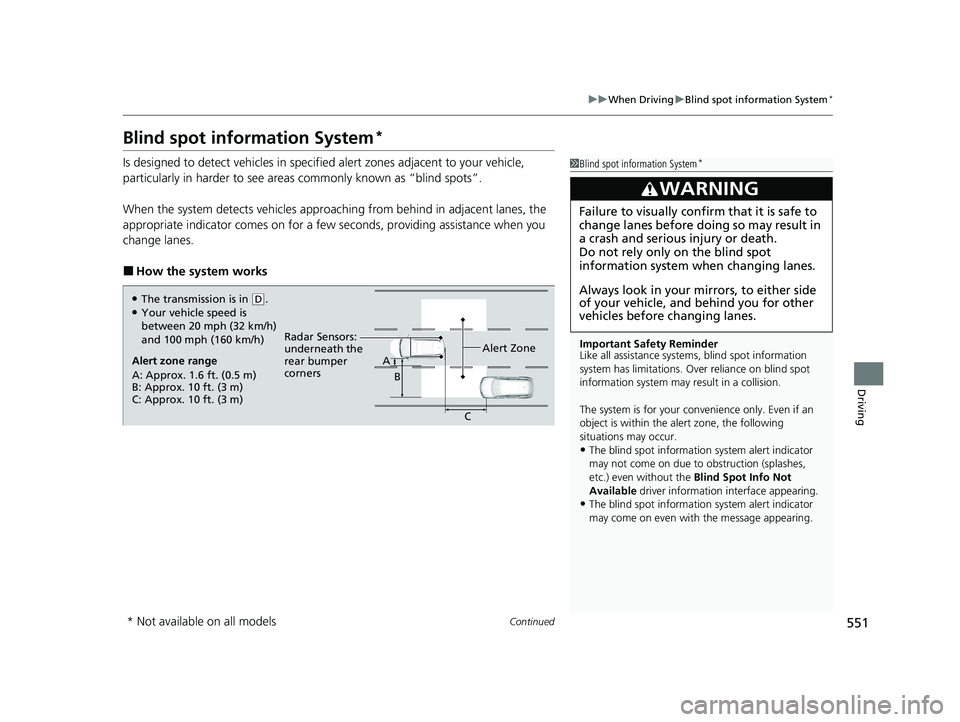
Blind spot information System*
Is designed to detect vehicles in specifie d alert zones adjacent to your vehicle,
particularly in harder to see areas commonly known as “blind spots”.
When the system detects vehicles approaching from behind in adjacent lanes, the
appropriate indicator comes on for a few se conds, providing assistance when you
change lanes.
■How the system works
1 Blind spot information System*
Important Safety Reminder
Like all assistance systems, blind spot information
system has limitations. Over reliance on blind spot
information system may result in a collision.
The system is for your convenience only. Even if an
object is within the alert zone, the following
situations may occur.
•The blind spot informatio n system alert indicator
may not come on due to obstruction (splashes,
etc.) even without the Blind Spot Info Not
Available driver information interface appearing.
•The blind spot information system alert indicator
may come on even with the message appearing.
3WARNING
Failure to visually confirm that it is safe to
change lanes before doing so may result in
a crash and serious injury or death.
Do not rely only on the blind spot
information system wh en changing lanes.
Always look in your mi rrors, to either side
of your vehicle, and behind you for other
vehicles before changing lanes.
Alert zone range
A: Approx. 1.6 ft. (0.5 m)
B: Approx. 10 ft. (3 m)
C: Approx. 10 ft. (3 m) Radar Sensors:
underneath the
rear bumper
corners
Alert ZoneA
B
C
●The transmission is in (D.●Your vehicle speed is
between 20 mph (32 km/h)
and 100 mph (160 km/h)
* Not available on all models
21 PILOT-31TG76500.book 551 ページ 2020年3月18日 水曜日 午後4時38分
Page 554 of 739

uuWhen Driving uBlind spot information System*
552
Driving
■When the system detects a vehicle
Blind spot information System Alert Indicator:
Located near the pillar on both sides.
Comes on when:
•A vehicle enters the alert zone from behind
to overtake you with a speed difference of
no more than 31 mph (50 km/h) from your
vehicle.
• You pass a vehicle with a speed difference
of no more than 12 mph (20 km/h).
Blinks and a beep er sounds when:
You move the turn signal lever in the direction
of the detected vehicle. The beeper sounds
three times.1 Blind spot information System*
The blind spot information system alert indicator may
not come on under the following conditions:
•A vehicle does not stay in the alert zone for more
than two seconds.
•A vehicle is parked in a side lane.
•The speed difference betw een your vehicle and the
vehicle you are passing is greater than 6 mph
(10 km/h).
•An object not detected by the radar sensors
approaches or passes your vehicle.
•A vehicle running in the adjacent lane is a
motorcycle or other small vehicle.
The system does not operate when in
( R.
You can turn off the audible al ert, or all the blind spot
information system alert using the audio/information
screen.
2 Customized Features P. 430
Turn the system off when towing a trailer.
The system may not work properly for the following
reasons:
•The added mass tilts the vehicle and changes the
radar coverage.
•The trailer itself can be detected by the radar
sensors, causing the blind spot information system
alert indicators to come on.
Comes On
Blinks
* Not available on all models
21 PILOT-31TG76500.book 552 ページ 2020年3月18日 水曜日 午後4時38分
Page 555 of 739

553
uuWhen Driving uBlind spot information System*
Driving
1Blind spot information System*
Blind spot information sy stem may be adversely
affected when:
•Objects (guard rails, poles, trees, etc,.) are detected.
•An object that does not re flect radio waves well,
such as a motorcycle, is in the alert zone.
•Driving on a curved road.
•A vehicle is moving from a far lane to the adjacent
lane.
•The system picks up external electrical interference.
•The rear bumper or the sens ors have been improperly
repaired or the rear bu mper has been deformed.
•The orientation of the sensors has been changed.
•In bad weather (Heavy rain, snow, and fog).
For a proper blind spot in formation system operation:
•Always keep the rear bumper corner area clean.•Do not cover the rear bumper corner area with
labels or stickers of any kind.
•Take your vehicle to a dealer if you need the rear
bumper corner area or the radar sensors to be repaired,
or the rear bumper corner area is strongly impacted.
* Not available on all models
21 PILOT-31TG76500.book 553 ページ 2020年3月18日 水曜日 午後4時38分
Page 563 of 739

561Continued
Driving
Honda Sensing®
Honda Sensing® is a driver support system which employs the use of two distinctly
different kinds of sensors: a radar sensor located behind the emblem and a front
sensor camera mounted to the interior side of the windshield, behind the rearview
mirror.
Honda Sensing ® has following functions.
■The functions which do not requir e switch operations to activate
• Collision Mitigation Braking SystemTM (CMBS)TM 2 P. 564
• Road Departure Mitigation (RDM) System 2 P. 598
■The functions wh ich require switch operations to activate
• Adaptive Cruise Control (ACC)
2 P. 576
• Lane Keeping Assist System (LKAS) 2 P. 589
21 PILOT-31TG76500.book 561 ページ 2020年3月18日 水曜日 午後4時38分