Page 319 of 687

317
uuAudio System Basic Operation uPlaying Bluetooth ® Audio
Continued
Features
Playing Bluetooth ® Audio
Your audio system allows you to listen to music from your Bluetooth-compatible
phone.
This function is available when the phone is paired an d connected to the vehicle’s
Bluetooth ® HandsFreeLink ® (HFL) system.
2Phone Setup P. 425
1Playing Bluetooth ® Audio
Not all Bluetooth -enabled phones with streaming
audio capabilities are compatible with the system.
For a list of compatible phones:
•U.S.: Visit automobiles.honda.c om/handsfreelink,
or call 1-888-528-7876.
•Canada: For more info rmation on smartphone
compatibility, call 1-855-490-7351.
It may be illegal to pe rform some data device
functions while driving.
Only one phone can be used with HFL at a time.
When there are more than two paired phones in the
vehicle, the first paired phone the system finds is
automatically connected.
The connected phone for Bluetooth® Audio can be
different.
If more than one phone is paired to the HFL system,
there may be a delay before the system begins to play.
In some cases, the name of the artist, album, or track
may not appear correctly.
Some functions may not be available on some devices.
If a phone is currently conne cted via Apple CarPlay or
Android Auto, Bluetooth® Audio from that phone
will be unavailable. Howe ver, you can have a second
previously paired phone stream Bluetooth® Audio by
selecting from the Bluetooth® device list.
2 Phone Setup P. 425
Audio/Information Screen
(Back)
Button
Press to go
back to the
pre
vious
display.
VOL/ AUDIO
(Volume/Power) Knob
Push to turn the audio
system on and off.
Turn to adjust the
volume.
Play/Pause
Icon
Bluetooth
Ind
icator
Appears when your
phone is connected
to HFL.
Track Icons
Select or to
change tracks.
Browse Icon
Select to display the
menu items.
/
Buttons
Press or to
change tracks.
21 INSIGHT-31TXM6200.book 317 ページ 2020年2月5日 水曜日 午前10時0分
Page 321 of 687

319
uuAudio System Basic Operation uHondaLink ®
Continued
Features
HondaLink ®
HondaLink® connects you to the latest info rmation from Honda. You can connect
your phone wirelessly through Wi-Fi or Bluetooth®.
2Wi-Fi Connection P. 328
2 Phone Setup P. 425
Use the following procedure to connect to HondaLink ®.
■To enable the HondaLink®
You need to allow the consent of the location service to enable the HondaLink ®.
Disable: Does not allow this consent.
Enable Once: Allows only one time. (Shows
again next time.)
Always Enable: Allows anytime. (Never
show again.)
■To Connect to HondaLink ®
1HondaLink ®
If your vehicle has a telema tics control unit (TCU), you
can use HondaLink ® without connecting the phone.
The HondaLink® connect app is compatible with most
iPhone and Android phones.
If the system is connected to the HondaLink ® connect
app through Bluetooth® and another Bluetooth®
audio device is connected, the Bluetooth®
connection to the HondaLink ® connect app will be
severed.
Some cell phone carriers charge for tethering and
smartphone data use. Check your phone’s data
subscription package.
21 INSIGHT-31TXM6200.book 319 ページ 2020年2月5日 水曜日 午前10時0分
Page 322 of 687
320
uuAudio System Basic Operation uHondaLink ®
Features
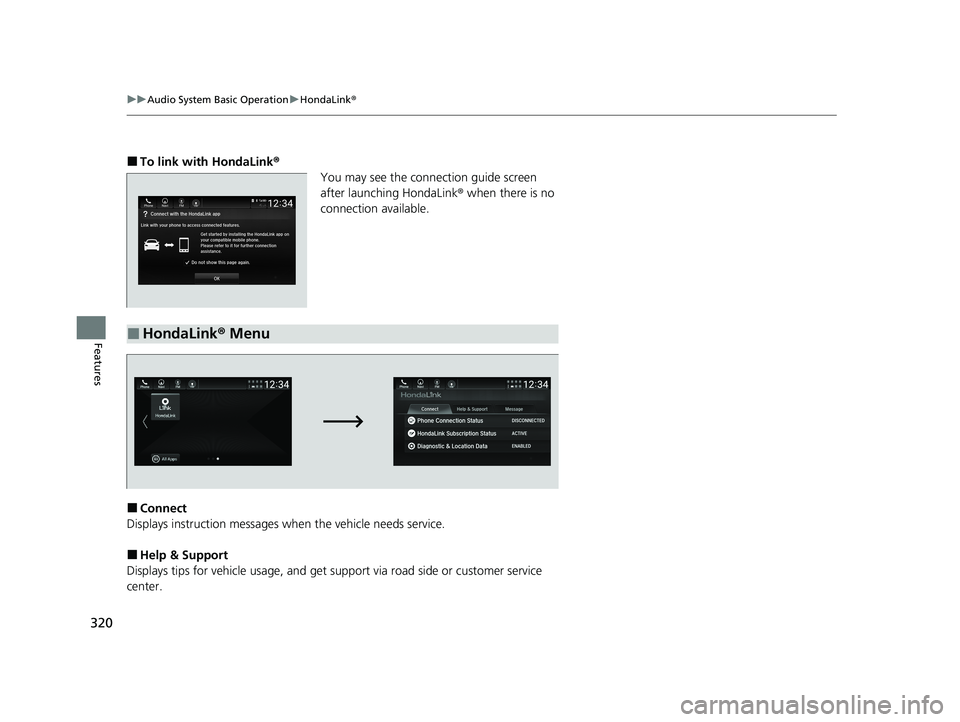
■To link with HondaLink ®
You may see the conne ction guide screen
after launching HondaLink ® when there is no
connection available.
■Connect
Displays instruction messages wh en the vehicle needs service.
■Help & Support
Displays tips for vehicle usage, and get support via road side or customer service
center.
■HondaLink ® Menu
21 INSIGHT-31TXM6200.book 320 ページ 2020年2月5日 水曜日 午前10時0分
Page 323 of 687
321
uuAudio System Basic Operation uHondaLink ®
Continued
Features
■Message
Displays helpful and important information from Honda.
You can check the messages that are receiv ed quickly in the shortcut operation.
1. A notification appears and notifies you of a
new message on the header area.
2. A notification is continuously displayed in
the header area until the new message is
read.
■Vehicle Information and Message from Honda Tips
Notification
21 INSIGHT-31TXM6200.book 321 ページ 2020年2月5日 水曜日 午前10時0分
Page 324 of 687
uuAudio System Basic Operation uHondaLink ®
322
Features
3.Select the system status icon to see the
messages.
4. Select a new message to open.
u If you have selected the update option
for HondaLink ®, follow the directions on
the screen to complete the process.1 Vehicle Information and Message from Honda Tips
When you update HondaLink ®, you must keep the
power system on and maintain a constant connection
with HondaLink ®.
If the update is interr upted, the system will
automatically resume the process. If, however, a
week has elapsed since the process was first
interrupted, you must repeat the process from the
beginning.
You can update HondaLink ® by selecting Message
from Honda on the HondaLink ® menu.
21 INSIGHT-31TXM6200.book 322 ページ 2020年2月5日 水曜日 午前10時0分
Page 325 of 687

323
uuAudio System Basic Operation uHondaLink® Service*
Continued
Features
HondaLink® Service*
Is a subscription-based service that provid es convenient features such as voice
communication in case of emergency, online security, and one-on-one operator
assistance.
■Automatic collis ion notification
If your vehicle’s airbags deploy or if the unit
detects that the vehicle is severely impacted,
your vehicle automatically will attempt to
connect to the HondaLink ® operator. If
connected, information ab out your vehicle, its
location, and its condition can be sent to the
operator
*1; you also can speak to the operator
when connected.
IMPORTANT: In a crash, HondaLink® will attempt to notify emergency services but
NEITHER HONDA NOR ITS SERVICE PROVIDERS GUARANTEE THAT SUCH
NOTIFICATION WILL OCCUR.
Honda reserves the right to terminate HondaLink ® services at any time or for any
reason, and in the future may not be able to provide services due to changes in, or
obsolescence of, technology integral to the service or changes in governmental
regulation.
*1: Depending on your phone and adequate cellular coverage, your vehicle’s location may not
be sent to the operator.
■In Case of Emergency
1 HondaLink ® Service*
HondaLink ® also provides serv ices you can operate
from the Internet or your smartphone.
To subscribe to HondaLink ®, or to get more
information about all of its features, contact an
Honda dealer, or visit hondalink.honda.com
1In Case of Emergency
Your vehicle may not be able to connect to the
operator if the 12-volt battery level is low, the line is
disconnected, or you do not have adequate cellular
coverage.
You cannot use this emergency services when:
•You travel outside the HondaLink ® service coverage
areas.
•There is a problem with the connecting devices,
such as the microphones, speakers, or the unit
itself.
You cannot operate othe r phone-related functions
using the screen while talking to the operator.
Only the operator can terminate the connection to
your vehicle.
1 Automatic collision notification
If the unit fails to connect to the operator, it
repeatedly tries until it succeeds.
* Not available on all models
21 INSIGHT-31TXM6200.book 323 ページ 2020年2月5日 水曜日 午前10時0分
Page 326 of 687
uuAudio System Basic Operation uHondaLink ® Service*
324
Features
■Manual operator connection
If you need to talk to the HondaLink ® operator
in a situation where no airbag has deployed,
you can manually connect to them by pressing
the ASSIST button with the power mode in
ACCESSORY or ON.
1. Open the cover attached to the ceiling
console.
2. Press the ASSIST button.
u You are connected to the HondaLink ®
operator.1 Manual operator connection
Do not press the button while driving. When you
need to contact the operato r, park the vehicle in a
safe place.
If the unit fails to connect to the operator, it
automatically cancels the action after three minutes.
If necessary, the cover can be broken to access the
ASSIST button.
ASSIST
Button
21 INSIGHT-31TXM6200.book 324 ページ 2020年2月5日 水曜日 午前10時0分
Page 327 of 687

Continued325
uuAudio System Basic Operation uHondaLink® Service*
Features
Your subscribed telematics service prov ider can track your vehicle’s location,
remotely lock or unlock doors, and help you find your vehicle.
To use these features, you n eed your user ID and personal identification number
(PIN).
■Stolen vehicle tracking
This feature searches and tracks down your vehicle position even if it is on the move.
If you believe that your vehicle has been stolen, contact the police as well as the
provider.
■Remote door lock/unlock
The provider can remotely lock or unlock doors upon your request.
■Vehicle finder
This feature is convenient to use when trying to locate your vehicle in large areas,
such as a crowded parking lot. If you cannot locate your vehicle after using the
remote transmitter’s answerback function, you can contact the provider which can
then flash your vehicle’s exterior lights and sound the horn, and sends vehicle
location via web/Smartphone.
■Security alarm notification
If the security system in your vehicle detects an abnormal condition, such as
someone tampering with the lock on your vehicle, the provider notifies you by email.
■Security Features1Security Features
The contact information of your provider, your user
ID and PIN will be given when you subscribe to
HondaLink ®. If you forget any of the above, contact a
Honda dealer, or go to hondalink.honda.com.
You can also activate the remote door lock/unlock
and vehicle finder features from the Internet or using
your smartphone app. As k a dealer, or visit
hondalink.honda.com .
1Vehicle finder
The lights will stop flas hing and horn will stop
sounding under the following:
•When conditions 30 seconds have elapsed.
•You unlock the doors using the remote transmitter.
•You unlock the doors using the smart entry system.•You unlock the doors using the built-in key.
•The power mode is set to ACCESSORY or ON.
21 INSIGHT-31TXM6200.book 325 ページ 2020年2月5日 水曜日 午前10時0分