2021 HONDA HR-V Transmission
[x] Cancel search: TransmissionPage 173 of 643

Continued171
uuOperating the Switches Around the Steering Wheel uENGINE START/STOP Button
Controls
If you leave the vehicle for 30 to 60 minutes with the transmission in (P and the
power mode in ACCESSORY, the vehicle automa tically goes into the mode similar to
VEHICLE OFF (LOCK) to avoid draining the battery.
When in this mode:
The steering wheel does not lock.
You cannot lock or unlock doors with th e remote transmitter or the smart entry
system.
Press the ENGINE START/STOP button to switch the mode to VEHICLE OFF (LOCK).
2Changing the Power Mode P. 170
■Automatic Power Off1Changing the Power Mode
If the power mode does not change from VEHICLE
OFF to ACCESSORY, press the ENGINE START/STOP
button while moving the st eering wheel left and
right. The steering wheel will unlock, allowing the
mode to change.
Canadian models
Canadian models
All models
21 HR-V HDMC-31T7A6500.book 171 ページ 2020年9月23日 水曜日 午前7時0分
Page 177 of 643
175
uuOperating the Switches Around the Steering Wheel uLight Switches
Continued
Controls
Light Switches
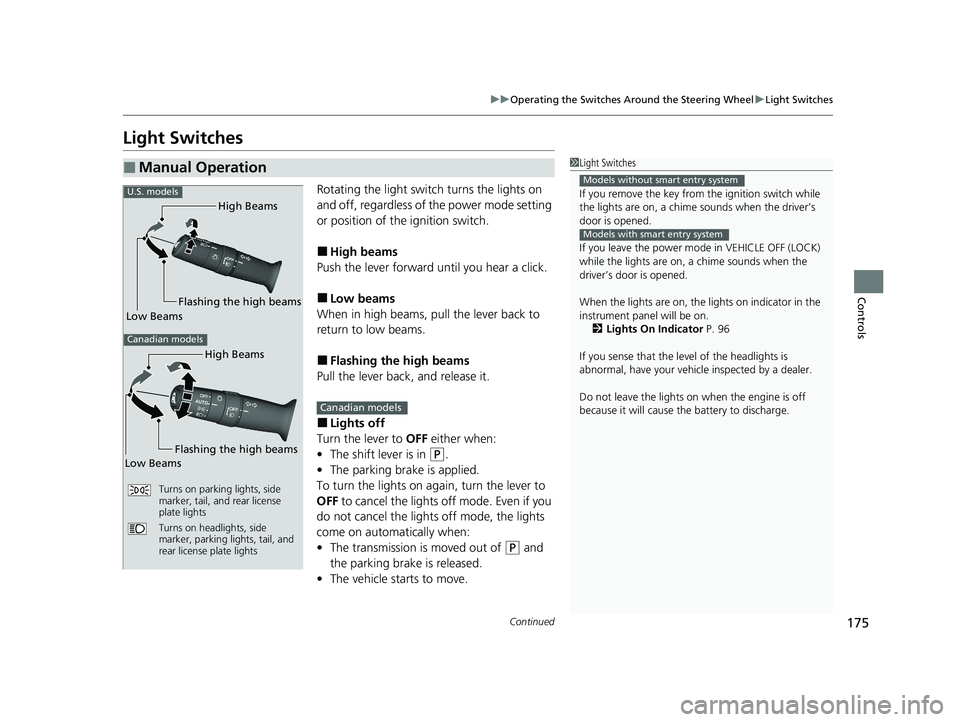
Rotating the light switch turns the lights on
and off, regardless of the power mode setting
or position of the ignition switch.
■High beams
Push the lever forward until you hear a click.
■Low beams
When in high beams, pull the lever back to
return to low beams.
■Flashing the high beams
Pull the lever back, and release it.
■Lights off
Turn the lever to OFF either when:
• The shift lever is in
(P.
• The parking brake is applied.
To turn the light s on again, turn the lever to
OFF to cancel the lights off mode. Even if you
do not cancel the lights off mode, the lights
come on automatically when:
• The transmission is moved out of
(P and
the parking brake is released.
• The vehicle starts to move.
■Manual Operation1Light Switches
If you remove the key from the ignition switch while
the lights are on, a chime sounds when the driver’s
door is opened.
If you leave the power mode in VEHICLE OFF (LOCK)
while the lights are on, a chime sounds when the
driver’s door is opened.
When the lights are on, the lights on indicator in the
instrument pane l will be on.
2 Lights On Indicator P. 96
If you sense that the le vel of the headlights is
abnormal, have your vehicle inspected by a dealer.
Do not leave the lights on when the engine is off
because it will cause the battery to discharge.
Models without smart entry system
Models with smart entry system
High Beams
Flashing the high beams
Low Beams
Turns on parking lights, side
marker, tail, and rear license
plate lights
Turns on headlights, side
marker, parking lights, tail, and
rear license plate lights
U.S. models
Canadian models
High Beams
Flashing the high beams
Low Beams
Canadian models
21 HR-V HDMC-31T7A6500.book 175 ページ 2020年9月23日 水曜日 午前7時0分
Page 187 of 643

185
uuOperating the Switches Around the Steering Wheel uWipers and Washers
Controls
The rear wiper and washer can be used when
the ignition switch is in ON
(w*1.
■Wiper switch (OFF, INT, ON)
Change the wiper switch setting according to
the amount of rain.
■Washer ( )
Sprays while you rotate the switch to this
position.
Hold it to activate th e wiper and to spray the
washer. Once released, it stops operating
after a few more sweeps.
■Operating in reverse
When you shift the transmission to
(R with the windshield wiper activated, the rear
wiper operates automati cally as follows even if its switch is off.
*1: Models with the smart entry system have an ENGINE START/STOP button instead of an
ignition switch.
■Rear Wiper/Washer
ON
OFF INT: Intermittent
Washer
Front Wiper PositionRear Wiper Operation
INT* (Intermittent)
AUTO* (Intermittent)
Intermittent
LO (Low speed wipe)
HI (High speed wipe)Continuous
* Not available on all models
21 HR-V HDMC-31T7A6500.book 185 ページ 2020年9月23日 水曜日 午前7時0分
Page 315 of 643

313
uuAudio System Basic Operation uWi-Fi Connection
Continued
Features
Wi-Fi Connection
You can connect the display audio system to the Internet using Wi-Fi and browse
websites or use online services on the audio/information screen. If your phone has
wireless hotspot capabilities, the system can be tethered to the phone. Use the
following steps to setup.
1.Select .
2. Select Settings .
3. Select Bluetooth / Wi-Fi .
4. Select the Wi-Fi tab.
5. Select Wi-Fi On/Off Status , then On.
6. Select Wi-Fi Device List .
u Make sure your phone’s Wi-Fi setting is
in access point (tethering) mode.
u Select the phone you want to connect to
the system.
u If you do not find the phone you want to
connect in the list, select Scan.
■Wi-Fi mode (setting for the first time)
1Wi-Fi mode (setting for the first time)
You cannot go through the se tting procedure while a
vehicle is moving. Park in a safe place to set the audio
system in Wi-Fi mode.
Some cell phone carriers charge for tethering and
smartphone data use. Check your phone’s data
subscription package.
Check your phone manual to find out if the phone
has Wi-Fi connectivity.
You can confirm whether Wi -Fi connection is on or
off with the icon on Wi-Fi Device List.
Transmission speed and others will not be displayed
on this screen.
21 HR-V HDMC-31T7A6500.book 313 ページ 2020年9月23日 水曜日 午前7時0分
Page 320 of 643

uuAudio System Basic Operation uApple CarPlay
318
Features
■Maps
Display Apple Maps and use the navigation function just as you would on your
iPhone.
Only one navigation system (pre-installed navigation or Apple CarPlay map) can give
directions at a time. When you are using one system, directions to any prior
destination set on the other system wi ll be canceled, and the system you are
currently using will direct you to your destination.
After you have connected your iPhone to the system via USB, use the following
procedure to set up Apple CarPlay. Us e of Apple CarPlay will result in the
transmission of certain user and vehicle information (such as vehicle location, speed,
and status) to your iPhone to enhance th e Apple CarPlay experience. You will need
to consent to the sharing of this information on the audio/information touch screen.
■Enabling Apple CarPlay
•Enable once : Allows only once. (Prompt
shows again next time.)
• Always Enable : Allows anytime. (Prompt
does not show again.)
• Cancel : Does not allo w this consent.
You may change the consent settings under
the Smartphone settings menu.
■Setting Up Apple CarPlay
Models with navigation system
1Setting Up Apple CarPlay
You can also use the method below to set up Apple
CarPlay:
Select HOME Settings Smartphone Apple
CarPlay.
Use of user and vehicle information
The use and handling of user and vehicle information
transmitted to/from your iP hone by Apple CarPlay is
governed by the Apple iOS terms and conditions and
Apple’s Privacy Policy.
21 HR-V HDMC-31T7A6500.book 318 ページ 2020年9月23日 水曜日 午前7時0分
Page 345 of 643

343
uuGeneral Information on the Audio System uHonda App License Agreement
Continued
Features
E. Information Collection and Storage
1. Information Collection , Use, Transmission and Storage of Data. Consent to Use of Data:
You agree that HONDA and PROVIDERS may
collect and use your information gathered in any manner as part of product support services related to the SOFTWARE or related services.
HONDA may share such information with third parties, including, without limitation, PR OVIDERS, third party software and services
suppliers, their affiliates and/or their designated agents, solely to improve their products or to provide services or technolo gies to you.
HONDA, third party software and syst ems suppliers, their affiliates and/or their de signated agent may disclose this information to others,
but not in a form that pe rsonally identifies you.
2. Information Storage.
Depending on the type of mult imedia system you have in your VEHICLE, certain information may be stored for ease
of use of the SOFTWARE including, without limitation, search hi story, location history in certain applications, previous and saved
destinations, map locations within certain applicat ions, and device numbers and contact information.
(a) Vehicle Health Information.
Your VEHICLE may remotely transmit information re garding the status and health of your VEHICLE
(“VEHICLE INFORMATION”) to HONDA without notification to you. VEHICLE INFORMATION may contain VEHICLE maintenance and
malfunction status that is derived from VEHICLE diagnostic data and includes, but is not limited to, status of powered doors and windows,
battery life data, battery charging data, VE HICLE speed, coolant temperature, air comp ressor revolution, output power, warning codes,
diagnostic trouble codes, fuel injection volume, and engine rotati ons per minute. VEHICLE HEALTH INFORMATION may be used by HON DA
for research and development, to deliver HONDA SERVICES and informat ion to you, and to contact you, and is retained only for a period
of time necessary to fulfill these goals.
(b) VEHICLE Geolocation Data (non-navigation/map based).
If you opt-in to geolocation-based SERVICES, your vehicle’s geolocation data
(latitude and longitude) will be automatically sent from your VEHICLE to HONDA and PROVIDERS.
(c) You understand that the inputting or uploading of information to your VEHICLE’s multimedia system or the SOFTWARE or SERVIC ES is
at your own risk and that HONDA is not responsible for unauthori zed access to or use of any personal or other information. All information
uploaded to the SOFTWARE and SERVICES may be stored on your VEHICLES’s multimedia system and you understand that the security and
safety of your VEHICLE’s multimedia system is your sole responsibility.
21 HR-V HDMC-31T7A6500.book 343 ページ 2020年9月23日 水曜日 午前7時0分
Page 348 of 643

346
uuGeneral Information on the Audio System uHonda App License Agreement
Features
I. Availability/Interruption. The SOFTWARE and certain SERVICES are made availa ble through your VEHICLE’s compatible multimedia
system when the VEHICLE is turned on. Certai n SERVICES may be available only through your compatible mobile device when it is w ithin
the operating range of the VEHICLE and a wireless carrier. The availability of the SOFTWARE and SERVICES may be subject to tran smission
limitation or interruption, including but not limited to technica l obsolesce or sunsetting of the hardware, software or firmware, inside of
or external to the Vehicle, required for data transmission or receipt. HONDA does not guarantee that the SOFTWARE, SERVICES, or any
portion thereof will be av ailable at all times or in all areas. You acknowle dge and agree that HONDA is not responsible for per formance
degradation, interruption or delays. You acknowledge that HONDA shall not be liable to you if the SOFTWARE or SERVICES in a given
location are not available. If the SOFTWARE or SERVICES are not available within your intended location, you agree that your sole remedy
shall be to cease using the SOFTWARE and SERVICES.
J. PRODUCT SUPPORT: Product support for the SOFTWARE is provided by HONDA. For product support, please refer to HONDA
instructions provided in the DOCUMENTATION. Should you have any que stions concerning this AGREEMENT, or if you desire to contact
HONDA for any other reason, please refer to the HONDA contact information provided in the DOCUMENTATION.
K. Termination and Transfer.
1. Termination. This AGREEMENT is effective until terminated by you or US. WE may term inate this AGREEMENT for any or no reason,
and with or without notice to you. Your rights under this AGRE EMENT will terminate automatically without notice from US if you fail to
comply with any term of this AGREEMENT. Upon termination of this AGREEMENT, you sh all cease all use of the SOFTWARE and SERVICE S.
2. Transfer: You may permanently transfer your rights under this AGREEMENT only as part of a sale or transfer of the VEHICLE, provided
you retain no copies, you transfer all of the SOFTWARE and HO NDA SERVICES (including all component parts, the media and printed
materials, and any upgrades), and the recipi ent agrees to the terms of this AGREEMENT. You agree to notify HONDA upon the sale or
transfer of the VEHICLE. To contact HONDA, please refer to the HONDA contact information provided in the DOCUMENTATION.
21 HR-V HDMC-31T7A6500.book 346 ページ 2020年9月23日 水曜日 午前7時0分
Page 429 of 643

427
Driving
This chapter discusses driving and refueling.
Before DrivingDriving Preparation .......................... 428
Maximum Load Limit........................ 431
Towing a Trailer Towing Behind a Motorhome .......... 433
Off-Highway Driving Guidelines ..... 434
When Driving Starting the Engine .................. 436, 439
Precautions While Driving................. 442
Continuously Variable Transmission ..... 443Shifting .................................... 444, 446
ECON Button ................................... 450
Cruise Control
*................................ 451
Vehicle Stability AssistTM (VSA®), aka Electronic
Stability Control (ESC), System .............. 454
LaneWatchTM*.................................. 456
Real Time AWD with Intelligent Control System
TM*...................................... 458Tire Pressure Monitoring System (TPMS) ...... 459Tire Pressure Monitoring System (TPMS) - Required Federal Explanation ......... 462
Honda Sensing ®
*.............................. 464
Collision Mitigati on Braking SystemTM
(CMBSTM) ....................................... 467
Adaptive Cruise Control (ACC)......... 477
Lane Keeping Assist System (LKAS)...... 490
Road Departure Mitigation (RDM) System.... 499Front Sensor Camera ....................... 504
Radar Sensor ................................... 506
Braking Brake System ................................... 507
Anti-lock Brake System (ABS) ........... 512
Brake Assist System ......................... 513
Parking Your Vehicle When Stopped ................................ 514
Multi-View Rear Camera .................. 515
Refueling Fuel Information .............................. 517
How to Refuel ................................. 518
Fuel Economy and CO
2 Emissions .... 520
* Not available on all models
21 HR-V HDMC-31T7A6500.book 427 ページ 2020年9月23日 水曜日 午前7時0分