Page 29 of 690

28
Quick Reference Guide
Features (P241)
Audio Remote Controls
(P246)
●(+ / ( - Bar
Press to adjust the volume up/down.
● / Button
Press or to cycle through the audio
mode as follows:
FM1/FM2/AM/USB or iPod/Pandora ®/
Bluetooth ®Audio
FM/AM/SiriusXM® /USB/iPod/
Bluetooth ®Audio/Pandora® /Apps/
Audio Apps
ENTER Button
/ / / Button34
(+ / (- Bar
Button
3434
Models with color audio system
Models with Display Audio
●ENTER Button
•When listening to a USB flash drive
aPress ENTER to display the folder list.
bPress or to select a folder.
cPress ENTER to display a list of tracks in
that folder.
dPress or to select a track, then
press ENTER .
•When listening to an iPod
aPress ENTER to display the iPod music
list.
bPress or to select a category.
cPress ENTER to display a list of items in
the category.
dPress or to select an item, then
press ENTER .
uPress ENTER and press or
repeatedly until a desired item you
want to listen is displayed.
Models with Display Audio
34
34
34
34
34
• When listening to Pandora®
aPress ENTER to display the station list.
bPress or to select an item, then
press ENTER .
•When listening to Bluetooth®Audio
aPress ENTER to display the track list.
bPress or to select a track, then
press ENTER .
34
34
21 CR-V HYBRID HMIN-31TPG6100.book 28 ページ 2020年9月14日 月曜日 午前11時36分
Page 245 of 690
uuAudio System uUSB Port(s)
244
Features
■On the back of the center console*
The USB ports (2.5A) are only for charging
devices.
On the back of the center console1USB Port(s)
This port is for battery charge only. You cannot play
music even if you have conne cted a music player to it.
USB Port (2.5A)*
* Not available on all models
21 CR-V HYBRID HMIN-31TPG6100.book 244 ページ 2020年9月14日 月曜日 午前11時36分
Page 248 of 690
247
uuAudio System uAudio Remote Controls
Continued
Features
• When listening to an iPod
1. From the audio screen in the dr iver information interface, press ENTER to display
the iPod music list.
2. Press or to select a category.
3. Press ENTER to display a list of items in the category.
4. Press or to select an item, then press ENTER.
u Press ENTER and press or repeatedly until the desired mode you want
to listen to is displayed.
• When listening to Pandora ®
1. From the audio screen in the dr iver information interface, press ENTER to display
the station list.
2. Press or to select an item, then press ENTER.
• When listening to Bluetooth ®Audio
1. From the audio screen in the dr iver information interface, press ENTER to display
the track list.
2. Press or to select a track, then press ENTER.
(+ (- (Volume) Bar
Press
(+: To increase the volume.
Press
(-: To decrease the volume.
34
34
34
34
34
21 CR-V HYBRID HMIN-31TPG6100.book 247 ページ 2020年9月14日 月曜日 午前11時36分
Page 260 of 690
Continued259
uuAudio System Basic Operation uPlaying an iPod
Features
1. Press to display the iPod music list.
2. Rotate to select a category.
3. Press to display a list of items in the
category.
4. Rotate to select an item, then press .
u Press and rotate repeatedly until a
desired item you want to listen is
displayed.
■How to Select a Song from the iPod Music List with the
Selector Knob1 Playing an iPod
Available operating functi ons vary on models or
versions. Some functions ma y not be available on the
vehicle’s audio system.
If there is a problem, you may see an error message
on the audio/information screen. 2 iPod/USB Flash Drive P. 339
Item
Selection Category
Selection
21 CR-V HYBRID HMIN-31TPG6100.book 259 ページ 2020年9月14日 月曜日 午前11時36分
Page 262 of 690
261
uuAudio System Basic Operation uPlaying Pandora ®
Continued
Features
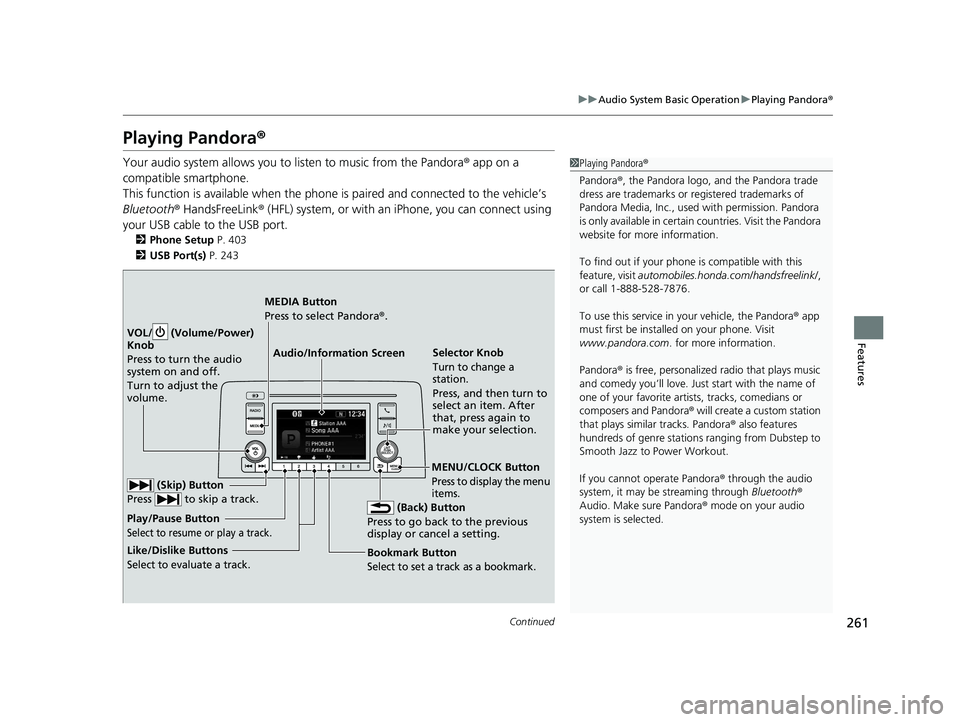
Playing Pandora ®
Your audio system allows you to listen to music from the Pandora ® app on a
compatible smartphone.
This function is available when the phone is paired and connected to the vehicle’s
Bluetooth ® HandsFreeLink ® (HFL) system, or with an iPhone, you can connect using
your USB cable to the USB port.
2 Phone Setup P. 403
2 USB Port(s) P. 243
1Playing Pandora ®
Pandora ®, the Pandora logo, and the Pandora trade
dress are trademarks or registered trademarks of
Pandora Media, Inc., used with permission. Pandora
is only available in certai n countries. Visit the Pandora
website for more information.
To find out if your phone is compatible with this
feature, visit automobiles.honda.com /handsfreelink/,
or call 1-888-528-7876.
To use this service in your vehicle, the Pandora ® app
must first be installed on your phone. Visit
www.pandora.com . for more information.
Pandora ® is free, personalized radio that plays music
and comedy you’ll love. Just start with the name of
one of your favorite arti sts, tracks, comedians or
composers and Pandora ® will create a custom station
that plays similar tracks. Pandora ® also features
hundreds of genre stations ranging from Dubstep to
Smooth Jazz to Power Workout.
If you cannot operate Pandora ® through the audio
system, it may be streaming through Bluetooth®
Audio. Make sure Pandora ® mode on your audio
system is selected.
Audio/Information Screen Selector Knob
Turn to change a
station.
Press, and then turn to
select an item. After
that, press again to
make your selection.
VOL/ (Volume/Power)
Kn
ob
Press to turn the audio
system on and off.
Turn to adjust the
volume.
(Back) Button
Press to go back to the previous
display or cancel a setting.
MEDIA Button
Press to select Pandora ®.
Play/Pause Button
Select to resume or play a track.
(Skip) Button
Press to skip a track.
Like/Dislike Buttons
Select to evaluate a track.
MENU/CLOCK Button
Press to display the menu
items.
Bookmark Button
Select to set a track as a bookmark.
21 CR-V HYBRID HMIN-31TPG6100.book 261 ページ 2020年9月14日 月曜日 午前11時36分
Page 267 of 690
266
uuAudio System Basic Operation uPlaying Bluetooth ® Audio
Features
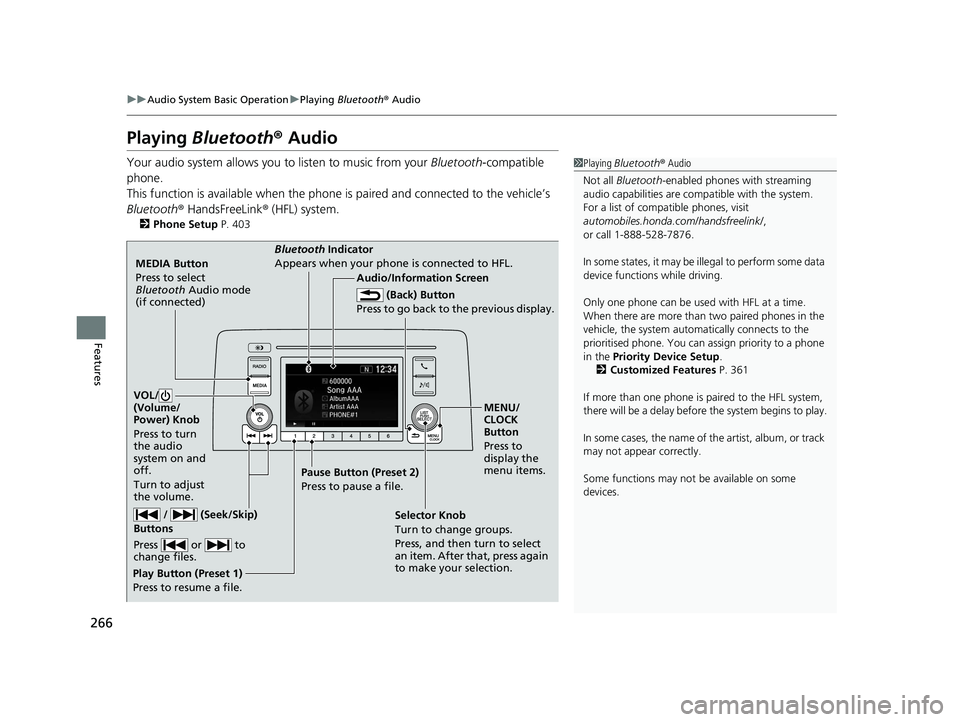
Playing Bluetooth ® Audio
Your audio system allows you to listen to music from your Bluetooth-compatible
phone.
This function is available when the phone is paired and connected to the vehicle’s
Bluetooth ® HandsFreeLink ® (HFL) system.
2 Phone Setup P. 403
1Playing Bluetooth ® Audio
Not all Bluetooth -enabled phones with streaming
audio capabilities are comp atible with the system.
For a list of compatible phones, visit
automobiles.honda.com /handsfreelink/,
or call 1-888-528-7876.
In some states, it may be il legal to perform some data
device functions while driving.
Only one phone can be used with HFL at a time.
When there are more than two paired phones in the
vehicle, the system automatically connects to the
prioritised phone. You can assign priority to a phone
in the Priority Device Setup .
2 Customized Features P. 361
If more than one phone is paired to the HFL system,
there will be a delay before the system begins to play.
In some cases, the name of the artist, album, or track
may not appear correctly.
Some functions may not be available on some
devices.
MEDIA Button
Press to select
Bluetooth Audio mode
(if connected)
VOL/
(Volume/
Power) Knob
Press to turn
the audio
system on and
off.
Turn to adjust
the volume.
MENU/
CLOCK
Button
Press to
display the
menu items.
Audio/Information Screen
Bluetooth Ind
icator
Appears when your phone is connected to HFL.
/ (Seek/Skip)
Buttons
Press or to
change files.
Play Button (Preset 1)
Press to resume a file. Pause Button (Preset 2)
Press to pause a file.
Selector Knob
Turn to change groups.
Press, and then turn to select
an item. After that, press again
to make your selection.
(Back) Button
Press to go back to the previous display.
21 CR-V HYBRID HMIN-31TPG6100.book 266 ページ 2020年9月14日 月曜日 午前11時36分
Page 268 of 690
Continued267
uuAudio System Basic Operation uPlaying Bluetooth ® Audio
Features
1. Make sure that your phone is paired and
connected to HFL.
2. Press the MEDIA button until the
Bluetooth ® Audio mode is selected.
If the phone is not recognized, another HFL-
compatible phone, which is not compatible
for Bluetooth ® Audio, may already be
connected.
■To pause or resume a file
Press the Play or Pause button to select a mode.
■To Play Bluetooth® Audio Files1To Play Bluetooth ® Audio Files
To play the audio files, y ou may need to operate your
phone. If so, follow the phone maker's operating
instructions.
The pause function may no t be available on some
phones.
If any audio device is connected to the USB port, you
may need to press the MEDIA button repeatedly to
select the Bluetooth® Audio system.
Switching to another mode pauses the music playing
from your phone.
Play Button Pause Button
MEDIA
Button
21 CR-V HYBRID HMIN-31TPG6100.book 267 ページ 2020年9月14日 月曜日 午前11時36分
Page 269 of 690
uuAudio System Basic Operation uPlaying Bluetooth ® Audio
268
Features
1. Press to display the music search list.
2. Rotate to select a category.
3. Press to display a list of items in the
category.
4. Rotate to select an item, then press .
u Press and rotate repeatedly until a
desired item you want to listen is
displayed.
■How to Select a Song from the Music Search List with the
Selector Knob1 How to Select a Song from the Music Search List with the Selector
Knob
Depending on the Bluetooth® device you connect,
some or all of the catego ries may not be displayed.
Item
Selection Category
Selection
21 CR-V HYBRID HMIN-31TPG6100.book 268 ページ 2020年9月14日 月曜日 午前11時36分


