Page 8 of 659
6
Quick Reference Guide
Quick Reference Guide
Visual Index
❚ (Vehicle Stability AssistTM (VSA®) System OFF) Button (P 444)
❚Safety Support Switch (P 454, 461, 469, 498)
❚Parking Sensor System Button* (P 523)
❚Heated Windshield Button (P 204)
Canadian models
❚Brightness Control (P 205)
❚Head-Up Display (HUD) Buttons* (P 159)❚System Indicators (P 82)
❚Gauges (P 139)
❚Driver Information Interface (P 140)
❚ENGINE START/STOP Button (P 191)
❚Climate Control System (P 240)
❚Rear Window Defogger (P 204)
❚Heated Door Mirror Button* (P 204)
❚Center Pocket (P 225)
❚Hazard Warning Button
❚TRIP Button (P 142)
❚Audio System (P 246)
❚Navigation System*
() See Navigation System Manual
❚Front Seat Heater Buttons* (P 237)
❚Front Seat Heaters and Seat
Ventilation Buttons* (P 238)
❚Passenger Front Airbag Off Indicator
(P 61)
Page 9 of 659
7
Quick Reference Guide❚Headlights/Turn Signals (P 194, 195)
❚Fog Lights* (P 197)
❚Paddle Shifter (Shift down)* (P 428, 434)
❚Left Selector Wheel (P 140)
❚ (home) Button (P 140)
❚Adaptive Cruise Control (ACC) with Low
Speed Follow Buttons
(P 473)
❚Wipers/Washers (P 202)
❚Paddle Shifter (Shift up)* (P 428, 434)
❚Lane Keeping Assist System (LKAS) Button
(P 490)
❚Interval Button (P 482, 486)
❚Steering Wheel Adjustments (P 209)
❚Bluetooth® HandsFreeLink ® System Voice Control Buttons (P 375)
❚Audio Remote Controls (P 250)
❚Horn (Press an area around .)
❚ (HUD) Button* (P161 )
❚Heated Steering Wheel* (P 236)
Canadian models
* Not available on all models
Page 10 of 659
Visual Index
8
Quick Reference Guide❚Power Window Switches (P 187)
❚Master Door Lock Switch (P 179)
❚Door Mirror Controls (P 211)
❚Memory Buttons* (P 208)
❚SET Button* (P 208)
❚Trunk Opener (P 181)
❚Interior Fuse Boxes (P 624, 626)
❚Hood Release Handle (P 552)
❚Driver’s Front Airbag (P 49)
❚Rearview Mirror (P 210)
❚HomeLink® Buttons* (P 373)
❚Accessory Power Socket (P 231)
❚Passenger’s Front Airbag (P 49)
❚Wireless Charger* (P 232)
❚USB Ports (P 247)
❚Trunk Main Switch* (P 183)
❚Glove Box (P 225)
❚ECON Button (P 436)
❚Automatic Brake Hold Button (P 515)
❚Electric Parking Brake Switch (P 510)
❚Auto Idle Stop OFF Button* (P 438)
❚SPORT Button* (P 435)
❚Shift Buttons*
Automatic Transmission* (P 422)
❚Shift Lever*
Continuously Variable
Transmission (CVT)* (P 429, 431)
Page 21 of 659
19
Quick Reference Guide
Features (P 245)
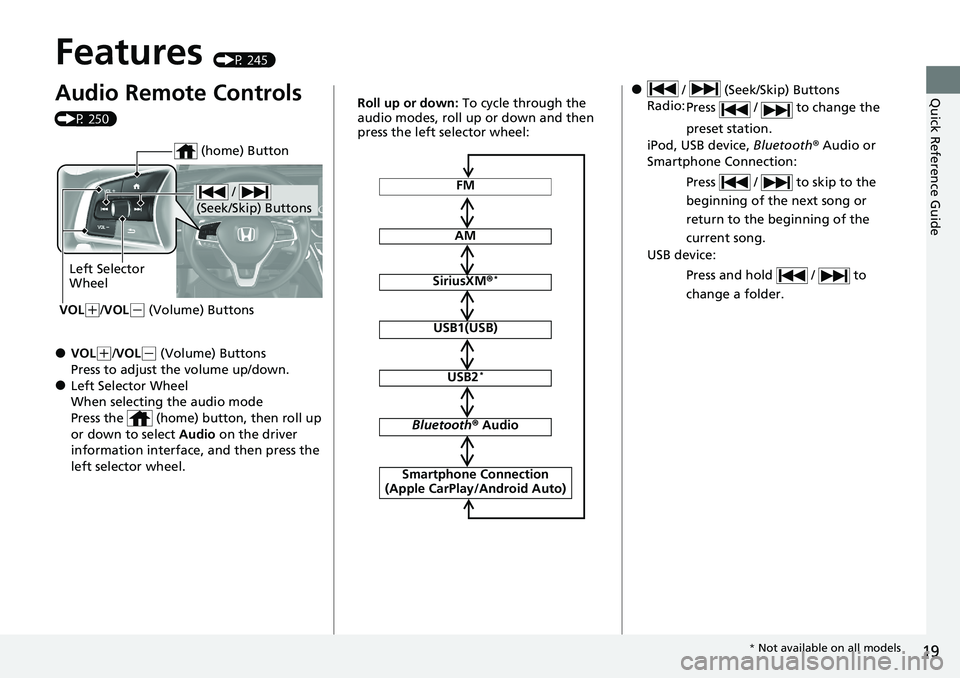
Audio Remote Controls
(P 250)
●VOL(+/VOL( - (Volume) Buttons
Press to adjust the volume up/down.
●Left Selector Wheel
When selecting the audio mode
Press the (home) button, then roll up
or down to select Audio on the driver
information interface, and then press the
left selector wheel.
/
(Seek/Skip) Buttons
Left Selector
Wheel
VOL
( +/VOL(- (Volume) Buttons
(home) Button
FM
AM
SiriusXM ®*
USB1(USB)
USB2*
Bluetooth ® Audio
Smartphone Connection
(Apple CarPlay/Android Auto)
Roll up or down: To cycle through the
audio modes, roll up or down and then
press the left selector wheel:● / (Seek/Skip) Buttons
Radio: Press / to change the
preset station.
iPod, USB device, Bluetooth® Audio or
Smartphone Connection:
Press / to skip to the
beginning of the next song or
return to the beginning of the
current song.
USB device:
Press and hold / to
change a folder.
* Not available on all models
Page 83 of 659
81
Instrument Panel
This chapter describes the buttons, indicators, and gauges that are used while driving.
Indicators............................................ 82
Driver Information Interface Warning and Information Messages .................... 109
Gauges and Displays Gauges ............................................ 139
Driver Information Interface ............. 140
Head-Up Display
*............................ 159
* Not available on all models
Page 242 of 659

240
Controls
Climate Control System
Using Automatic Climate Control
The automatic climate control system maintains the interior temperature you select.
The system also selects the proper mix of heated or cooled air that raises or lowers
the interior temperature to your preference as quickly as possible.
Use the system when the engine is running.
1. Press the AUTO button.
2. Adjust the interior temperature using the dr iver’s side or passenger’s side control
dial.
3. Press the (ON/OFF) button to cancel.
■Switching between the recirc ulation and fresh air modes
Press the (recirculation) button and switch the mode depending on
environmental conditions.
Recirculation mode (indicator on): Recirculates air from the vehicle’s interior through
the system.
Fresh air mode (indicator off): Maintains out side ventilation. Keep the system in
fresh air mode in normal situations.
1 Using Automatic Climate Control
If any buttons are presse d while using the climate
control system in auto, the function of the button
that was pressed will take priority.
The AUTO indicator will go off, but functions
unrelated to the button th at was pressed will be
controlled automatically.
During idle-stops, air-conditioning is suspended, and
only the blower remains active.
If you do not want air-cond itioning suspended, press
the Auto Idle Stop OFF button to cancel idle-stop.
To prevent cold air from bl owing in from outside, the
fan may not start i mmediately when the AUTO
button is pressed.
If the interior is very warm, you can cool it down
more rapidly by partial ly opening the windows,
turning the system on auto, and setting the
temperature to low. Change the fresh air mode to
recirculation mode until the temperature cools down.
When you set the temperat ure to the lower or upper
limit, Lo or Hi is displayed.
Pressing the button switches the climate
control system between on and off. When turned on,
the system returns to your last selection.
While ECON mode is active, the climate control
system may have reduced cooling performance.
Models with Auto Idle Stop
All models
Floor and
defroster
vents
Floor vents
Dashboard and floor
vents, and back of
the center console
*
Dashboard vents
and back of the
center console
*
AUTO Button
Driver’s Side
Temperature
Control Dial
(Recirculation)
Button
Fan Control Dial
A/C (Air Conditioning)
Button Passenger’s Side
Temperature
Control Dial
(ON/OFF) Button
* Not available on all models
Page 248 of 659
246
Features
Audio System
About Your Audio System
The audio system features AM/FM radio and SiriusXM® Radio* service. It can also
play USB flash drives, iPod, iPhone and Bluetooth® devices.
You can operate the audio system from the buttons and knobs on the panel, the
remote controls on the steering wheel, or the icons on the touchscreen interface.1 About Your Audio System
iPod ®, iPhone ® and iTunes are trad emarks of Apple
Inc.
State or local laws may pr ohibit the operation of
handheld electronic devices while operating a
vehicle.
SiriusXM ® Radio
* is available on a subscription basis
only. For more information on SiriusXM ® Radio*,
contact a dealer. 2 General Information on the Audio System
P. 330
SiriusXM ® Radio
* is available in the United States and
Canada, except Ha waii, Alaska, and Puerto Rico.
SiriusXM ®
* is a registered tra demark of SiriusXM
Radio, Inc.
Remote Controls
iPod
USB Flash Drive
* Not available on all models
Page 252 of 659
250
uuAudio System uAudio Remote Controls
Features
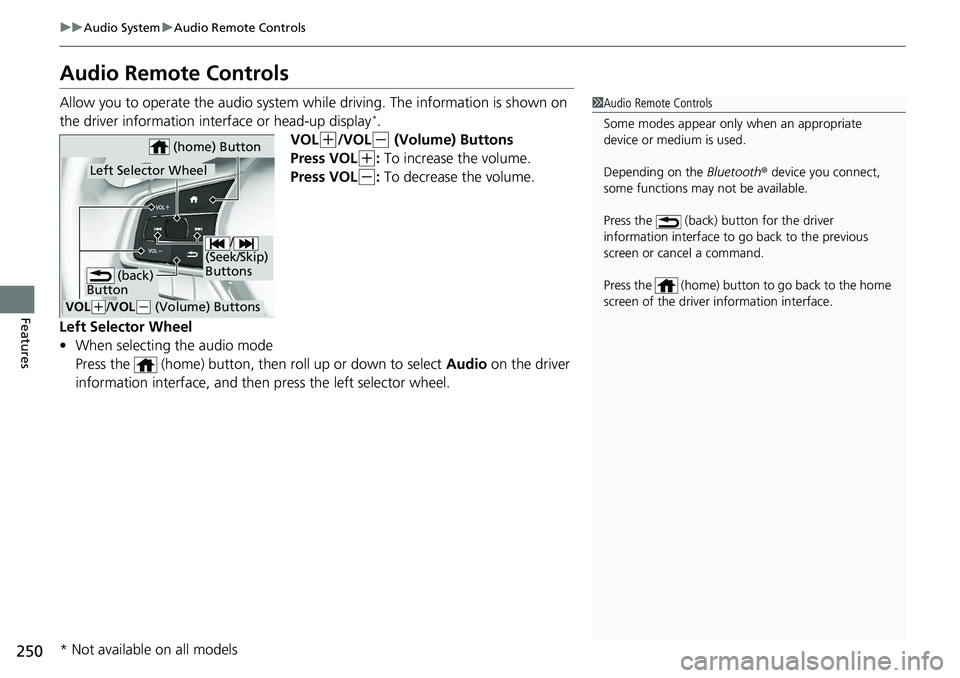
Audio Remote Controls
Allow you to operate the audio system wh ile driving. The information is shown on
the driver information interface or head-up display*.
VOL
(+/VOL(- (Volume) Buttons
Press VOL
(+: To increase the volume.
Press VOL
(-: To decrease the volume.
Left Selector Wheel
• When selecting the audio mode
Press the (home) button, then roll up or down to select Audio on the driver
information interface, and then press the left selector wheel.
1 Audio Remote Controls
Some modes appear only when an appropriate
device or medium is used.
Depending on the Bluetooth® device you connect,
some functions may not be available.
Press the (back) button for the driver
information interface to go back to the previous
screen or cancel a command.
Press the (home) button to go back to the home
screen of the driver information interface.
/
(Seek/Skip)
Buttons
VOL( +/VOL(- (Volume) Buttons
Left Selector Wheel
(home) Button
(back)
Button
* Not available on all models