Page 6 of 659

Contents
This owner’s manual should be considered a permanent part of the
vehicle and should remain with the vehicle when it is sold.
This owner’s manual covers all models of your vehicle. You may find
descriptions of equipment and features that are not on your
particular model.
Images throughout this owner’s manual (including the front cover)
represent features and equipment that are available on some, but
not all, models. Your particular mo del may not have some of these
features.
This owner’s manual is for vehicles sold in the United States and
Canada.
The information and specifications in cluded in this publication were
in effect at the time of approval for printing. Honda Motor Co., Ltd.
reserves the right, however, to discontinue or change specifications
or design at any time without notice and without incurring any
obligation.2 Safe Driving P. 33
For Safe Driving P. 34 Seat Belts P. 38 Airbags P. 46
2Instrument Panel P. 81
Indicators P. 82 Gauges and Displays P. 139
2Controls P. 165
Clock P. 166 Locking and Unlocking the Doors P. 167
Moonroof* P. 190
Seats P. 212
2 Features P. 245
Audio System P. 246 Audio System Basic Operation P. 253
Customized Features P. 352 HomeLink ® Universal Transceiver* P. 372
2 Driving P. 403
Before Driving P. 404 Towing a Trailer P. 409
Multi-View Rear Camera P. 531 Refueling P. 533
2Maintenance P. 539
Before Performing Maintenance P. 540 Maintenance MinderTM P. 543
Checking and Maintaining Wiper Blades P. 574
Climate Control System Maintenance P. 589
2Handling the Unexpected P. 597
Tools P. 598 If a Tire Goes Flat P. 599
Overheating P. 613 Indicator, Coming On/Blinking P. 615
If You Cannot Open the Trunk P. 630
2Information P. 633
Specifications P. 634 Identification Numbers P. 638
Emissions Testing P. 641 Warranty Coverages P. 643
Page 17 of 659
15
Quick Reference Guide
Controls (P 165)
Clock (P166)
To adjust time
To adjust date
aPress , then select Settings.
bSelect System , then Day & Time.
cSelect Set Date & Time .
dSelect Automatic Date & Time , then
select OFF.
eSelect Set Date or Set Time .
fAdjust the dates, hours and minutes by
selecting / .
gSelect Save to set the date or time.
The navigation system receives signals from
GPS satellites, updating the clock
automatically.
34
Models with navigation system
ENGINE START/STOP
Button
(P191)
Press the button to change the vehicle’s
power mode.
* Not available on all models
Page 27 of 659
25
Quick Reference Guide
VSA® On and Off (P 444)
●The Vehicle Stability AssistTM (VSA ®)
system helps stabilize the vehicle during
cornering, and helps maintain traction
while accelerating on loose or slippery
road surfaces.
●VSA ® comes on automatically every time
you start the engine.
●To partially disable or fully restore VSA ®
function, press and ho ld the button until
you hear a beep.
CMBSTM On and Off
(P 461)
●When a possible frontal collision is likely
unavoidable, the CMBSTM can help you to
reduce the vehicle speed and the severity
of the collision.
●The CMBSTM is turned on every time you
start the engine.
●To turn the CMBSTM on or off, use the
safety support switch.
Tire Pressure Monitoring
System (TPMS)
(P 446)
●Detects a change in tire conditions and
overall dimensions due to decrease in tire
pressures.
●The TPMS is turned on automatically
every time you start the engine.
●A calibration procedure must be
performed when certain conditions arise.
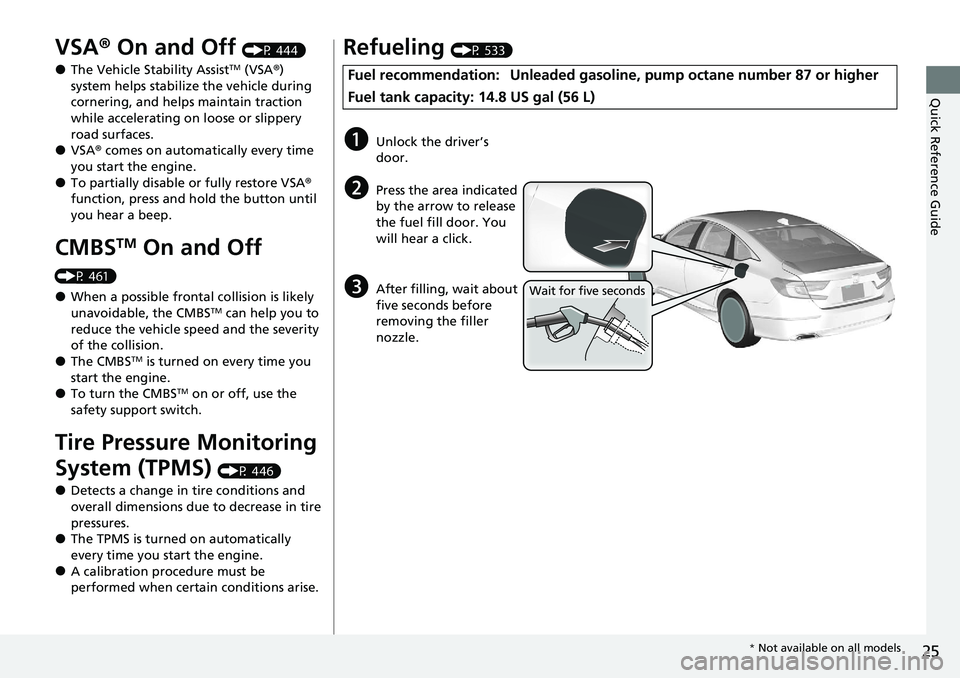
Refueling (P 533)
Fuel recommendation: Unlead ed gasoline, pump octane number 87 or higher
Fuel tank capacity: 14.8 US gal (56 L)
aUnlock the driver’s
door.
bPress the area indicated
by the arrow to release
the fuel fill door. You
will hear a click.
cAfter filling, wait about
five seconds before
removing the filler
nozzle.Wait for five seconds
* Not available on all models
Page 37 of 659
35
uuFor Safe Driving uImportant Safety Precautions
Safe Driving
■Pay appropriate attention to the task of driving safely
Engaging in cell phone conversation or other activities that keep you from paying
close attention to the road, other vehicles, and pedestrians could lead to a crash.
Remember, situations can change quickly, and only you can decide when it is safe to
divert some attention away from driving.
■Control your speed
Excessive speed is a major factor in crash injuries and deaths. Generally, the higher
the speed, the greater the risk, but serious injuries can also occur at lower speeds.
Never drive faster than is safe for current conditions, regardless of the maximum
speed posted.
■Keep your vehicle in safe condition
Having a tire blowout or a mechanical failure can be extremely hazardous.
To reduce the possibility of such problems, check your tire pressures and condition
frequently, and perform all regul arly scheduled maintenance.
■Do not leave children unattended in the vehicle
Children, pets and people needing assistan ce left unattended in the vehicle may be
injured if they activate one or more of the vehicle controls. They may also cause the
vehicle to move, resulting in a crash in wh ich they and/or another person(s) can be
injured or killed. Also, depending on the am bient temperature, the temperature of
the interior may reach extreme levels, which can result in harm or death.
Even if the climate control system is on, never leave them in the vehicle unattended
as the climate control system can shut off at any time.
Page 123 of 659
121
uuIndicators uDriver Information Interface Wa rning and Information Messages
Continued
Instrument Panel
MessageConditionExplanation
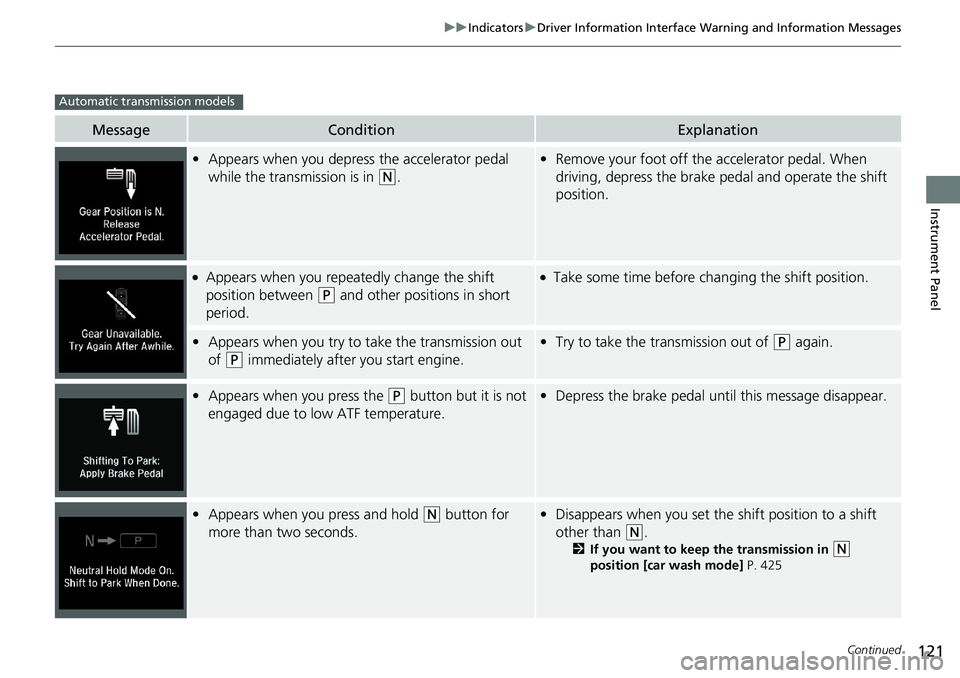
•Appears when you depress the accelerator pedal
while the transmission is in
(N.
•Remove your foot off the accelerator pedal. When
driving, depress the brake pedal and operate the shift
position.
●Appears when you repeatedly change the shift
position between
(P and other positions in short
period.
●Take some time before changing the shift position.
• Appears when you try to take the transmission out
of
(P immediately after you start engine.
•Try to take the transmission out of (P again.
• Appears when you press the (P button but it is not
engaged due to low ATF temperature.• Depress the brake pedal until this message disappear.
• Appears when you press and hold (N button for
more than two seconds.• Disappears when you set the shift position to a shift
other than
(N.
2 If you want to keep the transmission in (N
position [car wash mode] P. 425
Automatic transmission models
Page 147 of 659
Continued145
uuGauges and Displays uDriver Information Interface
Instrument Panel
■Trip meter
Shows the total number of miles or kilomete rs driven since the last reset. Meters A
and B can be used to measure two separate trips.
Resetting a trip meter
To reset the trip meter, display it, press the left selector wheel and then select Reset.
u The trip meter is reset to 0.0 .
■Average fuel economy (Avg. Fuel)
Shows the estimated average fuel economy of each trip meter in mpg or l/100 km.
The display is updated at set intervals. Wh en a trip meter is reset, the average fuel
economy is also reset.
■Instant fuel economy
Shows the instant fuel economy as a bar graph in mpg or l/100 km.
■Range
Shows the estimated distance you can trave l on the remaining fuel. This estimated
distance is based on the vehicle’s current fuel economy.
1 Trip meter
Switch between trip meter A and trip meter B by
rolling the left selector wheel.
Resetting the trip meter in the Range & Fuel, the trip
meter in the sub display resets at the same time.
1 Average fuel economy (Avg. Fuel)
You can change when to reset the average fuel
economy.
2 Customized Features P. 352
Page 149 of 659
Continued147
uuGauges and Displays uDriver Information Interface
Instrument Panel
■Trip meter
2 Trip meter P. 145
■Elapsed Time
Shows the time elapsed since Trip A or Trip B was reset.
■Average Speed (Avg. Speed)
Shows the average speed in mph or km/h since Trip A or Trip B was reset.
1Elapsed Time
You can change when to reset the elapsed time.
2 Customized Features P. 352
1Average Speed (Avg. Speed)
You can change when to reset the average speed.
2 Customized Features P. 352
Page 153 of 659
Continued151
uuGauges and Displays uDriver Information Interface
Instrument Panel
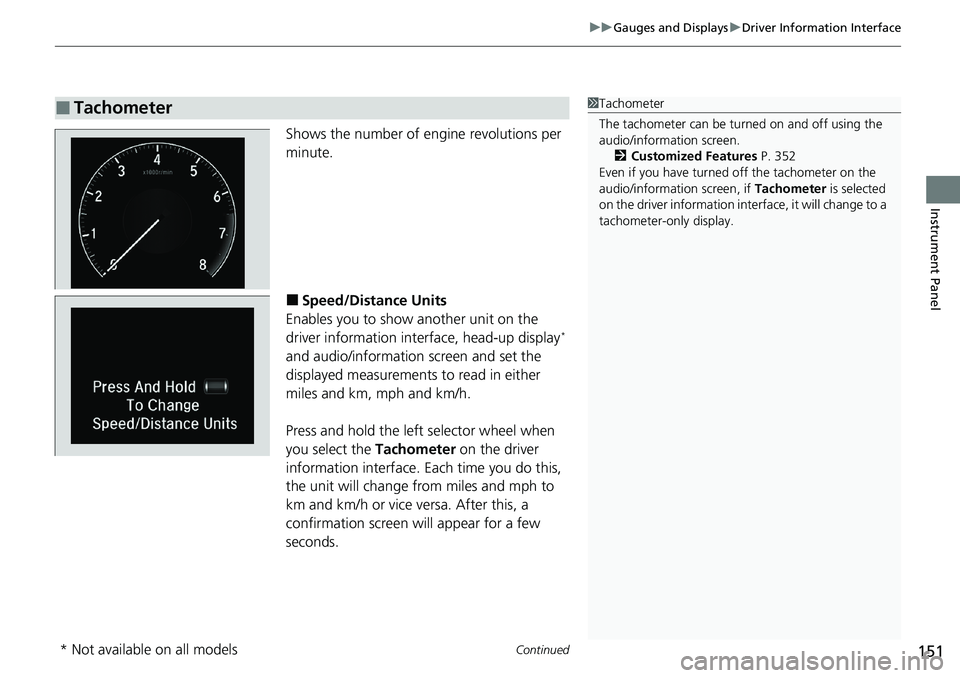
Shows the number of engine revolutions per
minute.
■Speed/Distance Units
Enables you to show another unit on the
driver information interface, head-up display
*
and audio/information screen and set the
displayed measurements to read in either
miles and km, mph and km/h.
Press and hold the left selector wheel when
you select the Tachometer on the driver
information interface. Each time you do this,
the unit will change from miles and mph to
km and km/h or vice versa. After this, a
confirmation screen will appear for a few
seconds.
■Tachometer1 Tachometer
The tachometer can be tu rned on and off using the
audio/information screen.
2 Customized Features P. 352
Even if you have turned off the tachometer on the
audio/information screen, if Tachometer is selected
on the driver information interface, it will change to a
tachometer-only display.
* Not available on all models