Page 183 of 659
181
Controls
Opening and Closing the Trunk
Precautions for Opening/Closing the Trunk
■Opening the trunk
Open the trunk all the way. u If it is not fully opened, the trunk lid may begin to close under its own weight.
■Closing the trunk
Keep the trunk lid closed while driving to:
u Avoid possible damage.
u Prevent exhaust gas from leaking into the vehicle.
2 Exhaust Gas Hazard P. 78
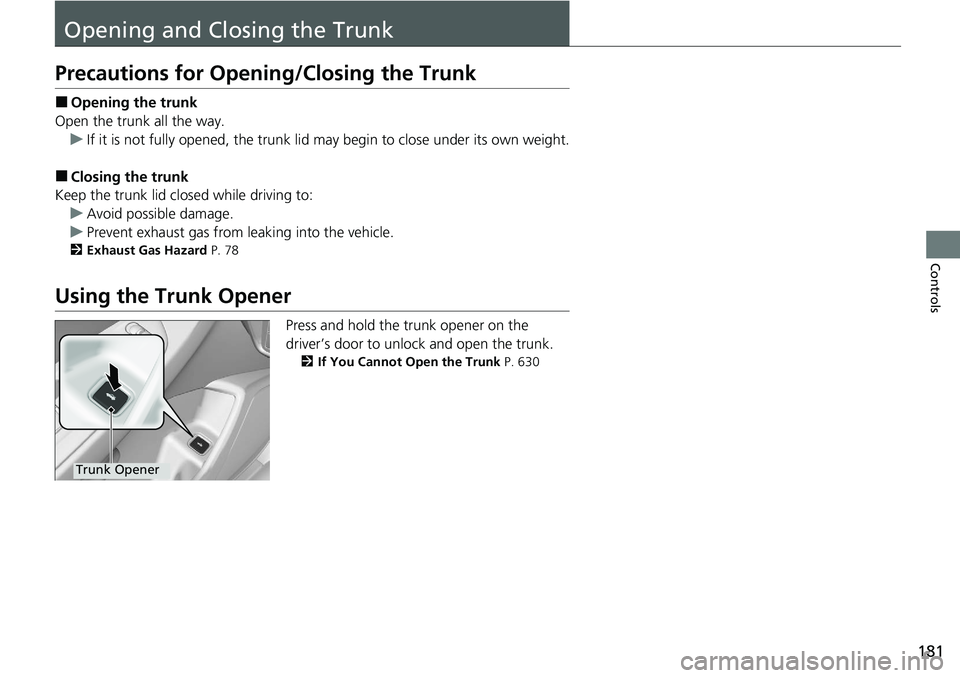
Using the Trunk Opener
Press and hold the trunk opener on the
driver’s door to unlock and open the trunk.
2If You Cannot Open the Trunk P. 630
Trunk Opener
Page 184 of 659
182
uuOpening and Closing the Trunk uUsing the Trunk Release Button*
Controls
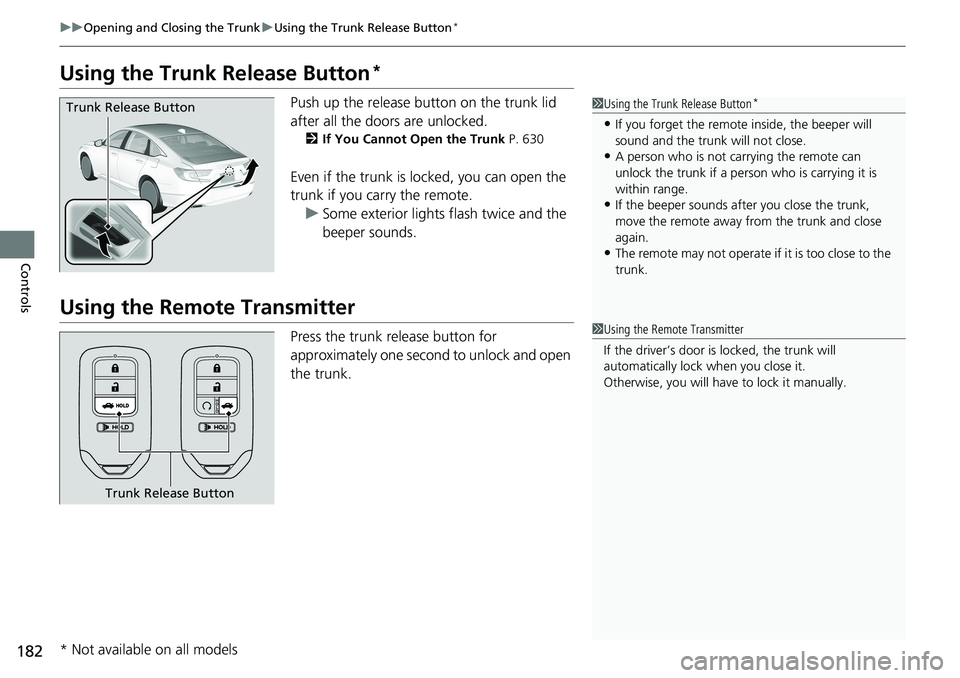
Using the Trunk Release Button*
Push up the release button on the trunk lid
after all the doors are unlocked.
2If You Cannot Open the Trunk P. 630
Even if the trunk is locked, you can open the
trunk if you carry the remote.
u Some exterior lights flash twice and the
beeper sounds.
Using the Remote Transmitter
Press the trunk release button for
approximately one second to unlock and open
the trunk.
1Using the Trunk Release Button*
•If you forget the remote inside, the beeper will
sound and the trunk will not close.
•A person who is not carrying the remote can
unlock the trunk if a person who is carrying it is
within range.
•If the beeper sounds after you close the trunk,
move the remote away from the trunk and close
again.
•The remote may not operate if it is too close to the
trunk.
Trunk Release Button
1Using the Remote Transmitter
If the driver’s door is locked, the trunk will
automatically lock when you close it.
Otherwise, you will have to lock it manually.
Trunk Release Button
* Not available on all models
Page 185 of 659
183
uuOpening and Closing the Trunk uTrunk Main Switch*
Controls
Trunk Main Switch*
The trunk main switch disables the trunk
release button on the remote transmitter and
the trunk release button on the trunk lid and
trunk opener on the driver’s door to protect
luggage in the trunk.
1. Make sure the rear seat-back is not folded
down.
2. Turn off the trunk main switch in the glove
box.
3. Lock the glove box.
Emergency Trunk Opener
The trunk release lever allows you to open the
trunk from inside for your safety.
Slide the release lever in the direction of the
arrow.
1Trunk Main Switch*
If you need to give the ke y to someone else, remove
the built-in key from the remote by sliding the release
knob, and give the remote as a valet key.
ON
OFF
Main Switch
1 Emergency Trunk Opener
Parents should deci de if their children should be
shown how to use this feature.
Lever
* Not available on all models
Page 187 of 659

185
uuSecurity System uSecurity System Alarm
Continued
Controls
Security System Alarm
The security system alarm activates when the trunk, hood or doors are forcibly
opened. The alarm does not activate if the trunk or doors are opened with the key,
remote transmitter, or smart entry system
*.
However, the alarm activates if a door is opened with the key and then the
transmission is taken out of
(P (continuously variable transmission models) or the
hood is opened before the power mode is in ON.
■When the security system alarm activates
The horn sounds intermittently, and some exterior lights flash.
■To deactivate the security system alarm
Unlock the vehicle using the key, remo te transmitter or smart entry system*, or set
the power mode to ON. The system, along with the horn and flashing lights, is
deactivated.
■Setting the security system alarm
The security system alarm automatically sets when the following conditions have
been met:
• The power mode is set to VEHICLE OFF (LOCK).
• The hood is closed.
• All doors and trunk are locked from outsid e with the key, remote transmitter, or
smart entry system
*.
■When the security system alarm sets
The security system alarm in dicator in the instrument panel blinks and the blinking
interval changes after about 15 seconds.
■To cancel the security system alarm
The security system alarm is canceled wh en the vehicle is unlocked using the key,
remote transmitter or smart entry system
*, or when the power mode is set to ON. The
security system alarm indicato r goes off at the same time.
1Security System Alarm
Do not alter the system or add other devices to it.
Doing so may damage the system and make your
vehicle inoperable.
The security system alarm continues for a maximum
of two minutes until the security system alarm
deactivates.
Do not set the security system alarm when someone
is in the vehicle or a window is open. The system can
accidentally activate when:
•Unlocking the door with the lock tab.
•Opening the trunk with the trunk opener or the
emergency trunk opener.
•Opening the hood with the hood release.
•Taking the transmission out of ( P.
If the battery goes dead after you have set the
security system alarm, the security alarm may go off
once the battery is re charged or replaced.
If this occurs, deactivate the security system alarm by
unlocking a door using the ke y, remote transmitter,
or smart entry system
*.
Continuously variable transmission models
* Not available on all models
Page 218 of 659

216
uuSeats uRear Seats
Controls
Rear Seats
1. Remove the center shoulder belt from the
guide.
2. Pull the release lever in the trunk to release
the lock.
3. Fold the seat-back down.
■Folding Down the Rear Seat(s)1Folding Down the Rear Seat(s)
The rear seat-back(s
*) can be folded down to
accommodate bulkier items in the trunk.
Never drive with the seat-back folded down and the
trunk lid open.
2 Exhaust Gas Hazard P. 78
To lock a seat-back upright, push it backwards until it
locks.
When returning the seat-back to its original position,
push it firmly back. Also, m ake sure all rear shoulder
belts are positioned in front of the seat-back, and the
center shoulder belt is re -positioned in the guide.
Make sure that the folded seat-back does not press
against the front passenger seat, as this can cause the
weight sensors in the front passenger seat to work
improperly. 2 Passenger Front Airbag Off Indicator P. 61
Make sure all items in the trunk or items
extending through the opening into the rear
seat is properly secured. Loose items can fly
forward if you have to brake hard.
The front seat(s) must be far enough forward so they
do not interfere with the rear seats as they fold
down.
Guide
Center
Shoulder Belt
Release
Lever
Release
Lever*
* Not available on all models
Page 227 of 659
225
uuInterior Convenience Items uStorage Items
Continued
Controls
Storage Items
Pull the handle to open the glove box.
You can lock the glove box with the built-in
key.
Push the cover to open the pocket.
■Glove Box1Glove Box
3WARNING
An open glove box can cause serious injury
to your passenger in a crash, even if the
passenger is wearing the seat belt.
Always keep the glove box closed while
driving.
Glove BoxHandle
To Lock
Models with trunk main switch
■Center Pocket
Page 231 of 659
Continued229
uuInterior Convenience Items uStorage Items
Controls
There is a coat hook on the rear left grab
handle. Pull it down to use it.
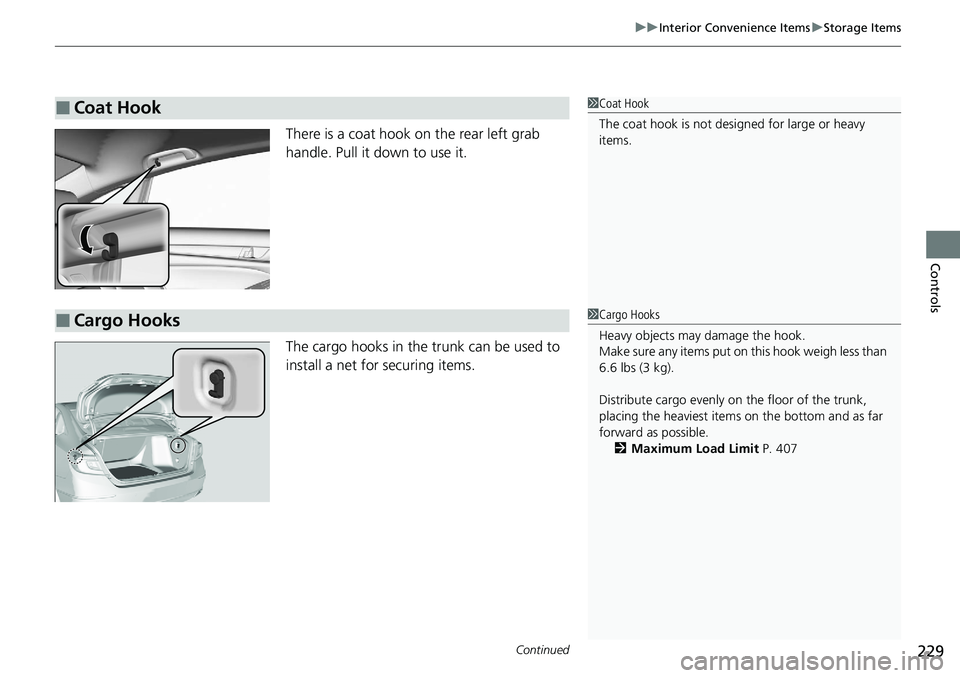
The cargo hooks in the trunk can be used to
install a net for securing items.
■Coat Hook1Coat Hook
The coat hook is not desi gned for large or heavy
items.
■Cargo Hooks1 Cargo Hooks
Heavy objects may damage the hook.
Make sure any items put on this hook weigh less than
6.6 lbs (3 kg).
Distribute cargo evenly on the floor of the trunk,
placing the heaviest item s on the bottom and as far
forward as possible. 2 Maximum Load Limit P. 407
Page 237 of 659
Continued235
uuInterior Convenience Items uOther Interior Convenience Items
Controls
1Wireless Charger*
Charging may be briefl y interrupted when:•All the doors and the trunk are closed
- to avoid interference with the proper functioning
of the smart entry system.
•The position of the device is altered.
Do not charge more than one device at a time on a
charging area.
If the device becomes too hot and its battery
protection function activa tes, it may charge
extremely slowly or no longer charge.
The temperature at which the battery protection
function activates de pends on the device.
* Not available on all models