2021 GMC SIERRA park assist
[x] Cancel search: park assistPage 2 of 20

2
INSTRUMENT PANEL
Engine
Start/Stop Button
F
Cruise Control/ Forward Collision AlertF/Heated
Steering WheelF
Buttons
Electric Parking Brake
Switch
Power
Mirror
F/
Window Buttons Driver
Information Center
Controls
F/Voice
Recognition Buttons
Audio Volume
Control
(on back
of steering wheel)
Steering
Wheel
Adjustment Lever
(on steering column)
Audio Next/
Previous Favorite Station Controls (on back of
steering wheel)
Exterior/
Instrument
Panel/Cargo
Lamp Controls 4WD
Controls
F/
Traction Select Controls Turn Signal/
Windshield
Wipers Lever Range +/-
Gear Selection Buttons
(on shift lever)
Driver
Information Center
HUD ControlsF
(behind
steering wheel)
Low Fuel
Traction Control Off
Brake System
Cruise Control
StabiliTrak Active
StabiliTrak Off
Forward Collision Alert
Security
PARK Electric Parking Brake
Electric Parking Brake Service
Lights On Reminder
Airbag Readiness
Engine Oil Pressure
Check Engine
Lane Keep Assist
Symbols
Gasoline model shown
Page 3 of 20

3
Read your Owner’s Manual to
learn about the information being
relayed by the lights, gauges and
indicators on the instrument cluster.
See Introduction in your
Owner’s Manual.
Driver’s Heated/ Ventilated Seat Buttons
F
Infotainment
System (8-inch* screen shown
F) Passenger’s Heated/
Ventilated Seat ButtonsF
Infotainment System
Controls Climate
Controls
F
USB Ports/
Accessory Power Outlet/120-Volt Power Outlet
F
Integrated
Trailer Brake Control
F
Wireless
Charging Pad
F
Lane Keep AssistF/
Park AssistF/Auto Engine
Stop-Start Disable/Power Release Tailgate
F/
Hazard Warning Flashers Buttons
F Optional equipment *Screen measured diagonally
Traction Control-StabiliTrak Off/
Power Outlet
F/Hill
Descent ControlF/
Power WindowsF/
MultiPro Power Assist Steps
F Buttons
Vehicle Ahead
Antilock Brake System
Low Tire Pressure
Door Ajar
Charging System
Driver Seat Belt Reminder
2 Passenger Seat Belt
Reminder
AU TO 4WD Mode
Page 8 of 20

8F Optional equipment
VEHICLE CUSTOMIZATIONF
Some features can be turned on/off or cus tomized using the Settings menus on the infotainment screen. The Settings
menus include System, Apps, and Vehicle.
1. Select Settings on the Home page.
2. Select the desired menu tab.
3. Select the desired feature and setting.
4. Press
BACK to exit each menu.
See Instruments and Controls in your Owner’s Manual.
CLIMATE CONTROLS/VEHICLE CONTROLSF
AUTO
Driver’s Temp. Control/
Automatic
Operation
F
SYNC
Passenger’s Temp.
Control/Syncronize
passenger’s setting to driver’s setting
F
AC/ Air Conditioning/
Recirculation Mode Fan Speed/ On/Off
Air Delivery
Modes: Defog Vent Floor
MA X/REAR Defrost Mode/Rear
Window-Heated
Outside Mirror Defog
F
Park
Assist
On/Off
F
Lane Keep Assist
On/Off
F
Hill
Descent Control
On/Off
F
Power
Assist Steps
On/Off
F
$ Auto Engine Stop/Start Disable
On/Off Press to
lower the tailgate Cargo Box
Power Outlet On/Off
F
(Ignition
must be On)
Hazard
Warning
Flashers On/Off Traction
Control/
StabiliTrak On/Off
Dual automatic climate controlsF shown
See Introduction in your Owner’s Manual.
Page 15 of 20
15F Optional equipment
DRIVER ASSISTANCE SYSTEMSF
LANE KEEP ASSIST WITH LANE DEPARTURE WARNING – The system may help you
avoid collisions due to unintentional lane departures. The
Lane Keep Assist indicator
is green if the system is available to assist. If the vehicle approaches a detected lane
marking without using a turn signal in that direction, the system may assist by gently
turning the steering wheel and displaying an amber
.
If active driver steering is not detected, the amber may flash and the Safety Alert
Seat may pulse or beeps may sound (if selected) on the side of the departure direction
as the lane marking is crossed. In order to use this system safely, the driver needs to
steer and be in complete control of the vehicle.
To turn on or off, press the Lane Keep Assist button on the instrument panel.
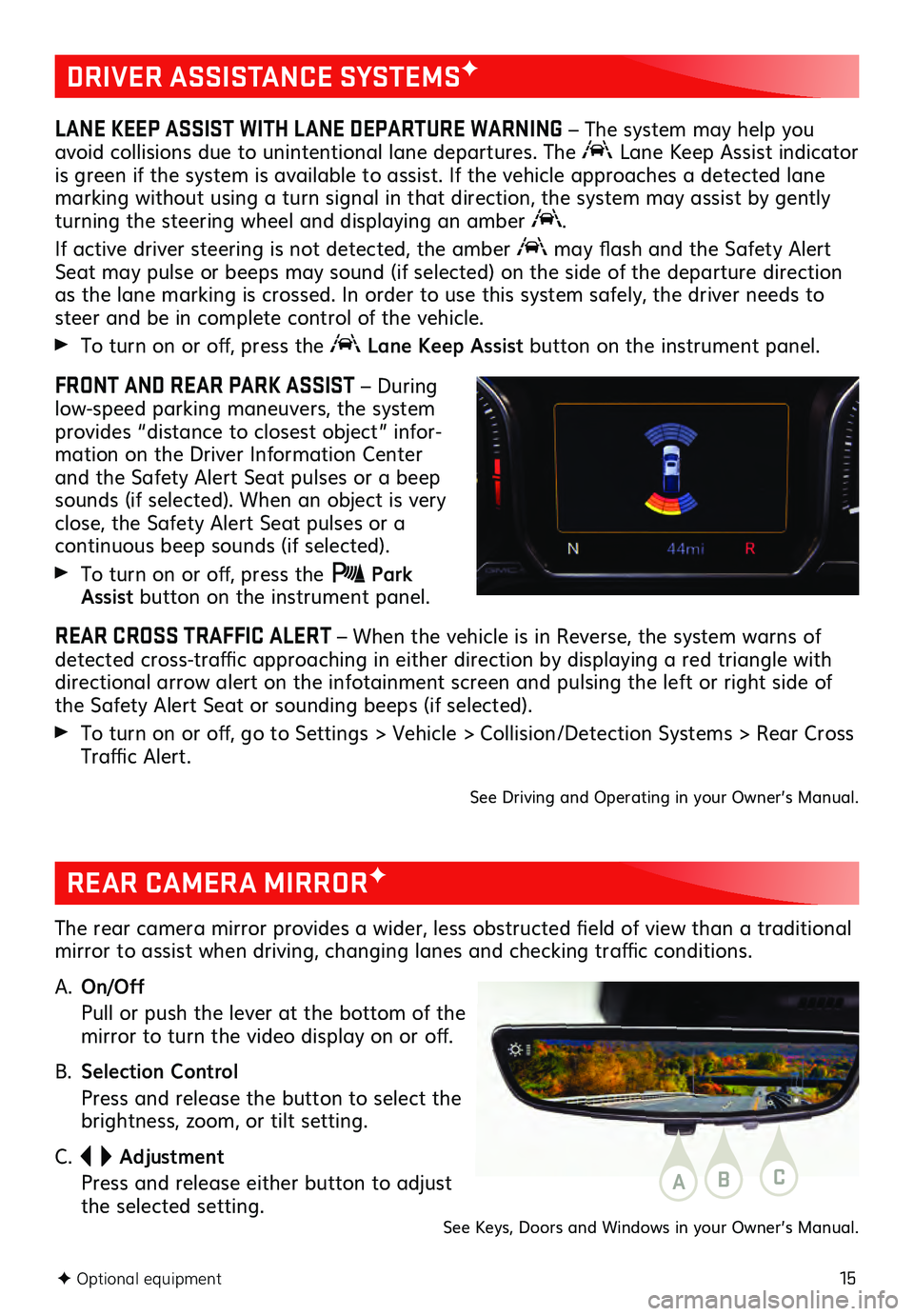
FRONT AND REAR PARK ASSIST – During
low-speed parking maneuvers, the system
provides “distance to closest object” infor -
mation on the Driver Information Center
and the Safety Alert Seat pulses or a beep
sounds (if selected). When an object is very
close, the Safety Alert Seat pulses or a
continuous beep sounds (if selected).
To turn on or off, press the Park Assist button on the instrument panel.
REAR CROSS TRAFFIC ALERT – When the vehicle is in Reverse, the system warns of
detected cross-traffic approaching in either direction by displaying a red triangle with
directional arrow alert on the infotainment screen and pulsing the left or right side of
the Safety Alert Seat or sounding beeps (if selected).
To turn on or off, go to Settings > Vehicle > Collision/Detection Systems > Rear Cross
Traffic Alert.
See Driving and Operating in your Owner’s Manual.
REAR CAMERA MIRRORF
The rear camera mirror provides a wider, less obstructed field of view than a traditional
mirror to assist when driving, changing lanes and checking traffic conditions.
A.
On/Off
Pull or pu sh the lever at the bottom of the mirror to turn the video display on or off.
B. Selection Control
Press and release the button to select the brightness, zoom, or tilt setting.
C.
Adjustment
Press and release either button to adjust the selected setting.ABC
See Keys, Doors and Windows in your Owner’s Manual.
Page 20 of 20
20
Download the myGMC app to your compatible smartphone (or device) and, if your vehicle is properly equipped, you can start or turn off your engine, lock or unlock your doors, view key diagnostic information, set parking information and more.
The app is available on select Apple and Android devices. Service availability, features and functionality vary by vehicle, device and data plan. Device data connection
required. Visit onstar.com for more details. Download the mobile app from your
compatible mobile device’s app store.
ROADSIDE ASSISTANCE
1-888-881-3302 TTY Users: 1-888-889-2438
As the owner of a new GMC, you are automatically enrolled in the GMC Roadside
Assistance program for up to 5 years/60,000 miles, whichever occurs first, at no
expense to you. GMC’s Roadside Assistance toll-free number is staffed by a team of
trained advisors who are available 24 hours a day, 365 days a year, to contact a service
provider for light services (fuel delivery, jump-starts, flat tire and lock-outs) or make
arrangements to tow your vehicle to the nearest GMC dealer for any repairs.
ONSTAR® ROADSIDE ASSISTANCE
If you have a current OnStar Safety & Security plan, push the blue OnStar button or red
Emergency button to get the help you need. An OnStar advisor will use GPS technology
to pinpoint your vehicle location and contact the nearest service provider.
To learn more about OnStar services, push the blue OnStar button, visit onstar.com, call
1-888-4-ONSTAR (1-888-466-7827), or refer to your Owner’s Manual.
GMC OWNER CENTER
Get to know your vehicle inside and out with the GMC Owner Center. Check out person -
alized information, including an online Owner’s Manual and helpful how-to videos, track
your service history and warranty status, manage your OnStar and Connected Services
vehicle plans, review your current Vehicle Diagnostics report (active service required)
and more. Create an account today at my.gmc.com.
MYGMC MOBILE APP
!84550395=A!84550395 A
We recommend always using ACDelco or GM Genuine Parts
Certain restrictions, precautions and safety procedures apply to your vehicle. Please read your Owner’s Manual
for complete instructions. All information contained in this guide is based on the latest information available at
the time of printing and is subject to change without notice. Copyright 2020 General Motors. All rights reserved.