2021 GENESIS GV80 driver
[x] Cancel search: driverPage 168 of 632

Convenient Features
5-26
Operating Door Locks From
Outside the Vehicle
Mechanical key
OJX1059013OJX1059013After pulling the door handle (1), turn the
key (2) toward the front of the vehicle to
lock (A) or turn the key toward the rear of
the vehicle to unlock (B).
If you lock the driver’s door with a
mechanical key, the driver’s door will
lock. If you unlock the driver’s door with
a mechanical key, the driver’s door will
unlock.
Once the doors are unlocked, they may
be opened by pulling the door handle.
When closing the door, push the door by
hand. Make sure that doors are closed
securely.
NOTICE
Do not apply excessive force on the
door and door handle. It may damage
the door and door handle.
Information
When the keyhole freezes and does not
open, lightly tap or indirectly warm (i.e.
hand temperature) the keyhole.
Smart key
Page 171 of 632

05
5-29
OJX1059231OJX1059231
Rear door
When the lock switch is pressed (door
indicator light ON), all the doors will lock.
However, if a door is opened, the doors
will not lock.
Note that the doors cannot be unlocked
with the rear door lock switch.
Information
If all doors are locked with the rear door
lock button, and the electronic child safety
lock button (if equipped) in the driver’s
seat is turned ON (indicator light ON), the
rear doors cannot be opened. If you want
to open the rear doors:
• Unlock the door with the smart key
from outside.
• Unlock the door with Genesis
Connected Service using your
smartphone.
• Press the electronic child safety lock
button on the driver’s door to turn
it off (indicator light OFF), then
unlock the doors with the driver’s or
passenger’s central door lock switch.
(Electronic child lock OFF → Door
unlocked)
• Press the electronic child safety lock
button on the driver’s door to turn it
off (indicator light OFF), then pull the
rear inner door handle twice.
In case of an emergency
OJX1059014LOJX1059014L
In case of emergency such as when the
battery is discharged, the only way to
lock the door(s) is with the mechanical
key from the outside key hole.
Doors without an outside key hole can be
locked as follows:
1. Open the door.
2. Insert the key into the emergency
door lock hole and turn the key to the
lock position.
3. Close the door securely.
Information
If the electrical power door lock switch
does not operate (ex. dead car battery) and
the liftgate is closed, you will not be able to
open the liftgate until power is restored.
Page 172 of 632

Convenient Features
5-30
WARNING
• The doors should always be fully
closed and locked while the
vehicle is in motion. If the doors
are unlocked, the risk of being
thrown from the vehicle in a crash is
increased.
• Do not pull the inner door handle of
the driver’s or passenger’s door while
the vehicle is moving.
WARNING
Do not leave children or animals
unattended in your vehicle. An enclosed
vehicle can become extremely hot,
causing death or serious injury to
unattended children or animals who
cannot escape the vehicle. Children
might operate features of the vehicle
that could injure them, or they could
encounter other harm, possibly from
someone gaining entry to the vehicle.
WARNING
Always secure your vehicle.
Leaving your vehicle unlocked increases
the potential risk to you or others from
someone hiding in your vehicle.
To secure your vehicle, while
depressing the brake, shift the gear
to the P (Park) position, engage the
parking brake, and press the Engine
Start/Stop button to the OFF position,
close all windows, lock all doors, and
always take the key with you.
CAUTION
Opening a door when something is
approaching may cause damage or
injury. Be careful when opening doors
and watch for vehicles, motorcycles,
bicycles or pedestrians approaching the
vehicle in the path of the door.
WARNING
If you stay in the vehicle for a long time
while the weather is very hot or cold,
there are risks of injuries or danger to
life. Do not lock the vehicle from the
outside when someone is in the vehicle.
Page 173 of 632

05
5-31
Automatic Door Lock and Unlock
Features
Your vehicle is equipped with features
that will automatically lock or unlock
your vehicle based on settings you select
in the infotainment system screen.
Auto LOCK Enable on speed
When this feature is set in the
infotainment system screen, all the doors
will be locked automatically when the
vehicle exceeds 9 mph (15 km/h).
Auto LOCK Enable on shift
When this feature is set in the
infotainment system screen, all the doors
will be locked automatically when the
vehicle is shifted out of P (Park) while the
engine is running.
Auto UNLOCK On Shift to P
When this feature is set in the
infotainment system screen, all the doors
will be unlocked automatically when the
vehicle is shifted back into P (Park) while
the engine is running.
Auto UNLOCK Vehicle off
When this feature is set in the
infotainment system screen, all the doors
will be unlocked automatically when the
vehicle is turned off.
See additional information in supplied
Infotainment Manual.
Additional unlock safety feature air
bag deployment
As an additional safety feature, all doors
will be automatically unlocked when an
impact causes the air bags to deploy.
Child-Protector Rear Door Locks
(if equipped)
OJX1059274LOJX1059274L
The child safety lock is provided to help
prevent children seated in the rear from
accidentally opening the rear doors. The
rear door safety locks should be used
whenever children are in the vehicle.
The child safety lock is located on the
edge of each rear door. When the child
safety lock is in the lock position, the
rear door will not open if the inner door
handle is pulled.
To lock the child safety lock, insert a
small flat blade tool (like a screwdriver or
similar) (1) into the slot and turn it to the
lock position as shown.
To allow a rear door to be opened from
inside the vehicle, unlock the child safety
lock.
WARNING
If children accidently open the rear
doors while the vehicle is in motion,
they could fall out of the vehicle. The
rear door safety locks should always
be used whenever children are in the
vehicle.
Page 174 of 632
Convenient Features
5-32
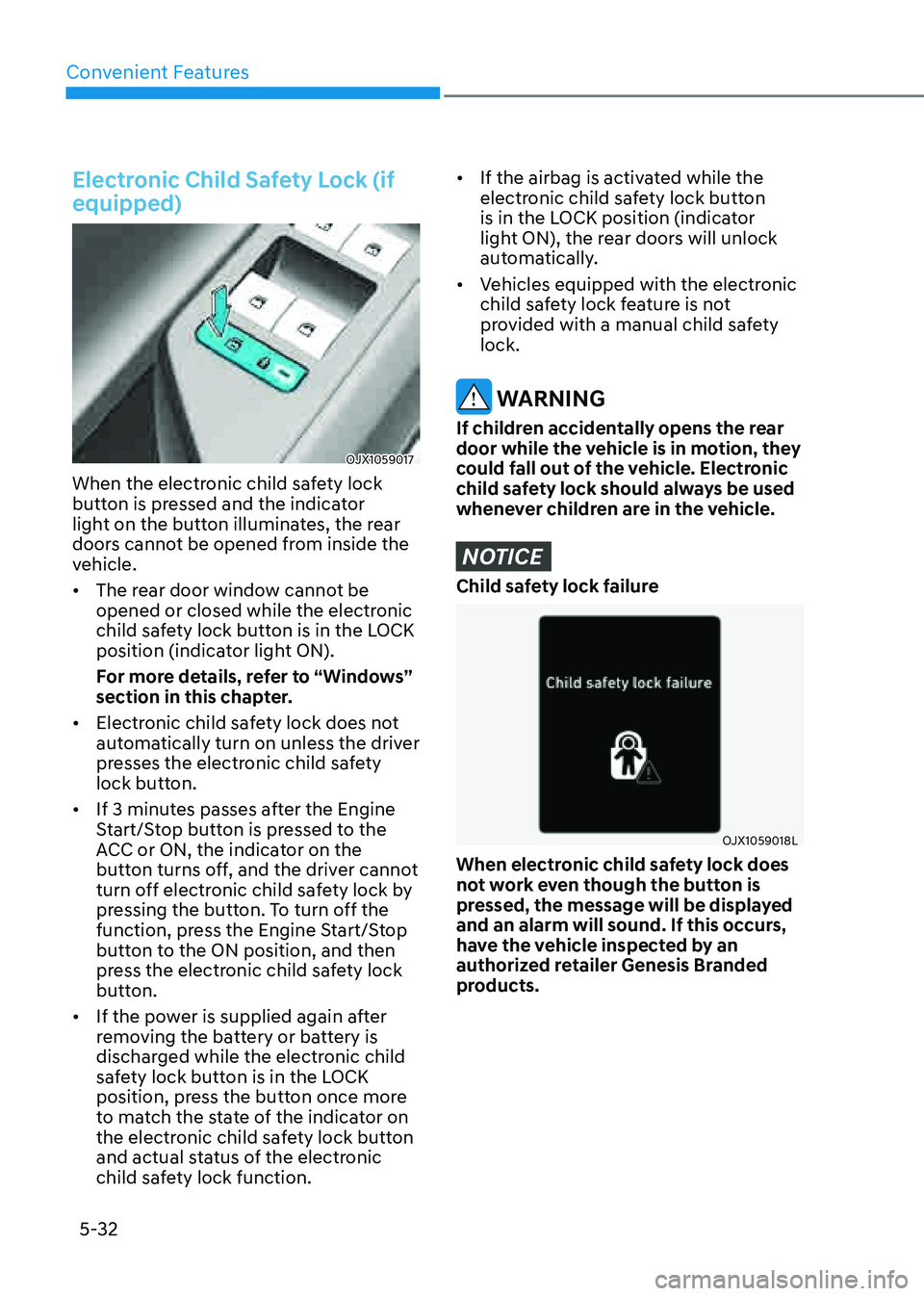
Electronic Child Safety Lock (if
equipped)
OJX1059017OJX1059017
When the electronic child safety lock
button is pressed and the indicator
light on the button illuminates, the rear
doors cannot be opened from inside the
vehicle.
• The rear door window cannot be
opened or closed while the electronic
child safety lock button is in the LOCK
position (indicator light ON).
For more details, refer to “Windows”
section in this chapter.
• Electronic child safety lock does not
automatically turn on unless the driver
presses the electronic child safety
lock button.
• If 3 minutes passes after the Engine
Start/Stop button is pressed to the
ACC or ON, the indicator on the
button turns off, and the driver cannot
turn off electronic child safety lock by
pressing the button. To turn off the
function, press the Engine Start/Stop
button to the ON position, and then
press the electronic child safety lock
button.
• If the power is supplied again after
removing the battery or battery is
discharged while the electronic child
safety lock button is in the LOCK
position, press the button once more
to match the state of the indicator on
the electronic child safety lock button
and actual status of the electronic
child safety lock function.
• If the airbag is activated while the
electronic child safety lock button
is in the LOCK position (indicator
light ON), the rear doors will unlock
automatically.
• Vehicles equipped with the electronic
child safety lock feature is not
provided with a manual child safety
lock.
WARNING
If children accidentally opens the rear
door while the vehicle is in motion, they
could fall out of the vehicle. Electronic
child safety lock should always be used
whenever children are in the vehicle.
NOTICE
Child safety lock failure
OJX1059018LOJX1059018L
When electronic child safety lock does
not work even though the button is
pressed, the message will be displayed
and an alarm will sound. If this occurs,
have the vehicle inspected by an
authorized retailer Genesis Branded
products.
Page 175 of 632

05
5-33
Safe Exit Assist (if equipped with
electronic child safety lock)
Safe Exit Assist helps prevent the rear
occupant from opening the rear door.
When an approaching vehicle from the
rear area is detected after the vehicle
stops, the rear doors will not unlock even
when the driver tries to unlock the rear
doors using the electronic child safety
lock button.
For more details, refer to “Safe Exit
Assist (SEA)” section in chapter 7.
Vehicle Auto-Shut Off
If your parked vehicle is in a garage and
engine is left on for a period of time, the
engine will turn off automatically to help
reduce fuel consumption, etc.
System setting
You can activate or deactivate Vehicle
Auto-Shut Off from the Settings menu in
the infotainment system screen. Select:
-Setup → Vehicle Settings →
Convenience → Vehicle Auto-Shut Off
Operating conditions
ODN8A059340ODN8A059340
Vehicle Auto-Shut Off timer will operate
when all the following conditions are
satisfied:
• The Engine Start/Stop button is in the
ON position or engine is running
• The gear is shifted to P (Park)
• The driver’s seat belt is unfastened
• The vehicle door is open
Deactivating conditions
Vehicle Auto-Shut Off timer will turn off
when one of the situation occur:
• ‘Vehicle Auto-Shut Off’ is deselected
from the Settings menu (However,
the feature is enabled whenever the
engine is turned on.)
• The gear is shifted to R (Reverse), D
(Drive) or N (Neutral)
• The driver’s seat belt is fastened
• The brake pedal or accelerator pedal
is depressed
System operation
The engine will turn off automatically
according to the set time.
Page 177 of 632

05
5-35
OJX1059020OJX1059020
Integrated Memory System for the
driver’s seat is provided to store and
recall the following memory settings with
a simple button operation.
• Driver’s seat position
• Steering wheel position (power
adjustment)
• Outer side view mirror position
• Instrument panel illumination
intensity
• Head-Up Display (HUD) position and
brightness (if equipped)
WARNING
Never attempt to operate the
Integrated Memory System while the
vehicle is moving.
This could result in loss of control, and
an accident causing death, serious
injury, or property damage.
Information
• If the battery is disconnected, the
memory settings will be erased.
• If Integrated Memory System does
not operate normally, have the system
inspected by an authorized retailer of
Genesis Branded products.
Storing Memory Positions
1. Shift to P (Park) while the Engine
Start/Stop button is in the ON
position.
2. Adjust the driver’s seat position, outer
side view mirror position, steering
wheel position, instrument panel
illumination intensity and head-up
display height/brightness to the
desired position.
3. Press the SET button. The system
will beep once and notify you ‘Press
button to save settings’ on the cluster
LCD display.
4. Press one of the memory buttons (1
or 2) within 4 seconds. The system
will beep twice when the memory has
been successfully stored.
5. ‘Driver 1 (or 2) settings saved’ will
appear on the cluster LCD display. The
message appears only for the driver’s
seat position memory setting.
INTEGRATED MEMORY SYSTEM
Page 178 of 632

Convenient Features
5-36
Recalling Memory Positions
1. Shift to P (Park) while the Engine
Start/Stop button is in the ON
position.
2. Press the desired memory button (1
or 2). The system will beep once, and
then the driver’s seat position, outer
side view mirror position, steering
wheel position, instrument panel
illumination intensity and head-
up display height/brightness will
automatically adjust to the stored
positions.
3. ‘Driver 1 (or 2) settings applied’ will
appear on the cluster LCD display.
Information
• If you press the SET button or the
corresponding button which the
setting is being recalled, the setting will
temporarily deactivate. If you press the
other buttons, the setting of the pressed
button will activate.
For example, if you press the SET
button or number 1 button with the
number 1 setting in operation, the
setting will temporarily deactivate. If
you press the number 2 button, the
number 2 setting will activate.
• If you adjust the seat, side view mirror,
steering wheel, instrument panel
illumination or head-up display while
recalling the stored positions, the pre-
set settings will become ineffective.
Resetting the System
Take the following procedures to reset
Integrated Memory System, when it does
not operate properly.
Resetting Integrated Memory
System
1. Stop the vehicle and open the driver’s
door with the vehicle shifted to P
(Park).
2. Adjust the driver’s seat and seatback
to the foremost position.
3. Press the SET button and push
forward the driver’s seat movement
switch over 2 seconds simultaneously.
While resetting Integrated Memory
System
1. Resetting starts with a notification
sound.
2. The driver’s seat and seatback is
adjusted to the rearward position with
the notification sound.
3. The driver’s seat and seatback is
re-adjusted to the default position
(central position) with the notification
sound.
However, in the following cases, the
resetting procedure and the notification
sound may stop.
• The memory button is pressed.
• The seat control switch is operated.
• The driving speed exceeds
2 mph (3 km/h).
• The driver’s door is closed.