2021 GENESIS GV80 pin
[x] Cancel search: pinPage 160 of 632

Convenient Features
5-18
How to delete Digital Key (Smart
Phone)
1. Turn the vehicle on with the smart key
and make sure to keep the smart key
inside the vehicle during the digital
key (smart phone) deleting process.
ORG3050223N ORG3050223N
2. From the infotainment system settings
menu, select ‘Setup → Vehicle → Digital
Key → Smartphone key → Delete’. The
‘Delete’ menu will be disabled if there
is no digital key (smart phone) saved.
3. When the digital key (smart phone) is
deleted, a message will appear on the
infotainment screen or cluster.
4. Go to ‘Initialize Digital Key’ menu
in the Digital Key App and select
the vehicle to delete the digital key
information.
What to do when user changes
smart phone or deletes app
If the driver changes his/her smart phone
or has deleted the Genesis Digital Key
App, refer to the following to set up the
Genesis Digital Key App again.Smart phone change
Follow the procedure below to use the
digital key in your new smart phone.
1. Install the Genesis Digital Key App and
log in.
2. From the infotainment system settings
menu, first delete the previous digital
key (Digital Key → Smartphone key →
Delete), and then save the digital key
again.
3. If you have shared the digital key with
others, you will need to re-share the
digital key.
Smart phone reset/App delete & reinstall/
App data delete
Follow the procedure below to use the
digital key when the smart phone was
reset, the app was deleted and then
reinstalled, or the app data was deleted.
1. Install the Genesis Digital Key App
and log in.
2. Input the PIN number for user
verification. If PIN is correct, digital
key data will be downloaded to the
user’s smart phone and you can use
the digital key without any further
registration or sharing procedure.
Smart phone operability with Digital Key
The Digital Key App may not be available
on some smart phones. Check for
available smart phone models on the
Genesis website. The smart phone NFC
antenna location guide can be confirmed
on the Genesis website or contact the
smart phone manufacturer’s customer
service center.
Page 216 of 632
Convenient Features
5 -74
OJX1050054NOJX1050054N
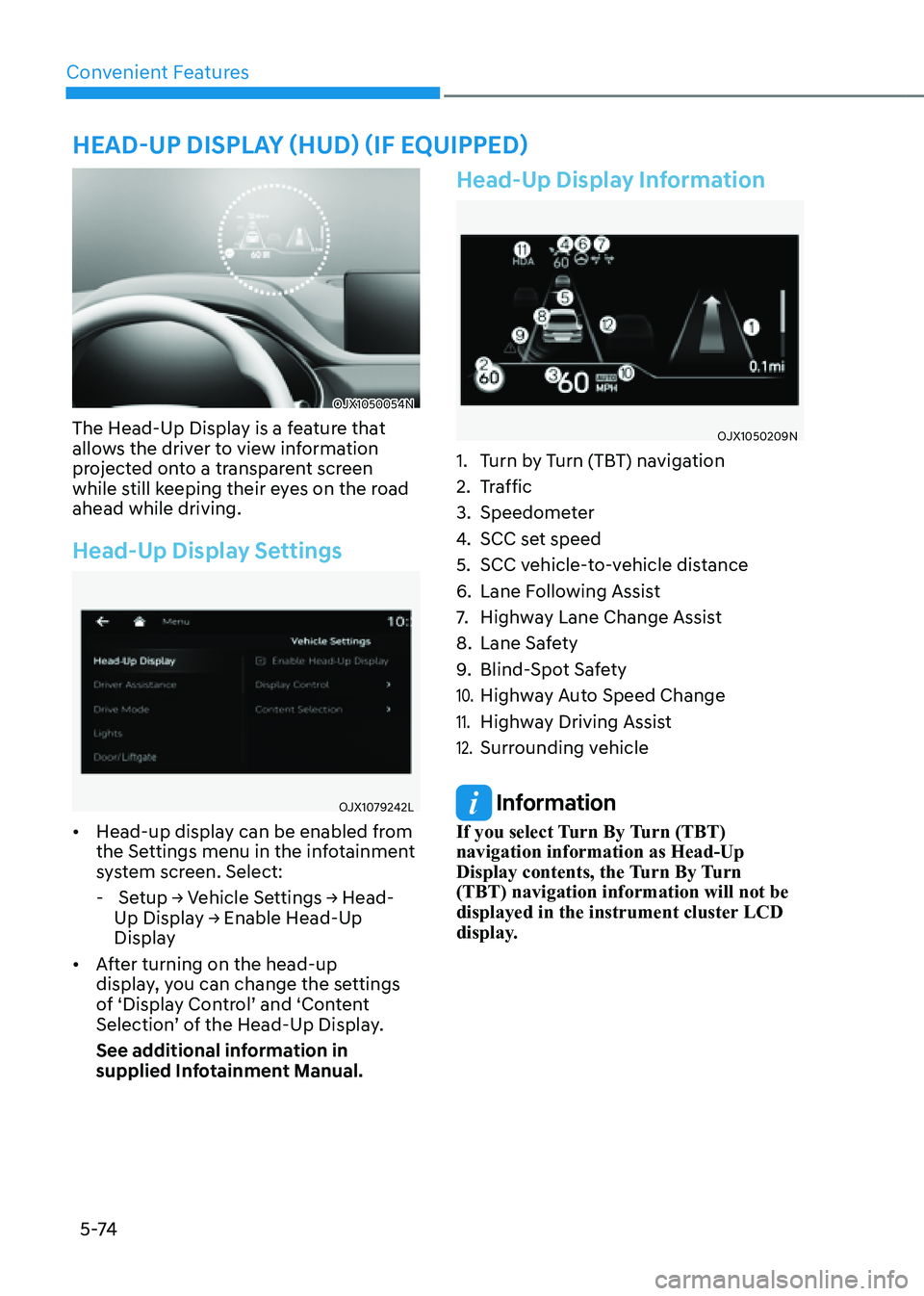
The Head-Up Display is a feature that
allows the driver to view information
projected onto a transparent screen
while still keeping their eyes on the road
ahead while driving.
Head-Up Display Settings
OJX1079242LOJX1079242L
• Head-up display can be enabled from
the Settings menu in the infotainment
system screen. Select:
- Setup → Vehicle Settings → Head-
Up Display → Enable Head-Up
Display
• After turning on the head-up
display, you can change the settings
of ‘Display Control’ and ‘Content
Selection’ of the Head-Up Display.
See additional information in
supplied Infotainment Manual.
Head-Up Display Information
OJX1050209NOJX1050209N
1. Turn by Turn (TBT) navigation
2. Traffic
3. Speedometer
4. SCC set speed
5. SCC vehicle-to-vehicle distance
6. Lane Following Assist
7. Highway Lane Change Assist
8. Lane Safety
9. Blind-Spot Safety
10. Highway Auto Speed Change
11. Highway Driving Assist
12. Surrounding vehicle
Information
If you select Turn By Turn (TBT)
navigation information as Head-Up
Display contents, the Turn By Turn
(TBT) navigation information will not be
displayed in the instrument cluster LCD
display.
HEAD-UP DISPLAY (HUD) (IF EQUIPPED)
Page 229 of 632

05
5-87
WIPERS AND WASHERS
OJX1059066OJX1059066
Front Windshield Wipers
Operates as follows when the Engine
Start/Stop button is in the ON position.
MIST :For a single wiping cycle, push
the lever upward and release. The
wipers will operate continuously
if the lever is held in this position.
OFF : Wiper is not in operation.
AUTO : The rain sensor located on the
upper end of the windshield glass
senses the amount of rainfall and
controls the wiping cycle for the
proper interval. The more it rains,
the faster the wiper operates.
When the rain stops, the wiper
stops. To vary the speed setting,
turn the speed control knob.
LO : The wiper runs at a lower speed.
HI : The wiper runs at a higher speed.
Information
If there is heavy accumulation of snow
or ice on the windshield, defrost the
windshield for about 10 minutes, or until
the snow and/or ice is removed before
using the windshield wipers to ensure
proper operation.
If you do not remove the snow and/or ice
before using the wiper and washer, it may
damage the wiper and washer system.
AUTO (Automatic) control
OJX1059073OJX1059073
The rain sensor located on the upper
end of the windshield glass senses
the amount of rainfall and controls the
wiping cycle for the proper interval.
The wiper operation time will be
automatically controlled depends on
rainfall.
When the rain stops, the wiper stops.
To vary the sensitivity setting, turn the
sensitivity control knob.
If the wiper switch is set in AUTO mode
when the Engine Start/Stop button is in
the ON position, the wiper will operate
once to perform a self-check of the
system. Set the wiper to the OFF position
when the wiper is not in use.
WARNING
To avoid personal injury from the
windshield wipers, when the engine
is running and the windshield wiper
switch is placed in the AUTO mode:
• Do not touch the upper end of the
windshield glass facing the rain
sensor.
• Do not wipe the upper end of the
windshield glass with a damp or wet
cloth.
• Do not put pressure on the
windshield glass.
Page 259 of 632
05
5-117
WARNING
Avoid electrical shocks. Do not place
your fingers or foreign objects (pin, etc.)
into a power outlet or touch the power
outlet with a wet hand.
NOTICE
To prevent damage to the power
outlets:
• Use the power outlet only when the
engine is running and remove the
accessory plug after use. Using the
accessory plug for prolonged periods
of time with the engine off could
cause the battery to discharge.
• Only use 12 volts electric accessories
which are less than 180 watts in
electric capacity.
• Adjust the air-conditioner or heater
to the lowest operating level when
using the power outlet.
• Close the cover when not in use.
• Some electronic devices can
cause electronic interference
when plugged into a vehicle’s
power outlet. These devices may
cause excessive audio static and
malfunctions in other electronic
systems or devices used in your
vehicle.
• Push the plug in as far as it will go. If
good contact is not made, the plug
may overheat and the fuse may open.
• Plug in battery equipped electrical/
electronic devices with reverse
current protection. The current
from the battery may flow into the
vehicle’s electrical/electronic system
and cause system malfunction.
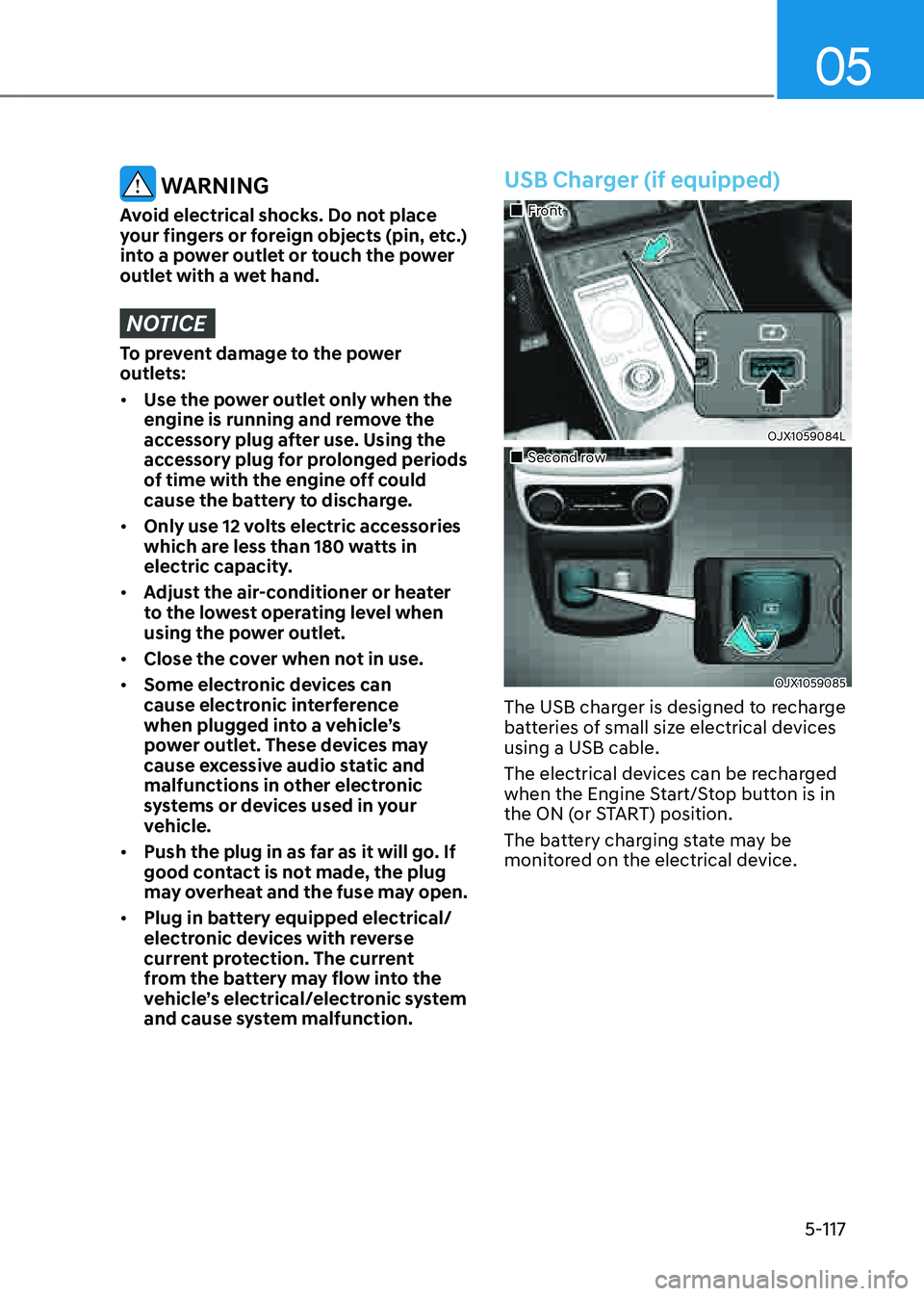
USB Charger (if equipped)
Page 267 of 632

05
5-125
Cargo Security Screen
(if equipped)
OJX1059263LOJX1059263L
Use the cargo security screen to cover
items stored in the cargo area.
Using the cargo security screen
OJX1059264LOJX1059264L
1. Pull the cargo security screen towards
the rear of the vehicle by the handle
(1).
2. Insert the guide pin (2) into the guide
(3).
Information
Pull out the cargo security screen with the
handle in the center to prevent the guide
pin from falling out of the guide.
When the cargo security screen is not in
use:
1. Pull the cargo security screen
rearward and up to release it from the
guides.
2. The cargo security screen will
automatically slide back in.
Information
The cargo security screen may not
automatically slide back in if the cargo
security screen is not fully pulled out. Pull
the cargo screen out all the way and then
slowly allow the screen to retract back in.
NOTICE
Since the cargo security screen may
be damaged or malformed, do not put
luggage on it when it is used.
WARNING
• Do not place objects on the cargo
security screen. Such objects may be
thrown about inside the vehicle and
possibly injure vehicle occupants
during an accident or when braking.
• Never allow anyone to ride in the
cargo area. It is designed for cargo
only.
• Maintain the balance of the vehicle
and locate the weight as forward as
possible.
Page 268 of 632

Convenient Features
5-126
Removing the cargo security screen
OJX1059265LOJX1059265L
1. Push one side of the cargo screen
inward to compress the spring and
release the screen from the vehicle.
2. While the spring is compressed, pull
out the cargo security screen.
3. Open the cargo tray and keep the
cargo security screen in the tray.
Removing the cargo security screen
from the cargo tray
OJX1059271LOJX1059271L
1. Pull up the screen board.
OJX1050272NOJX1050272N
2. Push in the guide pin.
OJX1059273LOJX1059273L
3. While pushing the guide pin, pull out
the cargo security screen.
Page 288 of 632

Driving Your Vehicle
6-16
CAUTION
When you start after stopping on a
steep incline, even if the gear is in
D (Drive), if you do not depress the
accelerator or brake pedal, the vehicle
may roll backwards, which can cause an
accident.
When the battery is discharged
You cannot shift gears, when the battery
is discharged.
In emergencies, do the following to shift
the gear to N (Neutral) on a level ground.
1. Connect the battery cables from
another vehicle or from a another
battery to the jump-starting terminals
inside the engine compartment.
For more details, refer to "Jump
Starting" section in chapter 8.
2. Release the Electronic Parking Brake
with the Engine Start/Stop button in
the ON position.
3. Press the Engine Start/Stop button to
the OFF position.
OJX1069010LOJX1069010L
4. Remove the cap-cover (1) and press
the button (2) while depressing the
brake pedal.
Then, the gear will change to the N
(Neutral) position. The button must
be pressed within 3 minutes after
the engine is turned off. The button
(2) operates only for 20 seconds to
change the gear between P (Park) and
N (Neutral) from the time when the
button (2) is first pressed.
Information
In situations when the gear needs to be
shifted from P (Park) to N (Neutral) when
the Engine Start/Stop button is in the OFF
position, refer to step 4.
Page 289 of 632

06
6-17
Shift-lock system
For your safety, the automatic
transmission has a shift-lock system
which prevents shifting the transmission
from P (Park) into R (Reverse) or D (Drive)
unless the brake pedal is depressed.
To shift from P (Park) or N (Neutral) into R
(Reverse) or D (Drive):
1. Depress and hold the brake pedal.
2. Start the engine.
3. Shift gear while depressing the brake
pedal.
Parking
Always come to a complete stop and
continue to depress the brake pedal.
Shift the gear to P (Park), apply the
parking brake, and press the Engine
Start/Stop button to the OFF position.
Take the Key with you when leaving the
vehicle.
WARNING
• When you stay in the vehicle with
the engine running, be careful not
to depress the accelerator pedal for
a long period of time. The engine or
exhaust system may overheat and
start a fire.
• The exhaust gas and the exhaust
system are very hot. Keep away from
the exhaust system components.
• Do not stop or park over flammable
materials, such as dry grass, paper
or leaves. They may ignite and cause
a fire.
LCD Display Messages (Cluster)
Press brake pedal to change gear
OJX1069015LOJX1069015L
This message is displayed when the
brake pedal is not depressed while
shifting the gear.
Depress the brake pedal and then shift
the gear.
Shift to P after stopping
OJX1069016LOJX1069016L
This message is displayed when the gear
is shifted to P (Park) while the vehicle is
moving.
Stop the vehicle before shifting to P
(Park).