2021 GENESIS G90 Mechanical key
[x] Cancel search: Mechanical keyPage 107 of 538
3-6
Convenient features of your vehicle
Mechanical key
If the Smart Key does not operate
normally, you can lock or unlock the
door by using the mechanical key.
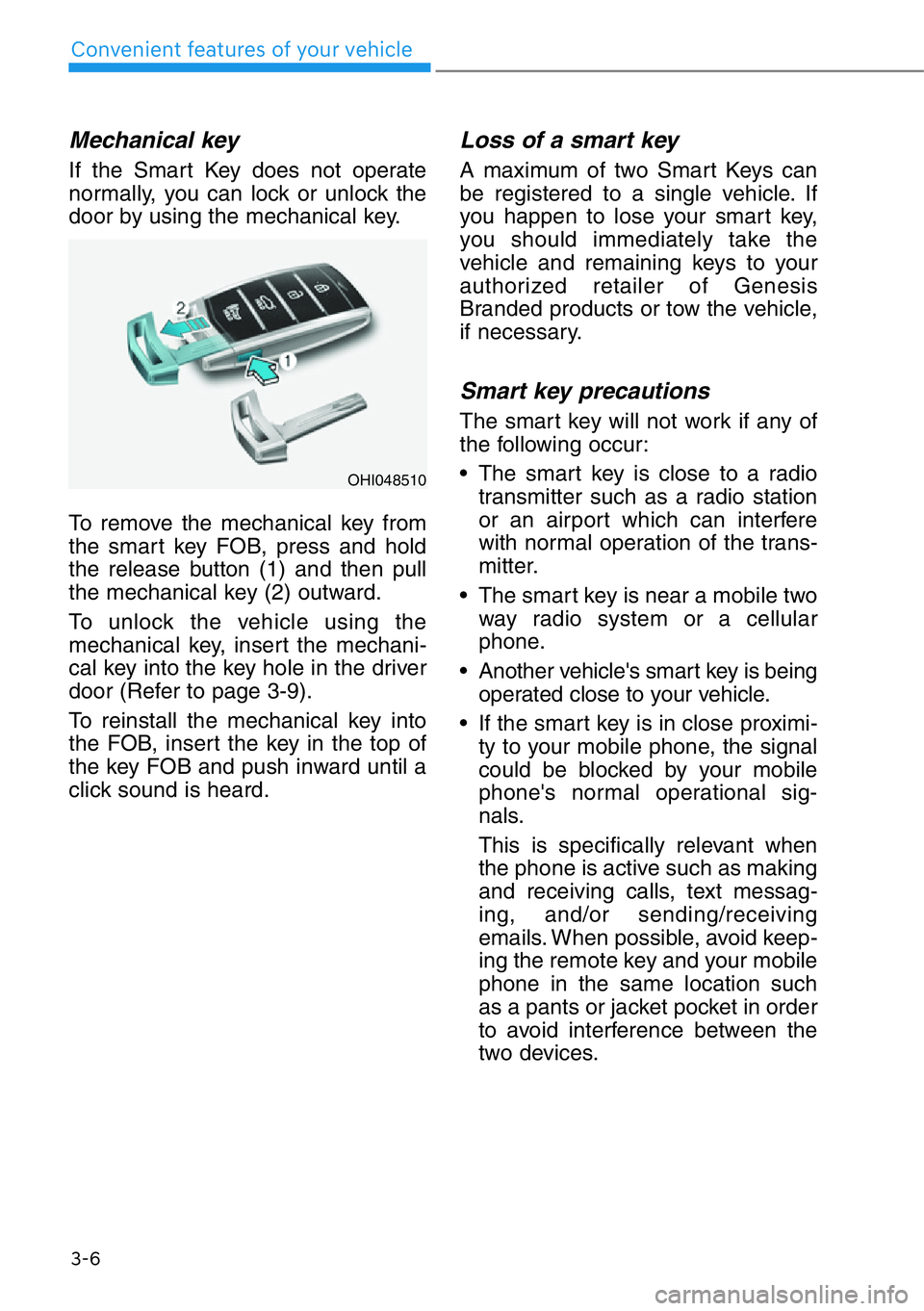
To remove the mechanical key from
the smart key FOB, press and hold
the release button (1) and then pull
the mechanical key (2) outward.
To unlock the vehicle using the
mechanical key, insert the mechani-
cal key into the key hole in the driver
door (Refer to page 3-9).
To reinstall the mechanical key into
the FOB, insert the key in the top of
the key FOB and push inward until a
click sound is heard.
Loss of a smart key
A maximum of two Smart Keys can
be registered to a single vehicle. If
you happen to lose your smart key,
you should immediately take the
vehicle and remaining keys to your
authorized retailer of Genesis
Branded products or tow the vehicle,
if necessary.
Smart key precautions
The smart key will not work if any of
the following occur:
• The smart key is close to a radio
transmitter such as a radio station
or an airport which can interfere
with normal operation of the trans-
mitter.
• The smart key is near a mobile two
way radio system or a cellular
phone.
• Another vehicle's smart key is being
operated close to your vehicle.
• If the smart key is in close proximi-
ty to your mobile phone, the signal
could be blocked by your mobile
phone's normal operational sig-
nals.
This is specifically relevant when
the phone is active such as making
and receiving calls, text messag-
ing, and/or sending/receiving
emails. When possible, avoid keep-
ing the remote key and your mobile
phone in the same location such
as a pants or jacket pocket in order
to avoid interference between the
two devices.
OHI048510
Page 108 of 538

3-7
03
Keep the smart key away from
electromagnetic materials that
blocks electromagnetic waves to
the key surface.
Information
This device complies with Part 15 of
the FCC rules.
Operation is subject to the following
three conditions:
1. This device may not cause harmful
interference, and
2. This device must accept any inter-
ference received, including interfer-
ence that may cause undesired
operation.
3. Changes or modifications not express-
ly approved by the party responsible
for compliance could void the user's
authority to operate the device.
Restrictions in handling keys
When leaving keys with parking lot
and valet attendants, the following
procedures will ensure your vehicle’s
glove box compartment can only be
opened with the mechanical key.
To lock:
1. Remove the mechanical key from
the Smart Key.
2. Lock the glove box using the
mechanical key (1).
3. Leave the smart key with the
attendant and keep the mechani-
cal key with you.
The Smart Key can only be used to
start the engine and operate door
locks.
To unlock:
Open the glove box with the mechan-
ical key.
i
NOTICE
OHI048569
Page 109 of 538

3-8
Convenient features of your vehicle
Battery replacement
If the Smart Key is not working prop-
erly, try replacing the battery with a
new one.
Battery Type : CR2032
To replace the battery:
1. Remove the mechanical key.
2. Use a slim tool to pry open the
rear cover of the smart key.
3. Remove the old battery and insert
the new battery. Make sure the
battery position is correct.
4. Reinstall the rear cover of the
smart key.
Information
An inappropriately disposed
battery can be harmful to the
environment and human
health. Dispose of the battery
according to your local
law(s) or regulations.
Immobilizer System
The immobilizer system protects
your vehicle from theft. If an improp-
erly coded key (or other device) is
used, the engine's fuel system is dis-
abled.
When the Engine Start/Stop button
is in the ON position, the immobilizer
system indicator should come on
briefly, then go off. If the indicator
starts to blink, the system does not
recognize the coding of the Smart
Key.
Press the Engine Start/Stop button
to the OFF position, then press the
Engine Start/Stop button to the ON
position again.
The system may not recognize your
key’s coding if another immobilizer
key or other metal object (i.e., key
chain) is near the key. The engine
may not start because the metal may
interrupt the transponder signal from
transmitting normally.
If the system repeatedly does not
recognize the coding of the key, con-
tact an authorized retailer of Genesis
Branded products.
Do not attempt to alter this system or
add other devices to it. Electrical
problems could result that may make
your vehicle inoperable.
i
OHI038180L
Page 110 of 538

The transponder in your key is an
important part of the immobilizer
system. It is designed to give
years of trouble-free service, how-
ever you should avoid exposure to
moisture, static electricity and
rough handling. Immobilizer sys-
tem malfunction could occur.
Information
This device complies with Part 15 of
the FCC rules.
Operation is subject to the following
three conditions:
1. This device may not cause harmful
interference, and
2. This device must accept any inter-
ference received, including interfer-
ence that may cause undesired
operation.
3. Changes or modifications not
expressly approved by the party
responsible for compliance could
void the user’s authority to operate
the device.
Operating Door Locks from
Outside the Vehicle
Mechanical key
To remove the cover:
1. Pull out the door handle.
2. Press the lock located at the bot-
tom of the cover with a key or flat-
blade screwdriver (1).
3. Push out the cover (2) while
pressing the lock.
Be careful not to damage the
cover while removing it or mis-
place it after removing it.
After removing the cover, turn the
key toward the rear of the vehicle to
unlock and toward the front of the
vehicle to lock (3).
Once the doors are unlocked, they
may be opened by pulling the door
handle.
When closing the door, push the
door by hand. Make sure that doors
are closed securely.
NOTICE
i
NOTICE
DOOR LOCKS
3-9
03
In order to prevent theft of your
vehicle, do not leave spare keys
anywhere in your vehicle. Your
immobilizer password is a cus-
tomer unique password and
should be kept confidential.
WARNING
OHI048010
Page 112 of 538

3-11
03
Operating Door Locks from
Inside the Vehicle
With the door lock button
• To unlock a door, pull the door lock
button (1) to the "Unlock" position.
The red mark (2) on the door lock
button will be visible.
• To lock a door, push the door lock
button (1) to the "Lock" position. If
the door is locked properly, the red
mark (2) on the door lock button
will not be visible.
• To open a door, pull the door han-
dle (3) outward.
• If the inner door handle of the dri-
ver's (or front passenger's) door is
pulled when the door lock button is
in the lock position, the button is
unlocked and door opens.• The doors cannot be locked if the
smart key is in the vehicle and any
door is open.
Information
If a power door lock ever fails to func-
tion while you are in the vehicle try
one or more of the following tech-
niques to exit:
• Operate the door unlock feature
repeatedly (both electronic and man-
ual) while simultaneously pulling on
the door handle.
• Operate the other door locks and
handles, front and rear.
• Lower a front window and use the
mechanical key to unlock the door
from outside.
Information
When the vehicle's battery run out
and you leave the vehicle, make sure
all the doors are locked. You can lock
the driver's door with a mechanical
key and the rest of the doors with the
lock button above the door inside han-
dle.
i
i
To reduce the risk of injury:
• Before closing the door, check
there are no obstructions in
the path of the door.
• Keep your fingers away from
the edge of the door or they
may become trapped when
the power door latch oper-
ates.
CAUTION
OHI048012
Unlock
Lock
Page 116 of 538

This system helps to protect your
vehicle and valuables. The horn will
sound and the hazard warning lights
will blink continuously if any of the
following occur:
- A door is opened without using the
smart key.
- The trunk is opened without using
the smart key.
- The engine hood is opened.
The alarm continues for 30 seconds,
then the system resets. To turn off
the alarm, unlock the doors with the
smart key.
The Theft Alarm System automati-
cally sets 30 seconds after you lock
the doors and the trunk. For the sys-
tem to activate, you must lock the
doors and the trunk from outside the
vehicle with the smart key or by
pressing the button on the outside of
the door handles with the smart key
in your possession.
The hazard warning lights will blink
and the chime will sound once to
indicate the system is armed.
Once the security system is set,
opening any door, the trunk, or the
hood without using the smart key will
cause the alarm to activate.
The Theft Alarm System will not set if
the hood, the trunk, or any door is
not fully closed. If the system will not
set, check the hood, the trunk, or the
doors are fully closed.
Do not attempt to alter this system or
add other devices to it.Information
• Do not lock the doors until all pas-
sengers have left the vehicle. If the
remaining passenger leaves the
vehicle when the system is armed,
the alarm will be activated.
• If the vehicle is not disarmed with
the smart key, open the doors by
using the mechanical key or start
the engine by directly pressing the
Engine Start/Stop button with the
smart key.
• When the system is disarmed but a
door or trunk is not opened within 30
seconds, the system will be rearmed.
i
THEFT-ALARM SYSTEM
3-15
03
Page 146 of 538
3-45
03
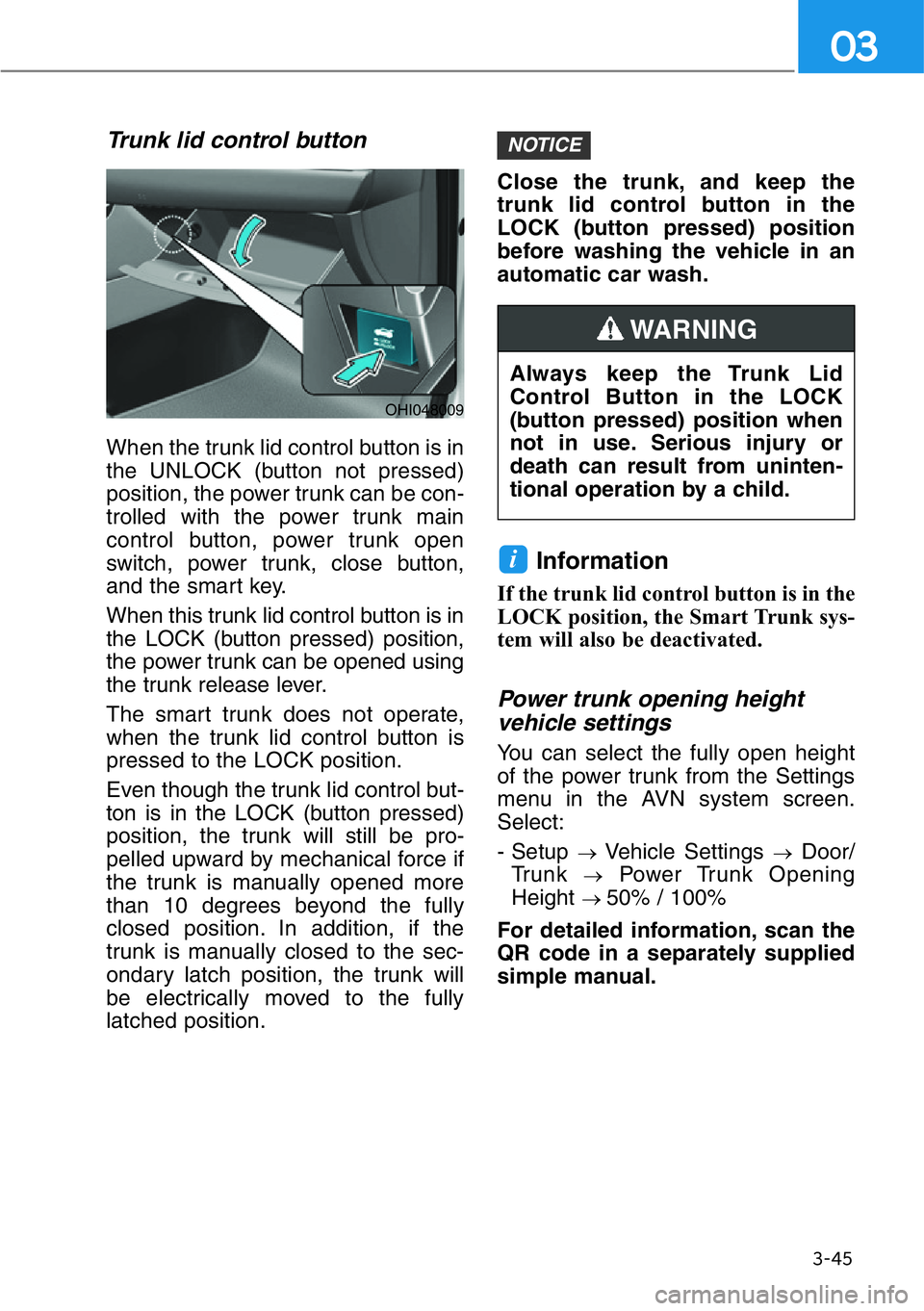
Trunk lid control button
When the trunk lid control button is in
the UNLOCK (button not pressed)
position, the power trunk can be con-
trolled with the power trunk main
control button, power trunk open
switch, power trunk, close button,
and the smart key.
When this trunk lid control button is in
the LOCK (button pressed) position,
the power trunk can be opened using
the trunk release lever.
The smart trunk does not operate,
when the trunk lid control button is
pressed to the LOCK position.
Even though the trunk lid control but-
ton is in the LOCK (button pressed)
position, the trunk will still be pro-
pelled upward by mechanical force if
the trunk is manually opened more
than 10 degrees beyond the fully
closed position. In addition, if the
trunk is manually closed to the sec-
ondary latch position, the trunk will
be electrically moved to the fully
latched position.Close the trunk, and keep the
trunk lid control button in the
LOCK (button pressed) position
before washing the vehicle in an
automatic car wash.
Information
If the trunk lid control button is in the
LOCK position, the Smart Trunk sys-
tem will also be deactivated.
Power trunk opening height
vehicle settings
You can select the fully open height
of the power trunk from the Settings
menu in the AVN system screen.
Select:
- Setup
→Vehicle Settings →Door/
Trunk
→Power Trunk Opening
Height
→ 50% / 100%
For detailed information, scan the
QR code in a separately supplied
simple manual.
i
NOTICE
OHI048009
Always keep the Trunk Lid
Control Button in the LOCK
(button pressed) position when
not in use. Serious injury or
death can result from uninten-
tional operation by a child.
WARNING
Page 235 of 538

3-134
Convenient features of your vehicle
Glove Box
The glove box can be locked and
unlocked with the mechanical key
(1).
To open:
Pull the lever (2).
Sunglass Holder
To open:
Push and release the cover and the
holder will slowly open. Place your
sunglasses in the compartment door
with the lenses facing out.
To close:
Push back into position.
Make sure the sunglass holder is
closed while driving. ALWAYS close the glove box
after use.
An open glove box can cause
serious injury to the passenger
in an accident, even if the pas-
senger is wearing a seat belt.
WARNING
• Do not keep objects except
sunglasses inside the sun-
glass holder. Such objects can
be thrown from the holder in
the event of a sudden stop or
an accident, possibly injuring
the passengers in the vehicle.
• Do not open the sunglass
holder while the vehicle is
moving. The rear view mirror of
the vehicle can be blocked by
an open sunglass holder.
• Do not put the glasses forcibly
into a sunglass holder. It may
cause personal injury if you try
to open it forcibly when the
glasses are jammed.
WARNING
OHI048435OHI048436