2021 FORD TRANSIT settings
[x] Cancel search: settingsPage 122 of 509
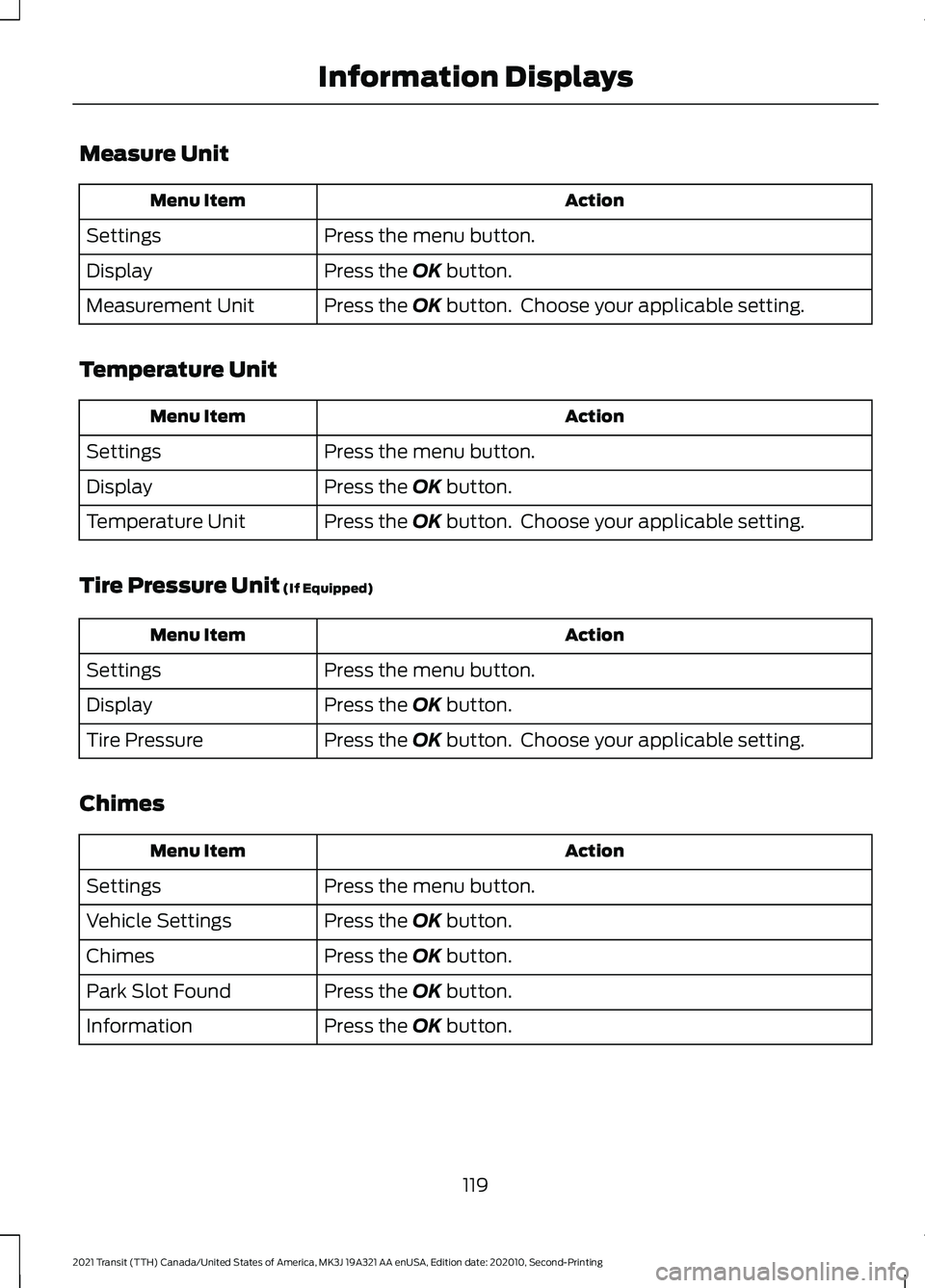
Measure Unit
Action
Menu Item
Press the menu button.
Settings
Press the OK button.
Display
Press the
OK button. Choose your applicable setting.
Measurement Unit
Temperature Unit Action
Menu Item
Press the menu button.
Settings
Press the
OK button.
Display
Press the
OK button. Choose your applicable setting.
Temperature Unit
Tire Pressure Unit
(If Equipped) Action
Menu Item
Press the menu button.
Settings
Press the
OK button.
Display
Press the
OK button. Choose your applicable setting.
Tire Pressure
Chimes Action
Menu Item
Press the menu button.
Settings
Press the
OK button.
Vehicle Settings
Press the
OK button.
Chimes
Press the
OK button.
Park Slot Found
Press the
OK button.
Information
119
2021 Transit (TTH) Canada/United States of America, MK3J 19A321 AA enUSA, Edition date: 202010, Second-Printing Information Displays
Page 123 of 509

WHAT IS REMOTE START
The system allows you to remotely start
your vehicle and therefore to heat or cool
the interior to a predetermined
temperature.
REMOTE START LIMITATIONS
Remote start does not work if:
•
The alarm horn is sounding.
• The hood is open.
• The transmission is not in park (P).
• Remote start is not enabled.
• The ignition is on.
Note: Do not use remote start if your fuel
level is low.
ENABLING REMOTE START
1. Using the information display controls on the steering wheel, select Settings.
2. Select Vehicle Settings.
3. Select
Remote Start.
4. Switch
System on.
Note: To use remote start, make sure that
the modem is enabled. See
Enabling and
Disabling the Modem (page 371).
REMOTELY STARTING AND
STOPPING THE VEHICLE WARNING: Do not start the engine
in a closed garage or in other enclosed
areas. Exhaust fumes are toxic. Always
open the garage door before you start
the engine. Failure to follow this
instruction could result in personal injury
or death. Use the FordPass App to start the vehicle.
Note:
The turn signal lamps flash twice.
Note: The parking lamps turn on when the
vehicle is running.
Note: The horn sounds if the system fails
to start.
Note: All other vehicle systems remain off
when you have remotely started the vehicle.
Note: You may have to wait a short period
of time before remotely starting the vehicle
after the vehicle stops running.
Note: The vehicle remains secured when
you have remotely started it. A valid key
must be inside your vehicle to switch the
ignition on and drive your vehicle.
Note: A maximum of two remote starts are
allowed. After that you need to turn the
ignition on and off before you can use
remote start again.
Use the FordPass App to switch the vehicle
off.
REMOTE START SETTINGS
Climate Control Settings
1. Using the information display controls on the steering wheel, select Settings.
2. Select Vehicle Settings.
3. Select
Remote Start.
4. Select
Climate Control.
5. Select
Auto or Last Settings.
Note: If you select
Auto, the system
attempts to heat or cool the interior to 72°F
(22°C)
.
Note: If you select
Last Settings, the
system remembers the last used settings.
Note: You cannot adjust the climate control
settings when you have remotely started
the vehicle.
120
2021 Transit (TTH) Canada/United States of America, MK3J 19A321 AA enUSA, Edition date: 202010, Second-Printing Remote Start
Page 124 of 509

Note:
When you switch the ignition on, the
climate control system returns to the last
used settings.
Heated Seat Settings
1. Using the information display controls on the steering wheel, select Settings.
2. Select Vehicle Settings.
3. Select
Remote Start.
4. Select
Seats.
5. Select
Auto or Off.
Note: If you switch the heated seat settings
to
Auto, the heated seats turn on during
cold weather.
Note: You cannot adjust the heated seat
settings when you have remotely started
the vehicle.
Setting the Remote Start Duration
You can set a duration for Remote Start
to run.
1. Using the information display controls on the steering wheel, select Settings.
2. Select
Vehicle Settings.
3. Select
Remote Start.
4. Select
Duration.
121
2021 Transit (TTH) Canada/United States of America, MK3J 19A321 AA enUSA, Edition date: 202010, Second-Printing Remote Start
Page 126 of 509

Setting the Temperature
Turn the temperature control
counterclockwise for cooler temperature
settings.
Turn the temperature control clockwise
for warmer temperature settings.
HINTS ON CONTROLLING THE
INTERIOR CLIMATE
General Hints
Do not place objects under the front seats
as this may interfere with directing air to
the rear seats.
Remove any snow, ice or leaves from the
air intake area at the base of the
windshield.
Note:
You may feel a small amount of air
from the footwell air vents regardless of the
air distribution setting.
Note: To reduce humidity build-up inside
your vehicle, do not drive with the system
switched off or with recirculated air always
switched on. Note:
To reduce fogging of the windshield
during humid weather conditions, direct air
to the windshield air vents.
Note: Prolonged use of recirculated air may
cause the windows to fog up.
Note: Use air conditioning with recirculated
air to improve cooling performance and
efficiency.
Quickly Heating the Interior
• Select the highest blower motor speed.
• Select the highest temperature.
• Direct air to the footwell air vents.
Recommended Settings for
Heating
• Select a medium blower motor speed.
• Select the required temperature.
• Direct air to the footwell and
windshield air vents.
Quickly Cooling the Interior
• Select maximum cooling.
Note: To improve the time to reach a
comfortable temperature in hot weather,
drive with the windows open until you feel
cold air through the air vents.
Recommended Settings for
Cooling
• Select a medium blower motor speed.
• Select the required temperature.
• Direct air to the instrument panel air
vents.
• Press A/C.
Defogging the Side Windows in
Cold Weather
• Select maximum defrost.
123
2021 Transit (TTH) Canada/United States of America, MK3J 19A321 AA enUSA, Edition date: 202010, Second-Printing Climate ControlE244106
Page 139 of 509

WHAT IS THE REAR
OCCUPANT ALERT SYSTEM
The rear occupant alert system monitors
vehicle conditions and notifies you to check
for rear seat occupants when you switch
the ignition off.
HOW DOES THE REAR
OCCUPANT ALERT SYSTEM
WORK
The system monitors when rear doors have
been opened and closed to indicate the
potential presence of an occupant in the
rear seat.
A message displays in the information and
entertainment display screen and an
audible warning sounds when you switch
the ignition off after any of the following
conditions have been met:
•
A rear door is opened or closed while
the ignition is on.
• You switch the ignition on within 15
minutes of a rear door opening and
closing.
• You switch the ignition on within 15
minutes of the alert having displayed
or sounded.
REAR OCCUPANT ALERT
SYSTEM PRECAUTIONS WARNING: On hot days, the
temperature inside the vehicle can rise
very quickly. Exposure of people or
animals to these high temperatures for
even a short time can cause death or
serious heat related injuries, including
brain damage. Small children are
particularly at risk. WARNING:
Do not leave children
or pets unattended in your vehicle.
Failure to follow this instruction could
result in personal injury or death.
REAR OCCUPANT ALERT
SYSTEM LIMITATIONS
The system does not detect the presence
of objects or passengers in the rear seat.
It monitors when rear doors are opened
and closed.
Note: It is possible to receive an alert when
there is no rear seat occupant, but alert
conditions are met.
Note: It is possible to receive no alert when
there is an occupant in the rear seat, if alert
conditions are not met. For example, if a rear
seat occupant does not enter the vehicle
through a rear door.
Note: The audible warning does not sound
when the front door is opened before you
switch the ignition off.
SWITCHING REAR OCCUPANT
ALERT SYSTEM ON AND OFF Press the button on the audio
unit.
1. Using the controls on the audio unit, select
Settings.
2. Switch Rear Occupant Alert on or off.
Semiannual Reminder
(If Equipped)
When you switch the system off, a
message appears every six months as a
reminder that the system is off. You can
switch the system back on or leave it off.
136
2021 Transit (TTH) Canada/United States of America, MK3J 19A321 AA enUSA, Edition date: 202010, Second-Printing Rear Occupant Alert System
(If Equipped)
Page 140 of 509

SWITCHING REAR OCCUPANT
ALERT SYSTEM ON AND OFF -
VEHICLES WITH: SYNC 3
1. Press Settings on the touchscreen.
2. Press
Vehicle.
3. Switch
Rear Occupant Alert on or off.
Note: The default setting is on.
Note: Performing a master reset causes the
system to switch on again.
Semiannual Reminder
(If Equipped)
When you switch the system off, a
message appears every six months as a
reminder that the system is off. You can
switch the system back on or leave it off.
REAR OCCUPANT ALERT
SYSTEM INDICATORS -
VEHICLES WITH: SYNC Message
Check rear seats for occupants.
Displays when you switch the vehicle off
after the alert conditions are met. The message displays for a short
period of time. Press the
OK
button to acknowledge and
remove some messages from the
information display. REAR OCCUPANT ALERT
SYSTEM INDICATORS -
VEHICLES WITH: SYNC 3
Message
Check rear seats for occupants.
Displays when you switch your vehicle off
after the alert conditions are met.
The message displays for a short period of
time. Press
Close to acknowledge and
remove the message.
Note: Depending on your SYNC version, the
graphic may look different from what you
see here.
REAR OCCUPANT ALERT
SYSTEM AUDIBLE WARNINGS
Sounds when you switch your vehicle off
after the alert conditions are met.
The warning sounds for a short period of
time.
137
2021 Transit (TTH) Canada/United States of America, MK3J 19A321 AA enUSA, Edition date: 202010, Second-Printing Rear Occupant Alert System
(If Equipped)E281480 E350472
Page 172 of 509

Maintenance and Modifications
The suspension and steering systems on
your vehicle have been designed and
tested to provide predictable performance
whether loaded or empty and durable load
carrying capability. For this reason, we
strongly recommend that you do not make
modifications such as adding or removing
parts (such as lowering kits or stabilizer
bars) or by using replacement parts not
equivalent to the original factory
equipment.
Any modifications to a vehicle that raise
the center of gravity can make it more likely
the vehicle will rollover as a result of a loss
of control. We strongly recommend that
caution be used with any vehicle equipped
with a high load or device (such as ladder
or luggage racks).
Failure to maintain your vehicle properly
could void the warranty, increase your
repair cost, reduce vehicle performance
and operational capabilities and adversely
affect driver and passenger safety.
Frequent inspection of vehicle chassis
components is recommended if the vehicle
is subjected to off-highway usage.
All-Wheel Drive Gauge
This feature shows how the engine power
is split between the front and rear axles in
real time.
1. Using the information display controls
on the steering wheel, select Settings.
2. Select Information.
3. Select
Intelligent AWD.
All-Wheel Drive Information Messages Description
Message
The system is temporarily locked. This could be due to the
system increasing its capacity in order to improve perform-
ance.
AWD Temporarily Locked
The system temporarily turns off. This could be due to the
system overheating. Stop your vehicle as soon as it is safe
to do so and allow the system to cool.
AWD Temporarily
Disabled
The system resumes normal function.
AWD Restored
The system has malfunctioned. Have your vehicle checked
as soon as possible.
AWD Malfunction Service
Required
The system temporarily turns off to protect itself from over-
heating or if you are using a mismatched tire.
AWD OFF
169
2021 Transit (TTH) Canada/United States of America, MK3J 19A321 AA enUSA, Edition date: 202010, Second-Printing All-Wheel Drive
Page 198 of 509

Active guidelines.
A
Centerline.
B
Fixed guideline: Green zone.
C
Fixed guideline: Yellow zone.
D
Fixed guideline: Red zone.
E
Rear bumper.
F
If the vehicle battery is disconnected, the
guidelines are not fully functional directly
after the battery is reconnected. The
guidelines become fully functional after
you drive your vehicle as straight as
possible for five minutes at a minimum
speed of 31.1 mph (50 km/h). The system uses three types of guidelines
to help you see what is behind your vehicle:
•
Active guidelines show the intended
path of your vehicle when reversing.
• The centerline helps align the center
of your vehicle with a trailer.
• Fixed guidelenes show the actual path
of your vehicle when reversing in a
straight line.This can be helpful when
backing into a parking space or aligning
your vehicle with another object.
Active guidelines are only available with
fixed guidelines. To use active guidelines,
turn the steering wheel to point the
guidelines toward an intended path. If you
change the steering wheel position when
driving in reverse (R), your vehicle might
deviate from the original intended path.
The fixed and active guidelines fade in and
out depending on the steering wheel
position. When the steering wheel position
is straight the active guidelines are not
visible. Objects in the red zone are closest
to your vehicle and objects in the green
zone are further from your vehicle.
Note: Guidelines are only available when
the transmission is in reverse (R).
System Settings
You can adjust the camera settings using
the vehicle settings menu.
See Settings
(page 427).
Manual Zoom WARNING:
When manual zoom is
on, the full area behind your vehicle may
not show. Be aware of your surroundings
when using the manual zoom feature.
Manual zoom is only available when you
shift the transmission into reverse (R).
195
2021 Transit (TTH) Canada/United States of America, MK3J 19A321 AA enUSA, Edition date: 202010, Second-Printing Parking AidsABCD
F
E
E142436