2021 FORD TRANSIT traction control
[x] Cancel search: traction controlPage 185 of 509

Side-Wind Stabilization
The system applies the brakes on one side
of your vehicle to reduce the effect of a
sudden side-wind gust on your vehicle's
path. When the system turns on, the
stability and traction control light flashes,
and a message may appear in the
information display. You may notice a
slight deceleration and may still need to
make a steering correction to maintain the
intended vehicle path. The system does
not turn on for a continuous side-wind or
during turns.
Traction Control
The system enhances your vehicle's ability
to maintain traction of the wheels by
detecting and controlling wheel spin. See
Using Traction Control (page 180). Vehicle without stability control
skidding off its intended route.
A
Vehicle with stability control
maintaining control on a slippery
surface.
B USING STABILITY CONTROL
The system automatically turns on each
time you switch the ignition on.
You cannot switch the stability control and
roll stability control systems off, but when
you shift into reverse (R), the systems turn
off.
You can switch the traction control system
off or on. See
Using Traction Control
(page 180).
182
2021 Transit (TTH) Canada/United States of America, MK3J 19A321 AA enUSA, Edition date: 202010, Second-Printing Stability ControlE72903
Page 192 of 509

Front Parking Aid Information Messages
Description
Message
The system has malfunctioned. Have your vehicle checked
as soon as possible.
Park Aid Fault
The system has malfunctioned. Have your vehicle checked
as soon as possible.
Check Park Aid
The system has malfunctioned. Have your vehicle checked
as soon as possible.
Check Front Park Aid
A sensor is blocked or the system has malfunctioned.
Clean the bumper or remove any obstruction. If the
message continues to appear, have your vehicle checked
as soon as possible.
Front Park Aid Not Available
Sensor Blocked See Manual
SIDE SENSING SYSTEM WARNING: The system may not
detect objects with surfaces that absorb
reflection. Always drive with due care
and attention. Failure to take care may
result in a crash. WARNING:
The system may not
detect small or moving objects,
particularly those close to the ground. WARNING:
To help avoid personal
injury, always use caution when in
reverse (R) and when using the sensing
system. WARNING:
The parking aid system
can only assist you to detect objects
when your vehicle is moving at parking
speeds. To help avoid personal injury you
must take care when using the parking
aid system. The system uses the front and rear
outermost parking aid sensors to detect
objects that are near to the sides of your
vehicle. The system displays them on a
virtual map in the information display as
your vehicle moves past them.
The sensors are on the front and rear
bumpers.
Note:
Keep the sensors free from snow, ice
and large accumulations of dirt.
Note: Do not cover up the sensors.
Note: Do not clean the sensors with sharp
objects.
Note: If your vehicle sustains damage
leaving the sensors misaligned, this may
cause inaccurate measurements or false
alerts.
The system may not function if:
• You switch the ignition on, off and back
on within a few seconds.
• Your vehicle remains stationary for over
two minutes.
• The anti-lock brake system activates.
• The traction control system activates.
Note: If you switch traction control off, the
side sensing system also turns off.
189
2021 Transit (TTH) Canada/United States of America, MK3J 19A321 AA enUSA, Edition date: 202010, Second-Printing Parking Aids
Page 195 of 509

4. Follow the instructions on the
information display.
Note: After the system drives your vehicle
to a position where you can exit the parking
space in a forward movement, a message
appears instructing you to take full control
of your vehicle.
Canceling Active Park Assist
To cancel parking assistance at any time,
press the active park assist button or turn
the steering wheel. Note:
It also cancels when your vehicle
exceeds 6 mph (9 km/h).
Brake System Intervention
When active park assist is controlling the
steering, it may under certain conditions
apply the brakes to slow or stop your
vehicle.
Note: This could cause the parking
assistance to cancel.
Active Park Assist Troubleshooting Possible Cause
Symptom
You may have switched traction control off.
The system does not search for
a parking space.
The transmission is in reverse (R). Your vehicle must
be moving forward to be able to detect a parking space.
The sensors may be blocked. For example, snow, ice
or large accumulations of dirt. Blocked sensors can
affect how the system functions.
The system does not offer a
parking space.
The sensors in the front or rear bumper could be
damaged.
There is not enough room in the parking space for your
vehicle to safely park.
There is not enough space for the parking maneuver on
the opposite side of the parking space.
The parking space is more than
5 ft (1.5 m) or less than
2 ft (0.5 m) away.
The vehicle speed is greater than
22 mph (35 km/h)
for parallel parking or greater than 19 mph (30 km/h)
for perpendicular parking.
You recently disconnected or replaced the battery. After
you reconnect the battery you must drive your vehicle
on a straight road for a short period of time.
An irregular curb along the parking space prevents the
system from correctly aligning your vehicle.
The system does not correctly
position your vehicle in a
parking space.
192
2021 Transit (TTH) Canada/United States of America, MK3J 19A321 AA enUSA, Edition date: 202010, Second-Printing Parking Aids
Page 205 of 509

The system may apply the brakes to slow
your vehicle to the new set speed. The set
speed continuously displays in the
information display when the system is
active.
Canceling the Set Speed
Press the button, or tap the
brake pedal.
The last set speed displays with a
strikethrough and the last gap setting
appears but does not erase.
Note: The set speed also cancels if you
press the clutch pedal for an extended
period.
Resuming the Set Speed Press the button.
The vehicle speed returns to the previously
set speed and gap setting. The set speed
continuously shows in the information
display when the system is active.
Note: Only use resume if you are aware of
the set speed and intend to return to it.
Automatic Cancellation
The system does not operate if the vehicle
speed is below 12 mph (20 km/h). A tone
sounds and adaptive braking releases if
the vehicle speed falls below
12 mph
(20 km/h).
Automatic cancellation can also occur
when:
• The tires lose traction.
• The engine speed is too low.
• You apply the parking brake.
Note: If the engine speed drops too low,
the information display advises you to shift
to a lower gear. Hilly Condition Usage
Select a lower gear when the system is
active and you are driving downhill on
steep grades, for example in mountainous
areas. The system needs additional engine
braking in these situations to reduce the
load on the brake system to prevent it from
overheating.
Note:
A tone sounds and the system turns
off if it applies brakes for an extended period
of time. This allows the brakes to cool. The
system operates after the brakes cool.
Switching Adaptive Cruise Control
Off Press the button.
Note: The set speed erases when you
switch the system off.
Detection Issues WARNING:
On rare occasions,
detection issues can occur due to the
road infrastructures, for example bridges,
tunnels and safety barriers. In these
cases, the system may brake late or
unexpectedly. At all times, you are
responsible for controlling your vehicle,
supervising the system and intervening,
if required. WARNING:
If the system
malfunctions, have your vehicle checked
as soon as possible.
The radar has a limited field of view. It does
not detect all vehicles in all situations and
could detect vehicles later that you expect.
The lead vehicle graphic does not display
if the system does not detect a vehicle in
front of you.
202
2021 Transit (TTH) Canada/United States of America, MK3J 19A321 AA enUSA, Edition date: 202010, Second-Printing Cruise Control E144529
Page 212 of 509

WARNING: The system will not
operate if the sensor cannot track the
road lane markings. WARNING:
If damage occurs in the
immediate area surrounding the sensor,
have your vehicle checked as soon as
possible. WARNING:
The system may not
correctly operate if your vehicle is fitted
with a suspension kit not approved by
us.
The system is designed to alert you by
providing temporary steering assistance
or steering wheel vibration when it detects
an unintended lane departure. The system
detects and tracks the road lane markings
using a camera mounted behind the
interior mirror. The system only operates
when the vehicle speed is greater than
approximately
37 mph (60 km/h). You
can view the system status in the
information display.
Note: The system works when the camera
can detect at least one lane marking or the
edge of the road.
The system may not correctly operate in
any of the following conditions:
• The system does not detect at least
one lane marking or the edge of the
road.
• You switch the direction indicator on.
• You apply direct steering, accelerate
fast or brake hard.
• The vehicle speed is less than
37 mph
(60 km/h).
• The anti-lock brake, stability control or
traction control system activates.
• Narrow lane width. The system may not correct lane
positioning in any of the following
conditions:
•
High winds.
• Uneven road surfaces.
• Heavy or uneven loads.
• Incorrect tire pressure.
Switching Lane Keeping System
On or Off Press the button on the direction indicator
stalk.
Note:
A warning indicator may remain
illuminated in the information display when
you switch the system off.
Note: The system may turn on when you
start your vehicle.
Lane Keeping System Settings
The system has different settings that you
can view or adjust using the information
display.
Note: The system remembers the last
setting when you start your vehicle. If the
system detects a MyKey, the mode is set to
alert.
Alert Mode
Provides steering wheel vibration when the
system detects an unintended lane
departure.
209
2021 Transit (TTH) Canada/United States of America, MK3J 19A321 AA enUSA, Edition date: 202010, Second-Printing Driving AidsE132099
Page 250 of 509
BREAKING-IN
You need to break in new tires for
approximately 300 mi (480 km). During
this time, your vehicle may exhibit some
unusual driving characteristics. The engine
also needs to break in. Avoid hard
accelerations and driving too fast for the
first 1,000 mi (1,600 km). If possible, avoid
carrying heavy loads up steep grades
during the break-in period.
DRIVING THROUGH WATER WARNING:
Do not drive through
flowing or deep water as you may lose
control of your vehicle.
Note: Driving through standing water can
cause vehicle damage.
Note: Engine damage can occur if water
enters the air filter.
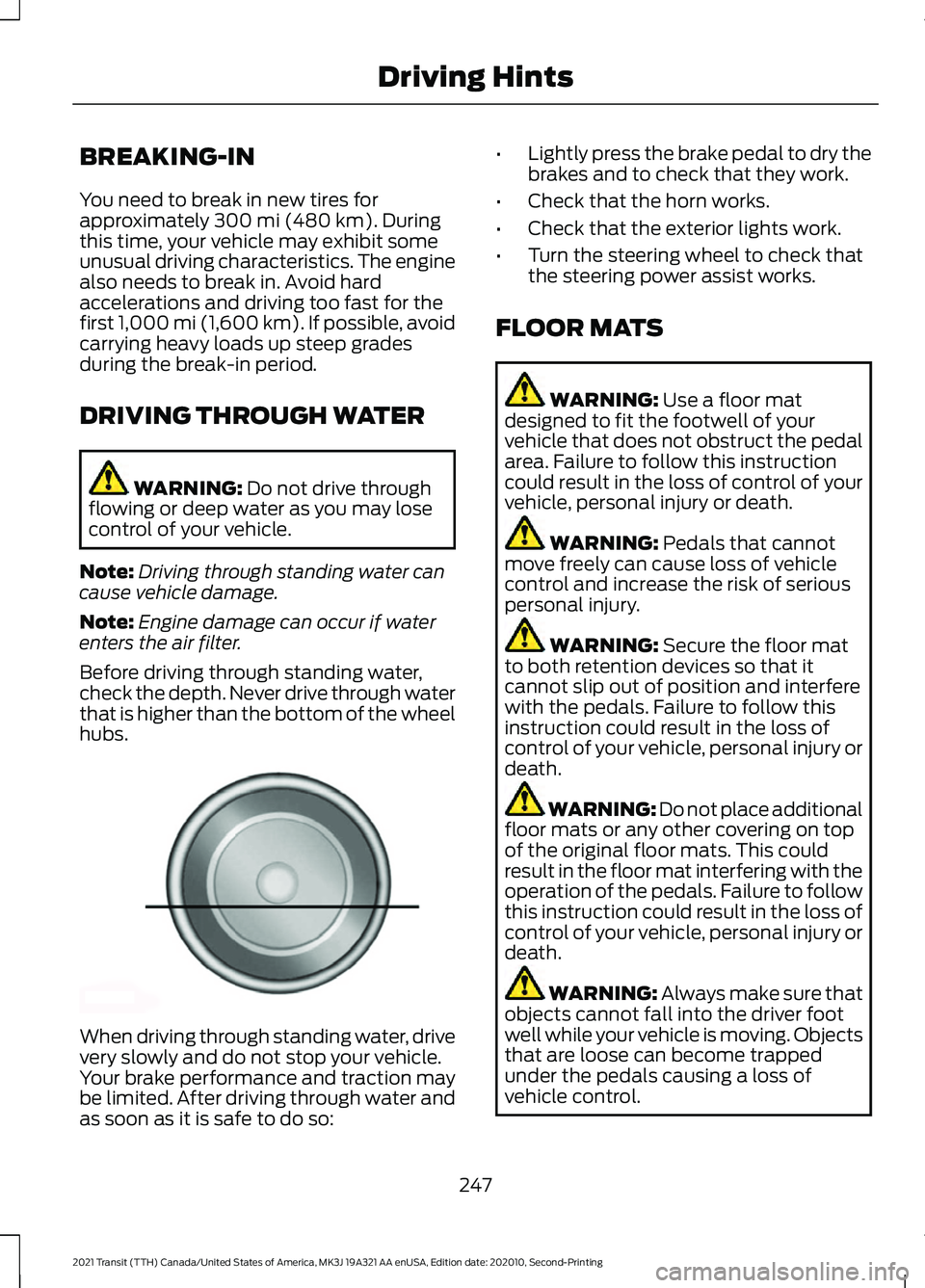
Before driving through standing water,
check the depth. Never drive through water
that is higher than the bottom of the wheel
hubs. When driving through standing water, drive
very slowly and do not stop your vehicle.
Your brake performance and traction may
be limited. After driving through water and
as soon as it is safe to do so: •
Lightly press the brake pedal to dry the
brakes and to check that they work.
• Check that the horn works.
• Check that the exterior lights work.
• Turn the steering wheel to check that
the steering power assist works.
FLOOR MATS WARNING:
Use a floor mat
designed to fit the footwell of your
vehicle that does not obstruct the pedal
area. Failure to follow this instruction
could result in the loss of control of your
vehicle, personal injury or death. WARNING:
Pedals that cannot
move freely can cause loss of vehicle
control and increase the risk of serious
personal injury. WARNING:
Secure the floor mat
to both retention devices so that it
cannot slip out of position and interfere
with the pedals. Failure to follow this
instruction could result in the loss of
control of your vehicle, personal injury or
death. WARNING: Do not place additional
floor mats or any other covering on top
of the original floor mats. This could
result in the floor mat interfering with the
operation of the pedals. Failure to follow
this instruction could result in the loss of
control of your vehicle, personal injury or
death. WARNING:
Always make sure that
objects cannot fall into the driver foot
well while your vehicle is moving. Objects
that are loose can become trapped
under the pedals causing a loss of
vehicle control.
247
2021 Transit (TTH) Canada/United States of America, MK3J 19A321 AA enUSA, Edition date: 202010, Second-Printing Driving HintsE176913
Page 319 of 509

United States Department of
Transportation Tire Quality
Grades
The United States of America
Department of Transportation
requires Ford Motor Company to
give you the following information
about tire grades exactly as the
government has written it.
Treadwear
The treadwear grade is a
comparative rating based on the
wear rate of the tire when tested
under controlled conditions on a
specified government test course.
For example, a tire graded 150
would wear 1½ times as well on
the government course as a tire
graded 100. The relative
performance of tires depends
upon the actual conditions of their
use, however, and may depart
significantly from the norm due to
variations in driving habits, service
practices, and differences in road
characteristics and climate.
Traction AA A B C
WARNING: The traction
grade assigned to this tire is
based on straight-ahead braking
traction tests, and does not
include acceleration, cornering,
hydroplaning or peak traction
characteristics. The traction grades, from highest
to lowest are AA, A, B, and C. The
grades represent the tire
’s ability
to stop on wet pavement as
measured under controlled
conditions on specified
government test surfaces of
asphalt and concrete. A tire
marked C may have poor traction
performance.
Temperature A B C WARNING:
The
temperature grade for this tire is
established for a tire that is
properly inflated and not
overloaded. Excessive speed,
underinflation, or excessive
loading, either separately or in
combination, can cause heat
buildup and possible tire failure.
The temperature grades are A
(the highest), B and C,
representing the tire ’s resistance
to the generation of heat and its
ability to dissipate heat when
tested under controlled conditions
on a specified indoor laboratory
test wheel. Sustained high
temperature can cause the
material of the tire to degenerate
and reduce tire life, and excessive
temperature can lead to sudden
tire failure. The grade C
corresponds to a level of
performance which all passenger
car tires must meet under the
316
2021 Transit (TTH) Canada/United States of America, MK3J 19A321 AA enUSA, Edition date: 202010, Second-Printing Wheels and Tires
Page 323 of 509

manufacturers also must
indicate the ply materials
in the tire and the
sidewall, which include
steel, nylon, polyester,
and others.
Maximum Load:
Indicates the maximum
load in kilograms and
pounds that can be
carried by the tire. Refer to
the Safety Compliance
K
Certification Label
(affixed to either the door
hinge pillar, door-latch
post, or the door edge
that meets the door-latch
post, next to the driver
seating position), for the
correct tire pressure for
your vehicle.
Treadwear, Traction
and Temperature
Grades:Treadwear The
treadwear grade is a
comparative rating based
on the wear rate of the tire
L
when tested under
controlled conditions on
a specified government
test course. For example,
a tire graded 150 would
wear one and one-half
times as well on the
government course as a
tire graded 100. Traction:
The traction grades, from
highest to lowest are AA,
A, B, and C. The grades
represent the tire's ability
to stop on wet pavement as measured under
controlled conditions on
specified government test
surfaces of asphalt and
concrete. A tire marked C
may have poor traction
performance.
Temperature:
The
temperature grades are A
(the highest), B and C,
representing the tire's
resistance to the
generation of heat and its
ability to dissipate heat
when tested under
controlled conditions on
a specified indoor
laboratory test wheel.
Maximum Inflation
Pressure:
Indicates the
tire manufacturer's
maximum permissible
pressure or the pressure
at which the maximum
M
load can be carried by the
tire. This pressure is
normally higher than the
manufacturer's
recommended cold
inflation pressure, which
can be found on the
Safety Compliance
Certification Label
(affixed to either the door
hinge pillar, door-latch
post, or the door edge
that meets the door-latch
post, next to the driver
seating position), or Tire
Label which is located on
the B-Pillar or the edge of
320
2021 Transit (TTH) Canada/United States of America, MK3J 19A321 AA enUSA, Edition date: 202010, Second-Printing Wheels and Tires