2021 FORD SUPER DUTY remote control
[x] Cancel search: remote controlPage 4 of 666
Introduction
About This Manual
..........................................9
Symbols Glossary ............................................
9
Data Recording .................................................
11
Perchlorate .......................................................
15
Ford Credit ........................................................
15
Replacement Parts Recommendation ........................................................................\
...
16
Special Notices ...............................................
16
Mobile Communications Equipment ........................................................................\
....
17
Export Unique Options ................................
18
Environment
Protecting the Environment .......................
19
At a Glance
Instrument Panel ..........................................
20
Child Safety
General Information .....................................
22
Installing Child Restraints ..........................
24
Booster Seats .................................................
33
Child Restraint Positioning ........................
35
Child Safety Locks .........................................
37
Seatbelts
Principle of Operation .................................
38
Fastening the Seatbelts .............................
39
Seatbelt Height Adjustment .....................
42
Seatbelt Warning Lamp and Indicator Chime ............................................................
42
Seatbelt Reminder .......................................
43
Child Restraint and Seatbelt Maintenance ...............................................
44
Seatbelt Extensions .....................................
44
Supplementary Restraints System
Principle of Operation .................................
45Driver and Passenger Airbags
..................
46
Side Airbags .....................................................
51
Safety Canopy ™............................................
52
Crash Sensors and Airbag Indicator .......
53
Airbag Disposal ..............................................
54
Keys and Remote Controls
General Information on Radio Frequencies .................................................
55
Remote Control .............................................
55
Replacing a Lost Key or Remote Control ........................................................................\
..
60
MyKey ™
Principle of Operation ..................................
61
Creating a MyKey ...........................................
62
Clearing All MyKeys ......................................
63
Checking MyKey System Status .............
64
Using MyKey With Remote Start Systems ........................................................
64
MyKey – Troubleshooting ..........................
64
Doors and Locks
Locking and Unlocking ...............................
66
Keyless Entry ..................................................
69
Tailgate
Tailgate Lock .....................................................
71
Electronic Tailgate ..........................................
71
Removing the Tailgate .................................
72
Tailgate Step ....................................................
72
Bed Extender ...................................................
73
Security
Passive Anti-Theft System ........................
76
Anti-Theft Alarm ...........................................
76
Power Running Boards
Using Power Running Boards ...................
78
1
Super Duty (TFE) Canada/United States of America, enUSA, Edition date: 202008, Second-Printing Table of Contents
Page 5 of 666

Steering Wheel
Adjusting the Steering Wheel - Vehicles
With: Manual Adjustable Steering
Column .........................................................80
Adjusting the Steering Wheel - Vehicles With: Power Adjustable Steering
Column .........................................................
80
Audio Control ...................................................
81
Voice Control ..................................................
82
Cruise Control - Vehicles With: Cruise Control ..........................................................
82
Cruise Control - Vehicles With: Adaptive Cruise Control .............................................
82
Information Display Control ......................
82
Heated Steering Wheel ...............................
82
Horn ....................................................................
83
Adjustable Pedals
Adjusting the Pedals ...................................
84
Wipers and Washers
Windshield Wipers .......................................
85
Autowipers ......................................................
85
Windshield Washers ....................................
86
Lighting
General Information .....................................
87
Lighting Control .............................................
87
Autolamps .......................................................
88
Instrument Lighting Dimmer ....................
88
Daytime Running Lamps - Vehicles With: Configurable Daytime Running Lamps
........................................................................\
..
88
Daytime Running Lamps - Vehicles With: Daytime Running Lamps (DRL) .........
89
Front Fog Lamps ...........................................
89
Direction Indicators ......................................
90
Spot Lamps ....................................................
90
Interior Lamps ................................................
90
Ambient Lighting ............................................
91
Cargo Lamps ....................................................
91Automatic High Beam Control
What Is Automatic High Beam Control
........................................................................\
..
93
Switching Automatic High Beam Control On and Off ...................................................
93
Automatic High Beam Control Indicators ........................................................................\
..
93
Overriding Automatic High Beam Control ........................................................................\
..
93
Windows and Mirrors
Power Windows ............................................
95
Global Opening .............................................
96
Exterior Mirrors ...............................................
96
Interior Mirror ..................................................
99
Sliding Windows ...........................................
99
Sun Visors ......................................................
100
Moonroof .......................................................
100
Instrument Cluster
Gauges .............................................................
102
Warning Lamps and Indicators ..............
105
Audible Warnings and Indicators ..........
109
Information Displays
General Information ....................................
110
Information Messages ................................
121
Remote Start
What Is Remote Start ................................
140
Remote Start Limitations ........................
140
Enabling Remote Start .............................
140
Remotely Starting the Engine ................
140
Extending the Remote Start Duration ........................................................................\
140
Remotely Stopping the Engine ...............
141
Remote Start Remote Control Indicators ........................................................................\
..
141
Remote Start Settings ................................
141
2
Super Duty (TFE) Canada/United States of America, enUSA, Edition date: 202008, Second-Printing Table of Contents
Page 18 of 666
If you connect a cell phone to the system,
the system creates a profile that links to
that cell phone. The cell phone profile
enables more mobile features and efficient
operation. The profile contains, for
example, data from your phonebook, read
and unread text messages and call history,
including history of calls when your cell
phone was not connected to the system.
If you connect a media device, the system
creates and retains a media device index
of supported media content. The system
also records a short diagnostic log of
approximately 10 minutes of all recent
system activity.
The cell phone profile, media device index
and diagnostic log remain in your vehicle
unless you delete them and are generally
accessible only in your vehicle when you
connect your cell phone or media device.
If you no longer plan to use the system or
your vehicle, we recommend you use the
master reset function to erase the stored
information. See Settings (page 543).
System data cannot be accessed without
special equipment and access to your
vehicle's module.
For additional information about our
privacy policy, refer to your local Ford
website.
Note: To find out if your vehicle has
connectivity technology, visit
www .For dC onne c t e d . c om .
Vehicles With an Emergency Call
System
When the emergency call system is active,
it may disclose to emergency services that
your vehicle has been in a crash involving
the deployment of an airbag or activation
of the fuel pump shut-off. Certain versions
or updates to the emergency call system
may also be capable of electronically or
verbally disclosing to emergency services
operators your vehicle location or other details about your vehicle or crash to assist
emergency services operators to provide
the most appropriate emergency services.
If you do not want to disclose this
information, do not activate the emergency
call system.
Note:
You cannot deactivate emergency
call systems that are required by law.
PERCHLORATE
Certain components in your vehicle such
as airbag modules, seatbelt pretensioners
and remote control batteries may contain
perchlorate material. Special handling
may apply for service or vehicle end of life
disposal.
For more information visit: Web Address
www.dtsc.ca.gov/hazard- ouswaste/perchlorate
FORD CREDIT
US Only
Ford Credit offers a full range of financing
and lease plans to help you acquire your
vehicle. If you have financed or leased your
vehicle through Ford Credit, thank you for
your business.
For assistance call 1-800-727-7000, or for
more information about Ford Credit and
access to the online Account Manager tool,
visit www.ford.com/finance.
15
Super Duty (TFE) Canada/United States of America, enUSA, Edition date: 202008, Second-Printing Introduction
Page 20 of 666
Your vehicle has an OBD Data Link
Connector (DLC) that is used in
conjunction with a diagnostic scan tool for
vehicle diagnostics, repairs and
reprogramming services. Installing an
aftermarket device that uses the DLC
during normal driving for purposes such as
remote insurance company monitoring,
transmission of vehicle data to other
devices or entities, or altering the
performance of the vehicle, may cause
interference with or even damage to
vehicle systems. We do not recommend
or endorse the use of aftermarket plug-in
devices unless approved by Ford. The
vehicle Warranty will not cover damage
caused by an aftermarket plug-in device.
Using your Vehicle With a
Snowplow
More information and guidelines for using
your vehicle with a snowplow are in this
Owner's Manual. See Snow Plowing
(page 321).
Using a Slide-In Camper
For information regarding the use of
slide-in campers, consult the Truck
Camper Loading document supplied with
your vehicle.
Using your Vehicle as an
Ambulance
If your light truck has the Ford Ambulance
Preparation Package, it may be utilized as
an ambulance. We urge ambulance
manufacturers to follow the
recommendations of the Ford Incomplete
Vehicle Manual, Ford Truck Body Builder ’s
Layout Book and the Qualified Vehicle
Modifiers (QVM) Guidelines as well as pertinent supplements. For additional
information, please contact the Truck Body
Builders Advisory Service at
http://www.fleet.ford.com/truckbbas/
and then by selecting Contact Us or by
phone at 1–877
–840–4338.
Use of your Ford light truck as an
ambulance, without the Ford Ambulance
Preparation Package voids the Ford New
Vehicle Limited Warranty and may void
the emissions warranties. In addition,
ambulance usage without the preparation
package could cause high underbody
temperatures, overpressurized fuel and a
risk of spraying fuel which could lead to
fires.
If your vehicle has the Ford Ambulance
Preparation Package, it will be indicated
on the Safety Compliance Certification
Label. The label is on the driver side door
pillar or on the rear edge of the driver door.
You can determine whether the
ambulance manufacturer followed Ford ’s
recommendations by directly contacting
that manufacturer. The Ford Ambulance
Preparation Package is only available on
certain diesel engine equipped vehicles.
Using your Vehicle as a Stationary
Power Source
Information and guidelines for operating a
vehicle with an aftermarket power take-off
system are in this Owner's Manual.
See
Power Take-Off (page 212).
MOBILE COMMUNICATIONS
EQUIPMENT WARNING:
Driving while
distracted can result in loss of vehicle
control, crash and injury. We strongly
recommend that you use extreme
caution when using any device that may
take your focus off the road. Your
17
Super Duty (TFE) Canada/United States of America, enUSA, Edition date: 202008, Second-Printing Introduction
Page 58 of 666
GENERAL INFORMATION ON
RADIO FREQUENCIES
This device complies with Part 15 of the
FCC Rules and with Industry Canada
license-exempt RSS standard(s).
Operation is subject to the following two
conditions: (1) This device may not cause
harmful interference, and (2) This device
must accept any interference received,
including interference that may cause
undesired operation.
WARNING: Changes or
modifications not expressively approved
by the party responsible for compliance
could void the user's authority to operate
the equipment. The term "IC:" before the
radio certification number only signifies
that Industry Canada technical
specifications were met.
The typical operating range for your
transmitter is approximately
33 ft (10 m).
Vehicles with the remote start feature will
have a greater range.
One of the following could cause a
decrease in operating range:
• Weather conditions.
• Nearby radio towers.
• Structures around the vehicle.
• Other vehicles parked next to your
vehicle.
The radio frequency used by your remote
control can also be used by other radio
transmitters, for example amateur radios,
medical equipment, wireless headphones,
wireless remote controls, cell phones,
battery chargers and alarm systems. If the
frequencies are jammed, you will not be
able to use your remote control. You can
lock and unlock the doors with the key.
Note: Make sure to lock your vehicle before
leaving it unattended. Note:
If you are in range, the remote control
will operate if you press any button
unintentionally.
Note: The remote control contains sensitive
electrical components. Exposure to moisture
or impact may cause permanent damage.
Intelligent Access
(If Equipped)
The system uses a radio frequency signal
to communicate with your vehicle and
authorize your vehicle to unlock when one
of the following conditions are met:
• You activate the front exterior door
handle switch.
• You press the luggage compartment
button.
• You press a button on the transmitter.
If excessive radio frequency interference
is present in the area or if the transmitter
battery is low, you may need to
mechanically unlock your door. You can
use the mechanical key blade in your
intelligent access key to open the driver
door in this situation. See
Remote
Control (page 55).
REMOTE CONTROL
(IF EQUIPPED)
Integrated Keyhead Transmitter
Use the key blade to start your vehicle and
unlock or lock the driver door from outside
your vehicle. The integrated keyhead
transmitter functions as a programmed
ignition key that operates all the locks and
starts your vehicle, as well as a remote
control.
55
Super Duty (TFE) Canada/United States of America, enUSA, Edition date: 202008, Second-Printing Keys and Remote Controls
Page 59 of 666
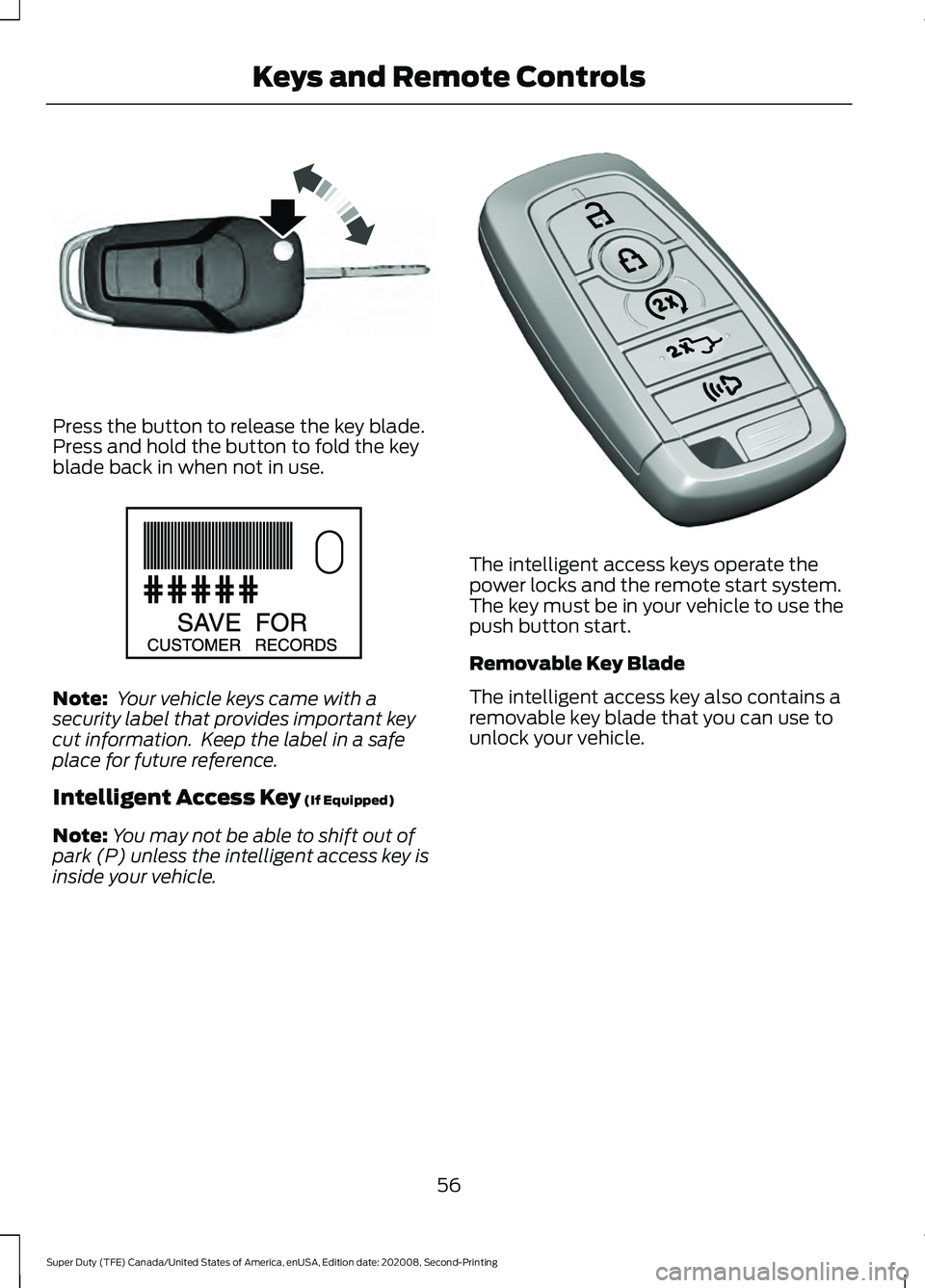
Press the button to release the key blade.
Press and hold the button to fold the key
blade back in when not in use.
Note:
Your vehicle keys came with a
security label that provides important key
cut information. Keep the label in a safe
place for future reference.
Intelligent Access Key (If Equipped)
Note: You may not be able to shift out of
park (P) unless the intelligent access key is
inside your vehicle. The intelligent access keys operate the
power locks and the remote start system.
The key must be in your vehicle to use the
push button start.
Removable Key Blade
The intelligent access key also contains a
removable key blade that you can use to
unlock your vehicle.
56
Super Duty (TFE) Canada/United States of America, enUSA, Edition date: 202008, Second-Printing Keys and Remote ControlsE191532 E151795 E307113
Page 60 of 666

Press the release button and pull the key
blade out.
Note:
Your vehicle keys came with a
security label that provides important key
cut information. Keep the label in a safe
place for future reference.
Replacing the Battery WARNING: Keep batteries away
from children to prevent ingestion.
Failure to follow this instruction could
result in personal injury or death. If
ingested, immediately seek medical
attention. WARNING:
If the battery
compartment does not securely close,
stop using the remote control and
replace it as soon as possible. In the
meantime, keep the remote control away
from children. Failure to follow this
instruction could result in personal injury
or death.
Note: Refer to local regulations when
disposing of transmitter batteries.
Note: Do not wipe off any grease on the
battery terminals or on the back surface of
the circuit board.
Note: Replacing the battery does not erase
the programmed key from your vehicle. The
transmitter should operate normally.
A message appears in the information
display when the remote control battery
is low. See
General Information (page
110).
Integrated Keyhead Transmitter
The remote control uses one coin-type
three-volt lithium battery CR2032 or
equivalent.
Press the button to release the key blade
before beginning the procedure. 57
Super Duty (TFE) Canada/United States of America, enUSA, Edition date: 202008, Second-Printing Keys and Remote ControlsE307112 E151795 E191533
Page 61 of 666
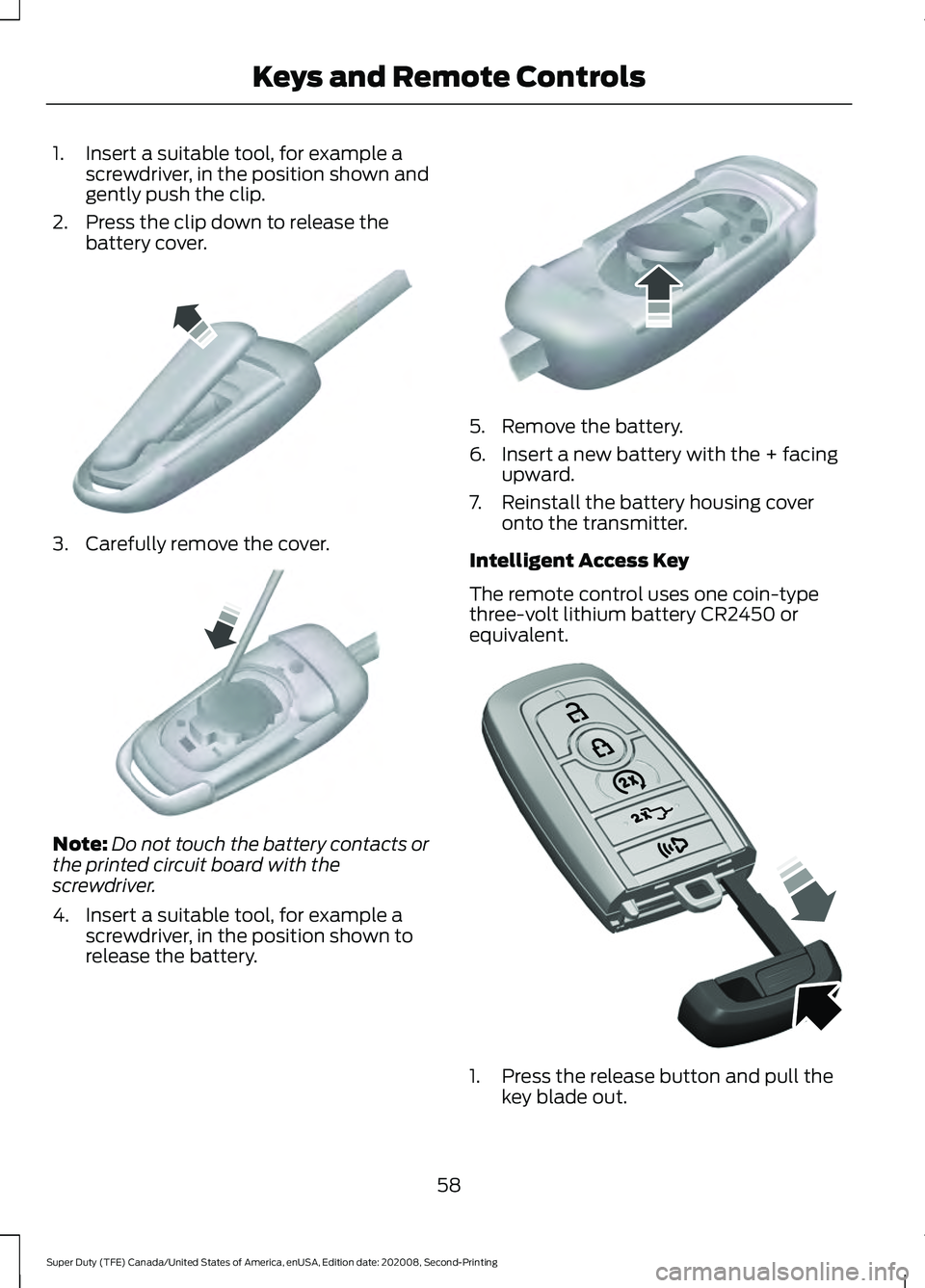
1. Insert a suitable tool, for example a
screwdriver, in the position shown and
gently push the clip.
2. Press the clip down to release the battery cover. 3. Carefully remove the cover.
Note:
Do not touch the battery contacts or
the printed circuit board with the
screwdriver.
4. Insert a suitable tool, for example a screwdriver, in the position shown to
release the battery. 5. Remove the battery.
6. Insert a new battery with the + facing
upward.
7. Reinstall the battery housing cover onto the transmitter.
Intelligent Access Key
The remote control uses one coin-type
three-volt lithium battery CR2450 or
equivalent. 1. Press the release button and pull the
key blade out.
58
Super Duty (TFE) Canada/United States of America, enUSA, Edition date: 202008, Second-Printing Keys and Remote ControlsE151799 E151800 E151801 E307112