2021 FORD POLICE INTERCEPTOR USB
[x] Cancel search: USBPage 318 of 412
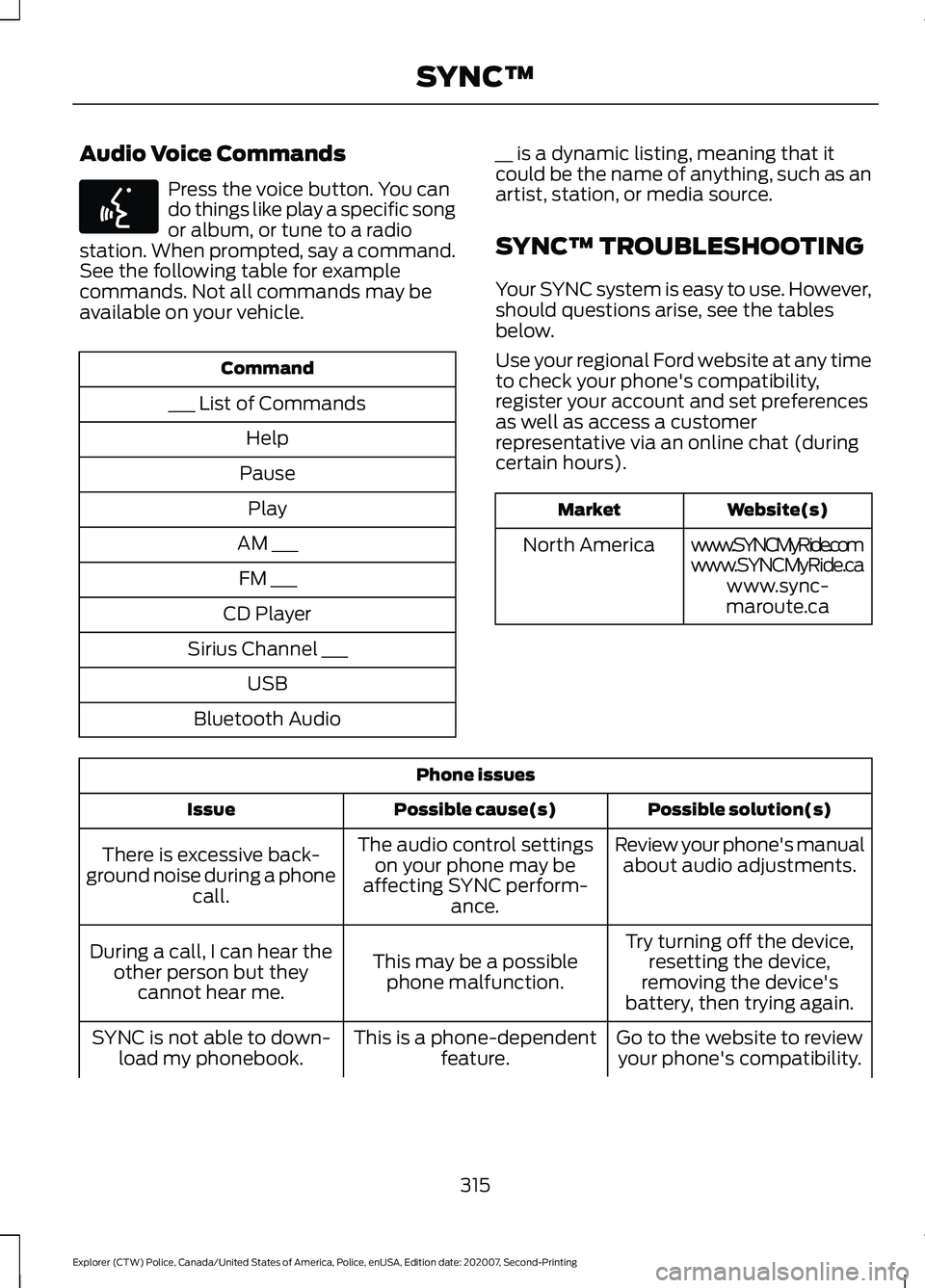
Audio Voice Commands
Press the voice button. You can
do things like play a specific song
or album, or tune to a radio
station. When prompted, say a command.
See the following table for example
commands. Not all commands may be
available on your vehicle. Command
___ List of Commands Help
Pause Play
AM ___ FM ___
CD Player
Sirius Channel ___ USB
Bluetooth Audio __ is a dynamic listing, meaning that it
could be the name of anything, such as an
artist, station, or media source.
SYNC™ TROUBLESHOOTING
Your SYNC system is easy to use. However,
should questions arise, see the tables
below.
Use your regional Ford website at any time
to check your phone's compatibility,
register your account and set preferences
as well as access a customer
representative via an online chat (during
certain hours). Website(s)
Market
www.SYNCMyRide.com
North America
www.SYNCMyRide.cawww.sync-
maroute.ca Phone issues
Possible solution(s)
Possible cause(s)
Issue
Review your phone's manualabout audio adjustments.
The audio control settings
on your phone may be
affecting SYNC perform- ance.
There is excessive back-
ground noise during a phone call.
Try turning off the device,resetting the device,
removing the device's
battery, then trying again.
This may be a possible
phone malfunction.
During a call, I can hear the
other person but theycannot hear me.
Go to the website to reviewyour phone's compatibility.
This is a phone-dependent
feature.
SYNC is not able to down-
load my phonebook.
315
Explorer (CTW) Police, Canada/United States of America, Police, enUSA, Edition date: 202007, Second-Printing SYNC™E142599
Page 320 of 412

Phone issues
Possible solution(s)
Possible cause(s)
Issue
Try deleting your device
from SYNC, deleting SYNC
from your device and trying again.
Check the security and auto accept and prompt always
settings relative to the SYNC Bluetooth connection on your phone.
This may be a possible
phone malfunction. Update your device's firm-
ware.
Turn off the Auto phone- book download setting.
Go to the website to review your phone's compatibility.
This is a phone-dependent
feature.
Text messaging is not working on SYNC. Try turning off the device,
resetting the device orremoving the device's
battery, then trying again.
This may be a possible
phone malfunction.
Press the Phone button to
return to the Phone menu.
You are on the Select a
Character screen.
I cannot return to the Phone
menu when selecting a contact. USB and media issues
Possible solution(s)
Possible cause(s)
Issue
Try turning off the device,resetting the device,
removing the device's
battery, then trying again.
This may be a possible device malfunction.
I am having trouble
connecting my device. Make sure you are using the
manufacturer's cable.
Make sure you insert the
USB cable correctly into the device and the USB port.
317
Explorer (CTW) Police, Canada/United States of America, Police, enUSA, Edition date: 202007, Second-Printing SYNC™
Page 321 of 412

USB and media issues
Possible solution(s)
Possible cause(s)
Issue
Make sure that the devicedoes not have an auto-
install program or active security settings.
Make sure you are not
leaving the device in your vehicle during very hot or cold temperatures.
This is a device limitation.
SYNC does not recognize
my device when I turn on the car.
Review the device compatib-ility chart on the SYNC
website to confirm your phone supports the
Bluetooth audio streaming function.
This is a phone-dependent
feature.
Bluetooth audio does not stream.
Make sure you correctly
connect the device to SYNC, and that you have pressed play on your device.
The device is not connected.
Make sure that all songdetails are populated.
Your music files may not
contain the correct artist,
song title, album or genre information.
SYNC does not recognize
music that is on my device. The file may be corrupted.
Some devices require you tochange the USB settings
from mass storage to MTP class.
The song may have copy-
right protection, which does not allow it to play.
Switch radio bands and
return to Sirius or switch the feature off. You can then
change the Sirius station using the directional buttons.
Sirius Replay is active.
I cannot change the Sirius
station.
318
Explorer (CTW) Police, Canada/United States of America, Police, enUSA, Edition date: 202007, Second-Printing SYNC™
Page 324 of 412
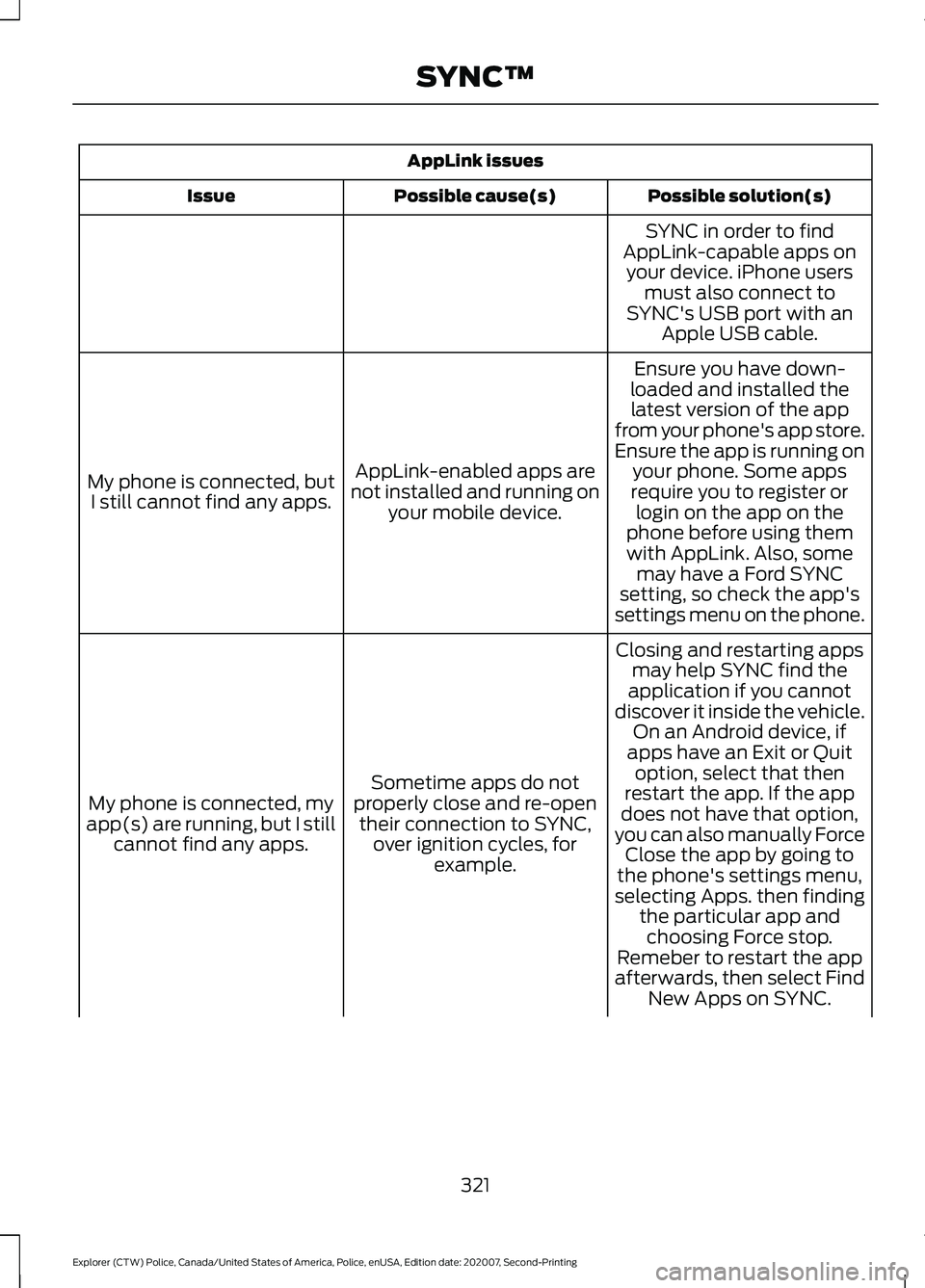
AppLink issues
Possible solution(s)
Possible cause(s)
Issue
SYNC in order to find
AppLink-capable apps on your device. iPhone users must also connect to
SYNC's USB port with an Apple USB cable.
Ensure you have down-
loaded and installed the latest version of the app
from your phone's app store.
Ensure the app is running on your phone. Some apps
AppLink-enabled apps are
not installed and running on your mobile device.
My phone is connected, but
I still cannot find any apps. require you to register or
login on the app on the
phone before using them with AppLink. Also, some may have a Ford SYNC
setting, so check the app's
settings menu on the phone.
Closing and restarting apps may help SYNC find the
application if you cannot
discover it inside the vehicle. On an Android device, if
apps have an Exit or Quit
Sometime apps do not
properly close and re-open their connection to SYNC, over ignition cycles, for example.
My phone is connected, my
app(s) are running, but I still cannot find any apps. option, select that then
restart the app. If the app
does not have that option,
you can also manually Force Close the app by going to
the phone's settings menu,
selecting Apps. then finding the particular app andchoosing Force stop.
Remeber to restart the app
afterwards, then select Find New Apps on SYNC.
321
Explorer (CTW) Police, Canada/United States of America, Police, enUSA, Edition date: 202007, Second-Printing SYNC™
Page 326 of 412
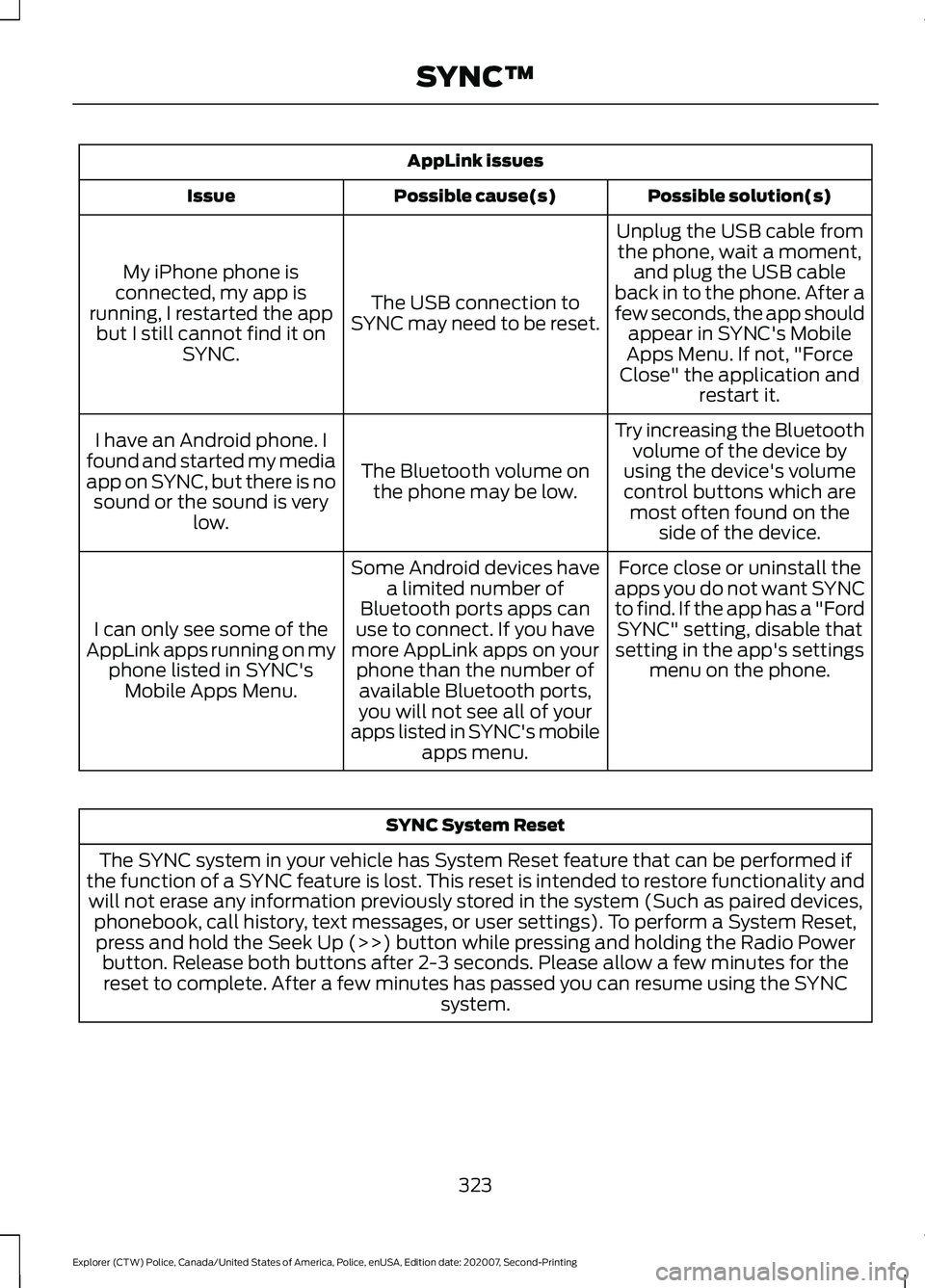
AppLink issues
Possible solution(s)
Possible cause(s)
Issue
Unplug the USB cable fromthe phone, wait a moment, and plug the USB cable
back in to the phone. After a
few seconds, the app should appear in SYNC's Mobile
Apps Menu. If not, "Force
Close" the application and restart it.
The USB connection to
SYNC may need to be reset.
My iPhone phone is
connected, my app is
running, I restarted the app but I still cannot find it on SYNC.
Try increasing the Bluetoothvolume of the device by
using the device's volume control buttons which are most often found on the side of the device.
The Bluetooth volume on
the phone may be low.
I have an Android phone. I
found and started my media
app on SYNC, but there is no sound or the sound is very low.
Force close or uninstall the
apps you do not want SYNC
to find. If the app has a "Ford SYNC" setting, disable that
setting in the app's settings menu on the phone.
Some Android devices have
a limited number of
Bluetooth ports apps can
use to connect. If you have
more AppLink apps on your phone than the number ofavailable Bluetooth ports,
you will not see all of your
apps listed in SYNC's mobile apps menu.
I can only see some of the
AppLink apps running on my phone listed in SYNC'sMobile Apps Menu. SYNC System Reset
The SYNC system in your vehicle has System Reset feature that can be performed if
the function of a SYNC feature is lost. This reset is intended to restore functionality and will not erase any information previously stored in the system (Such as paired devices, phonebook, call history, text messages, or user settings). To perform a System Reset,press and hold the Seek Up (>>) button while pressing and holding the Radio Power button. Release both buttons after 2-3 seconds. Please allow a few minutes for thereset to complete. After a few minutes has passed you can resume using the SYNC system.
323
Explorer (CTW) Police, Canada/United States of America, Police, enUSA, Edition date: 202007, Second-Printing SYNC™
Page 403 of 412

Auxiliary Power Points.................................116
110 Volt AC Power Point.................................... 116
12 Volt DC Power Point...................................... 116
USB Port and Power Point Locations..........116
AWD See: All-Wheel Drive......................................... 144
B
Battery See: Changing the 12V Battery....................... 231
Blind Spot Information System...............167 Blind Spot Information System with Trailer
Tow..................................................................... 168
Switching the System On and Off................170
System Errors....................................................... 170
Using the Blind Spot Information System............................................................... 167
BLIS See: Blind Spot Information System...........167
Bonnet Lock See: Opening and Closing the Hood...........218
Booster Seats..................................................28 Types of Booster Seats...................................... 29
Brake Fluid Check
........................................230
Brake Fluid Service Interval............................. 231
Brakes................................................................151 General Information........................................... 151
Breaking-In......................................................192
Bulb Specification Chart...........................301
C
Canceling the Set Speed...........................166
Capacities and Specifications - 3.0L.................................................................279
Air Conditioning System.................................. 279
Alternative Engine Oil for Extremely Cold Climates........................................................... 282
Automatic Transmission................................ 280
Engine Coolant.................................................... 281
Engine Oil.............................................................. 282
Front Axle............................................................. 285
Fuel Tank............................................................... 283
Grease.................................................................... 283
Hydraulic Brake System.................................. 284
Locks...................................................................... 284
Rear Axle............................................................... 285Transfer Case......................................................
284
Washer Reservoir............................................... 286
Capacities and Specifications - 3.3L, Hybrid Electric Vehicle (HEV)..............294
Air Conditioning System................................. 294
Alternative Engine Oil for Extremely Cold Climates............................................................ 297
Automatic Transmission................................. 295
Engine Coolant................................................... 296
Engine Oil............................................................. 296
Front Axle............................................................. 299
Fuel Tank.............................................................. 298
Grease.................................................................... 298
Hydraulic Brake System.................................. 298
Locks...................................................................... 298
Rear Axle.............................................................. 300
Transfer Case...................................................... 299
Washer Reservoir.............................................. 300
Capacities and Specifications - 3.3L................................................................286
Air Conditioning System.................................. 287
Alternative Engine Oil for Extremely Cold Climates........................................................... 289
Automatic Transmission................................. 287
Engine Coolant................................................... 288
Engine Oil............................................................. 289
Front Axle.............................................................. 292
Fuel Tank.............................................................. 290
Grease................................................................... 290
Hydraulic Brake System................................... 291
Locks....................................................................... 291
Rear Axle............................................................... 293
Transfer Case...................................................... 292
Washer Reservoir............................................... 293
Capacities and Specifications................275
Car Wash See: Cleaning the Exterior.............................. 239
Catalytic Converter
......................................138
On-Board Diagnostics (OBD-II)................... 139
Readiness for Inspection and Maintenance (I/M) Testing................................................... 139
Changing a Bulb
...........................................236
LED Lamps............................................................ 237
License Plate Lamp........................................... 237
Rear Direction Indicator and Reversing Lamp................................................................. 236
Changing a Fuse
...........................................216
Fuses....................................................................... 216
400
Explorer (CTW) Police, Canada/United States of America, Police, enUSA, Edition date: 202007, Second-Printing Index
Page 411 of 412

Information Contained on the Tire
Sidewall........................................................... 250
Police Wheels and Tires................................. 260
Temperature A B C............................................ 248
Traction AA A B C.............................................. 248
Treadwear............................................................ 248
Tire Pressure Monitoring System...........263 Changing Tires With a Tire Pressure
Monitoring System....................................... 264
Understanding Your Tire Pressure Monitoring System ...................................... 264
Tires See: Wheels and Tires..................................... 246
Towing a Trailer.............................................185
Load Placement................................................. 185
Towing the Vehicle on Four Wheels..........................................................190
Emergency Towing............................................ 190
Recreational Towing......................................... 190
Towing..............................................................185
Traction Control
............................................156
Principle of Operation....................................... 156
Transmission..................................................142
Transporting the Vehicle...........................199
U
Under Hood Overview - 3.0L..................220
Under Hood Overview - 3.3L....................221
Unique Driving Characteristics................123
USB Port.........................................................306 Locating the USB Ports.................................. 306
Using All-Wheel Drive
.................................144
Driving In Special Conditions With
All-Wheel Drive (AWD)............................... 146
How Utility Vehicles Differ from Other Vehicles............................................................. 146
Operating AWD Vehicles With Mismatched Tires.................................................................... 146
Using Snow Chains......................................261
Using Stability Control...............................158
Using SYNC™ With Your Media Player
.............................................................314
Audio Voice Commands.................................. 315
Media Sources..................................................... 314
Using SYNC™ With Your Phone.............310 Accessing Features through the Phone
Menu.................................................................... 311Pairing a Phone...................................................
310
Phone Controls..................................................... 311
Phone Voice Commands................................. 310
Using Traction Control................................156 Switching the System Off............................... 156
System Indicator Lights and Messages.......................................................... 156
Using a Switch..................................................... 156
Using the Information Display Controls............................................................. 156
Using Voice Recognition...........................308 Initiating a Voice Session............................... 308
System Interaction and Feedback.............309
Utilizing the Mediation/Arbitration Program (Canada Only)........................204
V
Vehicle Care
...................................................238
General Information......................................... 238
Vehicle Identification Number................279
Vehicle Storage
.............................................243
Body........................................................................\
243
Brakes.................................................................... 244
Cooling system................................................... 244
Disconnecting Your 12 Volt Battery.............244
Engine ..................................................................... 243
Fuel system.......................................................... 244
General.................................................................. 243
Miscellaneous..................................................... 244
Plugging in Your HYBRID................................ 244
Removing Vehicle From Storage.................244
Tires........................................................................\
244
Ventilation See: Climate Control.......................................... 101
VIN See: Vehicle Identification Number............279
Voice Control...................................................66
W
Warning Lamps and Indicators.................79 Anti-Lock Braking System................................. 79
Battery...................................................................... 79
Blind Spot Monitor............................................... 79
Brake System Warning Lamp.......................... 79
Cruise Control....................................................... 80
Deep Snow and Sand........................................ 80
408
Explorer (CTW) Police, Canada/United States of America, Police, enUSA, Edition date: 202007, Second-Printing Index