2021 FORD MUSTANG sport mode
[x] Cancel search: sport modePage 214 of 530
To create or save MyMode, press the
button on the steering wheel and access
the menu. See General Information
(page 99). The available systems display.
Select your desired settings using the
appropriate buttons and menus. Press and
hold OK to save your settings. MyMode is
added to the drive mode list and can be
selected the next time you drive your
vehicle.
Note: The system has diagnostic checks
that continuously monitor the system to
make sure it properly operates. If a mode is
unavailable due to a system fault or change
in gear position, the selected mode defaults
to normal.
Note: Pre-Collision Assist is automatically
disabled when track mode is selected.
See
Pre-Collision Assist (page 202).
Note: If your vehicle has adaptive dampers,
the steering setting is optimized to work with
each drive mode. Other steering settings
may not be available.
Selectable Steering
Note: The steering setting defaults to
normal if the battery is disconnected or
removed. Press the steering button on the
instrument panel to change the
steering feel. The first press
illuminates the selected mode. Each time
you press the button, it changes the mode.
Modes:
• Normal - Default factory setting.
• Sport - Slightly higher effort required
for steering with more road force felt
through the steering wheel.
• Comfort - Slightly less effort required
for steering with less road force felt
through the steering wheel. Note:
A soft feedback bump in the steering
wheel may be felt after you make a
selection.
Adaptive Dampers
(If Equipped) Press the button on the steering
wheel to adjust the suspension.
The first press illuminates the
current mode. Each time you press the
button, it changes the mode.
Adaptive damper modes:
• Normal — Available in normal and
sport drive modes.
• Sport — Available in normal, sport and
track drive modes.
• Track — Available only in track drive
mode.
• Drag Strip — Available only in drag strip
drive mode.
Active Exhaust
(If Equipped) Press the button on the
instrument panel under the
display to adjust the tone of the
exhaust.
Active Exhaust modes:
• Quiet - Lowers the noise of the exhaust.
• Normal - Default factory setting.
• Sport - Raises the noise of the exhaust.
• Track - Tunes the exhaust for track
performance.
Note: The track exhaust mode setting is
only for use at tracks and not for use on
public roadways. Use of this setting results
in increased exterior noise, which may not
meet state and local laws and regulations.
It is the obligation of the driver to operate
the vehicle in a manner that complies with
state and local requirements. Only use the
track exhaust mode setting at a competition
track or an off-road course where elevated
exterior vehicle noise is acceptable.
211
Mustang (CZG) Canada/United States of America, Vehicles Built From: 14-09-2020, enUSA, Edition date: 202010, Second-Printing Driving AidsE174705 E282723 E287122
Page 225 of 530
TRANSPORTING THE VEHICLE
- MACH 1 If you need to have your vehicle towed,
contact your roadside assistance center
or a professional towing service.
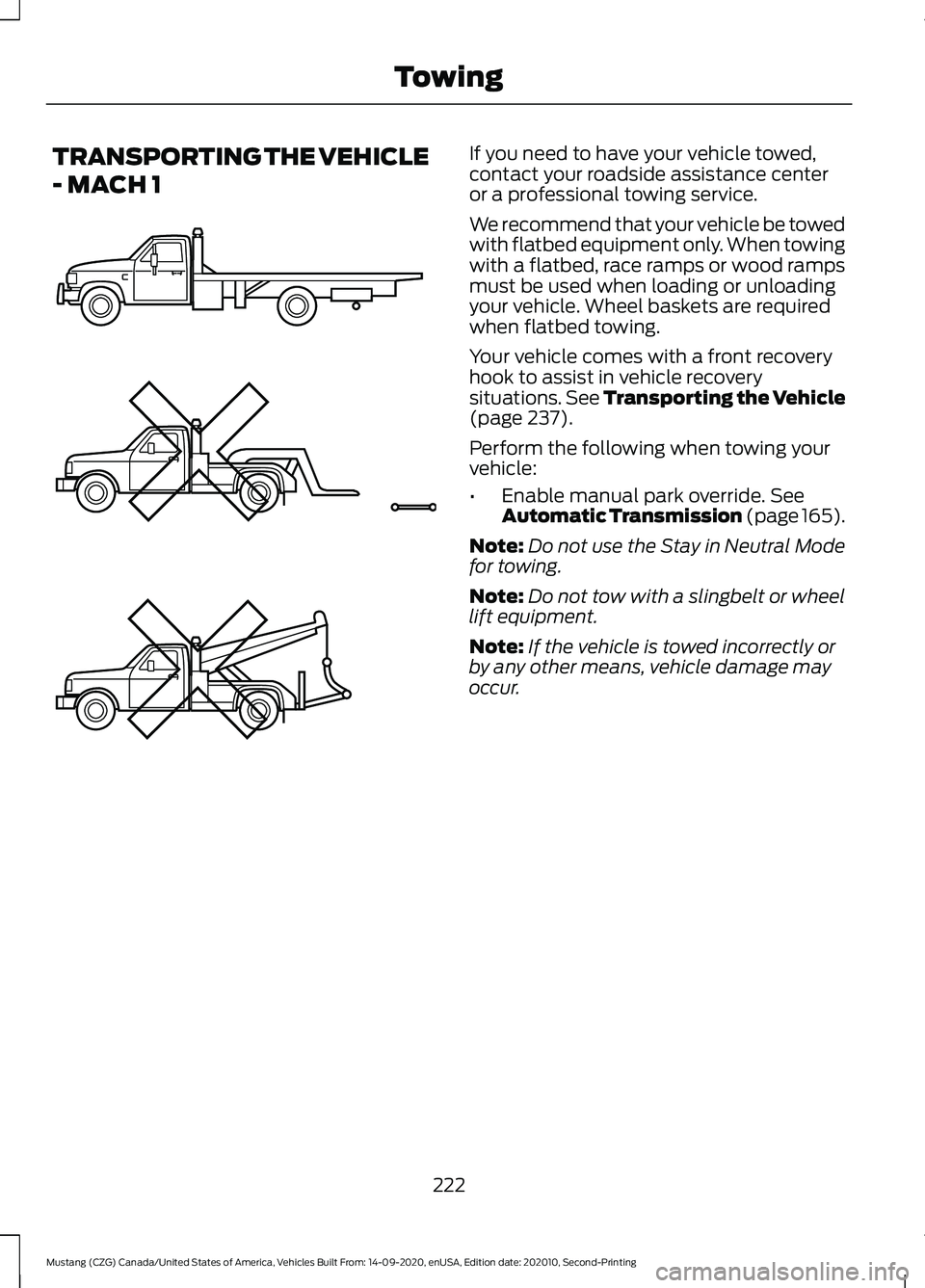
We recommend that your vehicle be towed
with flatbed equipment only. When towing
with a flatbed, race ramps or wood ramps
must be used when loading or unloading
your vehicle. Wheel baskets are required
when flatbed towing.
Your vehicle comes with a front recovery
hook to assist in vehicle recovery
situations. See Transporting the Vehicle
(page 237).
Perform the following when towing your
vehicle:
• Enable manual park override.
See
Automatic Transmission (page 165).
Note: Do not use the Stay in Neutral Mode
for towing.
Note: Do not tow with a slingbelt or wheel
lift equipment.
Note: If the vehicle is towed incorrectly or
by any other means, vehicle damage may
occur.
222
Mustang (CZG) Canada/United States of America, Vehicles Built From: 14-09-2020, enUSA, Edition date: 202010, Second-Printing TowingE203788
Page 279 of 530

TRACK USE - MACH 1
Operating at High Speeds and
Track Days
Your vehicle is capable of sustained high
speeds and track day driving.
Before operating your vehicle at high
speeds:
•
Verify your tires have the correct
pressures.
• Inspect wheels and tires for wear and
damage. Replace any damaged wheels
and tires.
• Check and set lug nut torque. See
Technical Specifications (page 334).
• Verify fluid levels for oil, coolant, brake
and hydraulic fluid. See
Capacities
and Specifications (page 335).
• Change the engine oil and replace the
engine oil filter prior to use on the track.
Change the engine oil and filter again
after every four hours of track time.
Maintain the engine oil level at or near
the max mark on the engine oil dipstick.
See
Engine Oil Check (page 261).
• Replace the brake fluid with fresh
Motorcraft/Ford DOT 4 LV High
Performance Brake Fluid or other DOT
compliant fluid with a dry boiling point
greater than
500°F (260°C) from a
sealed container. Do not use silicone
or DOT 5 brake fluids. •
If you are operating your Mach 1 on a
drag strip, use drag strip selectable
drive mode in addition to using line lock
and launch control to provide a specific
set-up tuned for the quickest straight
line elapsed times.
• If you are operating your Mach 1 on a
road course, use sport or track
selectable drive modes to provide a
specific set-up tuned for optimal shift
and suspension set-up that is tuned
towards handling prowess on closed
course surfaces.
After operating your vehicle at high speeds
or track day driving, do the following:
• Set the tire pressure to the proper
specification.
• Check and set the lug nut torque. See
Technical Specifications
(page 334).
• Check all fluid levels.
• Refer to the track maintenance interval
chart. See
Normal Scheduled
Maintenance (page 444).
• Check the front and rear wheel
bearings for abnormal wear.
• Inspect brake caliper dust boots for
abnormal wear.
Track Apps WARNING:
Track Apps™
is for
track use only. Remember that even
advanced technology cannot defy the
laws of physics. It is always possible to
lose control of a vehicle due to
inappropriate driver input for the
conditions. Aggressive driving on any
road condition can cause you to lose
control of your vehicle increasing the risk
of personal injury or property damage.
276
Mustang (CZG) Canada/United States of America, Vehicles Built From: 14-09-2020, enUSA, Edition date: 202010, Second-Printing Track Use
Page 528 of 530
Adjustable Camber Front Strut Top Mounts
(vehicles with Optional Handling
Package)........................................................... 281
Aerodynamics...................................................... 281
Brake Burnishing................................................ 282
Brake Performance ........................................... 277
Exhaust Mode ..................................................... 277
Lap Timer............................................................... 277
Launch Control.................................................... 277
Line Lock............................................................... 278
Operating at High Speeds and Track Days.................................................................... 276
Performance Shift Indicator.......................... 279
Road Course Alignment Recommendations....................................... 279
Start Option ........................................................ 279
Status Screen ..................................................... 279
Track Apps ........................................................... 276
Track Tire Pressures......................................... 280
Track Use Maintenance Intervals................280
View/Clear Results ........................................... 279
Track Use
........................................................283
Acceleration Timer............................................ 284
Accelerometer.................................................... 284
Adjustable Camber Front Strut Top Mounts............................................................. 286
Aerodynamics..................................................... 286
Brake Burnishing................................................ 287
Brake Performance .......................................... 284
Catch Can............................................................. 287
Exhaust Mode .................................................... 284
Lap Timer............................................................. 284
Launch Control................................................... 284
Line Lock............................................................... 284
Operating at High Speeds and Track Days................................................................... 283
Performance Shift Indicator.......................... 285
Start Option ....................................................... 286
Status Screen .................................................... 286
Timing Chain....................................................... 286
Track Apps ........................................................... 283
Track Use Maintenance Intervals................286
View/Clear Results .......................................... 286
Traction Control.............................................174 Principle of Operation....................................... 174
Transmission..................................................164 Technical Specifications - Mach 1................168 Transporting the Vehicle - Mach 1.........222
Alternate Flatbed Method.............................. 224
Preferred Flatbed Method.............................. 223
Transporting or Trailering - Mach 1 Handling Package............................................................ 224
Transporting the Vehicle
...........................237
U
Under Hood Overview - 2.3L EcoBoost™.................................................258
Under Hood Overview - 5.0L, Mach 1
.......................................................................260
Under Hood Overview - 5.0L..................259
USB Port..........................................................374
Using Adaptive Cruise Control................185 Automatic Cancellation................................... 188
Blocked Sensor................................................... 189
Canceling the Set Speed................................. 188
Changing the Set Speed................................. 188
Detection Issues................................................. 188
Following a Vehicle............................................ 186
Hilly Condition Usage....................................... 188
Overriding the Set Speed................................. 187
Resuming the Set Speed................................ 188
Setting the Adaptive Cruise Speed.............186
Setting the Gap Distance................................. 187
Switching Adaptive Cruise Control Off....................................................................... 188
Switching Adaptive Cruise Control On........................................................................\
186
Switching to Normal Cruise Control...........190
System Not Available....................................... 189
Using MyKey With Remote Start Systems..........................................................65
Using Snow Chains.....................................323
Using Stability Control................................176 Electronic Stability Control ............................ 176
Using Summer Tires
...................................320
Mach 1 Handling Package.............................. 320
Using SYNC™ With Your Media Player............................................................382
Audio Voice Commands................................. 383
Media Sources.................................................... 382
Using SYNC™ With Your Phone............378 Accessing Features through the Phone
Menu.................................................................. 379
Pairing a Phone................................................... 378
525
Mustang (CZG) Canada/United States of America, Vehicles Built From: 14-09-2020, enUSA, Edition date: 202010, Second-Printing Index