2021 FORD MUSTANG ABS
[x] Cancel search: ABSPage 264 of 530
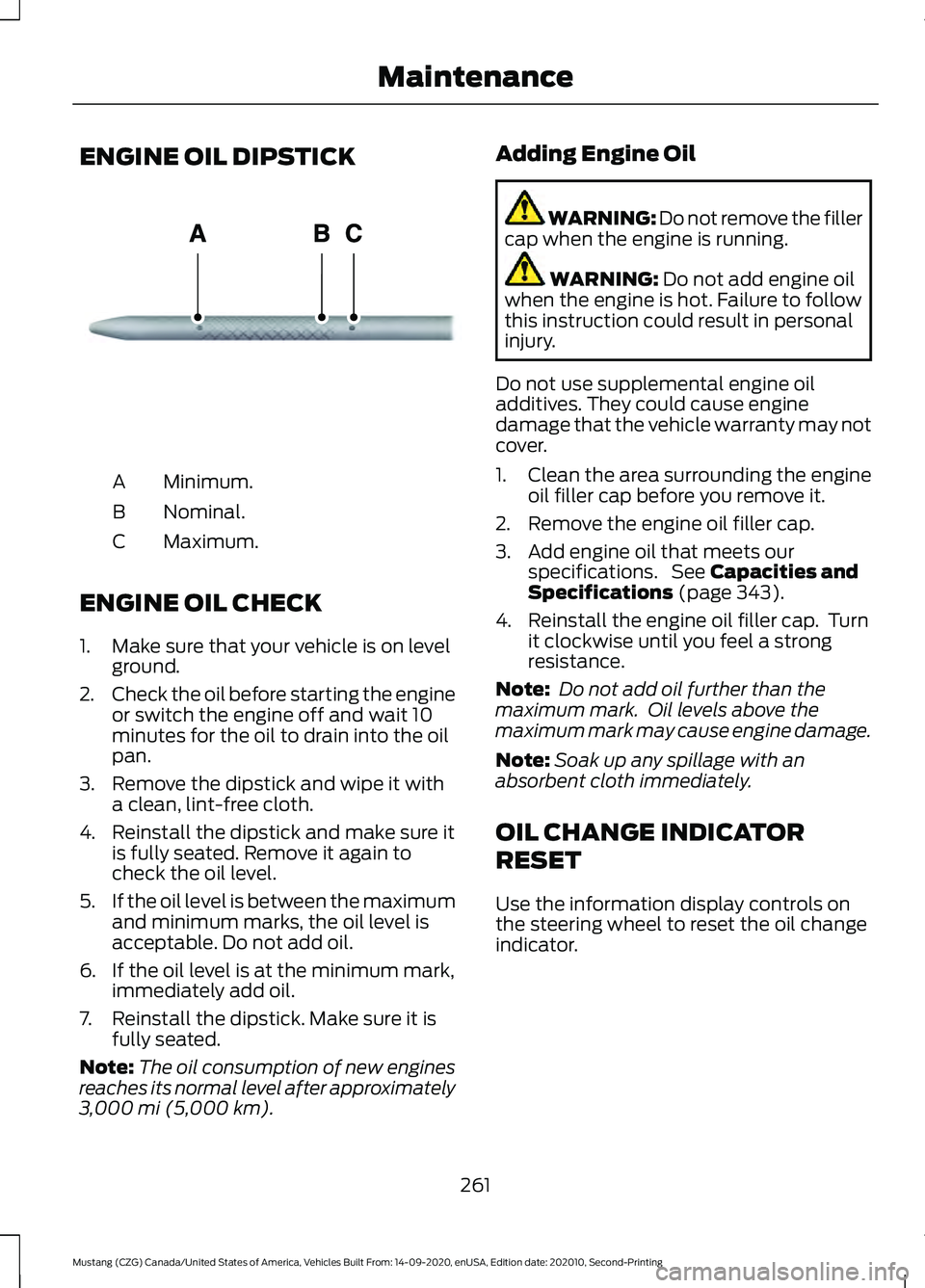
ENGINE OIL DIPSTICK
Minimum.
A
Nominal.
B
Maximum.
C
ENGINE OIL CHECK
1. Make sure that your vehicle is on level ground.
2. Check the oil before starting the engine
or switch the engine off and wait 10
minutes for the oil to drain into the oil
pan.
3. Remove the dipstick and wipe it with a clean, lint-free cloth.
4. Reinstall the dipstick and make sure it is fully seated. Remove it again to
check the oil level.
5. If the oil level is between the maximum
and minimum marks, the oil level is
acceptable. Do not add oil.
6. If the oil level is at the minimum mark, immediately add oil.
7. Reinstall the dipstick. Make sure it is fully seated.
Note: The oil consumption of new engines
reaches its normal level after approximately
3,000 mi (5,000 km). Adding Engine Oil WARNING: Do not remove the filler
cap when the engine is running. WARNING:
Do not add engine oil
when the engine is hot. Failure to follow
this instruction could result in personal
injury.
Do not use supplemental engine oil
additives. They could cause engine
damage that the vehicle warranty may not
cover.
1. Clean the area surrounding the engine oil filler cap before you remove it.
2. Remove the engine oil filler cap.
3. Add engine oil that meets our specifications. See
Capacities and
Specifications (page 343).
4. Reinstall the engine oil filler cap. Turn it clockwise until you feel a strong
resistance.
Note: Do not add oil further than the
maximum mark. Oil levels above the
maximum mark may cause engine damage.
Note: Soak up any spillage with an
absorbent cloth immediately.
OIL CHANGE INDICATOR
RESET
Use the information display controls on
the steering wheel to reset the oil change
indicator.
261
Mustang (CZG) Canada/United States of America, Vehicles Built From: 14-09-2020, enUSA, Edition date: 202010, Second-Printing MaintenanceE270482
Page 273 of 530
Note:
If the brake fluid level is between the
MIN and the MAX marks on the reservoir, it
is acceptable.
Note: If the brake fluid level is below the
MIN
mark or above the MAX mark, have
your vehicle checked as soon as possible.
Note: To avoid fluid contamination, the
reservoir cap must remain in place and fully
tight, unless you are adding fluid.
Only use fluid that meets our
specifications. See
Capacities and
Specifications (page 335).
Brake Fluid Service Interval
Brake fluid absorbs water over time which
degrades the effectiveness of the brake
fluid. Change the brake fluid at the
specified intervals to prevent degraded
braking performance.
For detailed interval information, see
Scheduled Maintenance in your Owner's
Manual or your local maintenance guide.
CLUTCH FLUID CHECK -
MANUAL TRANSMISSION
The clutch and brake systems share the
same fluid reservoir. See
Brake Fluid
Check (page 269).
POWER STEERING FLUID
CHECK
Your vehicle is equipped with an electric
power steering (EPS) system. There is no
fluid reservoir to check or fill. CHANGING THE 12V BATTERY WARNING:
Batteries normally
produce explosive gases which can
cause personal injury. Therefore, do not
allow flames, sparks or lighted
substances to come near the battery.
When working near the battery, always
shield your face and protect your eyes.
Always provide correct ventilation. WARNING:
When lifting a
plastic-cased battery, excessive pressure
on the end walls could cause acid to flow
through the vent caps, resulting in
personal injury and damage to the
vehicle or battery. Lift the battery with a
battery carrier or with your hands on
opposite corners. WARNING:
Keep batteries out of
reach of children. Batteries contain
sulfuric acid. Avoid contact with skin,
eyes or clothing. Shield your eyes when
working near the battery to protect
against possible splashing of acid
solution. In case of acid contact with skin
or eyes, flush immediately with water for
a minimum of 15 minutes and get prompt
medical attention. If acid is swallowed,
call a physician immediately. WARNING:
Battery posts,
terminals and related accessories
contain lead and lead compounds,
chemicals known to the State of
California to cause cancer and
reproductive harm. Wash your hands
after handling
.
270
Mustang (CZG) Canada/United States of America, Vehicles Built From: 14-09-2020, enUSA, Edition date: 202010, Second-Printing Maintenance
Page 379 of 530
(read and unread), and call history,
including history of calls when your cellular
phone was not connected to the system.
In addition, if you connect a media device,
the system creates and retains an index of
supported media content. The system also
records a short development log of
approximately 10 minutes of all recent
system activity. The log profile and other
system data may be used to improve the
system and help diagnose any problems
that may occur.
The cellular profile, media device index,
and development log will remain in the
vehicle unless you delete them and are
generally accessible only in the vehicle
when you connect the cellular phone or
media player. If you no longer plan to use
the system or the vehicle, we recommend
you perform a Master Reset to erase all
stored information.
No one can access system data without
special equipment and access to the
vehicle's SYNC module. Ford Motor
Company and Ford of Canada will not
access the system data for any purpose
other than as described absent consent, a
court order, or where required by law
enforcement, other government
authorities, or other third parties acting
with lawful authority. Other parties may
seek to access the information
independently of Ford Motor Company and
Ford of Canada. For further privacy
information, see the section on 911 Assist.
See SYNC™ Applications and Services
(page 379).
USING VOICE RECOGNITION
This system helps you control many
features using voice commands. This
allows you to keep your hands on the
wheel and focus on what is around you.
Initiating a Voice Session Press the voice button. A list of
available voice commands
appears in the display.
Global Voice Commands
These voice commands are always
available. You can say them at any time. Global voice commands
Gives you available commands you can use
on the current screen.
Help
Gives you a list of possible voice
commands.
List of Commands
This command ends the voice session. You
can also cancel a session by pressing seek
up, seek down, or holding the voice button
for two or more seconds.
Cancel
376
Mustang (CZG) Canada/United States of America, Vehicles Built From: 14-09-2020, enUSA, Edition date: 202010, Second-Printing SYNC™
(If Equipped)E142599
Page 443 of 530
Less Cost to Properly Maintain Your
Vehicle
Ford Protect extended service plan also
offers a Premium Maintenance Plan that
covers all scheduled maintenance, and
selected wear items. The coverage is
prepaid, so you never have to worry about
the cost of your vehicle
’s maintenance.
Covered maintenance includes:
• Windshield wiper blades.
• Spark plugs.
• The clutch disc (if equipped).
• Brake pads and linings.
• Shock absorbers.
• Struts.
• Engine Belts.
• Engine coolant hoses, clamps and
o-rings.
• Diesel exhaust fluid replenishment (if
equipped).
• Cabin air filter replacement every
20,000 mi (32,000 km) (electric
vehicles only).
Interest Free Finance Options
Just a 5% down payment will provide you
with an affordable, no interest, no fee
payment program allowing you all the
security and benefits Ford Protect
extended service plan has to offer while
paying over time. You are pre-approved
with no credit check or hassles. To learn
more, call our Ford Protect extended
service plan specialists at 800-367-3377.
Ford Protect Extended Service Plan
P.O. Box 321067
Detroit, MI 48232 Ford Protect Extended Service
Plan (CANADA ONLY)
You can get more protection for your
vehicle by purchasing a Ford Protect
extended service plan. Ford Protect
extended service plan is the only service
contract backed by Ford Motor Company
of Canada, Limited. Depending on the plan
you purchase, Ford Protect extended
service plan provides benefits such as:
•
Rental reimbursement.
• Coverage for certain maintenance and
wear items.
• Protection against repair costs after
your New Vehicle Limited Warranty
Coverage expires.
• Roadside Assistance benefits.
There are several Ford Protect extended
service plans available in various time,
distance and deductible combinations.
Each plan is tailored to fit your own driving
needs, including reimbursement for towing
and rental. When you purchase Ford
Protect extended service plan, you receive
added peace-of-mind protection
throughout Canada, the United States and
Mexico, provided by a network of
participating authorized Ford Motor
Company dealers.
Note: Repairs performed outside of Canada
and the United States are not eligible for
Ford Protect extended service plan
coverage.
This information is subject to change. For
more information; visit your local Ford of
Canada dealer or www.ford.ca to find the
Ford Protect extended service plan that is
right for you.
440
Mustang (CZG) Canada/United States of America, Vehicles Built From: 14-09-2020, enUSA, Edition date: 202010, Second-Printing Ford Protect
Page 446 of 530
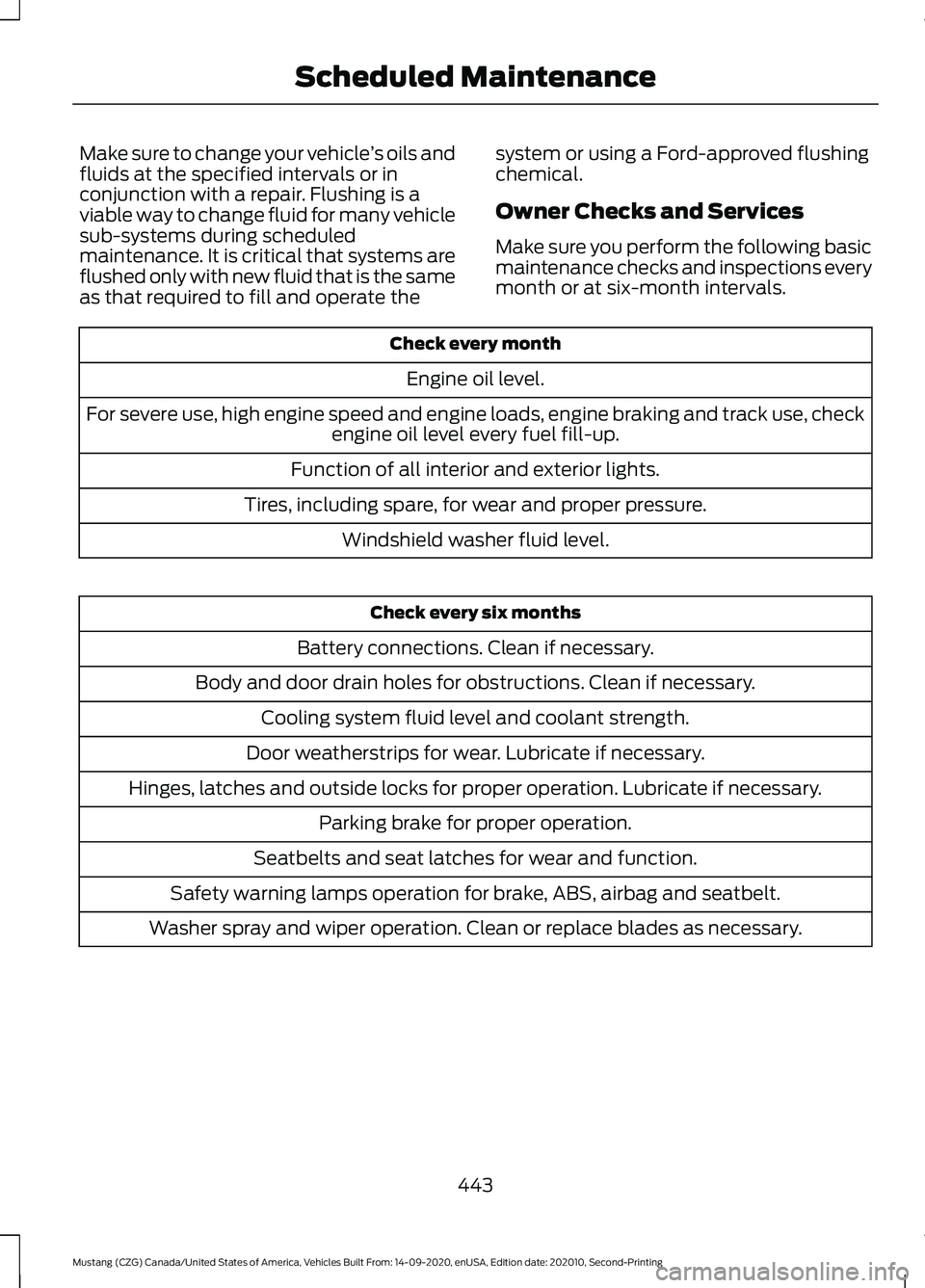
Make sure to change your vehicle
’s oils and
fluids at the specified intervals or in
conjunction with a repair. Flushing is a
viable way to change fluid for many vehicle
sub-systems during scheduled
maintenance. It is critical that systems are
flushed only with new fluid that is the same
as that required to fill and operate the system or using a Ford-approved flushing
chemical.
Owner Checks and Services
Make sure you perform the following basic
maintenance checks and inspections every
month or at six-month intervals.Check every month
Engine oil level.
For severe use, high engine speed and engine loads, engine braking and track use, check engine oil level every fuel fill-up.
Function of all interior and exterior lights.
Tires, including spare, for wear and proper pressure. Windshield washer fluid level. Check every six months
Battery connections. Clean if necessary.
Body and door drain holes for obstructions. Clean if necessary. Cooling system fluid level and coolant strength.
Door weatherstrips for wear. Lubricate if necessary.
Hinges, latches and outside locks for proper operation. Lubricate if necessary. Parking brake for proper operation.
Seatbelts and seat latches for wear and function.
Safety warning lamps operation for brake, ABS, airbag and seatbelt.
Washer spray and wiper operation. Clean or replace blades as necessary.
443
Mustang (CZG) Canada/United States of America, Vehicles Built From: 14-09-2020, enUSA, Edition date: 202010, Second-Printing Scheduled Maintenance
Page 516 of 530

A
A/C
See: Climate Control.......................................... 127
About This Manual...........................................9
About This Supplement - Mach 1...............9 Mach 1 History........................................................ 10
ABS See: Brakes............................................................. 171
ABS driving hints See: Hints on Driving With Anti-Lock
Brakes.................................................................. 171
Accessories....................................................438
Accessories See: Replacement Parts
Recommendation............................................ 19
ACC See: Using Adaptive Cruise Control............185
Adjusting the Headlamps.........................272
Horizontal Aim Adjustment............................ 274
Vertical Aim Adjustment................................. 272
Adjusting the Steering Wheel....................75
Airbag Disposal...............................................57
Air Conditioning See: Climate Control.......................................... 127
Air Filter See: Changing the Engine Air Filter - 2.3L
EcoBoost™/5.0L.......................................... 263
See: Changing the Engine Air Filter - 5.0L, Mach 1............................................................... 262
Alarm See: Anti-Theft Alarm......................................... 74
Ambient Lighting
............................................83
Anti-Theft Alarm............................................74
Arming the Alarm................................................. 74
Disarming the Alarm........................................... 74
Appendices....................................................483
Apps
.................................................................420
SiriusXM Traffic and Travel Link...................422
Using Apps on an Android Device................421
Using Apps on an iOS Device......................... 421
Using Mobile Navigation on an Android Device................................................................. 421
At a Glance
.......................................................23
Audible Warnings and Indicators.............97 Beltminder Warning............................................ 98
Direction Indicator Left On............................... 98
Headlamps On Warning Tone......................... 97Keyless Warning Alert.........................................
97
Parking Brake On Warning Tone.....................97
Transmission Not in Park.................................. 98
Audio Control
...................................................75
You can operate the following functions
with the control:............................................... 75
Audio System
................................................365
General Information......................................... 365
Audio Unit - Vehicles With: 4.2 Inch Information and Entertainment Display
Screen...........................................................365
Accessing the Apps Menu.............................. 366
Accessing the Clock Settings.......................366
Accessing the Media Source Menu............366
Accessing the Phone Features.....................366
Accessing the Settings Menu.......................366
Accessing the Sound Settings.....................366
Adjusting the Volume...................................... 366
Changing Radio Stations............................... 366
Listening to the Radio...................................... 367
Muting the Audio................................................ 367
Playing or Pausing Media................................ 367
Switching the Audio Unit On and Off.........367
Switching the Display On and Off...............367
Using Seek, Fast Forward and Reverse .............................................................. 367
Using the Display Control............................... 367
Using the Number Block................................. 367
Audio Unit - Vehicles With: 8 Inch Information and Entertainment Display
Screen...........................................................367
Accessing the Sound Settings.....................368
Adjusting the Volume...................................... 368
Changing Radio Stations............................... 368
Ejecting the CD................................................... 368
Inserting a CD..................................................... 368
Playing or Pausing Media............................... 368
Switching the Audio Unit On and Off........368
Using Seek, Fast Forward and Reverse............................................................. 369
Autolamps
.........................................................81
Windshield Wiper Activated
Headlamps......................................................... 81
Automatic Climate Control......................128 Setting the Blower Motor Speed..................128
Setting the Temperature................................. 129
Switching Auto Mode On and Off................129
Switching Defrost On and Off.......................129
513
Mustang (CZG) Canada/United States of America, Vehicles Built From: 14-09-2020, enUSA, Edition date: 202010, Second-Printing Index