2021 FORD F-150 Tire Rotation
[x] Cancel search: Tire RotationPage 20 of 796

Wheel and Tire Information
Locating the Tire label
..............................542
Department of Transportation Uniform Tire Quality Grades ................................
542
Information on the Tire Sidewall ..........
543
Glossary of Tire Terminology .................
548
Tire Replacement Requirements .........
549
Using Snow Chains .....................................
551
Using Bead-Lock Wheels - Raptor ......
553
Tire Care
Checking the Tire Pressures ...................
555
Inflating the Tires ........................................
555
Inspecting the Tire for Wear ...................
556
Inspecting the Tire for Damage ............
556
Inspecting the Wheel Valve Stems ......
557
Tire Rotation .................................................
557
Tire Pressure Monitoring System
What Is the Tire Pressure Monitoring System .......................................................
559
Tire Pressure Monitoring System Overview ....................................................
559
Tire Pressure Monitoring System Precautions ..............................................
560
Tire Pressure Monitoring System Limitations ...............................................
560
Viewing the Tire Pressures .......................
561
Resetting Tire Pressure Monitoring System ........................................................
561
Tire Pressure Monitoring System – Troubleshooting .....................................
564
Changing a Road Wheel
Changing a Flat Tire ..................................
566
Wheel Nuts ....................................................
572Capacities and Specifications
Engine Specifications - 2.7L EcoBoost™
........................................................................\
574
Engine Specifications - 3.0L Diesel ......
575
Engine Specifications - 3.3L ...................
576
Engine Specifications - 3.5L Ecoboost™ ........................................................................\
.
577
Engine Specifications - 3.5L, Hybrid Electric Vehicle (HEV) ..........................
578
Engine Specifications - 5.0L ...................
579
Motorcraft Parts - 2.7L EcoBoost™ .....
580
Motorcraft Parts - 3.0L Diesel ................
581
Motorcraft Parts - 3.3L .............................
582
Motorcraft Parts - 3.5L Ecoboost™ .....
583
Motorcraft Parts - 3.5L Ecoboost™, Raptor ........................................................
584
Motorcraft Parts - 3.5L, Hybrid Electric Vehicle (HEV) ..........................................
585
Motorcraft Parts - 5.0L ............................
586
Engine Oil Capacity and Specification - 2.7L EcoBoost™ ......................................
587
Engine Oil Capacity and Specification - 3.0L Diesel ................................................
588
Engine Oil Capacity and Specification - 3.3L ..............................................................
590
Engine Oil Capacity and Specification - 3.5L Ecoboost™ .....................................
592
Engine Oil Capacity and Specification - 3.5L, Hybrid Electric Vehicle (HEV)
.......................................................................
594
Engine Oil Capacity and Specification - 5.0L .............................................................
596
Cooling System Capacity and Specification - 2.7L EcoBoost™ .......
598
Cooling System Capacity and Specification - 3.0L Diesel .................
599
Cooling System Capacity and Specification - 3.3L ...............................
599
Cooling System Capacity and Specification - 3.5L Ecoboost™ ......
600
Cooling System Capacity and Specification - 3.5L, Hybrid Electric
Vehicle (HEV) ...........................................
601
16
F-150 (TFD) Canada/United States of America, enUSA, Edition date: 202104, Second-Printing Table of Contents
Page 561 of 796

Highway Hazards
No matter how carefully you drive,
there is always the possibility that
you could eventually have a flat
tire on the highway. Drive slowly
to the closest safe area out of
traffic. This could further damage
the flat tire, but your safety is
more important.
If you feel a sudden vibration or
ride disturbance while driving, or
you suspect your tire or vehicle
has been damaged, immediately
reduce your speed. Drive with
caution until you can safely pull
off the road. Stop and inspect the
tires for damage. If a tire is
under-inflated or damaged,
deflate it, remove the wheel and
replace it with your spare tire and
wheel. If you cannot detect a
cause, have the vehicle towed to
the nearest repair facility or tire
dealer to have the vehicle
inspected.
Tire and Wheel Alignment
A bad jolt from hitting a curb or
pothole can cause the front end
of your vehicle to become
misaligned or cause damage to
your tires. If your vehicle seems to
pull to one side when you are
driving, the wheels could be out of
alignment. Have an authorized
dealer check the wheel alignment
periodically.
Wheel misalignment in the front
or the rear can cause uneven and
rapid treadwear of your tires and
should be corrected by an
authorized dealer.
INSPECTING THE WHEEL
VALVE STEMS
Check the valve stems for holes,
cracks, or cuts that could permit
air leakage.
TIRE ROTATION
WARNING: If the tire label
shows different tire pressures for
the front and rear tires and the
vehicle has a tire pressure
monitoring system, then you
need to update the settings for
the system sensors. Always
perform the system reset
procedure after tire rotation. If
you do not reset the system, it
may not provide a low tire
pressure warning when
necessary.
Rotating your tires at the
recommended interval will help
your tires wear more evenly,
providing better tire performance
and longer tire life.
Note: If your tires show any uneven
wear have the alignment checked
by an authorized dealer before
rotating tires.
557
F-150 (TFD) Canada/United States of America, enUSA, Edition date: 202104, Second-Printing Tire Care
Page 562 of 796
Note:
If you have a dissimilar spare
wheel and tire assembly, it is
intended for temporary use only
and should not be used in a tire
rotation.
Note: After having your tires
rotated, inflation pressure must be
checked and adjusted to the
vehicle requirements.
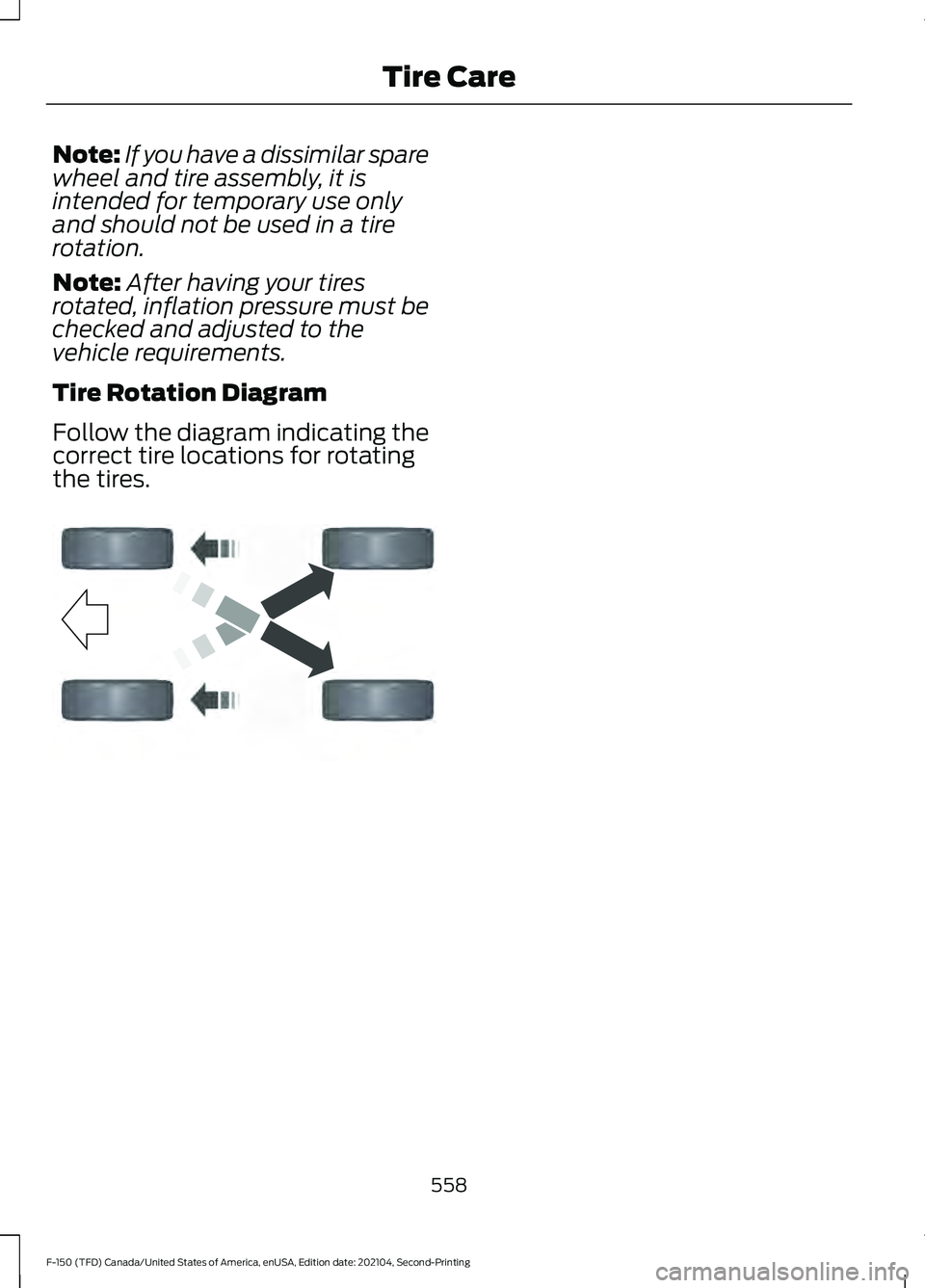
Tire Rotation Diagram
Follow the diagram indicating the
correct tire locations for rotating
the tires. 558
F-150 (TFD) Canada/United States of America, enUSA, Edition date: 202104, Second-Printing Tire CareE142548
Page 565 of 796

VIEWING THE TIRE
PRESSURES
Using the information display
arrow keys navigate to the truck
info section where you can view
the tire pressures.
RESETTING TIRE PRESSURE
MONITORING SYSTEM
Tire Pressure Monitoring
System Reset Procedure
WARNING: To determine
the required pressure(s) for your
vehicle, see the Safety
Compliance Certification Label
(on the door hinge pillar,
door-latch post or the door edge
that meets the door-latch post,
next to the driver seat) or the
Tire Label on the B-Pillar or the
edge of the driver door. You must reset the tire pressure
monitoring system after each tire
rotation on vehicles that require
different recommended tire
pressures in the front tires as
compared to the rear tires.
Note:
To reduce the chances of
interference from another vehicle,
perform the system reset
procedure at least three feet, one
meter, away from another vehicle
undergoing the system reset
procedure at the same time.
Note: Do not wait more than two
minutes between resetting each
tire sensor or the system can
time-out and you need to repeat
the entire procedure on all four
wheels.
1. Drive the vehicle above 20 mph
(32 km/h)
for at least two
minutes, then park in a safe
location where you can easily
get to all four tires and have
access to an air pump.
2. Switch the ignition off.
3. Switch the ignition on but do
not start the engine.
4. Switch the hazard flashers on
then off three times.
Note: You must accomplish this
within 10 seconds. If you
successfully enter the reset mode,
the horn sounds once, the system
indicator flashes and a message
shows in the information display.
561
F-150 (TFD) Canada/United States of America, enUSA, Edition date: 202104, Second-Printing Tire Pressure Monitoring SystemE224333
Page 567 of 796

pressure sensors are mounted into
each tire on your trailer. The
sensors send a message to your
vehicle indicating the current
trailer tire pressure and
temperature.
If the trailer tire pressure
monitoring system detects that a
tire is low, a warning message
appears in the information display.
The trailer tire information screen
in the information display
highlights the tire with a low
pressure.
If the trailer tire pressure
monitoring system detects that a
tire temperature is over temp, a
warning message appears in the
Information display. The trailer tire
information screen in the
information display highlights the
tire with a high temperature.
The main function of the trailer tire
pressure monitoring system is to
warn you when your trailer tires
need air or if the tires are
experiencing high temperatures.
It can also warn you in the event
the system is no longer capable
of functioning as intended. See
Tire Pressure Monitoring
System – Information
Messages
(page 565). When a Temporary Spare or
New Tire is Installed
If you have replaced a trailer tire
with a new or spare tire, a warning
message appears and pressure
readings are no longer displayed
for that tire.
To restore the full function of the
trailer tire pressure monitoring
system:
•
Have the damaged wheel and
tire assembly repaired and
remounted to your trailer.
• Install the trailer tire pressure
monitoring sensor into the new
wheel and tire assembly.
• Perform the trailer tire pressure
monitoring system reset
procedure.
Trailer Tire Pressure
Monitoring System Reset
Procedure
Note: You need to perform the tire
pressure monitoring system reset
procedure after each tire rotation,
or when a new trailer tire pressure
sensor is installed into a trailer tire.
The trailer tire pressure monitoring
system can be reset through the
menu in the information display.
See Tire Pressure Monitoring
System – Information
Messages (page 565). Performing
the trailer setup process also
resets the trailer tire pressure
monitoring system.
563
F-150 (TFD) Canada/United States of America, enUSA, Edition date: 202104, Second-Printing Tire Pressure Monitoring System
Page 576 of 796
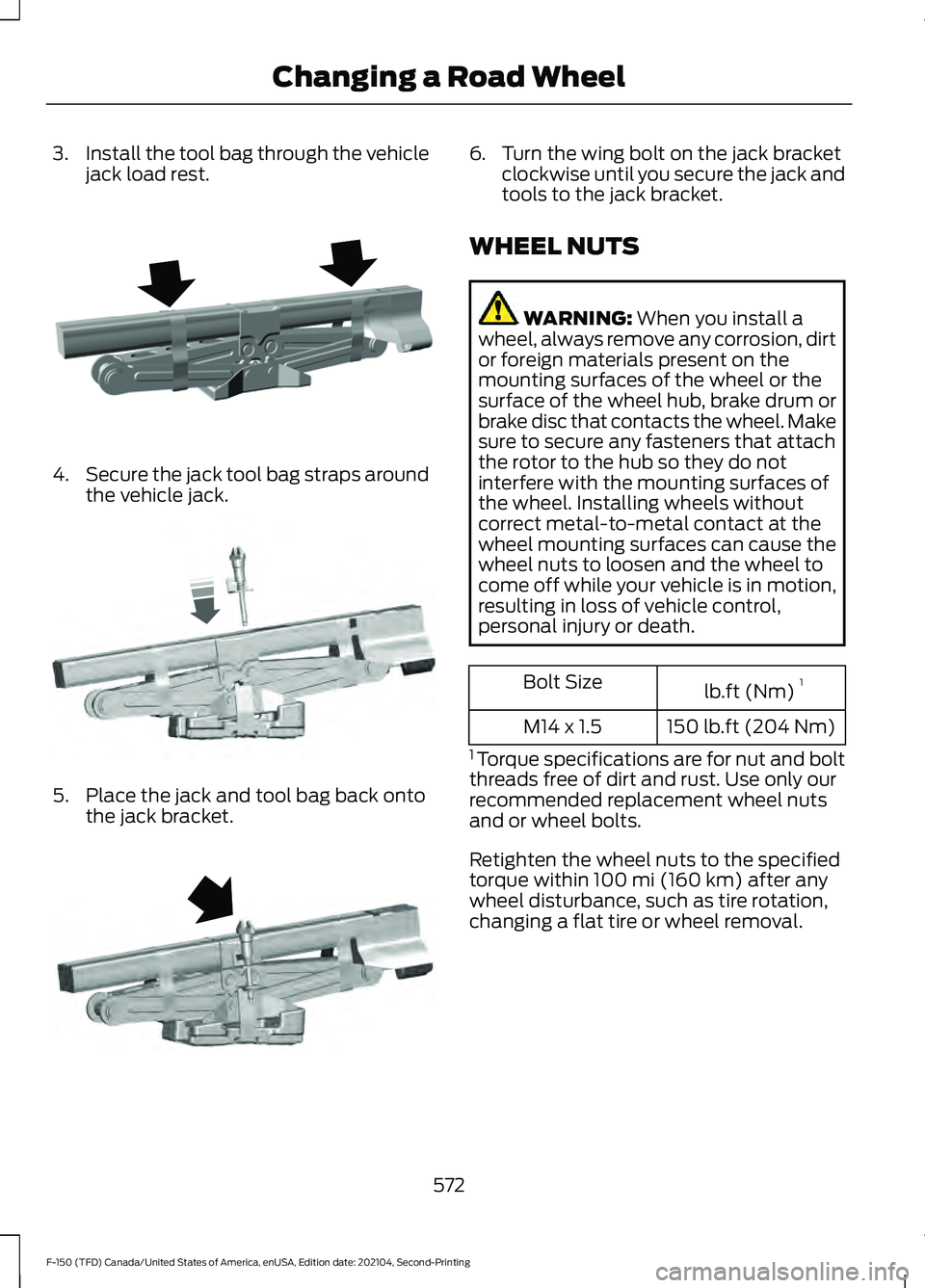
3.
Install the tool bag through the vehicle
jack load rest. 4.
Secure the jack tool bag straps around
the vehicle jack. 5. Place the jack and tool bag back onto
the jack bracket. 6. Turn the wing bolt on the jack bracket
clockwise until you secure the jack and
tools to the jack bracket.
WHEEL NUTS WARNING: When you install a
wheel, always remove any corrosion, dirt
or foreign materials present on the
mounting surfaces of the wheel or the
surface of the wheel hub, brake drum or
brake disc that contacts the wheel. Make
sure to secure any fasteners that attach
the rotor to the hub so they do not
interfere with the mounting surfaces of
the wheel. Installing wheels without
correct metal-to-metal contact at the
wheel mounting surfaces can cause the
wheel nuts to loosen and the wheel to
come off while your vehicle is in motion,
resulting in loss of vehicle control,
personal injury or death. lb.ft (Nm)
1
Bolt Size
150 lb.ft (204 Nm)
M14 x 1.5
1 Torque specifications are for nut and bolt
threads free of dirt and rust. Use only our
recommended replacement wheel nuts
and or wheel bolts.
Retighten the wheel nuts to the specified
torque within
100 mi (160 km) after any
wheel disturbance, such as tire rotation,
changing a flat tire or wheel removal.
572
F-150 (TFD) Canada/United States of America, enUSA, Edition date: 202104, Second-Printing Changing a Road WheelE323386 E327654 E323384
Page 793 of 796

Tire Pressure Monitoring System..........559
Tire Pressure Monitoring System –
Troubleshooting............................................ 564
Tire Pressure Monitoring System – Troubleshooting.......................................564
Tire Pressure Monitoring System – Information Messages................................ 565
Tire Pressure Monitoring System – Warning Lamps............................................................... 564
Tire Replacement Requirements..........549
Tire Rotation..................................................557
Towing a Trailer Limitations....................429
Towing a Trailer Precautions...................428
Towing a Trailer............................................428 Towing a Trailer – Troubleshooting............433
Towing Weights and Dimensions.................431
Towing a Trailer – Troubleshooting........................................433
Towing a Trailer – Information Messages......................................................... 433
Towing Weights and Dimensions...........431 Calculating the Maximum Loaded Trailer
Weight for Your Vehicle.............................. 432
Recommended Towing Weights..................431
What Is the Maximum Loaded Trailer Weight............................................................... 432
Towing Your Vehicle Precautions.........490
Towing Your Vehicle...................................490 Towing Your Vehicle –
Troubleshooting............................................ 492
Towing Your Vehicle – Troubleshooting........................................492
Towing Your Vehicle – Information Messages......................................................... 492
Traction Control Indicator.........................319
Traction Control
............................................319
Traction Control – Troubleshooting...........320
Traction Control – Troubleshooting........................................320
Traction Control – Information Messages......................................................... 320
Trail Control Indicators - Raptor.............325
Trail Control Limitations - Raptor..........324
Trail Control...................................................324 Trail Control – Troubleshooting -
Raptor................................................................ 327
Trail One Pedal Drive........................................ 325Trail One Pedal Drive –
Troubleshooting............................................ 326
Trail Control – Troubleshooting - Raptor............................................................327
Trail Control – Information Messages.......................................................... 327
Trailer Backup Assistance Precautions................................................446
Trailer Backup Assistance........................446 Setting Up the Trailer Backup Assistance
for a Conventional Trailer.......................... 446
Trailer Backup Assistance – Troubleshooting............................................ 453
Trailer Backup Assistance – Troubleshooting........................................453
Trailer Backup Assistance – Frequently Asked Questions........................................... 456
Trailer Backup Assistance – Information Messages......................................................... 453
Trailer Brake Precautions
.........................428
Trailer Hitching Assistance Indicators......................................................441
Trailer Hitching Assistance Limitations
..................................................439
Trailer Hitching Assistance Precautions.................................................439
Trailer Hitching Assistance......................439
Trailer Lighting Check................................426
Trailer Reverse Guidance Precautions................................................459
Trailer Reverse Guidance..........................459 Setting Up Trailer Reverse Guidance for a
Conventional Trailer.................................... 459
Trailer Reverse Guidance – Troubleshooting............................................ 465
Trailer Reverse Guidance – Troubleshooting........................................465
Trailer Reverse Guidance – Frequently Asked Questions........................................... 467
Trailer Reverse Guidance – Information Messages......................................................... 465
Trailer Sway Control Precautions..........438
Trailer Sway Control...................................438
Trailer Towing Hints....................................429
Trailer Towing Navigation
.........................655
Trail One Pedal Drive..................................325 Switching Trail One Pedal Drive On and
Off....................................................................... 325
789
F-150 (TFD) Canada/United States of America, enUSA, Edition date: 202104, Second-Printing Index