2021 FORD F-150 parking brake
[x] Cancel search: parking brakePage 337 of 796
Note:
During parking maneuvers, the
adaptive steering system balances the driver
workload for various steering wheel inputs
and vehicle loading conditions. Under
extreme operating conditions the system
locking device could engage. This strategy
prevents overheating and permanent
damage to the adaptive steering system.
Typical steering and driving maneuvers
allow the system to cool and return to
normal operation.
Adaptive Learning
Adaptive learning helps correct road
irregularities and improves overall handling
and steering. It communicates with the
brake system to help operate advanced
stability control and crash avoidance
systems. Additionally, whenever you
disconnect the battery or install a new
battery, you must drive your vehicle a short
distance before the system relearns the
strategy and reactivates all systems. STEERING –
TROUBLESHOOTING
STEERING – WARNING
INDICATORS The adaptive steering system
indicator illuminates if the
system detects a fault during the
continuous diagnostic checks.
Note: If a red warning message displays,
stop your vehicle as soon as it is safe to do
so.
STEERING – INFORMATION MESSAGES Action
Message
The power steering system has detected acondition that requires service. Have your vehicle checked as soon as possible.
Steering Fault Service Now
The power steering system is not working.
Stop your vehicle in a safe place. Have your vehicle checked as soon as possible.
Steering Loss Stop Safely
The power steering system has detected acondition that requires service. Have your vehicle checked as soon as possible.
Steering Assist Fault Service Required
The steering system has detected a condi-
tion that requires service. Have your vehiclechecked as soon as possible.
Steering Lock Malfunction Service Now
333
F-150 (TFD) Canada/United States of America, enUSA, Edition date: 202104, Second-Printing SteeringE223375
Page 338 of 796

PARKING AID PRECAUTIONS
WARNING: To help avoid personal
injury, always use caution when in
reverse (R) and when using the sensing
system. WARNING:
The system may not
detect objects with surfaces that absorb
reflection. Always drive with due care
and attention. Failure to take care may
result in a crash. WARNING: Traffic control systems,
fluorescent lamps, inclement weather,
air brakes, external motors and fans may
affect the correct operation of the
sensing system. This may cause reduced
performance or false alerts. WARNING:
The system may not
detect small or moving objects,
particularly those close to the ground. WARNING:
The parking aid system
can only assist you to detect objects
when your vehicle is moving at parking
speeds. To help avoid personal injury you
must take care when using the parking
aid system. WARNING:
The system may not
function if the sensor is blocked. WARNING:
In cold and severe
weather conditions the system may not
function. Rain, snow and spray can all
limit sensor performance. WARNING:
If damage occurs in the
immediate area surrounding the sensor,
have your vehicle checked as soon as
possible. Note:
If your vehicle sustains damage
leaving the sensors misaligned, this will
cause inaccurate measurements or false
alerts.
When you connect a trailer to your vehicle,
the rear parking aid detects the trailer and
provides an alert. Disable the parking aid
when you connect a trailer to prevent the
alert.
Note: Certain add-on devices installed
around the bumper or fascia may create
false alerts, for example, large trailer
hitches, bike or surfboard racks, license plate
brackets, bumper covers or any other device
that could block the normal detection zone
of the parking aid system. Aftermarket spare
tires or spare tire covers mounted to the rear
tailgate could cause false alerts from the
park aid system. Remove the add-on device
to prevent false alerts.
Note: Keep the sensors free from snow, ice
and large accumulations of dirt. If the
sensors are covered, the system's accuracy
can be affected.
Do not clean the sensors with sharp
objects.
Note: When using a programmed MyKey,
you cannot switch the parking aids off. See
MyKey ™
(page 98).
REAR PARKING AID
(IF EQUIPPED)
WHAT IS THE REAR PARKING AID
Rear parking sensors detect objects behind
your vehicle when in reverse (R).
REAR PARKING AID LIMITATIONS
There is a decreased coverage area at the
outer corners.
When using a programmed MyKey, you
cannot switch the rear parking aid off.
334
F-150 (TFD) Canada/United States of America, enUSA, Edition date: 202104, Second-Printing Parking Aids
(If Equipped)
Page 340 of 796

If your vehicle is in any forward gear, the
front parking aid provides audible warnings
and visual indication when your vehicle is
moving at a speed of 5 mph (8 km/h) or
below and the system detects an object
within the detection zone. Once your
vehicle reaches a stop, the visual indication
and audio warning stops after a few
seconds.
If your vehicle is in neutral (N), the front
and rear sensors provide visual indication
only when your vehicle is moving below a
speed of
5 mph (8 km/h) and obstacles
are detected inside the detection areas.
Once your vehicle stops, the visual
indication and audio warning stops after
a few seconds.
LOCATING THE FRONT PARKING
AID SENSORS The front parking aid sensors are in the
front bumper.
FRONT PARKING AID AUDIBLE
WARNINGS
A warning tone sounds when there is an
object within
28 in (70 cm) from the front
bumper. As your vehicle moves closer to
an object, the rate of the tone increases. The warning tone continuously sounds
when an object is 12 in (30 cm) or less from
the front bumper.
Note:
If the detected object is 12 in (30 cm)
or less from your vehicle, visual indication
remains on.
SIDE PARKING AID
(IF EQUIPPED)
WHAT IS THE SIDE PARKING AID
The front and rear outermost parking aid
sensors map objects that are near to the
sides of your vehicle.
SIDE PARKING AID LIMITATIONS
The sensor coverage is up to 24 in (60 cm)
from the sides of your vehicle.
The side parking aid may not function if:
• Your vehicle remains stationary for over
two minutes.
• The anti-lock brake system activates.
• The traction control system activates.
• Your vehicle is in park (P).
• The steering wheel angle information
is not available. You must drive at least
492 ft (150 m)
above 19 mph
(30 km/h) to reset the steering wheel
angle information.
Note: If you switch traction control off, the
side sensing system also turns off.
To reinitialize the system, drive the length
of your vehicle.
The side parking aid does not detect an
object that is moving toward the side of
your vehicle, for example another vehicle
moving at a low speed, if it does not pass
a front or rear parking aid sensor.
336
F-150 (TFD) Canada/United States of America, enUSA, Edition date: 202104, Second-Printing Parking Aids
(If Equipped)E310332
Page 351 of 796
4. Use the turn signal lever to search for
a parking space on the driver or
passenger side of your vehicle.
Note: If you do not use the turn signal lever,
the system searches for a parking space on
the passenger side of your vehicle.
5. Drive your vehicle approximately 3 ft
(1 m) away from and parallel to the
other parked vehicles when searching
for a parking space.
Note: A tone sounds and a message
appears in the information and
entertainment display when active park
assist finds a suitable parking space.
6. Press and hold the brake pedal.
7. Release the steering wheel and shift into neutral (N).
8. Press and hold the active park assist button.
9. Release the brake pedal to allow your vehicle to park.
Note: You can slow down your vehicle at
any time by pressing the brake pedal.
Note: When parallel parking between
objects, the system parks closer to the
object in front of your vehicle to allow easier
access to the luggage compartment.
Note: When parking is complete, your
vehicle shifts into park (P).
ENTERING A PERPENDICULAR
PARKING SPACE
1. Press the parking aid button.
Note: Active park assist does not recognize
parking space lines and centers your vehicle
between objects.
2. Press the active park assist icon on the
touchscreen.
3. Select perpendicular parking. 4. Use the turn signal lever to search for
a parking space on the driver or
passenger side of your vehicle.
Note: If you do not use the turn signal lever,
the system searches for a parking space on
the passenger side of your vehicle.
5. Drive your vehicle approximately 3 ft
(1 m) away from and perpendicular to
the other parked vehicles when
searching for a parking space.
Note: A tone sounds and a message
appears in the information and
entertainment display when active park
assist finds a parking space.
6. Press and hold the brake pedal.
7. Release the steering wheel and shift into neutral (N).
8. Press and hold the active park assist button.
9. Release the brake pedal to allow the vehicle to park.
Note: Active park assist backs your vehicle
into parking spaces.
Note: Active park assist aligns the front end
of your vehicle with the lane side of the
object next to it.
Note: When the system detects only one
object, it allows enough distance to open
the door on either side.
Note: You can slow down your vehicle at
any time by pressing the brake pedal.
Note: When parking is complete, your
vehicle shifts into park (P).
EXITING A PARKING SPACE
Active park assist only assists leaving
parallel parking spaces.
1. Press the parking aid button.
2. Press the active park assist icon on the
touchscreen.
347
F-150 (TFD) Canada/United States of America, enUSA, Edition date: 202104, Second-Printing Active Park Assist
(If Equipped)
Page 352 of 796
3. Select parallel park exit.
4. Use the turn signal to choose the
direction to exit the parking space.
5. Press and hold the brake pedal.
6. Release the steering wheel and shift into neutral (N).
7. Release the parking brake.
8. Press and hold the active park assist button.
9. Release the brake pedal to allow your vehicle to move.
Note: After active park assist drives your
vehicle to a position where you can exit the
parking space in a forward movement, a
message appears instructing you to take full
control of your vehicle.
10. Take control of your vehicle.
Note: You can slow down your vehicle at
any time by pressing the brake pedal. ACTIVE PARK ASSIST –
TROUBLESHOOTING
ACTIVE PARK ASSIST –
INFORMATION MESSAGES Action
Message
The system
requires service.
Have your vehicle
checked as soon as possible.
Active Park Fault
ACTIVE PARK ASSIST –
FREQUENTLY ASKED QUESTIONS
Why does active park assist not
operate correctly? The system is unable to detect a
vehicle, curb or object to park next to
or in between. The system needs
boundary objects to operate correctly.
Why does active park assist not search
for a parking space? You have switched traction control off.
Why does active park assist not search
for a parking space? The transmission is in reverse (R). Your
vehicle must be moving forward to be
able to detect a parking space.
Why does active park assist not offer
a parking space? The sensors could be blocked. For
example, snow, ice or large
accumulations of dirt. Blocked sensors
can affect how the system functions.
Why does active park assist not offer
a parking space? The sensors in the front or rear bumper
could be damaged.
348
F-150 (TFD) Canada/United States of America, enUSA, Edition date: 202104, Second-Printing Active Park Assist (If Equipped)
Page 359 of 796

Switching Adaptive Cruise Control
Off
Press the button when the
system is in standby mode or
switch the ignition off.
Note: When you switch the system off, the
set speed clears.
ADAPTIVE CRUISE CONTROL
AUTOMATIC CANCELLATION
The system may cancel if:
• The tires lose traction.
• You apply the parking brake.
The system may cancel and set the parking
brake if:
• You unbuckle the seatbelt and open
the driver door after you stop your
vehicle.
• Your vehicle is at a stop continuously
for more than three minutes.
The system may deactivate or prevent
activating when requested if:
• The vehicle has a blocked sensor.
• The brake temperature is too high.
• There is a failure in the system or a
related system.
SETTING THE ADAPTIVE
CRUISE CONTROL SPEED
Drive to the speed you prefer. Press the SET+ or SET- buttons
to set the current speed.
Take your foot off the accelerator pedal. The indicator, current gap setting and set
speed appear in the instrument cluster
display.
A vehicle image illuminates if there is a
vehicle detected in front of you.
Note:
When adaptive cruise control is
active, the speedometer may vary slightly
from the set speed displayed in the
instrument cluster display.
Setting the Adaptive Cruise Speed
from a Complete Stop Press the SET+ or SET- buttons
while keeping the brake pedal
fully depressed.
The set speed adjusts to 20 km/h when in
metric units or 15 mph when in imperial
units.
The indicator, current gap setting and set
speed appear in the instrument cluster
display.
Note: The system activates from a
complete stop only when it detects a lead
vehicle in close proximity.
355
F-150 (TFD) Canada/United States of America, enUSA, Edition date: 202104, Second-Printing Adaptive Cruise Control (If Equipped)E144529 E337576
Page 429 of 796
When attaching the trailer wiring connector
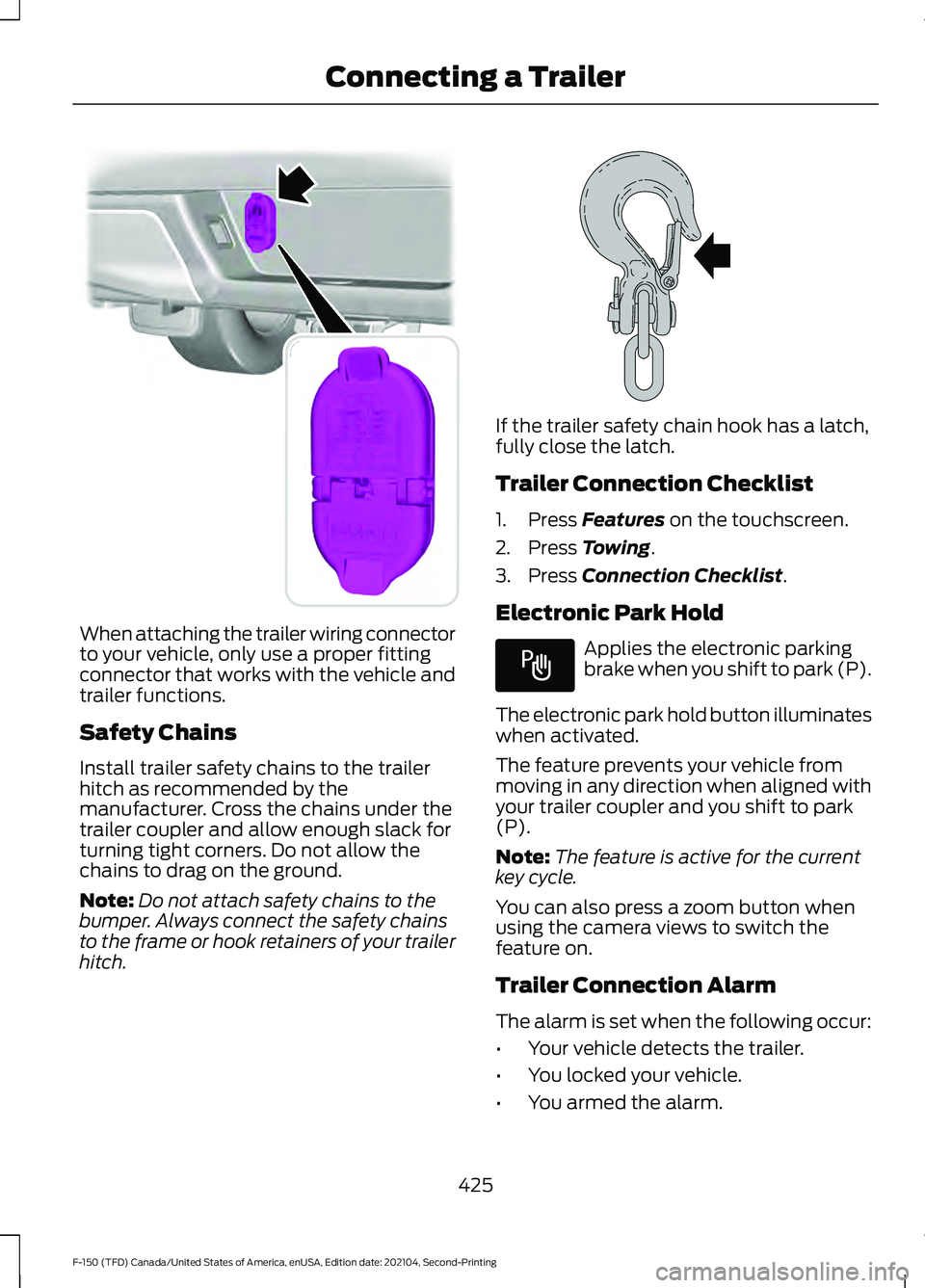
to your vehicle, only use a proper fitting
connector that works with the vehicle and
trailer functions.
Safety Chains
Install trailer safety chains to the trailer
hitch as recommended by the
manufacturer. Cross the chains under the
trailer coupler and allow enough slack for
turning tight corners. Do not allow the
chains to drag on the ground.
Note:
Do not attach safety chains to the
bumper. Always connect the safety chains
to the frame or hook retainers of your trailer
hitch. If the trailer safety chain hook has a latch,
fully close the latch.
Trailer Connection Checklist
1. Press Features on the touchscreen.
2. Press
Towing.
3. Press
Connection Checklist.
Electronic Park Hold Applies the electronic parking
brake when you shift to park (P).
The electronic park hold button illuminates
when activated.
The feature prevents your vehicle from
moving in any direction when aligned with
your trailer coupler and you shift to park
(P).
Note: The feature is active for the current
key cycle.
You can also press a zoom button when
using the camera views to switch the
feature on.
Trailer Connection Alarm
The alarm is set when the following occur:
• Your vehicle detects the trailer.
• You locked your vehicle.
• You armed the alarm.
425
F-150 (TFD) Canada/United States of America, enUSA, Edition date: 202104, Second-Printing Connecting a TrailerE193232 E265060 E337016
Page 434 of 796

When towing a trailer:
•
Obey country specific regulations for
towing a trailer.
• Do not drive faster than 70 mph
(113 km/h) during the first 500 mi
(800 km).
• Do not make full-throttle starts.
• Check your hitch, electrical connections
and trailer wheel lug nuts thoroughly
after you have traveled 50 mi (80 km).
• When stopped in congested or heavy
traffic during hot weather, place the
transmission in park (P) to aid engine
and transmission cooling and to help
A/C performance.
• Turn off the speed control with heavy
loads or in hilly terrain. The speed
control may turn off when you are
towing on long, steep slopes.
• Shift to a lower gear when driving down
a long or steep hill. Do not continuously
apply the brakes, as they may overheat
and become less effective.
• If your transmission has Grade Assist
or Tow/Haul, use this feature when
towing. This provides engine braking
and helps eliminate excessive
transmission shifting for optimum fuel
economy and transmission cooling.
• Your vehicle has AdvanceTrac with roll
stability control. When towing a trailer,
additional loads could cause the
AdvanceTrac system to engage during
cornering maneuvers. Reduce cornering
speeds to make sure that you can
maintain control of the vehicle and
trailer if the AdvanceTrac system
engages. •
Allow more distance for stopping with
a trailer attached. Anticipate stops and
gradually brake.
• Avoid parking on a slope. However, if
you must park on a slope, turn the
steering wheel to point your vehicle
tires away from traffic flow, set the
parking brake, place the transmission
in park (P) and place wheel chocks in
front and back of the trailer wheels.
Note: Chocks are not included with your
vehicle.
LAUNCHING OR RETRIEVING
A BOAT OR PERSONAL
WATERCRAFT
When backing down a ramp during boat
launching or retrieval:
• Do not allow the static water level to
rise above the bottom edge of the rear
bumper.
• Do not allow waves to break higher
than
6 in (15 cm) above the bottom
edge of the rear bumper.
Exceeding
6 in (15 cm) could allow water
to enter vehicle components, causing
internal damage to the components and
affecting driveability, emissions and
reliability.
Note: Replace the rear axle lubricant
anytime the rear axle has been submerged
in water.
Note: Disconnect the trailer wiring
connector before backing the trailer into the
water.
Note: Reconnect the trailer wiring
connector after removing the trailer from
the water.
430
F-150 (TFD) Canada/United States of America, enUSA, Edition date: 202104, Second-Printing Towing a Trailer