2021 FORD EXPLORER manual transmission
[x] Cancel search: manual transmissionPage 23 of 577

AT A GLANCE - ST
Exterior
•
Front and rear fascias feature unique
ST grille and unique finish.
• ST badging in front grille and on rear
liftgate.
• Trim features unique ST gloss black
finish.
• E-X-P-L-O-R-E-R lettering across
hood.
• Blackout treatment on headlight and
taillight lenses.
Interior
• Unique ST interior trim.
• Ford Performance sill plates.
• ST flat-bottom steering wheel with
integrated transmission shift paddle
controls.
• Selectable Drive Mode controller with
7 settings (Normal, Eco, Sport, Trail,
Slippery, Deep Snow/Sand and
Tow/Haul).
• Unique electronic sound enhancement
in Sport Selectable Drive Mode.
Chassis
• Unique ST-tuned suspension featuring
32 N/mm front coil springs and a 34
mm hollow front stabilizer bar and 106
N/mm rear coil springs and a 21.7 mm
hollow rear stabilizer bar.
• Standard ST brake system consists of
345 mm diameter vented front rotors
with two piston calipers and low-dust
linings; 326 mm solid rear rotors with
single-piston brake calipers and
electric integrated park brake with low
dust linings. •
Optional ST braking system includes
363 mm diameter vented front rotors
with heavy duty two-piston calipers
and low-dust linings; 350 mm diameter
vented rear rotors with heavy-duty
single-piston brake calipers and
electric integrated park brake with
low-dust linings; system requires 21 x
9-inch wheels and P275/45R21
all-season tires.
• Optional low-metallic brake linings are
included with optional P275/45R21
summer tire (late availability).
• ST-tuned electric power assist steering
rack and pinion.
• AdvanceTrac with stability
enhancement system with four modes:
Default, Traction Control Off, Sport and
Disabled.
• Aluminum ST 20 in (50.8 cm) x 8.5 in
(21.6 cm) wheels standard; 21 in
(53.3 cm) x 9 in (22.9 cm) wheels
optional.
• P255/55R20 all-season tires or
optional P275/45R21 all-season tires.
Powertrain
• 3.0L V6 DOHC GTDI engine, 400
horsepower, 415 lb-ft.
• 10R60 10-speed automatic
transmission with SelectShift manual
shift mode.
• 3.58 axle ratios.
• Unique transmission calibration in
Sport Selectable Drive Mode.
• Dual exhaust with quad-tip outlets.
20
Explorer (CTW), enUSA, Edition date: 202007, Second-Printing At a Glance
Page 65 of 577

Car Finder
Press the button twice within
three seconds. The horn sounds
and the direction indicators
flash. We recommend you use this method
to locate your vehicle, rather than using
the panic alarm.
Sounding the Panic Alarm
Note: The panic alarm only operates when
the ignition is off. Press the button to sound the
panic alarm. Press the button
again or switch the ignition on to
turn it off.
Remote Start (If Equipped) WARNING: Do not start the engine
in a closed garage or in other enclosed
areas. Exhaust fumes are toxic. Always
open the garage door before you start
the engine. Failure to follow this
instruction could result in personal injury
or death.
Note: Do not use remote start if your fuel
level is low. The remote start button is on the
remote control.
This feature allows you to start your
vehicle from the outside. Your remote
control has an extended operating range.
If your vehicle has automatic climate
control, you can configure it to operate
when you remote start your vehicle.
See
Climate Control (page 139). A manual
climate control system runs at the setting
it was set to when you switched your
vehicle off. Many states and provinces have
restrictions for the use of remote start.
Check your local and state or provincial
laws for specific requirements regarding
remote start systems.
The system does not work if:
•
The ignition is on.
• The anti-theft alarm triggers.
• You disable the feature.
• The hood is open.
• The transmission is not in park (P).
• The battery voltage is below the
minimum operating voltage.
• The service engine soon light is on.
Remote Control Feedback (If
Equipped)
An LED on the remote control provides
status feedback of remote start or stop
commands. Status
LED
Remote startsuccessful
Solid green
Remote stopsuccessful
Solid red
Request failed or
status not received
Blinking red
Status incomplete
Blinking green
Remote Starting Your Vehicle
Note: You must press each button within
three seconds of each other. If you do not
follow this sequence, your vehicle does not
start remotely, the direction indicators do
not flash twice and the horn does not sound.
62
Explorer (CTW), enUSA, Edition date: 202007, Second-Printing Keys and Remote ControlsE138623 E138624 E138625
Page 78 of 577
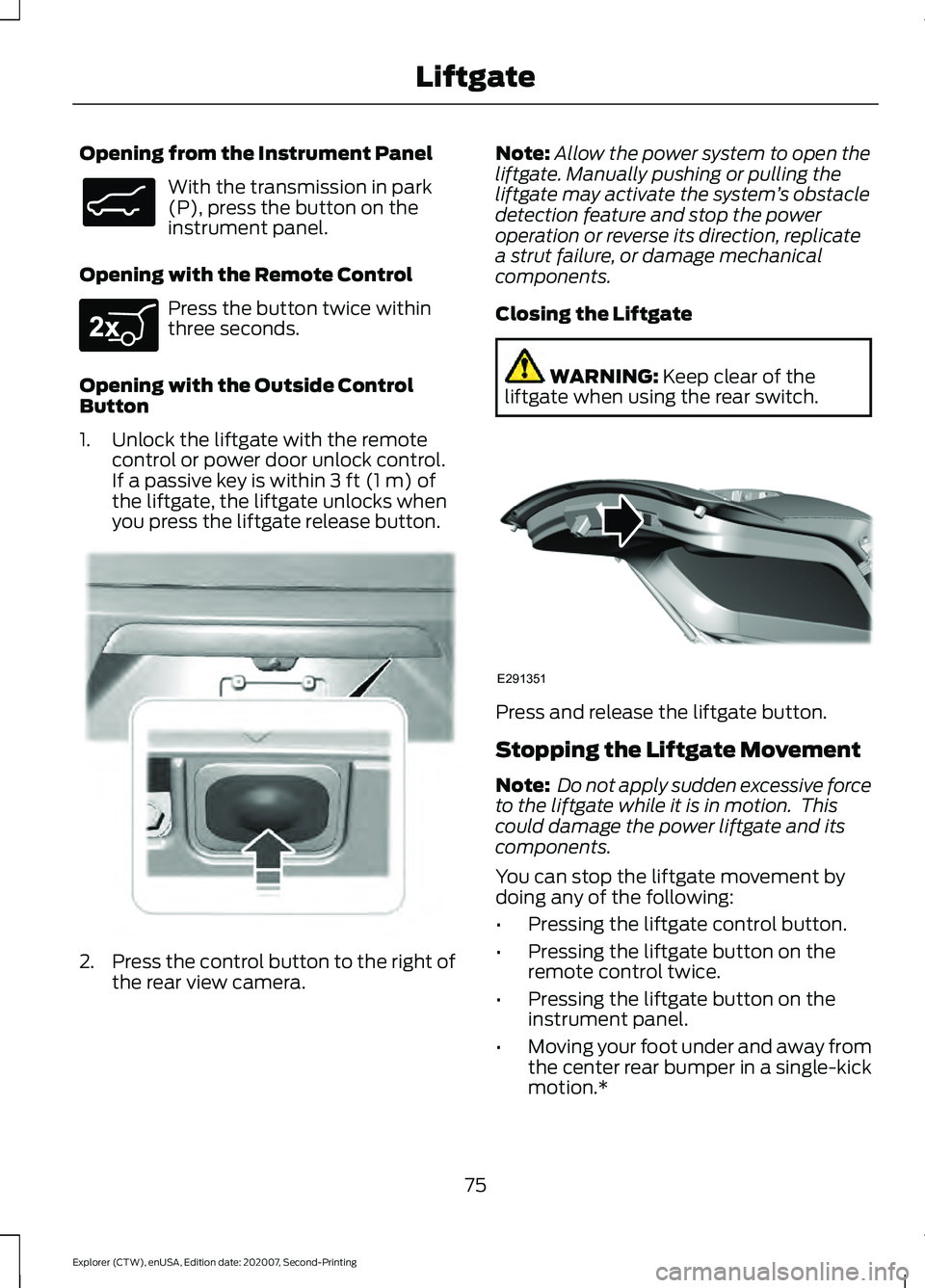
Opening from the Instrument Panel
With the transmission in park
(P), press the button on the
instrument panel.
Opening with the Remote Control Press the button twice within
three seconds.
Opening with the Outside Control
Button
1. Unlock the liftgate with the remote control or power door unlock control.
If a passive key is within 3 ft (1 m) of
the liftgate, the liftgate unlocks when
you press the liftgate release button. 2.
Press the control button to the right of
the rear view camera. Note:
Allow the power system to open the
liftgate. Manually pushing or pulling the
liftgate may activate the system ’s obstacle
detection feature and stop the power
operation or reverse its direction, replicate
a strut failure, or damage mechanical
components.
Closing the Liftgate WARNING:
Keep clear of the
liftgate when using the rear switch. Press and release the liftgate button.
Stopping the Liftgate Movement
Note:
Do not apply sudden excessive force
to the liftgate while it is in motion. This
could damage the power liftgate and its
components.
You can stop the liftgate movement by
doing any of the following:
• Pressing the liftgate control button.
• Pressing the liftgate button on the
remote control twice.
• Pressing the liftgate button on the
instrument panel.
• Moving your foot under and away from
the center rear bumper in a single-kick
motion.*
75
Explorer (CTW), enUSA, Edition date: 202007, Second-Printing LiftgateE138633 E267940 E291352 E291351
Page 92 of 577
DAYTIME RUNNING LAMPS -
VEHICLES WITH:
CONFIGURABLE DAYTIME
RUNNING LAMPS
WARNING: The daytime running
lamps system does not activate the rear
lamps and may not provide adequate
lighting during low visibility driving
conditions. Make sure you switch the
headlamps on, as appropriate, during all
low visibility conditions. Failure to do so
may result in a crash.
Switch the daytime running lamps on or
off using the touchscreen:
1. Select
Settings. See Settings (page
464).
2. Select
Vehicle.
3. Select
Lighting.
The daytime running lamps turn on when:
1. The lamps are on in the information display.
2. You switch the ignition on.
3. The transmission is not in park (P) for vehicles with automatic transmissions
or you release the parking brake for
vehicles with manual transmissions.
4. The lighting control is in the autolamps
position.
5. The headlamps are off.
The other lighting control switch positions
do not turn on the daytime running lamps.
If the daytime running lamps are off in the
information display, the lamps stay off in
all switch positions. DAYTIME RUNNING LAMPS -
VEHICLES WITH: DAYTIME
RUNNING LAMPS (DRL) WARNING:
The daytime running
lamps system does not activate the rear
lamps and may not provide adequate
lighting during low visibility driving
conditions. Make sure you switch the
headlamps on, as appropriate, during all
low visibility conditions. Failure to do so
may result in a crash.
The system turns the lamps on in daylight
conditions.
To switch the system on, switch the
lighting control to any position except
headlamps.
FRONT FOG LAMPS
(IF EQUIPPED)
Switching the Front Fog Lamps On
or Off
Only switch the front fog lamps on during
reduced visibility.
You can switch the front fog lamps on if
any of the following occur:
• You set the lighting control to the
parking lamps position.
• You set the lighting control to the
headlamps position.
• You set the lighting control to the
autolamps position and the headlamps
are on.
The front fog lamp button is on the lighting
control. Press the button to switch the
front fog lamps on or off.
89
Explorer (CTW), enUSA, Edition date: 202007, Second-Printing Lighting
Page 102 of 577
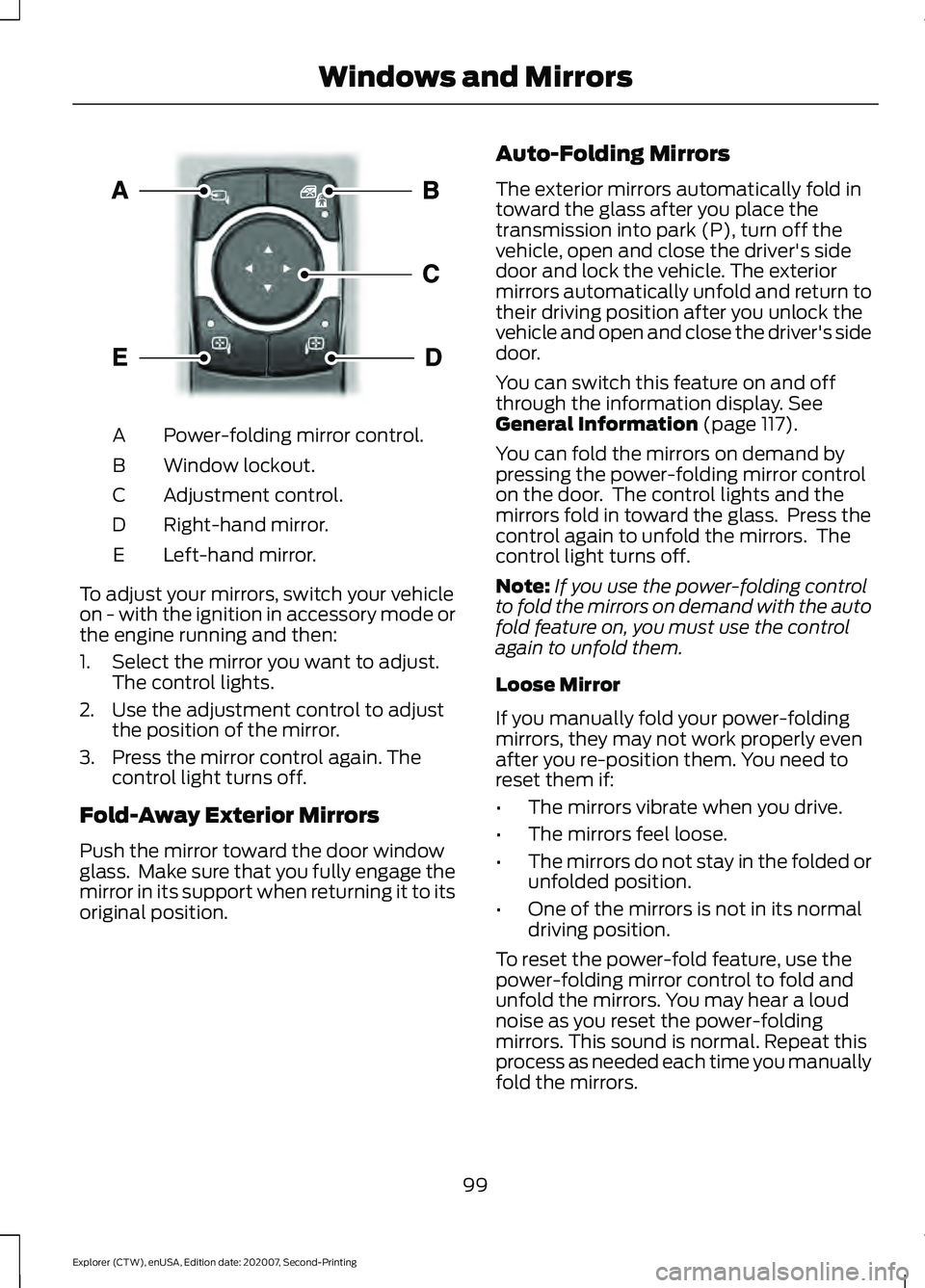
Power-folding mirror control.
A
Window lockout.
B
Adjustment control.
C
Right-hand mirror.
D
Left-hand mirror.
E
To adjust your mirrors, switch your vehicle
on - with the ignition in accessory mode or
the engine running and then:
1. Select the mirror you want to adjust. The control lights.
2. Use the adjustment control to adjust the position of the mirror.
3. Press the mirror control again. The control light turns off.
Fold-Away Exterior Mirrors
Push the mirror toward the door window
glass. Make sure that you fully engage the
mirror in its support when returning it to its
original position. Auto-Folding Mirrors
The exterior mirrors automatically fold in
toward the glass after you place the
transmission into park (P), turn off the
vehicle, open and close the driver's side
door and lock the vehicle. The exterior
mirrors automatically unfold and return to
their driving position after you unlock the
vehicle and open and close the driver's side
door.
You can switch this feature on and off
through the information display. See
General Information (page 117).
You can fold the mirrors on demand by
pressing the power-folding mirror control
on the door. The control lights and the
mirrors fold in toward the glass. Press the
control again to unfold the mirrors. The
control light turns off.
Note: If you use the power-folding control
to fold the mirrors on demand with the auto
fold feature on, you must use the control
again to unfold them.
Loose Mirror
If you manually fold your power-folding
mirrors, they may not work properly even
after you re-position them. You need to
reset them if:
• The mirrors vibrate when you drive.
• The mirrors feel loose.
• The mirrors do not stay in the folded or
unfolded position.
• One of the mirrors is not in its normal
driving position.
To reset the power-fold feature, use the
power-folding mirror control to fold and
unfold the mirrors. You may hear a loud
noise as you reset the power-folding
mirrors. This sound is normal. Repeat this
process as needed each time you manually
fold the mirrors.
99
Explorer (CTW), enUSA, Edition date: 202007, Second-Printing Windows and MirrorsE295322
Page 130 of 577

Action
Message
The fuel system has finished depressurizing and you can begin to refuel.
Fuel Door Open
A reminder to close the fuel door. Failure to follow this instructioncan cause the check engine light to illuminate.
Close Fuel Door to
Avoid ""CheckEngine"" Light
There is an error in attempting to refill your vehicle.
Refuel Error See
Manual
Hill Descent Control Action
Message
Displays when you deactivate hill descent control mode.
Hill Descent
Control OFF
Displays when hill descent speed exceeds 20 mph (32 km/h).
For Hill Descent
Reduce Speed 20 MPH or Less
Displays when hill descent speed exceeds
20 mph (32 km/h).
For Hill Descent
Reduce Speed 32 Km/h or Less
Displays when hill descent control mode requires you to shift the transmission into gear.
For Hill Descent
Select Gear
Displays when the hill control mode requires you to resume control.
Hill Descent Driver
Resume Control
Displays when a hill descent system fault is present.
Hill Descent
Control Fault
Displays when you disable the hill descent control mode to cool the brake system.
Hill Descent
Control Off
System Cooling
Displays when hill descent control mode is ready.
Hill Descent
Control Ready
Displays when you activate the hill descent control mode.
Hill Descent
Control Active
127
Explorer (CTW), enUSA, Edition date: 202007, Second-Printing Information Displays
Page 139 of 577
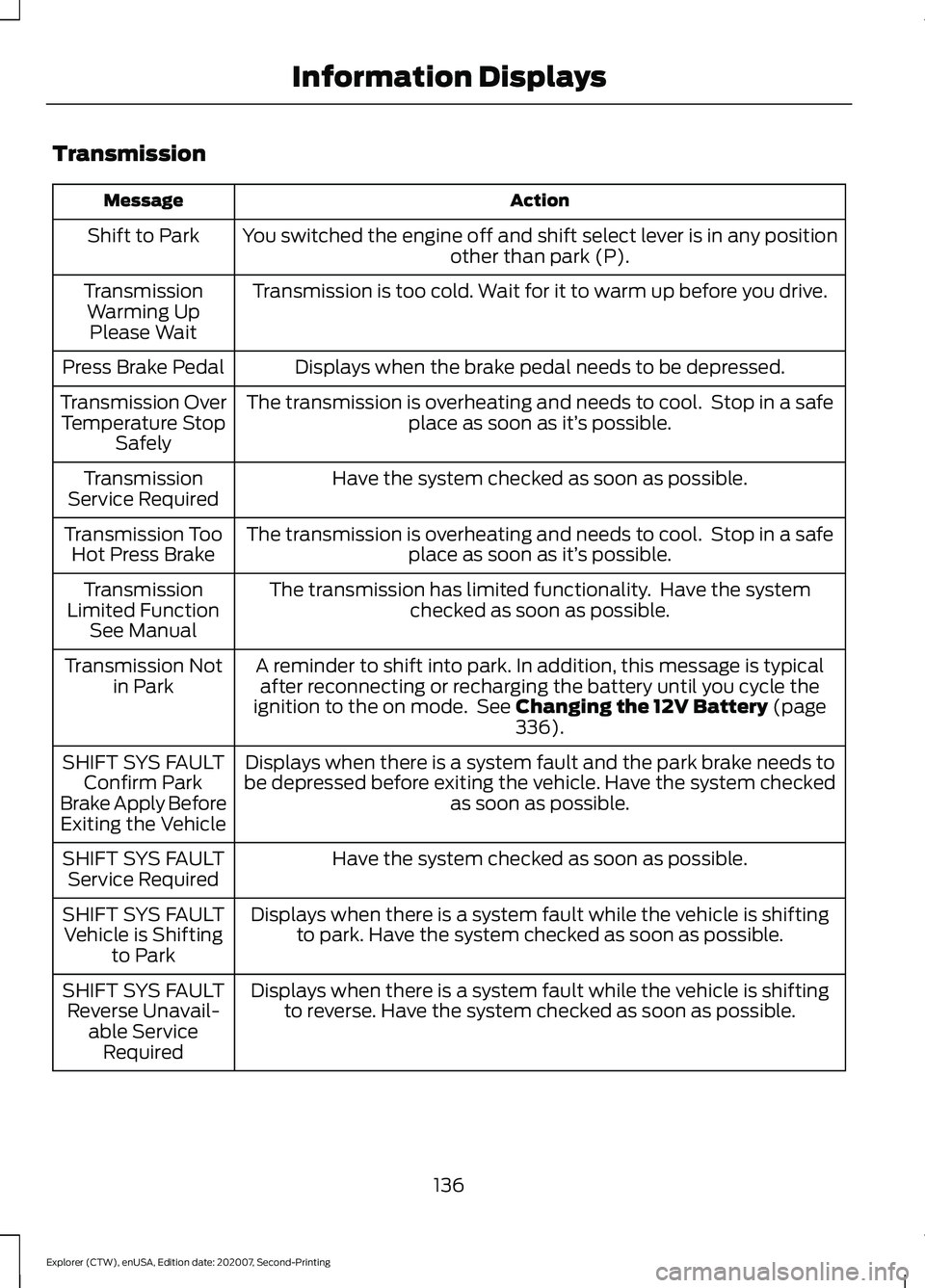
Transmission
Action
Message
You switched the engine off and shift select lever is in any position other than park (P).
Shift to Park
Transmission is too cold. Wait for it to warm up before you drive.
Transmission
Warming UpPlease Wait
Displays when the brake pedal needs to be depressed.
Press Brake Pedal
The transmission is overheating and needs to cool. Stop in a safeplace as soon as it’ s possible.
Transmission Over
Temperature Stop Safely
Have the system checked as soon as possible.
Transmission
Service Required
The transmission is overheating and needs to cool. Stop in a safeplace as soon as it’ s possible.
Transmission Too
Hot Press Brake
The transmission has limited functionality. Have the systemchecked as soon as possible.
Transmission
Limited Function See Manual
A reminder to shift into park. In addition, this message is typicalafter reconnecting or recharging the battery until you cycle the
ignition to the on mode. See Changing the 12V Battery (page
336).
Transmission Not
in Park
Displays when there is a system fault and the park brake needs to
be depressed before exiting the vehicle. Have the system checked as soon as possible.
SHIFT SYS FAULT
Confirm Park
Brake Apply Before Exiting the Vehicle
Have the system checked as soon as possible.
SHIFT SYS FAULT
Service Required
Displays when there is a system fault while the vehicle is shiftingto park. Have the system checked as soon as possible.
SHIFT SYS FAULT
Vehicle is Shifting to Park
Displays when there is a system fault while the vehicle is shiftingto reverse. Have the system checked as soon as possible.
SHIFT SYS FAULT
Reverse Unavail- able ServiceRequired
136
Explorer (CTW), enUSA, Edition date: 202007, Second-Printing Information Displays
Page 160 of 577
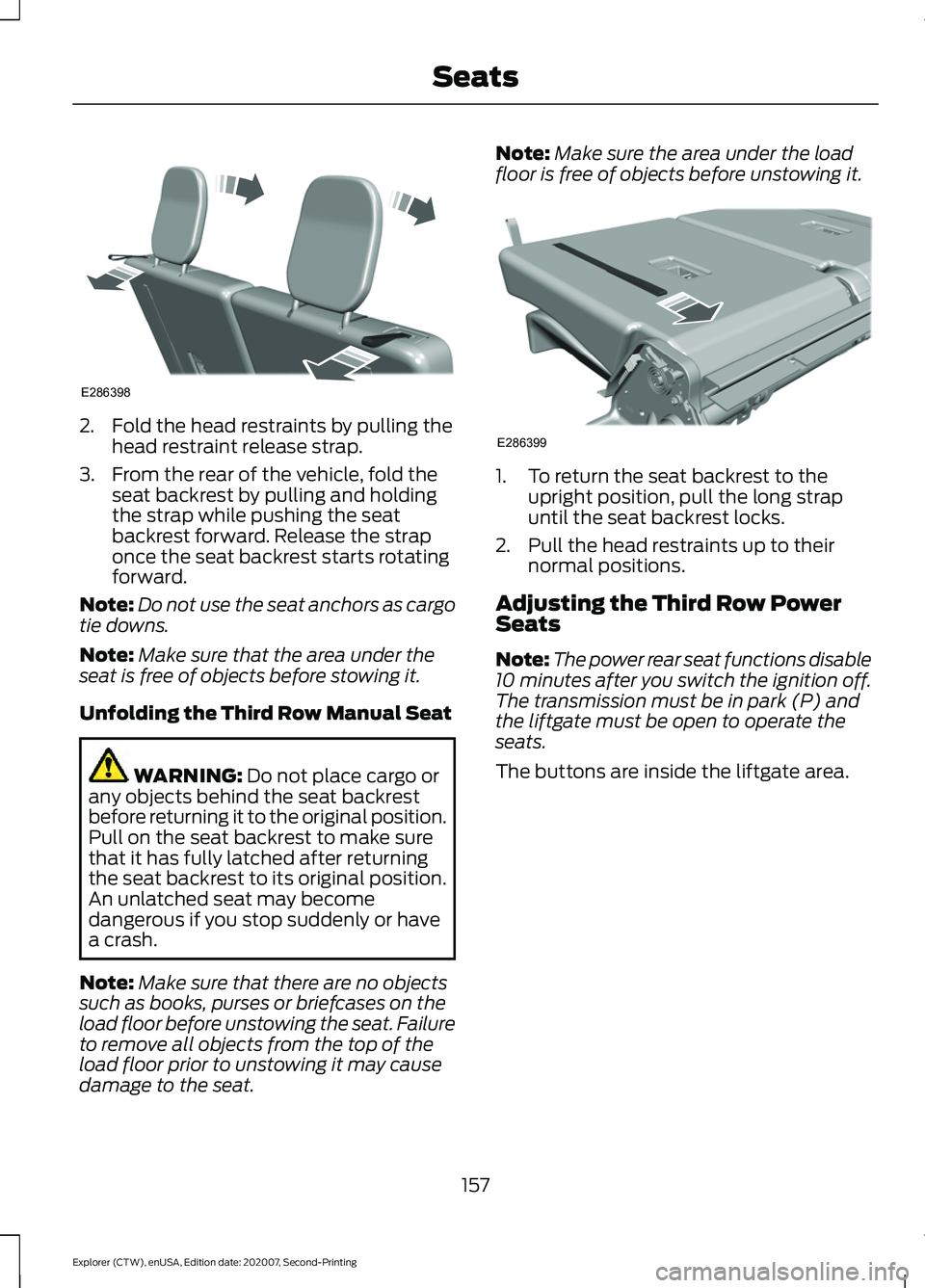
2. Fold the head restraints by pulling the
head restraint release strap.
3. From the rear of the vehicle, fold the seat backrest by pulling and holding
the strap while pushing the seat
backrest forward. Release the strap
once the seat backrest starts rotating
forward.
Note: Do not use the seat anchors as cargo
tie downs.
Note: Make sure that the area under the
seat is free of objects before stowing it.
Unfolding the Third Row Manual Seat WARNING: Do not place cargo or
any objects behind the seat backrest
before returning it to the original position.
Pull on the seat backrest to make sure
that it has fully latched after returning
the seat backrest to its original position.
An unlatched seat may become
dangerous if you stop suddenly or have
a crash.
Note: Make sure that there are no objects
such as books, purses or briefcases on the
load floor before unstowing the seat. Failure
to remove all objects from the top of the
load floor prior to unstowing it may cause
damage to the seat. Note:
Make sure the area under the load
floor is free of objects before unstowing it. 1. To return the seat backrest to the
upright position, pull the long strap
until the seat backrest locks.
2. Pull the head restraints up to their normal positions.
Adjusting the Third Row Power
Seats
Note: The power rear seat functions disable
10 minutes after you switch the ignition off.
The transmission must be in park (P) and
the liftgate must be open to operate the
seats.
The buttons are inside the liftgate area.
157
Explorer (CTW), enUSA, Edition date: 202007, Second-Printing SeatsE286398 E286399