2021 FORD EXPEDITION overhead console
[x] Cancel search: overhead consolePage 7 of 574

Wireless Accessory Charger Precautions
........................................................................\
180
Locating the Wireless Accessory Charger ........................................................................\
180
Charging a Wireless Device .....................
180
Storage Compartments
Center Console .............................................
182
Overhead Console .......................................
182
Starting and Stopping the Engine
General Information ...................................
183
Ignition Switch ..............................................
183
Keyless Starting ...........................................
183
Starting a Gasoline Engine ......................
184
Engine Block Heater ...................................
187
Unique Driving Characteristics
Auto-Start-Stop ..........................................
189
Fuel and Refueling
Safety Precautions ......................................
192
Fuel Quality ....................................................
192
Fuel Filler Funnel Location .......................
193
Running Out of Fuel ...................................
193
Refueling .........................................................
195
Fuel Consumption .......................................
197
Engine Emission Control
Emission Law ................................................
199
Catalytic Converter ....................................
200
Transmission
Automatic Transmission .........................
203
Four-Wheel Drive
Using Four-Wheel Drive ............................
210Rear Axle
Limited Slip Differential
............................
218
Brakes
General Information ...................................
219
Hints on Driving With Anti-Lock Brakes ........................................................................\
.
219
Electric Parking Brake ...............................
220
Hill Start Assist .............................................
221
Traction Control
Principle of Operation ...............................
223
Using Traction Control ..............................
223
Stability Control
Principle of Operation ...............................
224
Using Stability Control ..............................
225
Hill Descent Control
Principle of Operation ................................
227
Using Hill Descent Control .......................
227
Parking Aids
Principle of Operation ...............................
228
Rear Parking Aid ..........................................
229
Front Parking Aid ........................................
230
Side Sensing System .................................
232
Active Park Assist .......................................
233
Rear View Camera .....................................
240
360 Degree Camera ..................................
243
Cruise Control
What Is Cruise Control ..............................
246
Switching Cruise Control On and Off ........................................................................\
246
Setting the Cruise Control Speed ........
246
Canceling the Set Speed .........................
247
Resuming the Set Speed .........................
247
Cruise Control Indicators ..........................
247
Using Adaptive Cruise Control ...............
247
4
Expedition (TB8) Canada/United States of America, enUSA, First-Printing Table of Contents
Page 104 of 574

Note:
The brightness of the daytime running
lamps may decrease when the front fog
lamps are switched on.
Front Fog Lamp Indicator It illuminates when you switch
the front fog lamps on.
DIRECTION INDICATORS Push the lever up or down to use
the direction indicators.
Note: Tap the lever up or down to make the
direction indicators flash three times.
Note: When in Tow/Haul mode, tap the
lever up or down to make the direction
indicators flash five times.
INTERIOR LAMPS
The lamps turn on under the following
conditions:
• You open any door.
• You press a remote control button.
• You press the all lamps on button on
the overhead console. Front Interior Lamp
The front interior lamp switches are on the
overhead console.
Note:
The position and availability of each
button on the overhead console depends
on your vehicle.
Switching All of the Interior Lamps
On Press to switch all interior lamps
on.
Note: For vehicles without a lamps off
switch, press again to switch all interior
lamps off.
Switching All of the Interior Lamps
Off (If Equipped) Press to switch all interior lamps
off.
Switching the Individual Map
Lamps On and Off Press to switch the left-hand
individual dome lamp on and off.
Press to switch the right-hand
individual dome lamp on and off.
101
Expedition (TB8) Canada/United States of America, enUSA, First-Printing Lighting E163272 E262162 E262185 E262193
Page 105 of 574

Interior Lamp Function
Press to switch the interior lamp
function on and off.
When the interior lamp function is off and
you open a door, the courtesy and door
lamps stay off.
When the interior lamp function is on and
you open a door, the courtesy and door
lamps turn on.
Note: The indicator lamp lights amber
when the door function is off.
Rear Interior Lamps
The rear interior lamps may be above the
rear seat or above the rear windows. Press to switch the lamps on or
off.
Note: If the rear lamps are switched on
through the overhead console, you cannot
turn them off with the rear lamp switch.
AMBIENT LIGHTING (IF EQUIPPED)
Use the touchscreen to select the
following: Select the settings option on the
feature bar.
Select
Vehicle.
Select
Ambient Light. Switching Ambient Lighting On
Drag the slider above zero brightness.
Adjusting the Brightness
Drag the slider left or right.
Switching Ambient Lighting Off
Drag the slider left to zero brightness.
102
Expedition (TB8) Canada/United States of America, enUSA, First-Printing Lighting E280315 E306304
Page 111 of 574
The mirror dims to reduce the effect of
bright light from behind. It returns to
normal when the bright light from behind
is no longer present or if you shift into
reverse (R).
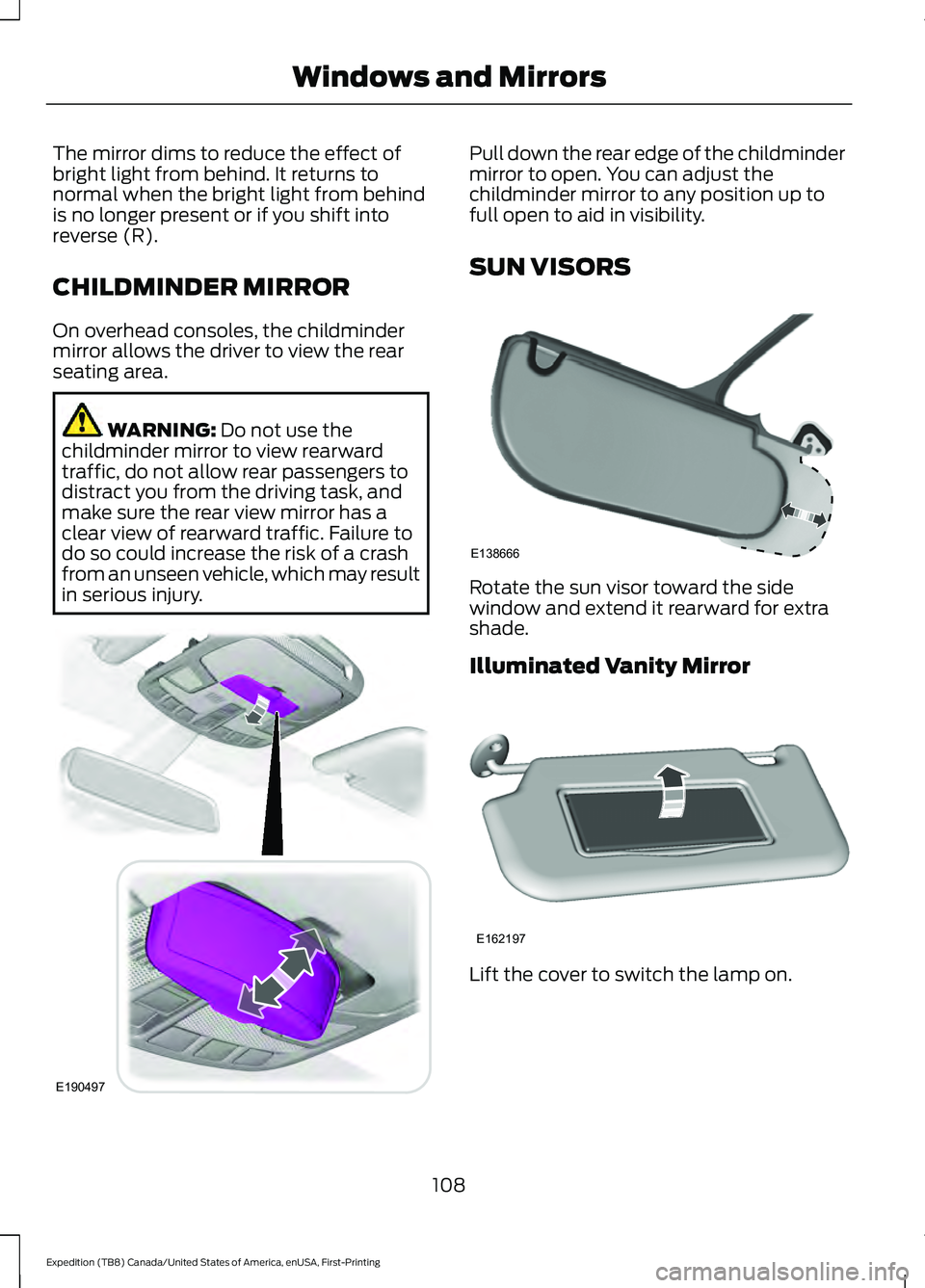
CHILDMINDER MIRROR
On overhead consoles, the childminder
mirror allows the driver to view the rear
seating area.
WARNING: Do not use the
childminder mirror to view rearward
traffic, do not allow rear passengers to
distract you from the driving task, and
make sure the rear view mirror has a
clear view of rearward traffic. Failure to
do so could increase the risk of a crash
from an unseen vehicle, which may result
in serious injury. Pull down the rear edge of the childminder
mirror to open. You can adjust the
childminder mirror to any position up to
full open to aid in visibility.
SUN VISORS
Rotate the sun visor toward the side
window and extend it rearward for extra
shade.
Illuminated Vanity Mirror
Lift the cover to switch the lamp on.
108
Expedition (TB8) Canada/United States of America, enUSA, First-Printing Windows and MirrorsE190497 E138666 E162197
Page 112 of 574

MOONROOF (IF EQUIPPED)
WARNING:
Do not let children play
with the moonroof or leave them
unattended in the vehicle. They may
seriously hurt themselves. WARNING:
When closing the
moonroof, you should verify that it is free
of obstructions and make sure that
children and pets are not in the proximity
of the roof opening.
The moonroof controls are located on the
overhead console and have a one-touch
open and close feature. To stop its
movement during one-touch operation,
press the control a second time.
Opening and Closing the Moonroof Moonroof open.
Press and
release to open the moonroof.
The moonroof stops short of the
fully opened position. Press and
release the control again to open
the moonroof fully.
A
Moonroof vent.
Press and
release to vent the moonroof.
B Sunshade open.
Press and
release to open the sunshade.
The sunshade opens
automatically with the
moonroof. You can also open
the sunshade with the moonroof
C
closed. Note:
The sunshade
stops short of its fully opened
position for the comfort of rear
passengers. To open the
sunshade fully, press the control
again.
Sunshade close.
Press and
release to close the sunshade.
Note:
The sunshade does not
fully close unless the moonroof
glass is fully closed.
D
Moonroof close.
Press and
release to close the moonroof
from either the open or vent
positions.
E
Bounce-Back
The moonroof automatically reverses
some distance if an obstacle is detected
while closing.
To override this feature, press and hold the
moonroof close
control within two
seconds after the roof comes to a stop
following a bounce-back reversal.
LIFTGATE WINDOW
Opening the Liftgate Window
Note: To avoid vehicle damage, use care
when operating the liftgate when the
liftgate window is open.
109
Expedition (TB8) Canada/United States of America, enUSA, First-Printing Windows and MirrorsE191272
Page 185 of 574

CENTER CONSOLE
Stow items in the cup holder carefully as
items may become loose during hard
braking, acceleration or crashes, including
hot drinks which may spill.
Available console features include:
Front storage compartment with
wireless charging port, and USB
ports.
A
Cup holders.
B
Storage compartment with
auxiliary power point.
C
Rear cup holders.
D
Rear audio controls.
E
AC power point.
F
Auxiliary power point.
G
Rear climate controls.
H
Rear storage compartment.
I
USB ports.
J
Switch pack.
K OVERHEAD CONSOLE
Press near the rear edge of the door to
open it.
182
Expedition (TB8) Canada/United States of America, enUSA, First-Printing Storage CompartmentsE248043 E332434
Page 569 of 574

Ordering Additional Owner's
Literature......................................................323
Obtaining a French Owner ’s Manual..........323
Overhead Console........................................182
Overriding Automatic High Beam Control...........................................................103
P
Parking Aids...................................................228 Principle of Operation...................................... 228
Passive Anti-Theft System
........................85
SecuriLock ™.......................................................... 85
PATS See: Passive Anti-Theft System..................... 85
Perchlorate........................................................15
Personal Safety System ™
..........................49
How Does the Personal Safety System
Work?.................................................................. 49
Phone...............................................................455 Android Auto........................................................ 457
Apple CarPlay...................................................... 457
Pairing Your Cell Phone for the First Time.................................................................. 456
Text Messaging.................................................. 456
Using Your Cell Phone..................................... 456
Post-Crash Alert System...........................316
Power Door Locks See: Locking and Unlocking.............................. 73
Power Liftgate
..................................................81
Obstacle Detection............................................. 83
Opening and Closing the Liftgate.................. 82
Opening the Liftgate Window......................... 83
Setting the Liftgate Open Height................... 83
Stopping the Liftgate Movement................... 83
Switching the Power Liftgate On or Off........................................................................\
. 84
Using the Hands-Free Liftgate....................... 84
Power Outlet Indicators.............................179
Power Outlet
..................................................178
Power Outlet Precautions.........................178
Power Running Boards................................89
Power Seats....................................................161 Adjusting the Lumbar Support...................... 162
Adjusting the Multi-Contour Front Seats With Active Motion ....................................... 162
Power Steering Fluid Check.....................345 Power Windows
............................................105
Accessory.............................................................. 105
Bounce-Back....................................................... 105
One-Touch Down............................................... 105
One-Touch Up..................................................... 105
Window Lock....................................................... 105
Pre-Collision Assist.....................................267 Adjusting the Pre-Collision Assist
Settings............................................................ 269
Blocked Sensors................................................. 270
Distance Indication and Alert....................... 268
Using the Pre-Collision Assist System.............................................................. 268
Protecting the Environment
........................19
Puncture See: Changing a Road Wheel....................... 382
R
Radio Frequency Certification Labels...........................................................492
Blind Spot Information System Sensors............................................................. 492
Body Control Module....................................... 496
Cruise Control Module.................................... 498
Garage Door Opener........................................ 502
Keys and Remote Controls............................ 503
Passive Anti-Theft System........................... 508
Radio Transceiver Module............................... 512
SYNC....................................................................... 515
Tire Pressure Monitoring System Sensors.............................................................. 519
Wireless Accessory Charging Module........523
Rear Axle..........................................................218
Rear Occupant Alert System Audible Warnings........................................................173
Rear Occupant Alert System Indicators - Vehicles With: SYNC 3...........................173
Rear Occupant Alert System Indicators - Vehicles With: SYNC..............................173
Rear Occupant Alert System Limitations....................................................172
Rear Occupant Alert System Precautions...................................................172
Rear Occupant Alert System
....................172
Rear Parking Aid...........................................229 Object Distance Indicator............................... 230
566
Expedition (TB8) Canada/United States of America, enUSA, First-Printing Index