2021 FORD ESCAPE instrument panel
[x] Cancel search: instrument panelPage 334 of 589

Protected Component
Fuse Rating
Fuse Location
Ignition switch.
10 A
4
Lock.
20 A
5
Unlock.
Moonroof.
10 A
6
DC inverter.
Passenger door module.
30 A
7
Parking assist control
module.
5 A
8
Electrochromatic mirror.
5 A
9
Image processing module A.
Extended power module.
10 A
10
Power liftgate.
5 A
11
Hands-free liftgate actu-
ation module.
Telematics control unit
module.
Head up display module.
5 A
12
Keyless keypad switch.
Driver door lock.
15 A
13
Driver door module.
30 A
14
Extended power module.
15 A
15
Not used (spare).
15 A
16
SYNC.
15 A
17
Receiver transceiver
module.
Integrated control panel.
Wireless accessory charging
module.
7.5 A
18
Headlamp switch pack.
7.5 A
19
Not used (spare).
10 A
20
Climate control.
7.5 A
21
E-shifter module.
Instrument cluster.
7.5 A
22
331
Escape (CTC) Canada/United States of America, Vehicles Built From: 02-11-2020, enUSA, Edition date: 202011, First-Printing Fuses
Page 356 of 589
Cleaning Windows and Wiper
Blades
To clean the windshield and wiper blades:
•
Clean the windshield with a
non-abrasive glass cleaner.
Note: When cleaning the interior of the
windshield, avoid getting any glass cleaner
on the instrument panel or door panels.
Wipe any glass cleaner off these surfaces
immediately.
• Clean the wiper blades with washer
fluid or water applied with a soft
sponge or cloth.
Note: Do not use razor blades or other
sharp objects to clean or remove decals
from the inside of the heated rear window.
This can cause damage not covered by the
vehicle Warranty.
Cleaning Chrome, Aluminium or
Stainless Steel
We recommend that you only use a car
shampoo, a soft cloth and water on
bumpers and other chrome, aluminium or
stainless steel parts.
Note: For additional information and
assistance, we recommend that you contact
an authorized dealer.
Note: Rinse the area well after cleaning.
Note: Do not use abrasive materials, for
example steel wool or plastic pads, as they
can scratch these surfaces.
Note: Do not use chrome cleaner, metal
cleaner or polish on wheels or wheel covers.
Cleaning Wheels
Only use a recommended wheel and tire
cleaner to clean the wheels weekly. For
additional information and assistance, we
recommend that you contact an
authorized dealer. 1. Use a sponge to remove heavy
deposits of dirt and brake dust.
2. Rinse well after cleaning.
Note: Do not apply a cleaning chemical to
warm or hot wheel rims and covers.
If you intend on parking your vehicle for an
extended period after cleaning the wheels
with a wheel cleaner, drive your vehicle for
a few minutes before parking your vehicle.
This reduces the risk of corrosion of the
brake discs, brake pads and linings.
Do not clean the wheels when they are hot.
Note: Some car washes could damage
wheel rims and covers.
Note: Using non-recommended cleaners,
harsh cleaning products, chrome wheel
cleaners or abrasive materials could
damage wheel rims and covers.
Cleaning the Engine Compartment
Use a vacuum cleaner to remove debris
from the screen area below windshield.
Note: If you are not familiar with the parts
around the engine do not wash the engine
compartment. Avoid frequent engine
washes.
When washing the engine compartment:
• Never wash or rinse the engine while it
is hot or running.
• Never wash or rinse any ignition coil,
spark plug wire or spark plug well.
• Cover the battery, power distribution
box, and air filter assembly to prevent
water damage.
Note: If your vehicle has an engine cover
remove the cover before application of
shampoo and degreaser.
• Spray an approved engine shampoo
and degreaser on all parts that require
cleaning and rinse with water.
353
Escape (CTC) Canada/United States of America, Vehicles Built From: 02-11-2020, enUSA, Edition date: 202011, First-Printing Vehicle Care
Page 357 of 589

Cleaning Stripes or Graphics
It is recommended to wash your vehicle by
hand however, pressure washing may be
used under the following conditions:
•
Use a spray with a 40° wide spray
angle pattern.
• Keep the nozzle at a
12 in (305 mm)
distance and 90° angle to your
vehicle's surface.
• Do not use water pressure higher than
2,000 psi (14,000 kPa)
.
• Do not use water hotter than
179°F
(82°C).
Note: Holding the pressure washer nozzle
at an angle to the vehicle's surface may
damage graphics and cause the edges to
peel away from the vehicle's surface.
Cleaning Camera Lenses and
Sensors
We recommend that you only use
lukewarm or cold water and a soft cloth
to clean the camera lens and sensors.
Note: Do not pressure wash camera lens
and sensors.
Cleaning the Underbody
Flush the complete underside of your
vehicle frequently. Keep body and door
drain holes free from packed dirt.
Rear suspension components may require
regular cleaning with a power washer or a
thorough rinse with a strong stream of
water if the vehicle is operated in dusty or
muddy environments. Rear leaf springs or
other suspension components may emit
squeaking or popping noises while
operating the vehicle if particles, such as
dirt, rocks, or other debris, are present in
the components. CLEANING THE INTERIOR
Cleaning the Instrument Panel WARNING:
Do not use chemical
solvents or strong detergents when
cleaning the steering wheel or
instrument panel to avoid contamination
of the airbag system.
We recommend that you only clean the
instrument panel and cluster lens with a
damp soft cloth. Dry the area with a clean,
soft cloth.
For additional information and assistance,
we recommend that you contact an
authorized dealer.
Note: Avoid cleaners or polishes that
increase the gloss of the upper portion of
the instrument panel. The dull finish in this
area helps protect you from undesirable
windshield reflection.
Cleaning Plastic
We recommend that you only use a mild
soap and water solution on a soft cloth.
Dry the area with a clean, soft cloth.
Cleaning Displays and Screens
We recommend that you only use a
microfiber cloth in a circular motion to
clean off the fingerprint or dust.
If dirt or fingerprints are still on the screen,
apply a small amount of alcohol to the
cloth and try to clean it again.
Note: Do not pour or spray alcohol onto the
touchscreen.
Note: Do not use detergent or any type of
solvent to clean the touchscreen.
354
Escape (CTC) Canada/United States of America, Vehicles Built From: 02-11-2020, enUSA, Edition date: 202011, First-Printing Vehicle Care
Page 381 of 589
•
In the first stage, the tire will be
reinflated with a sealing compound
and air. After the tire has been inflated,
you will need to drive the vehicle a
short distance approximately 4 mi
(6 km) to distribute the sealant in the
tire.
• In the second stage, you will need to
check the tire pressure and adjust, if
necessary, to the vehicle's specified
tire inflation pressure.
First Stage: Reinflating the Tire
with sealing compound and air WARNING:
Do not stand directly
over the kit while inflating the tire. If you
notice any unusual bulges or
deformations in the tire's sidewall during
inflation, stop and call roadside
assistance. WARNING:
If the tire does not
inflate to the recommended tire pressure
within 15 minutes, stop and call roadside
assistance.
Park the vehicle in a safe, level and secure
area, away from moving traffic.
Turn the hazard lights on. Apply the parking
brake and power off the vehicle. Inspect
the flat tire for visible damage.
If a puncture is located in the tire sidewall,
stop and call roadside assistance.
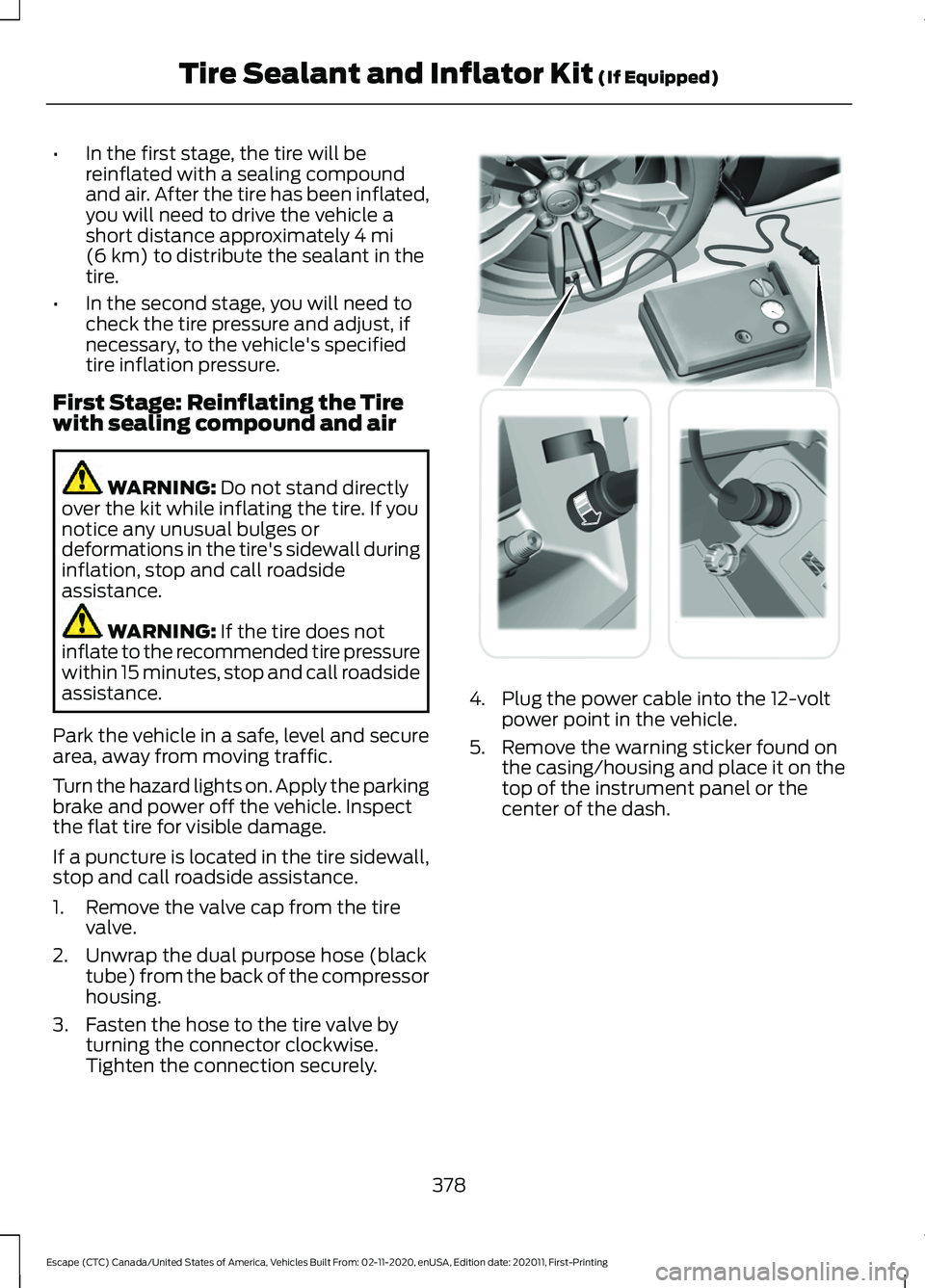
1. Remove the valve cap from the tire valve.
2. Unwrap the dual purpose hose (black tube) from the back of the compressor
housing.
3. Fasten the hose to the tire valve by turning the connector clockwise.
Tighten the connection securely. 4. Plug the power cable into the 12-volt
power point in the vehicle.
5. Remove the warning sticker found on the casing/housing and place it on the
top of the instrument panel or the
center of the dash.
378
Escape (CTC) Canada/United States of America, Vehicles Built From: 02-11-2020, enUSA, Edition date: 202011, First-Printing Tire Sealant and Inflator Kit
(If Equipped) E175979
Page 411 of 589

VEHICLE IDENTIFICATION
NUMBER
Locating the Vehicle Identification
Number
The vehicle identification number is on the
left-hand side of the instrument panel.
Note:
In the illustration, XXXX is
representative of your vehicle identification
number.
Vehicle Identification Number
Overview
The vehicle identification number contains
the following information: World manufacturer identifier.
A
Brake system, gross vehicle
weight rating, restraint devices
and their locations.
B
Make, vehicle line, series, body
type.
C
Engine or motor type.
D
Check digit.
E
Model year.
F
Assembly plant.
G
Production sequence number.
H
408
Escape (CTC) Canada/United States of America, Vehicles Built From: 02-11-2020, enUSA, Edition date: 202011, First-Printing Vehicle IdentificationE311767 E142477
Page 457 of 589

Function
Button
Playlists
Artist
Albums
Songs
Genres
Podcasts
Audio books
Composers
This button allows you to choose a specific
letter to view within the category you are
browsing.
A-Z Jump
If available, this allows you to browse the
folders and files on your USB device.
Explore Device
USB Ports The USB ports are located in the media bin
under the instrument panel.
This feature allows you to plug in USB
media devices, memory sticks, flash drives
or thumb drives, and charge devices if they
support this feature.
Select this option to play audio from your
USB device. Apps
The system supports the use of certain
audio apps such as iHeartRadio through a
USB or Bluetooth enabled device.
Each app gives you different on-screen
options depending on the app's content.
See Apps (page 467).
Supported Media Players, Formats
and Metadata Information
The system is capable of hosting nearly
any digital media player, including iPod,
iPhone, and most USB drives.
Supported audio formats include MP3,
WMA, WAV, AAC, and FLAC.
Supported audio file extensions include
MP3, WMA, WAV, M4A, M4B, AAC, and
FLAC.
Supported USB file systems include: FAT,
exFAT, and NTFS.
454
Escape (CTC) Canada/United States of America, Vehicles Built From: 02-11-2020, enUSA, Edition date: 202011, First-Printing SYNC™ 3
(If Equipped)E211463
Page 566 of 589

9
911 Assist............................................................57
A
A/C See: Climate Control.......................................... 137
About This Publication..................................17 Features and Options.......................................... 17
Illustrations.............................................................. 17
Location of Components.................................... 17
ABS See: Brakes............................................................ 221
Accessing the Trip Computer - Vehicles With: 4.2 Inch Instrument Cluster
Display Screen
............................................129
Accessing the Trip Computer - Vehicles With: 6.5 Inch Instrument Cluster
Display Screen/12.3 Inch Instrument
Cluster Display Screen.............................129
Using Select Screens........................................ 129
Using the Home Screen................................... 129
Accessories...................................................484
AC Charging
...................................................205
Connecting the Charger.................................. 205
Stopping Charging............................................ 206
Active Park Assist........................................243 Active Park Assist –
Troubleshooting............................................ 245
Active Park Assist Precautions...............243
Active Park Assist – Troubleshooting........................................245
Active Park Assist – Frequently Asked Questions......................................................... 245
Active Park Assist – Information Messages......................................................... 245
Adaptive Cruise Control
............................249
Adaptive Cruise Control –
Troubleshooting............................................ 258
Intelligent Adaptive Cruise Control.............257
Lane Centering.................................................... 255
Adaptive Cruise Control Automatic Cancellation................................................252
Adaptive Cruise Control Indicators.......255
Adaptive Cruise Control Limitations
..................................................250
Sensor Limitations............................................ 250Adaptive Cruise Control
Precautions.................................................249
Hilly Condition Usage....................................... 249
When Following a Vehicle.............................. 249
Adaptive Cruise Control – Troubleshooting........................................
258
Adaptive Cruise Control – Information
Messages......................................................... 258
Adjusting the Exterior Mirrors..................108
Adjusting the Headlamps........................348 Horizontal Aim Adjustment........................... 348
Vertical Aim Adjustment................................ 348
Adjusting the Instrument Panel Lighting Brightness....................................................103
Adjusting the Seatbelt Height...................42
Adjusting the Seatbelts During Pregnancy......................................................42
Adjusting the Sound Settings..................415 Balance and Fade.............................................. 415
Occupancy Mode............................................... 415
Sound Mode......................................................... 415
Speed Compensated Volume....................... 415
Tone Settings....................................................... 415
Adjusting the Steering Wheel....................91
Adjusting the Volume.................................414
Aid Mode
........................................................268
How Does Aid Mode Work............................. 268
What Is Aid Mode.............................................. 268
Airbag Precautions
........................................49
Airbags................................................................47 Front Passenger Sensing System................... 51
Air Conditioning See: Climate Control.......................................... 137
Air Conditioning System Capacity and Specification - 1.5L EcoBoost™.........404
Air Conditioning System Capacity and Specification - 2.0L EcoBoost™........405
Air Conditioning System Capacity and Specification - 2.5L, Hybrid Electric
Vehicle (HEV)/Plug-In Hybrid Electric
Vehicle (PHEV).........................................406
Air Filter See: Changing the Engine Air Filter - 1.5L
EcoBoost™/2.0L EcoBoost™.................343
See: Changing the Engine Air Filter - 2.5L, Hybrid Electric Vehicle (HEV)/Plug-In
Hybrid Electric Vehicle (PHEV)...............344
563
Escape (CTC) Canada/United States of America, Vehicles Built From: 02-11-2020, enUSA, Edition date: 202011, First-Printing Index
Page 570 of 589

Changing the Engine Air Filter - 2.5L,
Hybrid Electric Vehicle (HEV)/Plug-In
Hybrid Electric Vehicle (PHEV)...........344
Changing the Fuel Filter - Gasoline, Hybrid Electric Vehicle (HEV)..............344
Changing the Remote Control Battery - Vehicles With: Flip Key...............................61
Battery Replacement Procedure..................... 61
Changing the Remote Control Battery - Vehicles With: Push Button Start.........60
Changing the Vehicle Wi-Fi Hotspot Name or Password
....................................413
Charge Port Indicators..............................204
Charging a Device.........................................167
Charging a Wireless Device
......................169
Charging Equipment...................................201
........................................................................\
........... 201
MOVING AND STORAGE INSTRUCTIONS............................................ 204
Charging Your Vehicle.................................201 AC Charging......................................................... 205
Charging Your Vehicle – Troubleshooting........................................... 208
Charging Your Vehicle Precautions
........201
Charging Your Vehicle – Troubleshooting.......................................208
Charging Your Vehicle – Frequently Asked Questions........................................................ 209
Charging Your Vehicle – Information Messages......................................................... 208
Checking MyKey System Status..............66
Checking the Brake Fluid...........................222
Checking the Coolant................................339 Adding Coolant.................................................. 339
Coolant Change.................................................. 341
Engine Coolant Temperature Management
.................................................. 342
Fail-Safe Cooling................................................ 341
Severe Climates................................................. 340
Checking the Seatbelts...............................44
Checking the Tire Pressures.....................372
Checking the Wiper Blades
........................94
Children and Airbags....................................50
Child Restraint Anchor Points...................29 Locating the Child Restraint Lower Anchor
Points................................................................... 29
Locating the Child Restraint Top Tether Anchor Points................................................... 30What Are the Child Restraint Anchor
Points................................................................... 29
Child Restraints
..............................................30
Child Restraint Position Information............30
Child Restraints Recommendation................31
Child Safety......................................................28 Child Restraint Anchor Points......................... 29
Child Restraints.................................................... 30
Installing Child Restraints.................................. 31
Child Safety Locks.........................................38 Left-Hand Side..................................................... 38
Right-Hand Side................................................... 38
Child Safety Precautions
.............................28
Cleaning Products.......................................352
Materials................................................................ 352
Cleaning the Exterior
..................................352
Cleaning Camera Lenses and
Sensors............................................................. 354
Cleaning Chrome, Aluminium or Stainless Steel................................................................... 353
Cleaning Headlamps and Rear Lamps............................................................... 352
Cleaning Stripes or Graphics......................... 354
Cleaning the Engine Compartment............353
Cleaning the Exterior Precautions...............352
Cleaning the Underbody................................. 354
Cleaning Wheels................................................ 353
Cleaning Windows and Wiper Blades............................................................... 353
Cleaning the Interior...................................354 Cleaning Carpets and Floor Mats................355
Cleaning Displays and Screens.................... 354
Cleaning Fabric Seats and Headliners....................................................... 355
Cleaning Leather and Vinyl ........................... 355
Cleaning Moonroof Tracks............................. 356
Cleaning Plastic.................................................. 354
Cleaning Seatbelts............................................ 355
Cleaning Storage Compartments...............356
Cleaning the Instrument Panel.................... 354
Clearing All MyKeys.......................................66
Clearing the Garage Door Opener.........164
Climate Control
..............................................137
Closing the Liftgate.......................................78 Closing the Hands-Free Liftgate.................... 83
567
Escape (CTC) Canada/United States of America, Vehicles Built From: 02-11-2020, enUSA, Edition date: 202011, First-Printing Index