Page 244 of 500

Switching Distance Indication On
and Off
To switch the system on or off, use the
instrument cluster display:
1. Using the instrument cluster display
controls on the steering wheel, select
Driver Assist.
2. Select
Pre-Collision.
3. Switch
Dist. Indication on or off.
Distance Indication Indicator
The indicator displays the time gap
between your vehicle and vehicles traveling
in the same direction ahead of you. DISTANCE ALERT (If
Equipped)
What Is Distance Alert
The system alerts you with a warning lamp
if the distance to the vehicle ahead is
small.
Note:
The warning lamp does not
illuminate if cruise control or adaptive cruise
control is active.
Adjusting the Sensitivity of
Distance Alert
To adjust the sensitivity of the system, use
the instrument cluster display:
1. Using the instrument cluster display controls on the steering wheel, select
Driver Assist
.
2. Select
Pre-Collision.
3. Select
Alert Sensitivity.
4. Select a setting.
AUTOMATIC EMERGENCY
BRAKING
What Is Automatic Emergency
Braking
Automatic emergency braking may
activate if the system determines that a
collision is imminent. The system may help
reduce impact damage to avoid the crash
completely.
Automatic emergency braking is only
available up to certain speeds. See
Pre-Collision Assist Limitations
(page
238).
240
2021 Edge (CDQ) Canada/United States of America, enUSA, Edition date: 202011, First-Printing Pre-Collision AssistE254791
Page 245 of 500

Switching Automatic Emergency
Braking On and Off
To switch the system on or off, use the
instrument cluster display:
1. Using the instrument cluster display
controls on the steering wheel, select
Driver Assist.
2. Select
Pre-Collision.
3. Switch
Active Braking on or off.
Note: Automatic emergency braking
switches on every time you switch the
ignition on.
EVASIVE STEERING ASSIST
(If Equipped)
What Is Evasive Steering Assist
E v a siv e S t e ering A ssis t
If your vehicle is rapidly approaching a road
user, evasive steering assist helps you steer
around the road user.
After you turn the steering wheel in an
attempt to avoid a crash with the road
user, the system applies additional steering
torque to help you steer around the road
user. After you pass the road user, the
system applies steering torque when you
turn the steering wheel to steer back into
the lane. The system deactivates after you
fully pass the road user.
Note:
Road users are defined as obstacles
encountered on the road that the system is
able to detect. See
Pre-Collision Assist
Precautions (page 237). Evasive Steering Assist
Limitations
Evasive steering assist only activates when
all the following occur:
•
Automatic emergency braking and
evasive steering assist are on.
• The system detects a road user ahead
and starts to apply the brakes.
• You significantly turn the steering
wheel to steer around a road user.
Note: The system does not automatically
steer around a road user. If you do not turn
the steering wheel, the system does not
activate.
Note: The system does not activate if the
distance to the road user ahead is too small
and the system cannot avoid a crash.
Switching Evasive Steering Assist
On and Off
To switch the system on or off, use the
instrument cluster display:
1. Using the instrument cluster display controls on the steering wheel, select
Driver Assist
.
2. Select
Pre-Collision.
3. Switch
Evasive Steering on or off.
Note: If you switch automatic emergency
braking off, evasive steering assist turns off.
Note: Evasive steering assist switches on
every time you switch the ignition on.
241
2021 Edge (CDQ) Canada/United States of America, enUSA, Edition date: 202011, First-Printing Pre-Collision Assist
Page 249 of 500
SWITCHING DRIVER ALERT ON
AND OFF
1. Using the instrument cluster display
controls on the steering wheel, select
Driver Assist.
2. Switch
Driver Alert on or off. Note:
The system remains on or off
depending on how it was last set.
Resetting Driver Alert
You can reset the system by either:
• Switching the ignition off and on.
• Stopping the vehicle and then opening
and closing the driver door.
DRIVER ALERT – TROUBLESHOOTING
Driver Alert – Information Messages Action
Message
Stop and rest as soon as it is safe to do so.
Driver Alert Warning Rest Now
Take a rest soon.
Driver Alert Warning Rest Suggested
245
2021 Edge (CDQ) Canada/United States of America, enUSA, Edition date: 202011, First-Printing Driver Alert
Page 262 of 500

When towing a trailer:
•
Obey country specific regulations for
towing a trailer.
• Do not drive faster than 70 mph
(113 km/h) during the first 500 mi
(800 km).
• Do not make full-throttle starts.
• Check your hitch, electrical connections
and trailer wheel lug nuts thoroughly
after you have traveled 50 mi (80 km).
• When stopped in congested or heavy
traffic during hot weather, place the
transmission in park (P) to aid engine
and transmission cooling and to help
A/C performance.
• Turn off the speed control with heavy
loads or in hilly terrain. The speed
control may turn off when you are
towing on long, steep slopes.
• Shift to a lower gear when driving down
a long or steep hill. Do not continuously
apply the brakes, as they may overheat
and become less effective.
• If your transmission has Grade Assist
or Tow/Haul, use this feature when
towing. This provides engine braking
and helps eliminate excessive
transmission shifting for optimum fuel
economy and transmission cooling.
• If your vehicle has AdvanceTrac with
roll stability control, this system may
turn on during typical cornering
maneuvers with a heavily loaded trailer.
This is normal. Turning the corner at a
slower speed when towing may reduce
this tendency. •
Allow more distance for stopping with
a trailer attached. Anticipate stops and
gradually brake.
• Avoid parking on a slope. However, if
you must park on a slope, turn the
steering wheel to point your vehicle
tires away from traffic flow, set the
parking brake, place the transmission
in park (P) and place wheel chocks in
front and back of the trailer wheels.
Note: Chocks are not included with your
vehicle.
LAUNCHING OR RETRIEVING
A BOAT OR PERSONAL
WATERCRAFT
When backing down a ramp during boat
launching or retrieval:
• Do not allow the static water level to
rise above the bottom edge of the rear
bumper.
• Do not allow waves to break higher
than
6 in (15 cm) above the bottom
edge of the rear bumper.
Exceeding
6 in (15 cm) could allow water
to enter vehicle components, causing
internal damage to the components and
affecting driveability, emissions and
reliability.
Note: Replace the rear axle lubricant
anytime the rear axle has been submerged
in water.
Note: Disconnect the trailer wiring
connector before backing the trailer into the
water.
Note: Reconnect the trailer wiring
connector after removing the trailer from
the water.
258
2021 Edge (CDQ) Canada/United States of America, enUSA, Edition date: 202011, First-Printing Towing a Trailer
Page 267 of 500

COLD WEATHER
PRECAUTIONS
The functional operation of some
components and systems can be affected
at temperatures below approximately
-13°F (-25°C).
BREAKING-IN
Tires
You need to break in new tires for
approximately
300 mi (480 km). During
this time, your vehicle may exhibit some
unusual driving characteristics.
Brakes and Clutch
Avoid heavy use of the brakes and clutch
if possible for the first
100 mi (160 km) in
town and for the first 1,000 mi (1,600 km)
on freeways.
DRIVING THROUGH WATER WARNING:
Do not drive through
flowing or deep water as you may lose
control of your vehicle.
Note: Driving through standing water can
cause vehicle damage.
Note: Engine damage can occur if water
enters the air filter.
Before driving through standing water,
check the depth. Never drive through water
that is higher than the bottom of the front
rocker area of your vehicle. When driving through standing water, drive
very slowly and do not stop your vehicle.
Your brake performance and traction may
be limited. After driving through water and
as soon as it is safe to do so:
•
Lightly press the brake pedal to dry the
brakes and to check that they work.
• Check that the horn works.
• Check that the exterior lights work.
• Turn the steering wheel to check that
the steering power assist works.
DRIVING ECONOMICALLY
The following helps to improve fuel
consumption:
• Drive smoothly, accelerate gently and
anticipate the road ahead to avoid
heavy braking.
• Regularly check your tire pressures and
make sure that they are inflated to the
correct pressure.
• Follow the recommended maintenance
schedule and carry out the
recommended checks.
• Plan your journey and check the traffic
before you set off. It is more efficient
to combine errands into a single trip
whenever possible.
263
2021 Edge (CDQ) Canada/United States of America, enUSA, Edition date: 202011, First-Printing Driving HintsE259345
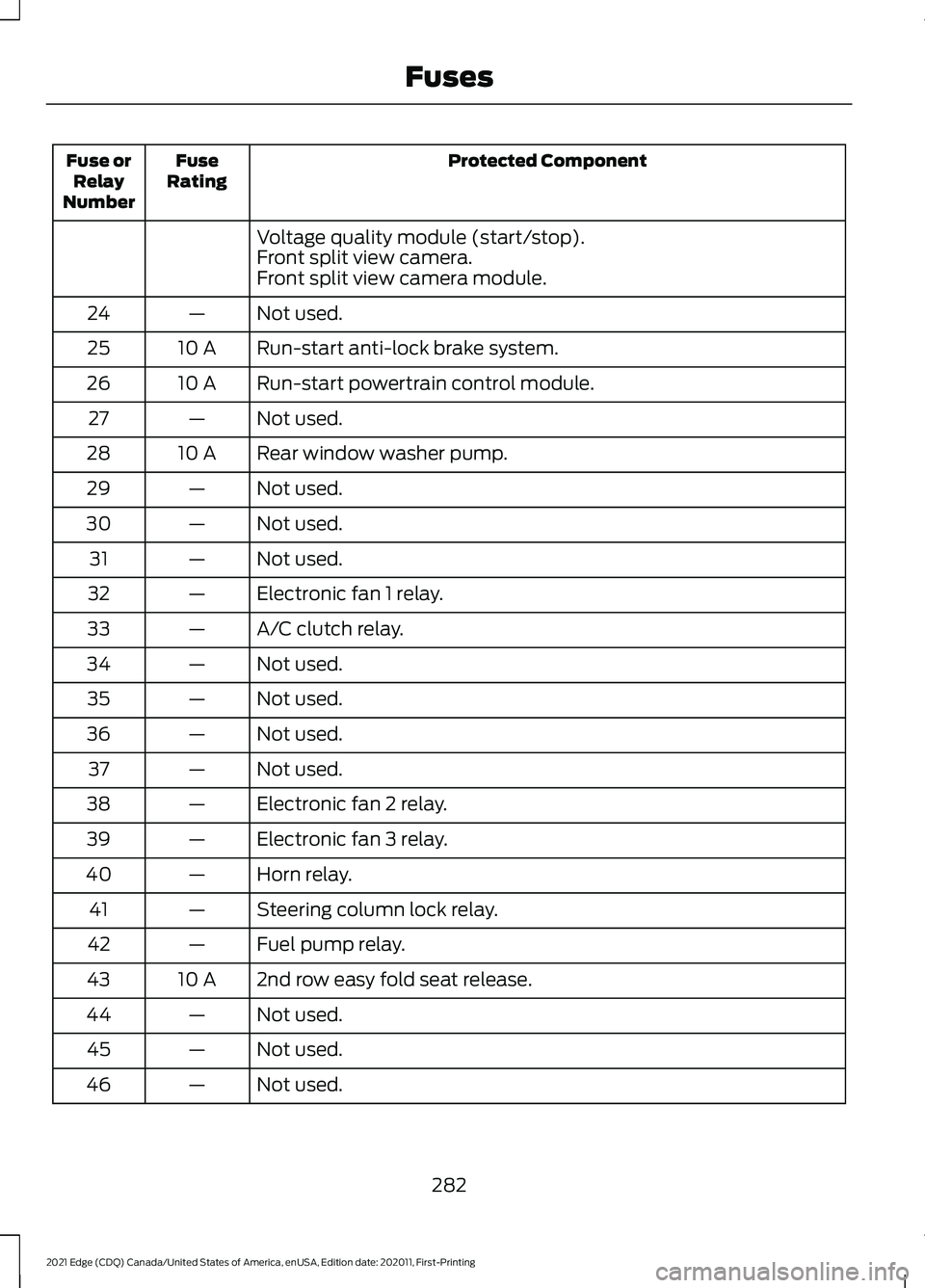
Page 285 of 500

Protected Component
Fuse
Rating
Fuse or
Relay
Number
Power point 3 - back of console.
20 A
5
Not used.
—
6
Powertrain control module - vehicle power 1.
20 A
7
Powertrain control module - vehicle power 2.
20 A
8
Canister vent.
Vapor blocking valve.
Heated oxygen post.
Powertrain control module relay.
—
9
Power point 1 - driver front.
20 A
10
Powertrain control module - vehicle power 4.
15 A
11
Powertrain control module - vehicle power 3.
15 A
12
All-wheel drive module relay coil.
Active grille shutters.
Active transmission warm up.
Auxiliary cooling pump.
Electric compressor bypass.
Vacuum on demand valve.
A/C compressor.
Not used.
—
13
Not used.
—
14
Run-start relay.
—
15
Power point 2 - console bin.
20 A
16
Power point 4 - luggage compartment.
20 A
17
Not used.
—
18
Run-start electronic power assist steering.
10 A
19
Headlamp leveling.
10 A
20
Not used.
—
21
Air conditioner clutch solenoid.
10 A
22
Blind spot information system.
15 A
23
Rear view camera.
Forward looking radar.
281
2021 Edge (CDQ) Canada/United States of America, enUSA, Edition date: 202011, First-Printing Fuses
Page 286 of 500
Protected Component
Fuse
Rating
Fuse or
Relay
Number
Voltage quality module (start/stop).
Front split view camera.
Front split view camera module.
Not used.
—
24
Run-start anti-lock brake system.
10 A
25
Run-start powertrain control module.
10 A
26
Not used.
—
27
Rear window washer pump.
10 A
28
Not used.
—
29
Not used.
—
30
Not used.
—
31
Electronic fan 1 relay.
—
32
A/C clutch relay.
—
33
Not used.
—
34
Not used.
—
35
Not used.
—
36
Not used.
—
37
Electronic fan 2 relay.
—
38
Electronic fan 3 relay.
—
39
Horn relay.
—
40
Steering column lock relay.
—
41
Fuel pump relay.
—
42
2nd row easy fold seat release.
10 A
43
Not used.
—
44
Not used.
—
45
Not used.
—
46
282
2021 Edge (CDQ) Canada/United States of America, enUSA, Edition date: 202011, First-Printing Fuses
Page 287 of 500
Protected Component
Fuse
Rating
Fuse or
Relay
Number
Not used.
—
47
Steering column lock relay power.
15 A
48
Not used.
—
49
Horn.
20 A
50
Not used.
—
51
Not used.
—
52
Not used.
—
53
Brake on-off switch.
10 A
54
Alternator sensor.
10 A
55
Not used.
–
86
283
2021 Edge (CDQ) Canada/United States of America, enUSA, Edition date: 202011, First-Printing Fuses