2021 FORD BRONCO SPORT power steering
[x] Cancel search: power steeringPage 5 of 471
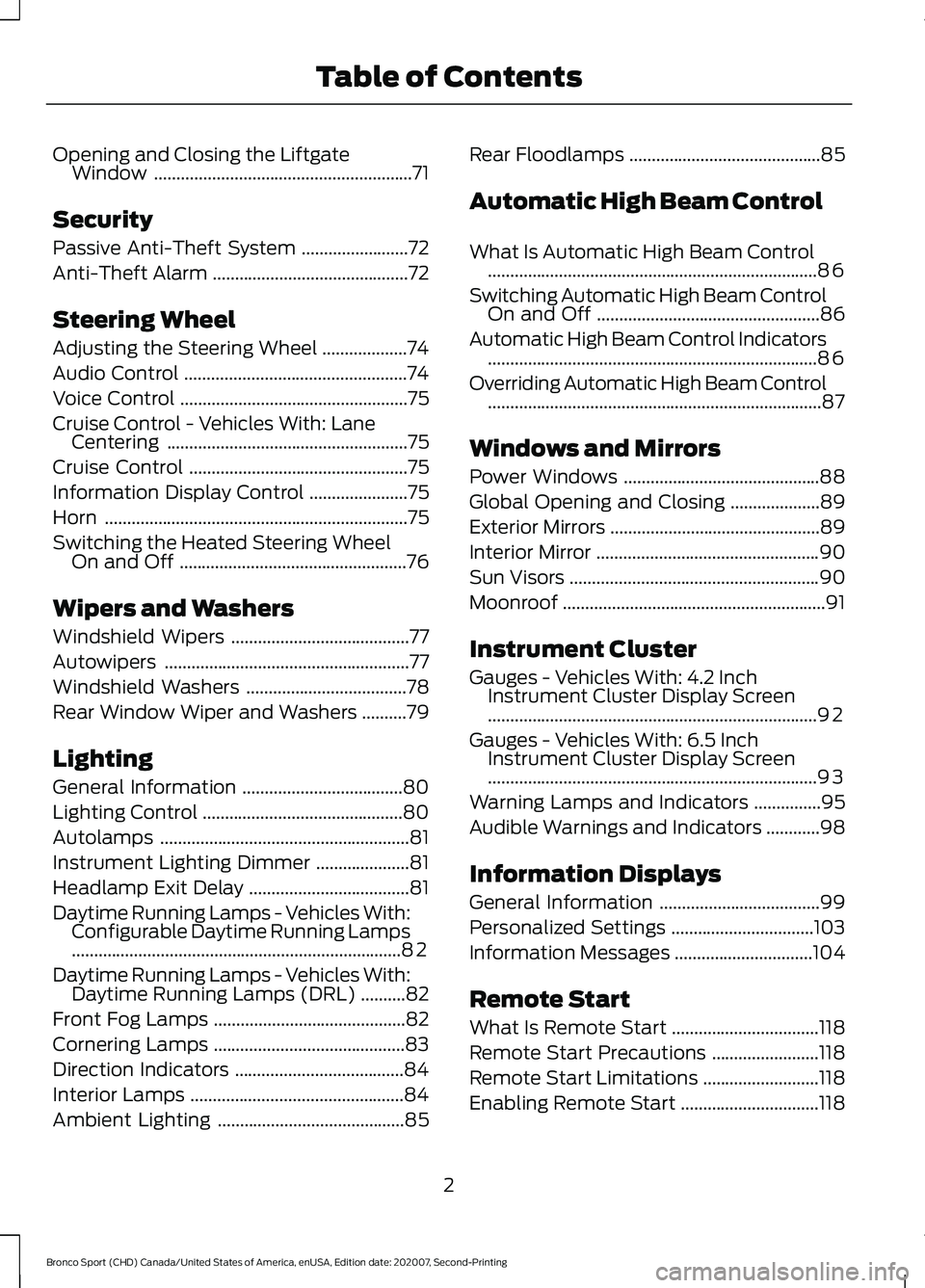
Opening and Closing the Liftgate
Window ..........................................................71
Security
Passive Anti-Theft System ........................
72
Anti-Theft Alarm ............................................
72
Steering Wheel
Adjusting the Steering Wheel ...................
74
Audio Control ..................................................
74
Voice Control ...................................................
75
Cruise Control - Vehicles With: Lane Centering ......................................................
75
Cruise Control .................................................
75
Information Display Control ......................
75
Horn ....................................................................
75
Switching the Heated Steering Wheel On and Off ...................................................
76
Wipers and Washers
Windshield Wipers ........................................
77
Autowipers .......................................................
77
Windshield Washers ....................................
78
Rear Window Wiper and Washers ..........
79
Lighting
General Information ....................................
80
Lighting Control .............................................
80
Autolamps ........................................................
81
Instrument Lighting Dimmer .....................
81
Headlamp Exit Delay ....................................
81
Daytime Running Lamps - Vehicles With: Configurable Daytime Running Lamps
........................................................................\
..
82
Daytime Running Lamps - Vehicles With: Daytime Running Lamps (DRL) ..........
82
Front Fog Lamps ...........................................
82
Cornering Lamps ...........................................
83
Direction Indicators ......................................
84
Interior Lamps ................................................
84
Ambient Lighting ..........................................
85Rear Floodlamps
...........................................
85
Automatic High Beam Control
What Is Automatic High Beam Control ........................................................................\
..
86
Switching Automatic High Beam Control On and Off ..................................................
86
Automatic High Beam Control Indicators ........................................................................\
..
86
Overriding Automatic High Beam Control ........................................................................\
...
87
Windows and Mirrors
Power Windows ............................................
88
Global Opening and Closing ....................
89
Exterior Mirrors ...............................................
89
Interior Mirror ..................................................
90
Sun Visors ........................................................
90
Moonroof ...........................................................
91
Instrument Cluster
Gauges - Vehicles With: 4.2 Inch Instrument Cluster Display Screen
........................................................................\
..
92
Gauges - Vehicles With: 6.5 Inch Instrument Cluster Display Screen
........................................................................\
..
93
Warning Lamps and Indicators ...............
95
Audible Warnings and Indicators ............
98
Information Displays
General Information ....................................
99
Personalized Settings ................................
103
Information Messages ...............................
104
Remote Start
What Is Remote Start .................................
118
Remote Start Precautions ........................
118
Remote Start Limitations ..........................
118
Enabling Remote Start ...............................
118
2
Bronco Sport (CHD) Canada/United States of America, enUSA, Edition date: 202007, Second-Printing Table of Contents
Page 10 of 471

Engine Coolant Check
...............................277
Automatic Transmission Fluid Check ........................................................................\
.
281
Brake Fluid Check ........................................
281
Power Steering Fluid Check ....................
282
Changing the 12V Battery ........................
282
Adjusting the Headlamps .......................
284
Washer Fluid Check ...................................
285
Fuel Filter .......................................................
285
Checking the Wiper Blades ....................
286
Changing the Front Wiper Blades ........
286
Changing the Rear Wiper Blades .........
286
Changing a Bulb ..........................................
287
Vehicle Care
General Information ..................................
289
Cleaning Products ......................................
289
Cleaning the Exterior ................................
290
Waxing .............................................................
291
Cleaning the Engine ....................................
291
Cleaning the Windows and Wiper Blades ........................................................................\
292
Cleaning the Interior ..................................
292
Cleaning the Instrument Panel and Instrument Cluster Lens ......................
293
Repairing Minor Paint Damage .............
294
Cleaning the Wheels .................................
294
Vehicle Storage ...........................................
294
Wheels and Tires
General Information ..................................
297
Tire Care .........................................................
299
Using Snow Chains .....................................
312
Tire Pressure Monitoring System ...........
312
Changing a Road Wheel ...........................
316
Technical Specifications ..........................
322Capacities and Specifications
Engine Specifications - 1.5L EcoBoost™
........................................................................\
323
Engine Specifications - 2.0L EcoBoost™ ........................................................................\
323
Vehicle Dimensions ...................................
324
Motorcraft Parts - 1.5L EcoBoost™ ......
325
Motorcraft Parts - 2.0L EcoBoost™ .....
325
Bulb Specification Chart ..........................
326
Engine Oil Capacity and Specification - 2.0L EcoBoost™ .....................................
328
Engine Oil Capacity and Specification - 1.5L EcoBoost™ ......................................
329
Cooling System Capacity and Specification - 2.0L EcoBoost™ ........
331
Cooling System Capacity and Specification - 1.5L EcoBoost™ ........
332
Fuel Tank Capacity .....................................
332
Air Conditioning System Capacity and Specification - 2.0L EcoBoost™ .......
333
Air Conditioning System Capacity and Specification - 1.5L EcoBoost™ .......
334
Washer Fluid Specification .....................
334
Brake Fluid Specification .........................
335
Vehicle Identification
Vehicle Identification Number ...............
336
Connected Vehicle
What Is a Connected Vehicle ..................
337
Connected Vehicle Requirements ........
337
Connected Vehicle Limitations ..............
337
Connecting the Vehicle to a Mobile Network - Vehicles With: Modem ......
337
Connecting the Vehicle to a Wi-Fi Network - Vehicles With: SYNC 3 ......
337
Connected Vehicle – Troubleshooting - Vehicles With: Modem .........................
338
Connected Vehicle – Troubleshooting - Vehicles With: SYNC 3 ..........................
339
7
Bronco Sport (CHD) Canada/United States of America, enUSA, Edition date: 202007, Second-Printing Table of Contents
Page 14 of 471
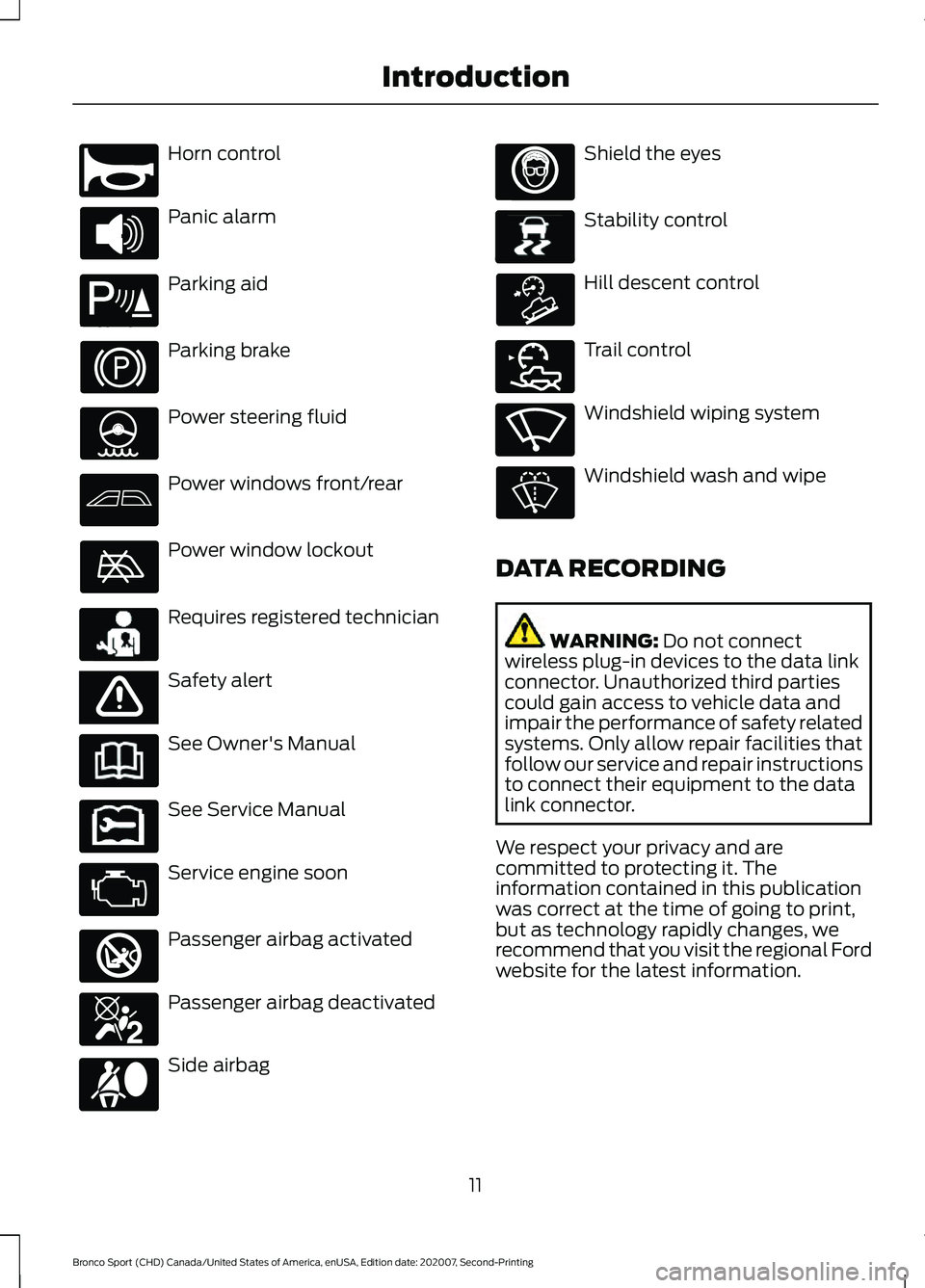
Horn control
Panic alarm
Parking aid
Parking brake
Power steering fluid
Power windows front/rear
Power window lockout
Requires registered technician
Safety alert
See Owner's Manual
See Service Manual
Service engine soon
Passenger airbag activated
Passenger airbag deactivated
Side airbag Shield the eyes
Stability control
Hill descent control
Trail control
Windshield wiping system
Windshield wash and wipe
DATA RECORDING WARNING: Do not connect
wireless plug-in devices to the data link
connector. Unauthorized third parties
could gain access to vehicle data and
impair the performance of safety related
systems. Only allow repair facilities that
follow our service and repair instructions
to connect their equipment to the data
link connector.
We respect your privacy and are
committed to protecting it. The
information contained in this publication
was correct at the time of going to print,
but as technology rapidly changes, we
recommend that you visit the regional Ford
website for the latest information.
11
Bronco Sport (CHD) Canada/United States of America, enUSA, Edition date: 202007, Second-Printing IntroductionE270945 E139213 E231159 E65963 E231158 E270849 E270850 E167012 E138639 E163957 E272858 E270969
Page 113 of 471
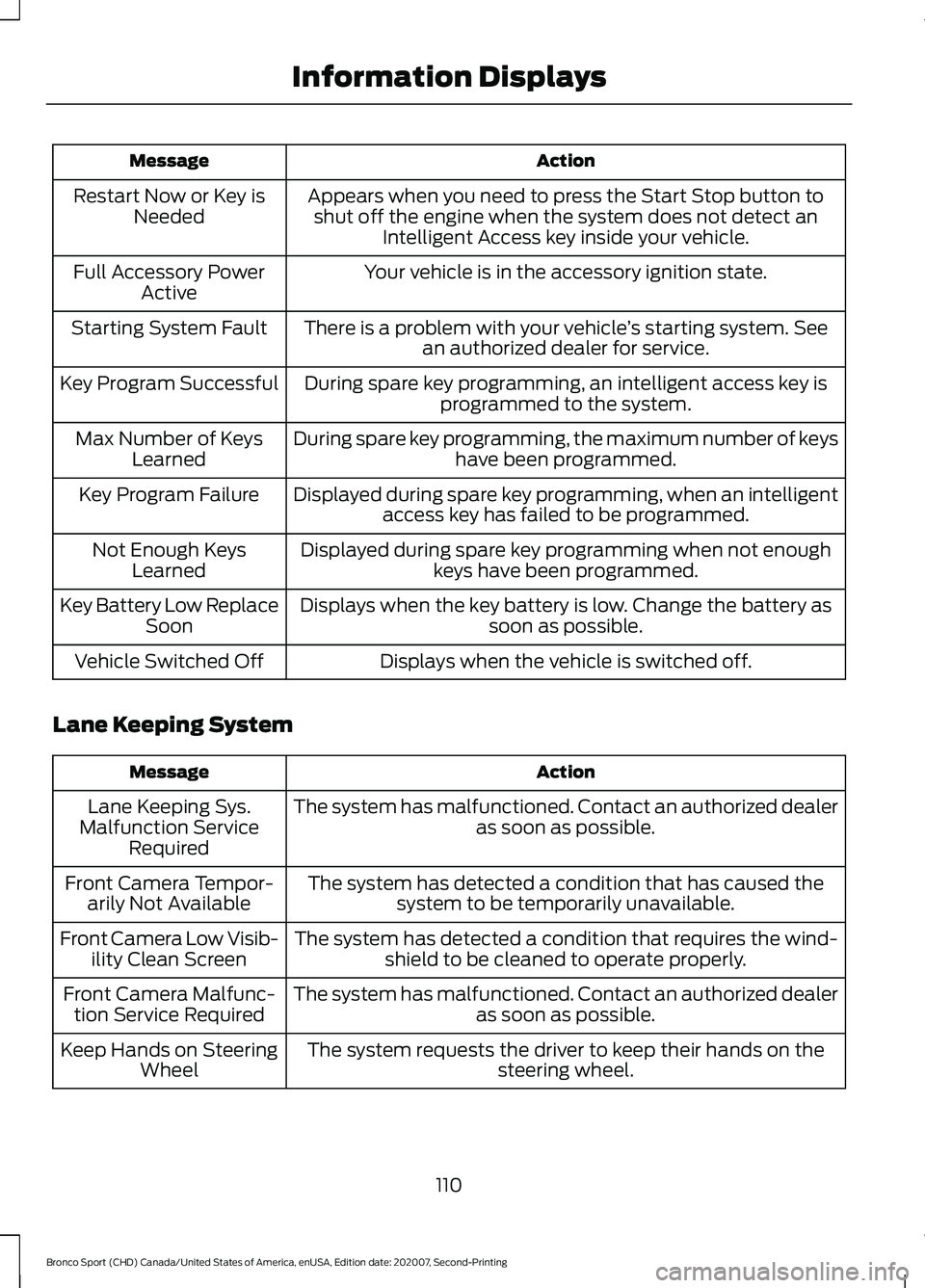
Action
Message
Appears when you need to press the Start Stop button toshut off the engine when the system does not detect an Intelligent Access key inside your vehicle.
Restart Now or Key is
Needed
Your vehicle is in the accessory ignition state.
Full Accessory Power
Active
There is a problem with your vehicle ’s starting system. See
an authorized dealer for service.
Starting System Fault
During spare key programming, an intelligent access key isprogrammed to the system.
Key Program Successful
During spare key programming, the maximum number of keyshave been programmed.
Max Number of Keys
Learned
Displayed during spare key programming, when an intelligentaccess key has failed to be programmed.
Key Program Failure
Displayed during spare key programming when not enoughkeys have been programmed.
Not Enough Keys
Learned
Displays when the key battery is low. Change the battery as soon as possible.
Key Battery Low Replace
Soon
Displays when the vehicle is switched off.
Vehicle Switched Off
Lane Keeping System Action
Message
The system has malfunctioned. Contact an authorized dealer as soon as possible.
Lane Keeping Sys.
Malfunction Service Required
The system has detected a condition that has caused thesystem to be temporarily unavailable.
Front Camera Tempor-
arily Not Available
The system has detected a condition that requires the wind-shield to be cleaned to operate properly.
Front Camera Low Visib-
ility Clean Screen
The system has malfunctioned. Contact an authorized dealeras soon as possible.
Front Camera Malfunc-
tion Service Required
The system requests the driver to keep their hands on thesteering wheel.
Keep Hands on Steering
Wheel
110
Bronco Sport (CHD) Canada/United States of America, enUSA, Edition date: 202007, Second-Printing Information Displays
Page 117 of 471
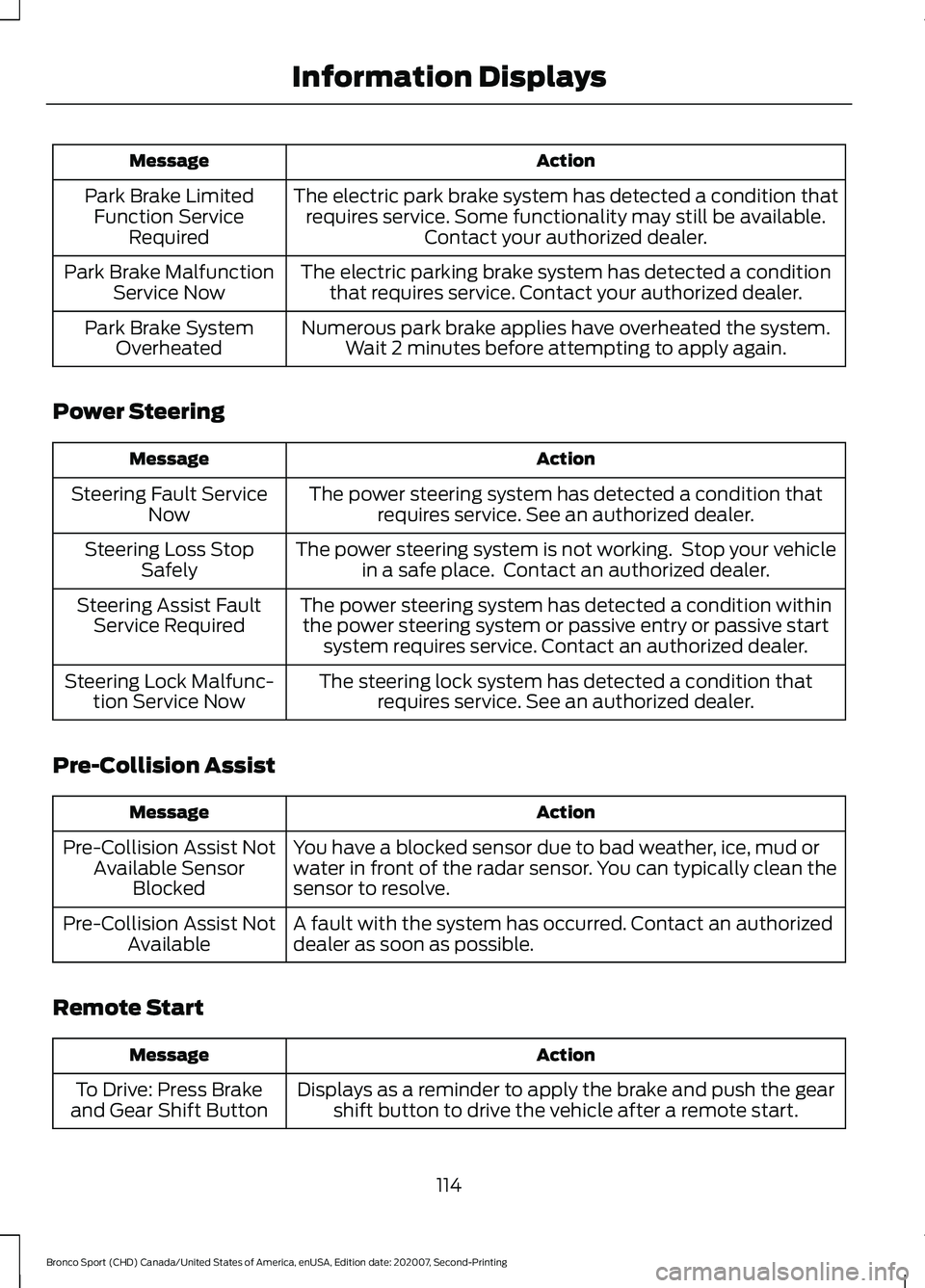
Action
Message
The electric park brake system has detected a condition thatrequires service. Some functionality may still be available. Contact your authorized dealer.
Park Brake Limited
Function Service Required
The electric parking brake system has detected a conditionthat requires service. Contact your authorized dealer.
Park Brake Malfunction
Service Now
Numerous park brake applies have overheated the system.Wait 2 minutes before attempting to apply again.
Park Brake System
Overheated
Power Steering Action
Message
The power steering system has detected a condition thatrequires service. See an authorized dealer.
Steering Fault Service
Now
The power steering system is not working. Stop your vehiclein a safe place. Contact an authorized dealer.
Steering Loss Stop
Safely
The power steering system has detected a condition withinthe power steering system or passive entry or passive start system requires service. Contact an authorized dealer.
Steering Assist Fault
Service Required
The steering lock system has detected a condition thatrequires service. See an authorized dealer.
Steering Lock Malfunc-
tion Service Now
Pre-Collision Assist Action
Message
You have a blocked sensor due to bad weather, ice, mud or
water in front of the radar sensor. You can typically clean the
sensor to resolve.
Pre-Collision Assist Not
Available Sensor Blocked
A fault with the system has occurred. Contact an authorized
dealer as soon as possible.
Pre-Collision Assist Not
Available
Remote Start Action
Message
Displays as a reminder to apply the brake and push the gearshift button to drive the vehicle after a remote start.
To Drive: Press Brake
and Gear Shift Button
114
Bronco Sport (CHD) Canada/United States of America, enUSA, Edition date: 202007, Second-Printing Information Displays
Page 156 of 471
AUTO-START-STOP
The system helps reduce fuel consumption
by automatically shutting off and restarting
the engine while your vehicle is stopped.
The engine restarts when you release the
brake pedal. Your vehicle may restart in
some situations, for example:
•
To maintain interior comfort.
• To recharge the battery.
Note: Power assist steering is turned off
when the engine is off. WARNING: Apply the parking
brake, shift into park (P), switch the
ignition off and remove the key before
you open the hood or have any service
or repair work completed. If you do not
switch the ignition off, the engine could
restart at any time. Failure to follow this
instruction could result in personal injury
or death. WARNING:
The system may
require the engine to automatically
restart when the auto-start-stop
indicator illuminates green or flashes
amber. Failure to follow this instruction
could result in personal injury.
The Auto-Start-Stop system status is
available at a glance within the information
display. See Information Displays (page
99
).
Enabling Auto-Start-Stop
The system is enabled every time you start
your vehicle if the following conditions are
met:
• You do not press the Auto-Start-Stop
button.
• Your vehicle exceeds an initial speed
of
3 mph (5 km/h) after the vehicle
initially starts. •
Your vehicle is stopped.
• Your foot is on the brake pedal.
• The transmission is in drive (D).
• The driver door is closed.
• There is adequate brake vacuum.
• The interior compartment has cooled
or warmed to an acceptable level.
• The front windshield defroster is off.
• The steering wheel is not being turned.
• The vehicle is not on a steep road
slope.
• The battery is within optimal operating
conditions, such as battery state of
charge and temperature in range.
• The engine coolant is at operating
temperature.
• Your vehicle is not being driven at a
high altitude.
• The ambient temperature is moderate. The green Auto-Start-Stop
indicator light on the instrument
cluster illuminates to indicate
when the automatic engine stop occurs. If the instrument cluster has a
grey Auto-Start-Stop indicator
light, it illuminates when
automatic engine stop is not available due
to one of the above noted conditions not
being met.
Automatic Engine Restart
Any of the following conditions results in
an automatic restart of the engine if:
• You remove your foot from the brake
pedal.
• You press the accelerator pedal.
• You press the accelerator and the
brake pedal at the same time.
• The driver seatbelt becomes
unfastened or the driver door is ajar.
153
Bronco Sport (CHD) Canada/United States of America, enUSA, Edition date: 202007, Second-Printing Unique Driving Characteristics E146361
Page 172 of 471
Manual Park Release
WARNING: When doing this
procedure, you need to take the
transmission out of park (P) which
means your vehicle can roll freely. To
avoid unwanted vehicle movement,
always fully apply the parking brake prior
to doing this procedure. Use wheel
chocks if appropriate. WARNING:
If the parking brake is
fully released, but the brake warning
lamp remains illuminated, the brakes
may not be working properly. Have your
vehicle checked as soon as possible. WARNING:
Do not drive your
vehicle until you verify that the
stoplamps are working.
Use the manual park release to move your
transmission from the park (P) position in
the event of an electrical malfunction or
emergency.
Activating the Manual Park Release
Cable
1. Apply the parking brake. See Electric
Parking Brake
(page 177).
Note: If the vehicle battery is dead, for
example, no electrical power is available,
you could use an external power source to
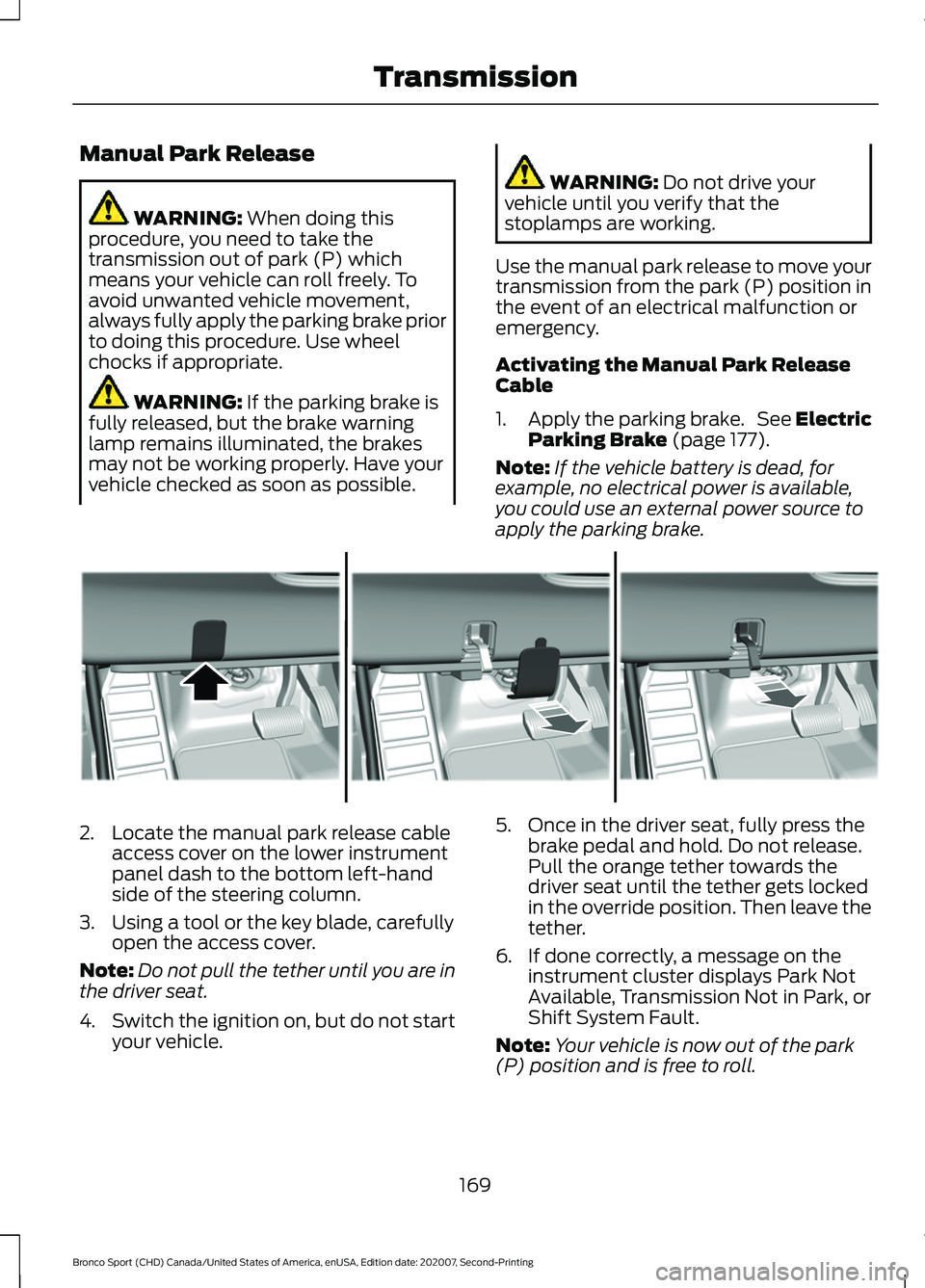
apply the parking brake. 2. Locate the manual park release cable
access cover on the lower instrument
panel dash to the bottom left-hand
side of the steering column.
3. Using a tool or the key blade, carefully open the access cover.
Note: Do not pull the tether until you are in
the driver seat.
4. Switch the ignition on, but do not start
your vehicle. 5. Once in the driver seat, fully press the
brake pedal and hold. Do not release.
Pull the orange tether towards the
driver seat until the tether gets locked
in the override position. Then leave the
tether.
6. If done correctly, a message on the instrument cluster displays Park Not
Available, Transmission Not in Park, or
Shift System Fault.
Note: Your vehicle is now out of the park
(P) position and is free to roll.
169
Bronco Sport (CHD) Canada/United States of America, enUSA, Edition date: 202007, Second-Printing TransmissionE307867
Page 176 of 471
Driving in Special Conditions With
Four-Wheel Drive
Four-wheel drive has operating
characteristics that are somewhat
different from front-wheel drive, both on
and off the freeway.
When driving at slow speeds under
high-load conditions, use a low gear when
possible. Low gear operation maximizes
the engine and transmission cooling
capability.
Under severe operating conditions, the air
conditioning may cycle on and off to
prevent the engine from overheating.
Note:
It may be useful to select the most
appropriate drive mode to most effectively
maximize vehicle performance. See Drive
Mode Control (page 223).
Note: It may be useful to switch traction
control off. This allows for more wheel spin
and engine torque in certain conditions or if
your vehicle becomes stuck.
Note: If the front or rear axle is submerged
in water, check the rear axle lubricant and
power transfer unit lubricant and change if
necessary.
See Driving Through Water
Limitations (page 246).
Basic Operating Principles
Drive slower in strong crosswinds which
can affect the normal steering
characteristics of your vehicle.
When driving your vehicle on surfaces
made slippery by loose sand, water, gravel,
snow or ice, proceed with care.
If Your Vehicle leaves the Road
If your vehicle leaves the road, reduce your
vehicle speed and avoid severe braking.
When your vehicle speed has been
reduced, ease your vehicle back onto the
road. Do not turn the steering wheel
sharply while returning your vehicle to the
road. It may be safer to stay on the shoulder of
the road and slow down gradually before
returning to the road. You could lose
control if you do not slow down or if you
turn the steering wheel too sharply or
abruptly.
It may be less risky to strike small objects,
such as freeway reflectors, with minor
damage to your vehicle rather than
attempt a sudden return to the road which
could cause your vehicle to slide sideways
out of control, or roll over. Remember, your
safety and the safety of others is your
primary concern.
Emergency Maneuvers
In an unavoidable emergency where a
sudden sharp turn must be made,
remember to avoid over-driving your
vehicle, for example, turn the steering
wheel only as rapidly and as far as required
to avoid the emergency. Excessive steering
can result in loss of vehicle control. Apply
smooth pressure to the accelerator pedal
or brake pedal when changes in vehicle
speed are required. Avoid abrupt steering,
acceleration and braking. This could result
in an increased risk of vehicle rollover, loss
of vehicle control and personal injury. Use
all available road surface to bring your
vehicle to a safe direction of travel.
In the event of an emergency stop, avoid
skidding the tires and do not attempt any
sharp steering wheel movements.
If your vehicle goes from one type of
surface to another, for example, from
concrete to gravel, there will be a change
in the way your vehicle responds to a
maneuver, for example, steering,
acceleration or braking.
Note:
For off-road driving,
173
Bronco Sport (CHD) Canada/United States of America, enUSA, Edition date: 202007, Second-Printing Four-Wheel Drive