2021 FORD BRONCO SPORT brake light
[x] Cancel search: brake lightPage 13 of 471
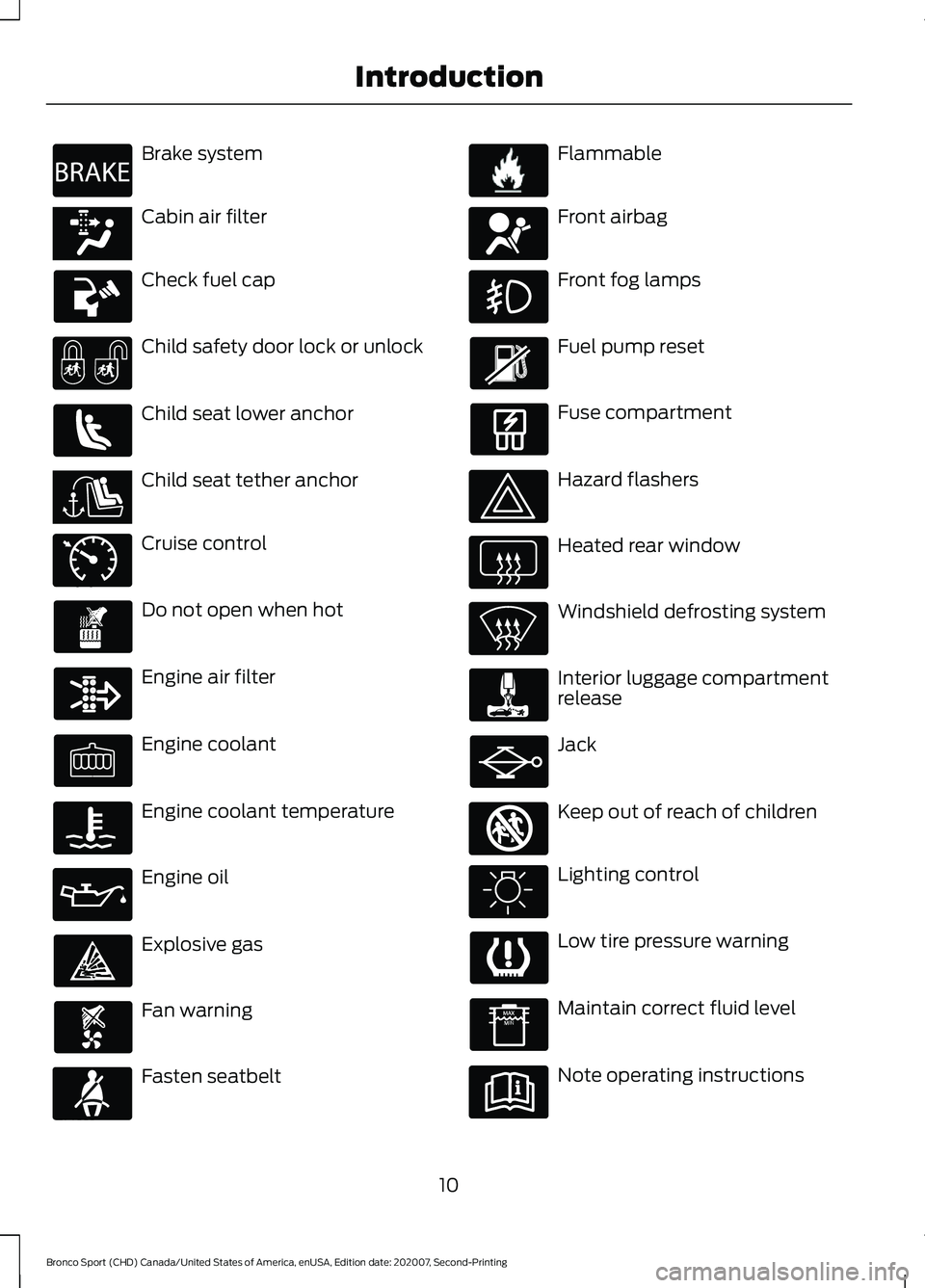
Brake system
Cabin air filter
Check fuel cap
Child safety door lock or unlock
Child seat lower anchor
Child seat tether anchor
Cruise control
Do not open when hot
Engine air filter
Engine coolant
Engine coolant temperature
Engine oil
Explosive gas
Fan warning
Fasten seatbelt Flammable
Front airbag
Front fog lamps
Fuel pump reset
Fuse compartment
Hazard flashers
Heated rear window
Windshield defrosting system
Interior luggage compartment
release
Jack
Keep out of reach of children
Lighting control
Low tire pressure warning
Maintain correct fluid level
Note operating instructions
10
Bronco Sport (CHD) Canada/United States of America, enUSA, Edition date: 202007, Second-Printing IntroductionE270480 E139223 E141128 E71340 E71880 E231160 E67017 E161353
Page 85 of 471
DAYTIME RUNNING LAMPS -
VEHICLES WITH:
CONFIGURABLE DAYTIME
RUNNING LAMPS
WARNING: The daytime running
lamps system does not activate the rear
lamps and may not provide adequate
lighting during low visibility driving
conditions. Make sure you switch the
headlamps on, as appropriate, during all
low visibility conditions. Failure to do so
may result in a crash.
Switch the daytime running lamps on or
off using the touchscreen:
1. Select
Settings. See Settings (page
378).
2. Select
Vehicle.
3. Select
Lighting.
The daytime running lamps turn on when:
1. The lamps are on in the information display.
2. You switch the ignition on.
3. The transmission is not in park (P) for vehicles with automatic transmissions
or you release the parking brake for
vehicles with manual transmissions.
4. The lighting control is in the autolamps
position.
5. The headlamps are off.
The other lighting control switch positions
do not turn on the daytime running lamps.
If the daytime running lamps are off in the
information display, the lamps stay off in
all switch positions. DAYTIME RUNNING LAMPS -
VEHICLES WITH: DAYTIME
RUNNING LAMPS (DRL) WARNING:
The daytime running
lamps system does not activate the rear
lamps and may not provide adequate
lighting during low visibility driving
conditions. Make sure you switch the
headlamps on, as appropriate, during all
low visibility conditions. Failure to do so
may result in a crash.
The system turns the lamps on in daylight
conditions.
To switch the system on, switch the
lighting control to any position except
headlamps.
FRONT FOG LAMPS
(IF EQUIPPED)
Switching the Front Fog Lamps On
or Off
Only switch the front fog lamps on during
reduced visibility.
You can switch the front fog lamps on if
any of the following occur:
• You set the lighting control to the
parking lamps position.
• You set the lighting control to the
headlamps position.
• You set the lighting control to the
autolamps position and the headlamps
are on.
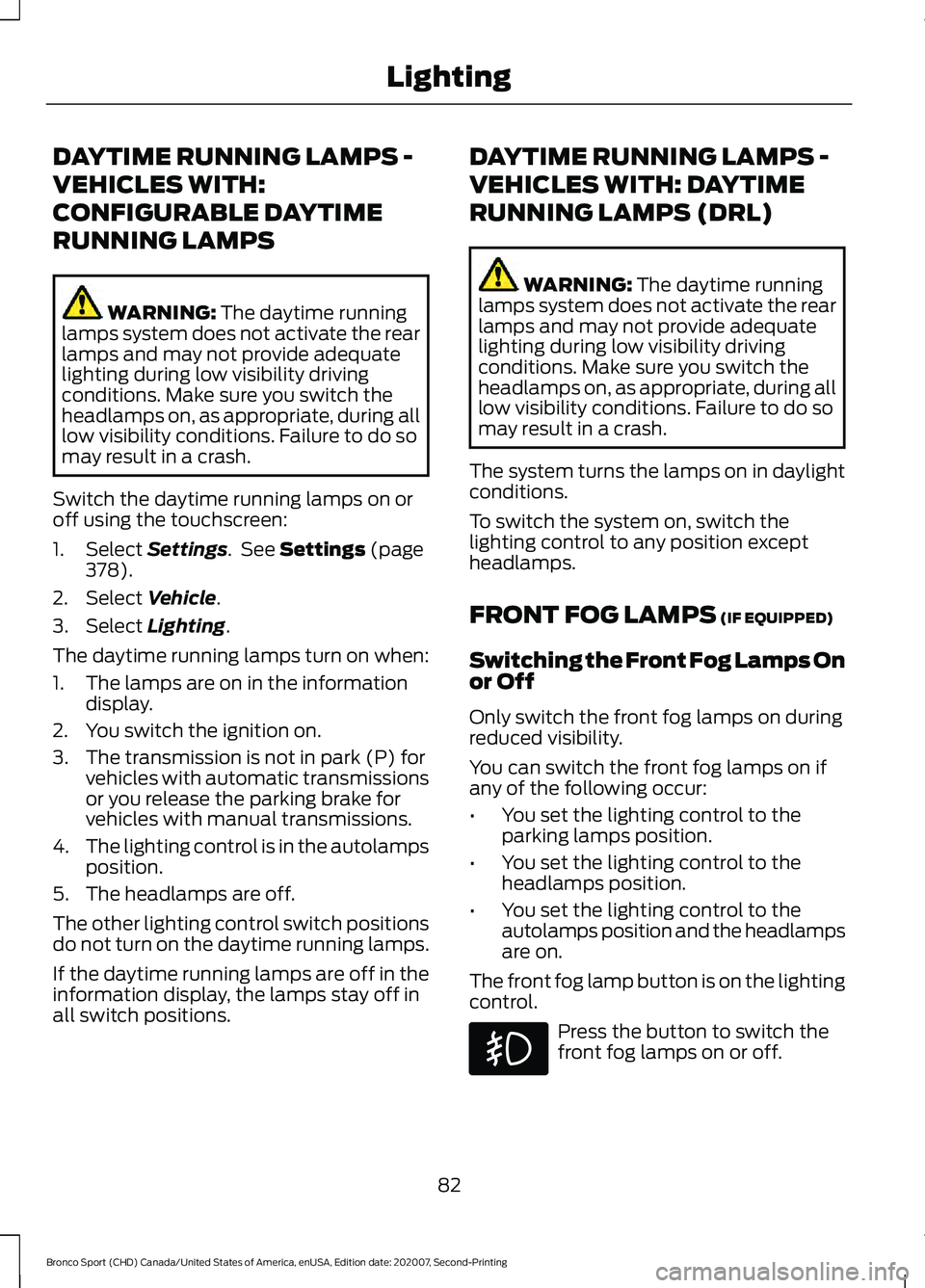
The front fog lamp button is on the lighting
control. Press the button to switch the
front fog lamps on or off.
82
Bronco Sport (CHD) Canada/United States of America, enUSA, Edition date: 202007, Second-Printing Lighting
Page 98 of 471
WARNING LAMPS AND
INDICATORS
The following warning lamps and
indicators alert you to a vehicle condition
that may become serious. Some lamps
illuminate when you start your vehicle to
make sure they work. If any lamps remain
on after starting your vehicle, refer to the
respective system warning lamp for further
information.
Note:
Some warning indicators appear in
the information display and function the
same as a warning lamp, but do not display
when you start your vehicle.
Note: Depending on your vehicle options
and instrument cluster type, not all
indicators display or are available.
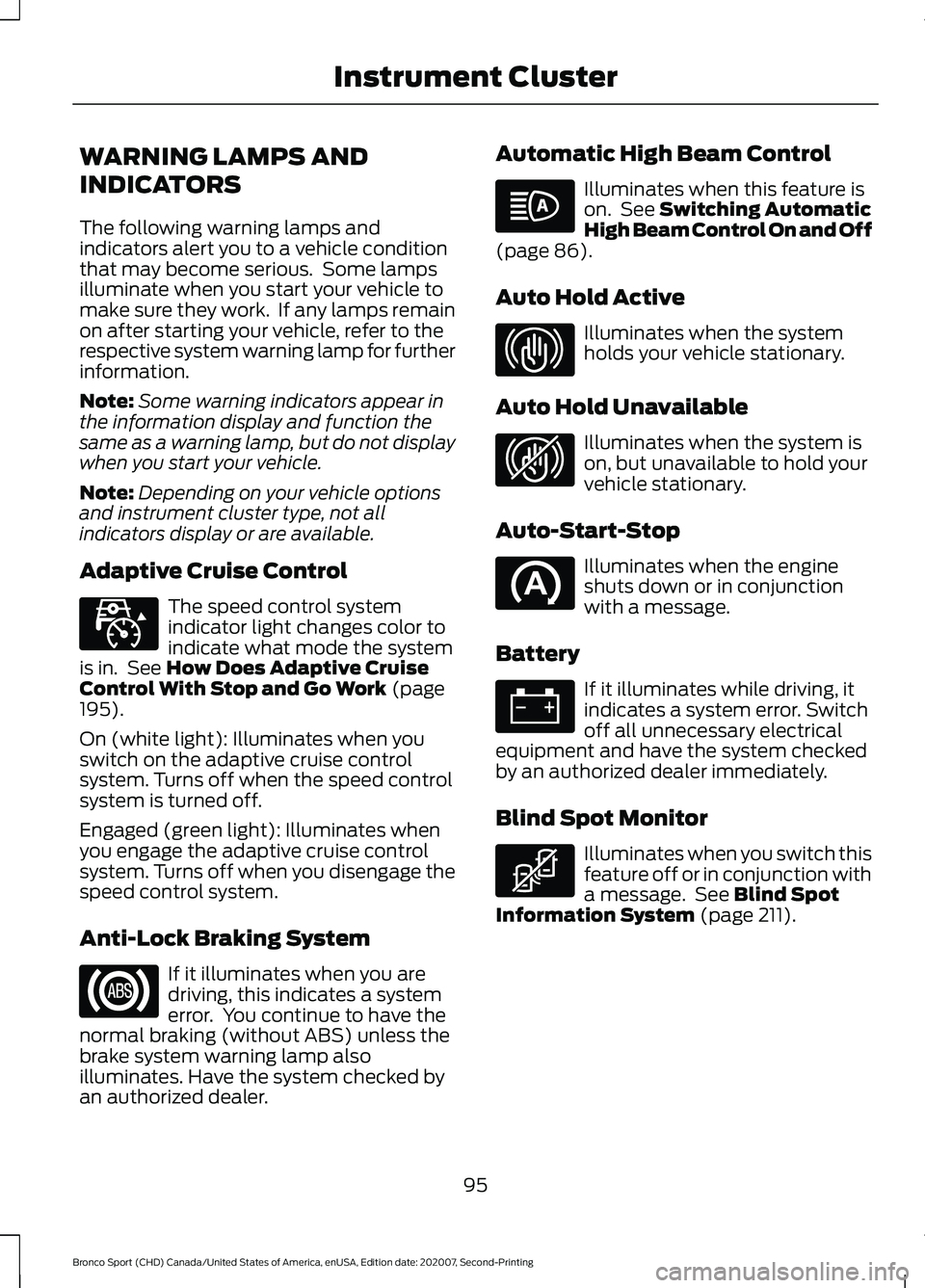
Adaptive Cruise Control The speed control system
indicator light changes color to
indicate what mode the system
is in. See How Does Adaptive Cruise
Control With Stop and Go Work (page
195).
On (white light): Illuminates when you
switch on the adaptive cruise control
system. Turns off when the speed control
system is turned off.
Engaged (green light): Illuminates when
you engage the adaptive cruise control
system. Turns off when you disengage the
speed control system.
Anti-Lock Braking System If it illuminates when you are
driving, this indicates a system
error. You continue to have the
normal braking (without ABS) unless the
brake system warning lamp also
illuminates. Have the system checked by
an authorized dealer. Automatic High Beam Control Illuminates when this feature is
on. See
Switching Automatic
High Beam Control On and Off
(page
86).
Auto Hold Active Illuminates when the system
holds your vehicle stationary.
Auto Hold Unavailable Illuminates when the system is
on, but unavailable to hold your
vehicle stationary.
Auto-Start-Stop Illuminates when the engine
shuts down or in conjunction
with a message.
Battery If it illuminates while driving, it
indicates a system error. Switch
off all unnecessary electrical
equipment and have the system checked
by an authorized dealer immediately.
Blind Spot Monitor Illuminates when you switch this
feature off or in conjunction with
a message. See
Blind Spot
Information System (page 211).
95
Bronco Sport (CHD) Canada/United States of America, enUSA, Edition date: 202007, Second-Printing Instrument ClusterE323440 E323448 E323449 E323450
Page 112 of 471
Action
Message
Displays when you have the power transfer unit fluid changed and reset to new.
4WD Power Transfer
Unit Lube Set to New
The selected drive mode does not allow you to turn on therear differential lock feature.
Rear Differential Lock
Not Available in Current Drive Mode
The selected drive mode requires your vehicle to be in four- wheel drive.
4WD Lock Required in
Current Drive Mode
Fuel Action
Message
An early reminder of a low fuel condition.
Fuel Level Low
The fuel fill inlet may not be properly closed.
Check Fuel Fill Inlet
Wait for up to 15 seconds while the fuel system depressurizes.
Fuel Door Opening
The fuel system has finished depressurizing and you can begin
to refuel.
Fuel Door Open
A reminder to close the fuel door. Failure to follow this
instruction can cause the check engine light to illuminate.
Close Fuel Door to Avoid
""Check Engine"" Light
There is an error in attempting to refill your vehicle.
Refuel Error See Manual
Hill Start Assist Action
Message
Hill start assist is not available. Contact an authorized dealer.See Hill Start Assist (page 178).
Hill Start Assist Not
Available
Keys and Intelligent Access Action
Message
A reminder to press the brake when starting your vehicle.
To START Press Brake
The system does not detect the key. See
Keyless Starting
(page 148).
No Key Detected
109
Bronco Sport (CHD) Canada/United States of America, enUSA, Edition date: 202007, Second-Printing Information Displays
Page 119 of 471
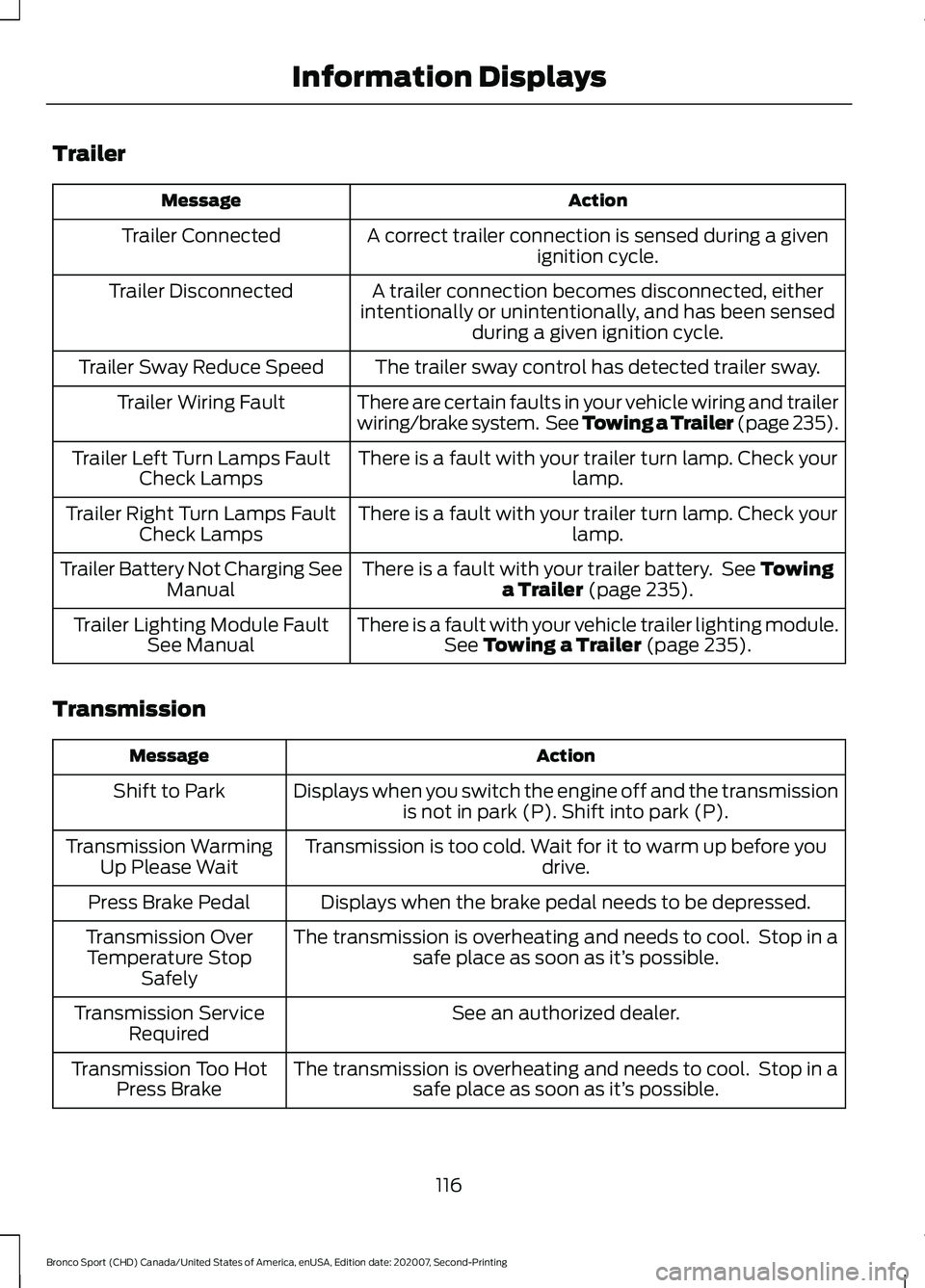
Trailer
Action
Message
A correct trailer connection is sensed during a givenignition cycle.
Trailer Connected
A trailer connection becomes disconnected, either
intentionally or unintentionally, and has been sensed during a given ignition cycle.
Trailer Disconnected
The trailer sway control has detected trailer sway.
Trailer Sway Reduce Speed
There are certain faults in your vehicle wiring and trailer
wiring/brake system. See Towing a Trailer (page 235).
Trailer Wiring Fault
There is a fault with your trailer turn lamp. Check yourlamp.
Trailer Left Turn Lamps Fault
Check Lamps
There is a fault with your trailer turn lamp. Check yourlamp.
Trailer Right Turn Lamps Fault
Check Lamps
There is a fault with your trailer battery. See
Towing
a Trailer (page 235).
Trailer Battery Not Charging See
Manual
There is a fault with your vehicle trailer lighting module.See
Towing a Trailer (page 235).
Trailer Lighting Module Fault
See Manual
Transmission Action
Message
Displays when you switch the engine off and the transmissionis not in park (P). Shift into park (P).
Shift to Park
Transmission is too cold. Wait for it to warm up before you drive.
Transmission Warming
Up Please Wait
Displays when the brake pedal needs to be depressed.
Press Brake Pedal
The transmission is overheating and needs to cool. Stop in asafe place as soon as it’ s possible.
Transmission Over
Temperature Stop Safely
See an authorized dealer.
Transmission Service
Required
The transmission is overheating and needs to cool. Stop in asafe place as soon as it’ s possible.
Transmission Too Hot
Press Brake
116
Bronco Sport (CHD) Canada/United States of America, enUSA, Edition date: 202007, Second-Printing Information Displays
Page 156 of 471
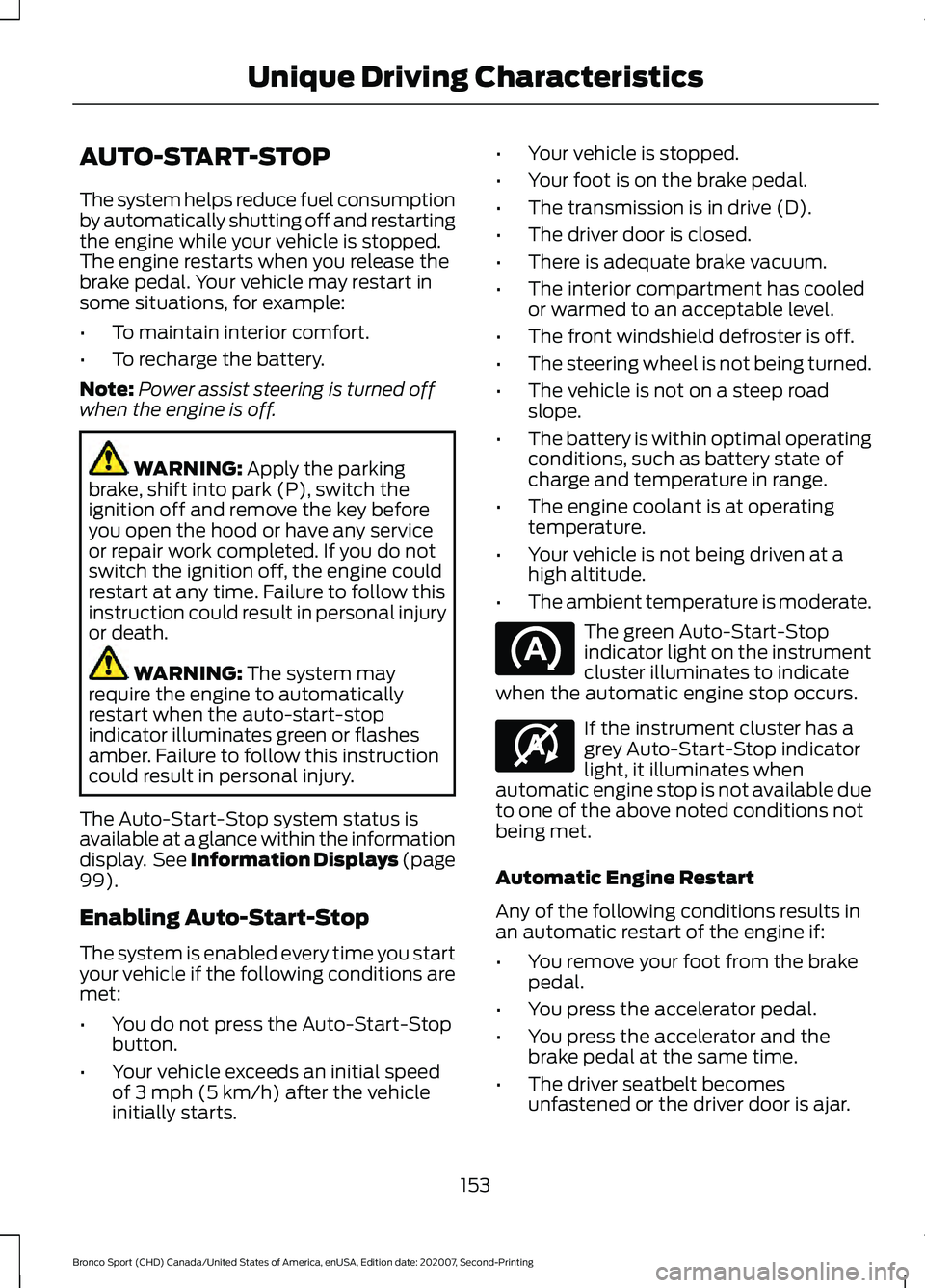
AUTO-START-STOP
The system helps reduce fuel consumption
by automatically shutting off and restarting
the engine while your vehicle is stopped.
The engine restarts when you release the
brake pedal. Your vehicle may restart in
some situations, for example:
•
To maintain interior comfort.
• To recharge the battery.
Note: Power assist steering is turned off
when the engine is off. WARNING: Apply the parking
brake, shift into park (P), switch the
ignition off and remove the key before
you open the hood or have any service
or repair work completed. If you do not
switch the ignition off, the engine could
restart at any time. Failure to follow this
instruction could result in personal injury
or death. WARNING:
The system may
require the engine to automatically
restart when the auto-start-stop
indicator illuminates green or flashes
amber. Failure to follow this instruction
could result in personal injury.
The Auto-Start-Stop system status is
available at a glance within the information
display. See Information Displays (page
99
).
Enabling Auto-Start-Stop
The system is enabled every time you start
your vehicle if the following conditions are
met:
• You do not press the Auto-Start-Stop
button.
• Your vehicle exceeds an initial speed
of
3 mph (5 km/h) after the vehicle
initially starts. •
Your vehicle is stopped.
• Your foot is on the brake pedal.
• The transmission is in drive (D).
• The driver door is closed.
• There is adequate brake vacuum.
• The interior compartment has cooled
or warmed to an acceptable level.
• The front windshield defroster is off.
• The steering wheel is not being turned.
• The vehicle is not on a steep road
slope.
• The battery is within optimal operating
conditions, such as battery state of
charge and temperature in range.
• The engine coolant is at operating
temperature.
• Your vehicle is not being driven at a
high altitude.
• The ambient temperature is moderate. The green Auto-Start-Stop
indicator light on the instrument
cluster illuminates to indicate
when the automatic engine stop occurs. If the instrument cluster has a
grey Auto-Start-Stop indicator
light, it illuminates when
automatic engine stop is not available due
to one of the above noted conditions not
being met.
Automatic Engine Restart
Any of the following conditions results in
an automatic restart of the engine if:
• You remove your foot from the brake
pedal.
• You press the accelerator pedal.
• You press the accelerator and the
brake pedal at the same time.
• The driver seatbelt becomes
unfastened or the driver door is ajar.
153
Bronco Sport (CHD) Canada/United States of America, enUSA, Edition date: 202007, Second-Printing Unique Driving Characteristics E146361
Page 157 of 471
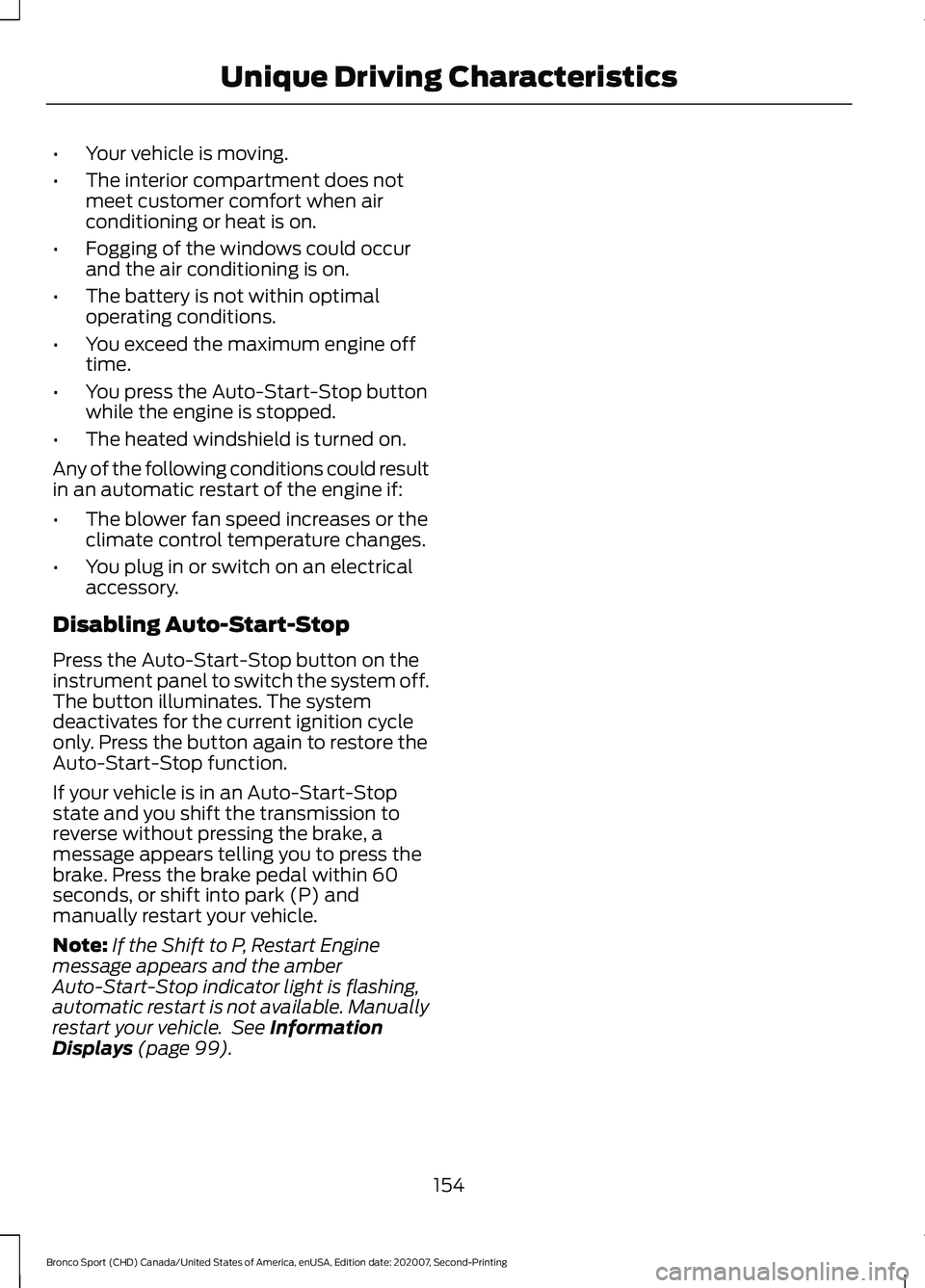
•
Your vehicle is moving.
• The interior compartment does not
meet customer comfort when air
conditioning or heat is on.
• Fogging of the windows could occur
and the air conditioning is on.
• The battery is not within optimal
operating conditions.
• You exceed the maximum engine off
time.
• You press the Auto-Start-Stop button
while the engine is stopped.
• The heated windshield is turned on.
Any of the following conditions could result
in an automatic restart of the engine if:
• The blower fan speed increases or the
climate control temperature changes.
• You plug in or switch on an electrical
accessory.
Disabling Auto-Start-Stop
Press the Auto-Start-Stop button on the
instrument panel to switch the system off.
The button illuminates. The system
deactivates for the current ignition cycle
only. Press the button again to restore the
Auto-Start-Stop function.
If your vehicle is in an Auto-Start-Stop
state and you shift the transmission to
reverse without pressing the brake, a
message appears telling you to press the
brake. Press the brake pedal within 60
seconds, or shift into park (P) and
manually restart your vehicle.
Note: If the Shift to P, Restart Engine
message appears and the amber
Auto-Start-Stop indicator light is flashing,
automatic restart is not available. Manually
restart your vehicle. See Information
Displays (page 99).
154
Bronco Sport (CHD) Canada/United States of America, enUSA, Edition date: 202007, Second-Printing Unique Driving Characteristics
Page 171 of 471
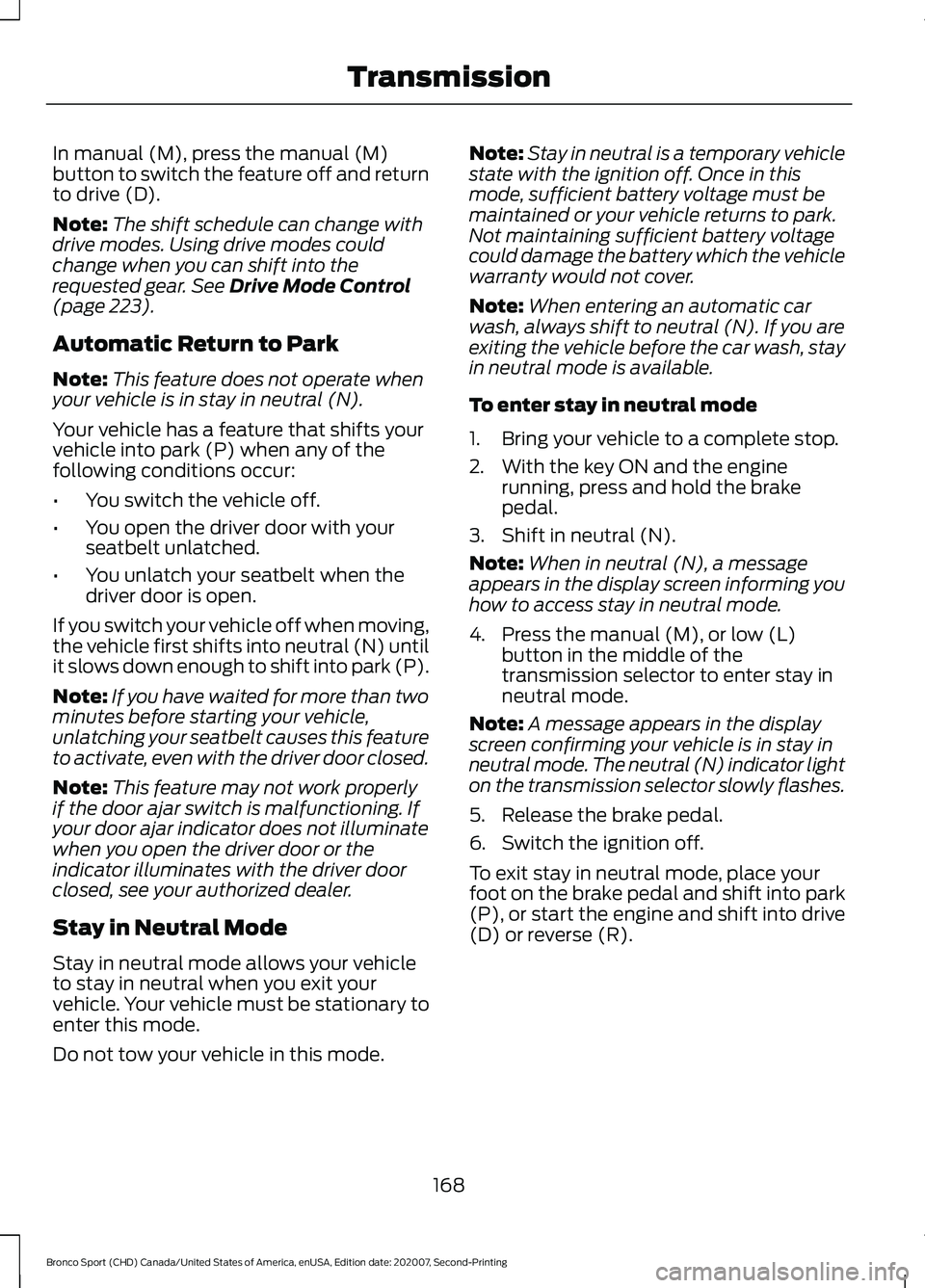
In manual (M), press the manual (M)
button to switch the feature off and return
to drive (D).
Note:
The shift schedule can change with
drive modes. Using drive modes could
change when you can shift into the
requested gear. See Drive Mode Control
(page 223).
Automatic Return to Park
Note: This feature does not operate when
your vehicle is in stay in neutral (N).
Your vehicle has a feature that shifts your
vehicle into park (P) when any of the
following conditions occur:
• You switch the vehicle off.
• You open the driver door with your
seatbelt unlatched.
• You unlatch your seatbelt when the
driver door is open.
If you switch your vehicle off when moving,
the vehicle first shifts into neutral (N) until
it slows down enough to shift into park (P).
Note: If you have waited for more than two
minutes before starting your vehicle,
unlatching your seatbelt causes this feature
to activate, even with the driver door closed.
Note: This feature may not work properly
if the door ajar switch is malfunctioning. If
your door ajar indicator does not illuminate
when you open the driver door or the
indicator illuminates with the driver door
closed, see your authorized dealer.
Stay in Neutral Mode
Stay in neutral mode allows your vehicle
to stay in neutral when you exit your
vehicle. Your vehicle must be stationary to
enter this mode.
Do not tow your vehicle in this mode. Note:
Stay in neutral is a temporary vehicle
state with the ignition off. Once in this
mode, sufficient battery voltage must be
maintained or your vehicle returns to park.
Not maintaining sufficient battery voltage
could damage the battery which the vehicle
warranty would not cover.
Note: When entering an automatic car
wash, always shift to neutral (N). If you are
exiting the vehicle before the car wash, stay
in neutral mode is available.
To enter stay in neutral mode
1. Bring your vehicle to a complete stop.
2. With the key ON and the engine running, press and hold the brake
pedal.
3. Shift in neutral (N).
Note: When in neutral (N), a message
appears in the display screen informing you
how to access stay in neutral mode.
4. Press the manual (M), or low (L) button in the middle of the
transmission selector to enter stay in
neutral mode.
Note: A message appears in the display
screen confirming your vehicle is in stay in
neutral mode. The neutral (N) indicator light
on the transmission selector slowly flashes.
5. Release the brake pedal.
6. Switch the ignition off.
To exit stay in neutral mode, place your
foot on the brake pedal and shift into park
(P), or start the engine and shift into drive
(D) or reverse (R).
168
Bronco Sport (CHD) Canada/United States of America, enUSA, Edition date: 202007, Second-Printing Transmission