2021 CHEVROLET COLORADO reset
[x] Cancel search: resetPage 12 of 89

Chevrolet/GMC 2.8L Duramax Diesel Engine Supplement (GMNA-Localizing-
U.S./Canada-14465442) - 2021 - CRC - 2/3/20
Instruments and Controls 11
Exhaust Fluid Level :The Diesel Exhaust
Fluid (DEF) level will be displayed as either
OK, XX%, or LOW.
When LOW appears on the display, add DEF
as soon as possible. See Diesel Exhaust Fluid
0 22.
Fuel Filter Life Remaining : This display
shows an estimate of the fuel filter's
remaining useful life. If 90% Fuel Filter Life
Remaining is displayed, it means 90% of the
current fuel filter life remains. The fuel filter
life system will alert when to change the
fuel filter on a schedule consistent with your
driving conditions.
When the remaining fuel filter life is low,
the CHANGE FUEL FILTER message will
appear on the display. Change the fuel filter
as soon as possible.
Fuel Filter Life Reset : Reset the Fuel Filter
Life Remaining display after each fuel filter
change. It will not reset itself. Also, be
careful not to reset the display at any time
other than when the fuel filter has just been
changed because it cannot be reset
accurately until the next fuel filter change.
The fuel filter life will change to 100% when
the system has been reset. To reset the
system, press and hold the set/reset button, or the trip odometer reset stem if there are
no DIC buttons, for two seconds while Fuel
Filter Life Remaining is displayed on the DIC.
Engine Hour (Hourmeter) :
Shows the total
number of hours the engine has run. The
display also shows the engine idle hours.
Vehicle Personalization
Vehicle Personalization (Van
Models)
This vehicle may have customization
capabilities that allow you to program
certain features to one preferred setting.
Customization features can only be
programmed to one setting on the vehicle
and cannot be programmed to a preferred
setting for two different drivers.
A Duramax diesel vehicle may have the
following additional vehicle personalization
items:
Feature Settings Menu Items
The following are customization features
that allow you to program settings to the
vehicle: ELEVATED IDLE
This feature allows you to turn on or off
Elevated Idle.
Press
Uuntil ELEVATED IDLE appears on the
DIC display. Press
Vonce to access the
settings for this feature. Then press
Uto
scroll through OFF, ON, or NO CHANGE. To
select a setting, press
Vwhile the desired
setting is displayed on the DIC.
Vehicle Personalization (Pickup
Models)
Use the audio system controls to access the
personalization menus for customizing
vehicle features.
The following features may be available on
some vehicles with a diesel engine. See
“Vehicle Personalization” in the owner’s
manual for additional vehicle
personalizations.
If equipped, these features may be selected
using the infotainment display.
To access the vehicle personalization menu:
1. Touch the Settings icon on the Home Page of the infotainment display.
Page 16 of 89
Chevrolet/GMC 2.8L Duramax Diesel Engine Supplement (GMNA-Localizing-
U.S./Canada-14465442) - 2021 - CRC - 2/3/20
Driving and Operating 15
{Warning
Do not use gasoline or starting aids, such
as ether, in the air intake. They could
damage the engine, which may not be
covered by the vehicle warranty. They
could also cause a fire, which could cause
serious personal injury.
Engine Idle Variations
Under certain conditions the engine idle
speed can vary or be elevated. Change in
idle speed is normal and does not indicate a
problem. Normal conditions that can raise
idle speed are low voltage, DPF
regeneration, air conditioning compressor
loads, and engine warmup. These speeds can
range from approximately 600 to 1000 rpm.
Elevated Idle
The engine has a cold temperature high idle
feature which elevates the engine idle speed
from base idle to 1050 to 1100 rpm for
pickup models or 1200 rpm for van models
when outside temperatures are below 0 °C
(32 °F), and the engine coolant temperature
is below 65 °C (150 °F). This feature enhances
heater performance by raising the engine
coolant temperature faster.To turn this feature on or off on pickup
models, see
Vehicle Personalization (Van
Models) 011 or
Vehicle Personalization (Pickup Models) 011.
On van models, this feature can be turned
on and off using the DIC buttons.
When the engine is started, it will slowly
ramp up to the high idle speed after a delay
of a few seconds up to approximately
two minutes. For this method to work
properly there must be no throttle or brake
pedal faults.
The engine idle speed will return to normal
once the following conditions are met:
.Engine coolant temperature reaches 65 °C
(150 °F).
.Air intake temperature reaches 0 °C
(32 °F).
The high idle speed will be temporarily
interrupted and the engine speed will return
to normal if any of the following conditions
occur:
.The brake pedal is applied.
.The accelerator pedal is pressed.
.The transmission is shifted out of P (Park)
or N (Neutral).
.Vehicle speed is detected. Once these inputs are removed, the engine
idle speed will slowly ramp back up to high
idle after the normal delay, if the conditions
for engine coolant temperature and air
intake temperature are still met.
Fast Idle Control (Vans Only)
The vehicle may have this system which can
be used to increase the engine idle speed.
Fast Idle control will be enabled when the
following conditions are met:
.The parking brake is set.
.The transmission is in P (Park) or
N (Neutral).
.The vehicle speed is about
0 km/h (0 mph).
.The cruise control Set switch is pressed
and released for Preset Fast Idle Speed
(1200 rpm).
Fast Idle control will be disabled when one
or more of the following conditions occur:
.The cruise control Set switch is pressed
and released. See “Cruise Control”in the
owner’s manual.
.The cruise control Cancel switch is
pressed.
.The brake pedal is pressed.
Page 22 of 89

Chevrolet/GMC 2.8L Duramax Diesel Engine Supplement (GMNA-Localizing-
U.S./Canada-14465442) - 2021 - CRC - 2/3/20
Driving and Operating 21
or see www.gmupfitter.com to contact the
GM Upfitter Integration Group for
assistance.
If equipped, this feature allows for manual
cleaning/regeneration of the DPF when it is
unable to clean itself. It may be necessary
to perform a manual regeneration if driving
conditions—such as extended slow speed,
stop-and-go traffic, extended idles, short
drive cycles, or stationary PTO operation —
prevent DPF self-cleaning.
Manual regeneration can only be used when
the DPF has become at least 90% full. At
100% full, it will attempt to automatically
self-clean if proper driving conditions are
met. The DPF will clean itself if the vehicle
can be driven above 50 km/h (30 mph) for
about 30 minutes.
A Driver Information Center (DIC) message
displays when manual regeneration is
possible.
Scroll through the DIC pages to find the
Exhaust Cleaning menu. Depending on
whether the vehicle has a base or uplevel
cluster, it may be under the Settings menu.
If the vehicle cannot be stopped when the
DIC message first indicates cleaning is
available, automatic self-cleaning may have begun. If conditions cannot be met for
self-cleaning to complete, and manual
regeneration is selected, it may take up to
four minutes for the system to switch to
manual regeneration. When the switch
occurs, a DIC message prompts to start the
cleaning process.
{Warning
Do not leave the vehicle during the
regeneration.
Make sure that there are no flammables
near the muffler, DPF and exhaust pipe
which may result in a fire.
Remember that the temperature of
exhaust gases is high enough to burn
you. You and others could be seriously
injured.
Before starting the manual regeneration,
make sure all of the following safety
conditions are met:
.The vehicle is parked on level ground,
away from any flammable materials.
.The vehicle is parked outdoors, away
from any walls or buildings.
.The vehicle is at least 3 m (10 ft) from
any obstructions or materials that may
combust or melt.
.The shift lever is in P (Park).
.The fuel tank is at least one-eighth full.
.All fluids are at the proper level.
.No diagnostic trouble codes have been
set, and the malfunction indicator lamp is
not on.
.The engine coolant temperature is above
71 °C (160 °F).
After making sure all of the safety
conditions have been met, press the trip
odometer reset stem or
Von the steering
wheel control for at least one second to
select Start on the infotainment display.
Follow the instructions in the DIC messages.
Touch ACCEPT to acknowledge that all of
these safety conditions have been met and
to activate regeneration.
If the infotainment display returns to the
previous screen, then one or more of the
necessary operating conditions has not been
met. If you cannot determine which
condition has not been met, see
www.gmupfitter.com to contact the GM
Upfitter Integration Group for assistance.
Page 32 of 89
Chevrolet/GMC 2.8L Duramax Diesel Engine Supplement (GMNA-Localizing-
U.S./Canada-14465442) - 2021 - CRC - 2/3/20
Driving and Operating 31
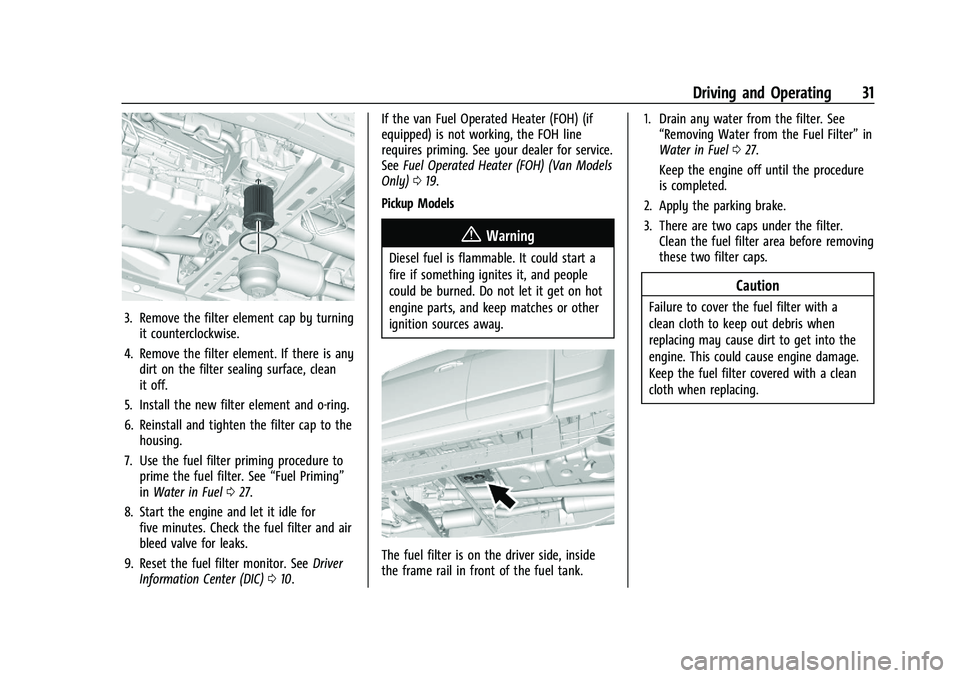
3. Remove the filter element cap by turningit counterclockwise.
4. Remove the filter element. If there is any dirt on the filter sealing surface, clean
it off.
5. Install the new filter element and o-ring.
6. Reinstall and tighten the filter cap to the housing.
7. Use the fuel filter priming procedure to prime the fuel filter. See “Fuel Priming”
in Water in Fuel 027.
8. Start the engine and let it idle for five minutes. Check the fuel filter and air
bleed valve for leaks.
9. Reset the fuel filter monitor. See Driver
Information Center (DIC) 010. If the van Fuel Operated Heater (FOH) (if
equipped) is not working, the FOH line
requires priming. See your dealer for service.
See
Fuel Operated Heater (FOH) (Van Models
Only) 019.
Pickup Models
{Warning
Diesel fuel is flammable. It could start a
fire if something ignites it, and people
could be burned. Do not let it get on hot
engine parts, and keep matches or other
ignition sources away.
The fuel filter is on the driver side, inside
the frame rail in front of the fuel tank. 1. Drain any water from the filter. See
“Removing Water from the Fuel Filter” in
Water in Fuel 027.
Keep the engine off until the procedure
is completed.
2. Apply the parking brake.
3. There are two caps under the filter. Clean the fuel filter area before removing
these two filter caps.
Caution
Failure to cover the fuel filter with a
clean cloth to keep out debris when
replacing may cause dirt to get into the
engine. This could cause engine damage.
Keep the fuel filter covered with a clean
cloth when replacing.
Page 33 of 89

Chevrolet/GMC 2.8L Duramax Diesel Engine Supplement (GMNA-Localizing-
U.S./Canada-14465442) - 2021 - CRC - 2/3/20
32 Driving and Operating
4. Remove both filter elements. If there isany dirt on the filter sealing surface,
clean it off.
5. Install the new filter elements and tighten both caps.
6. Use the fuel filter priming procedure earlier in this section to prime the fuel
filter.
7. Start the engine and let it idle for five minutes. Check the fuel filter for
leaks.
8. Reset the fuel filter monitor. See Driver
Information Center (DIC) 010.
Filling the Tank
An arrow on the fuel gauge indicates which
side of the vehicle the fuel door is on. See
Fuel Gauge 07. Do not refill the diesel fuel
and Diesel Exhaust Fluid (DEF) at the
same time.
{Warning
Fuel vapors and fuel fires burn violently
and can cause injury or death.
Follow these guidelines to help avoid
injuries to you and others:
.Read and follow all the instructions on
the fuel pump island.
.Turn off the engine when refueling.
.Keep sparks, flames, and smoking
materials away from fuel.
.Do not leave the fuel pump
unattended.
.Avoid using electronic devices while
refueling.
.Do not re-enter the vehicle while
pumping fuel.
(Continued)
Warning (Continued)
.Keep children away from the fuel
pump and never let children
pump fuel.
.Before touching the fill nozzle, touch a
metallic object to discharge static
electricity from your body.
.Fuel can spray out if the fuel cap is
opened too quickly. This spray can
happen if the tank is nearly full, and is
more likely in hot weather. Open the
fuel cap slowly and wait for any hiss
noise to stop, then unscrew the cap all
the way.
Van Shown, Pickup Similar
Page 39 of 89
Chevrolet/GMC 2.8L Duramax Diesel Engine Supplement (GMNA-Localizing-
U.S./Canada-14465442) - 2021 - CRC - 2/3/20
38 Driving and Operating
{Warning
Engine exhaust contains Carbon
Monoxide (CO), which cannot be seen or
smelled. Exposure to CO can cause
unconsciousness or even death. Never
operate PTO in an enclosed area such as
a garage or building that has no fresh air
ventilation. See“Engine Exhaust” in the
owner’s manual.
Caution
If the key is in the ignition during
Remote PTO operation, the vehicle can be
shifted out of P (Park). Even though PTO
will be disengaged, depending on PTO
Upfitter application, personal injury or
property damage may result from vehicle
movement. Always remove the key from
the ignition before operating
Remote PTO.
Primary PTO Operating Modes
PTO modes of operation are:
.Preset
Stationary operation only: In-cab control
is standard, remote control is available.
.Variable
Stationary operation only: In-cab control
is standard, remote control is available.
.Mobile
In-cab control only.
.Operator Selectable In-Cab Mode (OSIM)
OSIM is for in-cab operation only.
OSIM is for vehicles that require both
stationary and mobile modes. OSIM is
available via the GM Service Tool only.
During the configuration of OSIM, two
modes must be paired. The options for
pairing are: stationary preset and mobile,
or stationary variable and mobile. During
activation of OSIM, the operator must
select one of the two modes within the
pre-configured pairing. If an OSIM mode is
not selected, PTO will not operate.
OSIM modes of operation are:
‐ Stationary
For stationary mode, the configuration
may be stationary preset or stationary
variable.
‐ Mobile
For mobile mode, the configuration is
variable only. Selection between OSIM pairings is not
available.
Remote modes are not available.
The factory default programming enables
in-cab control. For stationary modes, a GM
Service Tool can reprogram the system to
allow for remote control and disable the
in-cab control.
All PTO modes provide for engine rpm
control and PTO load relay control.
All PTO modes provide for safety interlocks
for PTO load disengagement.
Remote PTO modes provide for remote
engine starting and shutdown.
Stationary in-cab and Remote PTO modes
provide for engine shutdown due to critical
engine conditions, as well as a timed engine
shutdown feature.
Preset PTO
Preset Enable Conditions –In-Cab Operation
To enable PTO: 1. With the engine running, shift the vehicle into P (Park) and set the parking
brake. Do not press the brake pedal.
2. Confirm that cruise control is off.
Page 40 of 89
Chevrolet/GMC 2.8L Duramax Diesel Engine Supplement (GMNA-Localizing-
U.S./Canada-14465442) - 2021 - CRC - 2/3/20
Driving and Operating 39
3. Press and release the PTO in-cab switchbelow the climate controls in the center
stack. The PTO indicator light will blink
rapidly until the PTO load relay becomes
engaged and will then be on steady. The
engine will advance to the PTO Standby
Speed.
4. Once the PTO Standby Speed is reached, use SET− and +RES on the cruise control
to reach the Set 1 or Set 2 PTO engine
speeds.
The accelerator pedal is disabled and
cannot be used to override the PTO
preset speeds.
Factory Default PTO Engine Speeds
Standby 900 rpm
Set 1 (SET−) 1200 rpm
Set 2 (+RES) 1900 rpm
The first time a vehicle is used for PTO: 1. The PTO Control setting on the GM Service Tool is programmed to Interior
Mode PTO Switch.
2. Check the correct operation of the default PTO preset stationary mode to
observe the three idle up speeds. The
PTO function should be confirmed before any wiring modifications are done or any
reprogramming is attempted. See your
dealer if the default presets are not
functioning properly.
3. The PTO indicator light will not initially reflect the status of the PTO load until
the PTO load relay is wired into the
system. The PTO load relay output is
enabled as a factory default. When the
PTO indicator light is either blinking or
on solid, the PTO relay output will be
activated.
Preset Enable Conditions –Remote
Operation
This requires programming with the GM
Service Tool and remote switch panel
provided by GM Upfitter.
1. Confirm that cruise control is off.
2. Set the parking brake and shift the transmission into P (Park).
3. Turn the engine off. Remove or place the key in the ignition off position. Lock the
vehicle, if desired.
4. Confirm the hood is closed.
5. From outside the vehicle, press and release the Remote PTO Arm switch. 6. Within five seconds, open and close the
Remote PTO Engine Start/Shutdown
switch.
7. The horn will chirp, and then engine starting will be automatically initiated.
The PTO system will then elevate engine
rpm to PTO Standby Speed and engage
the PTO load relay.
8. The Remote PTO Set switch can now be used to accomplish the PTO Set 1 and
Set 2 engine speeds.
The accelerator pedal is disabled when
Remote PTO operation is selected.
Preset Enable Conditions –Remote
Operation In-Cab Enable
This requires programming with the GM
Service Tool and remote switch panel
provided by GM Upfitter.
Starting remote operation in-cab:
1. With the engine running, shift the vehicle into P (Park), release the brake
pedal, and set the parking brake.
2. Confirm that cruise control is off.
3. Confirm the hood is closed.
4. Press and release the in-cab PTO switch.
Page 41 of 89
Chevrolet/GMC 2.8L Duramax Diesel Engine Supplement (GMNA-Localizing-
U.S./Canada-14465442) - 2021 - CRC - 2/3/20
40 Driving and Operating
5. The horn will chirp, the PTO load relaywill engage, and the engine will advance
to the PTO Standby Speed.
6. The Remote PTO Set switch may be used to select PTO Set 1 and Set 2 engine
speeds.
The accelerator pedal is disabled when
Remote PTO operation is selected.
The operator may exit the vehicle.
{Warning
If the key is in the ignition during
Remote PTO operation, the vehicle can be
shifted out of P (Park) by an
unauthorized operator. Even though PTO
will be disengaged, depending on PTO
Upfitter application, personal injury or
property damage may result from vehicle
movement. The operator must ensure
that the vehicle is secured against
unauthorized access during Remote PTO
operation.
Remote PTO operation may be ended by
pressing the brake pedal at which time the
PTO load relay disengages and the engine returns to base idle speed. The operator
may drive the vehicle after releasing the
parking brake.
Preset Enable Conditions
–Operator
Selectable In-Cab Mode (OSIM)
This requires programming with the GM
Service Tool and requires pairing OSIM
stationary preset with OSIM mobile mode.
If OSIM pairing has been configured, initiate
OSIM preset operation:
1. With the engine running, shift the vehicle into P (Park) and release the
brake pedal, and set the parking brake.
2. Confirm cruise control is off.
3. Confirm the hood is closed.
4. Press and release the in-cab PTO switch. The PTO indicator light will blink slowly.
5. Within 10 seconds, press and release SET −on the cruise control.
6. The PTO indicator light will change to solid when the PTO load relay becomes
engaged. The engine speed will advance
to the PTO Standby Speed. Press and
release SET− on the cruise control to
select the PTO Set 1 speed. Press and
release +RES on the cruise control to
select the PTO Set 2 speed.
.The PTO load relay engages immediately
when the PTO operation is initiated by
the switch input. The transmission torque
converter is unlocked. The torque
converter will lock upon reaching stable
PTO Standby Speed (default = 900 rpm)
so maximum power is available.
.The first elevated engine speed, PTO
Standby Speed, is not intended as a
working speed but as a verification that
the system is active and ready to go to a
working speed. This speed can be
modified to a working speed with the GM
Service Tool. The upper limit for PTO
Standby Speed is 1500 rpm.
.The remote switches and relay
connections are made at the PTO Upfitter
Connector located on the chassis frame
behind the cab.
.The PTO Control setting on the Service
Tool must be programmed to Remote
PTO Mode Switch before the remote
switches can be used.
.The PTO relay is programmed to be
enabled in the factory default
configuration.