2021 BUICK ENCORE door lock
[x] Cancel search: door lockPage 44 of 313

Buick Encore Owner Manual (GMNA-Localizing-U.S./Canada-14607636) -
2021 - CRC - 8/18/20
Seats and Restraints 43
The parts of the airbag that come into
contact with you may be warm, but not too
hot to touch. There may be some smoke
and dust coming from the vents in the
deflated airbags. Airbag inflation does not
prevent the driver from seeing out of the
windshield or being able to steer the
vehicle, nor does it prevent people from
leaving the vehicle.
{Warning
When an airbag inflates, there may be
dust in the air. This dust could cause
breathing problems for people with a
history of asthma or other breathing
trouble. To avoid this, everyone in the
vehicle should get out as soon as it is
safe to do so. If you have breathing
problems but cannot get out of the
vehicle after an airbag inflates, then get
fresh air by opening a window or a door.
If you experience breathing problems
following an airbag deployment, you
should seek medical attention.
The vehicle has a feature that may
automatically unlock the doors, turn on the
interior lamps and hazard warning flashers,
and shut off the fuel system after the airbags inflate. The feature may also
activate, without airbag inflation, after an
event that exceeds a predetermined
threshold. After turning the ignition off and
then on again, the fuel system will return to
normal operation; the doors can be locked,
the interior lamps can be turned off, and
the hazard warning flashers can be turned
off using the controls for those features.
If any of these systems are damaged in the
crash they may not operate as normal.{Warning
A crash severe enough to inflate the
airbags may have also damaged
important functions in the vehicle, such
as the fuel system, brake and steering
systems, etc. Even if the vehicle appears
to be drivable after a moderate crash,
there may be concealed damage that
could make it difficult to safely operate
the vehicle.
Use caution if you should attempt to
restart the engine after a crash has
occurred.
In many crashes severe enough to inflate
the airbag, windshields are broken by
vehicle deformation. Additional windshield
breakage may also occur from the front
outboard passenger airbag.
.Airbags are designed to inflate only once.
After an airbag inflates, you will need
some new parts for the airbag system.
If you do not get them, the airbag
system will not be there to help protect
you in another crash. A new system will
include airbag modules and possibly other
parts. The service manual for the vehicle
covers the need to replace other parts.
.The vehicle has a crash sensing and
diagnostic module which records
information after a crash. See
Vehicle
Data Recording and Privacy 0292 and
Event Data Recorders 0292.
.Let only qualified technicians work on the
airbag systems. Improper service can
mean that an airbag system will not work
properly. See your dealer for service.
Page 72 of 313

Buick Encore Owner Manual (GMNA-Localizing-U.S./Canada-14607636) -
2021 - CRC - 8/18/20
Instruments and Controls 71
Instruments and Controls
Controls
Steering Wheel Adjustment . . . . . . . . . . . . . 71
Steering Wheel Controls . . . . . . . . . . . . . . . . 72
Horn . . . . . . . . . . . . . . . . . . . . . . . . . . . . . . . . . . . . 72
Windshield Wiper/Washer . . . . . . . . . . . . . . 72
Rear Window Wiper/Washer . . . . . . . . . . . 73
Compass . . . . . . . . . . . . . . . . . . . . . . . . . . . . . . . . 74
Clock . . . . . . . . . . . . . . . . . . . . . . . . . . . . . . . . . . . 75
Power Outlets . . . . . . . . . . . . . . . . . . . . . . . . . . 75
Warning Lights, Gauges, and Indicators
Warning Lights, Gauges, andIndicators . . . . . . . . . . . . . . . . . . . . . . . . . . . . . 75
Instrument Cluster . . . . . . . . . . . . . . . . . . . . . 76
Speedometer . . . . . . . . . . . . . . . . . . . . . . . . . . . 77
Odometer . . . . . . . . . . . . . . . . . . . . . . . . . . . . . . 77
Trip Odometer . . . . . . . . . . . . . . . . . . . . . . . . . . 77
Tachometer . . . . . . . . . . . . . . . . . . . . . . . . . . . . . 77
Fuel Gauge . . . . . . . . . . . . . . . . . . . . . . . . . . . . . 77
Engine Coolant Temperature Gauge . . . . 78
Seat Belt Reminders . . . . . . . . . . . . . . . . . . . . 79
Airbag Readiness Light . . . . . . . . . . . . . . . . . 79
Passenger Airbag Status Indicator . . . . . . 80
Charging System Light . . . . . . . . . . . . . . . . . 80
Malfunction Indicator Lamp (Check Engine Light) . . . . . . . . . . . . . . . . . . . . . . . . . . 81
Brake System Warning Light . . . . . . . . . . . 82 Antilock Brake System (ABS) Warning
Light . . . . . . . . . . . . . . . . . . . . . . . . . . . . . . . . . . 83
Lane Departure Warning (LDW) Light . . . 83
Vehicle Ahead Indicator . . . . . . . . . . . . . . . . 83
Traction Off Light . . . . . . . . . . . . . . . . . . . . . . 83
StabiliTrak OFF Light . . . . . . . . . . . . . . . . . . . 84
Traction Control System (TCS)/StabiliTrak Light . . . . . . . . . . . . . . . . . . . . . . . . . . . . . . . . . 84
Tire Pressure Light . . . . . . . . . . . . . . . . . . . . . 84
Engine Oil Pressure Light . . . . . . . . . . . . . . . 85
Low Fuel Warning Light . . . . . . . . . . . . . . . . 85
Immobilizer Light . . . . . . . . . . . . . . . . . . . . . . . 85
High-Beam On Light . . . . . . . . . . . . . . . . . . . . 86
Lamps On Reminder . . . . . . . . . . . . . . . . . . . . 86
Cruise Control Light . . . . . . . . . . . . . . . . . . . . 86
Door Ajar Light . . . . . . . . . . . . . . . . . . . . . . . . . 86
Information Displays
Driver Information Center (DIC) . . . . . . . . 86
Vehicle Messages
Vehicle Messages . . . . . . . . . . . . . . . . . . . . . . 88
Engine Power Messages . . . . . . . . . . . . . . . . 89
Vehicle Speed Messages . . . . . . . . . . . . . . . . 89
Vehicle Personalization
Vehicle Personalization (8 Inch Screen) . . . . . . . . . . . . . . . . . . . . . . . . . . . . . . . 89
Vehicle Personalization (7 Inch Screen) . . . . . . . . . . . . . . . . . . . . . . . . . . . . . . . 94
Controls
Steering Wheel Adjustment
To adjust the steering wheel:
1. Pull the lever down.
2. Move the steering wheel up or down.
3. Pull or push the steering wheel closer or away from you.
4. Lift the lever up to lock the steering wheel in place.
Do not adjust the steering wheel while
driving.
Page 73 of 313

Buick Encore Owner Manual (GMNA-Localizing-U.S./Canada-14607636) -
2021 - CRC - 8/18/20
72 Instruments and Controls
Steering Wheel Controls
The infotainment system can be operated
by using the steering wheel controls. See
Steering Wheel Controls0106.
Horn
Pressaon the steering wheel pad to
sound the horn.
Windshield Wiper/Washer
The windshield wiper/washer lever is on the
right side of the steering column.
Move the lever to one of the following
positions:
HI : Use for fast wipes.
LO : Use for slow wipes.
INT : Use this setting for intermittent wipes
or Rainsense™, if equipped. For intermittent
wipes, move the windshield wiper lever to
INT. Turn the
xINT band up for more
frequent wipes or down for less frequent
wipes.
If equipped with Rainsense wipes, see
“Rainsense” later in this section.
OFF : Use to turn the wipers off.
1X : For a single wipe, briefly move the
wiper lever down. For several wipes, hold
the wiper lever down.
b: Pull the windshield wiper lever toward
you to spray windshield washer fluid and
activate the wipers. The wipers will continue
until the lever is released or the maximum
wash time is reached. When the windshield
wiper lever is released, additional wipes may
occur depending on how long the windshield washer had been activated. See
Washer
Fluid 0216 for information on filling the
windshield washer fluid reservoir.
Wipe Parking
If the ignition is turned off while the wipers
are on LO, HI, or INT, they will
immediately stop.
If the windshield wiper lever is then moved
to OFF before the driver door is opened or
within 10 minutes, the wipers will restart
and move to the base of the windshield.
If the ignition is turned off while the wipers
are performing wipes due to windshield
washing or Rainsense wipes, the wipers
continue to run until they reach the base of
the windshield.
{Warning
In freezing weather, do not use the
washer until the windshield is warmed.
Otherwise the washer fluid can form ice
on the windshield, blocking your vision.
Page 91 of 313
Buick Encore Owner Manual (GMNA-Localizing-U.S./Canada-14607636) -
2021 - CRC - 8/18/20
90 Instruments and Controls
Personalization Menus
The following list of features may be
available:
.Time and Date
.Rear Seat Reminder
.Language
.Valet Mode
.Radio
.Vehicle
.Bluetooth
.Apple CarPlay
.Android Auto
.Voice
.Display
.Rear Camera
.Return to Factory Settings
.Software Information
.Wi-Fi
Each menu is detailed in the following
information.
Time and Date
Manually set the time and date. See "Time /
Date" under Settings (8 Inch Screen) 0129.
Rear Seat Reminder
This allows for a chime and a message when
the rear door has been opened before or
during operation of the vehicle.
Select Off or On.
Language
Select Language, then select from the
available language(s).
Valet Mode
To turn Valet Mode on and off, see “Valet
Mode” inSettings (8 Inch Screen) 0129.
Radio
To manage the radio features, see “Radio”in
Settings (8 Inch Screen) 0129.
Vehicle
Select and the following may be displayed:
.Collision/Detection Systems
.Comfort and Convenience
.Lighting
.Power Door Locks
.Remote Lock, Unlock, Start
Collision/Detection Systems
Select and the following may be displayed:
.Rear Cross Traffic Alert
.Side Blind Zone Alert
Rear Cross Traffic Alert
Select Off or On. See Rear Vision Camera
(RVC) 0190.
Side Blind Zone Alert
Select Off or On. See Side Blind Zone Alert
(SBZA) 0194.
Comfort and Convenience
Select and the following may be displayed:
.Chime Volume
.Auto Wipe in Reverse Gear
Chime Volume
This allows the selection of the chime
volume level.
Touch + or −to adjust the volume.
Auto Wipe in Reverse Gear
When on and the front wiper is on, the rear
wiper will automatically activate when the
vehicle is shifted to R (Reverse).
Select Off or On.
Page 92 of 313

Buick Encore Owner Manual (GMNA-Localizing-U.S./Canada-14607636) -
2021 - CRC - 8/18/20
Instruments and Controls 91
Lighting
Select and the following may be displayed:
.Vehicle Locator Lights
.Exit Lighting
Vehicle Locator Lights
This feature will flash the exterior lamps
when
Kon the Remote Keyless Entry (RKE)
transmitter is pressed to locate the vehicle.
Select Off or On.
Exit Lighting
This allows the selection of how long the
exterior lamps stay on when leaving the
vehicle when it is dark outside.
Select Off, 30 Seconds, 60 Seconds,
or 120 Seconds.
Power Door Locks
Select and the following may be displayed:
.Unlocked Door Anti Lock Out
.Auto Door Unlock
.Delayed Door Lock Unlocked Door Anti Lock Out
When on, this feature will keep the driver
door from locking when the door is open.
If Off is selected, the Delayed Door Lock
menu will be available.
Select Off or On.
Auto Door Unlock
This allows selection of which of the doors
will automatically unlock when the vehicle is
shifted into P (Park).
Select Off, All Doors, or Driver Door.
Delayed Door Lock
When on, this feature will delay the locking
of the doors.
Select Off or On.
Remote Lock, Unlock, and Start
Select and the following may be displayed:
.Remote Unlock Light Feedback
.Remote Lock Feedback
.Remote Door Unlock
.Passive Door Unlock
.Passive Door Lock
.Remote Left in Vehicle AlertRemote Unlock Light Feedback
When on, the exterior lamps will flash when
unlocking the vehicle with the RKE
transmitter.
Select Off or Flash Lights.
Remote Lock Feedback
This allows selection of what type of
feedback is given when locking the vehicle
with the RKE transmitter.
Select Off, Lights and Horn, Lights Only,
or Horn Only.
Remote Door Unlock
This allows selection of which doors will
unlock when pressing
Kon the RKE
transmitter.
When set to Driver Door, the driver door
will unlock the first time
Kis pressed and
all doors will unlock when
Kis pressed a
second time. When set to All Doors, all of
the doors will unlock at the first press of
K.
Select All Doors or Driver Door.
Page 93 of 313

Buick Encore Owner Manual (GMNA-Localizing-U.S./Canada-14607636) -
2021 - CRC - 8/18/20
92 Instruments and Controls
Passive Door Unlock
This allows the selection of what doors will
unlock when using the button on the driver
door to unlock the vehicle.
Select All Doors or Driver Door.
Passive Door Lock
This allows passive locking to be turned on
or off and selects feedback. SeeRemote
Keyless Entry (RKE) System Operation 07.
Select Off, On with Horn Chirp, or On.
Remote Left in Vehicle Alert
This feature sounds an alert when the RKE
transmitter is left in the vehicle. This menu
also enables Remote No Longer in Vehicle
Alert.
Select Off or On.
Bluetooth
Select and the following may be displayed:
.Pair New Device
.Device Management
.Ringtones
.Voice Mail Numbers
.Text Message Alerts Pair New Device
Select to pair a new device. See
Bluetooth
(Overview for 8 Inch Screen) 0123 or
Bluetooth (Pairing and Using the Phone for 8
Inch Screen) 0123 or
Bluetooth (Voice Recognition for 8 Inch
Screen) 0126.
Device Management
Select to connect to a different phone
source, disconnect a phone, or delete a
phone.
Ringtones
Touch to change the ring tone for the
specific phone. The phone does not need to
be connected to change the ring tone.
Voice Mail Numbers
This feature displays the voice mail number
for all connected phones. To change the
voice mail number, touch the edit icon. Type
a new number, then touch SAVE.
Text Message Alerts
This allows the feature to be turned on
or off.
Select Off or On.
Apple CarPlay
Select and the following may display:
.Apple CarPlay
.Manage Apple CarPlay Devices
Apple CarPlay
This feature allows Apple devices to be
connected to the infotainment system
through a USB port.
Select Off or On.
Manage Apple CarPlay Devices
Select to manage Apple devices. Apple
CarPlay must be on for this feature to be
accessed.
Android Auto
Select and the following may display:
.Android Auto
.Manage Android Auto Devices
Android Auto
This feature allows Android devices to be
connected to the infotainment system
through a USB port.
Select Off or On.
Page 96 of 313

Buick Encore Owner Manual (GMNA-Localizing-U.S./Canada-14607636) -
2021 - CRC - 8/18/20
Instruments and Controls 95
Vehicle Locator Lights
This feature will flash the exterior lamps and
allows some of the exterior lamps and most
of the interior lamps to turn on briefly
when
Kon the Remote Keyless Entry (RKE)
transmitter is pressed to locate the vehicle.
Touch Off or On.
Exit Lighting
This allows the selection of how long the
exterior lamps stay on when leaving the
vehicle when it is dark outside.
Touch Off, 30 Seconds, 60 Seconds,
or 120 Seconds.
Power Door Locks
Touch and the following may display:
.Open Door Anti Lockout
.Auto Door Unlock
.Delayed Door Lock
Open Door Anti Lock Out
When on, this feature will keep the driver
door from locking when the door is open.
If Off is selected, the Delayed Door Lock
menu will be available.
Touch Off or On. Auto Door Unlock
This allows selection of which of the doors
will automatically unlock when the vehicle is
shifted into P (Park).
Touch Off, All Doors, or Driver Door.
Delayed Door Lock
When on, this feature will delay the locking
of the doors. To override the delay, press
the power door lock switch on the door.
Touch Off or On.
Remote Lock, Unlock, and Start
Touch and the following may display:
.Remote Unlock Light Feedback
.Remote Lock Feedback
.Remote Door Unlock
.Passive Door Unlock
.Passive Door Lock
.Remote Left in Vehicle Alert
Remote Unlock Light Feedback
When on, the exterior lamps will flash when
unlocking the vehicle with the RKE
transmitter.
Touch Off or Flash Lights. Remote Lock Feedback
This allows selection of what type of
feedback is given when locking the vehicle
with the RKE transmitter.
Touch Off, Lights and Horn, Lights Only,
or Horn Only.
Remote Door Unlock
This allows selection of which doors will
unlock when pressing
Kon the RKE
transmitter.
Touch All Doors or Driver Door.
Passive Door Unlock
This allows the selection of what doors will
unlock when using the button on the driver
door to unlock the vehicle.
Touch All Doors or Driver Door Only.
Passive Door Lock
This allows passive locking to be turned on
or off and selects feedback. See Remote
Keyless Entry (RKE) System Operation 07.
Touch Off, On with Horn Chirp, or On.
Page 101 of 313
Buick Encore Owner Manual (GMNA-Localizing-U.S./Canada-14607636) -
2021 - CRC - 8/18/20
100 Lighting
Interior Lighting
Instrument Panel Illumination
Control
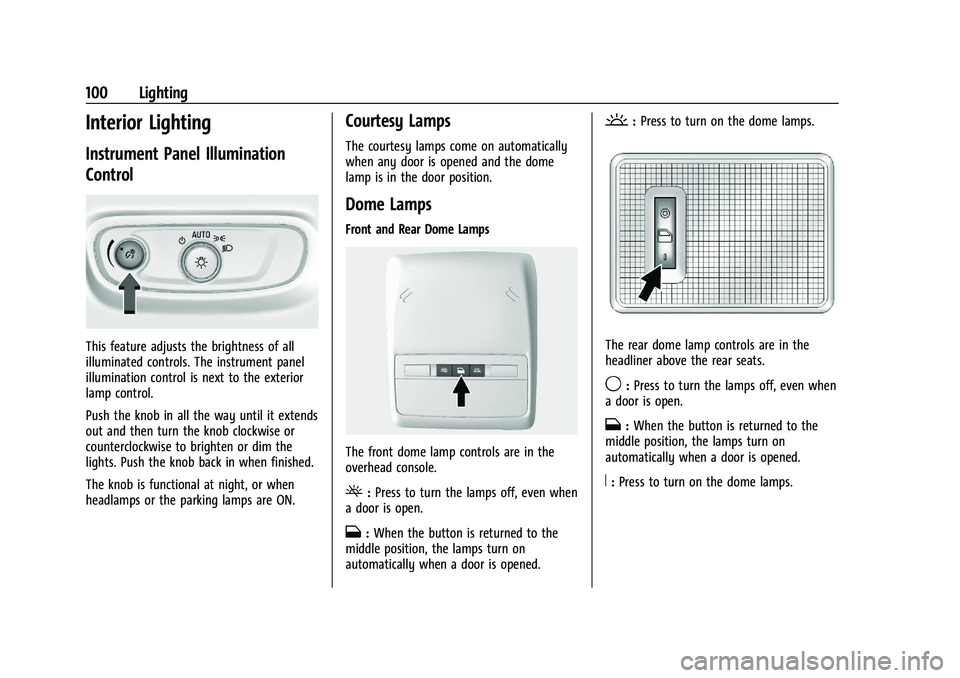
This feature adjusts the brightness of all
illuminated controls. The instrument panel
illumination control is next to the exterior
lamp control.
Push the knob in all the way until it extends
out and then turn the knob clockwise or
counterclockwise to brighten or dim the
lights. Push the knob back in when finished.
The knob is functional at night, or when
headlamps or the parking lamps are ON.
Courtesy Lamps
The courtesy lamps come on automatically
when any door is opened and the dome
lamp is in the door position.
Dome Lamps
Front and Rear Dome Lamps
The front dome lamp controls are in the
overhead console.
(:Press to turn the lamps off, even when
a door is open.
H: When the button is returned to the
middle position, the lamps turn on
automatically when a door is opened.
': Press to turn on the dome lamps.
The rear dome lamp controls are in the
headliner above the rear seats.
9:Press to turn the lamps off, even when
a door is open.
H: When the button is returned to the
middle position, the lamps turn on
automatically when a door is opened.
R: Press to turn on the dome lamps.