2021 AUDI TT battery
[x] Cancel search: batteryPage 132 of 280
Telephone
secondary phone, since the directory from the
primary phone is always displayed.
Switching the primary and secondary phone
Requirement: a primary phone and a secondary
phone must be connected.
> Select: [MENU] button > Telephone > right con-
trol button > Switch primary and second.
phone.
iG) Tips
— You can see if a cell phone is connected as
the primary phone or secondary phone in
the Connection manager > page 190.
— You can also make your connected cell
phone the default phone by selecting Set as
default telephone in the Connection man-
ager > page 792.
— The device name of the connected primary
phone is shown in the Telephone menu
(such as myPhone).
— If the primary phone does not connect auto-
matically to the MMI when the ignition is
switched on, for example because it is out
of the vehicle range or the Bluetooth func-
tion is switched off, then a previously paired
secondary phone is automatically connected
as the primary phone.
— You can send and receive messages on your
primary phone as well as on your secondary
phone
> page 132, fig. 1317. You do not
need to switch your primary phone and sec-
ondary phone for this.
1) The Qi standard makes it possible to charge your mobile
device wirelessly.
130
Using the Audi phone
box
Applies to: vehicles with Audi phone box
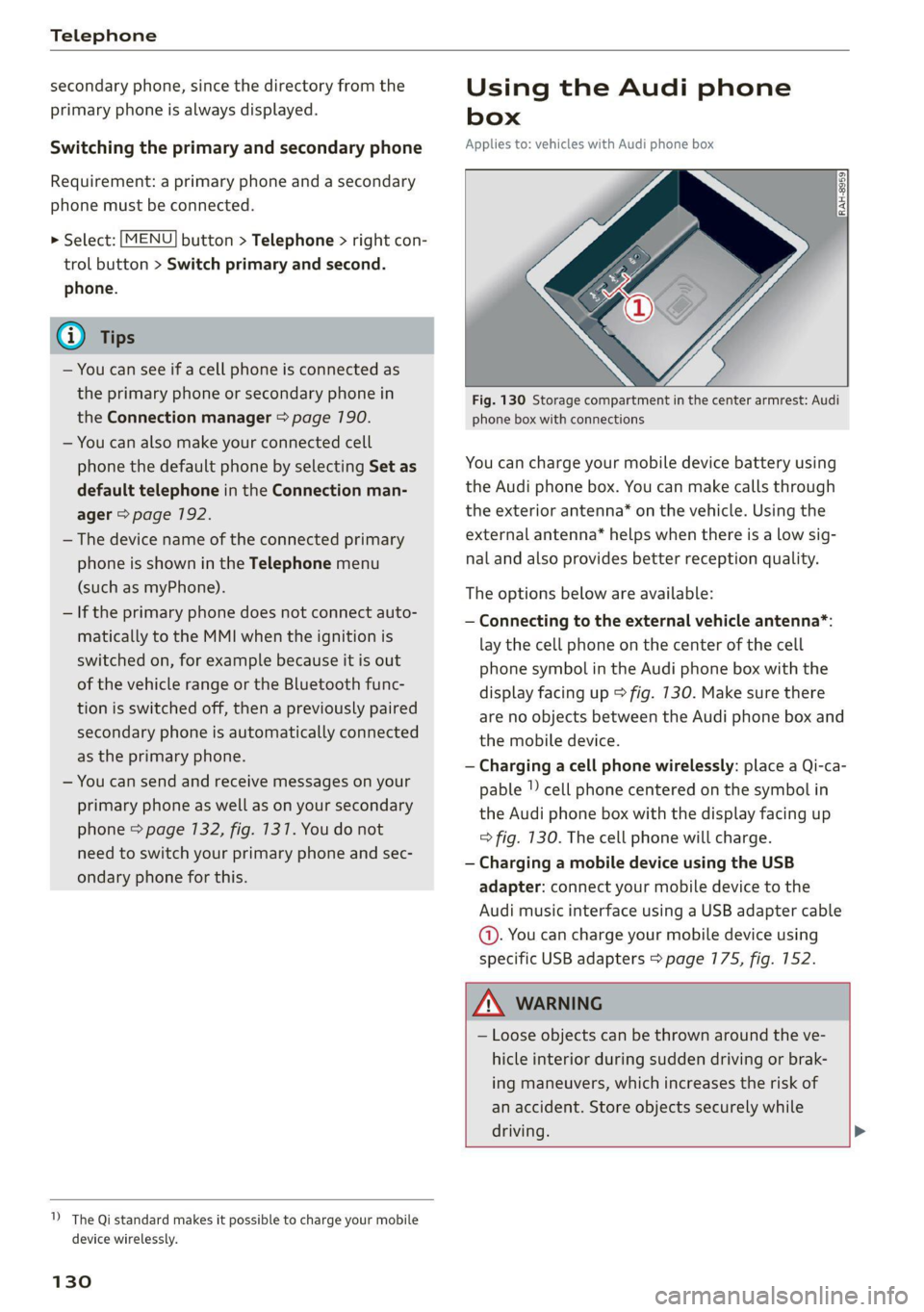
Fig. 130 Storage compartment in the center armrest: Audi
phone box with connections
You can charge your mobile device battery using
the Audi phone box. You can make calls through
the exterior antenna* on the vehicle. Using the
external antenna* helps when there is a low sig-
nal and also provides better reception quality.
The options below are available:
— Connecting to the external vehicle antenna*:
lay the cell phone on the center of the cell
phone symbol in the Audi phone box with the
display facing up > fig. 130. Make sure there
are no objects between the Audi phone box and
the mobile device.
— Charging a cell phone wirelessly: place a Qi-ca-
pable | cell phone centered on the symbol in
the Audi phone box with the display facing up
=> fig. 130. The cell phone will charge.
— Charging a mobile device using the USB
adapter: connect your mobile device to the
Audi music interface using a USB adapter cable
@. You can charge your mobile device using
specific USB adapters > page 775, fig. 152.
ZA WARNING
— Loose objects can be thrown around the ve-
hicle interior during sudden driving or brak-
ing maneuvers, which increases the risk of
an accident. Store objects securely while
driving. >
Page 174 of 280
Media
Requirement: the copying process must be active
in the background.
> Showing the copying process: select: right
control button > Copying in progress.
When importing, the audio files are automatical-
ly sorted into the media center categories based
on the stored additional information > page 178.
The copied video files* are stored in the media
center under the Videos* category.
Playing the Jukebox
Requirement: the Jukebox must contain audio/
video* files > page 171, Adding files to the Juke-
box.
The Jukebox is accessed and operated through
the MMI@) & page 177, fig. 154.
Displaying Jukebox memory capacity
> Select: right control button > Jukebox memory
capacity. Information about the Jukebox mem-
ory capacity and the number of stored tracks is
displayed.
Deleting tracks from the Jukebox!)
Requirement: the Jukebox must contain audio/
video files*.
> Select an entry from the Jukebox media center.
> Select: right control button > Delete from juke-
box > This entry or Entire list.
The status of the deleting process is shown in the
MMI. Jukebox playback stops during the deleting
Process and starts again automatically once the
deletion is complete.
@) Note
Do not import audio/video files* when the en-
gine is turned off because this will drain the
vehicle battery.
@ Tips
— Tracks from audio CDs cannot be imported
to the Jukebox for legal reasons.
1) Not in the Playback view.
172
— Files that have already been imported are
automatically recognized and cannot be
copied to the Jukebox again.
— It is not possible to play audio/video* files in
the CD/DVD* drive while importing them.
— The Jukebox does not provide an export
function due to legal reasons.
— Files or tracks without additional stored in-
formation are listed as Unknown. Audi rec-
ommends adding additional information
(such as ID3 tags) to audio files.
— Reset the Jukebox to the factory default set-
tings when selling your vehicle > page 190.
Bluetooth audio player
Applies to: vehicles with Bluetooth audio player
With the Bluetooth audio player, you can play
music wirelessly from your Bluetooth-capable de-
vice (such as a cell phone) through the MMI.
Requirement: the vehicle must be stationary and
the ignition must be switched on. The Bluetooth
settings will open on your mobile device during
the connection setup. The Bluetooth function
and visibility of the MMI > page 192 and mobile
device must be switched on. The Bluetooth audio
player > page 192 must be switched on in the
MMI.
Connecting a Bluetooth device
> Press the [MEDIA] button.
> Press the left control button until the sources
overview is displayed.
> Select and confirm Bluetooth audio player @)
=> page 177, fig. 155.
> If necessary, select and confirm: Not connected
> Connect Bluetooth audio player. The Blue-
tooth device search starts. Follow the instruc-
tions in the MMI.
> Select and confirm the desired Bluetooth de-
vice from the list. The MMI generates a PIN for
the connection.
> Select and confirm Yes.
>» Enter the PIN for connecting on your Bluetooth
device, or if the PIN is already displayed on your
Bluetooth device, confirm it on the Bluetooth
>
Page 178 of 280
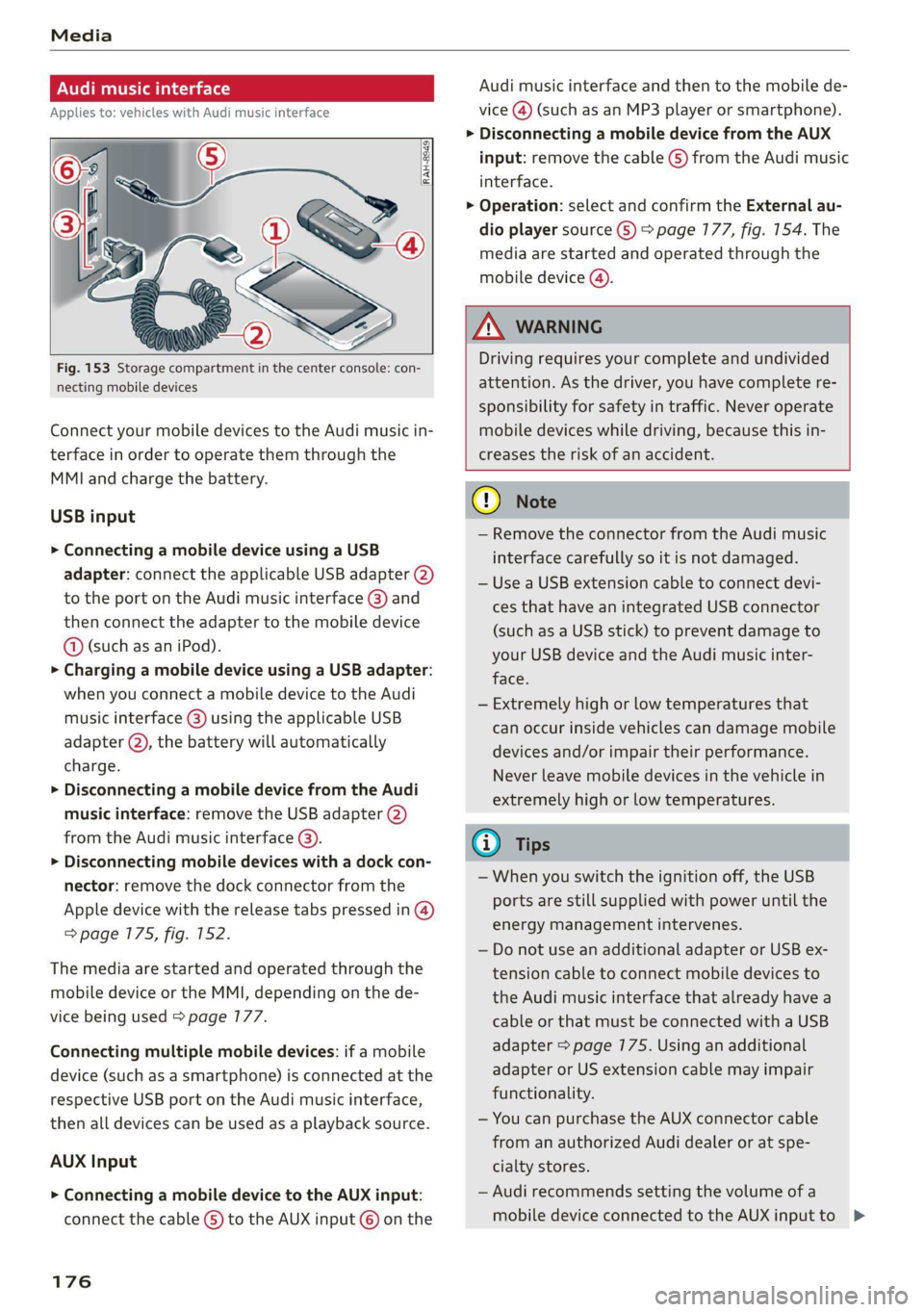
Fig. 153 Storage compartment in the center console: con-
necting mobile devices
Connect your mobile devices to the Audi music in-
terface in order to operate them through the
MMI and charge the battery.
USB input
> Connecting a mobile device using a USB
adapter: connect the applicable USB adapter (2)
to the port on the Audi music interface @) and
then connect the adapter to the mobile device
@ (such as an iPod).
> Charging a mobile device using a USB adapter:
when you connect a mobile device to the Audi
music interface (@) using the applicable USB
adapter @), the battery will automatically
charge.
> Disconnecting a mobile device from the Audi
music interface: remove the USB adapter @)
from the Audi music interface @).
> Disconnecting mobile devices with a dock con-
nector: remove the dock connector from the
Apple device with the release tabs pressed in @)
=> page 175, fig. 152.
The media are started and operated through the
mobile device or the MMI, depending on the de-
vice being used > page 177.
Connecting multiple mobile devices: if a mobile
device (such as a smartphone) is connected at the
respective USB port on the Audi music interface,
then all devices can be used as a playback source.
AUX Input
> Connecting a mobile device to the AUX input:
connect the cable G) to the AUX input © on the
176
Audi music interface and then to the mobile de-
vice
@) (such as an MP3 player or smartphone).
> Disconnecting a mobile device from the AUX
input: remove the cable (S) from the Audi music
interface.
> Operation: select and confirm the External au-
dio player source ©) > page 177, fig. 154. The
media are started and operated through the
mobile device ().
ZA WARNING
Driving requires your complete and undivided
attention. As the driver, you have complete re-
sponsibility for safety in traffic. Never operate
mobile devices while driving, because this in-
creases the risk of an accident.
@) Note
— Remove the connector from the Audi music
interface carefully so it is not damaged.
— Use a USB extension cable to connect devi-
ces that have an integrated USB connector
(such as a USB stick) to prevent damage to
your USB device and the Audi music inter-
face.
— Extremely high or low temperatures that
can occur inside vehicles can damage mobile
devices and/or impair their performance.
Never leave mobile devices in the vehicle in
extremely high or low temperatures.
@ Tips
— When you switch the ignition off, the USB
ports are still supplied with power until the
energy management intervenes.
— Do not use an additional adapter or USB ex-
tension cable to connect mobile devices to
the Audi music interface that already have a
cable or that must be connected with a USB
adapter > page 175. Using an additional
adapter or US extension cable may impair
functionality.
— You can purchase the AUX connector cable
from an authorized Audi dealer or at spe-
cialty stores.
— Audi recommends setting the volume of a
mobile device connected to the AUX input to >
Page 187 of 280

8S1012721BE
Media
Problem Solution
Audi music interface/Bluetooth au-
dio
player: mobile device is not sup-
ported.
Read the instructions in the chapter > page 175, Multimedia
connections/=> page 172, Bluetooth audio player.
Audi music interface/AUX input: the
volume is too high/too low when
starting playback through the AUX in-
put.
Adjust the volume of the mobile device to approximately 70%
of the maximum output > page 780, Input level.
Audi music interface: the mobile de-
vice
is not recognized as a source.
For many cell phones or mobile devices, playback is not possi-
ble when the battery Level is too low (less than 5 % of its ca-
pacity). The mobile device will only be recognized as a media
source in the MMI after connecting if the battery charge level
is sufficient.
Audi music interface: malfunctions
during audio playback through an
iPod/iPhone.
The Bluetooth audio player function is switched on. Switch
this function off > page 7192 when you are not using the Blue-
tooth audio player.
AUX input: there is static when con-
necting and disconnecting the AUX
connection cable.
When connecting and disconnecting, the External audio play-
er source is already selected. Before connecting or disconnect-
ing the mobile device, either mute the device (see
=> page 193) or switch to a different audio source (for exam-
ple > page 164, Opening the radio).
Bluetooth audio player/Wi-Fi audio
player: audio playback interference.
Only one interface should be actively used at a time to prevent
issues during playback.
Wi-Fi audio player: audio playback in-
terference.
Audio playback interference can occur on some cell phones if
the Internet connection in the vehicle was not established
through the SIM card reader* on the MMI control panel and
the mobile data option on the cell phone is switched on. De-
activate the mobile data option on your cell phone.
Jukebox: tracks on the imported play-
list are grayed out.
When importing playlists, all of the files themselves must be
imported.
Jukebox: imported tracks cannot be
played or found.
If you cannot find imported tracks in the media center, they
may not be supported. Only copy supported files > page 783
to the Jukebox.
Wi-Fi audio player: multiple devices
are connected to the Wi-Fi hotspot. A
media player (such as a smartphone)
appears as the media source and can-
not be changed.
Close the myAudi app on the connected devices (such as
smartphones) that are not being used as the Wi-Fi audio play-
er. Likewise, close the UPnP server apps or the media permis-
sions on the integrated UPnP/DLNA server. Connect the de-
sired device as a Wi-Fi audio player > page 173.
Online media: connection failed be-
tween the MMI and the myAudi app.
To establish a connection to the MMI, the MMI connection
switch must be switched on in the myAudi app status screen.
185
Page 190 of 280

Audi smartphone interface
Operating
Applies to: vehicles with Audi smartphone interface
Opening a menu
> Apple CarPlay: you can go back to the Apple
CarPlay main menu regardless of the selected
menu item by pressing and holding the [BACK
button.
Troubleshooting
Applies to: vehicles with Audi smartphone interface
> Android Auto: to go back to the Android Auto
menu bar, push the control knob down.
Opening a menu item
> Select and confirm a menu item using the MMI
control panel.
Problem Solution
Audi smartphone Check the battery charge level on your smartphone.
interface cannot be | Check the USB cable and use a different one if necessary.
opened.
cle is being operated.
Check if Android Auto or Apple CarPlay is available in the country where the vehi-
Android Auto: check if the Android Auto app is installed on your smartphone.
Connecting the Make sure that you are using the correct USB adapter and check if the USB
smartphone to the | adapter is connected correctly to your smartphone and the Audi music interface
MMI failed. =>page 175.
Apple CarPlay: check if Apple CarPlay is activated on your smartphone.
vehicles.
Android Auto: check in the Android Auto app if Android Auto permits new
The smartphone is
not automatically
detected. =>page 175.
Make sure that you are using the correct USB adapter and check if the USB
adapter is connected correctly to your smartphone and the Audi music interface
Check if the requirements needed to connect a smartphone have been met.
188
Page 203 of 280

8S1012721BE
Checking and Filling
High voltage! Switch off the engine be-
fore coming into contact with any igni-
tion system components!
The catalytic converter can be damaged
"271i if the oil level is too high!
Always follow the instructions in the op-
aa erating manual.
ZA\ WARNING
— Turn the engine off.
— Switch the ignition off.
— Set the parking brake.
— Select the “P” (Park) selector lever position.
— Allow the engine to cool.
— Keep children away from the motor com-
partment.
— Never spill fluids on a hot engine. These flu-
ids (such as the freeze protection contained
in the coolant) can catch fire.
— Avoid short circuits in the electrical system.
— Never reach into the radiator fan. The fan is
temperature-controlled and can turn on
suddenly, even when the ignition is switched
off.
— Never open the hood when there is steam or
coolant escaping from the motor compart-
ment, because there is a risk that you could
be burned. Wait until no steam or coolant is
escaping.
—The cap on the coolant expansion tank must
never be opened when the coolant is hot.
The cooling system is under pressure. There
is a risk of burns
— To protect your face, hands, and arms from
hot steam or coolant, cover the cap with a
thick cloth when opening.
— Do not remove the engine cover under any
circumstances. This increases the risk of
burns.
— Due to the risk of electric shock, never touch
the ignition cable or other components in
the electronic high-voltage ignition system
when the engine is running or is starting.
— If a gear is engaged while the vehicle is sta-
tionary and the engine is running, do not
press the accelerator pedal inadvertently.
Pressing the accelerator pedal will cause the
vehicle to move, and this could result in an
accident.
— If inspections or repairs must be performed
while the engine is running, moving compo-
nents (such as the ribbed belt, generator,
and radiator fan) pose an additional risk.
— Set the parking brake first and select the
“P” (Park) selector lever position.
— Always make sure that no parts of the
body, jewelry, ties, loose clothing, and
long hair can be caught in moving engine
components. Before any work, always re-
move any jewelry and/or ties, tie back long
hair, and make sure all clothing fits close
to the body to reduce the risk of anything
becoming caught in engine components.
— Pay attention to the following warnings list-
ed when work on the fuel system or on the
electrical equipment is required.
— Do not smoke.
— Never work near open flames.
— Always have a working fire extinguisher
nearby.
— All work on the battery or electrical system
in your vehicle can result in injuries, chemi-
cal burns, accidents, or burns. Because of
this, all work must be performed only by an
authorized Audi dealer or authorized Audi
Service Facility.
— Limit your exposure to exhaust and chemi-
cals to as short a time as possible.
Z\ WARNING
California Proposition 65 Warning:
— Engine exhaust, some of its constituents,
and certain vehicle components contain or
emit chemicals known to the State of Cali-
fornia to cause cancer and birth defects and
reproductive harm. In addition, certain flu-
ids contained in vehicles and certain prod-
ucts of component wear contain or emit
chemicals known to the State of California
to cause cancer and birth defects or other
reproductive harm.
— Battery posts, terminals and related acces-
sories contain lead and lead compounds,
chemicals known to the State of California
201
Page 211 of 280

8S1012721BE
Checking and Filling
@) Note
Do not continue driving if the coolant expan-
sion tank is empty. Do not add any coolant,
because air could enter the cooling system
and damage the engine. See an authorized
Audi dealer or authorized Audi Service Facility
for assistance.
Brake fluid
BFV-0229
Fig. 172 Motor compartment: cap on brake fluid reservoir
Observe the safety precautions > page 200, Gen-
eral information.
Checking the brake fluid level
> Read the brake fluid level on the brake fluid
reservoir > page 203, fig. 168. The brake fluid
level must be between the MIN and MAX mark-
ings > A\.
The brake fluid level is monitored automatically.
Message
EG / @® Brakes: stop vehicle and check brake
fluid level
Stop the vehicle and check the brake fluid level.
See an authorized Audi dealer or authorized Audi
Service Facility for assistance.
Changing the brake fluid
Brake fluid should be changed at regular inter-
vals. Have the brake fluid changed by an author-
ized Audi dealer or authorized Audi Service Facili-
ty. The authorized Audi dealer or authorized Audi
Service Facility will inform you of the replace-
ment intervals.
ZX WARNING
— If the brake fluid level is below the MIN
marking, it can impair the braking effect and
driving safety, which increase the risk of an
accident. Do not continue driving. See an au-
thorized Audi dealer or authorized Audi
Service Facility for assistance.
— If the brake fluid is old, bubbles may form in
the brake system during heavy braking. This
could impair braking performance and driv-
ing safety, which increases the risk of an ac-
cident.
— The brake fluid in your vehicle must meet
the standard VW 501 14 and is available at
an authorized Audi dealer or authorized
Audi Service Facility. If this brake fluid is not
available, another high-grade brake fluid of
equivalent quality may be used, and it must
meet the U.S. Federal Motor Vehicle Stand-
ard (FMVSS) 116 DOT 4, Class 6.
@) Note
— If the brake fluid level is above the MAX
marking, brake fluid may leak out over the
edge of the reservoir and result in damage
to the vehicle.
— Do not allow any brake fluid to come into
contact with the vehicle paint, because it
will corrode the paint.
Electrical system
If the fz or = indicator light turns on, there is a
malfunction in the generator, the battery, or the
vehicle electrical system.
= Electrical system: malfunction! Battery is
not being charged
Drive to an authorized Audi dealer or authorized
Audi Service Facility immediately. Turn off all un-
necessary electrical equipment because it will
drain the battery. See an authorized Audi dealer
or authorized Audi Service Facility if the battery
charge level is too low.
= Electrical system: low battery charge. Bat-
tery
will be charged while driving
The starting ability may be impaired.
209
Page 212 of 280

Checking and Filling
If this message turns off after a little while, the
vehicle battery has charged enough while driving.
If the message does not turn off, drive immedi-
ately to an authorized Audi dealer or authorized
Audi Service Facility to have the malfunction re-
Paired.
Battery
laa eee)
Because of the complex power supply, all work
on batteries such as disconnecting, replacing,
etc., should only be performed by an authorized
Audi dealer or authorized Audi Service Facility
>A.
Multiple batteries with different technologies
may be installed in your vehicle:
— Vehicle battery (for example, for starting the
engine, basic power supply) > page 270, Lead
battery or > page 211, Other battery types
— Auxiliary battery (for example, for recuperation
or optional equipment) > page 271, Other bat-
tery types
Not running the vehicle for long periods of
time
The battery will gradually drain if the vehicle
does not run for long periods of time. To ensure
that the vehicle can still be started, the electrical
equipment will be limited or switched off. Some
convenience functions, such as interior lighting
or power seat adjustment, may not be available
under certain circumstances. The convenience
functions will be available again when you start
the
engine.
Even when electrical equipment is switched off,
the equipment can still drain the battery if the
vehicle is not driven for Long periods of time.
Deep draining results in a chemical reaction that
destroys the inside of the battery. The battery
must be charged every month to prevent this
= page 211. Contact an authorized Audi dealer or
authorized Audi Service Facility for more infor-
mation.
210
Winter operation
Cold weather places higher demands on the bat-
tery. This results in reduced starting ability. Have
the battery checked by an authorized Audi dealer
or authorized Audi Service Facility before cold
weather begins.
ZA\ WARNING
— All work on the battery or electrical system
in your vehicle can result in injuries, chemi-
cal burns, accidents, or burns. Because of
this, all work must be performed only by an
authorized Audi dealer or authorized Audi
Service Facility.
— Never connect the charging cable or jump
start cable directly to your vehicle battery.
Only use the connections in the engine com-
partment > page 217.
ZA\ WARNING
California Proposition 65 Warning:
— Battery posts, terminals and related acces-
sories contain lead and lead compounds,
chemicals known to the State of California
to cause cancer and reproductive harms.
Wash hands after handling.
() Note
If the vehicle will be parked for long periods
of time, protect the battery against the cold
so that it will not be destroyed by “freezing”
= page 211, Charging the battery.
Explanation of warnings:
Always wear eye protection.
Fire, sparks, open flame, and smoking are
forbidden.
A highly explosive mixture of gases can
Battery acid is highly corrosive. Always
wear protective gloves and eye protection.
form when charging batteries. >