2021 AUDI Q8 wheel
[x] Cancel search: wheelPage 101 of 332

4M8012721BF
Driving
Manual shi
RAZ-0411
Fig. 85 Center console: shifting manually with the selector
lever
RAZ-0003
——
Fig. 86 Steering wheel: shift paddles*
You can shift the gears manually when in “D”
mode. The transmission must be in tiptronic
mode.
Shifting with the selector lever
You can shift into manual shifting mode while the
vehicle is stationary or while driving.
> To switch to manual shifting mode, tilt the se-
lector lever toward the front passenger's side
> fig. 85. “M” will be displayed in the instru-
ment cluster.
> Upshifting: push the selector lever forward (@).
> Downshifting: push the selector lever toward
the rear ©).
> To switch back to automatic mode, tilt the se-
lector lever toward the driver's side.
Shifting with the shift paddles
Applies to: vehicles with shift paddles
> Upshifting: press the @) shift paddle > fig. 86.
> Downshifting: press the ©) shift paddle.
> To engage the lowest possible gear for maxi-
mum acceleration, press and hold the ©) shift
paddle.
> To switch back to automatic mode, press and
hold the @) shift paddle or push the selector
lever toward the rear.
If you stop using the shift paddles temporarily,
the transmission will switch back to automatic
mode. To keep shifting manually, tilt the selector
lever toward the front passenger's side.
@ Tips
— The transmission only allows manual shift-
ing when the engine speed is within the per-
mitted range.
— The transmission automatically shifts up or
down before critical engine speed is
reached.
— Applies to: RS models: When accelerating,
the transmission will not automatically shift
to the next gear shortly before the maxi-
mum permitted engine RPM is reached.
Shift to the next highest gear at the right
time.
Accelerator pedal
You can accelerate the vehicle using the accelera-
tor pedal.
Depending on the equipment, you may be able to
adjust the haptic feedback for the accelerator
pedal in the MMI.
— Select on the home screen: VEHICLE > (Charg-
ing & Efficiency) > Efficiency assist > (Interac-
tive accelerator).
Accelerator pedal feedback / predictive
messages
Haptic feedback in the accelerator pedal indi-
cates when you should take your foot off the ac-
celerator pedal to drive more efficiently.
Maximum acceleration
If you press the accelerator pedal all the way
down, the motor’s full power will be used and
you will reach maximum acceleration, also called
“kick-down”.
99
>
Page 102 of 332
Driving
ZA\ WARNING
The driving wheels could spin and the vehicle
could swerve on slick or slippery road surfaces
when using kick-down, which increases the
risk of an accident.
Launch Control
Applies to: RS models
Launch Control provides the best possible accel-
eration when starting from a stop.
Requirements
— The engine must be at operating temperature.
—The steering wheel must not be turned.
— Start/Stop system* must be deactivated
=> page 103.
— ESC must be limited > page 116.
— Driving program “S” > page 98 or the dynamic
Audi drive select* mode must be selected
> page 111.
Using Launch Control
— Press the brake pedal with your left foot and
hold it all the way down for at least one second.
— With the brake pedal pressed, press the accel-
erator pedal all the way down with your right
foot at the same time.
— Once the engine reaches a constant speed, re-
move your foot from the brake pedal.
Once the vehicle has started moving, reactivate
the ESC so that it is fully functional.
Z\ WARNING
Only use Launch Control when road and traffic
conditions allow it and other road users will
not be endangered or impacted by your driv-
ing and the vehicle's acceleration. The driving
wheels could spin and the vehicle could
swerve, especially on slick or slippery road
surfaces, which increases the risk of an acci-
dent.
C) Note
When accelerating using Launch Control, all
vehicle components are subject to heavy
loads. This can result in increased wear.
100
G) Tips
After accelerating using the Launch Control,
the temperature of some vehicle components
may increase greatly. If that happens, the
function will not be available for a few mi-
nutes to reduce the risk of damage. After a
cool-down period, Launch Control will be
available again.
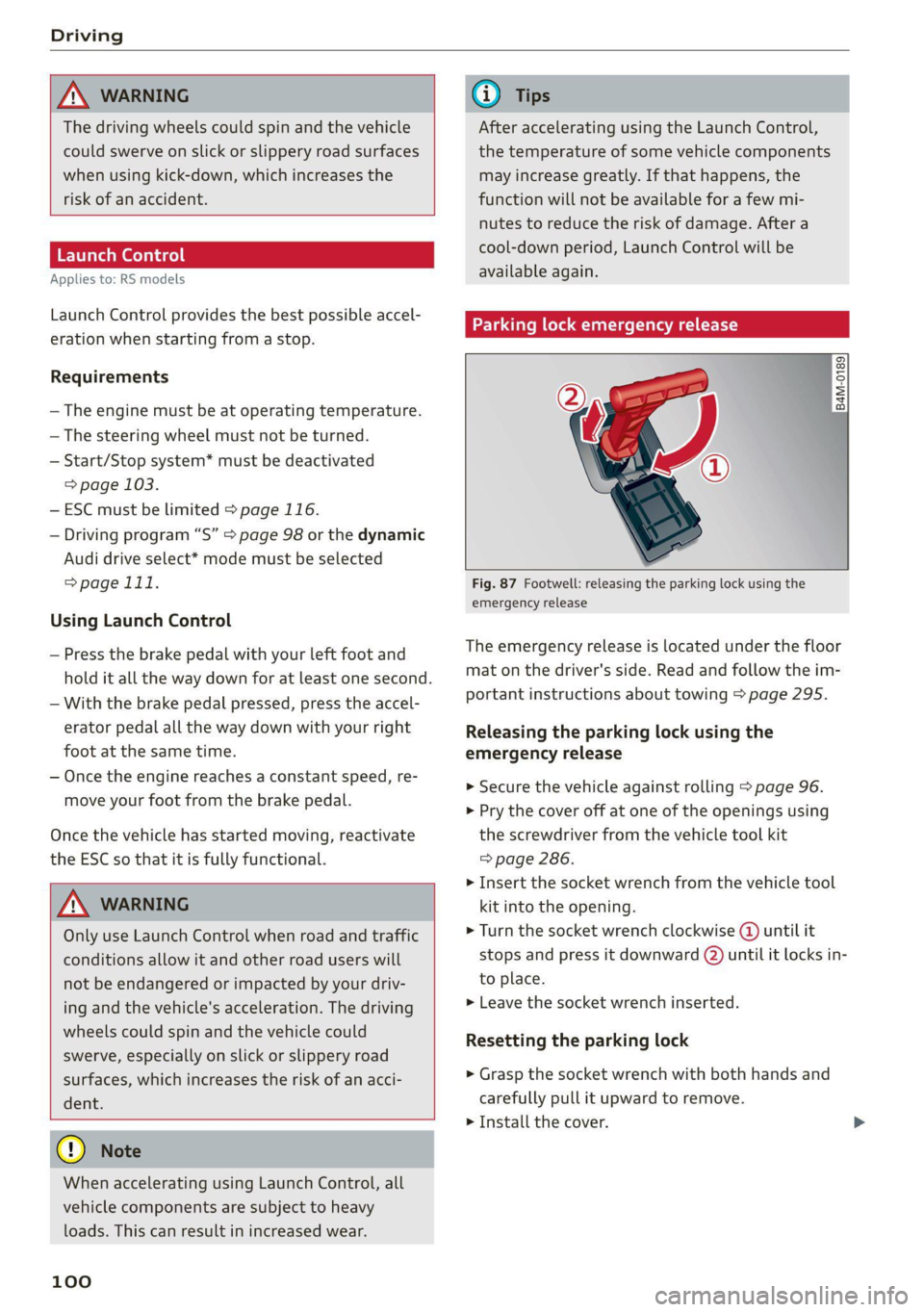
Parking lock emergency release
@
B4M-0189
@
Fig. 87 Footwell: releasing the parking lock using the
emergency release
The emergency release is located under the floor
mat on the driver's side. Read and follow the im-
portant instructions about towing > page 295.
Releasing the parking lock using the
emergency release
» Secure the vehicle against rolling > page 96.
> Pry the cover off at one of the openings using
the screwdriver from the vehicle tool kit
=> page 286.
> Insert the socket wrench from the vehicle tool
kit into the opening.
» Turn the socket wrench clockwise (4) until it
stops and press it downward @) until it locks in-
to place.
>» Leave the socket wrench inserted.
Resetting the parking lock
> Grasp the socket wrench with both hands and
carefully pull it upward to remove.
> Install the cover.
Page 105 of 332

4M8012721BF
Driving
— The vehicle battery will gradually drain if
the vehicle is not driven for long periods of
time, or if electrical equipment is used
when the engine is not running. To ensure
that the vehicle can still be started, the
electrical equipment will be limited or
switched off.
IC Te lt
B Drive system: malfunction! Safely stop vehi-
cle
There is a malfunction in the drive system. The
brake booster and the power steering may stop
working. Stop the vehicle immediately or as soon
as possible and do not continue driving. Secure
the vehicle against rolling before exiting the vehi-
cle > page 96. Have the problem corrected by an
authorized Audi dealer or authorized Audi Service
Facility.
B Drive system: malfunction! Please contact
Service
There is a malfunction in the drive system. Drive
slowly to an authorized Audi dealer or authorized
Audi Service Facility to have the malfunction cor-
rected.
Start/Stop system
Applies to: vehicles with Start/Stop system
The Start/Stop system can help increase fuel
economy and reduce CO2 emissions.
In Start/Stop mode, the engine shuts off auto-
matically when stopped, for example at a traffic
light. If certain conditions are met, the engine
may stop before the vehicle has come to a com-
plete stop. If you press the accelerator pedal
when this happens, the engine will start and driv-
ing power will be transmitted.
The ignition and important assist systems such
as the brake booster will remain available during
the Stop phase. The engine will restart automati-
cally when needed.
The Start/Stop system is automatically activated
once
the ignition is switched on.
Switching the Start/Stop system off and on
The & button is located above the selector lever
in the center console. The LED in the button turns
on when the function is switched off.
> Press & to switch the system on or off.
If you switch the system off during a Stop phase,
the engine will start again automatically.
Basic requirements
— The driver's door and hood must be closed.
—"P","N", or "D" must be engaged.
— The steering wheel must not be turned far in ei-
ther direction.
— The vehicle must have driven faster than 2 mph
(3 km/h) since the last time it stopped.
— The vehicle is not in trailer mode.
@) Note
Always switch the Start/Stop system off when
driving through water > page 103.
G) Tips
— Depending on the driving situation, the en-
gine may already stop when coasting before
the vehicle has come to a complete stop.
— Ifyou select the "D" position after shifting
into reverse, the vehicle must be driven fast-
er than 6 mph (10 km/h) in order for the
Start/Stop system to become active again.
This makes it possible to maneuver without
stopping the engine.
Stopping and starting the engine
Applies to: vehicles with Start/Stop system
> Press and hold the brake pedal until the vehicle
has stopped. The @) indicator light appears in
the instrument cluster once the engine stops
automatically.
> The engine starts again when you remove your
foot from the brake pedal. The indicator light
turns off.
If the parking brake is set, the engine will only
start again when the accelerator pedal is pressed. >
103
Page 107 of 332
4M8012721BF
Driving
Brake pads
New brake pads do not achieve their full braking
effect during the first 250 miles (400 km). They
must be “broken in” first. However, you can com-
pensate for the slightly reduced braking force by
pressing firmly on the brake pedal. Avoid heavy
braking during the break-in period.
Brake pad wear depends largely on the way the
vehicle is driven and on operating conditions.
Brake pad wear increases when driving frequently
in the city or short distances or when using a very
sporty driving style.
Ceramic brakes
Applies to: vehicles with ceramic brakes
Ceramic brakes provide excellent deceleration
rates.
The break-in period for new ceramic brakes may
be significantly longer than for standard brake
rotors. Due to the properties of the material,
they may cause noises at lower speeds. Ceramic
brakes also absorb more moisture in wet condi-
tions. Therefore, there will temporarily be less
braking force than when the brakes are dry. You
can compensate for this by pressing the brake
pedal harder.
Automatic post-collision braking system
The automatic post-collision braking system can
help to reduce the risk of sliding and of addition-
al collisions after an accident. If the airbag con-
trol module detects a collision, the vehicle is
braked by the ESC.
The vehicle does not brake automatically if one of
the following occurs:
— The driver presses the accelerator pedal, or
— The braking force generated by the pressed
brake pedal is greater than the braking force
that
would be initiated by the system
— The ESC, the brake system, or the vehicle elec-
trical system is not functioning
ZX WARNING
— Only apply the brakes for the purpose of
cleaning the brake system when road and
traffic conditions permit. You must not en-
danger other road users and increase the
risk of an accident.
— Due to the risk of injury, only have an au-
thorized Audi dealer or authorized Audi
Service Facility work on the brake system.
Incorrect repairs could impair the function.
— Never let the vehicle roll while the engine is
stopped because this increases the risk of an
accident.
— During automatic braking maneuvers, the
brake pedal may move downward automati-
cally. To reduce the risk of injury, do not
place your foot under the brake pedal.
() Note
— Never let the brakes “rub” by pressing the
pedal lightly when braking is not actually
necessary. This can cause the brakes to over-
heat and increases braking distance and
causes wear.
— Observe the important information for driv-
ing downhill > page 108. This especially ap-
plies when towing a trailer.
(i) Tips
— If you retrofit your vehicle with a front spoil-
er, wheel covers or similar items, make sure
that
the air flow to the brakes is not ob-
structed. Otherwise the brake system can
overheat.
— Also refer to the information about brake
fluid > page 250.
Messages
EG if © Brakes: malfunction! Stop vehicle
safely
There is a malfunction in the brake system. If
ES/ Gana B also turn on, there is a malfunc-
tion in the ABS, ESC, and braking distribution. If
the brake booster is not working, you have to use
much more force when braking the vehicle.
Do not continue driving. See an authorized Audi
dealer or authorized Audi Service Facility for as-
sistance. Read and follow the other safety pre-
cautions > A\.
105
Page 109 of 332

4M8012721BF
Driving
rolling before exiting the vehicle > page 96.
See an authorized Audi dealer or authorized
Audi Service Facility for assistance.
G) Tips
— On steep inclines, especially when in trailer
mode, the vehicle may roll backwards unin-
tentionally when starting to drive. To reduce
the risk of this happening, pull and hold the
switch while pressing the accelerator
pedal. If enough drive power has built up at
the wheels and the vehicle does not roll
backwards, then release the switch to start
to drive.
— If you leave the vehicle when “D” or “R” are
engaged, the parking brake will be set auto-
matically.
— Noises when the parking brake is set and re-
leased are normal and are not a cause for
concern.
— The parking brake goes through a self-test
cycle at regular intervals when the vehicle is
stopped. Any noises associated with this are
normal.
Emergency braking function
Emergency braking should only be used in an
emergency, if the standard brake pedal is mal-
functioning or obstructed. When the emergency
braking function is activated, the braking effect is
similar to a heavy braking maneuver.
> Pull and hold the ©) switch while driving.
> An audio warning signal will sound and emer-
gency braking will begin.
> If you press the accelerator pedal, emergency
braking will be canceled.
ZA WARNING
Heavy braking while driving through curves or
in poor road or weather conditions can cause
the vehicle to slide or the rear of the vehicle to
swerve, which increases the risk of an acci-
dent.
Messages
ii) B) Parking brake: malfunction! Safely
stop vehicle. See owner's manual
GG / © Parking brake: malfunction! Please
release parking brake
If one of the two messages appears, there is a
malfunction in the parking brake. If the message
appears while stationary, check if the parking
brake is released and can be reset. If this is the
case,
switch the ignition off and back on.
If the message stays on, if the parking brake can-
not be released, or if the message appears while
driving, do not continue driving. Secure the vehi-
cle against rolling before exiting the vehicle
= page 96. See an authorized Audi dealer or au-
thorized Audi Service Facility for assistance.
ww Parking brake: malfunction! Please contact
Service
There is a malfunction in the parking brake. Drive
to an authorized Audi dealer or authorized Audi
Service Facility immediately to have the malfunc-
tion corrected. Do not park the vehicle on inclines
and shift to “P”.
x | / Parking brake: warning! Vehicle parked
too steep
The braking force may not be enough to secure
the vehicle from rolling away. Park the vehicle in
a place with less of an incline.
& / {Q) Parking brake: applied
The parking brake is set. Press and hold the brake
pedal to release the parking brake.
Special driving situations
Sporty driving
Applies to: RS models
When driving in a sporty style, the wear on all ve-
hicle components is greatly increased, especially
on the engine, transmission, tires, brakes, and
suspension. This can result in increased wear. Al-
so note the following points:
107
>
Page 110 of 332

Driving
— Make sure the vehicle is in good condition.
Make sure to check the brake pads, tire tread,
and tire pressure (when tires are warm).
— Beforehand, warm up the engine by driving no
higher than two-thirds of the maximum permit-
ted engine RPM. The engine oil must be
brought to a minimum temperature of 158 °F
(70°C).
— Before stopping the vehicle, allow the engine
and brakes to cool back down to a regular oper-
ating temperature by driving normally.
If necessary, use the following functions:
— dynamic Audi drive select mode* > page 111
— Limit ESC > page 116
@) Tips
Wear caused by load does not constitute a ve-
hicle fault as defined by the terms of the war-
ranty.
Driving uphill and downhill
When driving uphill, downhill, or at high alti-
tudes, note the following information:
— Drive slowly and carefully.
— Do not try to turn around if you cannot safely
drive on an incline or hill. Instead, drive in re-
verse.
— When driving down hills, you can activate the
hill descent control if you press the brake pedal
while driving in “D” gear. The automatic trans-
mission will select a gear suitable for driving
down the hill and will attempt to maintain the
speed at which the vehicle was traveling at the
time the brake pedal was pressed. Press the
brake pedal if necessary. The hill descent con-
trol will switch off once the hill levels out or
you press the accelerator pedal.
— Utilize the engine braking effect when driving
downhill by selecting the “S” driving program
=> page 98. This especially applies when towing
a trailer. This reduces the load on the brakes.
— Apply the brakes in intervals and do not press
the brake pedal continuously.
— Use the hill descent assist if necessary
=> page 109
108
Inclinometer
Applies to: vehicles with a tilt angle display
You can display the vehicle's sideways angle and
lengthwise angle in relation to the horizon.
— Applies to: MMI: Select on the home screen:
VEHICLE > Vehicle data.
— You may need to scroll down to the Inclinome-
ter display.
The sideways angle of your vehicle should not ex-
ceed the yellow range in the gauge. If it reaches
the red range, there is a risk that the vehicle
might tip.
The steering wheel angle, the elevation, the com-
pass direction, and the geo-coordinates of the
current vehicle position are displayed in addition
to the current vehicle angle. You will also receive
information about the maximum sideways and
lengthwise angle that was reached in the current
driving cycle. These values are reset when the ig-
nition is switched off.
Note that the accuracy of the display depends on
the driving situation.
ZA\ WARNING
— Only drive on inclines that your vehicle is de-
signed to handle. Do not exceed the hill
climbing ability of your vehicle. Your vehicle
could tip or slide.
— Do not drive at an angle on steep inclines
and hills. If your vehicle is about to tip, you
must immediately start steering in the di-
rection of the downward slope to reduce the
risk of an accident.
— Always be ready to brake when using the hill
descent control function.
— Applies to: vehicles with an inclinometer: Do
not rely only on the inclinometer when as-
sessing the driving situation.
ier A dials)
Your vehicle is not an offroad vehicle. Note the
following points when driving offroad:
— Drive slowly and carefully.
—To reduce the risk of underbody damage, pay
attention to the vehicle's ground clearance and >
Page 111 of 332

4M8012721BF
Driving
drive across raised areas of the ground with the
wheels on one side of the vehicle, instead of al-
lowing the center of the vehicle to pass over the
raised areas.
—To reduce the risk of becoming stuck, drive
through sandy or swampy areas at a steady
speed and without stopping, if possible.
If necessary, use the following functions:
— Audi drive select* Offroad mode > page 111
— Hill hold assist* > page 109
—Inclinometer* > page 108
— Raising the vehicle > page 112
— Limit ESC > page 116
ZA WARNING
Only drive in terrain that is suitable for the ve-
hicle and your driving ability.
@) For the sake of the environment
Avoid actions that are damaging to the envi-
ronment. Show respect for the natural envi-
ronment and remain on marked routes.
G) Tips
Clean your vehicle after driving offroad. Dirt
and stones falling off your vehicle can affect
other road users.
Driving through water
If you must drive through water, follow these in-
structions:
— Check the stability of the ground, the current,
and the water depth. If the ground is unstable,
there is a strong current, or there are waves,
the water must only reach up to the lower edge
of the body at the most.
— Deactivate the Start/Stop system.
— Drive carefully and no faster than at walking
speeds to prevent the front of the vehicle from
creating waves, because they could splash
above the lower edge of the body. Oncoming
vehicles could also create waves.
— Do not stop the vehicle while in the water.
— Drive in reverse.
— Do not turn the engine off.
ZA\ WARNING
After driving through water, press the brake
pedal carefully to dry the brakes so that the
full braking effect will be restored.
@) Note
Vehicle components such as the engine, drive
system, suspension, or electrical system can
be severely damaged by driving through wa-
ers
@ Tips
If possible, avoid driving through salt water
because it increases the risk of corrosion. Use
fresh water to clean any vehicle components
that come into contact with salt water.
Hill descent assist
Applies to: vehicles with hill hold assist
The “@ button is located in the function bar on
the lower display. It lights up when the system is
turned on.
Hill descent assist can assist you when driving
down hills by maintaining a constant vehicle
speed by automatically braking all four wheels.
You can adjust the speed using the accelerator
and brake pedals. The regulation depends on the
hill and the vehicle speed.
> Switching on: press “2.
> Switching off: press “Z again.
Active regulation
Regulation begins shortly after you start driving
and is possible at speeds up to approximately 19
mph (30 km/h) and on hills that have an approxi-
mately 6-60% grade. If these conditions are met,
regulation will be activated and the 2a indicator
light will turn on.
Ready mode
If one of the requirements for active regulation is
not met, the system will be in ready mode. The
44 indicator light will turn on. Once the require-
ments are met again, the system will be able to
provide active regulation again.
109
>
Page 113 of 332

4M8012721BF
Driving dynamic
Driving dynamic
Audi drive select
Introduction
Applies to: vehicles with Audi drive select
Drive select makes it possible to experience dif-
ferent types of vehicle characteristics in one vehi-
cle. With different driving modes, the driver can
switch the setting, for example from sporty to
comfortable. This allows you to adjust the set-
tings to your personal preferences. This makes it
possible to combine settings such as a sporty
drivetrain setting with comfortable steering.
Selecting an Audi drive select mode
Applies to: vehicles with Audi drive select
The size button is located above the selector lever
in the center console.
> Press the left or right arrow key until the de-
sired mode appears in the MMI. Or:
> Applies to MMI: Select on the home screen: VE-
HICLE > Audi drive select.
You can change the driving mode when the vehi-
cle is stationary or while driving. If traffic per-
mits, briefly remove your foot from the accelera-
tor pedal after changing modes so that the mode
you have selected will be activated for the drive
system.
The following modes may be available depending
on the equipment:
offroad - Provides assistance when driving off-
road. The vehicle will be raised to the second-
highest level using the air suspension*. The ESC
will be restricted and the hill descent assist* will
be activated. The vehicle will exit this mode after
the ignition is switched off.
allroad - Provides balanced vehicle handling. The
vehicle will be raised to the second-highest level
using the air suspension*.
comfort - Provides a comfort-oriented vehicle
setup and is suited for long drives on highways.
auto - Provides an overall comfortable yet dy-
namic driving feel and is suited for everyday use.
dynamic - Gives the driver a sporty driving feel
and is suited to a sporty driving style. The “S”
driving program is selected.
Individual - Provides the option for personalized
vehicle settings. Press ¥ to configure the mode
=> page 111, Individual settings.
G) Tips
When the ignition is being switched on, indi-
vidual systems, such as the drive system, will
be reset to a balanced setting. Select the cur-
rent mode again to attain its full configura-
tion.
Selecting RS mode
Applies to: RS models
In RS models, there are two individual adjustable
RS modes instead of the individual mode.
Selecting the mode
> Press the fase button on the multi-function
steering wheel to switch between the RS modes
and the last selected Audi drive select mode.
Or:
> Applies to MMI: Select on the home screen: VE-
HICLE > Audi drive select.
Adjusting the mode
> Applies to MMI: Select on the home screen: VE-
HICLE > Audi drive select.
> Press to configure the respective RS mode
= page 111, Individual settings.
Individual settings
Applies to: vehicles with Audi drive select
The equipment in your vehicle will determine
which settings you can adjust.
Drive
The drive system will react to accelerator pedal
moves more quickly or in a more balanced man-
ner. The shift points are placed in higher or lower
speed ranges.
111
>