2021 AUDI Q2 172
[x] Cancel search: 172Page 221 of 364
Navigation
CO
â
rN
rN
t-H
O
<
Other settings
Navigation settings
Applies
to:
vehicles with navigation system
•
Press
the |NAV/MAP|
button repeatedly until
the Enter destination menu
is
displayed
o
page
207,
Fig.
172.
•
Select: right control button
>
Navigation set
tings.
Depending
on the
function seLected,
you can use
the following settings:
Display alternative routes
When this function
is
switched
on
|vj,
up to
three
route suggestions
are
displayed
on the map
^>page
216,
Alternative routes.
Fuel warning
When
the
fuel gauge
is in the
reserve zone,
a
message will appear when this function
is on
[vf.
A list
of
nearby filling stations will
be
displayed
when you confirm this message. When
you
select
one
of
the filling stations,
the
route
to its
loca
tion will
be
calculated based
on the
current
posi
tion
of
your
car.
Trailer mode*
Trailer mode
is
switched
off
when
the
vehicle
leaves
the
factory.
When this function
is
switched
on
|vf,
the MMI
will take
the
speed limit
for
vehicles towing
a
trailer into account and
the
calculated arrival
time will
be
adjusted accordingly. Trailer mode
is
indicated
on the
map's legend menu
by the
sym
bol-*!.
Personal route assist*1)
The personal route assist function
is
switched
off
by default
in the
factory settings.
When this function
is
activated
EÎ,
your trips
are
recorded
and
destinations
are
suggested by
the
MMI system
^>page
214.
Arrival notification*
The arrival notification
is
switched
off
when
the
vehicle leaves
the
factory.
When this function
is
switched
on
@f,
the MMI
will inform
you
when
you are
approaching selec
ted special destinations (e.g. imported myAudi
special destinations). You
can
also have a sound
played using
the
Play notification tone function.
Delete myAudi special destinations*11
Destinations that you import from your myAudi
account
to
your
MMI are
automatically saved.
You
can
delete them individually
or all at
once.
Presentation mode
Use
the
Presentation mode
to
plan
and
"drive"
a
journey effectively without
the
need
to
move
the
vehicle. You
can
choose your start Location
man
ually (Select start location)
if, for
example,
you
would like
to
calculate a route starting from
a
different position than
the
current position
of the
vehicle. Start
the
Presentation mode
to
simulate
a route guidance.
Route criteria
Applies
to:
vehicles with navigation system
®-«?
dHft
d^e
(S^#
Fig.
180
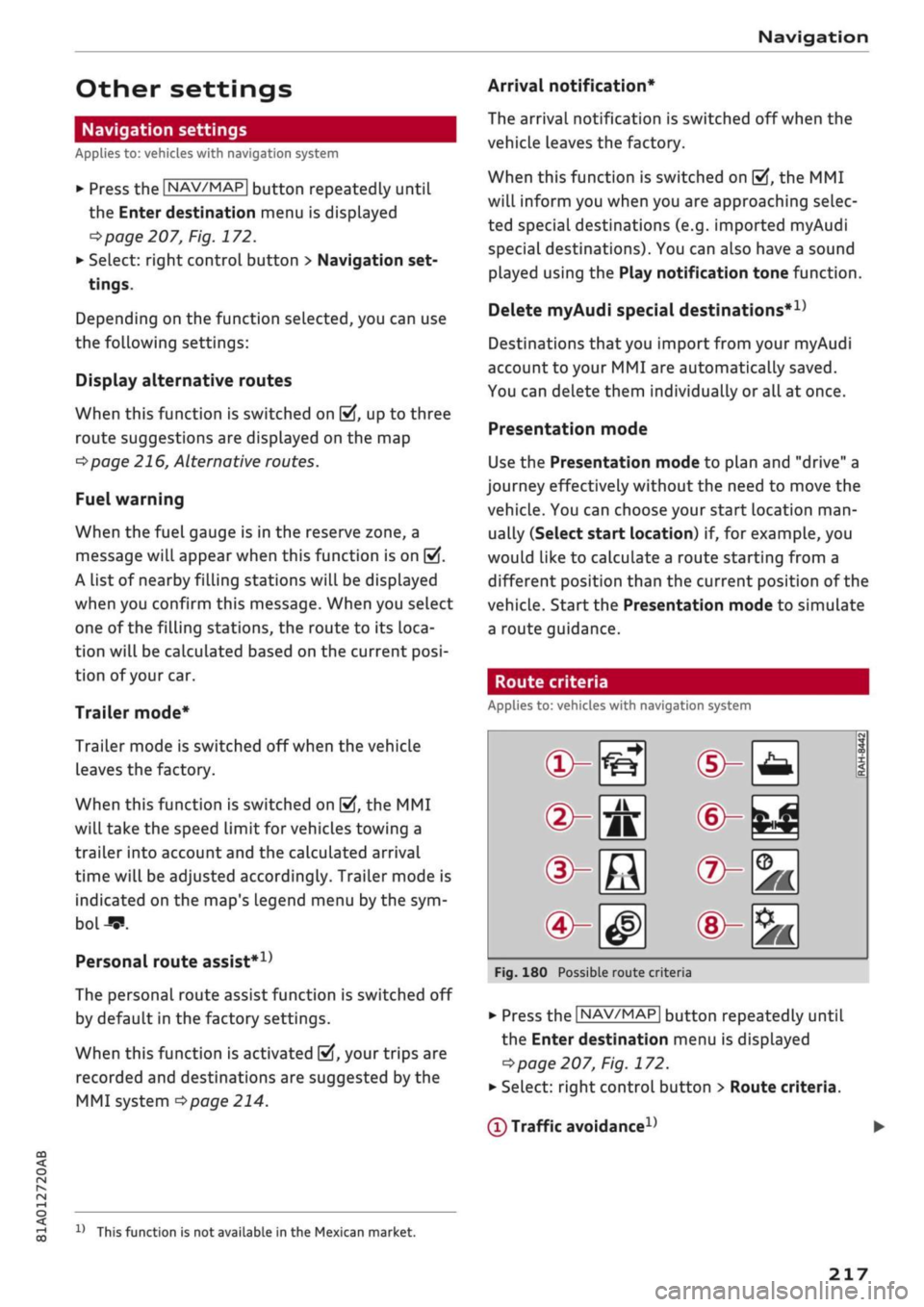
Possible route crite
1 1
1
®-feJ
®-fc
®-3K
ria
•
Press
the |NAV/MAP|
button repeatedly until
the Enter destination menu
is
displayed
=>page
207,
Fig.
172.
•
Select: right control button > Route criteria.
(T)
Traffic avoidance
D
x)
This function
is
not
available
in the
Mexican market.
217
Page 222 of 364

Navigation
- automatic: The route is automatically
opti
mised using the current traffic information. If
the MMI system does not display
a
detour route
although the automatic traffic avoidance func
tion is on and a traffic jam has been reported
on the planned route, this is because the
esti
mated time required for the detour is longer
than the delay on the route with the traffic jam.
- manual: The MMI indicates that
a
better route
is available and informs you of the potential
time saving
^>page
226. You can then choose
which route you would like to use.
- off: The route is not updated automatically. No
optimised route is suggested.
(2) Motorways/ (f) Vignette roads1)/ (4) Toll
roads/(?)
Ferries1)/©Motorail1);
If
you
do not
wish
for
the navigation system to include motor
ways,
vignette/toll roads, ferries or car trains
when calculating the route, you can select the
option avoid.
(7)
Time restricted
-
avoid:
Roads that are closed at certain times of
the day (e.g. pedestrian zones) are excluded
from the route calculation.
- automatic: The MMI system determines wheth
er the restricted road can be included in the
route calculation based on the time tables cur
rently stored in the navigation data.
- with: Roads that are closed at certain times of
the day are included in the route calculation.
(§)
Seasonally restricted1)
-
avoid:
Roads that are closed seasonally (e.g.
mountain passes) are excluded from the route
calculation.
- automatic: The MMI system determines wheth
er the seasonally restricted road can be
inclu
ded in the route calculation based on the time
tables currently stored in the navigation data.
-
with:
Roads that are closed seasonally are in
cluded in the route calculation.
Voice guidance
Applies to: vehicles with navigation system
»•
Press the |NAV/MAP| button repeatedly until
the Enter destination menu is displayed
^page
207, Fig. 172.
•
Select: right control button
>
Voice guidance.
Voice guidance: The navigation cues can be
played in complete or compact form. You can use
the traffic option to have the system play only
those announcements on traffic obstructions
that are relevant
for
your route. SeLect off if you
do not want the system to play any navigation
cues.
Voice guidance during calls: Navigation cues
during a telephone call can be switched on/off.
Entertainment fader: Refer to
•=>page
261.
Volume of spoken cues: You can change the
vol
ume of
a
spoken cue while it is being played us
ing the ON/OFF button
opage
152. Further in
formation can be found on
^>page
261.
11
This function is not available in the Mexican market.
218
Page 224 of 364

Navigation
© Better route
If
a
better route is available
for the current route guidance, this will be
shown on the map together with the time
saved.
Further information can be found
from
^>page
226 onwards.
Further options on the map
Applies to: vehicles with navigation system
©
Whether the level of congestion is taken into
account when the route is being calculated
depends on your traffic avoidance settings
<=>
page 217.
Map functions
Applies to: vehicles with navigation system
•
Press the |NAV/MAP| button repeatedly until
the map is displayed
•=>page
219, Fig. 181.
•
Press the left control button.
The following map functions are available:
Switch to destination entry
The search function must be displayed in the En
ter destination menu
•=>page
207, Fig. 172.
Traffic announcements
Up-to-date traffic information is shown on the in
fotainment display. Further information can be
found from
^page
225 onwards.
Route list
The route list can only be displayed when the
route guidance function is active; it contains in
formation on the route, road names and the
length of the route sections. On motorways, po
tential parking areas and service stations will be
displayed.
You can select them as e.g. a stopover.
Special destinations along the route
Important: The route guidance function must be
active.
You can search for special destinations along
your current route. For more information, please
refer to
opage
211.
»•
Press the |NAV/MAP| button repeatedly until
the map is displayed
^>page
219, Fig. 181.
•
Press the right controL button.
Depending on the function chosen, the following
additional options may be available in the Map
menu:
Stop route guidance: Refer to
^>page
213
Adjust position: You can adjust the vehicle's po
sition on the map manually and thus change the
route.
Map settings: Refer to
^>page
221.
Route criteria: Refer to
•=>page
217.
Voice guidance: Refer to
^>page
218.
Navigation settings: Refer to
<=>page
217.
Always display alternative routes: Refer to
<=>page
216.
Parking in vicinity of route*: Parking facilities
near the vehicle are displayed.
Store current position*: You can store your
vehi
cle's current position as a favourite
opage
216
or as a contact in the directory
<^page
216.
Audi connect at this location*: Enables you to
search for e.g. Travel information in the location
entered (events, weather at destination etc.).
Online traffic data*: You can switch the onLine
traffic data on or off
(vf.
Country information: Refer to
^>page
213.
Exclude route*: When route guidance is activa
ted,
a section of the calculated route that you
have set (max 20 km) will be avoided if possible.
The navigation system will calculate an alterna
tive route. The route you entered will only be
blocked in the current route guidance; if re
quired,
you will need to re-enter the route you
wish to avoid. If
you
exclude a route section, this
section will be hatched in red and white on the
map.
•
220
Page 257 of 364

Audi smartphone interface
CO
rN
IV
rN
t-H
o <
Audi smartphone
interface
Setting
upx)
Applies to: vehicles with Audi smartphone interface
You
can connect your smartphone to the MMI
system via the Audi smartphone interface. Some
of the content
on
your smartphone is displayed
in an optimised
screen
format on the infotain
ment display and can be operated via the MMI
control console.
Important
The vehicle must be stationary, and the ignition
must be switched on.
iPhone 5 or later with Lightning connector and
operating system iOS 7.1.2 or higher or:
Smartphone with Android Auto app and operat
ing system Android 5.0 Lollipop or later.
• Connect your smartphone to the Audi music in
terface
opage
241 via a USB adapter
^> page
240, Fig. 196.
•
Select and confirm Activate Apple CarPlay or
Activate Android Auto now.
•
Follow the instructions given by the system.
• Please note any system queries on your smart
phone.
If
you
decline the use of Apple CarPlay or Android
Auto the first time you connect your smartphone,
you can start the Audi smartphone interface at a
later time via the connection manager.
•
SeLect:
|MENU|
button
>
Audi smartphone in
terface > Switch to connection manager.
•
Connect your smartphone to the Audi music in
terface via a USB adapter
^>page
240, Fig. 196.
*•
Select and confirm Audi smartphone in Con
nection manager
<3>page
257. You can select
your smartphone from the list of devices al
ready connected
^page
258.
•
Follow the instructions given by the system.
© CAUTION
Please always observe the information
=>®
in
Wi-Fi hotspot on page 202.
- The functions you can use depend on a num
ber of factors including:
-The brand of your smartphone
-The operating system version of your
smartphone
- The software version of the app in use
- The USB adapter/cable and the correct
connection
- Your mobile network/service provider
- The individual settings on your smart
phone
- One or several of the factors listed above
can result in your smartphone being incom
patible with the Audi smartphone interface.
We regret that it is not possible to guaran
tee compatibility for all types of smart
phone.
For further information and support,
please refer to the operating manual of your
smartphone or contact its manufacturer.
- If the smartphone you have connected has a
voice controL feature, you can control your
smartphone using the external speech
con
trol system
^>page
170.
-The menu language displayed on the MMI is
based on the setting on your smartphone.
- The time displayed on the MMI is based on
the setting on your smartphone.
- Some of the MMI functions are not available
while an Apple CarPlay or Android Auto
con
nection is active.
- You cannot use mobile devices via Bluetooth
when an Apple CarPlay connection is active.
- If
you
have inserted your own mini SIM card
in the SIM card reader* for making phone
calls,
the SIM card will be used exclusively
for
a
data connection when the Audi smart
phone interface and the car phone function*
^page
172 are active.
x)
Not available in all markets.
253
Page 351 of 364

Index
CO
< o rN
iv
rN
t-H
o <
•H
00
Emergency braking function 82
New brake pads 147
Browser
see Media centre 244
Bulb failure
Changing bulbs 334
Bulbs,
changing 334
Buttons
Assigning functions (multi-function steering
wheel) 17
Multi-function steering wheel 15, 18
Operating unit (MMI) 152
C
Cables (USB adapter/AUX adapter) 240
Calling up media 243
Call
list 179
CalL
options 187
Capacities
AdBlue 292
Fuel
tank 343
Washer fluid reservoir 343
Caps for wheel bolts, removing 321
Car care
Washing/cleaning 312
Care
see Cleaning 312
Car phone
172,188
Catalytic converter 295
CD drive 236
Central locking system 37
Cetane number (diesel) 289
Changing settings for additional dispLay .... 19
Charging
see Power sources 60
Charging battery 242
Charging battery (mobile devices) 241
Chassis number 342
Child lock 46
DVD 246
Child seats 267
Fitting 270
Cigarette Lighter 60
Classic view 17
Cleaning 312
Cleaning/de-icing windows 314
Cleaning/treating leather 315
Cleaning Alcantara 315
Cleaning carbon parts 314, 315
Cleaning controls and displays 314
Cleaning fabrics 315
Cleaning leatherette 315
Cleaning plastic parts 314
Closing
Panorama sun roof 48
Windows 46
see also Unlocking/locking 39, 40
Closing/opening
see Unlocking/locking 39, 40
Coasting mode 91
Coat hooks 61
Colour code 342
Coming home/leaving home
see Entry/exit lights 51
Commands (speech dialogue system) 164
Compact temporary spare wheel 324
Compartments 61
Conference calls 180
Connection manager 257
Connections
see Media 234, 243
Consumption (fuel) 19, 20, 342
Contacts 185
From another directory 258
Importing/exporting 187
Memory capacity 189
Storing as a destination
216
Control buttons (MMI operation) 154
Controls and displays (overview) 10
Control units 150
Convenience key
Manual operation 79
Starting/stopping the engine 76
Unlocking/locking 39
Convenience open/close 47
Cooling mode
Automatic air conditioner 69
Manual air conditioner 67
Cooling system
Anti-freeze 299
Checking coolant level 300
347
Page 354 of 364

Index
Folding down rear seats 63, 64
Four-wheel drive
see quattro (four-wheel drive) 148
Frequency band
see Waveband 228
Front seats 58
FueL 289
Consumption 342
Current fuel consumption 19,20
Ethanol 289
Fuel gauge 12, 14
Saving fuel 131
Tank capacity 343
FueL
economy
Coasting mode 91
Driving style 72
Recuperation 19
Fuel range 19, 20
Fuses 332
G
GALA
see Speed-dependent volume control ... 260
Gearbox malfunction 92
Glove box 61
Ground clearance 85
H
Halogen headlights
Changing bulbs 334
Handbrake
see Electro-mechanical parking brake .... 82
Handsfree 172
Hazard warning lights 52
Head-protection airbag 286
Head-up display 25
Adjusting brightness 53
Headlight range control 49
Headlights 49
Headlight range control 49
Washer system 55
Washing 313
Headlights (changing buLbs) 334
Head restraints
Adjusting 58,
59
Removing/installing 59
Head restraints, adjusting 266
Heated
Exterior mirrors 53
Rear window (automatic air conditioner) .. 70
Rear window (heating/ventilation system
and manual air conditioner) 68
Seats (automatic air conditioner) 70
Seats (heating/ventilation system and
man
ual air conditioner) 68
Washer
jets 55
Heater (supplementary heater for diesel en
gine) 66
Heating/ventilation system 66
Adjusting air outlets 71
Controls 67
Default settings 66
Description 66
Key-coded settings 66
Supplementary heater 66
Hill hold assist 83
Hill starting
see Hill hold assist 83
Hold assist 84
Hold assist (hill hold) 83
Home address 210, 215
Horn 10
Hubcaps, removing 321
I
i-Size
(securing child seats) 270
Ignition
Switching on/off (with button) 76
Switching on/off (with the key) 74
Immobiliser
see Electronic immobiliser 38
Importing/exporting contacts 187
Inflation pressure (tyres) 309
Input level (media) 246
Inspection intervals 304
Instrument cluster 12
Cleaning 314
Driver messages 26
350
Page 356 of 364

Index
Memory list
see Favourites 231
MENU button 152
Menus/symbols 161
Messages 182
Mileage recorder 14
Mirrors 53
Anti-dazzle setting 54
MMI
see Multi Media Interface 152
MMI search
see Search function 160, 245
MMI touch 155
Mobile hotspot
see Personal hotspot 201
Mobile phone
see Telephone 172
Mobile phone tray
see Audi phone box 177
MODE button 18
Modifications 340
Motorway light 49
Mounting pin (for changing wheels) 319
MP3
see
Jukebox 236
Multi-function steering wheel
Operation 15, 18
Speech dialogue system 17
Switching between displays 15
Switching between tabs 15, 18
Multi Media Interface 152
Music
see Media 234, 243
Music collection
see
Jukebox 236
Mute 261
myAudi 196, 212
Importing contacts 187
Logging on in the vehicle 196
PIN 196
Update 224
N
Natural commands (speech dialogue
system) 170
NAV/MAP button 207
Navigation 207
Voice guidance 218
see also Map 219
Navigation (instrument cluster) 24, 25
Network connection (Wi-Fi) 201
Network selection (telephone mode) 188
NOx
catalytic converter
see AdBlue 292
Numbers/characters, entering (using the
speller) 159
O
Occupant protection 120
Octane rating (petrol) 289
Off-road driving 84
Oil
see Engine oil 297, 298
On-board computer (analogue instrument
cluster) 20
On-board computer (Audi virtual cockpit) ... 19
On-board Handbook 260
ON/OFF button (MMI) 152
Online destinations
see Point of interest search 212
Online map update 223
Online media 239
Online services
see Audi connect
(infotainment)
191
Opening 37
Boot lid 43
Doors 39
Fuel tank flap 290
Panorama sun roof 48
Power-operated boot lid 44
Windows 46
Opening/closing
see Unlocking/locking 39, 40
Operation
Multi-function steering wheel 15, 18
Multi Media Interface 153
Speech dialogue system 164
Options menu 16, 154, 158
Outside temperature display 12
Overrun fuel cut-off 72
Overview (controls and displays) 10
352
Page 358 of 364

Index
Rev counter 12, 13
Reverse gear (automatic gearbox) 87
Reversing camera
see Parking aids 137
Rewind (audio/video file) 243
Right control button 16
Rims 308
Washing 313
Ring tone settings 188
RME(fuel)
289
Roaming
see Data connection 203
Roof carrier 64
Roof load 343
Roof rack 64
Rotary pushbutton with joystick function
(MMI operation) 157
Route criteria 217
Route guidance
see Navigation 25, 207
Running in
New brake pads 147
New engine 72
New tyres 305
S
Safelock mechanism 42
Safety 263
Airbag system 281
Child seats 267
Correct sitting position 265
Head restraints 266
Luggage 272
Pedal area 272
Seat belts 275
Telephone 172
Saving fuel
Active Cylinder Management 19, 20
Economy tips (analogue instrument cluster) 21
Economy tips (Audi virtual cockpit) 20
Efficiency program (analogue instrument
cluster) 21
Energy consumers (Audi virtual cockpit) .. 20
Screen
see Display 15, 18
Screwdriver 319
SD card readers (MMI) 235
SDS
see Speech dialogue system 163
Search areas (special destination) 211
Search function 160
Media 245
Navigation 208
Radio 228
Telephone 186
Seat belts
275
Adjusting 278
Belt tensioners 279
Cleaning 314
During pregnancy 278
Height adjustment 279
Putting on 277
Securing child seats 271
Taking off 279
Seats
Adjusting 58
Cleaning 315
Correct sitting position 265
Folding down 63, 64
Seat heating (automatic air conditioner) .. 70
Seat heating (heating/ventilation system
and manual air conditioner) 68
Selection menu 16, 154, 158
Selective catalytic reduction
see AdBlue 292
Selector lever (automatic gearbox)
Manual release (left-hand drive) 93
Manual release (right-hand drive) 94
Positions 86
Self-help 318
Self-learning navigation
see Personal route assist 214
Serial number
(IMEI)
188
Service interval display 304
Service intervals 297
Service position
see Wiper blades, changing 56
Servo assist
see Electro-mechanical power steering .. 148
Settings
Directory 189
Map 221
Media 246
354