2021 AUDI Q2 clutch
[x] Cancel search: clutchPage 84 of 364

Driving
Electro-mechanical
parking brake
•_ -_-
:c
2C
Fig.
74 Centre console: Button for parking brake and hold
assist
Your vehicle is equipped with an electro-mechan
ical parking brake
(l)
^>Fig.
74. The parking brake
replaces the conventional handbrake, and is
mainly intended to prevent the vehicle from
roll
ing away accidentally.
Applying/releasing the parking brake
manually
• To apply the parking brake, pull the button (®).
The LED in the button will light up. In addition,
the warning lamp || will light up in the instru
ment cluster.
•
To release the parking brake manually, press
the brake or accelerator pedal with the ignition
switched on and simultaneously press the but
ton
©).
The LED in the button and the warning
lamp on the display will go out.
Releasing the parking brake automatically
Important: The parking brake must be applied
and the driver's door must be closed.
•
Accelerate in the usual way to drive off and re
lease the parking brake automatically.
Further features and safety functions are availa
ble for driving off, in addition to the automatic
parking brake release function
^>page
83,
Driv
ing away from a standstill.
Preventing the parking brake from being
released automatically
In certain situations, e.g. on a steep hill or when
towing a trailer, you may wish to prevent the ve
hicle from rolling back.
•
To prevent the parking brake from being re
leased automatically, pull and hold the but
ton ©) while you press the accelerator. The
parking brake will remain engaged and prevent
any tendency to roll back down the slope.
•
You can release the button
(®)
as soon as the
engine is delivering enough power to the
wheels.
Emergency braking function
You can use the emergency braking function in
emergencies or if the main brake system fails or
the pedal is obstructed.
•
PuLl
and hold the button
«EJ.
• The brakes will be released immediately if you
release the button
®
or press the accelerator.
If
you
pull and hold the button
(®)
while the
vehi
cle is moving, this will initiate an emergency
brake application. The brakes are then applied
hydraulically at all four wheels. The effect is
simi
lar to heavy braking
<=> /\.
To prevent the emergency braking function from
being used accidentally, a warning buzzer sounds
when the button
(®)
is operated. The brakes are
released immediately when you release the but
ton (®) or press the accelerator.
Parking the car
•
Press the brake pedal to bring the vehicle to a
stop.
•
To apply the parking brake, pull the button
©).
• Automatic gearbox: Move the selector lever to
position P.
• Switch off the engine
•» A-
•
Manual gearbox: Engage first gear.
•
When parking on a hill or gradient, turn the
steering wheel so that the vehicle would roll in
to the kerb if it did start to move accidentally.
A
WARNING
- Take care never to press the accelerator
pedal or release the clutch inadvertently if
a
gear is engaged or if the selector Lever is not
in position
P
or
N
(on automatic vehicles)
while the vehicle is stationary with the en
gine running. The vehicle will otherwise
82
Page 88 of 364

Driving
Applies to: vehicles with S tronic gearbox
The
S
tronic is a
dual-clutch
gearbox. Torque is
transmitted via two independent clutches. They
replace the torque converter found on conven
tional automatic gearboxes and allow for
smooth,
uninterrupted acceleration of the
vehi
cle.
Selector lever positions
Applies to: vehicles with automatic gearbox
8:20
09.06.2012
524S km 150.3
+22.5
(
Fig.
75 Instrument cluster: Selector lever positions
Fig.
76 Selector lever lock
The current selector Lever position is shown next
to the selector Lever
^>Fig.
76 and on the instru
ment cluster display
^>Fig.
75. In addition, the
current gear is shown on the instrument cluster
display.
•
Switch on the ignition.
•
If the selector lever is in position
P
or N, you
will need to release the selector lever lock
•=>page
86.
•
Move the selector lever to the desired position.
The current position is indicated on the selector
gate.
Selector lever lock
The selector Lever lock prevents gears from being
engaged inadvertently, so that the vehicle is not
set in motion unintentionally.
The selector Lever is Locked in the
P
and N
posi
tions when the ignition is on. To move the selec
tor lever out of positions
P
and N, the driver must
apply the brake pedal and press the interlock
button.
The selector Lever lock only works if the vehicLe is
stationary or driving at speeds up to approx. 2
km/h.
At higher speeds the selector lever lock in
the N position is disengaged automatically.
The selector Lever lock is not engaged if the se
lector Lever is moved quickly through position N
(e.g.
when shifting from
R
to D). This makes it
possible, for instance, to "rock" the vehicle back
wards and forwards if it is stuck in snow or mud.
The selector Lever lock engages automatically if
the brake pedal is not depressed and the lever is
in position N for more than about two seconds.
Safety interlock for ignition key*
Applies to: vehicles with ignition lock
The key can only be withdrawn from the ignition
lock with the ignition switched off and the selec
tor lever in position P. When the ignition key is
removed,
the selector lever is locked in position
P.
P- Parking lock
In this position, the vehicle cannot roll away. The
parking lock must only be engaged when the ve
hicle is stationary
•=> A-
The selector Lever lock (the button on the selec
tor lever handle) must be released
one/the
brake
pedal must be pressed before the selector lever
can be moved either into or out of position P.
Should the power supply to the selector lever
fail,
the selector lever will be locked in position P
cépage
93, Releasing the selector lever man
ually (left-hand drive vehicles) or
^>page
94,
Releasing the selector lever manually (right-
hand drive vehicles). •
86
Page 91 of 364

Driving
A WARNING
- The driver should never get out of the
vehi
cle when the engine is running and a gear is
engaged.
If you have to leave your vehicle
while the engine is running, you must apply
the parking brake and engage the parking
lock P.
-If the engine is running and a gear is engag
ed (D/S or R) or the vehicle is in "tiptronic"
mode,
you will need to hold the car with the
footbrake. Otherwise, the car will "creep"
forwards as the power transmission is not
fully interrupted even when the engine is
idling.
- The accelerator pedal must on no account
be pressed inadvertently when the vehicle is
stationary. The vehicle could otherwise start
moving immediately (in some cases even if
the parking brake is engaged) and possibly
cause an accident.
- Do not press the accelerator while selecting
a gear with the vehicle stationary and the
engine running, as this could cause an
acci
dent.
- Never move the selector lever to R or P
when driving at normal speeds, as this could
cause an accident.
- Before you drive down a steep gradient, re
duce the speed and use "tiptronic" to select
a low gear.
- Never allow the brake to drag when driving
downhill and do not use the brake pedal too
often
or
for long periods. Constant braking
will cause the brakes to overheat and will
considerably reduce the effectiveness of the
brakes. It will increase the braking distance
and could cause the brake system to
fail.
- To avoid rolling back on gradients always
hold the vehicLe with the footbrake or park
ing brake if you have to stop.
- Never attempt to hold the vehicle with the
clutch when stopping on a gradient. The
clutch is disengaged automatically if it is
overloaded and becomes too hot - accident
risk! If the clutch is overloaded, the indica
tor lamp
0
will light up and a message will
appear
^>page
92.
© CAUTION
- When you have stopped on a gradient, do
not try to stop the vehicle rolling back by ac
celerating when a gear is engaged. This
could cause the automatic gearbox to over
heat and become damaged. Apply the park
ing brake or press the brake pedal in order
to prevent the vehicle from rolling back.
- If you allow the car to roll with the selector
lever in position N with the engine switched
off, the automatic gearbox will be damaged
as it will not be lubricated
^page
328,
Tow-starting / towing
away.
- In certain driving and traffic conditions, for
instance in stop-and-go traffic, if you have
to pull away frequently or if the vehicle
creeps forwards over a long distance, the
gearbox can overheat and become dam
aged.
If the indicator Lamp
[5J
or the warn
ing
lampH
Lights up, stop the vehicle at
the first opportunity and let the gearbox
cool down
^>page
92.
© Note
For safety reasons the parking brake will only
release automatically if the driver's door is
closed.
Downhill speed control
Applies to: vehicles with automatic gearbox
The downhill speed control function helps the
driver when driving down steep gradients.
Downhill speed control is activated on a downhill
gradient when the selector lever is in D/S and the
driver presses the brake pedal. The gearbox auto
matically selects a suitable gear for the gradient.
The downhill speed control function attempts to
maintain the speed at which the vehicLe was trav
elling when the foot brake was applied (subject
to the laws of physics and technical limitations of
the power train). It may be necessary to adjust
the speed again using the foot brake. The down
hill speed control can change down to 3rd gear
but no further, so it may be necessary to change
to tiptronic mode on very steep gradients. In this
case,
change down manually to 2nd or 1st gear in •
CO
89
Page 115 of 364

Driver assist systems
CO
<
O
rN rN
t-H
o <
When driving into a bend
OF/'g.
102 and driving
out of
a
bend, the system may react to a vehicle
travelling in the next lane and therefore brake
the vehicle. You can prevent this from happening
by accelerating briefly.
Stationary vehicles
Applies to: vehicles with Audi adaptive cruise control
»)
Fig.
103 Example: Vehicle changing lane and vehicle sta
tionary
Adaptive cruise control
The adaptive cruise control system only reacts to
vehicles which are moving or which have already
been detected as moving vehicles. For example,
if
a
vehicle ©, which has already been detected
by the adaptive cruise control, turns off or
changes lane and another stationary vehicle © is
located in front of that
vehicLe,
the system will
not react to the stationary vehicle. Press the
brake pedal to slow down.
Vehicles with manual gearbox
Applies to: vehicles with Audi adaptive cruise control and
manual gearbox
The adaptive cruise control is available in second
gear or higher (when driven in the normal engine
speed range).
When the adaptive cruise control is switched on,
you must press the clutch pedal in the normal
way in order to change gear. The adaptive cruise
control will remain activated when you change
gear or press the clutch pedal.
You do not need to press the accelerator after se
lecting a gear and releasing the clutch. The adap-
15
The speed range may be different in some countries.
tive cruise control system accelerates the vehicle
automatically as appropriate.
The adaptive cruise control may be switched off
automatically if
you
keep the clutch pedal de
pressed for too long or if
you
change gears incor
rectly or use the clutch pedal improperly.
Switching on/off
Applies to: vehicles with Audi adaptive cruise control
Fig.
104 Control lever: Switching on/off
Distance 3 -
dyr
}
Fig.
105 Instrument cluster display: Adaptive cruise
con
trol
ACC:
You can set any
speed1)
between 30 and
200 km/h.
Indicator Lamps and messages in the instrument
cluster display will provide you with information
about the current driving situation and settings.
Information is also provided in the head-up dis
play*.
Switching on the adaptive cruise control
•
Pull the lever towards you to position ©
*>Fig.
104.
113
Page 121 of 364

Driver assist systems
© Note
The distance may be below the warning
threshold for a short time when overtaking or
approaching a slower vehicle quickly from be
hind.
In this case, no warning will be given. A
warning is only given if the distance is consis
tently below the threshold.
Driver messages
Applies to: vehicles with Audi adaptive cruise control
El
ACC:
not available
The system cannot detect vehicles reliably and
will be deactivated. The sensor is out of align
ment or defective. Drive to a qualified workshop
and have the fault rectified.
EH
ACC:
currently unavailable. No sensor vision
Eo3
ACC:
currently unavailable. Sensor view re
stricted due to surroundings. See owner's
man
ual
These messages appear if the radar sensor vision
is impaired, e.g. by leaves, snow, heavy road
spray or dirt. Clean the sensor
^>page
112,
Fig. 101.
E3
ACC:
currently unavailable. Speed too low
Manual gearbox: This message appears if the cur
rent speed is too low for
ACC
mode. You cannot
store speed settings below 30 km/h. The cruise
control system switches off if the speed falls
be
low 20 km/h.
Esi
ACC:
available from 2nd gear up
Manual gearbox: The adaptive cruise control only
operates in 2nd gear or higher.
B
ACC:
currently unavailable. Gradient too
steep
The maximum possible road gradient for safe op
eration of the adaptive cruise control has been
exceeded.
The adaptive cruise control cannot be
switched on.
ffl
Ea3
ACC:
only
available in D, S or M < o
PI
Automatic gearbox: Move the selector lever to
g
position D/S or M. <
00
Eol
ACC:
clutch pedal pressed
Automatic gearbox: Cruise control mode is deac
tivated if the clutch pedal is pressed for
a
rela
tively long period.
Bf
ACC:
engine speed
Manual gearbox: This message appears if the
driver does not change gear in time when the
adaptive cruise control accelerates or brakes the
vehicle and the engine speed is too high or low as
a result. The adaptive cruise control is switched
off.
EJACC:
parking brake applied
The adaptive cruise control system is deactivated
if the parking brake is applied. The adaptive
cruise control will be available again when the
parking brake is released.
Eo3
ACC:
currently unavailable. Stabilisation
control input
This message appears if the electronic stabilisa
tion control (ESC) intervenes. In this case, the
adaptive cruise control will automatically be
switched off.
Eo3 ACC
off: manual control!
This message appears if the vehicLe rolls back
wards when driving away on a slight gradient,
even though the adaptive cruise control is active.
Press the brake pedal to prevent the vehicle from
rolling back or colliding with an object behind.
EM
ACC:
currently unavailable. Park assist ac
tive
The systems are switched off when the park as
sist* is active. The systems will be available again
when the parking manoeuvre is finished.
Distance warning: fault. Please contact work
shop
The system cannot detect vehicles reliably and
will be deactivated. The radar sensor is out of
alignment or defective. Drive to a qualified work
shop and have the fault rectified.
Distance warning: currently unavailable. Sensor
view restricted due to surroundings •
119
Page 333 of 364

Mobility
CO
rN
IV
rN
•-i
00
Additional notes on towing by breakdown
truck
If one of the axles has to be raised in order to
tow the vehicLe, please refer to the following ta
ble to determine the appropriate axle
for
your
gearbox/drive combination:
Manual
gearbox
Automatic
gearbox
Front-wheel
drive
Front or rear
axle
Front axle
Four-wheel
drive
Front or rear
axle
Front axle
Applies to vehicles with four-wheel drive: If the
vehicle is to be towed with one of the axles
raised,
the ignition must be switched off; other
wise the drive train can be damaged.
Notes on tow-starting
Applies to vehicles with automatic gearbox: For
technical reasons, your vehicle must not be tow-
started.
Applies to vehicles with manual gearbox: As a
general rule, tow-starting is not recommended.
If the engine will not start, it is best to try start
ing it using the battery of another vehicle
*>page
326 before attempting to tow start. If
this is not possible, you can try to push-start or
tow-start the vehicle
*page
330, Tow-starting.
A WARNING
There is a high risk of accidents when towing/
tow-starting, as the towed vehicle can easily
be driven into the towing vehicle.
UTION
- If it is not possible to tow the vehicle as de
scribed above (e.g. due to a gearbox failure
or if the vehicle has to be towed further
than 50 km), it must be transported on a
special car transporter or trailer.
- Towing a vehicle with the wrong axle raised
can cause serious damage to the gearbox.
- Applies to vehicles with automatic gearbox:
It is not possible to move the selector lever
out of position
P
if the electrical power sup
ply fails. Before the vehicle can be recov
ered/manoeuvred you must manually re
lease the selector lever; left-hand drive
vehicles
*page
93, right-hand drive
vehicles
*page
94.
- Please observe the relevant regulations
when towing or tow-starting.
Towing away
Please observe the important safety warnings on
*
page 328.
Preparations
• Attach the tow-rope or the tow-bar only to the
towing anchorages provided
for
this purpose
opage
330,
*page
331.
• Please ensure that the tow-rope is not twisted
as it could otherwise unscrew the towline an
chorage while the vehicle is being towed.
• The hazard warning lights of both vehicles
must normally be switched on
*page
52. How
ever, observe any regulations to the contrary.
Towing vehicle (front)
• Ensure that the tow-rope is taut before you
drive off.
• Manual gearbox: Engage the clutch very gently
when starting to move and accelerate with par
ticular care.
• Automatic gearbox: Accelerate slowly and
grad
ually.
• Avoid unnecessary braking and manoeuvres.
Vehicle being towed (rear)
• Ensure that the ignition is switched on, the
steering wheel is not locked, and
that
you can
operate the turn signals, horn or windscreen
wipers if necessary
<=>/t\-
• The brake servo only works when the engine is
running.
The power steering only works when
329
Page 334 of 364
Mobility
the ignition is on and the vehicle is moving1'.
Otherwise you will need to press the brake
ped
al significantly harder and apply more force to
move the steering wheel.
• Please ensure that the steering wheel is un
locked and that it moves freely.
• Release the parking brake
*page
82.
• Applies to vehicles with manual gearbox: Put
the gear lever in neutral.
• Applies to vehicles with automatic gearbox:
Move the selector lever to position N.
• Ensure that the tow-rope remains taut at all
times when towing.
© CAUTION
A WARNING
If the vehicle has no electrical power, do NOT
use a tow-bar or tow-rope to tow the vehicle
© Note
You can use the turn signals to indicate a
change of direction (or lane) even when the
hazard warning lights are on. The hazard
warning lights will be interrupted temporari-
Ly.
Tow-starting
Please observe the important safety warnings on
*page
328.
Important: Your vehicle must be fitted with a
manual gearbox. If your vehicle has a petrol en
gine,
it must not be towed further than 50 me
tres
*(J).
• Attach the tow-rope or the tow-bar only to the
towing anchorages provided
for
this purpose
*page
330,
*
page 331.
• Engage second or third gear before moving off.
• Press the clutch and hold the pedal down.
• Switch on the ignition.
• Once both vehicles are moving, release the
clutch.
• As soon as the engine starts, press the clutch
pedal and put the gear lever in neutral.
When tow-starting the vehicle, do not tow it
further than 50 metres; otherwise the cata
lytic converter could be damaged.
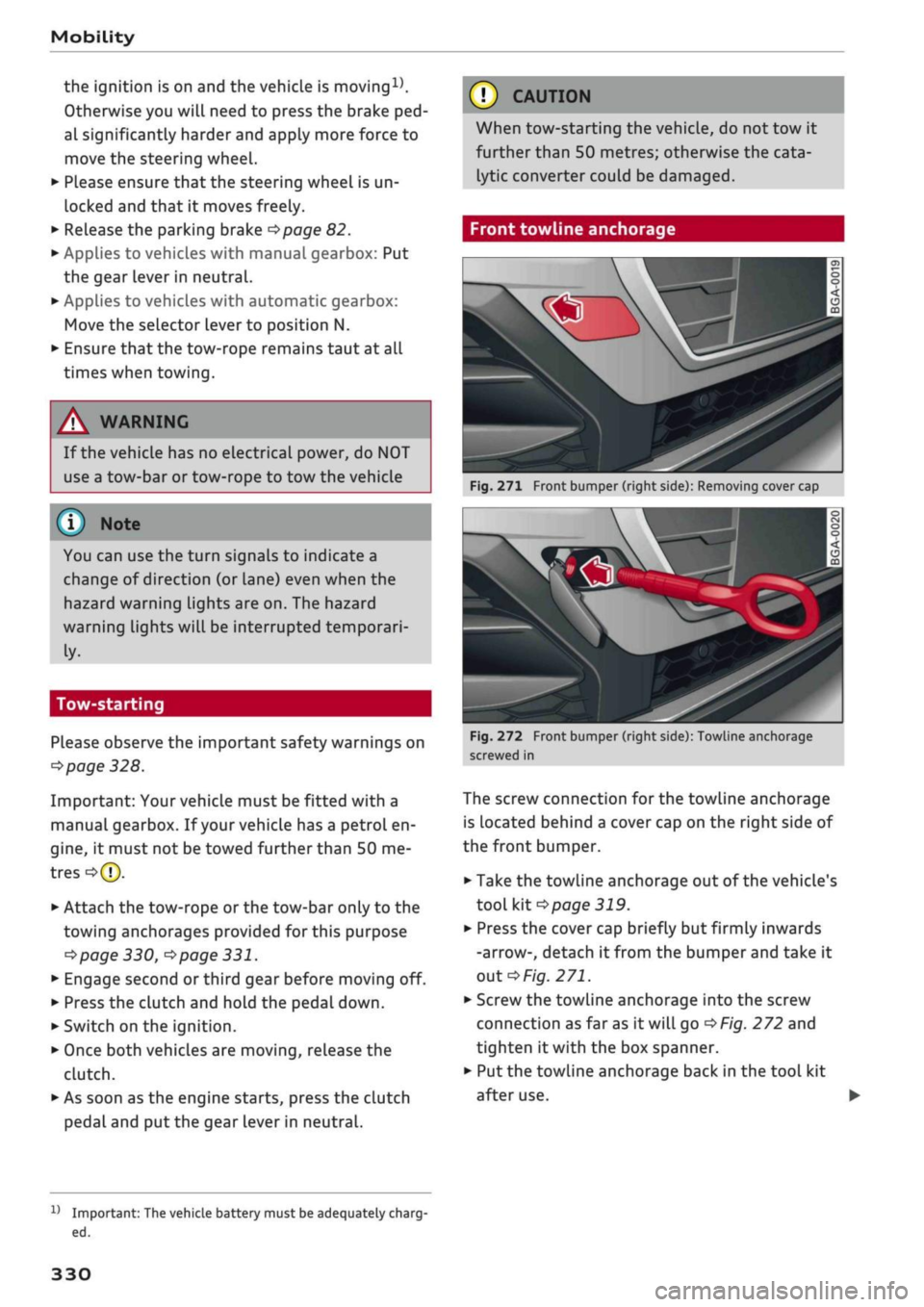
Front towline anchorage
»
Fig.
271 Front bumper (right side): Removing cover cap
Fig.
272 Front bumper (right side): Towline anchorage
screwed in
The screw connection for the towline anchorage
is located behind a cover cap on the right side of
the front bumper.
• Take the towline anchorage out of the vehicle's
tool kit
*
page 319.
• Press the cover cap briefly but firmly inwards
-arrow-, detach it from the bumper and take it
out*Fig.
271.
• Screw the towline anchorage into the screw
connection as far as
it
will go
*Fig.
272 and
tighten it with the box spanner.
• Put the towline anchorage back in the tool kit
after use.
11
Important: The vehicle battery must be adequately charg
ed.
330
Page 337 of 364

Fuses and bulbs
: -•.
-
i:i
m
R2 R3
F22
F-XII
F31
F30
:-:-.'
'.,
FM F43
F49
F!)3
F52
F51
R!,
a
R6
Fig.
277 Interior: Fuse layout
No.
Fl
F2
F4
F5
F6
F7
F8
F9
F10
Fll
F12
F13
F14
F15
F16
F17
F18
Electrical equipment
AdBlue engine components
Seat adjuster
Infotainment control console
Gateway
Selector lever (for automatic gearbox)
Air conditioner/heater console, relay coil
for rear window heating
Switch for electro-mechanical parking
brake,
light switch,
rain/Light
sensor, inte
rior lighting, anti-theft
aLarm
system, di
agnostic connector, emergency call system
Steering column switch module
Infotainment/head-up display
Belt tensioners (driver's side)
Infotainment components
Control unit for suspension control
Blower (heating system/air conditioner)
Electric steering column lock
Infotainment components
Instrument cluster
Reversing camera
No.
F19
F20
F22
F23
F24
F25
F26
F27
F29
F31
F32
F33
F34
F35
F36
F37
F39
F40
F41
F42
F43
F44
F47
F49
F53
Electrical equipment
Control unit for convenience access, park
assist
AdBlue engine components
Power-operated boot lid
Control unit for vehicle electrical system
(right side)
Panorama sun roof
Front/rear door control unit, front/rear
window switches
Seat heating
Sound amplifier
Interior lights
Control unit for vehicle electrical system
(left side)
Control unit for camera, radar sensor, park
assist
Airbag
Button Lighting for hold assist, interior
sound,
reversing light switch, temperature
sensor, coiL for electrical socket reLay, but
ton for hold assist
Function lighting (halogen), headlight
range control, air quality sensor, automat
ic anti-dazzle mirrors, diagnostic connec
tor, centre console power supply
Right headlight (LED)
Left headlight (LED)
Front/rear door control unit, front/rear
window switches
Cigarette lighter, electrical sockets
Belt tensioners (front passenger's side)
Central locking system, windscreen washer
Interior lights
Four-wheel drive
Rear window wiper
Clutch sensor (relays 1+2)
Rear window heating
The seats with electric adjustment* are protected
by circuit breakers. These reset automatically af
ter a few seconds when the overload has been
corrected.
333