2021 AUDI E-TRON virtual
[x] Cancel search: virtualPage 13 of 308
4KE012721BF
Instrument cluster
Instrument cluster
Instrument cluster overview
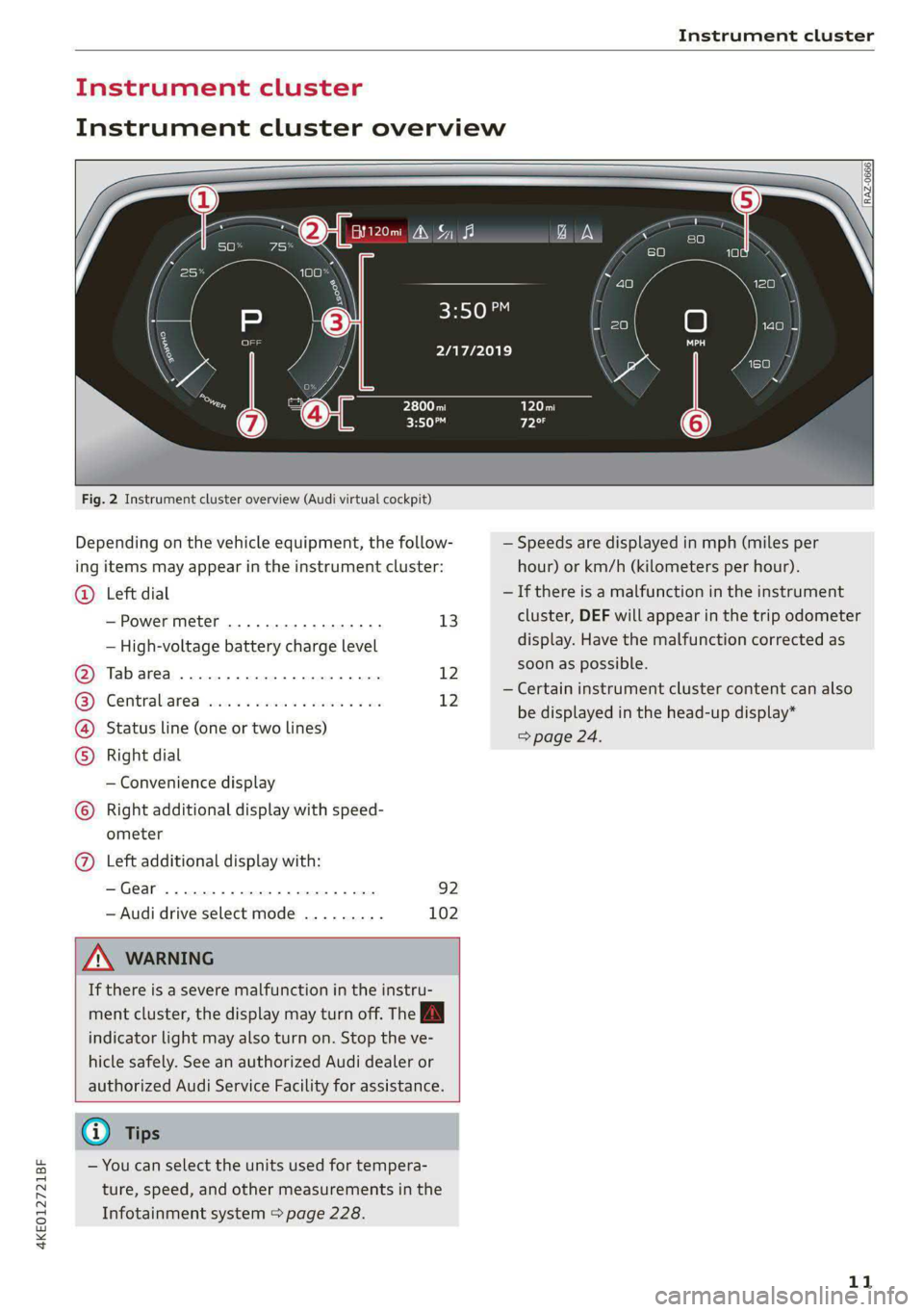
Fig. 2 Instrument cluster overview (Audi virtual cockpit)
Depending on the vehicle equipment, the follow-
ing items may appear in the instrument cluster:
Left dial
— Power meter ..............00. 13
©
— High-voltage battery charge level
Tabarea .... 0... eee eee 12
Centralised via as ieee s maven 6 wa 12
Status line (one or two lines)
Right dial
— Convenience display
Right additional display with speed-
COE
OLORORS)
3:50™
2/17/2019
ometer
Left additional display with:
—Gear ...... 02. eee eee eee 92
— Audi drive select mode ......... 102
ZA WARNING
If there is a severe malfunction in the instru-
ment cluster, the display may turn off. The A
indicator light may also turn on. Stop the ve-
hicle safely. See an authorized Audi dealer or
authorized Audi Service Facility for assistance.
G) Tips
— You can select the units used for tempera-
ture, speed, and other measurements in the
Infotainment system > page 228.
| zl ‘ae.
N a |
a WAi==)/)
A
— Speeds are displayed in mph (miles per
hour) or km/h (kilometers per hour).
— If there is a malfunction in the instrument
cluster, DEF will appear in the trip odometer
display. Have the malfunction corrected as
soon as possible.
— Certain instrument cluster content can also
be displayed in the head-up display*
> page 24.
11
Page 54 of 308

Lights and Vision
Tata
RAZ-1100
Fig. 38 Headliner: reading lights
Reading lights
> To switch the reading lamp on or off, press the
S button @.
> To activate the manual dimming function*,
touch the surface while the light is switched off
“~¥@ and keep touching it until the desired
brightness is reached.
Interior lighting
Applies to: vehicles with interior lighting
The ambient lighting turns on when the ignition
is switched on. The ambient lighting is deactivat-
ed when the lights are set to OFF.
You can adjust the interior lighting individually.
The settings depend on the vehicle equipment.
> Applies to MMI: Select on the home screen: VE-
HICLE > Light & Visibility > Interior lighting.
You can choose from various color profiles, such
as Maritime.
Additional settings and profiles:
— Brightness: you can adjust the brightness for
all of the interior lighting.
— Individual: you can adjust the brightness and
color of the interior lighting separately, divided
into contour and surface lighting.
— Audi drive select: the contour and surface
lighting color changes depending on the select-
ed drive select* mode.
G) Tips
Depending on vehicle equipment, when the
drive select function is activated, the color of
52
the contour and surface lighting may briefly
change to red or blue when the interior tem-
perature is manually increased or decreased.
Eyal) by
You can adjust the instrument and display illumi-
nation separately. The settings depend on the ve-
hicle equipment.
> Applies to MMI: select on the home screen:
SETTINGS > Display & brightness.
Possible settings in the MMI:
— Cockpit dimming
— Head-up display
—MMI
— Audi virtual cockpit
Vision
Adjusting exterior mirrors
~
9
O
© ©
Fig. 39 Driver's door: knob for the exterior mirrors
> Turn the knob in the driver's door to the desired
Position:
0 - Deactivates all adjustment functions.
Q/ © -Selects the left or right exterior mirror.
To adjust the mirror glass in a mirror, press the
knob in the desired direction.
GR - Heats* the mirror glass depending on the
outside temperature.
S) - Folds the exterior mirrors*. To fold the mir-
rors out, turn the knob to one of the other posi-
tions. In the MMI, you can select if the mirrors
fold in automatically when you lock the vehicle
> page 33.
Page 202 of 308

Navigation
Symbol Description
* Favorites > page 201
fa Previous destinations display
Traffic information
— Colored warning symbols: traffic incidents
ahead that are on your route.
— Grayed out warning symbols: traffic incidents
that are not on your route.
— All traffic incidents will display in color when
route guidance is inactive.
— Warning symbols with arrow: traffic incident
that you have been routed around, for example
®.
Map operation
Applies to: vehicles with navigation system
You can operate the map > page 199, fig. 136
with the movements described in the following
information.
Moving the map
> Drag your finger across the map in the desired
direction.
Moving the map quickly
> Swipe your finger across the map in the desired
direction and lift your finger off the map.
Zooming in on the map
>» Place two fingers on the map and pull your fin-
gers apart, or
> Double-tap on the map with one finger.
Zooming out on the map
> Place two fingers on the map and pull your fin-
gers together, or
> Double-tap on the map with two fingers.
Rotating the map
> Rotate the map using two fingers.
Tilting
the map
> Drag upward or downward with two fingers.
200
G) Tips
Certain gestures may not be available on all
touch displays or in every menu.
e guidance
Applies to:
cockpit
ehicles with navigation system and Audi virtual
Fig. 138 Instrument cluster: default view: turning maneu-
ver when route guidance has started
Requirement: route guidance must be on
=>page 195.
The following information will be displayed in the
driver information system, if available:
@ Current vehicle position
@A bar graph appears when there is an upcom-
ing turn. The fewer the bars that are shown, the
shorter the distance is until the turn. If there is
no upcoming turn immediately ahead, the dis-
tance to the destination or stopover, the calculat-
ed arrival time, and a direction arrow for the up-
coming maneuver will be displayed in the right
speedometer. If there is no upcoming maneuver,
the distance to the next maneuver will be dis-
played.
@® Lane recommendation
Page 282 of 308

Fuses and bulbs
Fuse panel () (black)
No. | Equipment
1 | Trailer hitch
3 | Passenger’s side rear safety belt tensioner
4 |Driver’s side rear safety belt tensioner
5 |Trailer hitch socket
6 | Left trailer hitch light
8 |Rear seat heating
Convenience system control module, left
% tail light
Luggage compartment, charging port door
11 | central locking, convenience system con-
trol module
12 | Luggage compartment lid control module
Fuse panel (2) (red)
No. | Equipment
Not assigned
Fuse panel (3) (brown)
No. | Equipment
1 | Driver assistance systems control module
2 | Audi phone box
3 | Right front lumbar support
4 |Side assist
5 | Service disconnect switch
6 |Tire pressure monitoring system
7 |Auxiliary climate control
8 | Exterior antenna
9 |Rear climate control system control panel
10 TV tuner, data exchange and telematics
control module
Virtual exterior mirrors, convenience ac-
11 |cess and start authorization control mod-
ule
12 | Garage door opener
13 | Rearview camera, peripheral cameras
14 Convenience system control module, right
tail light
15
| Right trailer hitch light
280
Bulbs
Your vehicle is equipped with maintenance-free
headlights and tail lights. However, if a light bulb
needs to be replaced, please contact an author-
ized Audi dealer or authorized Audi Service Facili-
ty.
Page 294 of 308

Index
A
A/C cooling mode..........-.. eee eee eee
A/C system refrigerant oil...............
Accelerator pedal...............-0000005
also refer to Accelerator pedal...........
ACCESSOFICES . 6. eee
Active lane assist
refer to Lane departure warning.........
refer to Lane guidance................
Adaptive cruise assist................04.
Cleaning the sensors..............000-
Adaptive cruise control
Predictive control..............000005
Adaptive dampers.............0000 eee
Adaptive speed assist
refer to Adaptive cruise assist..........
Adjusting the air distribution.............
Adjusting the brightness.................
Adjusting the sound.............-..0005
Adjusting the temperature...............
Adjusting the vents.................0005
Adjusting the volume..............00000-
Adjusting the volume (announcements)... .
Adjusting the welcome sound............
Airbag system... 2... eee eee
Airsuspension..............2..00-000.
Alarm system
refer to Anti-theft alarm system..........
Alignment pin (changing the wheel).......
All-weather lights.................00000.
Allseasontires...............000 eee ee
All wheel drive
refer to quattro... .... cece eee
Amazon Alexa integration
Media playback..............-eeeeeee
QPGrAtiNG's « wise 2 2 sic 6 2 ees sa oH © vos
AMI
refer to Audi music interface...........
Android Auto
refer to Audi smartphone interface......
Anti-lock braking system............0005
Anti-Slip Regulation...............0008.
Anti-theft alarmsystemt « ccs sc csaw sess
Anti-theft wheel bolts..................
292
Apple CarPlay
refer to Audi smartphone interface...... 226
Aspect ratio
NIDGO saiex 2 < news 2 5 Ra FB Hee s Gas 220, 222
ASR
refer to Anti-Slip Regulation............ 105
Audi adaptive light..................00-. 48
Audi connect
HEfEFTOMONNESE tive » wesc. ae omen a 2 oe ea 186
Auidi‘drive Sele Cts « 2 wows « x cows 4 2 ream ee 102
Audi e-tron compact charging system..... 119
Adjusting the charging power level...... 120
Changing or attaching the power cable... 124
SECUNING: s s sacum a 3 BaeRE GE Mea gE EEE a Ee 125
Status and malfunction indicators....... 120
Audi music interface ..0. 6c aeu es eae ee oe 217
AUGIOTINGS eeu 9 & aeau s x meen se meme 2 Kee 218
Audi phone box’: s sss ¢ s sees se ees se eee 177
Audi presense........ 0.00. e eee eee eee 156
MeSSAQES « sees = s meey 5 4 neue so eee b Bae 160
Audi pre sense front.............eeee eee 157
Audi side assist
refer to Side assist............-..000-. 160
Audi smartphone interface.............. 226
Legal information. « « ccosis x «ccs se amen 231
Audi virtual cockpit
refer to Instrument cluster.............. ay
AUTO
Automatic headlights.................. 48
Climate control system.............0005 85
Auto Lock (central locking) ............... 32
Automatic climate control system
refer to Climate control system.......... 84
Automatic luggage compartment lid.... 40,41
Automatic wipe/wash system............. 54
Auxiliary climate control................. 87
Average consumption..............20-0. 14
Average speed... eee eee eee eee 14
B
Bag hooks .............. cece eee eee ee 79
Band
refer to Frequency band............... 207
Battery
Charge level display...............0505. 11
Charging (12 Volt vehicle battery)....... 239