2021 AUDI E-TRON towing
[x] Cancel search: towingPage 277 of 308

4KE012721BF
Emergency assistance
— When the parking lock is engaged, neither
the front nor rear axle may be lowered or
raised more than 10. The driveshafts or
tires could be seriously damaged.
— Towing must not be used to charge the
high-voltage battery (recuperation), be-
cause this could result in major damages to
the tow vehicle or the vehicle being towed.
— The vehicle must not be tow started for
technical reasons.
G) Tips
— Switch Audi pre sense* off > page 160 when
loading the vehicle onto a vehicle carrier,
train, ship, or other type of transportation,
or when towing the vehicle. This can prevent
an undesired intervention from the pre
sense* system.
— Follow the local legal regulations for tow-
ing.
Read and follow the important information under
=> page 274.
Preparations
> Only secure the towing cable or tow bar at the
designated towing loops > page 275,
=> page 276.
> Make sure the towing cable is not twisted. Oth-
erwise it could disconnect from the towing loop
while towing.
> Switch the emergency flashers on in both
vehicles > page 50. However, do not do this if it
prohibited by law.
Towing vehicle (front)
> Only start to drive when the towing cable is
taut.
> Press the brake pedal very carefully.
> Avoid sudden braking or driving maneuvers.
Vehicle being towed (rear)
> Make sure the ignition is switched on so that
the steering wheel is not locked and so that you
can use the turn signals, the horn, and the
windshield wipers if needed > A\.
> Switching it off before the vehicle has stopped
may impair the function of the brake booster
and power steering. You would then need to
use more force to steer and brake the vehicle.
> Release the parking brake > page 98.
> Select the “N” selector lever position.
>» Switch the ESC off to avoid error messages
=> page 106.
> Make sure the towing cable is always taut.
ZA WARNING
— Never tow a vehicle using a tow bar or tow-
ing cable if the vehicle does not have electri-
cal power.
— If the vehicle runs out of power while it is
being towed, stop towing the vehicle imme-
diately and consult an authorized Audi deal-
er or qualified repair facility.
t towing loop
Fig. 170 Front bumper: installing the towing loop
The threaded opening for the towing loop is lo-
cated on the right side of the front bumper.
> Remove the towing loop from the vehicle tool
kit > page 267.
> Press the cap inward with brief, strong pressure
=> fig. 170. The cap will loosen from the bump-
er.
> Tighten the towing eye as far as it will go into
the mount. Use a suitable object to tighten the
towing eye completely and securely in the
mount.
» After using, place the towing loop back in the
vehicle tool kit. >
275
Page 278 of 308
Emergency assistance
If the towing loop is not tightened until it
stops when installing, the threads may be
pulled out when towing the vehicle and result
in an accident.
If the towing loop is not tightened until it
stops when installing, the threads may be
pulled out when towing the vehicle and result
in an accident.
Depending on the model, the shape of the cap
can vary.
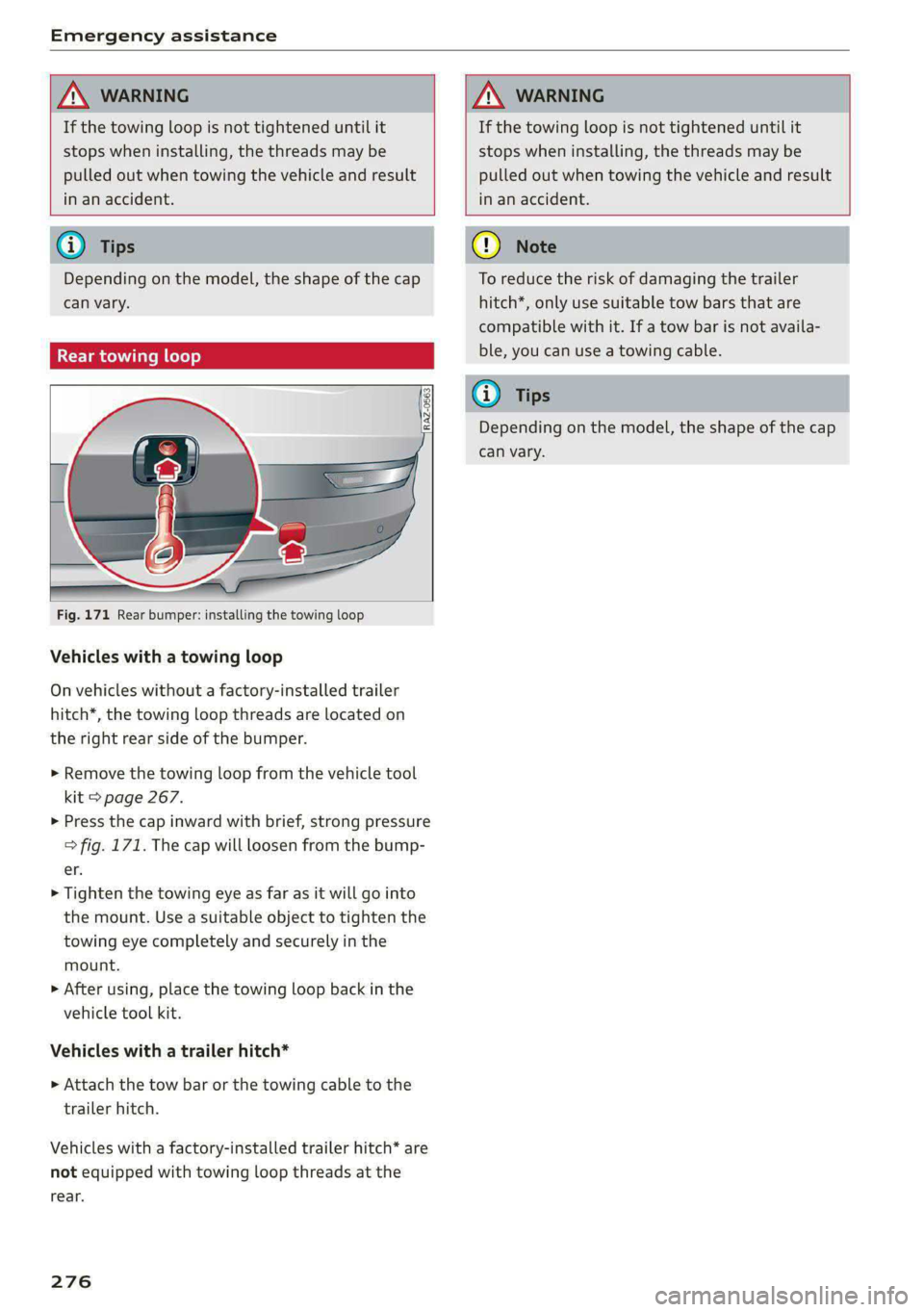
Rear towing loop
Fig. 171 Rear bumper: installing the towing loop
Vehicles with a towing loop
On vehicles without a factory-installed trailer
hitch*, the towing loop threads are located on
the right rear side of the bumper.
> Remove the towing loop from the vehicle tool
kit > page 267.
>» Press the cap inward with brief, strong pressure
=> fig. 171. The cap will loosen from the bump-
er.
> Tighten the towing eye as far as it will go into
the mount. Use a suitable object to tighten the
towing eye completely and securely in the
mount.
> After using, place the towing loop back in the
vehicle tool kit.
Vehicles with a trailer hitch*
» Attach the tow bar or the towing cable to the
trailer hitch.
Vehicles with a factory-installed trailer hitch* are
not equipped with towing loop threads at the
rear.
276
To reduce the risk of damaging the trailer
hitch*, only use suitable tow bars that are
compatible with it. If a tow bar is not availa-
ble, you can use a towing cable.
Depending on the model, the shape of the cap
can vary.
Page 305 of 308

4KE012721BF
Treadwear indicators................-. 250
Unidirectional................4.- 243, 272
Uniform tire quality grading............ 258
Tires and wheels
Glossary of tire and loading terminology .. 244
Tires and vehicle load limits............ 253
Toll Module
refer to Integrated Toll Module......... 139
Tools... cece eee 267
Tool tipS.... 6... eee eee eee eee eee 17
Top tether anchor (securing the child safety
S@at) eee 76
Touch display
Adjusting feedback................008. 17
OPerating ss seman so sesame ov semen + wenn w + cows 15
TOWING’: « 2 saves 5 ¢ ewe 5 9 ewes 2 2 ey + 2 ew 274
TOWING:OOD was ¢ ¢ exes 4 » eee 7s eres 275;276
Towing protection monitoring............. 35
TPMS
Tire pressure monitoring system........ 259
Traffic incidents
refer to Online traffic information....... 204
Traffic INFORMATION & sess 2s wee ¥ woes eo ores 204
Online traffic information.............. 204
Traffic light information................ 136
Traffic sign recognition. «cos. ss cee se ows 134
Thatfie SignSiesia 2 2 soon so semues ow cama oo oe 137
Trailer loadin: « = seam = 2 seme ys seme & y seme 291
Trailer mode
Air SUSPENSION & sissies & ceasice ve sonvee oo samen 126
Trailer towinGies ¢ « sean sv mown 4 5 ows 2 9 new 126
Tongue weight ........... 0... c eee eee 126
Trailer loads... ee eee eee 126
Trailer view. ......................000, 170
Turn assist... 2... cece ee eee ee 159
Turn signals .......... 0.00 cece eee eee 49
U
Uniform tire quality grading............. 258
Unlocking and locking. ...............605 32
By remote control..............-.000-- 37
Using the lock cylinder..............-.. 35
With Audi connect vehicle control........ 38
With the central locking switch.......... 34
With the convenience key............... 37
Update (software) .................0055 229
USB.adapter iin: 3 © sce oo eaaue sv mere 2 waver « 217
USB charging ports. « sis eo sess oo oan so ae 78
USB drive
Supported types/formats.............. 223
USB stick
refer to Audi music interface........... 217
Users
LOCAL USERS suas x 2 same < F Ree FY Skee GY Ga 29
IMYAUUSEDSicx: « «soe 2 x secre 2 een wom seem 29
V
Vanity Minor ces s s ses s saree 3 2 peeee 2 2 tee 54
Vehicle
Gare/cleaning « swan ¢ x isemus v ecninars « siamo 2 9 261
Dimensions .............0 00sec eee eee 290
Identification data................... 290
OULOFSERVICE ecsiie sé «owe ee ewe sv mmo ee 266
Raising........... 0... eee eee eee 271
StArtiiGies ¢ 3 mao g x eae 5 EMER sy eR 90
TRANS POPt cesccer s 2 essen 3 6 ame + eae as REE 103
Unlocking and locking...............05. 37
Weliclertaneinrs + seme ao neneue 2 a snimee 2 4 atene 261
Vehicle control services..............-.. 188
Vehicle data label...............-.0000. 290
Vehicle identification number............ 290
Vehicle jack: = sax « x sees = ¢ sees tp eee bee 267
LifEING POINESE. 5 o somes vo srmane «x cenwere w ¥ ceewe 271
Tire change mode.............00-000- 269
Vehicle key... 20... cee cece eee eee eee 32,36
Vehicle:SOunG icc 6 ces a 6 cere oo avaee ov concer 95
Vehicle: toolkits « cium: ox imma oe nase 2 e sernens 267
Ventilation’: « « wes «2 ween ¢ o wens oy eee a 84
VIEW BUttotiiay: « = coe ¢ 2 eens 2 5 sees 5 3 eee 12
VOIC@MGil « = s secs = = eee 2 y ees oy wee e ge 181
Voice recognition system................. 25,
EXtertial mcu s x noes s eaey ¢ wee as pees as 26
OPeratlings. « a cscs « merssee « scenes « & miedo « 6 a 25
WwW
Weallamountclip somsus & esses s+ crawece w & ceanen 9 125
Warning lights
refer to Indicator lights.................. 7
Washing matte finish paint.............. 261
Wave band
refer to Frequency band............... 207
303