2021 AUDI E-TRON Battery
[x] Cancel search: BatteryPage 111 of 308
![AUDI E-TRON 2021 Owners Manual 4KE012721BF
High-voltage system
Charging the high-voltage battery
Introduction
@
[RAZ-0665]
Fig. 82 Charging options overview
The following options are availab](/manual-img/6/57622/w960_57622-110.png "AUDI E-TRON 2021 Owners Manual 4KE012721BF
High-voltage system
Charging the high-voltage battery
Introduction
@
[RAZ-0665]
Fig. 82 Charging options overview
The following options are availab")
4KE012721BF
High-voltage system
Charging the high-voltage battery
Introduction
@
[RAZ-0665]
Fig. 82 Charging options overview
The following options are available to charge the
high-voltage battery:
Charging method Charging cable Charging port on
the vehicle
@ Charge with household and indus- _|@) Audi e-tron compact charging system |) or ©*
trial alternating current (AC) sockets | >page 119
@ Charge at public alternating current | Charging station cable © or ©*
(AC) charging stations
@®) Quick charge at public direct current | Charging station cable ©
(DC) charging stations
Audi recommends using alternating current (AC) with an industrial alternating current (AC) socket
to charge the high-voltage battery at industrial or with a public alternating current (AC) or direct
sockets, charging stations, or a wallbox. This will current (DC) charging station.
allow you to achieve higher efficiency and a con-
siderably shorter charging time when compared
to charging with a household socket.
High-voltage batteries age over time, which re-
duces the available range. High-voltage batteries
can also age because of how they are used: fre-
Only charge with the Audi e-tron compact charg- quently charging the high-voltage battery com-
ing system using household sockets in special cir- pletely accelerates the aging of the battery and
cumstances, when it is not possible to charge reduces the available range. >
109
Page 112 of 308

High-voltage system
Charging at household and industrial sockets
or at public charging stations with
alternating current (AC)
The vehicle's high-voltage battery can be charged
with alternating current (AC) via the charging
port () on the driver's side. Depending on the ve-
hicle equipment, there may be a second charging
port © on the front passenger's side. Both
charging ports have the same charging power.
You can use whichever charging port is more con-
venient for your charging setup. When using one
charging port, the opposite charging port is
locked.
Quick charging at public direct current (DC)
charging stations
The vehicle’s high-voltage battery can be charged
at a direct current (DC) charging station via the
charging port on the driver's side (S). There is a
significant decrease in charging time. The charg-
ing cable used may be a maximum of 98 feet (30
m).
Charging time
The duration of the charging process may vary
based on the following factors:
— Sockets being used (household or industrial
sockets)
— Country-specific system voltage, current
strength and number of available phases
— Household connection
— The value set for the charging power level on
the Audi charging system control unit
— Fluctuations in the system voltage
— The temperature outside the vehicle
— The temperature of the high-voltage battery
and the Audi charging system control unit.
— Settings for the climate control inside the vehi-
cle
— Current capacity of the charging connector
— Whether the ignition is on or off
Important safety precautions
ing the battery incorrectly (for example by
disregarding general safety precautions, using
unsuitable or damaged sockets and charging
cables, or charging with unsuitable electrical
equipment) and can lead to serious and fatal
injuries.
— Do not charge using sockets/electrical
equipment that is clearly damaged or instal-
led incorrectly.
— Never use charging equipment that is clearly
damaged and/or dirty. Check the charging
equipment for damage before every use.
— Never modify or repair any electrical compo-
nents, especially the high-voltage system.
— Never charge in areas at risk for explosions.
The components in the charging equipment
can trigger sparks, which can cause flamma-
ble or explosive fumes to ignite. To reduce
the risk of explosions, especially in garages,
make sure the Audi e-tron charging system
control unit is at least 19 inches (50 cm)
above the floor when charging.
— Never use the charging equipment with an
extension cord, a cable reel, a power strip,
or an adapter, for example, a travel adapter
or timer.
— Do not touch the contacts on the vehicle
charging port or charging equipment.
— Do not insert any objects in the vehicle
charging port or in the charging equipment.
— Always protect the sockets and connections
from water, moisture and other fluids.
— Never charge with both vehicle charging
ports at the same time.
— Only use the charging equipment provided
by the factory or the charging station cable.
ZA\ WARNING
Short circuiting, electric shock, explosions,
fire, and severe burns can result from charg-
ZA\ WARNING
Applies to: Audi charging systems
Sockets that are installed incorrectly can
cause electric shock or fire when charging the
high-voltage battery using the vehicle charg-
ing connection.
— Read all information and safety precautions
for Audi charging systems before using
them.
110
Page 113 of 308

4KE012721BF
High-voltage system
— Monitor the Audi charging system if it is be-
ing used near children.
— Installation and setup of the household con-
nection for Audi charging systems may only
be performed by a qualified electrician. The
qualified electrician is thereby responsible
for adhering to applicable standards and
regulations.
— Make sure that the household socket is
grounded and shielded from water.
— If Audi charging systems do not function ac-
cording to the specifications in the operat-
ing manual, they must not be used. Contact
an authorized Audi dealer or authorized
Audi Service Facility.
— Audi charging systems are intended for use
in private and semi-private areas (for exam-
ple, private property and company parking
lots). Depending on the country where the
vehicle is operated, charging with a mode 2
charging cable (meaning charging with the
Audi charging system) may be prohibited in
public areas. Contact an authorized Audi
dealer or authorized Audi Service Facility for
more information.
— Operate the Audi charging systems in power
networks that are properly grounded. It can-
not be used with non-grounded power net-
works (such as IT networks).
— When charging the high-voltage battery us-
ing household/industrial sockets, the elec-
trical installation can be used at full capaci-
ty. Audi recommends having a qualified elec-
trician regularly inspect the electrical instal-
lations that are used for charging.
— If possible, disconnect Audi charging sys-
tems from the power network during a
thunderstorm.
— Never submerge the Audi charging systems
or the connectors in water.
— Audi charging systems must only be cleaned
when the control unit is completely discon-
nected from the power supply and from the
vehicle. Use a dry towel to clean.
— Audi charging systems are only intended for
use on Audi vehicles and vehicles within the
Volkswagen Group. Using the devices on
vehicles made by another manufacturer is
not authorized.
() Note
— If the vehicle is not being used for long peri-
ods of time, the high-voltage battery must
be charged after four months at the latest
or the vehicle must be continuously con-
nected to a power source (for 50% charging
target > page 115). Otherwise, the high-
voltage battery could become damaged.
— Make sure that you always use the correct
charging equipment for the country in
which it is being used. Contact an author-
ized Audi dealer or authorized Audi Service
Facility for more information.
— On vehicles with only one charging port,
there is a cover on the opposite side of the
vehicle with no charging components instal-
led underneath it. Do not try to open this
cover.
G@) Tips
— Your vehicle can only be charged at charging
stations that meet the requirements in the
respective country and meet the following
standards, at a minimum:
— GB/T 18487.1 and GB/T 20234 (China)
— IEC 61851 and IEC 62196 (Europe)
— SAE J1772 (North America, Japan)
— You can use your Audi charging system if
there is a household or industrial connec-
tion available at the charging station.
(i) Tips
Applies to: Audi charging systems
— For an uninterrupted charging process, Audi
recommends only charging using sockets
that are connected to a separately protected
circuit.
— Audi recommends using Audi charging sys-
tems in the wall mount clip* during opera-
tion. If this is not possible, always position
Audi charging systems on a secure surface
during the charging process > A.
—To reduce the risk of overheating during op-
eration, do not place Audi charging systems
111
>
Page 115 of 308

4KE012721BF
High-voltage system
Depending on the selected view > page 12, the
following information about the charging process
is displayed in the instrument cluster:
— Gv: range
—&: remaining charging time until the charging
process is complete
— 2): current battery charge level
—Q: date and time of when the charging process
was completed
—&: charging speed (additional range per hour)
—4: charging power (depends on the selected
power source)
To access the charging process information at a
later time, select in the instrument cluster: Vehi-
cle functions tab > EE] button > Charging.
Ending the charging process
You can interrupt the charging process at any
time.
— Unlock the vehicle. In vehicles with a conven-
ience key*, the convenience key only needs to
be near the charging port door.
— Press the center of the button @.
— Remove the charging connector. If the charging
connector is not removed within 30 seconds, it
will automatically relock and the charging proc-
ess may continue.
— After removing the charging connector, the
charging port door will close automatically;
otherwise, press on the center of the button @
to close the charging port door.
— Disconnect the charging cable from the power
supply if necessary or return it securely to the
charging station.
— Install the protective caps on the charging ca-
ble again.
—If you are transporting the charging cable in
the vehicle, store it securely > page 119.
If the charging connector cannot be disconnected
from the vehicle, perform the following steps in
the order listed and try again to disconnect the
charging connector:
— Switch the ignition on/off.
— Lock/unlock the vehicle.
— Make sure the auxiliary air conditioning is not
activated > page 87.
If the charging connector still cannot be discon-
nected, you must unlock it manually > page 116.
If you cannot disconnect the charging connector
from the charging station, authenticate yourself
again at the charging station and then try again
to disconnect the charging connector. If you still
cannot disconnect the charging connector from
the charging station, contact the charging sta-
tion operator.
Z\ WARNING
—When closing the charging port door, make
sure the area where the door is closing is
clear to reduce the risk of injury.
— Do not disconnect the charging cable from
the socket or the vehicle charging port while
the vehicle is charging. End the charging
process before removing the charging cable
from the socket in order to reduce the risk of
damaging the connector contacts from
sparks.
— Never drive with the charging port door
open. An open charging port door could hit
other road users, which increases the risk of
injury.
— Ifa charging unit is damaged, the vehicle
must not be charged at the damaged charg-
ing port or at the charging port on the other
side* to reduce the risk of injury.
— If the charging unit is damaged or the
charging port door cannot close or is miss-
ing, drive immediately to an authorized Audi
dealer or authorized Audi Service Facility
and have the malfunction corrected to re-
duce the risk of injury.
@) Note
— If you drive with the charging unit open,
both the charging port door and the elec-
tronics installed behind it could be dam-
aged. Check each time after charging if the
port door is locked before you start driving
the vehicle.
— Applies to: vehicles with charging ports on
the driver and front passenger’s side: Never
attempt to charge the vehicle using both
113
>
Page 116 of 308

High-voltage system
charging ports at the same time, because — Remove ice and snow in the charging unit
this could damage the charging equipment. using a hand brush and solvent-free deicing
Gy Tips
spray.
— The vehicle radio and TV systems may have
— If the parking brake is set, it could create limited reception when charging the vehicle.
noises when the charging connector is con-
nected.
Charging display
The charging display is an LED light on the charg- informs you about the various displays. The fol-
ing unit @) that indicates the charging status. A lowing table explains the displays.
label on the charging unit @) > page 112, fig. 84
LED on the charging unit Meaning
Off
Vehicle charging system is in sleep mode. A timer may be active,
but charging has not started yet.
Charging process is interrupted.
White Pulsing
Connection between the power source and the vehicle is being
established.
Pulsing The high-voltage battery is charging.
Green Flashing A timer is active, but charging has not started yet.
On High-voltage battery charging process is completed.
On
Yellow
When using the Audi charging system, make sure the power
plug is inserted in the power socket > page 119. No power sup-
ply was recognized even though the charging cable is plugged
in. Have the power supply or power supply system inspected.
When using the Audi charging system, check the status displays
on the unit > table on page 120. See an authorized Audi dealer
or authorized Audi Service Facility for assistance if necessary.
Flashing
The vehicle is not secured from rolling away. Check if “P” is se-
lected and the parking brake is set. If the LED continues to
flash, see an authorized Audi dealer or authorized Audi Service
Facility for assistance.
114
Page 117 of 308

4KE012721BF
High-voltage system
LED on the charging unit Meaning
Red On The charging connector may not be able to lock correctly in the
vehicle charging port. Check if the charging connector is insert-
ed correctly. Disconnect the charging connector, reconnect it to
the charging socket, and press it upward lightly for five seconds,
or use a different charging station. If the LED stays turned on,
there is a malfunction either in the vehicle charging system or at
the power source. See an authorized Audi dealer or authorized
Audi Service Facility for assistance if necessary.
Both charging port doors are open. Try to close one of the charg-
ing port doors by hand. If the LED stays turned on, the high-
voltage battery may not be charging. See an authorized Audi
dealer or authorized Audi Service Facility for assistance.
The outside temperature is too low or too high.
@ Tips
The charging display modes are also displayed
in the instrument cluster Bag.
Setting the charging connector to unlock
automatically
To prevent a charging station from being blocked
for long periods of time and to make it possible
for others to charge, you can set the charging
connector to unlock automatically once the
charging process has ended.
> Before charging, always check if the selected
settings are suitable for the current charging
session.
> Applies to: MMI: Select on the home screen:
VEHICLE > Charging & Efficiency > Charging >
@.
@) Note
The function should only be activated if the
charging cable is part of the charging station.
Otherwise, your charging cable could be sto-
len.
Setting the charging target
You can set the charging target, meaning you can
set the maximum charge level to which the high-
voltage battery should be charged. The charging
target can be set between 50% and 100%. For
daily usage, Audi recommends setting the charg-
ing target at 80%. This can extend the service life
of the high-voltage battery. For long trips, Audi
recommends setting the charging target to
100% to achieve the highest possible range.
> Applies to: MMI: Select on the home screen:
VEHICLE > Charging & Efficiency > Charging.
> When the timer is displayed, swipe your finger
on the display toward the right.
> Press on the right section of the battery charge
level display.
> Set the desired charging target.
The charging target that is set will be stored and
used in all locations where you have not defined
specific charging settings. If you are charging at
an address where you have defined specific
charging settings > page 116, Advanced charg-
ing settings, the charging target that is set will
be stored in the advanced charging settings and
used.
G) Tips
If you set the charging target lower than the
current battery charge level while charging,
then the charging process will be canceled. If
you set the charging target above the current
battery
charge level again, then the charging
process will resume. This does not apply if you
are charging at a charging station, where you
have authenticated yourself manually. If this
is the case, authenticate yourself again at the
charging station.
115
Page 119 of 308
4KE012721BF
High-voltage system
> Drive to an authorized Audi dealer or author-
ized Audi Service Facility immediately to have
the malfunction corrected.
Manually releasing the charging connector
If you are not able to pull the charging connector
out of the vehicle charging port, there may bea
malfunction. You must use the emergency re-
lease to release the vehicle charging connector.
Requirement: the “P” gear must be selected and
the vehicle must be unlocked.
> End the charging process > page 113.
> Open the hood = page 234.
> Open the cover in the motor compartment on
the side of the applicable charging port.
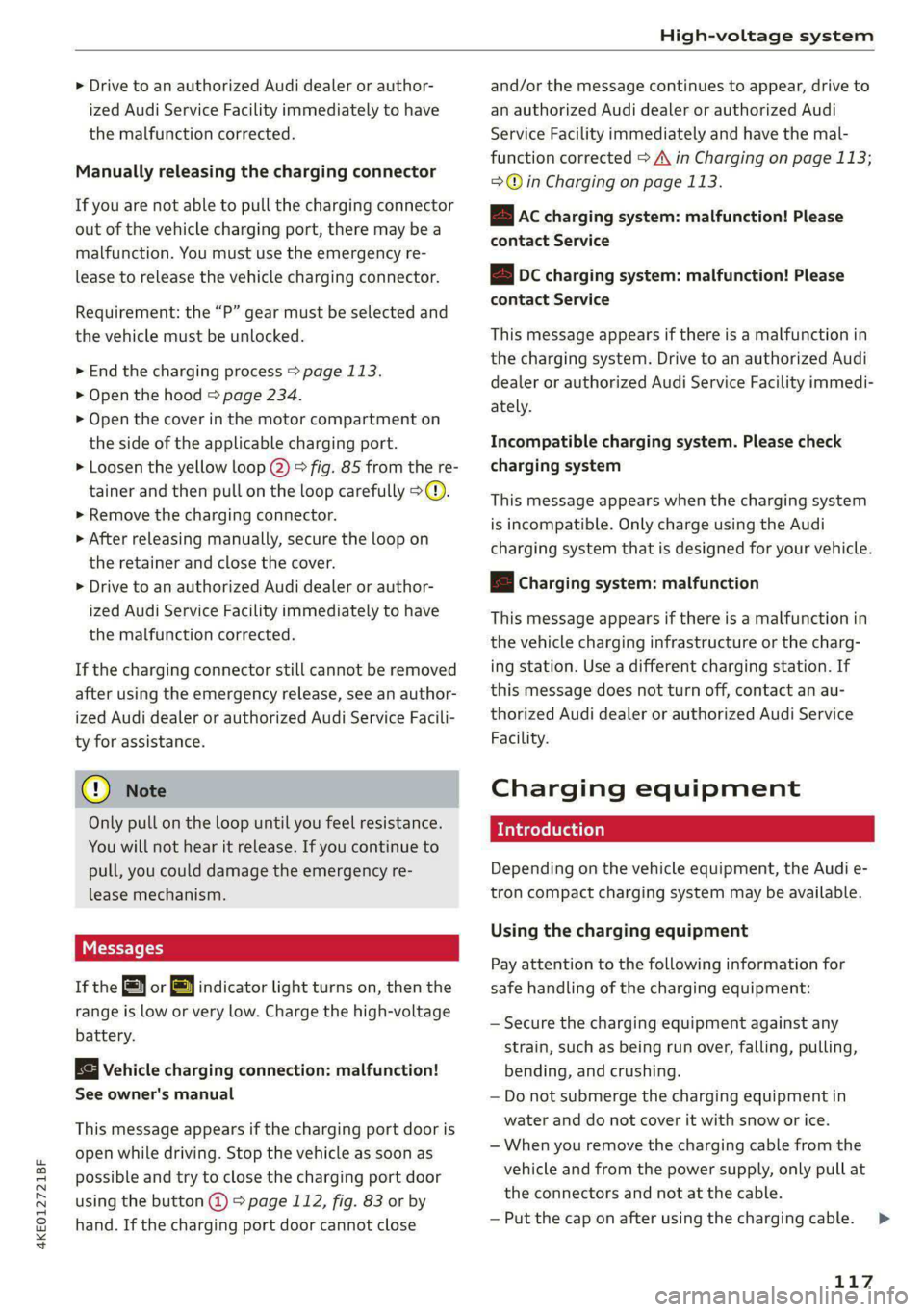
> Loosen the yellow loop @) fig. 85 from the re-
tainer and then pull on the loop carefully >@.
» Remove the charging connector.
> After releasing manually, secure the loop on
the retainer and close the cover.
> Drive to an authorized Audi dealer or author-
ized Audi Service Facility immediately to have
the malfunction corrected.
If the charging connector still cannot be removed
after using the emergency release, see an author-
ized Audi dealer or authorized Audi Service Facili-
ty for assistance.
@) Note
Only pull on the loop until you feel resistance.
You
will not hear it release. If you continue to
pull, you could damage the emergency re-
lease mechanism.
Messages
If the or BY indicator light turns on, then the
range is low or very low. Charge the high-voltage
battery.
Vehicle charging connection: malfunction!
See owner's manual
This message appears if the charging port door is
open while driving. Stop the vehicle as soon as
possible and try to close the charging port door
using the button @) & page 112, fig. 83 or by
hand. If the charging port door cannot close
and/or the message continues to appear, drive to
an authorized Audi dealer or authorized Audi
Service Facility immediately and have the mal-
function corrected > A\ in Charging on page 113;
=>@© in Charging on page 113.
EB Ac charging system: malfunction! Please
contact Service
B DC charging system: malfunction! Please
contact Service
This message appears if there is a malfunction in
the charging system. Drive to an authorized Audi
dealer or authorized Audi Service Facility immedi-
ately.
Incompatible charging system. Please check
charging system
This message appears when the charging system
is incompatible. Only charge using the Audi
charging system that is designed for your vehicle.
fa Charging system: malfunction
This message appears if there is a malfunction in
the vehicle charging infrastructure or the charg-
ing station. Use a different charging station. If
this message does not turn off, contact an au-
thorized Audi dealer or authorized Audi Service
Facility.
Charging equipment
Introduction
Depending on the vehicle equipment, the Audi e-
tron compact charging system may be available.
Using the charging equipment
Pay attention to the following information for
safe handling of the charging equipment:
— Secure the charging equipment against any
strain, such as being run over, falling, pulling,
bending, and crushing.
— Do not submerge the charging equipment in
water and do not cover it with snow or ice.
— When you remove the charging cable from the
vehicle and from the power supply, only pull at
the connectors and not at the cable.
— Put the cap on after using the charging cable.
117
>
Page 122 of 308

High-voltage system
Requirement: the correct power plug must be in-
stalled > page 124.
— Insert the plug into the socket.
— Plug the vehicle charging connector into the ve-
hicle charging port.
— The charging process e will start automatically.
— Once the charging process has completed, un-
lock the vehicle and remove the vehicle charg-
ing connector from the vehicle charging port.
Adjusting the charging power level
The control unit automatically recognizes the
voltage and the available current strength. You
can set whether you would like to charge with full
or reduced charging power. The last setting that
was selected will be saved and used again the
next time the vehicle is charged. If multiple
items are connected to the power circuit, the
charging current may be reduced when charging
Control unit: status and malfunction indicators
at a power outlet. This can help to prevent the
electrical equipment from overheating.
The vehicle has a minimum battery charging ca-
pacity of 880 W. Therefore, if the network volt-
age is less than 200 V, charging using a house-
hold socket will only be possible if the charging
power level is set to 100%. Otherwise, the charg-
ing process will not start.
Before charging, always check if the charging
power setting that was selected last is still suita-
ble.
— To set the charging power level, press and hold
the ® button © ® fig. 87 for at least two sec-
onds.
After the charging power level is set, the status
LEDs Q, {and (will flash green one time. The
selected value (50% or 100%) is displayed on the
left or right side of the ® button.
Indicator lights Meaning Solution
O Green The charger is ready to charge, | Starting the charging process
O O Off but is not charging. => page 112.
O & off
O 0 off
9 Off
O Flashing green _| The vehicle is being charged
QO Off with the ground conductor
E off monitor activated.
0 Off
Off
Flashing green
®O®OVSSC|I®OO0O
ance will be reduced.
C Yellow ed. Possible cause of the mal-
a
& oft is being used in single-phase
mode. The charging perform-
Off
The power cable has overheat- | After the cable cools down, the malfunc-
tion will be automatically cleared. Until it
Off function: a multi-phase socket | cools down, charging performance will be
reduced. If the malfunction continues,
have the power supply/household con-
nection checked by a qualified electrician.
120