2021 AUDI A8 high beam
[x] Cancel search: high beamPage 162 of 362
Driving information
— Night vision assist can only detect pedes-
trians and wild animals located within the
range of the infrared camera.
— Night vision assist cannot detect pedes-
trians or wild animals and mark them if:
— They are not in an upright position, for ex-
ample if they are sitting or lying down
and/or
—The silhouette in the display appears in-
complete or interrupted, for example be-
cause the pedestrian is partially behind a
vehicle or an animal is partially covered by
tall grass.
— Never attempt to swerve around animals if
doing so would endanger you or other road
users.
G@) Tips
— Even though the system evaluates the
shape and heat given off by all detected ob-
jects, there are limits to the system. There
may be false warnings.
— For technical reasons, the image pauses in
split second intervals.
Switching on and off
Applies to: vehicles with night vision assist
The system can be switched on and off in the
MMI > page 153.
> The AUTO light function must be selected for
the night vision assist to automatically activate
when it is dark.
> Switch on the low beams manually to activate
night
vision assist immediately. To do so,
press (@) on the light switch module > page 58,
fig. 42 and select 20.
When activated, the i tab appears in the instru-
ment cluster.
> Select in the instrument cluster: 4% tab
@) Tips
When the night vision assist tab is selected in
the instrument cluster and the low beams are
switched off, the thermal image display dis-
appears only after you have exited the tab.
160
Marking and warning
Applies to: vehicles with night vision assist
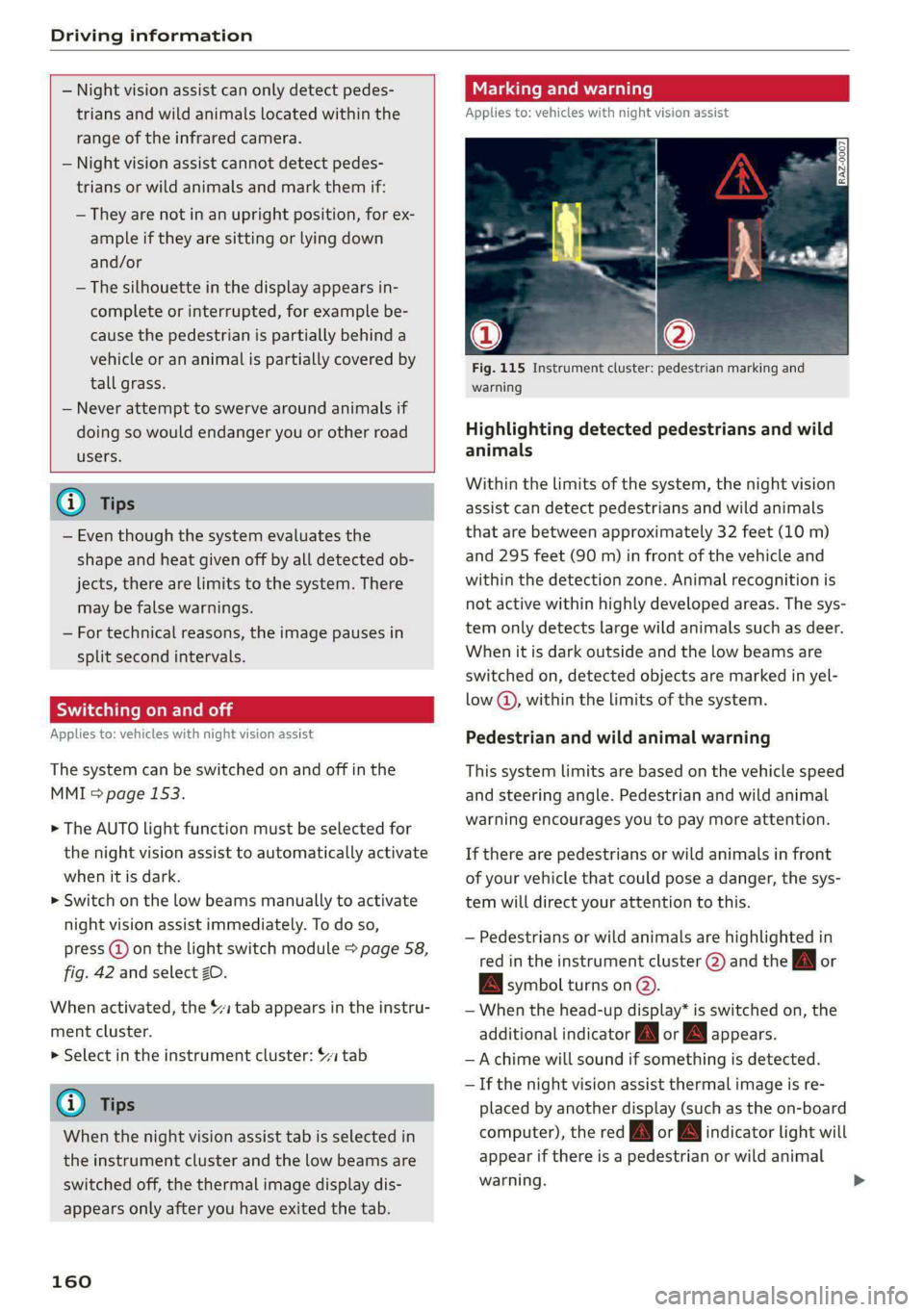
Fig. 115 Instrument cluster: pedestrian marking and
warning
Highlighting detected pedestrians and wild
animals
Within the limits of the system, the night vision
assist can detect pedestrians and wild animals
that are between approximately 32 feet (10 m)
and 295 feet (90 m) in front of the vehicle and
within the detection zone. Animal recognition is
not active within highly developed areas. The sys-
tem only detects large wild animals such as deer.
When it is dark outside and the low beams are
switched on, detected objects are marked in yel-
low @), within the limits of the system.
Pedestrian and wild animal warning
This system limits are based on the vehicle speed
and steering angle. Pedestrian and wild animal
warning encourages you to pay more attention.
If there are pedestrians or wild animals in front
of your vehicle that could pose a danger, the sys-
tem will direct your attention to this.
— Pedestrians or wild animals are highlighted in
red in the instrument cluster (2) and the J or
BAN symbol turns on @.
— When the head-up display* is switched on, the
additional indicator [AM or EM appears.
—Achime will sound if something is detected.
—If the night vision assist thermal image is re-
placed by another display (such as the on-board
computer), the red A or A indicator light will
appear if there is a pedestrian or wild animal
warning.
Page 163 of 362
4N0012721BF
Driving information
The Sl symbol will appear when pedestrian and
wild animal detection is not available.
Marking light*
To direct the driver's attention to a pedestrian,
the headlights can flash on the pedestrian when
there is a pedestrian warning.
This occurs at speeds above approximately
35 mph (60 km/h) if you are outside of illuminat-
ed areas and no detected vehicles are shown. The
marking light is not used for wild animals. The
high beam assistant* controls the marking
light*> page 59.
Adjusting the contrast
Applies to: vehicles with night vision assist
Requirement: the night vision assist must be
switched on and the 1 tab must be displayed.
> Applies to MMI: Select on the home screen: VE-
HICLE > Driver assistance > (<2) > Night vision
assist.
> To set the desired contrast, move the slider.
Messages
Applies to: vehicles with night vision assist
Night vision assist: currently unavailable.
See owner's manual
The system is not functioning correctly at the
time, so it has been switched off. If the malfunc-
tion persists, drive immediately to an authorized
Audi dealer or authorized Audi Service Facility to
have the malfunction repaired.
Integrated Toll Module
Applies to: vehicles with Integrated Toll Module
Depending on the region, you can pay toll fees in
certain countries using the Integrated Toll Mod-
ule (ITM). It replaces a separate transponder for
detecting toll fees. The system electronics are in-
tegrated in the rearview mirror housing.
To use the ITM in toll zones, you must register
and activate it.
Registration
> Applies to MMI: Select on the home screen: VE-
HICLE > Settings & Service > Vehicle informa-
tion Toll module.
> Note the Integrated Toll Module ID.
> To register the ITM, go to the displayed web ad-
dress and follow the instructions.
Activation
> To activate the ITM, press CD in the MMI.
Entering the number of passengers
Depending on the number of passengers and the
region, a lower toll fee may be charged. You must
either enter the number of passengers or deacti-
vate the ITM based on the laws applicable in the
area where you are driving.
> To enter the number of passengers, select the
appropriate button in the MMI.
> To deactivate the ITM, press C in the MMI.
@) Tips
— The driver is responsible for specifying the
correct number of passengers and activat-
ing or deactivating the ITM.
— Malfunctions can occur when detecting tolls
if both the ITM and transponder are activat-
ed. Deactivate the system not being used or
remove it as necessary.
—Ifa rearview mirror is replaced, you must
register the new ITM and remove the old
ITM from the account.
—The system complies with United States FCC
regulations and ISED regulations
> page 341.
Display
Applies to: vehicles with Integrated Toll Module
The selected number of passengers is displayed
in the MMI status bar > page 23.
The ii symbol in the status bar and a notifica-
tion in the MMI will indicate if there is a faulty
connection between the ITM and the MMI or if
the ITM is faulty. If the connection interference
continues or the ITM is faulty, drive immediately >
161
Page 352 of 362

Index
Glossary of tire and loading terminology... 292
Glove compartment ........0. 0c cece scene 97
Cooled... 62... eee eee 95
Valet parking’: + exes « ¥ cans & ¢ Sees + ¥ eevee 2 55
Gross Axle Weight Rating (GAWR)........ 344
Gross Vehicle Weight Rating (GVWR) ...... 344
GVWR
refer to Gross Vehicle Weight
Rating (GVWR) « sees © 2 sorves 2 0 ssamewe « a aes 344
H
Handset
refer to Rear Seat Remote............... 26
Hamdstreeis « snscsa: x x srawaws a x sams tv aceon wx one 210
HandsiFree Profiles. «ssw oo amin ss mmm © 210
Head-up display
TAGJUSTIAG scsi «6 sxsvews «a anexsen on amma 6 suszens wo 33
Adjusting the brightness................ 63
QOPErSLING’s + aces 3 = news 3 2 mom § ede + Ee 33
Headlight range control...............00. 58
Headlights
Cleaning’: « ¢ saws = ¢ sews oy eeew ee ees ene 311
Headlight range control................ 58
Washer system... .. 0... eee eee eee eee 66
Washer system (filling washer fluid) ..... 287
Head restraints
IACJUStIN Gans s cuecem @ 3 owen « 8 wee 6 oreHeR 79
Removing and installing................ 79
Heated rear Window occ. cee eee eee 102
Heated steering wheel.............00005 104
FO atingpasies ao svsise « & smwene © & anaes @ Hanae @ 0 6 100
HFP
refer to Hands Free Profile............. 209
High-voltage battery...............008- 131
Audi e-tron compact charging system.... 140
CharginiGee: « s eves = x sees + o eee eg 131, 134
Charging display on the vehicle......... 135
Charging equipment.................. 138
Charging methods.................... 131
Charging ports on the vehicle........... 131
Charging time.......... 2... eee eee 132
Connecting the charging cable.......... 134
Messages while driving................ 137
Not running for long periods of time..... 133
Opening the charging port door......... 134
Quick:eharging sec = 2 sews 2s eves vs wens we 131
350
Setting the timer’. « « esses v6 meee ve meee vs 136
Transporting charging equipment....... 139
High-voltage system............-...00-. 131
High beams
High beam assistant............00e00u 59
Highway lights..................-.0000s 58
Hill descent control.............0 2200s 122
Hill.holdiassisty. w:cesice x ecesese w = syersim oo avoir 109
Home
refer to Home address.............005 236
Home address............ 000-00 e eee 236
HomeLink
refer to Garage door opener............. 55
Home screen... 1... 0. cece eee eee eee ee 19
HOM... eee ete teens 6
Hotspot
refer to Wi-Fi...........0.- 00 eee eee 225
I
Ignition
Switching on and off...............0-. 107
Imbalance (wheels)..................-- 298
Immobilizer
refer to Electronic immobilizer........... 45
Indicator lights: : see: ss eens sy ores x copes se 7
Inspection interval............-.00--00. 287
Instrument cluster...............-0000-5 12
Adjusting the layout................0.. 13
Cleaning iwi: © swine ¥ o cwenie 2 weve wo 2 een « © 313
Engine code... .. 2... eee eee eee 267
FailUr@lve s = eee 2 x mown a = Beers ee ee x eee 12
Onsboard:computen « sss x x wari so swans oa 16
Operating......... 00. c cece eee ee eee 13
Service interval display...............- 287
Software information................. 267
Switching tabs.................0000005 13
SWitchintg CHE VIEW ass + ans 4 s ees xo Ra 13
Vehicle functions « « sivas < siren oo mewn 6 9 oe 16
Version information...............00- 267
Instrument illumination................. 63
Integrated assistance................0.. 20
Integrated Toll Module................. 161
Intelligent search
NaVvigatlotincs + weseuire + exaueas wo avassos i # eae 231
Interference-Causing Equipment Standard
(ICES) 2... eee eee 342