2021 AUDI A8 washer
[x] Cancel search: washerPage 6 of 362
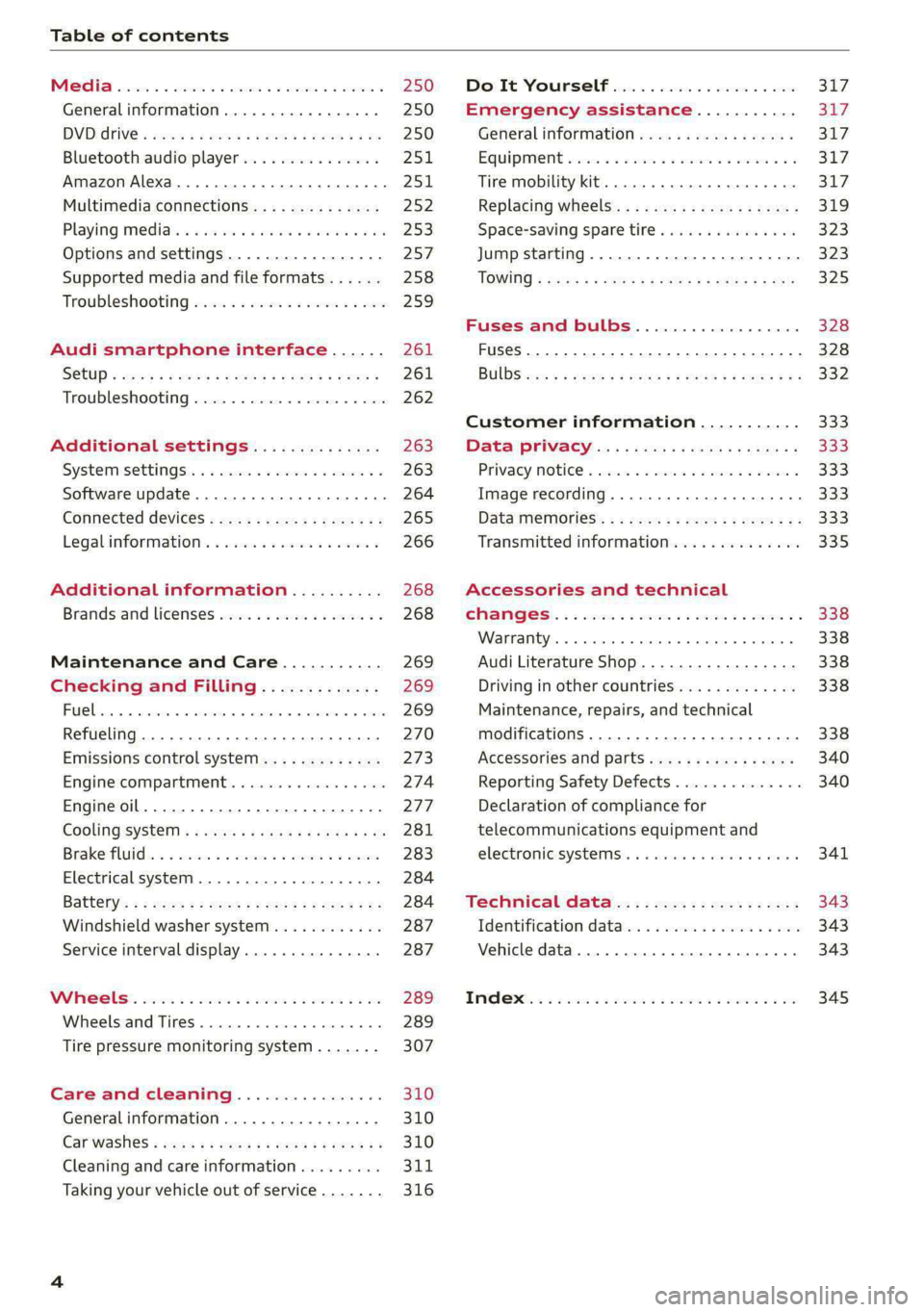
Table of contents
Co | fan a 250
General information................. 250
DVD: drive « swe s 2 awe 2 ewes 2 ewe see 250
Bluetooth audio player............... 251
Amazon Alexa.... 2.0.0. cece eee eee 251
Multimedia connections.............. 252
Playing medias. « & ssc 2c ewae « owe oo ee 253
Options and settings................. 257
Supported media and file formats...... 258
Troubleshooting ewies 2 < sce se enw so xy 259
Audi smartphone interface...... 261
S@tUD « ses + y gam peas + yoms os Bene 261
Troubleshooting.............-..00005 262
Additional settings.............. 263
Systemisettingsc « + cssuene so mvswee a soseeue vs 263
Software update........... 0.0 e eee 264
Connected devices..............2---5 265
Legal.information ss « sess s+ ama sx ween « 266
Additional information.......... 268
Brands and licenses...............-4- 268
Maintenance and Care........... 269
Checking and Filling............. 269
Fuel... cee eee 269
Refueling ......... 0... ce eee ee eee eee 270
Emissions control system............. 273
Engine:compartmMentss. scsi so vec eo cee 274
Engineoil........ 00... eee eee eee 277
COOLINGSYSEEM « « sees & = nets 5 = eetew so ore 281
Brake:fluid «2 csoswe s 2 wscceve ov eevee oo erm 283
Electrical system. ...........002-0 00 284
Battery: » = sees = » mean 5 4 meee ye ee Gt BE 284
Windshield washer system...........- 287
Service interval display............... 287
WWATEBUSE. core 5 6 sae oo sms oo ee oo oe 289
Wheels and Tires...........--0000 00s 289
Tire pressure monitoring system....... 307
Care and cleaning................ 310
Generalinformation................. 310
Carwashes ; aves + + sews ss ews se eee ee 310
Cleaning and care information......... 311
Taking your vehicle out of service....... 316
DO.It YOUSUF ovis. io 6 sssicone 3 6 excess 8 4 sane 317
Emergency assistance........... Sly
Generalinformation................. 317
Equipment sncseas xo wexeas ae seems as arvuews ¥ 2 317,
Tire mobility kit.............0...000- 317
Replacing wheels................-00. 319
Space-saving spare tire............... 323
Jump starting....................00. 323
"TOWING © szerws = i sates & 2 a £ § See 5g ee 325
Fuses and bulbs.................. 328
Fuses... 0... eee eee eee 328
BULDS ccs = seme x eens ot ewe ve ee a Pe 332
Customer information........... 333
Data Privaes:s ss seus ss gown se wom ss 333
PRIVAGY, MOLICE «sues 2 w avin w semecwns w vues a 333
Image recording..............00-000- 333
DatainieMmories:: < + sen x = wees sp eee eas 333
Transmitted information.............. 335
Accessories and technical
OMAMGES. « & cicrees 5 2 sn. 6 a snore 0 soe wo 338
Warranty... . 0. ee eee cece 338
Audi Literature Shop..............--- 338
Driving in other countries............. 338
Maintenance, repairs, and technical
modifications. ........ 0... cee eee eee 338
Accessories and parts.............0-. 340
Reporting Safety Defects.............. 340
Declaration of compliance for
telecommunications equipment and
electronic systeMS........0 cece ee eeee 341
Teennical datas: ¢ «ox. is meen ss ees 343
Identification data................ 00% 343
Vehicle data... 2... . ee eee eee eee ee 343
TAA Sis scence: oo cesses 2 v wee © o omen © 2 ove 345
Page 8 of 362

Quick access
Quick access
Cockpit
QOOOCOLO
©
OO©®@
Fig. 1 Cockpit
Door handle
Central locking switch ...........
Memory function buttons ........
Adjusting the air vents ..........
Vent
Lever for:
—Turn signals and high beams ....
— High beam assistant ..........
— Lane departure warning ........
—Lane guidance ...............
Multifunction steering wheel with:
— Horn ber
— Driver's airbag .............0.
— Operating buttons ............
— Shift paddles; « « ses « s veau 2 ew
Instrument cluster .............
Head-up display ...............
Windshield washer system lever ..
Upper display .................
cay Lower display, « s «sma ss wean soe
@ Lockable glove compartment with:
CD/DVD drive seas ss eae oo cae
— Switch for cooled glove compart-
ment ........ 00. eee eee eee ee
— Valet Parking function .........
@ Front passenger's airbag ........
@ Knee airbag ...................
@ Depending on equipment, buttons
for:
—drive select ..................
— Electronic Stabilization Control
(ESC) sisi s meron se awn a a one @ we
—Emergency flashers ...........
—Defrosting ..................
— Rear window defogger .........
@ MMI On/Off button .............
@ Depending on equipment, buttons
for:
— Parking systems ..............
3 S|
ns < |
20
250
95
55
84
84
124
130
100
Page 11 of 362

4N0012721BF
Quick access
Anti-lock braking system (ABS)
=> page 130
Steering
=>page 127
Steering lock
=>page 127
All wheel drive
=>page 129
Suspension control
=>page 126
Air suspension
=> page 126
Engine speed limitation
>page 14
Tank system
=> page 270
Tank system/high-voltage system
=> page 270
Electrical system
> page 284
Engine oil level (MIN)
> page 278
Engine oil level (MAX)
=> page 278
Engine oil sensor
> page 278
Malfunction Indicator Lamp (MIL)
=> page 274,
Engine warm-up request
> page 278
Washer fluid level
=> page 287
Windshield wipers
=> page 68
High-voltage battery range
=> page 137
Parking systems
=> page 190
Park assist plus
=> page 202
Maneuver assist
=> page 208
Tire pressure
=> page 307
Tire pressure
=> page 307
Loose wheel warning
=> page 304
Bulb failure indicator
=> page 62
Adaptive light
=> page 62
Light/rain sensor
=> page 62, > page 68
Door lock
=> page 43
Battery in vehicle key
=> page 47
Night vision assist
=> page 161
Intersection assist
=> page 185
Side assist
=> page 183;
Exit warning
=> page 184
Rear cross-traffic assist
=>page 195
Adaptive cruise assist
=>page 175
Steering intervention request
=>page 170, > page 177
Lane departure warning
=> page 178
Distance warning
=>page 175
Audi pre sense
=> page 182
Emergency assist
=> page 186
Emergency call function
=> page 228
Page 53 of 362

4N0012721BF
Opening and closing
— You are standing too close to the bumper or
too far away from it
— The luggage compartment lid was closed or
opened immediately beforehand
— You park close to a hedge and the branches
move back and forth under the vehicle for a
long period of time
— You clean your vehicle, for example with a
pressure washer or in a car wash
— There is heavy rain
— The bumper is very dirty, for example after
driving on salt-covered roads
— There is interference to the vehicle key's ra-
dio signal, such as from mobile devices or
remote controls
Mechanically unlocking the luggage
compartment lid
BGA-0026
Fig. 37 Luggage compartment lid: mechanical key in lock
cylinder
>» Remove the integrated mechanical key
=> page 45.
> Insert the mechanical key in the luggage com-
partment lid lock cylinder.
> Turn the key counterclockwise. The luggage
compartment lid opens.
A ‘WARNING
Observe the safety precautions > page 48.
Opening the luggage compartment lid
bicedu mia sie(M Une ( Tn
Fig. 38 Inner luggage compartment lid: lever
> Press the lever in the direction of the arrow un-
til the luggage compartment lid opens.
Never close the luggage compartment lid us-
ing
the emergency handle.
Child safety lock
The child safety lock prevents the rear doors
from being opened from the inside and the rear
power windows from being operated.
RAZ-1026|
Fig. 39 Driver's door: controls
> To activate or deactivate the child safety lock
for the rear doors (which controls the power
windows and interior door handle), press the
left and/or right 8 button in the driver's door
> fig. 39. The indicator light in the button turns
on/blinks.
> Make sure the child safety lock is working by
checking the function on the rear power win-
dow switch and door handle.
> Applies to: vehicles with controls for the cli-
mate control system in the rear and MMI: To
51
>
Page 68 of 362

Lights and Vision
Windshield wipers
Switching the windshield wipers on
RAZ-0149.
Fig. 51 Lever: windshield wipers.
> Move the windshield wiper lever SY to the cor-
responding position:
@ Windshield wipers off
@ Rain sensor/intermittent mode. The wind-
shield wipers switch on once the vehicle speed
exceeds approximately 2 mph (4 km/h) and it is
raining. The higher the sensitivity of the rain sen-
sor that is set (switch © to the right), the earlier
the
windshield wipers react to moisture on the
windshield. You can deactivate the rain sensor
mode, which switches the interval mode on. In
intermittent mode, you can adjust the interval
time using the switch ©.
» Applies to: MMI: Select on the home screen:
VEHICLE > Light & Visibility > Rain sensor.
@ Slow wiping
@ Fast wiping
@ Single wipe. If you hold the lever in this posi-
tion longer, the wipers switch from slow wiping
to fast wiping.
© Clean the windshield @. The number of wipes
and afterwipes depends on how long the lever is
held in position ©).
The wipers wipe one time after several seconds of
driving to remove water droplets. You can switch
this function off by moving the lever to position
© within ten seconds of the afterwipe. The after-
wipe function is reactivated the next time you
switch the ignition on.
66
If you hold the lever in position ©) for longer
than half a second, the edge wiping feature will
be activated. This moves the windshield wipers
closer to the edge of the windshield and per-
forms an afterwipe to clean the residue that re-
sults from the wiping process from the edge of
the windshield. The function is available when
driving at speeds up to 75 mph (120 km/h).
The headlight washer system* operates only
when the low beam headlights are on. If you
move the lever to position 6), the headlights and
the night vision assist camera”* are cleaned at in-
tervals.
Z\ WARNING
— The rain sensor is only intended to assist the
driver. The driver may still be responsible for
manually switching the wipers on based on
visibility
conditions.
— The windshield must not be treated with
water-repelling windshield coating agents.
Under unfavorable conditions, such as wet-
ness, darkness, and when the sun is low,
these coatings can cause increased glare,
which increases the risk of an accident. They
can also cause wiper blade chatter.
— Properly functioning windshield wiper
blades are required for a clear view and safe
driving > page 67, Cleaning/changing wip-
er blades.
@) Note
— If there is frost, make sure the windshield
wiper blades are not frozen to the wind-
shield. Switching on the windshield wipers
when the blades are frozen to the wind-
shield can damage the wiper blades.
— Prior to using a car wash, the windshield
wiper system must be switched off (lever in
position @). This prevents the wipers from
switching on unintentionally and causing
damage to the windshield wiper system.
@) Tips
— The windshield wipers switch off when the
ignition is switched off. You can activate the
windshield wipers after the ignition is
Page 69 of 362

4N0012721BF
Lights and Vision
switched on again by moving the windshield
wiper lever to any position. The single wipe
function (lever in position @) also functions
when the ignition is switched off.
— Worn or dirty windshield wiper blades result
in streaking. This can affect the rain sensor
function. Check your windshield wiper
blades regularly.
— The washer fluid nozzles for the windshield
washer system are heated when the ignition
is on if the outside temperature is low.
— When stopping temporarily, such as at a
traffic light, the speed of the windshield
wipers automatically reduces by one level.
[eG ce a es ce wiper blades
B8V-0696]
Ae
Fig. 52 Windshield wipers: changing the wiper blades
Wiper blade replacement position
> Switch off the ignition and hold the windshield
wiper lever in position @) > page 66, fig. 51 un-
til the windshield wiper moves into the wiper
blade replacement position.
> To bring the windshield wipers into the normal
position, switch the ignition on and hold the
windshield wiper lever in position @) until the
windshield wipers go back to the original posi-
tion, or drive faster than 8 mph (12 km/h).
You can also turn the wiper blade replacement
position on or off in the MMI:
> Switch the windshield wipers off (position @
=> page 66, fig. 51).
> Applies to MMI: Select on the home screen: VE-
HICLE > Settings & Service > Wiper change po-
sition.
Cleaning the wiper blades
Requirement: the windshield wipers must be in
the wiper blade replacement position.
> Fold the windshield wiper arm away from the
windshield.
> For information on cleaning, see > table on
page 311.
Replacing the wiper blades
Requirement: the windshield wipers must be in
the wiper blade replacement position.
> Fold the windshield wiper arm away from the
windshield.
> Press the locking knob @) on the wiper blade.
Hold the wiper blade firmly.
» Remove the wiper blade from the windshield
wiper arm mount (2).
> Insert the new wiper blade into the mount on
the wiper arm until it clicks into place.
> Place the wiper arm back on the windshield.
> Exit the wiper blade replacement position.
ZA WARNING
— For safety reasons, the windshield wiper
blades should be replaced once or twice
each year.
— Dirty windshield wiper blades can impair vi-
sion, which increases the risk of an accident.
@) Note
— The windshield wipers must only be lifted
up when in the wiper blade replacement po-
sition.
Otherwise, you risk damaging the
paint on the hood or the windshield wiper
motor.
— You should not move your vehicle or press
the windshield wiper lever when the wiper
arms are folded up from the windshield. The
windshield wipers would move back into
their original position and could damage the
hood and windshield.
67
>
Page 279 of 362

4N0012721BF
Checking and Filling
Engine compartment overview
The most important check points.
Fig. 181 Typical location of the reservoir and the engine oil filler opening (example)
Observe the safety precautions > page 274, Gen-
eral information.
@ Washer fluid reservoir (>) > page 287
@ Jump start point (+) under a cover, (-) with
hex head screw > page 286, Charging the 12
Volt vehicle battery > page 323, Jump start-
ing
Engine oil filler opening (7) > page 279
Brake fluid reservoir (OC) under a cover
=> page 283
Coolant expansion tank for combustion en-
gine (£) > page 282
© Plug-in hybrid drive: coolant expansion tank
for the high-voltage system (-) > page 282
©
©®&
@ Sticker* for engine oil specifications
=> page 277
The engine oil filler opening may be located ina
different area depending on the specific engine.
@ Tips
Plug-in hybrid drive*: read the information re-
garding the coolant expansion tank under
= page 282 and the jump start under >@ in
Preparation on page 324.
Engine oil
If the engine oil level is too low
If you need to add engine oil, use an oil that is
listed on the sticker. The sticker is located at the
front
of the engine compartment > page 277,
fig. 181. When using the engine oil listed on the
sticker, you can adjust the oil level as often as
needed.
If engine oil that meets the recommended speci-
fication is not available, in an emergency you
may add a maximum of 1 quart (1 liter) of
ACEA C3 or API SN engine oil one time until the
next oil change.
277
>
Page 289 of 362

4N0012721BF
Checking and Filling
> Close the cover on the positive terminal.
> Close the hood > page 276.
ZA WARNING
— Never connect a charging cable or jump
start cable directly to the 12 Volt vehicle
battery. Only use the connections in the en-
gine compartment > page 286.
— A highly explosive mixture of gases can form
when charging batteries. Only charge the
battery in well-ventilated areas.
— A drained battery can freeze at tempera-
tures around 32 °F (0 °C). Do not charge or
use a frozen or thawed battery. If ice forms,
the battery housing can crack and battery
electrolyte can leak out, which increases the
risk of an explosion and chemical burns.
Contact an authorized Audi dealer or author-
ized Audi Service Facility for more informa-
tion.
— Do not connect or disconnect the charging
cable while charging because this increases
the risk of an explosion.
@) Tips
Read all of the manufacturer's instructions
for the charger before charging the battery.
Windshield washer
system
B4M-0135)
Fig. 186 Engine compartment: washer fluid reservoir cap
Observe the safety precautions > page 274, Gen-
eral information.
The windshield washer reservoir <> contains the
cleaning solution for the windshield and the
headlight washer system* > fig. 186,
= page 277. The reservoir capacity can be found
in > page 344.
To reduce the risk of lime scale deposits on the
spray nozzles, use clean water with low amounts
of calcium. Always add window cleaner to the wa-
ter. When the outside temperatures are cold, an
anti-freezing agent should be added to the water
so that it does not freeze.
Messages
|} Please add washer fluid
Fill the washer fluid for the windshield washer
system and the headlight washer system* when
the ignition is switched off.
CG) Note
—The concentration of anti-freezing agent
must be adjusted to the vehicle operating
conditions and the climate. A concentration
that is too high can lead to vehicle damage.
— Never add radiator anti-freeze or other addi-
tives to the washer fluid.
— Do not use a glass cleaner that contains
paint solvents, because this could damage
the paint.
Service interval display
The service interval display detects when your ve-
hicle is due for service.
The service interval display works in two stages:
— Inspection or oil change reminder: after driv-
ing a certain distance, a message appears in the
instrument cluster display each time the igni-
tion is switched on or off. The remaining dis-
tance or time is displayed briefly.
— Inspection or oil change due: if your vehicle
has reached an inspection or oil change interval
or both intervals at the same time, the mes-
sage Inspection due! or Oil change due! or Oil
change and inspection due! appears briefly af-
ter switching the ignition on or off.
Checking service intervals
You can check the remaining distance or time un-
til the next oil change or next inspection in the
Infotainment system.
287