2021 AUDI A5 ABS
[x] Cancel search: ABSPage 227 of 318

8W7012721BB
Additional information
Additional information
Brands and licenses
This manual does not contain any symbols, such
as ® or ™, to identify trademarks or registered
trademarks. However, the absence of these sym-
bols does not constitute a waiver of any rights as-
sociated with these names.
Apple, iPhone, iPod touch, Apple CarPlay, Light-
ning, and iTunes Radio are trademarks of Apple
Inc.
10S is a trademark or, in the USA and other coun-
tries, a registered trademark of Cisco and is used
under license.
Other product and manufacturer names may be
trademarks of their respective owners.
225
Page 255 of 318

8W7012721BB
Wheels
absolutely necessary and drive
carefully when doing so.
—Do not use run-flat tires on
your vehicle. Using them when
not permitted can lead to ve-
hicle damage or accidents.
—If you install wheel covers on
the vehicle, make sure they al-
low enough air circulation to
cool the brake system. If they
do not, this could increase the
risk of an accident.
Tire wear and damage
rr)
+
x xz + a
Fig. 174 Tire profile: treadwear indica-
tor
Tire wear
Check the tires regularly for wear.
—Inflation pressure that is too low
or high can increase tire wear
considerably.
D Obey any applicable regulations in the
country where the vehicle is being oper-
ated.
—Driving quickly through curves,
rapid acceleration, and heavy
braking increase tire wear.
—Have an authorized Audi dealer
or authorized Audi Service Facili-
ty check the wheel alignment if
there is unusual wear.
—Have the wheels rebalanced if an
imbalance is causing noticeable
vibration in the steering wheel.
If you do not, the tires and other
vehicle components could wear
more quickly.
Treadwear indicator
Original equipment tires contain
treadwear indicators in the tread
pattern, which are bars that are
1/16 inch (1.6 mm) high and are
spaced evenly around the tire per-
pendicular to the running direc-
tion > fig. 174. The letters “TWI”
or triangles on the tire sidewall
indicate the location of the tread-
wear indicators.
The tires have reached the mini-
mum tread depth !) when they
have worn down to the treadwear
indicators. Replace the tires with
new ones > A.
253
Page 264 of 318

Wheels
tests, and does not include acceleration, cor-
nering, hydroplaning or peak traction charac-
teristics.
ZX WARNING
The temperature grade for this tire is estab-
lished for a tire that is properly inflated and
not overloaded. Excessive speed, underinfla-
tion, or excessive loading, either separately or
in combination, can cause heat buildup and
possible tire failure.
ZX WARNING
Temperature grades apply to tires that are
properly inflated and not over or underinflat-
ed.
Tire pressure monitoring
system
(1) General notes
Each tire, including the spare (if provided),
should be checked monthly when cold and inflat-
ed to the inflation pressure recommended by the
vehicle manufacturer on the vehicle placard or
tire
inflation pressure label. (If your vehicle has
tires of a different size than the size indicated on
the vehicle placard or tire inflation pressure la-
bel, you should determine the proper tire infla-
tion pressure for those tires).
As an added safety feature, your vehicle has been
equipped with a tire pressure monitoring system
(TPMS) that illuminates a low tire pressure tell-
tale when one or more of your tires is significant-
ly under-inflated. Accordingly, when the low tire
pressure telltale illuminates, you should stop and
check your tires as soon as possible, and inflate
them to the proper pressure. Driving on a signifi-
cantly under-inflated tire causes the tire to over-
heat and can lead to tire failure. Under-inflation
also reduces fuel efficiency and tire tread life,
and may affect the vehicle's handling and stop-
ping
ability.
Please note that the TPMS is not a substitute for
proper tire maintenance, and it is the driver's re-
sponsibility to maintain correct tire pressure,
262
even if under-inflation has not reached the level
to trigger illumination of the TPMS low tire pres-
sure telltale.
Your vehicle has also been equipped with a TPMS
malfunction indicator to indicate when the sys-
tem is not operating properly. The TPMS mal-
function indicator is combined with the low tire
pressure telltale. When the system detects a
malfunction, the telltale will flash for approxi-
mately one minute and then remain continuously
illuminated. This sequence will continue upon
subsequent vehicle start-ups as long as the mal-
function exists.
When the malfunction indicator is illuminated,
the system may not be able to detect or signal
low
tire pressure as intended. TPMS malfunctions
may occur for a variety of reasons, including the
installation of replacement or alternate tires or
wheels on the vehicle that prevent the TPMS
from functioning properly. Always check the
TPMS malfunction telltale after replacing one or
more tires or wheels on your vehicle to ensure
that the replacement or alternate tires and
wheels allow the TPMS to continue to function
properly.
If the tire pressure monitoring indicator
appears
Applies to: vehicles with Tire Pressure Monitoring System in-
dicator
The tire pressure indicator in the instrument
cluster informs you if the tire pressure is too low
or if there is a system malfunction.
Using the ABS sensors, the tire pressure monitor-
ing system compares the tire tread circumference
and vibration characteristics of the individual
tires. If the pressure changes in one or more
tires, this is indicated in the instrument cluster
display with an indicator light @ and a message.
If only one tire is affected, the location of that
tire will be indicated.
The tire pressures must be stored again each
time you change the pressures (switching be-
tween partial and full load pressure) or after
changing or replacing a tire on your vehicle
=> page 263. The tire pressure monitoring system >
Page 272 of 318
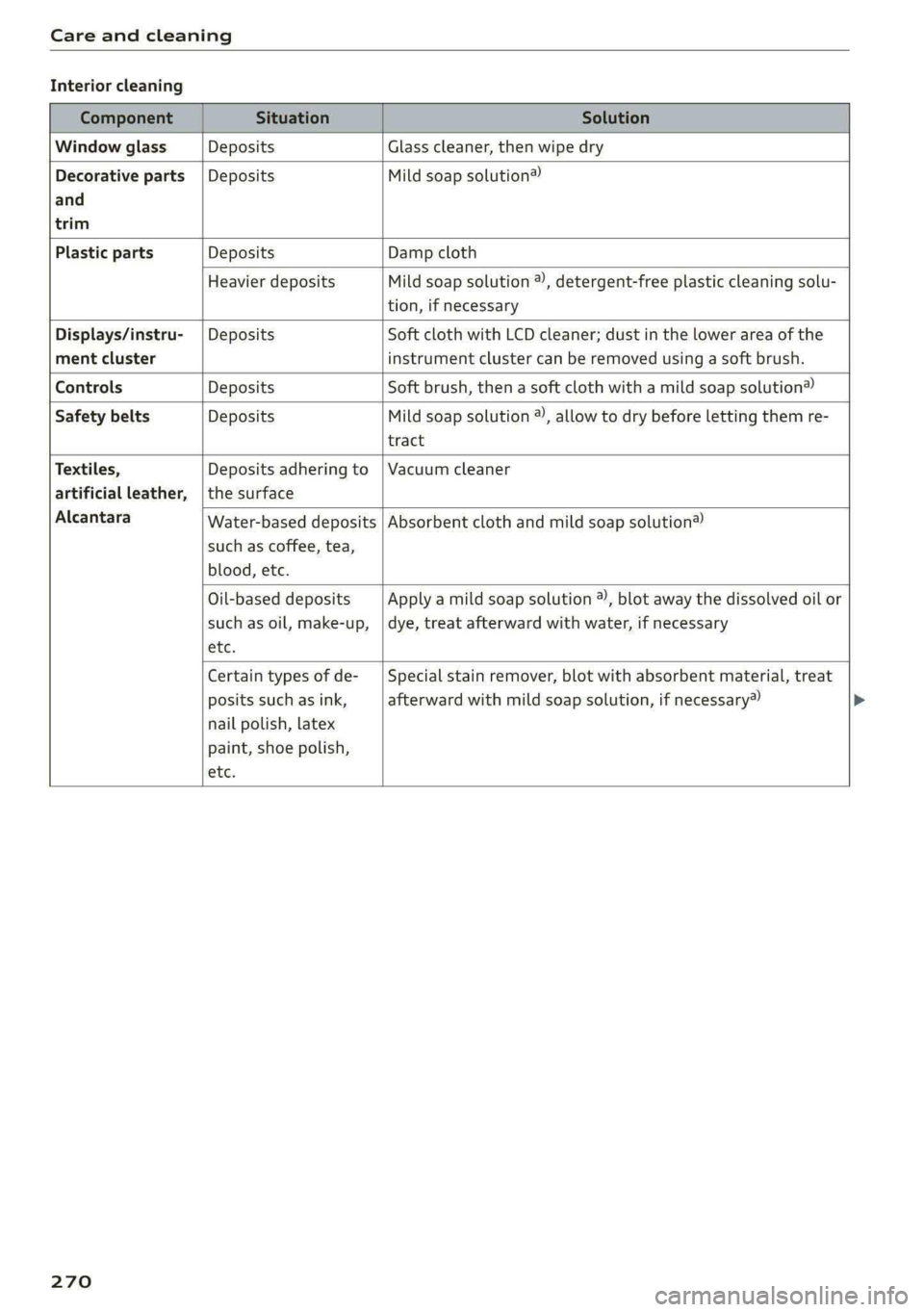
Care and cleaning
Interior cleaning
Component Situation Solution
Window glass Deposits Glass cleaner, then wipe dry
Decorative parts {Deposits Mild soap solution®
and
trim
Plastic parts Deposits Damp cloth
Heavier deposits Mild soap solution ®), detergent-free plastic cleaning solu-
tion, if necessary
Displays/instru- | Deposits Soft cloth with LCD cleaner; dust in the lower area of the
ment cluster instrument cluster can be removed using a soft brush.
Controls Deposits Soft brush, then a soft cloth with a mild soap solution®
Safety belts Deposits Mild soap solution ®), allow to dry before letting them re-
tract
Textiles, Deposits adhering to | Vacuum cleaner
artificial leather, | the surface
Alcantara
Water-based deposits
such as coffee, tea,
blood, etc.
Absorbent cloth and mild soap solution®
Oil-based deposits
such as oil, make-up,
etc.
Apply a mild soap solution ®), blot away the dissolved oil or
dye, treat afterward with water, if necessary
Certain types of de-
posits such as ink,
nail polish, latex
paint, shoe polish,
etc.
Special stain remover, blot with absorbent material, treat
afterward with mild soap solution, if necessary»
270
Page 273 of 318

8W7012721BB
Care and cleaning
Component Situation Solution
Natural leather Fresh stains Cotton cloth with a mild soap solution®
Water-based deposits
such as coffee, tea,
blood, etc.
Fresh stains: absorbent cloth
dried stains: stain remover suitable for leather
Oil-based deposits
such as oil, make-up,
etc.
Fresh stains: absorbent cloth and stain remover suitable
for leather
dried stains: oil cleaning spray
Certain types of de-
posits such as ink,
nail polish, latex
paint, shoe polish,
etc.
Spot remover suitable for leather
nents
Care Regularly apply conditioning cream that protects from
light and penetrates into the material. Use special colored
conditioning cream, if necessary.
Carbon compo- Deposits Clean the same way as plastic components
a) Mild soap solution: maximum two tablespoons of neutral soap in 1 quart (1 liter) of water
Z\ WARNING
The windshield must not be treated with wa-
ter-repelling windshield coating agents. Un-
der unfavorable conditions, such as wetness,
— Never use warm or hot water to remove
snow or ice from the camera lens. This
could cause the lens to crack.
— Never use abrasive cleaning materials or
alcohol to clean the camera lens. This
darkness, and when the sun is low, these coat-
ings can cause increased glare, which increas-
es the risk of an accident. They can also cause
wiper blade chatter.
() Note
— Headlights and tail lights
— Never clean the headlights or tail lights
with a dry cloth or sponge because the
lights could be damaged.
— Do not use any cleaning products that con-
tain alcohol, because they could cause
cracks to form.
— Wheels
— Never use any paint polish or other abra-
sive materials.
— Damage to the protective layer on the
rims, such as stone chips or scratches,
must be repaired immediately.
— Camera lenses
could cause scratches and cracks.
— Power top
— Remove bird droppings immediately.
— Never use gasoline, spot remover, ben-
zene, paint thinner or other solvents to re-
move.
— Door windows
— Remove snow and ice on windows and ex-
terior mirrors with a plastic scraper. To re-
duce the risk of scratches, move the scra-
per only in one direction and not back and
forth.
— Never remove snow or ice from door win-
dows and mirrors using warm or hot water
because this could cause cracks to form.
—To reduce the risk of damage to the rear
window defogger, do not apply any stick-
ers on the heating wires on the inside of
the window.
— Decorative parts and trim
— Never use chrome care or cleaning prod-
ucts.
271
Page 289 of 318

8W7012721BB
Fuses and bulbs
Fuse panel (4) (brown) Fuse panel © (black)
14 | Fuel injectors, engine control module 1 Left rear door control module, left rear
15 |Ignition coils, heated oxygen sensors power window
16 | Fuel pump 12 | Parking heater
Fuse panel @) (red) Fuse panel (0) (black)
No. | Equipment No. | Equipment
Anti-theft alarm system Front seat electronics, seat ventilation,
2. [Engine control module rearview mirror, rear climate ‘control sys-
1 |tem control panel, neck heating, front pas-
3 Left front seat electronics, lumbar sup- senger's airbag warning light, diagnostic
port, massaging seat connection
4_|Automatic transmission selector lever Diagnostic interface, vehicle electrical sys-
5 |Horn 2 tem control module
6 |Parking brake 3 /Sound generator
7 | Diagnostic interface 4 |Clutch position sensor
8 | Roof electronics control module 5 |Engine start, emergency shut-off
9 | Emergency call module 6 Diagnostic connection, traffic information
10 | Airbag control module antenna (TMC)
1 Electronic Stabilization Control (ESC), An- 7 |USB input
ti-Lock Braking System (ABS) 8 | Garage door opener
12 | Diagnostic connection, light/rain sensor 7 Audi adaptive cruise control, distance reg-
13 | Climate control system ulation
14 | Right front door control module 11 | Front camera
15 | Climate control system compressor 12 | Right headlight
16 Brake system pressure reservoir, left neck 13 | Left headlight
heating 14 |Transmission fluid cooling
Fuse panel © (black) Fuse panel © (red)
No. | Equipment No. | Equipment
1 |Front seat heating 1 | Ignition coils
2 |Windshield wipers 2 |Climate control system compressor
3 | Left headlight electronics 5 | Left headlight
4 | Panoramic glass roof 6 |Automatic transmission
5 |Left front door control module 7 | Instrument panel
6 | Sockets 8 | Climate control system blower
7 Right rear door control module, right rear 9 |Right headlight
power window 10 | Dynamic steering
All wheel drive control module 11 | Engine start
9 | Right headlight electronics
10 Windshield washer system/headlight
washer system control module
287
Page 308 of 318

Index
Heated steering wheel................-. 102
Oat bases. 4s sxesaas @ 2 ieee 5 ees so ese oe a 98
HFP
refer to Hands Free Profile............. 171
High beams
High beam assistant................... 59
Highway lights...... 2.6.0... e eee ee 58
Hill descemticomtrol. « secve + « canise «a mmo © & 116
Hill Holdsassist « cco es sense w eranene ve mee 2 105
Home
refer to Home address.............04. 196
Hommesaddnessi, = sieves + nmawos «+ wines x 2 eens 196
HomeLink
refer to Garage door opener............. 48
Home screen... ... ee eee eee ee eee 19
FHORM « « sonst 6 o arate © oi come © a ane © senor 6
Hotspot
refer to Wi-Fi...........0 0.0 c eee eee 185
I
Idle
refer to Gears..... 2... eee eee eee 105
Ignition
Switching Onvand Off : s owes + + news «cares 103
Imbalance (wheels) ..........-...2--055 253
Immobilizer
refer to Electronic immobilizer........... 38
Indicator lights = sews = « segs o 7 wows « ReURS a ae 7
Inspection intervals : woes s x wows sp eee oo 242
Instrument cluster.............0--.00005 12
Adjusting the layout.................0. 13
Cleaning........ 0... eee eee eee 270
Engine code... ... ec cece eee eee eee 224
Failt@’ss s secs s een 2 s waren & ¥ wees 5 Few 12
Onzboardcomputen acesese ao vances 0 emesis #0 vrs LL?
Operating............... 0.020. e eee 13
Service interval display................ 242
Software information..............005 224
Switching tabs..........0..0......200. 13
Switching the view..........00.e eee e ee 13
Vehicle functions « eaien x 2 sees oo enesene xo orev 16
Version information................-. 224
Instruments
Adjusting illumination.................. 63
Integrated Toll Module................. 135
306
Intelligent search
Navigation ........ 0... e eee e eee eee 191
Interior lighting...............-.000- 62, 63
InterioriMonitorings. . + ween « 6 women << ence a © 37
Intermittent mode (windshield wipers) ..... 65
International travel..................-. 186
Internet
refer toconnect..............0e eee eee 182
Internet radio
refer to Online radio.............. 206, 207
iPhone
refer to Audi music interface........... 211
J
Jump starting ....... 6c eee e eee eee eee 280
K
Key... eee 34, 38
Convenience opening and closing......... 46
Key:replacementiic. + vcs ee eeu es mee ee 38
Mechanical key... .. 0... cece eee eee eee 38
PANIG Button » ses < = ses ¢ = seen ¢ = sees ge 39
Replacing the battery.................. 40
Unlocking and locking............-...-- 39
VEHICLE COdG « secs s ¢ sews = 2 ees ye ee 5 38
Key user... ee eee 32
Kick-down.. 0.2... cee eee eee eee 107
L
Lane assist
refer to Audi active lane assist.......... 150
Lane departure warning
refer to Audi active lane assist.......... 150
Lap tMer's = = sans ¢ = sews x © Hawes ¢ o awe ee 133
Evaluating’: « 2 cccvaic < ences o sevens eo ences © ¥ 134
Starting........... 6.0. c cece eee eee 133
Laser lighting....................00 008s 60
LATCH (securing child safety seats)......... 87
Launch: Controle 2 2 ccesee v seseron 2 vsciens 3 = a0 107
Leather care and cleaning............... 271
Legal information
License subscriptions...............0. 224
Software information...............0- 224
Software licenses...........--000 ee eee 224
Version information................5. 224