2021 ALFA ROMEO GIULIA lane assist
[x] Cancel search: lane assistPage 119 of 284

117
The right and left lane boundaries must be
visible
The vehicle speed must be between 0 and
90 mph (0 and 145 km/h)
The camera, radar, and radio system must
be functioning properly
The road lane width must be between 8.5 ft
and 13.7 ft (2.6 m and 4.2 m)
The turn signals must not be activated
The HAS system must be functioning prop-
erly
Other operating limits:
If the speed of ACC can be set to a higher
value (top speed 110 mph (180 km/h), HAS
is only available as long as the vehicle
speed is equal to or less than 90 mph
(145 km/h).
When the ACC speed is reduced and the
vehicle speed is less than 90 mph
(145 km/h), the system will automatically
reactivate.
If the ACC speed is set to 90 mph (145 km/h),
traveling downhill may increase the vehicle
speed. The HAS system will deactivate until
the speed returns to 90 mph (145 km/h).
Indications On The Display
The HAS system status can always be viewed
in the instrument cluster display.
The system status is indicated by the color of
the symbol on the display.
The HAS system uses sensors in the steering
wheel to detect if the driver’s hands are on it.
If the driver’s hands are not on the steering
wheel, a series of warnings will appear in the
instrument cluster display to alert the driver to
reposition their hands on the steering wheel.
An acoustic signal will also sound. After a
period of time, the HAS system will disable if
the driver’s hands do not return to the steering
wheel.
After a period of time, the HAS system will
disable if the driver has not repositioned their
hands on the steering wheel.
When the system does not detect hands on
the steering wheel, it will warn the driver by
displaying a dedicated screen on the instru -
ment cluster display.
System Status
Active System
When the system is active, the screen below
will appear in the “Driver Assistance” menu on
the instrument cluster display.
HAS Active
If on a different menu screen, a symbol will
appear on the instrument cluster display indi -
cating that the system is active.
When the driver’s hands are removed from the
steering wheel, the system disables after a few
seconds. A screen will appear in the instru-
ment cluster display warning the driver to
return their hands to the steering wheel.
21_GA_OM_EN_USC_t.book Page 117
Page 120 of 284
STARTING AND OPERATING
118
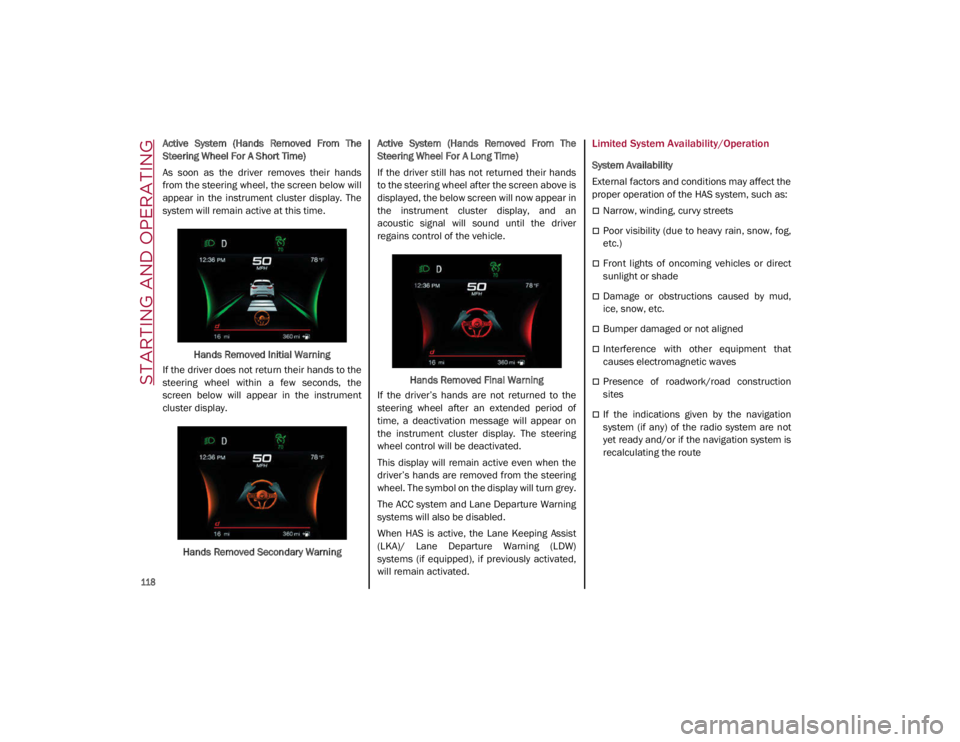
Active System (Hands Removed From The
Steering Wheel For A Short Time)
As soon as the driver removes their hands
from the steering wheel, the screen below will
appear in the instrument cluster display. The
system will remain active at this time.Hands Removed Initial Warning
If the driver does not return their hands to the
steering wheel within a few seconds, the
screen below will appear in the instrument
cluster display.
Hands Removed Secondary Warning Active System (Hands Removed From The
Steering Wheel For A Long Time)
If the driver still has not returned their hands
to the steering wheel after the screen above is
displayed, the below screen will now appear in
the instrument cluster display, and an
acoustic signal will sound until the driver
regains control of the vehicle.
Hands Removed Final Warning
If the driver’s hands are not returned to the
steering wheel after an extended period of
time, a deactivation message will appear on
the instrument cluster display. The steering
wheel control will be deactivated.
This display will remain active even when the
driver’s hands are removed from the steering
wheel. The symbol on the display will turn grey.
The ACC system and Lane Departure Warning
systems will also be disabled.
When HAS is active, the Lane Keeping Assist
(LKA)/ Lane Departure Warning (LDW)
systems (if equipped), if previously activated,
will remain activated.Limited System Availability/Operation
System Availability
External factors and conditions may affect the
proper operation of the HAS system, such as:
Narrow, winding, curvy streets
Poor visibility (due to heavy rain, snow, fog,
etc.)
Front lights of oncoming vehicles or direct
sunlight or shade
Damage or obstructions caused by mud,
ice, snow, etc.
Bumper damaged or not aligned
Interference with other equipment that
causes electromagnetic waves
Presence of roadwork/road construction
sites
If the indications given by the navigation
system (if any) of the radio system are not
yet ready and/or if the navigation system is
recalculating the route
21_GA_OM_EN_USC_t.book Page 118
Page 121 of 284

119
System Limited Operation
The HAS system may have limited or reduced
functionality when one of the following condi-
tions occur:
Lane markings are not clear or in conditions
of poor visibility (e.g. in heavy rain, snow,
fog, etc.)
Either the camera or radar are damaged,
covered, or obstructed (e.g. by mud, ice,
snow, etc.)
When driving on hills or roads with narrow
bends
Near highway toll booths
When the highway entrance or exit is wider
than 20 ft (6 m)
If the camera is exposed to glare caused by
reflections or direct sunlight
If the navigation system information is
unavailable or being recalculated
NOTE:
If the vehicle approaches a bend that is too
narrow with respect to the current speed,
the HAS system will disable.
If damage to the windshield occurs, have
the windshield replaced by an authorized
dealer as soon as possible.
TRAFFIC JAM ASSIST (TJA)
SYSTEM — IF EQUIPPED
The Traffic Jam Assist (TJA) system can be acti -
vated on all road types. The system uses a
camera to detect lane markings and keep the
vehicle in the center of the lane.
When the system is unable to detect lane
markings, it will still operate using surrounding
traffic. This can occur in congested traffic
scenarios, when the vehicles ahead or
surrounding obstruct the visibility of the lane
markings. When the speed is below 12 mph
(20 km/h), the system can use a lock-on
strategy that allows the vehicle to automati -
cally follow the vehicle ahead. The TJA system combines Adaptive Cruise
Control (ACC) functions with Lane Departure
Warning functions to maintain vehicle speed
and steering wheel behavior.
NOTE:
Do not use the TJA system while driving in
urban areas.
To Activate/Deactivate
To activate the system, push the button on the
left side of the steering wheel.
To deactivate the system, push the button
again.
Traffic Jam Assist Button
WARNING!
To prevent serious injury or death:
Always remain alert and be ready to take
control of the vehicle in the event that the
HAS system disables.
Always keep your hands on the steering
wheel when the HAS system is activated.
Maintain a safe distance from other vehi -
cles and pay attention to traffic condi -
tions.
Do not place any objects on the steering
wheel (e.g. steering wheel covers) which
could interfere with the hand detection
sensor.
21_GA_OM_EN_USC_t.book Page 119
Page 123 of 284

121
Indications On The Display
The TJA system status is indicated by the color
of the symbol in the instrument cluster display.
The system uses sensors in the steering wheel
to detect if the driver’s hands are present. If
the driver’s hands are removed, a series of
warnings will appear in the instrument cluster
display to alert the driver to reposition their
hands on the steering wheel. Acoustic signals
will also be emitted.
If the driver’s hands are not returned to the
steering wheel after a period of time, the
system will be disabled.
System Status
Active System
An active system is indicated by the following
screen in the “Driver Assistance” menu on the
instrument cluster display.TJA System Active Active System (Hands Removed From The
Steering Wheel For A Short Time)
The following screen will appear in the instru
-
ment cluster display immediately after the
driver’s hands are removed from the steering
wheel. The system still remains active at this
time.
Hands Removed Initial Warning
If the driver does not return their hands to the
steering wheel within a few seconds, the
following screen will appear in the instrument
cluster display.
Hands Removed Secondary Warning Active System (Hands Removed From The
Steering Wheel For A Long Time)
If the driver’s hands have still not been
returned to the steering wheel, the following
screen will appear in the instrument cluster
display.
Hands Removed Final Warning
An acoustic signal will sound until the driver
regains control of the vehicle (hands on
steering wheel). The system is still active at
this time.
If the driver’s hands are not returned to the
steering wheel after a period of time, a deacti -
vation message will appear on the instrument
cluster display and the steering wheel control
will be deactivated.
Once the indicator light on the display turns
grey, the system is no longer active and the
driver must take control of the vehicle. At this
time, the Adaptive Cruise Control (ACC) system
and Lane Departure Warning system will also
be disabled.
21_GA_OM_EN_USC_t.book Page 121
Page 124 of 284

STARTING AND OPERATING
122
When the TJA system is active, the Lane
Keeping Assist (LKA)/Lane Departure Warning
(LDW) systems (if equipped) will be tempo-
rarily disabled. When TJA is not active, the LKA
system
Ú
page 130 and LDW system
Ú
page 128 will remain active.
Limited System Availability/Operation
System Availability
Performance of the TJA system may be
affected by the following factors:
Narrow, winding, curvy streets
Lane boundaries that are not clear or in
conditions of poor visibility (e.g. heavy rain,
snow, fog, etc.)
If the camera is exposed to glare from direct
sunlight or headlights of an oncoming
vehicle
If the camera or sensor is damaged,
covered, or obstructed (e.g. by mud, ice,
snow, etc.)
The bumper is damaged or misaligned
Interference with other equipment causes
electromagnetic waves
Construction sites
If the indications given by the navigation
system of the radio system are not yet ready
or if the system is recalculating System Limited Operation
The TJA system may have limited or reduced
functionality when one of the following condi
-
tions occurs:
Lane boundaries are not clear or in condi -
tions of poor visibility (e.g. in heavy rain,
snow, fog, etc.)
Either the camera or radar are damaged,
covered, or obstructed (e.g. by mud, ice,
snow, etc.)
When driving on hills or narrow bends
Near highway toll booths
When the highway entrance or exit is more
than 20 ft (6 m) wide
If the camera is exposed to glare from
reflections or direct sunlight
NOTE:
If damage to the windshield occurs, have
the windshield replaced by an authorized
dealer as soon as possible.
If the vehicle approaches a bend that is too
narrow with respect to the current speed,
the TJA system will deactivate.
WARNING!
To prevent serious injury or death:
Always remain alert and be ready to take
control of the car in the event that the TJA
system disables.
Always keep your hands on the steering
wheel when the TJA system is activated.
Maintain a safe distance from other vehi -
cles and pay attention to traffic condi -
tions.
The TJA system should only be used as a
driving aid. The drive must always pay
attention to their surroundings when the
system is operating and be ready to take
control of the vehicle at any time.
Do not place any objects on the steering
wheel (e.g. steering wheel covers) that
could interfere with the hand detection
sensor on the steering wheel.
21_GA_OM_EN_USC_t.book Page 122
Page 131 of 284
129
Turning Lane Departure Warning On Or Off
The system is activated/deactivated by
pushing the button located on the end of the
multifunction lever, or through the “Driver
Assistance” widget though the radio system.Lane Departure Warning System Activation/ Deactivation Button
NOTE:
The Lane Departure Warning system will retain
the last system state on or off from the last
ignition cycle when the ignition is placed in the
ON/RUN position.
Activation Conditions
Once turned on, the system becomes active
only if the following conditions are met:
The vehicle speed is equal to or above
37 mph (60 km/h) (the system is deacti -
vated at speeds equal to or greater than
110 mph (180 km/h)).
The lane markings are visible at least on
one side.
There are suitable visibility conditions.
The road is straight or with wide radius
bends.
A suitable distance is kept from the vehicle
in front.
The turn signal is not active.
Lane Departure Warning Message
The Lane Departure Warning system will indi -
cate the current lane drift condition through
the instrument cluster display.
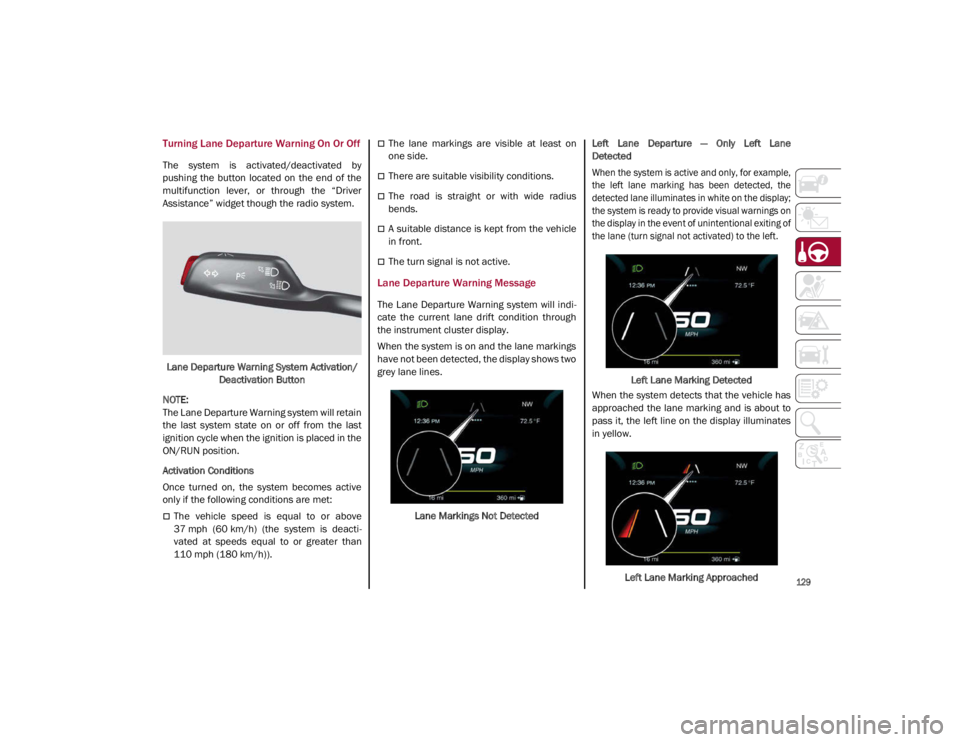
When the system is on and the lane markings
have not been detected, the display shows two
grey lane lines.
Lane Markings Not Detected Left Lane Departure — Only Left Lane
Detected
When the system is active and only, for example,
the left lane marking has been detected, the
detected lane illuminates in white on the display;
the system is ready to provide visual warnings on
the display in the event of unintentional exiting of
the lane (turn signal not activated) to the left.
Left Lane Marking Detected
When the system detects that the vehicle has
approached the lane marking and is about to
pass it, the left line on the display illuminates
in yellow.
Left Lane Marking Approached
21_GA_OM_EN_USC_t.book Page 129
Page 132 of 284
STARTING AND OPERATING
130
The system operates in the same way, but
mirrored, in the event of exiting the right lane
when only the right lane marking has been
detected.
Left Lane Departure — Both Lanes Detected
When the system is active, both lane lines on
the display illuminate in white to indicate that
both of the lane markings have been detected.
When lane markings are detected, the system
is ready to provide indications in case the
driver unintentionally leaves the lane (turn
signal not activated).
As the Lane Departure Warning system
detects the lane markings while the vehicle is
in motion, it will adjust the display accordingly
(from white to yellow and vice versa, and
increase their thickness).
If a lane line is crossed, the driver is alerted by
an audible signal as well as the visual indica-
tion in the instrument cluster. The signal is
emitted through the speakers on the side of
the lane marking which is being crossed (e.g.
if the vehicle is exceeding the left line of the
lane, the audible signal will come from the
speakers on the left of the vehicle).
Limited Operation Warning
If a message appears on the display, a condi -
tion limiting the Lane Departure Warning
system operation may have occurred. This
could be an obstruction of the camera view, or
a fault in the system. If an obstruction is detected, clean the area of
the windshield by the interior rearview mirror.
Although the vehicle can still be driven in
normal conditions, the system may not func
-
tion properly.
When the conditions limiting the system are
corrected, it will go back to normal operation.
Should a fault persist, contact an authorized
dealer.
System Failure Warning
If the system turns off and the warning light
appears on the display, it means that there is
a system fault.
In this case, it is still possible to drive the
vehicle, but you are advised to contact an
authorized dealer as soon as possible.
Changing Lane Departure Warning Status
The system's sensitivity can be set through the
radio system. Sensitivity “High” or “Low” can
be selected.
To access the function, from the main menu
select the following in order:
1. “Settings”
2. “Driver Assistance”
3. “Lane Departure Warning”
4. “Sensitivity”
LANE KEEPING ASSIST (LKA)
SYSTEM — IF EQUIPPED
The Lane Keeping Assist (LKA) system uses a
camera located on the windshield to detect
the lane markings and calculate the position
of the vehicle within such markings, in order to
make sure that the vehicle remains inside the
lane. This is an active system that will apply
torque to the steering wheel if it senses that
the vehicle is drifting out of the lane.
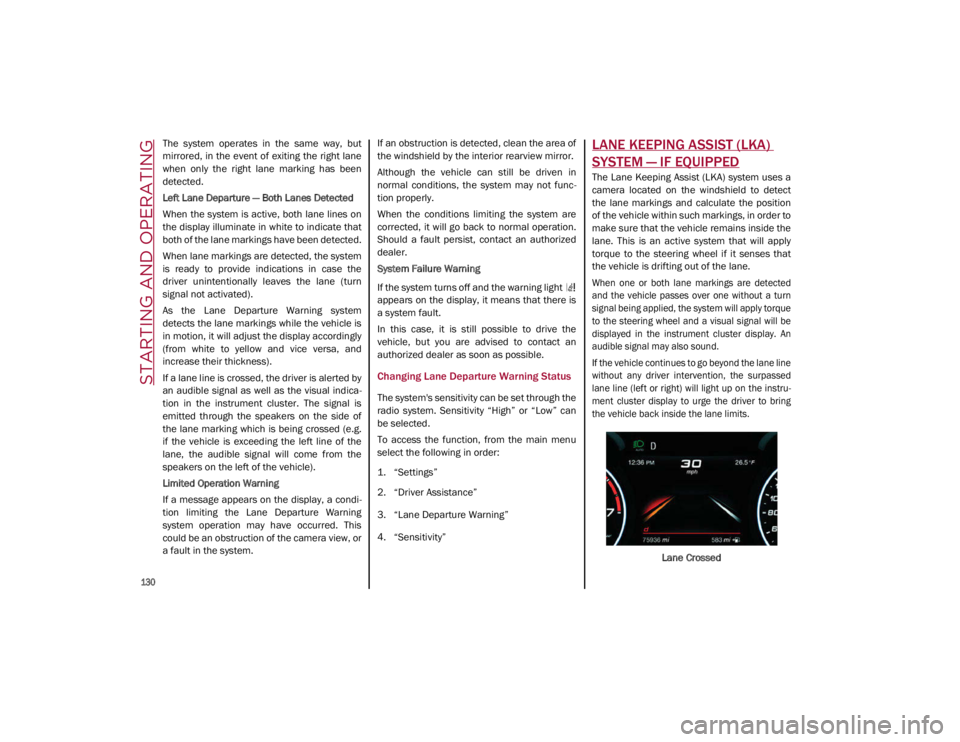
When one or both lane markings are detected
and the vehicle passes over one without a turn
signal being applied, the system will apply torque
to the steering wheel and a visual signal will be
displayed in the instrument cluster display. An
audible signal may also sound.
If the vehicle continues to go beyond the lane line
without any driver intervention, the surpassed
lane line (left or right) will light up on the instru -
ment cluster display to urge the driver to bring
the vehicle back inside the lane limits.
Lane Crossed
21_GA_OM_EN_USC_t.book Page 130
Page 133 of 284
131
Turning Lane Keeping Assist On Or Off
The system is activated/deactivated by pressing
the button at the end of the multifunction lever.
Each time the engine is started, the system main-
tains the operating mode that was selected when
it was previously turned off.
Activation/Deactivation Button
Activation Conditions
Once the activation button is pushed, the
system becomes active only if the following
conditions are met:
The car speed is higher than 37 mph
(60 km/h). (The system is deactivated at
speeds equal to or higher than 110 mph
(180 km/h))
The lane limit lines are visible at least on
one side
There are suitable visibility conditions
The road is straight or with wide radius
bends
A suitable distance is kept from the vehicle
in front
The turn signal (to indicate leaving the lane)
is not active
Lane Keeping Assist Warning Message
The Lane Keeping Assist system also advises
the driver when the car changes lanes by
showing symbols and messages on the instru -
ment cluster display.
The message at the top of the display remains
active only until the main reconfigurable area
of the display is activated by pressing the TRIP
button located on the end of the windshield
wiper lever
Ú
page 68.
After activating the main reconfigurable area,
the Lane Keeping Assist system messages will
be shown in the instrument cluster display.
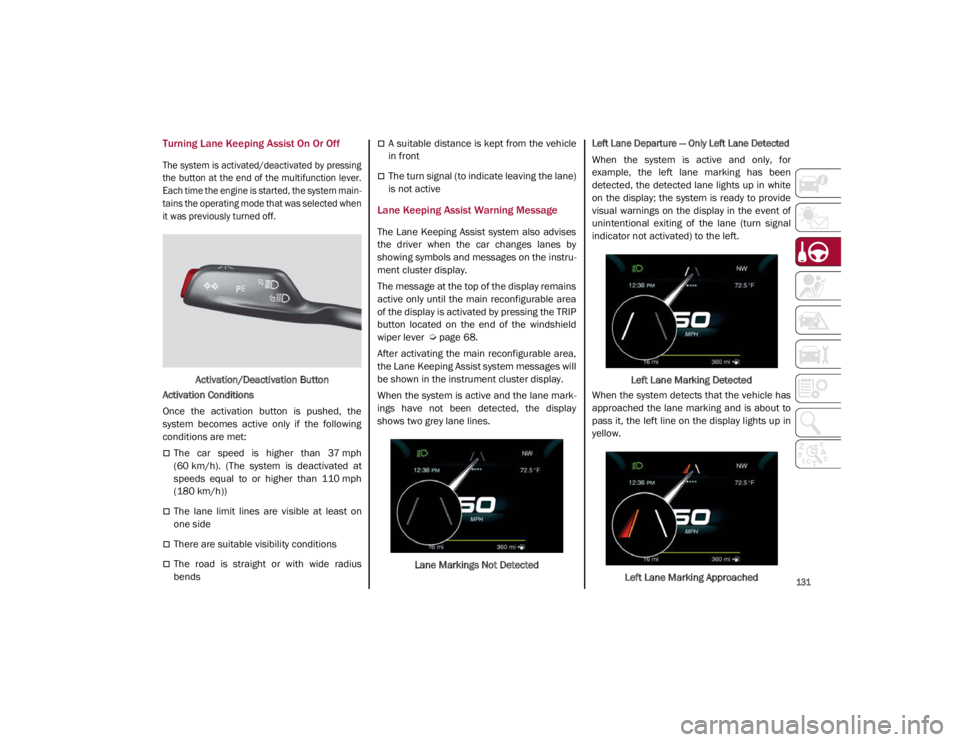
When the system is active and the lane mark -
ings have not been detected, the display
shows two grey lane lines.
Lane Markings Not Detected
Left Lane Departure — Only Left Lane Detected
When the system is active and only, for
example, the left lane marking has been
detected, the detected lane lights up in white
on the display; the system is ready to provide
visual warnings on the display in the event of
unintentional exiting of the lane (turn signal
indicator not activated) to the left.
Left Lane Marking Detected
When the system detects that the vehicle has
approached the lane marking and is about to
pass it, the left line on the display lights up in
yellow.
Left Lane Marking Approached
21_GA_OM_EN_USC_t.book Page 131