2020 VOLVO XC90 TWIN ENGINE ECU
[x] Cancel search: ECUPage 84 of 693

||
SAFETY
* Option/accessory.
82
Press down on the center of the booster cushion to lock it into position.
CAUTION
Make sure that there are no objects (e.g. toys) on the seat under the integratedbooster cushion before folding it down.
NOTE
The integrated booster cushion must be stowed (folded down) before folding downthe seat backrest.
WARNING
DEATH or SERIOUS INJURY can occur
Follow all instructions on this child restraint and in the vehi-cle's owner's manual.
Make sure the booster cushionis securely locked before thechild is seated.
Only use for children who weigh between 15-36 kg (33-80 lbs) andwho are between 97-137 cm(38-54 tum) in height. In Canada: 18kg (40 lbs) is the minimum weightrequirement for a child using boostercushions according to the Canadianregulation CMVSS 213.4
Use only the vehicle's lap and shoulderbelt system when restraining the childin this booster cushion.
In the event of a collision while theintegrated booster cushion was occu-pied, the entire booster cushion andseat belt must be replaced. Thebooster cushion should also bereplaced if it is badly worn or damagedin any way. This work should be per-formed by a trained and qualified Volvo service technician only.
Related information
Integrated booster cushion
* (p. 79)
Folding up the integrated booster cush- ion
* (p. 80)
Page 103 of 693

DISPLAYS AND VOICE CONTROL
}}
101
Symbol Meaning
Collision risk City Safety warns the driver if there is a risk of a collision withanother vehicle, pedestrian,cyclist or large animal.
System error This symbol illuminates during driving if a fault is detected in thedrive system. An explanatorymessage will be simultaneouslydisplayed in the instrumentpanel.
High engine temperature The symbol will illuminate while driving when the engine tem-perature is too high. An explana-tory message will be simultane-ously displayed in the instrumentpanel.
ACanadian models.
B US models.
Related information
Indicator symbols in the instrument panel (p. 97)
Instrument panel (p. 86)
Instrument panel licenses
A license is an agreement on the right to con- duct a certain activity or the right to usesomeone else's right according to terms andconditions specified in the agreement. Thefollowing text is Volvo's agreement with themanufacturer or developer.
Boost Software License 1.0
Permission is hereby granted, free of charge, to any person or organization obtaining a copyof the software and accompanyingdocumentation covered by this license (the"Software") to use, reproduce, display,distribute, execute, and transmit the Software,and to prepare derivative works of theSoftware, and to permit third-parties to whomthe Software is furnished to do so, all subjectto the following: The copyright notices in theSoftware and this entire statement, includingthe above license grant, this restriction andthe following disclaimer, must be included inall copies of the Software, in whole or in part,and all derivative works of the Software,unless such copies or derivative works aresolely in the form of machine-executableobject code generated by a source languageprocessor. THE SOFTWARE IS PROVIDED "AS IS", WITHOUT WARRANTY OF ANY KIND,EXPRESS OR IMPLIED, INCLUDING BUTNOT LIMITED TO THE WARRANTIES OFMERCHANTABILITY, FITNESS FOR A PARTICULAR PURPOSE, TITLE AND NON-INFRINGEMENT. IN NO EVENT SHALL THECOPYRIGHT HOLDERS OR ANYONEDISTRIBUTING THE SOFTWARE BE LIABLEFOR ANY DAMAGES OR OTHER LIABILITY,WHETHER IN CONTRACT, TORT OROTHERWISE, ARISING FROM, OUT OF ORIN CONNECTION WITH THE SOFTWARE ORTHE USE OR OTHER DEALINGS IN THESOFTWARE.
Page 105 of 693

DISPLAYS AND VOICE CONTROL
}}
103
BSD 2-clause “Simplified” license
Copyright (c)
reserved. Redistribution and use in source and binary forms, with or without modification, arepermitted provided that the followingconditions are met:
1. Redistributions of source code must retain the above copyright notice, this list of conditions and the following disclaimer.
2. Redistributions in binary form must reproduce the above copyright notice, thislist of conditions and the followingdisclaimer in the documentation and/orother materials provided with thedistribution.
THIS SOFTWARE IS PROVIDED BY THECOPYRIGHT HOLDERS ANDCONTRIBUTORS "AS IS" AND ANY EXPRESS OR IMPLIED WARRANTIES, INCLUDING, BUT NOT LIMITED TO, THE IMPLIED WARRANTIES OF MERCHANTABILITY AND FITNESS FOR APARTICULAR PURPOSE ARE DISCLAIMED. IN NO EVENT SHALL THE COPYRIGHT OWNER OR CONTRIBUTORS BE LIABLEFOR ANY DIRECT, INDIRECT, INCIDENTAL,SPECIAL, EXEMPLARY, ORCONSEQUENTIAL DAMAGES (INCLUDING,BUT NOT LIMITED TO, PROCUREMENT OFSUBSTITUTE GOODS OR SERVICES; LOSS OF USE, DATA, OR PROFITS; OR BUSINESSINTERRUPTION) HOWEVER CAUSED ANDON ANY THEORY OF LIABILITY, WHETHERIN CONTRACT, STRICT LIABILITY, OR TORT(INCLUDING NEGLIGENCE OROTHERWISE) ARISING IN ANY WAY OUTOF THE USE OF THIS SOFTWARE, EVEN IFADVISED OF THE POSSIBILITY OF SUCHDAMAGE. The views and conclusions contained in the software and documentation are those of theauthors and should not be interpreted asrepresenting official policies, either expressedor implied, of the FreeBSD Project.
FreeType Project License
1. 1 Copyright 1996-1999 by David Turner,
Robert Wilhelm, and Werner Lemberg Introduction The FreeType Project isdistributed in several archive packages;some of them may contain, in addition tothe FreeType font engine, various toolsand contributions which rely on, or relateto, the FreeType Project. This licenseapplies to all files found in such packages,and which do not fall under their ownexplicit license. The license affects thusthe FreeType font engine, the testprograms, documentation and makefiles,at the very least. This license was inspiredby the BSD, Artistic, and IJG(Independent JPEG Group) licenses,which all encourage inclusion and use of free software in commercial and freewareproducts alike. As a consequence, its mainpoints are that: o We don't promise thatthis software works. However, we are beinterested in any kind of bug reports. (`asis' distribution) o You can use thissoftware for whatever you want, in partsor full form, without having to pay us.(`royalty-free' usage) o You may notpretend that you wrote this software. Ifyou use it, or only parts of it, in a program,you must acknowledge somewhere inyour documentation that you've used theFreeType code. (`credits') We specificallypermit and encourage the inclusion of thissoftware, with or without modifications, incommercial products, provided that allwarranty or liability claims are assumed bythe product vendor. Legal Terms 0.Definitions Throughout this license, theterms `package', `FreeType Project', and`FreeType archive' refer to the set of filesoriginally distributed by the authors (DavidTurner, Robert Wilhelm, and WernerLemberg) as the `FreeType project', bethey named as alpha, beta or final release.`You' refers to the licensee, or personusing the project, where `using' is ageneric term including compiling theproject's source code as well as linking itto form a `program' or `executable'. Thisprogram is referred to as `a program usingthe FreeType engine'. This license applies
Page 190 of 693
SEATS AND STEERING WHEEL
* Option/accessory.
188
Manual front seats
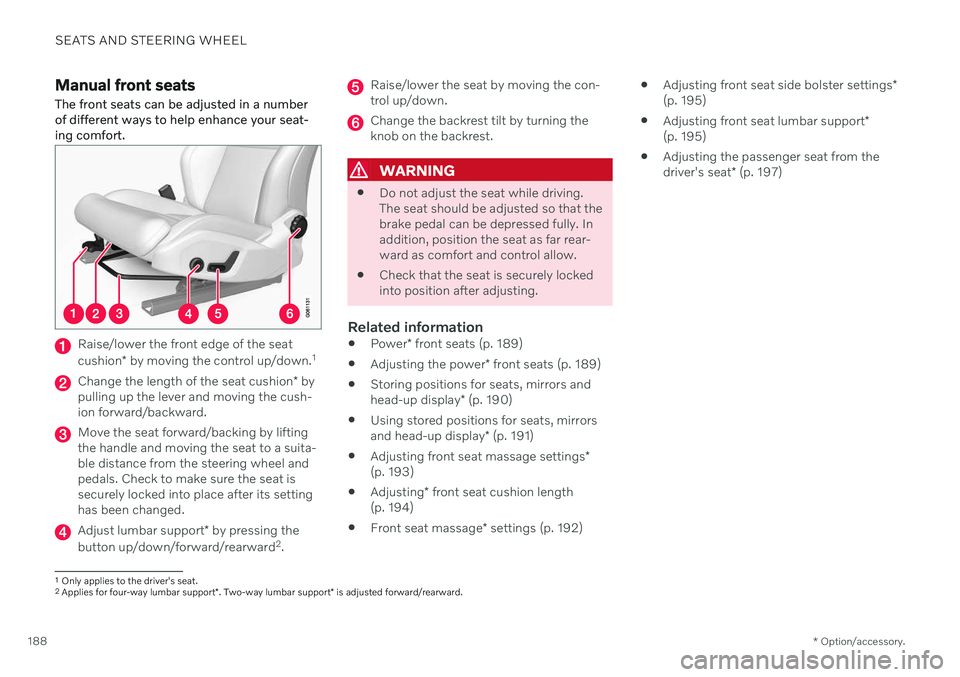
The front seats can be adjusted in a number of different ways to help enhance your seat-ing comfort.
Raise/lower the front edge of the seat cushion * by moving the control up/down. 1
Change the length of the seat cushion
* by
pulling up the lever and moving the cush- ion forward/backward.
Move the seat forward/backing by lifting the handle and moving the seat to a suita-ble distance from the steering wheel andpedals. Check to make sure the seat issecurely locked into place after its settinghas been changed.
Adjust lumbar support * by pressing the
button up/down/forward/rearward 2
.
Raise/lower the seat by moving the con- trol up/down.
Change the backrest tilt by turning the knob on the backrest.
WARNING
Do not adjust the seat while driving. The seat should be adjusted so that thebrake pedal can be depressed fully. Inaddition, position the seat as far rear-ward as comfort and control allow.
Check that the seat is securely lockedinto position after adjusting.
Related information
Power
* front seats (p. 189)
Adjusting the power
* front seats (p. 189)
Storing positions for seats, mirrors and head-up display
* (p. 190)
Using stored positions for seats, mirrorsand head-up display
* (p. 191)
Adjusting front seat massage settings
*
(p. 193)
Adjusting
* front seat cushion length
(p. 194)
Front seat massage
* settings (p. 192)
Adjusting front seat side bolster settings
*
(p. 195)
Adjusting front seat lumbar support
*
(p. 195)
Adjusting the passenger seat from thedriver's seat
* (p. 197)
1
Only applies to the driver's seat.
2 Applies for four-way lumbar support *. Two-way lumbar support * is adjusted forward/rearward.
Page 200 of 693

SEATS AND STEERING WHEEL
* Option/accessory.
198
Folding the second row backrests
The second row of seats has three individual seating positions 5
. The backrests can be
folded down separately.
WARNING
Adjust the seat and ensure it locks into position before driving. Use cautionwhen adjusting the seat. Uncontrolledor careless adjustments could lead toinjury.
Long objects must always be securelytied down to help prevent injury ordamage in the event of sudden brak-ing.
Always turn off the engine and applythe parking brake when loading orunloading the vehicle.
Put the gear selector in
P to help pre-
vent the gear selector from being inad-vertently moved.
CAUTION
When the backrest is folded down, make sure there are no objects in the rear seat,and the seat belts are not buckled. Other-wise there is a risk of damage to theupholstery.
CAUTION
The seat cushion of the integrated child restraint * must be in the stowed position
before the center seat backrest can be folded down. The armrest * in the center seat must be
raised before the seat backrest is folded down.
NOTE
The front seats may need to be pushed for- ward and/or the backrest adjusted so thatthe rear seat backrests can be fully low-ered. The rear seats may also need to be moved rearward. The seats in the second row must be in the upright position before they can be foldeddown completely. They should not befolded down when they are tilted forwardto access the third row of seats.
Center seat 6
To fold down the backrest:
5
Six-seat vehicles have two seats in the second row of seats.6In vehicles with three, four or six seats, there is no center seat.
Page 201 of 693

SEATS AND STEERING WHEEL
}}
* Option/accessory.199
1. Push down the head restraint manually.
2. Pull the strap on the right side of the cen-
ter seat.
3. Fold the backrest down until it locks into position. The seat cushion will move downward/forward when the backrest isfolded down and create a flat surface.
To return the backrest to the upright position:
1. Pull the strap.
2. Fold up the backrest and release the strap. Push the backrest until it locks into posi- tion.
3. Adjust the head restraint if necessary.
Outboard seats 7
To fold down the backrest:
NOTE
When folding down a second row seat backrest, always start from the seat's nor-mal upright position. Do not use the handlefor folding down the seat when the seat isin the position for accessing the third row.
1. Pull up and hold the handle on the side of
the seat while the backrest is being folded down.
2. Make sure that backrest and head restraint do not come in contact with theseat in front while the backrest is beingfolded down. Fold the backrest down untilit locks into position.
> The seat cushion will move downward/forward when the backrest is folded down and create a flat surface. Thehead restraint folds down automaticallywhen the backrest is lowered.
WARNING
Make sure the backrest is securely locked into position after it is folded down.
To return the backrest to the upright position: 1. Pull up and hold the handle on the side of
the seat while the backrest is being folded up.
2. Make sure that backrest and head restraint do not come in contact with theseat in front while the backrest is beingfolded up. Fold up the backrest andrelease the handle.
3. Press the backrest until it locks into posi- tion.
4. Push up the head restraint manually.
WARNING
Make sure that the rear seat backrest and head restraint are locked securely in placeafter the seat is folded up. The head restraints at the outer seats must always be raised when there is a passengerin one of these spots of the rear seat.
WARNING
The head restraints on the outboard sec- ond-row seats must always be folded upwhen there are passengers in the third row of seats *.
7
This illustration shows a vehicle with seven seats.
Page 203 of 693

SEATS AND STEERING WHEEL
}}
* Option/accessory.201
Electrically folding down the rear seat's outboard head restraints *
The outer head restraints can be folded via the center display's function view. The headrestraint can be folded down when the vehicleis in ignition mode 0.
Tap the
Headrest Fold but-
ton to activate/deactivate folding.
Manually push the head restraint until it clicks into position.
WARNING
Do not lower the head restraint if there are passengers in any of the rear seats.
WARNING
The head restraint must be locked in the upright position after it has been folded up.
WARNING
The head restraints on the outboard sec- ond-row seats must always be folded upwhen there are passengers in the third row of seats *.
Related information
Folding the second row backrests (p. 198)
Moving the second row seats forward/ rearward
* (p. 201)
Adjusting the second row backrest tilt (p. 202)
Getting into and out of the third row of seats
* (p. 203)
Folding the third row backrests
* (p. 204)
Moving the second row seats forward/rearward *
In vehicles with 6 or 7 seats *, the seats in the
second row can be moved forward or rear- ward individually to help adapt legroom forpassengers in the second and third rows. Thesecond row seats cannot be moved forwardor backward in 5-seat models.
Lift the handle under the seat.
Move the seat forward or backward to the desired position.
3. Release the handle and press the seat until it locks into position.
Check to make sure the seat is securelylocked into place after its position has beenchanged.
Page 204 of 693

||
SEATS AND STEERING WHEEL
* Option/accessory.
202
WARNING
Adjust the seat and ensure it locks into position before driving. Use cautionwhen adjusting the seat. Uncontrolledor careless adjustments could lead toinjury.
Long objects must always be securelytied down to help prevent injury ordamage in the event of sudden brak-ing.
Always turn off the engine and applythe parking brake when loading orunloading the vehicle.
Put the gear selector in
P to help pre-
vent the gear selector from being inad-vertently moved.
Adjusting seats in a 6-seat vehicle
Lift the handle under the seat.
Move the seat forward or backward to the desired position.
3. Release the handle and press the seat until it locks into position.
Check to make sure the seat is securelylocked into place after its position has beenchanged.
Related information
Folding the second row backrests (p. 198)
Adjusting the second row head restraints(p. 200)
Adjusting the second row backrest tilt(p. 202)
Getting into and out of the third row of seats
* (p. 203)
Folding the third row backrests
* (p. 204)
Adjusting the second row backrest tilt Backrest tilt can be adjusted separately for each seat in the second row.
Center seat 9
1. Pull the strap on the right side of the cen-
ter seat.
2. Adjust backrest tilt forward/backward by decreasing/increasing pressure on the backrest.
3. Release the strap to lock the backrest in its new position and press on the backrestuntil the lock engages.
Check to make sure the seat is securelylocked into place after its position has beenchanged.