2020 VOLVO XC90 TWIN ENGINE lock
[x] Cancel search: lockPage 280 of 693

||
KEY, LOCKS AND ALARM
278
Related information
Alarm (p. 276)
Page 284 of 693

||
DRIVER SUPPORT
* Option/accessory.
282 additional power from wheels that are not spinning. This function can also help prevent the wheels from spinning while the vehicle is accelerating.
Engine drag control
Engine drag control (EDC
3
) can help prevent
inadvertent wheel lock, e.g. after downshiftingor using engine braking when driving at lowspeeds on a slippery surface. Inadvertent wheel lock while driving could impair the driver's ability to steer the vehicle.
Trailer Stability Assist *4
Trailer Stability Assist (TSA
5
) is designed to
help stabilize a vehicle that is towing a trailer ifthe vehicle and trailer have begun to sway.
NOTE
Trailer Stability Assist is deactivated if ESC
Sport Mode is activated.
Related information
Driver support systems (p. 280)
Activating or deactivating Sport mode for Electronic Stability Control (p. 283)
Electronic Stability Control symbols andmessages (p. 284)
Trailer Stability Assist
* (p. 467)
Electronic Stability Control in sport mode The stability system (ESC 6
) is always acti-
vated and cannot be switched off. However, the driver can select
ESC Sport Mode,
which offers more active driving characteris- tics.
With the ESC Sport Mode sub-function
selected, intervention from the system is reduced and more lateral movement is permit-ted, giving the driver more control of the vehi-cle than usual. When
ESC Sport Mode is selected, the func-
tion may seem to be disabled even though it continues to assist the driver.
NOTE
When ESC Sport Mode is selected, the
trailer stabilizer (TSA 7
) is switched off.
ESC Sport Mode also helps provide more
traction, even if the vehicle gets stuck or is driving on a loose surface such as deep snowor loose sand.
3 Engine Drag Control4Trailer Stability Assist is included if the vehicle is equipped with a Volvo original towbar.5 Trailer Stability Assist
6 Electronic Stability Control
7 Trailer Stability Assist
Page 297 of 693

DRIVER SUPPORT
}}
* Option/accessory.295
Adaptive Cruise Control *27
standby
mode Adaptive Cruise Control (ACC 28
) can be deac-
tivated and put in standby mode. This may happen automatically or be due to driverintervention.
Standby mode means that the function is selected in the instrument panel but not acti-vated. In standby mode, Adaptive Cruise Con-trol will not regulate speed or distance to thevehicle ahead.
Standby mode due to action by the
driver
Adaptive Cruise Control will be deactivatedand put in standby mode if any of the follow-ing occurs:
The brakes are applied.
The gear selector is moved to
N.
The vehicle is driven faster than the setspeed for more than 1 minute.
Temporarily increasing speed using the accel-erator pedal, e.g. when passing another vehi-cle, will not affect the setting. The vehicle willreturn to the set speed when the acceleratorpedal is released.
WARNING
If Adaptive Cruise Control is in standby mode, the driver must intervene andregulate both speed and distance tothe vehicle ahead.
If the vehicle comes too close to a vehi-cle ahead when Adaptive Cruise Con-trol is in standby mode, the driver canbe warned of the short distance by the Distance Alert
* function.
Automatic standby modeAdaptive Cruise Control is dependent on other systems, such as Electronic Stability Control (ESC 29
). If any of these other systems stops
working, Adaptive Cruise Control will be auto- matically deactivated.
WARNING
With automatic standby mode, the driver is warned by an acoustic signal and a mes-sage on the instrument panel.
The driver must then regulate vehicle speed, apply the brakes if necessary,and maintain a safe distance to othervehicles. Adaptive Cruise Control may go into standbymode if:
your vehicle's speed goes below 5 km/h(3 mph) and ACC cannot determine if thevehicle ahead is stationary or if it isanother object, e.g. a speed bump.
your vehicle's speed goes under 5 km/h(3 mph) and the vehicle ahead turns sothat ACC no longer has a vehicle to follow.
the driver opens the door.
the driver unbuckles the seat belt.
the engine speed (rpm) is too low/high.
one or more of the wheels lose traction.
the brake temperature is high.
the parking brake is applied.
the camera/radar sensor is covered bysnow or heavy rain (the camera lens/radarwaves are blocked).Related information
Adaptive Cruise Control
* (p. 290)
Selecting and activating Adaptive Cruise Control
* (p. 293)
27
Depending on market, this function can be either standard or optional.
28 Adaptive Cruise Control
29 Electronic Stability Control
Page 301 of 693
DRIVER SUPPORT
* Option/accessory.299
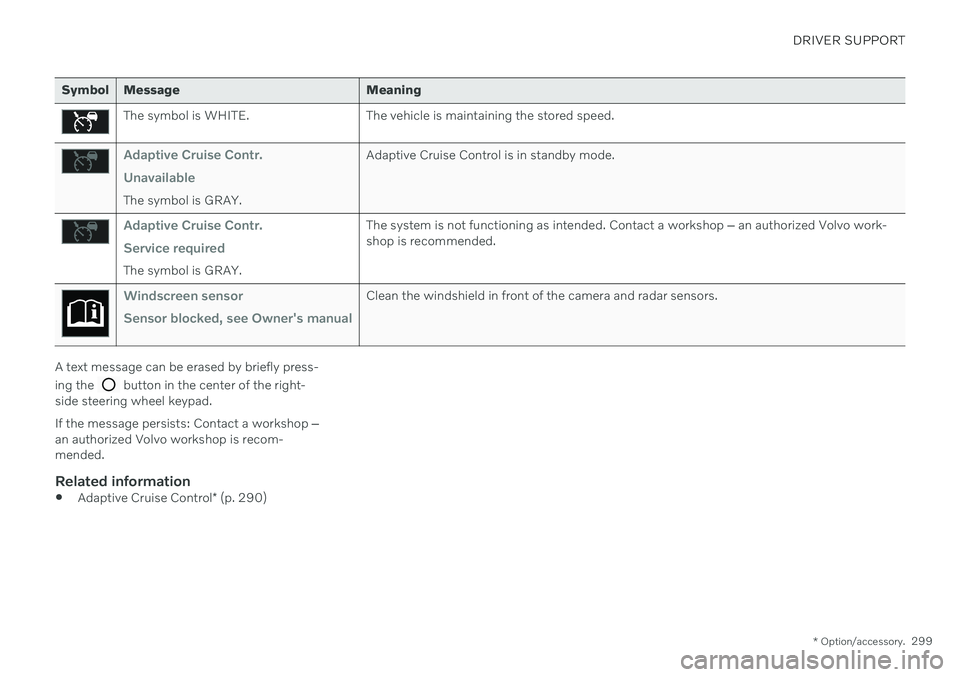
Symbol Message Meaning
The symbol is WHITE. The vehicle is maintaining the stored speed.
Adaptive Cruise Contr. Unavailable
The symbol is GRAY. Adaptive Cruise Control is in standby mode.
Adaptive Cruise Contr. Service required
The symbol is GRAY.The system is not functioning as intended. Contact a workshop
‒ an authorized Volvo work-
shop is recommended.
Windscreen sensor Sensor blocked, see Owner's manualClean the windshield in front of the camera and radar sensors.
A text message can be erased by briefly press- ing the
button in the center of the right-
side steering wheel keypad. If the message persists: Contact a workshop ‒
an authorized Volvo workshop is recom- mended.
Related information
Adaptive Cruise Control
* (p. 290)
Page 307 of 693

DRIVER SUPPORT
* Option/accessory.305
Pilot Assist*42
standby mode
Pilot Assist can be deactivated and put in standby mode. This may happen automati-cally or be due to driver intervention.
Standby mode means that the function is selected in the instrument panel but not acti-vated. In standby mode, Pilot Assist will notregulate the speed or distance to the vehicleahead or provide steering assistance.
Standby mode due to action by the
driver
Pilot Assist will be deactivated and put instandby mode if any of the following occurs:
The brakes are applied.
The gear selector is moved to
N.
A turn signal is used for more than1 minute.
The vehicle is driven faster than the setspeed for more than 1 minute.
Automatic standby modePilot Assist is dependent on other systems, such as Electronic Stability Control (ESC 43
). If
any of these other systems stops working, Pilot Assist will be automatically deactivated.
WARNING
With automatic standby mode, the driver is warned by an acoustic signal and a mes-sage on the instrument panel.
The driver must then regulate vehicle speed, apply the brakes if necessary,and maintain a safe distance to othervehicles.
Adaptive Cruise Control may go into standbymode if, e.g.: the driver opens the door.
the brake temperature is high.
the driver's hands are not on the steering wheel.
the parking brake is applied.
the engine speed (rpm) is too low/high.
the driver unbuckles the seat belt.
one or more of the wheels lose traction.
the camera/radar sensor is covered by snow or heavy rain (the camera lens/radarwaves are blocked).
your vehicle's speed goes under 5 km/h(3 mph) and Pilot Assist cannot determineif the vehicle ahead is stationary or if it isanother object, e.g. a speed bump.
your vehicle's speed goes under 5 km/h(3 mph) and the vehicle ahead turns sothat Pilot Assist no longer has a vehicle tofollow.
Related information
Pilot Assist
* (p. 300)
Selecting and activating Pilot Assist
*
(p. 303)
Deactivating Pilot Assist
* (p. 304)
Pilot Assist
* limitations (p. 306)
42
Depending on market, this function can be either standard or optional.
43 Electronic Stability Control
Page 309 of 693

DRIVER SUPPORT
}}
* Option/accessory.307
tively, they may be detected incorrectly as lane markings, with a subsequentrisk of contact between the vehicle andsuch obstacles. The driver is responsi-ble for ensuring that the vehicle main-tains a suitable distance from suchobstacles.
The camera and radar sensors do nothave the capacity to detect all oncom-ing objects and obstacles in trafficenvironments, e.g. potholes, stationaryobstacles or objects that completely orpartially block the route.
Pilot Assist does not "see" pedestrians,animals, etc.
The recommended steering input islimited in force, which means that itcannot always help the driver to steerand keep the vehicle within the lane.
In vehicles equipped with Sensus Navigation
*, the function is able to use
information from map data, which could cause variations in performance.
Pilot Assist will be switched off if thespeed-dependent power steeringwheel resistance is working at reducedpower, e.g. during cooling due to over-heating.WARNING
Pilot Assist should only be used if there are clear lane lines painted on each side of thelane. All other use will increase the risk ofcontact with nearby obstacles that cannotbe detected by the functions.
WARNING
This is not a collision avoidance sys- tem. The driver is always responsibleand must intervene if the system failsto detect a vehicle ahead.
The function does not brake for peopleor animals and does not brake for smallvehicles, such as bikes and motorcy-cles. Similarly, it does not brake for lowtrailers, oncoming, slow-moving or sta-tionary vehicles and objects.
Do not use the function in demandingsituations, such as in city traffic, atintersections, on slippery surfaces,with a lot of water or slush on the road,in heavy rain/snow, in poor visibility, onwinding roads, or on on/off ramps.
The driver can always correct or adjust steer-ing assistance provided by Pilot Assist by turn-ing the steering wheel to the desired position.
Steep roads and/or heavy loadsPilot Assist is primarily intended to be drivenon flat roads. The function may not be able tomaintain the correct time interval to the vehi-cle ahead when driving down steep hills. Thedriver should be extra attentive and preparedto apply the brakes. Do not use Pilot Assist if the vehicle is carrying a heavy load or towing a trailer.
NOTE
Pilot Assist cannot be activated if a trailer, bike carrier or similar is connected to thevehicle electrical system.
Other limitationsThe Off Road drive mode cannot be selected
when Pilot Assist is activated.
NOTE
The function uses the vehicle's camera and radar sensor, which has certain generallimitations.
Related information
Pilot Assist
* (p. 300)
Camera/radar sensor limitations (p. 322)
45
Depending on market, this function can be either standard or optional.
Page 324 of 693

DRIVER SUPPORT
322
Camera/radar sensor limitations The camera and radar sensor used by several of the driver support functions has certainlimitations, which also affect the functionsusing the camera and radar sensor. The drivershould be aware of the following limitations:
Camera and radar
Obstructed camera
The area marked in the illustration must be cleaned regularly and kept free of decals, objects, solar film,etc.
The camera is located on the upper interior section of the windshield along with the radarsensor. Do not place, affix or mount anything on the inside or outside of the windshield, or in frontof or around the camera and radar sensor –this could disrupt camera and radar-basedfunctions. It could cause functions to bereduced, deactivated completely or to producean incorrect function response.If this symbol and the message “
Windscreen sensor Sensor
blocked, see Owner's manual” is
displayed in the instrument panel, it
means that the camera and radar sensor are unable to detect other vehicles, cyclists,pedestrians and large animals in front of thevehicle and that the vehicle's camera andradar-based functions may be obstructed.
The following table shows some of the situa- tions that can cause the message to be dis-played, and suggested actions:
Cause Action
The area of the windshield in front of the camera/radar sensor is dirty or covered by ice or snow. Clean the windshield in front of the camera/radar sensor and remove dirt, iceand snow.
Thick fog, heavy rain or snow is blocking the radar signals or thecamera's range of visibility. No action. Heavy precipitation may sometimes prevent the camera/radar sensorfrom functioning.
Page 325 of 693

DRIVER SUPPORT
}}
323
CauseAction
Water or snow is spraying/swirling up and blocking the radar signals or the camera's range of visibility. No action. Very wet or snow-covered roads may sometimes prevent the cam-era/radar sensor from functioning.
There is dirt between the inside of the windshield and the cam-era/radar sensor. Consult a workshop to have the area of the windshield on the inside of the cam-era's casing cleaned. An authorized Volvo workshop is recommended.
Bright sunlight. No action. The camera/radar sensor will reset automatically when lighting con-ditions improve.
High temperatures
If the temperature in the passenger compart- ment is very high, the camera/radar sensorwill switch off temporarily forapprox. 15 minutes after the engine is startedto protect its electronic components. Whenthe temperature has cooled sufficiently, thecamera/radar sensor will automatically restart.
Damaged windshield
NOTE
Failure to take action could result in reduced performance for the driver supportsystems that use the camera and radarunit. It could cause functions to bereduced, deactivated completely or to pro-duce an incorrect function response.
To avoid the risk of malfunction of the driver support systems that use the radar sensor, thefollowing also apply:
If there are cracks, scratches or stonechips on the windshield in front of any ofthe camera and radar sensor "windows"and this covers an area ofabout 0.5 × 3.0 mm (0.02 × 0.12 in.) ormore, contact a workshop to have the windshield replaced 54
.
Volvo advises
against repairing cracks,
scratches or stone chips in the area in front of the camera and radar sensor – theentire windshield should instead bereplaced.
Before replacing the windshield, contact a workshop 54
to verify that the right wind-
shield has been ordered and installed.
The same type of windshield wipers or wipers approved by Volvo should be usedfor replacement.
If the windshield is replaced, the cameraand radar sensor must be recalibrated by a workshop 54
to help ensure proper func-
tioning of all of the vehicle's camera and radar-based systems.
Radar
Vehicle speed
The radar sensor's ability to detect a vehicle ahead is significantly reduced if the speed ofthe vehicle ahead differs greatly from yourvehicle's speed.
54 An authorized Volvo workshop is recommended.