Page 3 of 283
Introduction.................................... 2
In brief ............................................ 6
Keys, doors and windows ............20
Seats, restraints ........................... 44
Storage ........................................ 68
Instruments and controls .............78
Lighting ...................................... 112
Climate control ........................... 122
Driving and operating .................133
Vehicle care ............................... 210
Service and maintenance ..........250
Technical data ........................... 256
Customer information ................268
Index .......................................... 276Contents
Page 5 of 283

Introduction3Vehicle specific dataPlease enter your vehicle's data on
the previous page to keep it easily
accessible.
Please refer to the sections "Service
and maintenance", "Technical data",
the vehicle's identification plate and
national registration documents.
Introduction
Your vehicle is a designed
combination of advanced technology, safety, environmental friendliness
and economy.
This Owner's Manual provides you
with all the necessary information to
enable you to drive your vehicle
safely and efficiently.
Make sure your passengers are
aware of the possible risk of accident
and injury which may result from
improper use of the vehicle.
You must always comply with the
specific laws and regulations of the
country that you are in. These laws
may differ from the information in this Owner's Manual.Disregarding the description given in
this manual may affect your warranty.
When this Owner's Manual refers to a
workshop visit, we recommend your
Vauxhall Authorised Repairer.
All Vauxhall Authorised Repairers
provide first-class service at
reasonable prices. Experienced
mechanics trained by Vauxhall work
according to specific Vauxhall
instructions.
The customer literature pack should
always be kept ready to hand in the
vehicle.
Using this manual ● This manual describes all options
and features available for this
model. Certain descriptions,
including those for display and
menu functions, may not apply to
your vehicle due to model
variant, country specifications,
special equipment or
accessories.
● The "In brief" section will give you
an initial overview.● The table of contents at the beginning of this manual and
within each section shows where the information is located.
● The index will enable you to search for specific information.
● This Owner's Manual depicts left-
hand drive vehicles. Operation is similar for right-hand drive
vehicles.
● The Owner's Manual uses the engine identifier code. The
corresponding sales designation
and engineering code can be
found in the section "Technical
data".
● Directional data, e.g. left or right, or front or back, always relate to
the direction of travel.
● Displays may not support your specific language.
● Display messages and interior labelling are written in bold
letters.
Page 6 of 283
4IntroductionDanger, Warnings andCautions9 Danger
Text marked 9 Danger provides
information on risk of fatal injury.
Disregarding this information may
endanger life.
9 Warning
Text marked 9 Warning provides
information on risk of accident or
injury. Disregarding this
information may lead to injury.
Caution
Text marked Caution provides
information on possible damage to
the vehicle. Disregarding this
information may lead to vehicle
damage.
Symbols
Page references are indicated with 3.
3 means "see page".
Page references and index entries
refer to the indented headings given
in the section table of content.
Thank you for choosing a Vauxhall.
We wish you many hours of
pleasurable driving.
Your Vauxhall Team
Page 8 of 283
6In briefIn briefInitial drive informationVehicle unlocking
Press c
to unlock the vehicle. Open
the doors by pulling the handles.
Press P to unlock the tailgate only.
Tailgate
After unlocking, press the tailgate
button and open the tailgate.
Radio remote control 3 21.
Central locking system 3 23.
Electronic key system 3 22.
Load compartment 3 29.
Page 13 of 283

In brief111Power windows .....................39
2 Exterior mirrors .....................36
3 Side air vents ...................... 131
4 Turn lights, headlight
flash, low / high beam,
high beam assist .................117
Exit lighting ......................... 121
Parking lights ...................... 119
Buttons for Driver
Information Centre ..............100
5 Cruise control .....................159
Speed limiter ....................... 162
Heated steering wheel ..........80
6 Instruments .......................... 89
Driver Information Centre .... 100
7 Infotainment controls
8 Windscreen wiper and
washer, rear wiper and
washer ................................. 80
9 Power button ....................... 135
10 Air vents ............................. 131
11 Hazard warning flashers ....117
12 Info Display ........................ 10213Light sensor ........................ 113
Sun sensor .......................... 126
14 Central locking system ..........23
15 Glovebox .............................. 68
16 Controls for Info Display
operation ............................. 102
17 Climate control system ........ 123
18 USB charging port ................ 84
19 Power outlet .......................... 84
20 Parking assist, advanced
parking assist .....................176
Lane departure warning .....190
Eco button for stop-start
system ................................. 138
Electronic Stability Control
and Traction Control ...........156
Sport mode ......................... 158
21 Manual transmission ..........150
Automatic transmission ......147
22 Electric parking brake .........153
23 Selective ride control ..........157
24 Ignition switch .....................134
25 Steering wheel adjustment ..7926 Horn ..................................... 80
27 Storage ................................. 68
28 Bonnet release lever ..........213
29 Light switch ........................ 112
Headlight range
adjustment ......................... 114
Front / rear fog lights ..........118
Instrument illumination .......119
Page 25 of 283

Keys, doors and windows23Notice
To save battery power, the keyless
functions are set to stand-by after 21
days of non-use. To reactivate the
functions, press a button on the
electronic key.
Replacing battery in electronic
key
Replace the battery as soon as the
system no longer operates properly
or the range is reduced. The need for battery replacement is indicated by a
message in the Driver Information
Centre 3 106.
Batteries do not belong in household
waste. They must be disposed of at
an appropriate recycling collection
point.
1. Remove the cover.
2. Extract the flat battery from its location.
3. Replace battery with a battery of the same type. Pay attention to
the installation position.
4. Clip the cover in place.
Fault
If the central locking cannot be
operated or the engine cannot be
started, the cause may be one of the
following:
● Fault in electronic key.
● Electronic key is out of reception range.
● The battery voltage is too low.
● Overload of the central locking system by operating at frequent
intervals, the power supply is
interrupted for a short time.
● Interference from higher-power radio waves from other sources.
To rectify the cause of the fault,
change the position of the electronic
key.
Manual unlocking 3 23.
Central locking system Unlocks and locks doors, load
compartment and fuel filler flap.
A pull on an interior door handle
unlocks the respective door. Pulling
the handle once more opens the door.
Notice
In the event of an accident in which
airbags or belt pretensioners are
deployed, the vehicle is
automatically unlocked.
Notice
A short time after unlocking with the
remote control the doors are locked
automatically if no door has been
Page 26 of 283
24Keys, doors and windowsopened. A precondition is that the
setting is activated in the vehicle
personalisation 3 107.
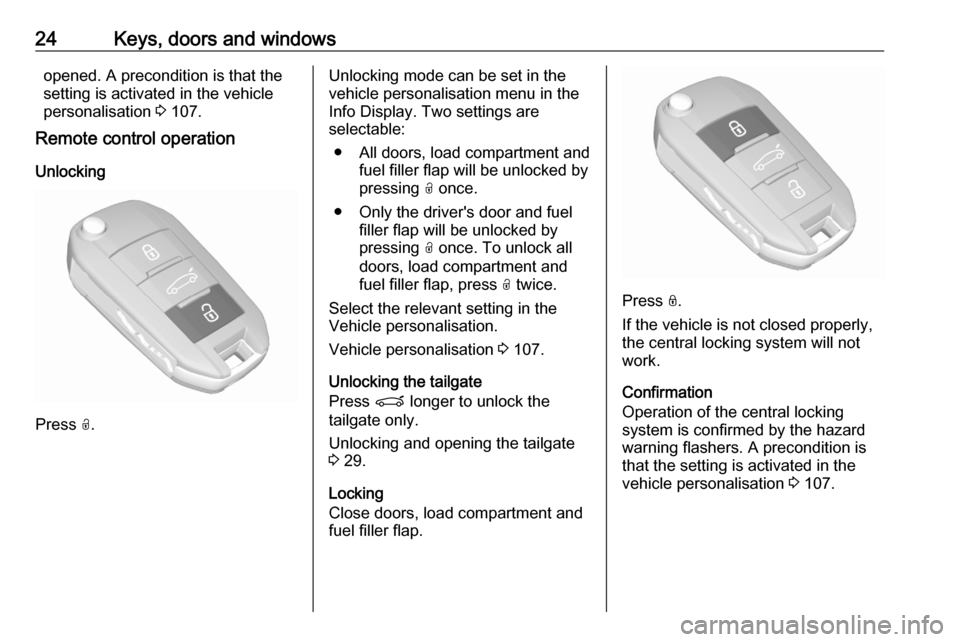
Remote control operation
Unlocking
Press O.
Unlocking mode can be set in the
vehicle personalisation menu in the
Info Display. Two settings are
selectable:
● All doors, load compartment and fuel filler flap will be unlocked by
pressing O once.
● Only the driver's door and fuel filler flap will be unlocked by
pressing O once. To unlock all
doors, load compartment and
fuel filler flap, press O twice.
Select the relevant setting in the
Vehicle personalisation.
Vehicle personalisation 3 107.
Unlocking the tailgate
Press P longer to unlock the
tailgate only.
Unlocking and opening the tailgate
3 29.
Locking
Close doors, load compartment and
fuel filler flap.
Press N.
If the vehicle is not closed properly,
the central locking system will not
work.
Confirmation
Operation of the central locking
system is confirmed by the hazard
warning flashers. A precondition is
that the setting is activated in the
vehicle personalisation 3 107.
Page 27 of 283
Keys, doors and windows25Electronic key system operation
The electronic key must be outside
the vehicle, within a range of approx. 1 m of the relevant door side.
Unlocking
Pass a hand behind the door handle
of a front door to unlock the vehicle or
press the tailgate button.
Unlocking mode can be set in the
vehicle personalisation menu in the
Info Display. Two settings are
selectable:
● Only the driver's door and fuel filler flap will be unlocked by
passing a hand behind the
driver's door handle.
● All doors, load compartment and fuel filler flap will be unlocked by
passing a hand behind the
passenger's door handle or by
pressing the tailgate button.
● Only the tailgate will be unlocked
by pressing the tailgate button.
Vehicle personalisation 3 107.
Locking
Press marking of the front door
handles.
Entire vehicle will be locked.


