2020 VAUXHALL GRANDLAND X Info
[x] Cancel search: InfoPage 96 of 283

94Instruments and controlsAirbag deactivation
ÓON illuminates yellow.
The front passenger airbag is
activated.
* OFF illuminates yellow.
The front passenger airbag is
deactivated.
Airbag deactivation 3 59.
Charging system
p illuminates red.
Illuminates when the ignition is
switched on and extinguishes shortly
after the engine starts.
Illuminates when the engine is
running
Stop, switch off engine. Vehicle
battery is not charging. Engine
cooling may be interrupted. The
brake servo unit may cease to be
effective. Seek the assistance of a
workshop.
Malfunction indicator light
Z illuminates or flashes yellow.
Illuminates when the ignition is
switched on and extinguishes shortly
after the engine starts.
Illuminates when the engine is
running
Fault in the emission control system.The permitted emission limits may be
exceeded. Seek the assistance of a
workshop immediately.Flashes when the engine is
running
Fault that could lead to catalytic
converter damage. Ease up on the
accelerator until the flashing stops.
Seek the assistance of a workshop
immediately.
Service vehicle soon
C illuminates yellow.
Illuminates briefly when the ignition is
switched on.
May illuminate together with other
control indicators and a
corresponding message in the Driver
Information Centre.
Seek the assistance of a workshop
immediately.
Stop engine
Y illuminates red.
Illuminates briefly when the ignition is switched on.
Page 97 of 283

Instruments and controls95Illuminates together with other control
indicators, accompanied by a warning chime and a corresponding message
in the Driver Information Centre.
Stop engine immediately and seek
the assistance of a workshop.
System check J illuminates yellow or red.
Illuminates yellow A minor engine fault has been
detected.
Illuminates red A major engine fault has been
detected.
Stop engine as soon as possible and
seek the assistance of a workshop.
Hybrid system active
READY illuminates green. The hybrid
system ist active.
Hybrid system fault
i illuminates red.The hybrid system has a fault.
Switch off ignition and seek the
assistance of a workshop.
Brake and clutch system
R illuminates red.
The brake and clutch fluid level is too low.9 Warning
Stop. Do not continue your
journey. Consult a workshop.
Brake fluid 3 216.
Electric parking brake
m illuminates or flashes red.
Illuminates
Electric parking brake is applied
3 153.
Flashes
Electric parking brake is not applied
automatically. The application or the
release are faulty.
9 Warning
Have the cause of the fault
remedied immediately by a
workshop.
o illuminates yellow.
Illuminates Automatic operation is deactivated or
faulty. Activate automatic operation
again or have the cause remedied by
a workshop in the event of a fault.
Automatic operation 3 153.
Electric parking brake fault
E illuminates yellow.
Illuminates
Electric parking brake has a fault
3 153.
9 Warning
Have the cause of the fault
remedied immediately by a
workshop.
Page 98 of 283

96Instruments and controlsAutomatic operation ofelectric parking brake off
o illuminates yellow.
Illuminates
Automatic operation is deactivated or faulty. In the event of a fault, o
illuminates together with other control
indicators or it is accompanied by a
corresponding message in the Driver
Information Centre.
Activate automatic operation again or have the cause remedied by a
workshop in the event of a fault.
Automatic operation 3 153.
Antilock brake system
(ABS)
u illuminates yellow.
Illuminates for a few seconds after the ignition is switched on. The system is
ready for operation when the control
indicator extinguishes.
If the control indicator does not
extinguish after a few seconds, or if it illuminates while driving, there is afault in the ABS. The brake system
remains operational but without ABS
regulation.
Antilock brake system 3 152.
Gear shifting R with the number of a higher gear is
indicated, when upshifting is
recommended for fuel saving
reasons.
Lane departure warning ) illuminates green or flashes yellow.
Illuminates green
System is switched on and ready to operate.
Flashes yellow System recognises an unintended
lane change.
Lane departure warning 3 190.
Lane keep assist a illuminates green or yellow, or
flashes yellow.Illuminates green
The system is switched on and ready to operate.
Illuminates yellow
The system approaches a detected
lane marking without using the turn
light in that direction.
Flashes yellow The system recognizes that the lane
is departed significantly.
Lane keep assist 3 191.
Electronic Stability Control and Traction Control system
b illuminates or flashes yellow.
Illuminates A fault in the system is present.
Continued driving is possible. Driving
stability, however, may deteriorate
depending on road surface
conditions.
Have the cause of the fault remedied
by a workshop.
Page 101 of 283

Instruments and controls99Low beam
9 illuminates green.
Illuminated when low beam is on.
High beam C illuminates blue.
Illuminates when high beam is on,
during headlight flash 3 113.
High beam assist f illuminates green.
The high beam assist is activated
3 114.
LED headlights C illuminates and a warning
message is displayed in the Driver
Information Centre.
Seek the assistance of a workshop.
Front fog lights > illuminates green.
The front fog lights are on 3 118.Rear fog light
r illuminates yellow.
The rear fog light is on 3 118.
Rain sensor < illuminates green.
Illuminated when rain sensor position on wiper lever is selected.
Windscreen wiper and washer 3 80.
Cruise control m illuminates white or green.
Illuminates white The system is on.
Illuminates green
Cruise control is active. Set speed is
indicated in the Driver Information
Centre.
Cruise control 3 159.
Adaptive cruise control
m illuminates white or green.C illuminates in the Driver
Information Centre.
m illuminates white
The system is on.
m illuminates green
Adaptive cruise control is active.
When adaptive cruise control is on or active, C with the set speed is
indicated in the Driver Information
Centre.
Adaptive cruise control 3 164.
Vehicle detected ahead
A illuminates green.
Illuminates green
A vehicle ahead is detected in the
same lane.
Adaptive cruise control 3 164.
Forward collision alert 3 170.
Side blind spot alert B illuminates green.
The system is active 3 184.
Page 102 of 283

100Instruments and controlsActive emergency brakingm illuminates or flashes yellow.
Illuminates
The system has been deactivated or a fault has been detected.
Additionally, a warning message is
displayed in the Driver Information
Centre.
Check the reason of the deactivation
3 172 and in case of a system fault,
seek the assistance of a workshop.
Notice
m also illuminates if the seat belts
of the front passengers are not
fastened. In this case, active
emergency braking is deactivated.
Flashes
The system is actively engaged.
Depending on the situation, the
vehicle may automatically brake
moderately or hard.
Forward collision alert 3 170.
Front pedestrian protection 3 175.Speed limiter
ß illuminates in the Driver
Information Centre when speed
limiter is active. Set speed is indicated alongside ß symbol.
Speed limiter 3 162.
Door open
h illuminates red.
A door or the tailgate is open.Displays
Driver Information Centre
The Driver Information Centre is
located in the instrument cluster.
Driver Information Centre indicates: ● overall and trip odometer
● digital speed indication
● trip / fuel information menu
● gear shift indication
● service information
● vehicle and warning messages ● driver assistance messages
● pop-up messages
● AdBlue information
● powerflow
● range autonomy
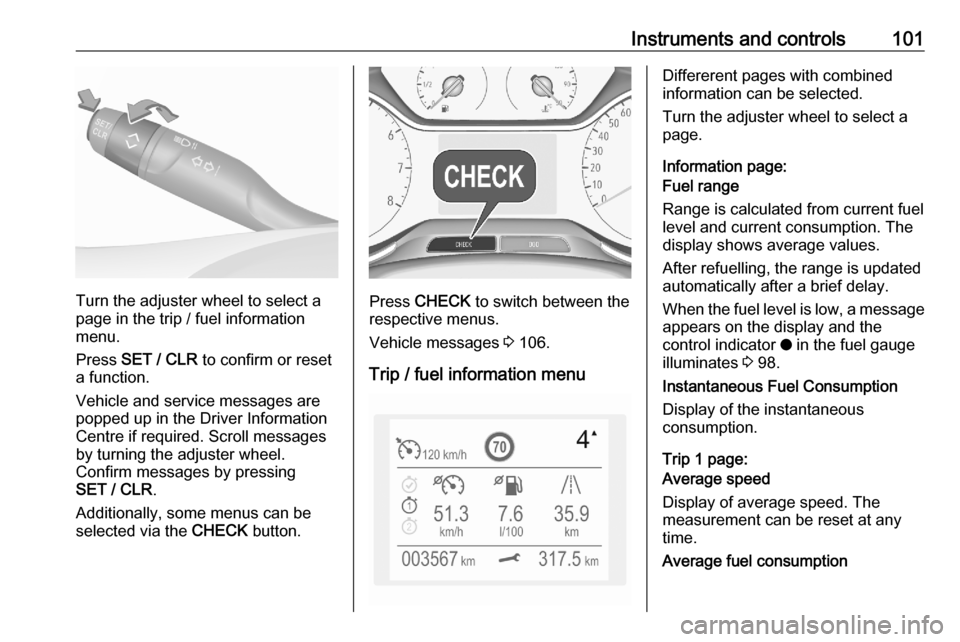
Selecting menus and functions The menus and functions can be
selected via the buttons on the
indicator lever.
Page 103 of 283
Instruments and controls101
Turn the adjuster wheel to select a
page in the trip / fuel information
menu.
Press SET / CLR to confirm or reset
a function.
Vehicle and service messages are
popped up in the Driver Information
Centre if required. Scroll messages
by turning the adjuster wheel.
Confirm messages by pressing
SET / CLR .
Additionally, some menus can be selected via the CHECK button.Press CHECK to switch between the
respective menus.
Vehicle messages 3 106.
Trip / fuel information menu
Differerent pages with combined
information can be selected.
Turn the adjuster wheel to select a
page.
Information page:
Fuel range
Range is calculated from current fuel
level and current consumption. The
display shows average values.
After refuelling, the range is updated
automatically after a brief delay.
When the fuel level is low, a message appears on the display and the
control indicator o in the fuel gauge
illuminates 3 98.
Instantaneous Fuel Consumption
Display of the instantaneous
consumption.
Trip 1 page:
Average speed
Display of average speed. The
measurement can be reset at any
time.
Average fuel consumption
Page 104 of 283

102Instruments and controlsDisplay of average consumption. Themeasurement can be reset at any
time and starts with a default value.
Distance travelled
Displays the current distance for trip
1 since the reset.
The values of trip 1 page can be reset
by pressing SET / CLR for a few
seconds.
Trip 2 page:
Average speed
Display of average speed. The
measurement can be reset at any
time.
Average fuel consumption
Display of average consumption. The measurement can be reset at any
time and starts with a default value.
Distance travelled
Displays the current distance for trip
2 since a certain reset.
The values of trip 2 page can be reset
by pressing SET / CLR for a few
seconds.Digital speed page
Digital display of the instantaneous
speed.
Autostop time counter
A time counter calculates the time
spent in Autostop during a journey. It
resets to zero every time the ignition
is switched on.
Compass page
Displays the geographic direction of
driving.
Blank page
No trip / fuel information is displayed.
AdBlue Press CHECK repeatedly until the
AdBlue menu is shown.
AdBlue range
Indicates an estimate of the AdBlue
level. A message indicates whether
the level is sufficient or low.
3 142.Powerflow
Displays the current powerflow in the
hybrid system, e.g., when the vehicle
is operating in electric mode or when
energy is regenerated.
Range autonomyDisplays the selected drive mode, the
range of the high voltage battery and
the combined range, i.e., the range of
the high voltage battery and the fuel
tank.
Info Display The Info Display is located in the
instrument panel near the instrument
cluster.
Depending on the vehicle
configuration the vehicle has a
● Graphic Info Display
or
● 7'' Colour Info Display with
touchscreen functionality
or
● 8'' Colour Info Display with
touchscreen functionality
Page 105 of 283
Instruments and controls103The Info Displays can indicate:● time 3 83
● outside temperature 3 83
● date 3 83
● Infotainment system, see description in the Infotainment
manual
● indication of rear view camera 3 188
● indication of panoramic view system 3 185
● indication of parking assist instructions 3 176
● navigation, see description in the
Infotainment manual
● vehicle and system messages 3 106
● settings for vehicle personalisation 3 107
● indication of the current powerflow within the hybrid
system
● indication of the average fuel and
power consumption● settings for programmable charging 3 197
● settings for eSave function
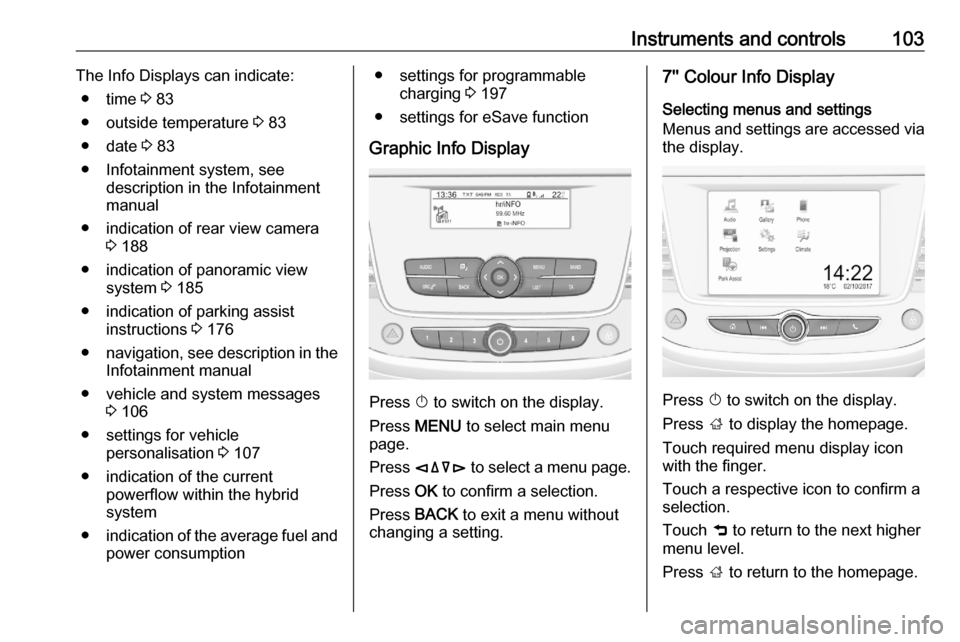
Graphic Info Display
Press X to switch on the display.
Press MENU to select main menu
page.
Press èäåé to select a menu page.
Press OK to confirm a selection.
Press BACK to exit a menu without
changing a setting.
7'' Colour Info Display
Selecting menus and settings
Menus and settings are accessed via
the display.
Press X to switch on the display.
Press ; to display the homepage.
Touch required menu display icon
with the finger.
Touch a respective icon to confirm a
selection.
Touch 9 to return to the next higher
menu level.
Press ; to return to the homepage.