2020 VAUXHALL COMBO E eco
[x] Cancel search: ecoPage 159 of 279

Driving and operating157Pull right paddle + to shift to a higher
gear.
Pull left paddle - to shift to a lower
gear.
Multiple pulls allow gears to be
skipped.
The selected gear is indicated in the
instrument cluster.
If a higher gear is selected when
vehicle speed is too low, or a lower
gear when vehicle speed is too high,
the shift is not executed. This can
cause a message in the Driver
Information Centre.
In manual mode, no automatic
shifting to a higher gear takes place
at high engine revolutions.
Gear shift indication
The symbol R or S with a number
beside it is indicated when
gearshifting is recommended for fuel
saving reasons.
Shift indication appears only in
manual mode.Electronic driving
programmes
● Following a cold start, the operating temperature
programme increases engine
speed to quickly bring the
catalytic converter to the required
temperature.
● Special programmes automatically adapt the shifting
points when driving up inclines or
down hills.
● In snowy or icy conditions or on other slippery surfaces, the
electronic transmission control
enables the driver to select
manually first, second or third gear for starting off.
Kickdown
Pressing down the accelerator pedal
beyond the kickdown detent will lead to maximum acceleration
independent of selected driving
mode. The transmission shifts to a
lower gear depending on engine speed.Fault
In the event of a fault a message is
displayed in the Driver Information
Centre.
Vehicle messages 3 114.
Electronic transmission control
enables only third gear. The
transmission no longer shifts
automatically.
Do not drive faster than 62 mph.
Have the cause of the fault remedied by a workshop.
Eco mode
Page 160 of 279
158Driving and operatingThis mode adjusts the settings of the
systems for a more economic fuel
consumption, e.g. by optimising the
automatic transmission shift points
and adapting the sensitivity of the
accelerator pedal.Manual transmission
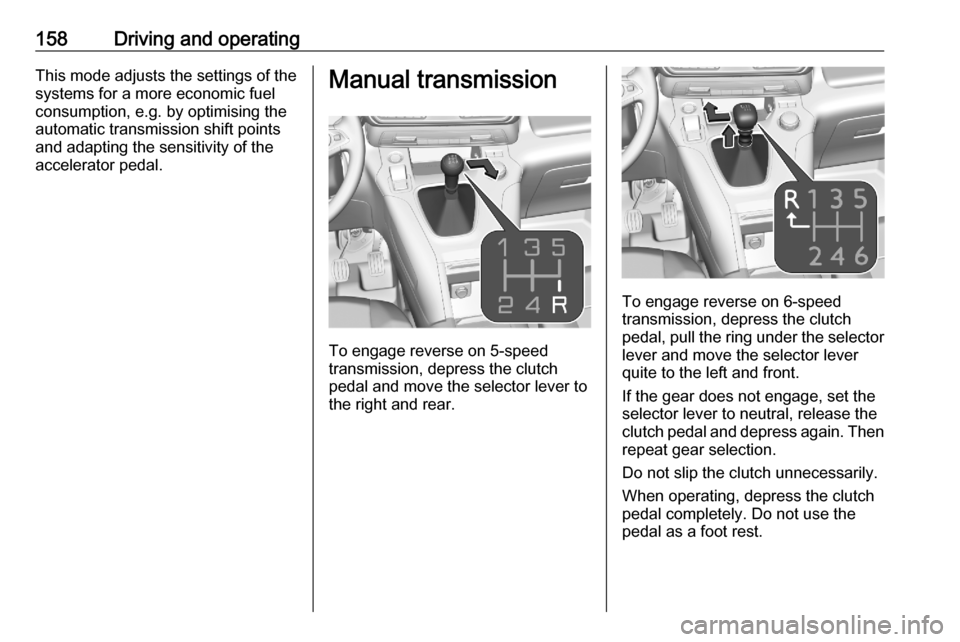
To engage reverse on 5-speed
transmission, depress the clutch
pedal and move the selector lever to
the right and rear.
To engage reverse on 6-speed
transmission, depress the clutch
pedal, pull the ring under the selector
lever and move the selector lever
quite to the left and front.
If the gear does not engage, set the
selector lever to neutral, release the
clutch pedal and depress again. Then
repeat gear selection.
Do not slip the clutch unnecessarily.
When operating, depress the clutch pedal completely. Do not use the
pedal as a foot rest.
Page 162 of 279

160Driving and operatingFault9Warning
If there is a fault in the ABS, the
wheels may be liable to lock due
to braking that is heavier than
normal. The advantages of ABS are no longer available. During
hard braking, the vehicle can no longer be steered and may
swerve.
Have the cause of the fault remedied
by a workshop.
Parking brake
9 Warning
Before leaving the vehicle, check
parking brake status. Control
indicator j illuminate constantly
when electric parking brake is
applied.
Manual parking brake9 Warning
Always apply parking brake firmly
without operating the release
button, and apply as firmly as
possible on a downhill or uphill
slope.
To release the parking brake, pull
the lever up slightly, press the
release button and fully lower the
lever.
To reduce the operating forces of
the parking brake, depress the
foot brake at the same time.
Control indicator R 3 103.
Electric parking brake
Applying when vehicle is stationary
9 Warning
Pull switch m for a minimum of
one second until control indicator
m illuminates constantly and
electric parking brake is applied
Page 164 of 279

162Driving and operatingAutomatic release:● Parking brake releases automatically after moving off.
● j extinguishes in the
instrument cluster and a display
message pops up to confirm the
release.
If the vehicle is equipped with an
automatic transmission and the brake is not released automatically, make
sure the front doors are correctly
closed.Deactivation of automatic operation 1. Start the engine.
2. If the parking brake is released, apply the parking brake pulling the
switch j.
3. Take your foot off the brake pedal.
4. Press the switch j for at least
10 s and maximum 15 s.
5. Release the switch j.
6. Press and hold the brake pedal. 7. Pull the switch j for 2 s.
The deactivation of the automatic operation of the electric parking brake
is confirmed by o illuminating in theinstrument cluster 3 103 . The electric
parking brake can only be applied and released manually.
To reactivate the automatic
operation, repeat the steps described above.
Functionality check
When the vehicle is not moving, the
electric parking brake might be
applied automatically. This is done to
check the system.
Fault
Failure mode of electric parking brake
is indicated by a control indicator j
and by a vehicle message which is
displayed in the Driver Information Centre.
Vehicle messages 3 114.
Control indicator j flashes: electric
parking brake is not fully applied or
released. When continuously
flashing, release electric parking
brake and retry applying.Brake assist
If brake pedal is depressed quickly
and forcefully, maximum brake force
is automatically applied.
Operation of brake assist might
become apparent by a pulse in the
brake pedal and a greater resistance when depressing the brake pedal.
Maintain steady pressure on the
brake pedal as long as full braking is
required. Maximum brake force is
automatically reduced when brake
pedal is released.
Hill start assist The system helps prevent unintendedmovement when driving away on
inclines.
When releasing the brake pedal after
stopping on an incline, brakes remain
on for further 2s. The brakes release
automatically as soon as the vehicle
begins to accelerate.
Page 166 of 279

164Driving and operatingESC and TC are also reactivated the
next time the ignition is switched on.
Fault
If there is a fault in the system, the control indicator b illuminates
continuously and a message appears
in the Driver Information Centre. The
system is not operational.
Have the cause of the fault remedied
by a workshop.
Descent control system
The descent control system allows
the vehicle to travel at a low speed
without depressing the brake pedal.
The vehicle will automatically
decelerate to a low speed and remain at that speed when the system is
activated. Some noise or vibration
from the brake system may be
apparent when the system is active.Caution
Use only when descending steep
grades while driving off-road. Do
not use when driving on normal
road surfaces. Unnecessary
usage of the DCS function, such
as while driving on normal roads,
may damage the brake system
and the ESC function.
Activation
Notice
If hill descent control is active, active emergency braking is automatically
deactivated.
The systems is only available for
slopes greater than 5%.
At speeds below approx. 30 mph,
press ò. The system can also be
activated when the vehicle is
stationary with the engine running. The control indicator ò in the
instrument cluster is illuminated in
green to show the system is
activated.
When the vehicles starts its descent, the system controls the speed of the
vehicle; accelerator and brake pedals can be released.
● If the gearbox is in first or second
gear, the speed decreases andthe control indicator in the
instrument cluster flashes
rapidly.
● If the gearbox is in neutral or the clutch pedal is released, the
speed decreases and the control
indicator in the instrument cluster
flashes slowly.
If the system is operating, the brake
lights automatically come on.
If the speed exceeds 18 mph,
regulation is paused. The ò
indicator light in the instrument cluster
Page 168 of 279

166Driving and operatingA LED illuminates and a status
message appears in the Driver
Information Centre to confirm the
chosen mode.
ESC off mode 9
The ESC and Traction Control are
deactivated in this mode.
An LED in the button a illuminates.
ESC and Traction Control are
reactivated automatically from
30 mph or everytime the ignition is
switched on.
Standard mode 2
This mode is calibrated for a low level of wheel spin, based on the different
types of grip generally encountered in
normal day to day driving.
Everytime the ignition is switched off,
the system is automatically reset to
this mode.
Snow mode 3
This mode adapts to the grip
conditions encountered by each
wheel when starting.When advancing, the system
optimises wheel spin to guarantee the
best acceleration based on the
available traction. Recommended in
cases of deep snow and steep
inclines.
This mode is active up to a speed of
30 mph.
Mud mode 4
This mode allows considerable wheel spin at start-up for the wheel with the
least grip, this removes mud and re-
establishes traction.
Simultaneously, the wheel with the
most grip is provided with the most
torque possible.
This mode is active up to a speed of 50 mph.
Sand mode 1
This mode allows a small amount of
simultaneous wheel spin on the two
drive wheels, enabling the vehicle to
advance and reduce the risk of
sinking.
This mode is active up to a speed of
75 mph.Caution
Do not use the other modes on
sand as the vehicle may become
stuck.
Page 169 of 279

Driving and operating167Driver assistance
systems9 Warning
Driver assistance systems are
developed to support the driver
and not to replace the driver's
attention.
The driver accepts full
responsibility when driving the
vehicle.
When using driver assistance
systems, always take care
regarding the current traffic
situation.
Cruise control
The cruise control can store and
maintain speeds above 25 mph.
Additionally at least the third gear
must be engaged on manual
transmission, on automatic
transmission position D or the second
or a higher gear in position M must be
selected.
Deviations from the stored speeds may occur when driving uphill or
downhill.
The system maintains the vehicle
speed at the preset speed by the
driver, without any action on the
accelerator pedal.
The preset speed can be exceeded
temporarily by pressing the
accelerator pedal firmly.
The status and preset speed is
displayed in the Driver Information Centre.
Do not use the cruise control if it is not advisable to maintain a constant
speed.
Control indicator m 3 107.Switching on the system
Press m, symbol m and a message
are displayed in the Driver
Information Centre. The system is still not active.
Page 170 of 279

168Driving and operating
Activation of the functionalitySetting speed by the driver
Accelerate to the desired speed and
press thumb wheel once briefly to
RES/+ or SET/- . The current speed is
stored and maintained. Accelerator
pedal can be released.
The preset speed can then be
changed by pressing thumb wheel to
RES/+ to increase or SET/- to
decrease the speed. Short press
changes speed in small steps, long
press in large steps.
Speed value is indicated in the Driver
Information Centre.
Adopting speed by the speed limit
recognition
The intelligent speed adaptation
informs the driver when a speed limit
is detected by the speed limit
recognition. The detected speed limit
can be used as new value for the
cruise control.
Using a camera at the top of the
windscreen, this system detects and
reads speed limit and end of speed
limit signs. The system also takes
account of information on speed limits from the navigation map data.
The function can be deactivated or
activated in the personalisation menu
3 115.
If the cruise control is active, the
recognised speed limit will be
displayed in the Driver Information
Centre and MEM illuminates.
The displayed information depends
on the Driver Information Centre
version.
In the Driver Information Centre,
speed limit sign is shown in the
display and MEM illuminates for a few
seconds.