Page 199 of 314
2017-2. Panoramic view monitor
7
Peripheral monitoring system
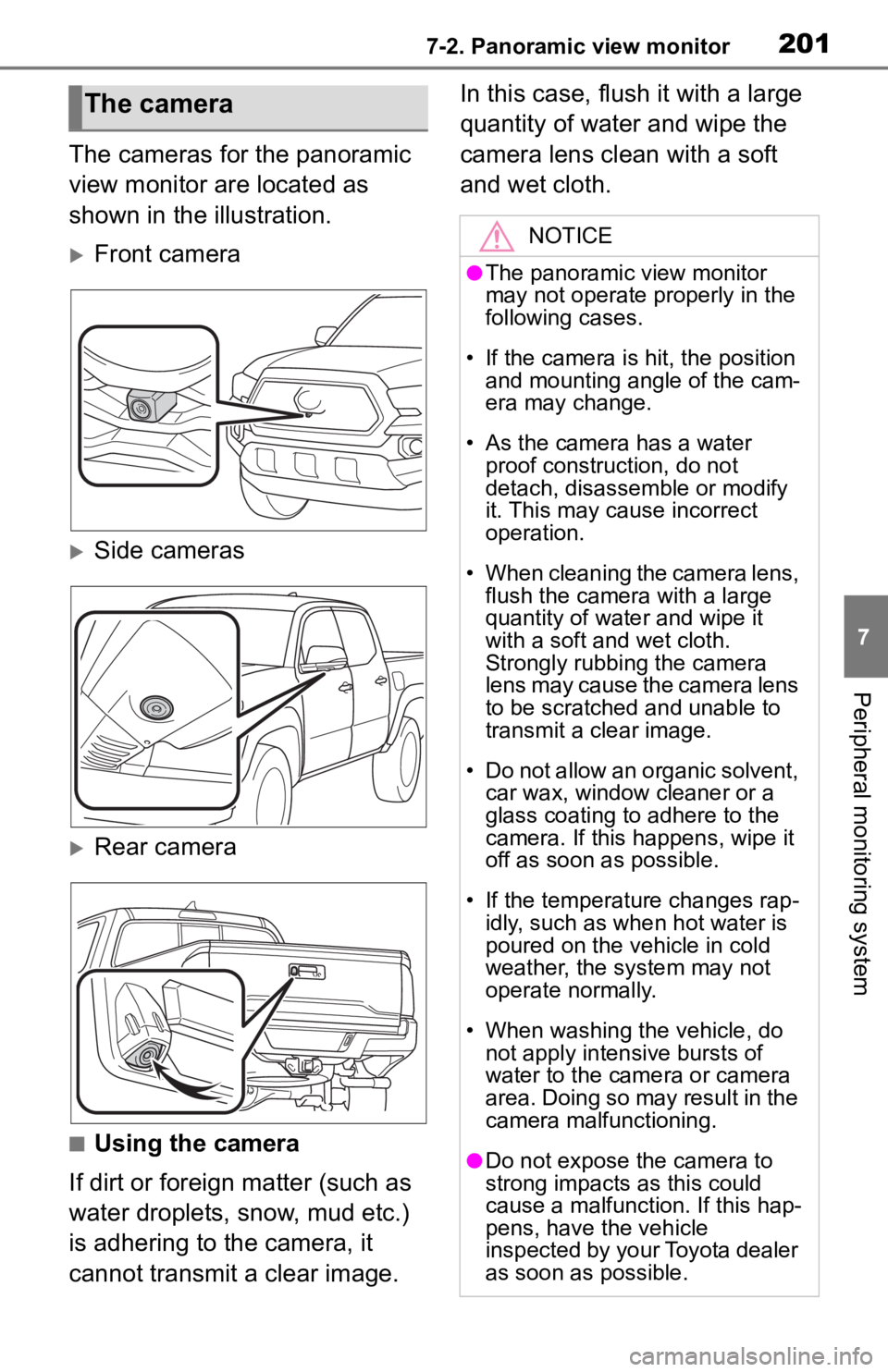
The cameras for the panoramic
view monitor are located as
shown in the illustration.
Front camera
Side cameras
Rear camera
■Using the camera
If dirt or foreign matter (such as
water droplets, snow, mud etc.)
is adhering to the camera, it
cannot transmit a clear image. In this case, flush it with a large
quantity of water and wipe the
camera lens clean with a soft
and wet cloth.
The camera
NOTICE
●The panoramic view monitor
may not operate properly in the
following cases.
• If the camera is hit, the position and mounting angle of the cam-
era may change.
• As the camera has a water proof construction, do not
detach, disassemble or modify
it. This may cause incorrect
operation.
• When cleaning the camera lens, flush the camera with a large
quantity of water and wipe it
with a soft and wet cloth.
Strongly rubbing the camera
lens may cause the camera lens
to be scratched and unable to
transmit a clear image.
• Do not allow an organic solvent, car wax, window cleaner or a
glass coating to adhere to the
camera. If this happens, wipe it
off as soon as possible.
• If the temperature changes rap- idly, such as when hot water is
poured on the vehicle in cold
weather, the system may not
operate normally.
• When washing the vehicle, do not apply intensive bursts of
water to the came ra or camera
area. Doing so may result in the
camera malfunctioning.
●Do not expose the camera to
strong impacts as this could
cause a malfunction. If this hap-
pens, have the vehicle
inspected by your Toyota dealer
as soon as possible.
Page 236 of 314

2387-3. Multi-terrain Monitor
The cameras for the Multi-ter-
rain Monitor are located as
shown in the illustration.
Front camera
Side cameras
Rear camera
■Using the camera
If dirt or foreign matter (such as
water droplets, snow, mud etc.)
is adhering to the camera, it
cannot transmit a clear image. In this case, flush it with a large
quantity of water and wipe the
camera lens clean with a soft
and wet cloth.
The camera
NOTICE
●The Multi-terrain Monitor may
not operate properly in the fol-
lowing cases.
• If the camera is hit, the position and mounting angle of the cam-
era may change.
• As the camera has a water proof construction, do not
detach, disassemble or modify
it. This may cause incorrect
operation.
• When cleaning the camera lens, flush the camera with a large
quantity of water and wipe it
with a soft and wet cloth.
Strongly rubbing the camera
lens may cause the camera lens
to be scratched and unable to
transmit a clear image.
• Do not allow an organic solvent, car wax, window cleaner or a
glass coating to adhere to the
camera. If this happens, wipe it
off as soon as possible.
• If the temperature changes rap- idly, such as when hot water is
poured on the vehicle in cold
weather, the system may not
operate normally.
• When washing the vehicle, do not apply intensive bursts of
water to the came ra or camera
area. Doing so may result in the
camera malfunctioning.
●Do not expose the camera to
strong impacts as this could
cause a malfunction. If this hap-
pens, have the vehicle
inspected by your Toyota dealer
as soon as possible.
Page 249 of 314

2518-1. Phone operation (Hands-free system for cellular phones)
8
Phone
■Steering switch
By pressing the phone switch, a
call can be received or ended
without taking your hands off the
steering wheel.
Volume control switch
• Press the “+” side to increase the volume.
• Press the “-” side to decrease the volume.
Off hook switch
• If the switch is pressed when an Apple CarPlay/Android Auto con-
nection is established, the Apple
CarPlay/Android Auto phone
application will be displayed on
the system screen.
On hook switch
■Microphone
The microphone is used when
talking on the phone.
Type A
Type B
●The other party’s voice will be
heard from the front speakers.
The audio/vis ual system will be
muted during phone calls or when
hands-free voice commands are
used.
●Talk alternately with the other
party on the phone. If both parties
speak at the same time, the other
party may not hear what has been
said. (This is not a malfunction.)
●Keep call volume down. Other-
wise, the other party’s voice may
be audible outside the vehicle and
voice echo may increase. When
talking on the phone, speak
clearly towards the microphone.
●The other party may not hear you
clearly when:
• Driving on an unpaved road.
(Making excessive traffic noise.)
• Driving at high speeds.
• The roof or windows are open.
• The air conditioning vents are pointed towards the microphone.
Using the phone
switch/microphone
A
B
C